
lkaesberg/EmailVerify
lkaesberg/EmailVerify has 64 GitHub stars and 32 forks. GitHot measured 0 stars in 24 hours, 0 in 7 days, and 0 in 15 days. Last checked 2026-11-15 20:13 UTC. Last push 2026-11-05.
Measured star growth
- in 24h
- 0
- in 7 days
- 0
- in 15 days
- 0
- in 1 month
- Update delayed
Net star changes over overlapping periods, not daily totals. Missing measurements are left blank. Stars measure attention, not software quality.
About
Discord bot that verifies members by email: users enter an address from your allowed domains, such as a university or company, get a 6-digit code and receive the verified role. Use the hosted bot or self-host with Docker.
Self-hostedREADME.md
Original
Discord Email Verify
A powerful Email Verification Bot for Discord servers


📋 Table of Contents
📖 About
This bot verifies that a Discord user owns an email address with a specific domain (e.g., verify [email protected] emails). This is useful for servers that need to restrict access to verified members only, such as:
- University/College servers - Verify students with
.eduemails - Company servers - Verify employees with corporate emails
- Organization servers - Verify members with organization emails
How it works:
- User clicks a verification button
- A popup asks for their email address
- A 6-digit verification code is sent to the email (with a Resend code button if it doesn't arrive)
- User enters the code to receive the verified role
🚀 Usage
Invite the Bot
Use this link to invite the bot to your server:

Quick Setup
The fastest way: run /setup — a guided wizard that creates the verified role for you (or uses your existing roles), configures email domains, and posts the verification message. Then run /testmail to confirm email delivery.
Prefer manual setup?
- Invite the bot using the link above
- Add a default role:
/role add @Verified(given to all verified users) - Add allowed domains:
/domain add @university.edu(use@*.edufor all .edu domains) - Create a verification button:
/button #verification-channel "Click to Verify" - Done! Users can now verify themselves
Advanced: Domain-Specific Roles
You can assign different roles based on which email domain the user verifies with:
/domainrole add domain:@staff.company.com role:@Staff
/domainrole add domain:@*.edu role:@Student
Users will receive their domain-specific roles plus any default roles you've configured.
📝 Commands
👤 User Commands
| Command | Description |
|---|---|
/verify |
Start the email verification process |
/data delete-user |
Delete your verification data and remove verified status |
👥 Role Configuration
| Command | Description |
|---|---|
/role add <role> |
Add a default role given to all verified users |
/role remove <role> |
Remove a role from the default roles list |
/role list |
View all default roles |
/role unverified [role] |
Set or view the optional role for unverified members |
🎭 Domain-Specific Roles
Assign different roles based on email domain:
| Command | Description |
|---|---|
/domainrole add <domain> <role> |
Add a role for a specific email domain |
/domainrole remove <domain> <role> |
Remove a role from a domain |
/domainrole list |
View all domain-role mappings |
/domainrole clear <domain> |
Remove all roles for a domain |
💡 Example:
/domainrole add @*.edu @Studentgives the Student role to anyone with a .edu email
📧 Domain Management
| Command | Description |
|---|---|
/domain add <domains> |
Add allowed email domains (supports * wildcard) |
/domain remove <domains> |
Remove allowed domains |
/domain list |
View all allowed domains |
/domain clear |
Remove all allowed domains |
💡 Wildcard Example: Use
@*.eduto allow any.eduemail address
🚫 Blacklist Management
| Command | Description |
|---|---|
/blacklist add <patterns> |
Block email patterns (supports * wildcard) |
/blacklist remove <patterns> |
Unblock patterns |
/blacklist list |
View all blacklisted entries |
/blacklist clear |
Remove all blacklist entries |
💡 Wildcard Examples:
*@tempmail.*blocks all tempmail domains,*spam*blocks emails containing "spam"
⚙️ Settings
| Command | Description |
|---|---|
/settings language <lang> |
Change the bot's language |
/settings log-channel [channel] |
Set or disable the verification log channel |
/settings verify-message [message] |
Set or reset custom message in verification emails |
/settings auto-verify <enable> |
Auto-prompt new members to verify on join |
/settings auto-unverified <enable> |
Auto-assign unverified role to new members |
🛡️ Moderation & Setup
| Command | Description |
|---|---|
/setup |
Guided setup wizard (verified role, created for you if you like → optional unverified role → domains → verification channel) |
/button <channel> <buttontext> |
Create a verification button embed in a channel |
/testmail <email> |
Send a test verification email to check delivery & spam placement |
/manualverify <user> <email> |
Manually verify a user without email confirmation |
/set_error_notify |
Configure where error notifications are sent |
📊 Information
| Command | Description |
|---|---|
/status |
View bot configuration, statistics, and check for issues |
/help |
Show setup instructions and command overview |
⚠️ Data Management
| Command | Description |
|---|---|
/data delete-user |
Delete your personal verification data |
/data delete-server |
Delete all server data and remove the bot |
⚠️ Note: Most commands require administrator permissions
Important: Role Hierarchy
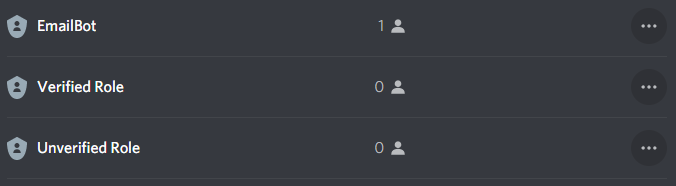
The EmailBot role must be higher in the role hierarchy than the verified and unverified roles, otherwise you'll get a Can't find roles. Please contact the admin! error.
🐳 Self Hosting
If you want to self-host the bot, you have two options: Docker (recommended) or Manual Installation.
💖 Enjoying the bot? If you find this project useful, please consider buying me a pizza to support ongoing development!
Docker (Recommended)
The easiest way to self-host is using Docker with the pre-built image.
1. Create a directory for the bot
mkdir emailverify && cd emailverify
2. Create the config file
mkdir config
nano config/config.json
Add your configuration:
{
  "token": "<Discord Bot Token>",
  "clientId": "<Discord Bot Client ID>",
  "email": "<Email Address>",
  "username": "<Mail Server Username>",
  "password": "<Email Password>",
  "smtpHost": "<SMTP Server>",
  "isGoogle": false
}
3. Create docker-compose.yml
version: '3'
services:
  emailverify:
    image: ghcr.io/lkaesberg/emailverify:latest
    ports:
      - 8181:8181
    volumes:
      - ./config:/usr/app/config
    environment:
      - DB_ENCRYPTION_KEY=<output of: openssl rand -base64 32>
    restart: always
4. Start the bot
docker-compose up -d
Docker CLI Alternative
docker run -d \
  --name emailverify \
  -p 8181:8181 \
  -v $(pwd)/config:/usr/app/config \
  -e DB_ENCRYPTION_KEY="<output of: openssl rand -base64 32>" \
  --restart always \
  ghcr.io/lkaesberg/emailverify:latest
Manual Installation
Requirements: Node.js v16.15.0 or higher
1. Clone the repository
git clone https://github.com/lkaesberg/EmailVerify.git
cd EmailVerify
2. Create the config file
nano config/config.json
{
  "token": "<Discord Bot Token>",
  "clientId": "<Discord Bot Client ID>",
  "email": "<Email Address>",
  "username": "<Mail Server Username>",
  "password": "<Email Password>",
  "smtpHost": "<SMTP Server>",
  "isGoogle": false
}
3. Install dependencies and start
npm install
npm start
Configuration Options
| Option | Description |
|---|---|
token |
Your Discord Bot Token from the Discord Developer Portal |
clientId |
Your Discord Bot's Client ID |
email |
The email address that will send verification codes |
username |
SMTP server username (usually your email address) |
password |
SMTP server password or App Password |
smtpHost |
Your SMTP server (e.g., smtp.gmail.com) |
isGoogle |
Set to true if using Gmail |
topggToken |
(Optional) Your Top.gg API token |
discordbotlistToken |
(Optional) Your discordbotlist.com API token; posts the server count and command list |
discordbotsggToken |
(Optional) Your discord.bots.gg API token; posts the server count |
topggWebhookSecret / discordbotlistWebhookSecret |
(Optional) Webhook secrets for vote rewards; the endpoints are /webhooks/topgg and /webhooks/discordbotlist on the stats server (port 8181) |
💡 Gmail Users: You need to create an App Password and use that instead of your regular password.
Database encryption
With the DB_ENCRYPTION_KEY environment variable set, the bot keeps config/bot.db encrypted with SQLCipher (AES-256). An existing unencrypted database is encrypted in place on the next start. You can also set the key as databaseEncryptionKey in config.json, but the environment variable is better: config.json sits next to the database, so a copy of the config folder would carry the key along with the data.
- Keep a copy of the key somewhere safe. Without it, the database can't be opened again.
- Without a key, the bot runs unencrypted as before and logs a warning on start.
- The Docker image ships a SQLCipher build. For a manual installation, build
sqlite3against SQLCipher the way the Dockerfile does; otherwise the bot refuses to start when a key is set. - To inspect the database by hand:
sqlcipher config/bot.db, thenPRAGMA key = '<your key>';as the first command.
Discord Developer Portal setup
Two things in the portal matter beyond the token, and neither is set from code:
Installation → Default Install Settings → Guild Install. This is what the App Directory and the "Add App" button on the bot's profile use, so it — not the invite links in this README — decides what most installs actually grant. Set:
- Scopes:
bot,applications.commands - Permissions: Manage Roles, View Channels, Send Messages, Embed Links, Read Message
History, Attach Files, View Audit Log (integer
268553344)
Bot → Privileged Gateway Intents. Enable Server Members Intent; the bot uses
GuildMembers to assign roles on join.
Commands are registered globally at startup — one API call for the whole application, not one per server — so nothing needs registering per guild.
Debugging
Type email in the console to see debugging messages for email errors.
👥 Contributors
Developer
- Lars Kaesberg - GitHub
Translators
| Language | Contributor |
|---|---|
| 🇬🇧 English | Lars Kaesberg |
| 🇩🇪 German | Lars Kaesberg |
| 🇪🇸 Spanish | gus2131 |
| 🇵🇱 Polish | kploskonka |
| 🇮🇱 Hebrew | Norma1Name |
| 🇰🇷 Korean | iplayagain |
| 🇫🇷 French | Charles Van |
| 🇹🇷 Turkish | EmreSoftware |
Want to add a new language?
Create an issue with your translation file using the English template as a reference.
📜 License
EmailVerify is free software licensed under the GNU Affero General Public License v3.0 or later (AGPL-3.0-or-later).
You may use, study, modify, and redistribute it. If you distribute it — or run a modified version as a network service that other people interact with (for example, hosting your own instance of this bot) — you must make the complete corresponding source code of your version available to those users under the same license (AGPL §13).
The upstream source is always available at https://github.com/lkaesberg/EmailVerify.
💖 Support the Project
If you're self-hosting this bot and find it useful, please consider supporting the development! Your contribution helps keep the project maintained and improved.

Made with ❤️ by Lars Kaesberg