
linbei0/EcomGen
linbei0/EcomGen has 251 GitHub stars and 61 forks. GitHot measured +1 stars in 24 hours and +8 in 7 days. Last checked 2026-11-16 23:38 UTC. Last push 2026-11-05.
Measured star growth
- in 24h
- +1
- in 7 days
- +8
- in 15 days
- Collecting history
- in 1 month
- Collecting history
Net star changes over overlapping periods, not daily totals. Missing measurements are left blank. Stars measure attention, not software quality.
About
Local-first AI e-commerce image suite generator for individual sellers. Pi Agent storyboards, 25 templates + reusable suites, product-truth pixel protection, OpenAI-compatible & Gemini image providers, AI layering (PNG/PSD), review, edit, and ZIP export. Self-hosted.
AIREADME.en.md
OriginalEcomGen
简体中文 | English
EcomGen is a local-first AI e-commerce image suite workbench for individual sellers. It turns product facts, product assets, target markets, and platform requirements into a reviewable storyboard, then a Worker calls OpenAI-compatible image providers to generate, edit, review, layer, and export a full image set.
Workbench preview
| Project gallery | Product setup |
|---|---|
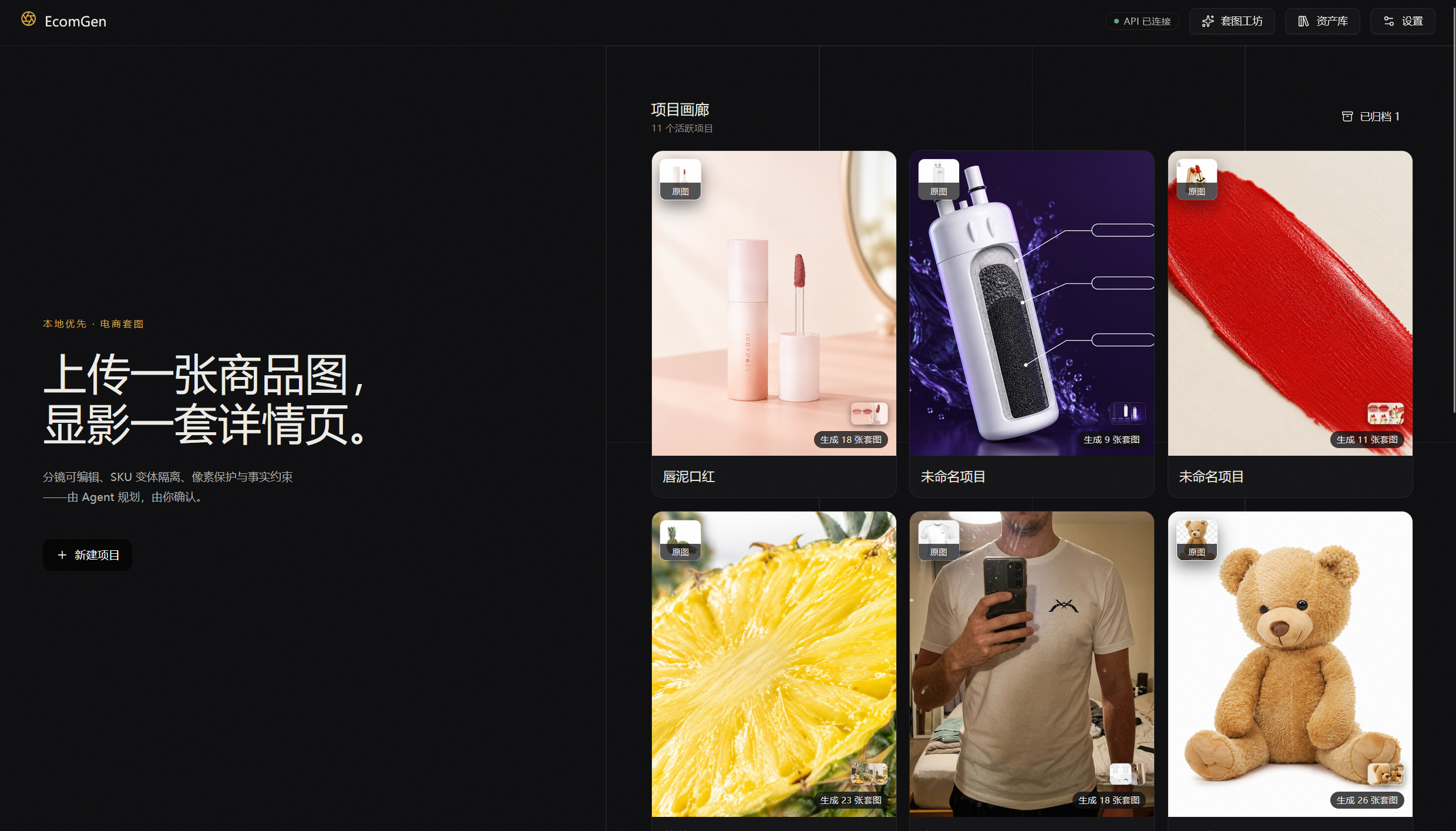 |
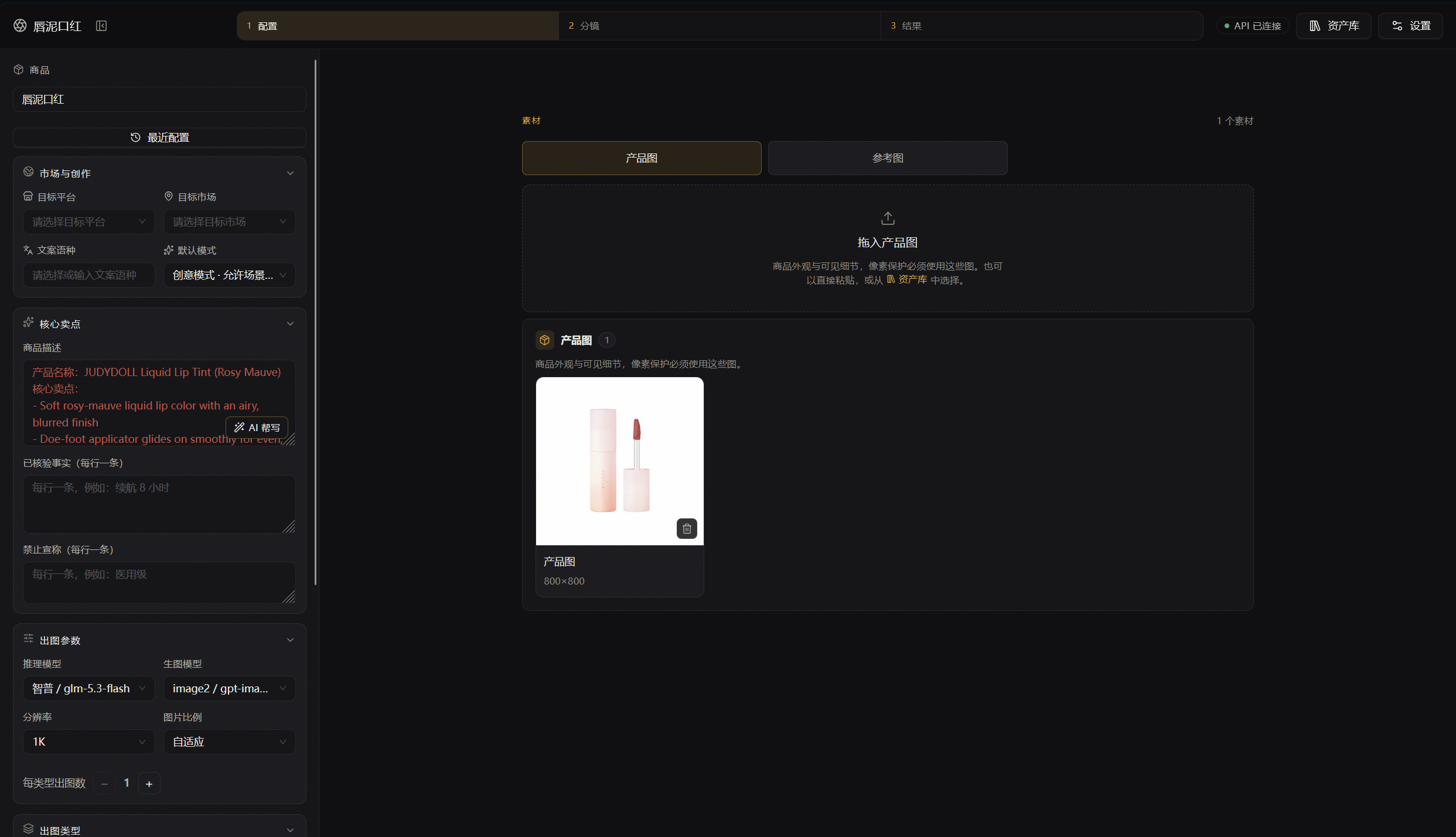 |
| Storyboard review | Generation results |
|---|---|
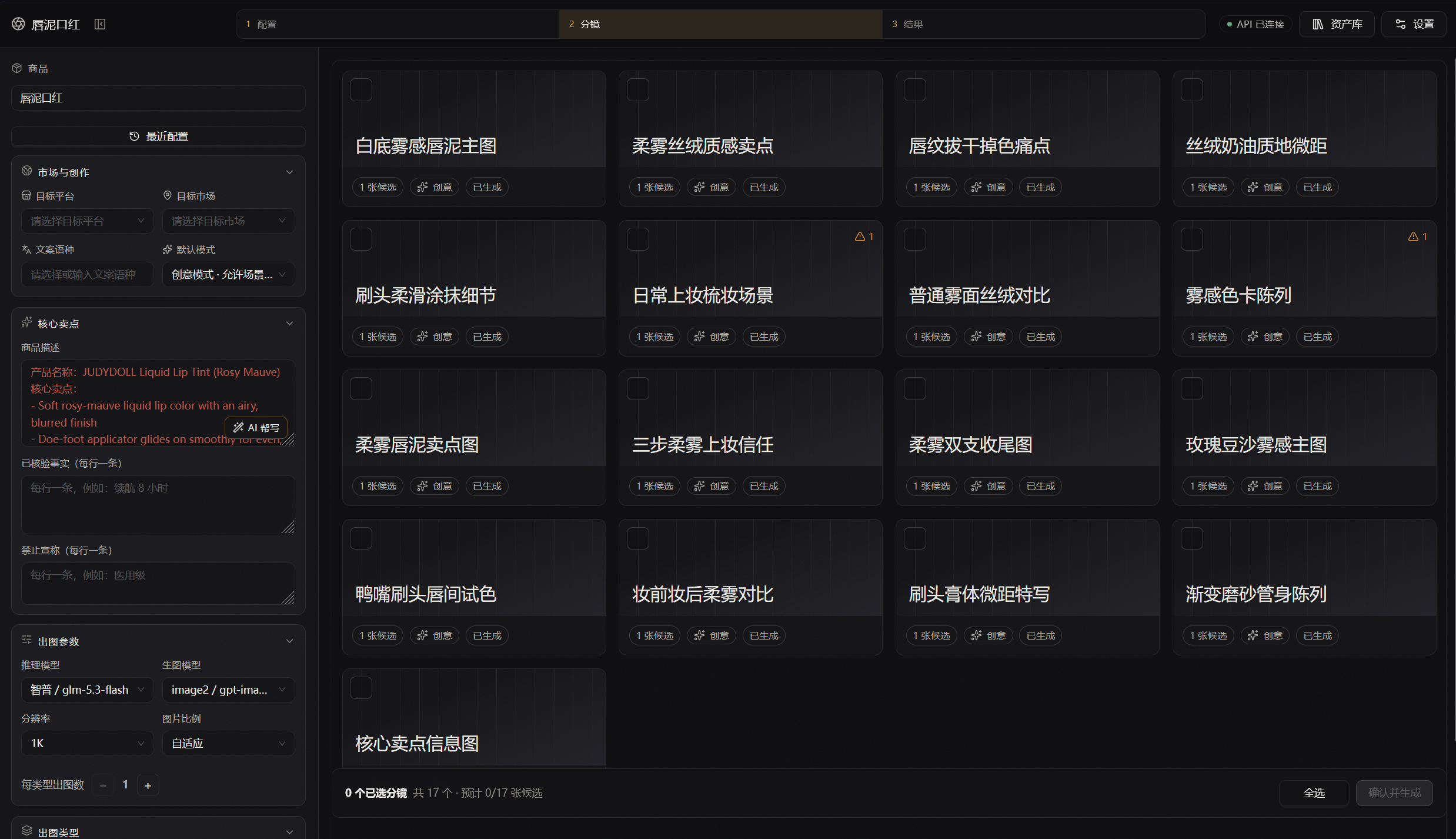 |
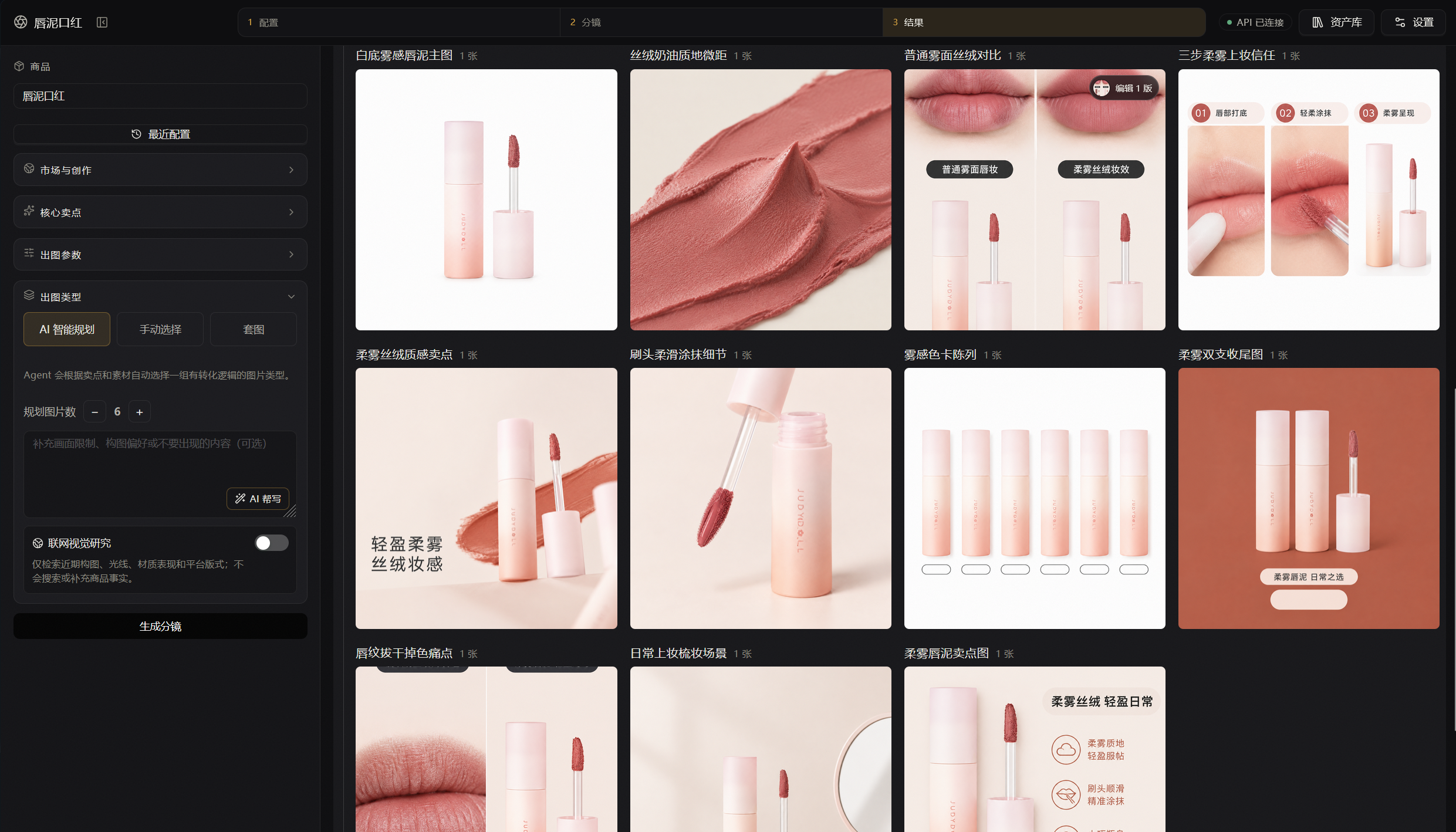 |
Highlights
- Project-based workflow: capture product description, verified facts, prohibited claims, brand rules, target market, target platform, copy language, and default generation mode.
- Three planning modes:
AI planning,manual selection, andsuite, with recent-config snapshots for one-click reuse of previous planning parameters. - Pi Agent storyboard planning: reads built-in e-commerce templates, suites, and platform guidance to produce final prompts for the image model; includes an optional web visual-research toggle.
- 25 built-in e-commerce templates: a customized
ecom-details-imagecatalog covering hero, lifestyle, infographic, packaging, comparison, social media, and more, plus importable custom templates. - Suite system: a reusable, category-classified storyboard of 5–12 shots. Ships 1,100+ built-in suites, covering 24 L1 categories and 169 L2 categories.
- Suite Forge: upload a set of viral reference images and let the Agent reverse-engineer a Campaign Style Lock, shot order, and per-shot prompt templates into a reusable suite template.
- 8 shot roles: HERO / PAIN_POINT / COMPARISON / SCENE / DETAIL / TRUST / VARIANT / CTA, keeping a suite diverse across the conversion funnel.
- Product truth & pixel protection: distinguishes
PRODUCT_TRUTH, packaging, and reference images;PIXEL_PROTECTEDmode requires the current project's product-truth assets. - Async generation & auditability: BullMQ Workers handle planning, copywriting, generation, editing, layering, and export jobs, persisting
compiledPrompt, generation snapshots, and job status. - Provider management: configure reasoning, image-generation, and image-segmentation providers covering OpenAI-compatible Images, Google Gemini native image generation (Nano Banana), and multiple segmentation protocols; image resolution, quality, and output format parameters are dispatched per model capability. API keys are encrypted, and the frontend never talks to providers, Redis, or SQLite directly.
- Editing workbench: output-branch editing with masked inpaint, product replacement, scene adjust, outpaint, references, and versioned edit sessions.
- AI layering & multi-format export: automatically recognize elements and export per-layer PNG, ZIP, and PSD files with visibility toggling, ordering, and history.
- Global asset library: browse uploads, generated outputs, and layer files across all projects, and reuse any of them in another project.
- Model library: create model identities (gender, age, heritage, stature, build) and cast them into consistent multi-pose portraits and scene shots.
- Pattern Studio: extract a pattern from a product photo, forge one from a prompt (reference images and hand-drawn sketches supported), or upload your own POD pattern asset; supports deterministic recoloring, style/composition variants, local tiling verification (a pixel-comparison verdict of tileable / visible seam that never modifies the artwork), 300DPI print packs with mockups per print spec, and vision-based cross-border listing copy.
- Packaging pipeline: answer three questions (print spec, layout, target platform) and the chain from tiling check to print pack to listing copy runs on its own, leaving a per-step receipt that can be re-run individually; a full-bleed print with a failed tiling check stops for a user decision instead of silently downgrading.
- Review & export: manually review results, then package everything into a ZIP with a
manifest.json.
Workflow
flowchart LR
  A[Product facts & assets] --> B[Create project]
  B --> C[Pick mode: AI / manual / suite]
  C --> D[Pi Agent writes storyboard & final prompts]
  D --> E[User edits and confirms]
  E --> F[Worker calls image or segmentation provider]
  F --> G[Review, edit, and AI layering]
  G --> H[ZIP export with manifest]
The API validates, persists, and enqueues; Pi Agent understands business rules and writes the final prompt; the Worker only checks cancellation, resources, status, and parameters, then hands the final prompt to the provider verbatim. SSE only tells the frontend to re-query; REST is the source of truth.
Navigation
| Route | Page | Purpose |
|---|---|---|
/ |
Project gallery | Create, archive, restore, and delete projects; open Suite Forge, asset library, settings |
/projects/:id |
Project workbench | Setup → Storyboard → Results: assets, planning, generation, editing, layering, export |
/library |
Global asset library | Manage assets, outputs, and layer files across all projects |
/models |
Model library | Create and manage model identities; cast them into consistent portraits and scenes |
/patterns |
Pattern Studio | POD pattern assets: extract, forge, upload, derive, verify tiling, print packs, listing copy |
/patterns/:patternId |
Pattern workspace | Preview artwork/tiling/print pack, run the three-answer packaging pipeline, review lineage |
/suite-forge |
Suite Forge | Upload a viral suite and reverse-engineer it into a reusable suite template |
Tech stack
| Layer | Technologies |
|---|---|
| Web | React 19, Vite, Ant Design, TanStack Query, Motion, openapi-fetch, ag-psd, fflate |
| API | Fastify 5, TypeBox, SQLite (better-sqlite3), SSE, multipart, Sharp |
| Worker | BullMQ, Redis, Sharp, Archiver, ag-psd |
| Agent | @earendil-works/pi-agent-core, @earendil-works/pi-ai |
| Engineering | TypeScript ESM, pnpm workspace, Vitest, OpenAPI 3.1 |
Requirements
- Windows, Node.js 22 or later
- pnpm 11 (the repo pins
11.19.0) - Redis 6.2 or later; a Redis 7 Docker container works for local development
- A Base64-encoded 32-byte
ECOMGEN_MASTER_KEY - At least one reasoning provider; image generation via OpenAI-compatible Images or Google Gemini Nano Banana
Provider configuration examples
- OpenAI-compatible Images: provide a Base URL and model ID that support
/images/generationsand/images/edits. - Google Gemini native image generation: set Base URL to
https://generativelanguage.googleapis.com/v1beta, model ID togemini-2.5-flash-image, and image API type togemini. This adapter uses Gemini's native image response fromgenerateContent, sending references as inline images. Gemini does not support OpenAI-style masks, so masked editing and outpainting are explicitly rejected by capability checks. - Image segmentation providers: fal.ai SAM 3, self-hosted Grounded-SAM, Seedream layerize, and Gitee AI SAM 3, used for AI layer export.
- Web search sources: Brave, Tavily, and self-hosted SearXNG, called serially by numeric priority for visual-direction research during planning.
Getting started
1. Install dependencies
corepack enable
pnpm install
2. Configure environment variables
Copy the example file:
cp .env.example .env
Generate a master key (never commit .env):
node -e "console.log(require('crypto').randomBytes(32).toString('base64'))"
Put the output into ECOMGEN_MASTER_KEY. By default the app stores SQLite, uploads, outputs, and exports under ./data, and connects to Redis at redis://127.0.0.1:6379. If needed, set the Web env in apps/web/.env:
VITE_API_BASE_URL=http://127.0.0.1:8787/api/v1
3. Run the services
Make sure Redis is running, then start three processes:
pnpm dev:api
pnpm dev:worker
pnpm dev:web
Defaults:
- Web: the Vite dev URL (usually
http://127.0.0.1:5173) - API:
http://127.0.0.1:8787 - OpenAPI:
openapi.yaml
You can also start API, Worker, and Web together with the root script:
pnpm dev
Docker Compose
Docker Compose starts Redis, the API, and the Worker, and stores business data in a named volume. The API also serves the Web build (apps/web/dist), so only one port is exposed. Create a root .env with at least ECOMGEN_MASTER_KEY, then run:
docker compose up -d --build
Open http://127.0.0.1:8787 for the full workbench. On a VPS or remote server, use http://<server-ip>:8787 (front it with Nginx/Caddy and HTTPS recommended). To tail logs or stop:
docker compose logs -f api worker
docker compose down
When deploying Web separately, VITE_API_BASE_URL is a build-time variable: set it to a browser-reachable API URL (e.g. http://<server-ip>:8787/api/v1) before pnpm --filter @ecomgen/web build; it cannot be changed afterwards. You must also set ECOMGEN_CORS_ORIGINS (comma-separated origin allowlist) — the API only accepts explicitly listed frontend origins. If unset, it defaults to the same-origin path /api/v1 (proxied by Vite in local development).
Common commands
pnpm build             # Build all workspace packages
pnpm test              # Run all Vitest tests
pnpm test:affected     # Validate only changed packages and their dependents (daily default)
pnpm test:e2e:mock     # Run the full Mock API/Worker acceptance flow
pnpm verify-contracts  # Verify OpenAPI contract and generated artifacts
pnpm lint:openapi      # Lint the OpenAPI contract only
Per package:
pnpm --filter @ecomgen/web test
pnpm --filter @ecomgen/agent test -- --run
pnpm --filter @ecomgen/worker build
Project structure
apps/
  api/              Fastify API, uploads, provider config, SSE
  web/              React + Vite desktop-first workbench
  worker/           BullMQ consumers, Pi planning, generation, editing, layering, ZIP export
packages/
  agent/            Pi Agent planning and prompt-rewrite adapters
  contracts/        Cross-app domain types and TypeBox contract source of truth
  core/             SQLite, file storage, secret encryption, request fingerprinting
  ecom-skill/       Built-in e-commerce template catalog and execution profiles
  ecom-suite/       Suite catalog, taxonomy, and built-in suites
  ecom-suite-forge/ Suite Forge skill, system prompt, and reverse-engineering workflow
  jobs/             Redis, BullMQ, and the event bus
  providers/        OpenAI-compatible / Gemini / segmentation provider adapters
docs/               Product design and prototype material
openapi.yaml        API contract (generated view)
Development conventions
- Add cross-app fields to the matching TypeBox schema in
packages/contracts/srcfirst, then runpnpm gen:openapiandpnpm --filter @ecomgen/web gen:api.openapi.yaml,openapi/schemas.generated.yaml, and the Web type file are all generated artifacts. - Never assemble templates, platform rules, or Campaign Style Locks inside the Worker;
promptInstructionis the editable final prompt. - Never bypass
ecom-skilltemplate validation; unknown template IDs, missingPRODUCT_TRUTH, or insufficient provider capabilities must fail explicitly. - API keys, the master key, and other credentials must never appear in prompts, logs,
manifest.json, or commits.
See ARCHITECTURE.md for runtime invariants and extension rules, packages/agent/README.md for the Pi Agent tool boundary, apps/worker/README.md for worker execution semantics, and packages/ecom-suite-forge/UPSTREAM.md for the Suite Forge origin.
Acknowledgements
Thanks to Pi for the Agent capabilities and liangdabiao/ecom-details-image for the e-commerce template and visual guidance.
Thanks also to the LINUX DO community for support and feedback throughout development.
The upstream templates are pinned and embedded in packages/ecom-skill; see packages/ecom-skill/UPSTREAM.md for provenance and local modification boundaries.