
libukai/Awesome-ChatTTS
libukai/Awesome-ChatTTS has 1,884 GitHub stars and 119 forks. GitHot measured 0 stars in 24 hours and -1 in 7 days. Last checked 2026-11-09 00:08 UTC. Last push 2024-07-03.
官方推荐的 ChatTTS 资源汇总项目,整理了全网相关资源和常见问题 || Officially recommended ChatTTS resource collection project
Measured star growth
- in 24h
- 0
- in 7 days
- -1
- in 15 days
- Update delayed
- in 1 month
- Update delayed
Net star changes over overlapping periods, not daily totals. Missing measurements are left blank. Stars measure attention, not software quality.
README-EN.md
Original
English | 简体中文
Awesome-ChatTTS is the officially recommended collection of ChatTTS resources. Feel free to recommend or self-recommend in the issues.
If you find this project helpful in using ChatTTS, please give it a ⭐️ to show your support.
[!NOTE] The following projects are all community resources. For official information, please visit the source repository 2noise/ChatTTS.
- Official Introduction
- Quick Experience
- Popular Branches
- Interface Description
- Tone Control
- Beginner Tutorial
- FAQs
Official Introduction
https://github.com/libukai/Awesome-ChatTTS/assets/5654585/532bfb80-316a-4244-9b92-301c732e8b63
Quick Experience
| URL | Type |
|---|---|
| Original Web | Original Web Experience |
| Forge Web | Forge Enhanced Experience |
| Linux | Python Installation Package |
| Samples | Tone Seed Samples |
| Cloning | Tone Cloning Experience |
Popular Branches
Feature Enhancement
| Project | Star | Highlights |
|---|---|---|
| jianchang512/ChatTTS-ui |  |
Provides API interface for third-party applications |
| 6drf21e/ChatTTS_colab |  |
Supports long audio generation and role reading |
| lenML/ChatTTS-Forge |  |
Voice enhancement and background noise reduction, allows additional prompt words |
| CCmahua/ChatTTS-Enhanced |  |
Support for Batch File Processing and Exporting SRT Files |
| HKoon/ChatTTS-OpenVoice |  |
Integration with OpenVoice for Voice Cloning |
Feature Expansion
| Project | Star | Highlights |
|---|---|---|
| 6drf21e/ChatTTS_Speaker |  |
Tone Role Tagging and Stability Evaluation |
| AIFSH/ComfyUI-ChatTTS |  |
ComfyUi workflow node |
| MaterialShadow/ChatTTS-manager |  |
Tone Management System |
Interface Description
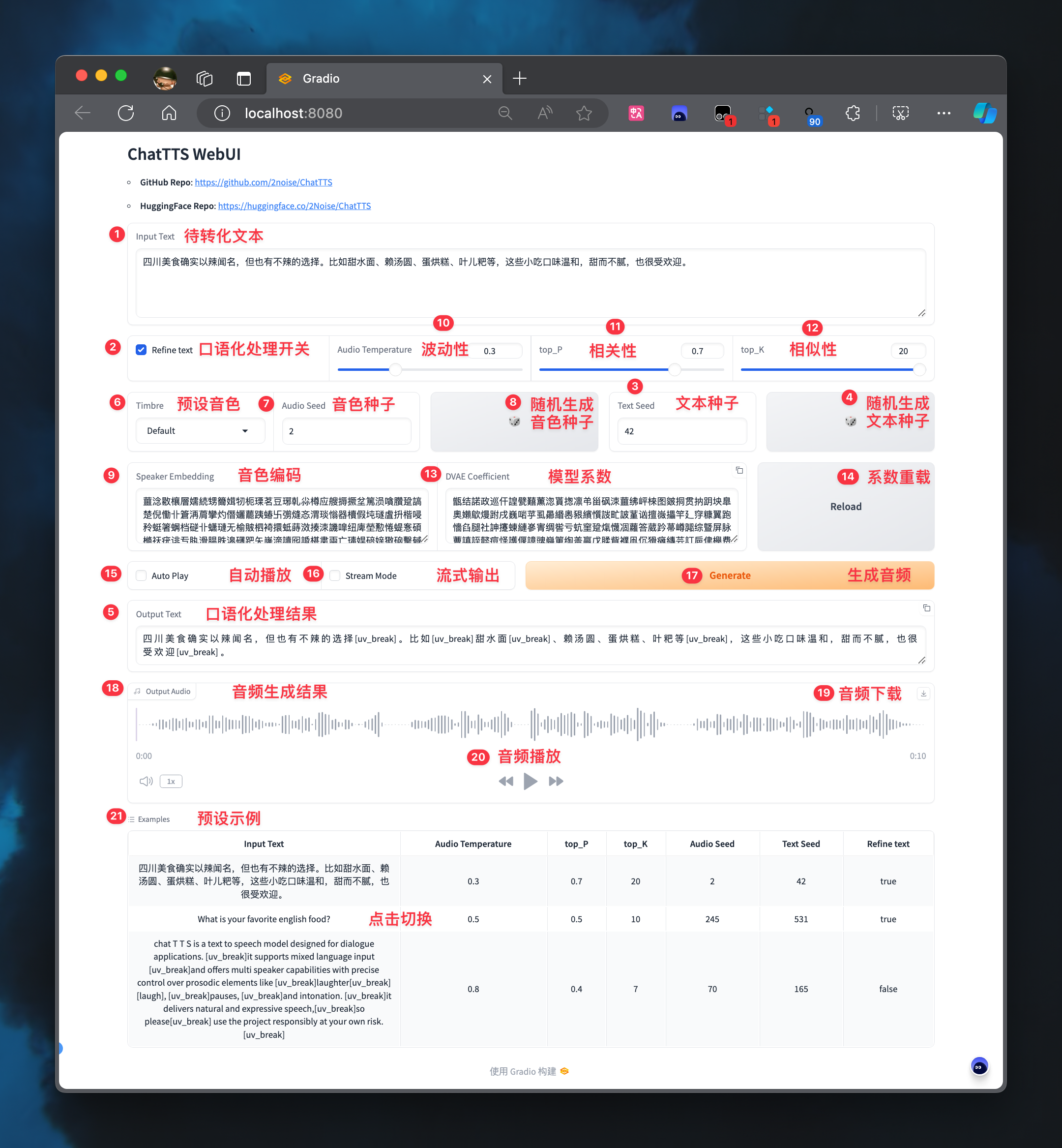
Text Control
- 1. Input Text: Text to be converted, supports mixed Chinese and English
- 2. Refine text: Whether to process the text into colloquial form
- 3. Text Seed: Configure text seed value, different seeds correspond to different colloquial styles
- 4. 🎲: Generate random text seed value
- 5. Output Text: Text generated after colloquial processing
Tone Control
- 6. Timbre: Preset timbre seed value
- 7. Audio Seed: Configure audio seed value, different seeds correspond to different tones
- 8. 🎲: Generate random audio seed value
- 9. Speaker Embedding: Timbre code, see Tone Control
Emotion Control
- 10. Temperature: Control audio emotional fluctuation, range is 0-1, the larger the number, the greater the fluctuation
- 11. top_P: Control audio emotional relevance, range is 0.1-0.9, the larger the number, the higher the relevance
- 12. top_K: Control audio emotional similarity, range is 1-20, the smaller the number, the higher the similarity
Coefficient Control
- 13. DVAE Coefficient: Model coefficient code
- 14. Reload: Reload model coefficient
Playback Control
- 15. Auto Play: Whether to automatically play after generating audio
- 16. Stream Mode: Whether to enable streaming output
- 17. Generate: Click to generate audio file
- 18. Output Audio: Audio generation result
- 19. ↓: Click to download audio file
- 20. ▶️: Click to play audio file
Example Control
- 21. Example: Click to switch example configurations
Tone Control
After testing, specifying a timbre seed value each time generates spk_emb and reusing pre-generated spk_emb results in significant differences. It is recommended to prioritize using .pt timbre files or timbre codes (in string form).
In the ChatTTS_Speaker project, preliminary tagging and stability evaluation of timbre seeds have been conducted. Examples can be used to quickly select suitable timbres.
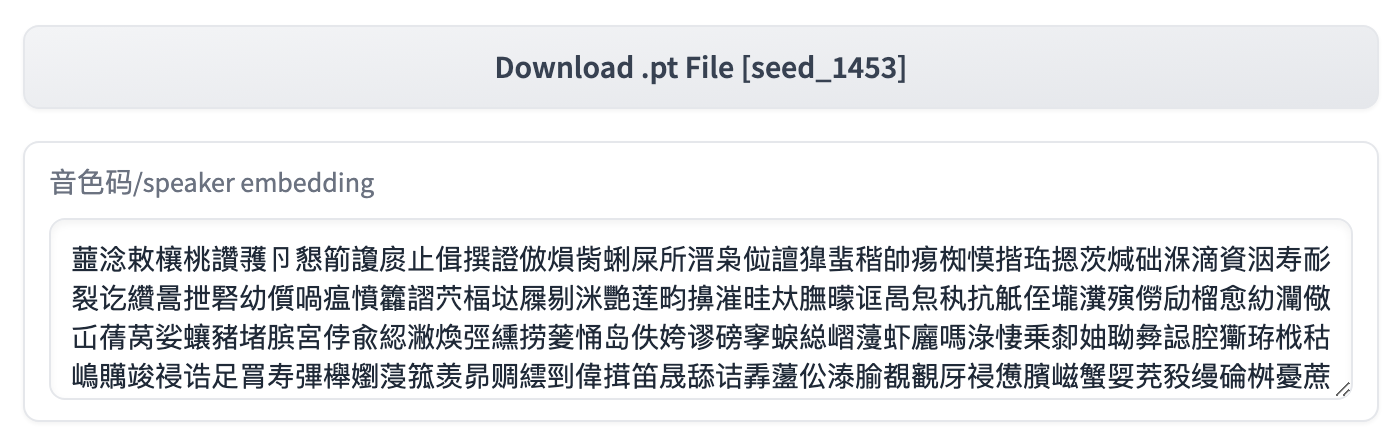
WebUI
When using the official WebUI, you can directly copy the timbre code and replace the value in 9. Speaker Embedding to achieve timbre control.
Python
When using in a Python script, refer to the compression scheme in issue#07 to implement timbre control.
spk = torch.load("asset/seed_1332_restored_emb.pt", map_location=torch.device('cpu')).detach()
spk_emb_str = compress_and_encode(spk)

params_infer_code = ChatTTS.Chat.InferCodeParams(
    spk_emb= spk_emb_str,  # add sampled speaker
    temperature=.0003,  # using custom temperature
    top_P=0.7,  # top P decode
    top_K=20,  # top K decode
)
Beginner Tutorial
English Tutorials
| Video | Highlights |
|---|---|
| Sam Witteveen | Conversational TTS Step by Step |
Chinese Tutorials
| Video | Highlights |
|---|---|
| Tongji Zihua Bro | Detailed deployment tutorial from beginner to advanced |
| ZTFS | Mac M1 deployment tutorial |
| Wang Baobao | Windows deployment tutorial |
FAQs
With recent iterations, the issues in the source repository code have been mostly resolved. If you encounter problems, it is recommended to first review the Official Documentation in Chinese.
Project Trends
Explore related projects
codecrafters-io/build-your-own-x
Master programming by recreating your favorite technologies from scratch.
561,232 starspublic-apis/public-apis
A collective list of free APIs
497,482 starsmorluto/rea
Reverse engineer anything with agents, from app behavior down to native binaries.
445,616 starsopenclaw/openclaw
The AI that really does things. Any OS. Any Platform. The lobster way. 🦞
394,229 stars