
liaosiliangCodeLife/harness-mate-plat
liaosiliangCodeLife/harness-mate-plat has 30 GitHub stars and 1 forks. GitHot measured 0 stars in 24 hours, +1 in 7 days, and +1 in 15 days. Last checked 2026-11-14 21:44 UTC. Last push 2026-10-30.
Measured star growth
- in 24h
- 0
- in 7 days
- +1
- in 15 days
- +1
- in 1 month
- Collecting history
Net star changes over overlapping periods, not daily totals. Missing measurements are left blank. Stars measure attention, not software quality.
About
端到端智能体平台:把本机的 AI Agent 变成人人可用的 Web 产品(Vue 3 + Flask + Go WS 网关 + Docker 部署)
AIREADME.en.md
Original
Harness Mate
[](https://m8ven.ai/mcp/liaosiliangcodelife-harness-mate-plat-1itulf?s=readme) [](https://github.com/awesome-dsh-plugin/awesome-dsh-plugin)
An end-to-end agent platform — turn the AI agent running on your own machine into a web product anyone can use.
中文版:README.md
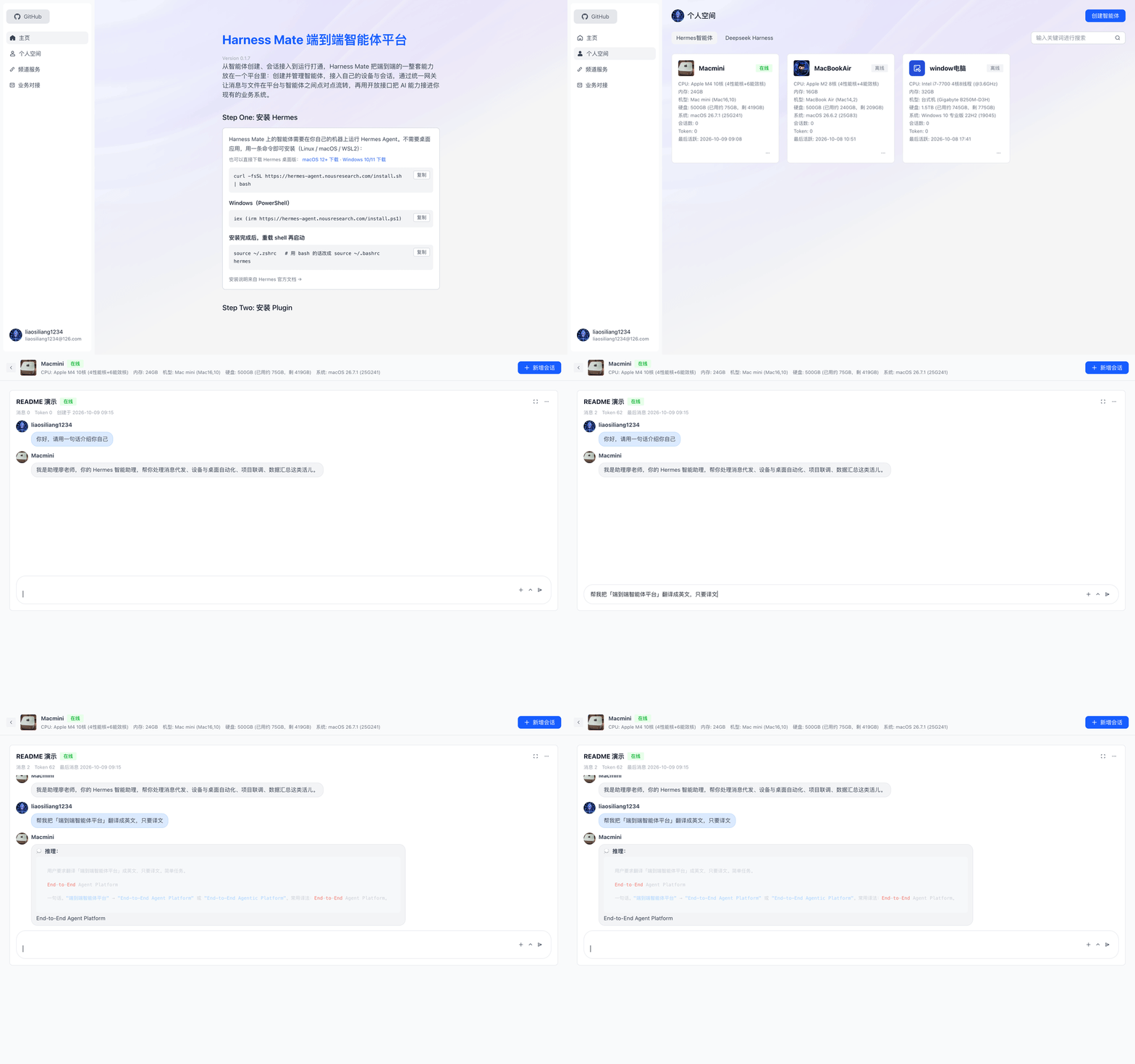
Your local AI agent is powerful, but only you can reach it: the terminal, the scripts, the local files — nobody else gets in. Harness Mate closes that last mile: colleagues and customers open a browser, chat with your agent and exchange files with it — without moving the agent to the cloud, and without writing any integration code.
It ships with a Hermes Agent adapter by default; the channel protocol is open, so supporting another agent means implementing a single adapter.
- 🌐 Live demo: https://harness.alltman.com
- 📘 中文文档: README.md
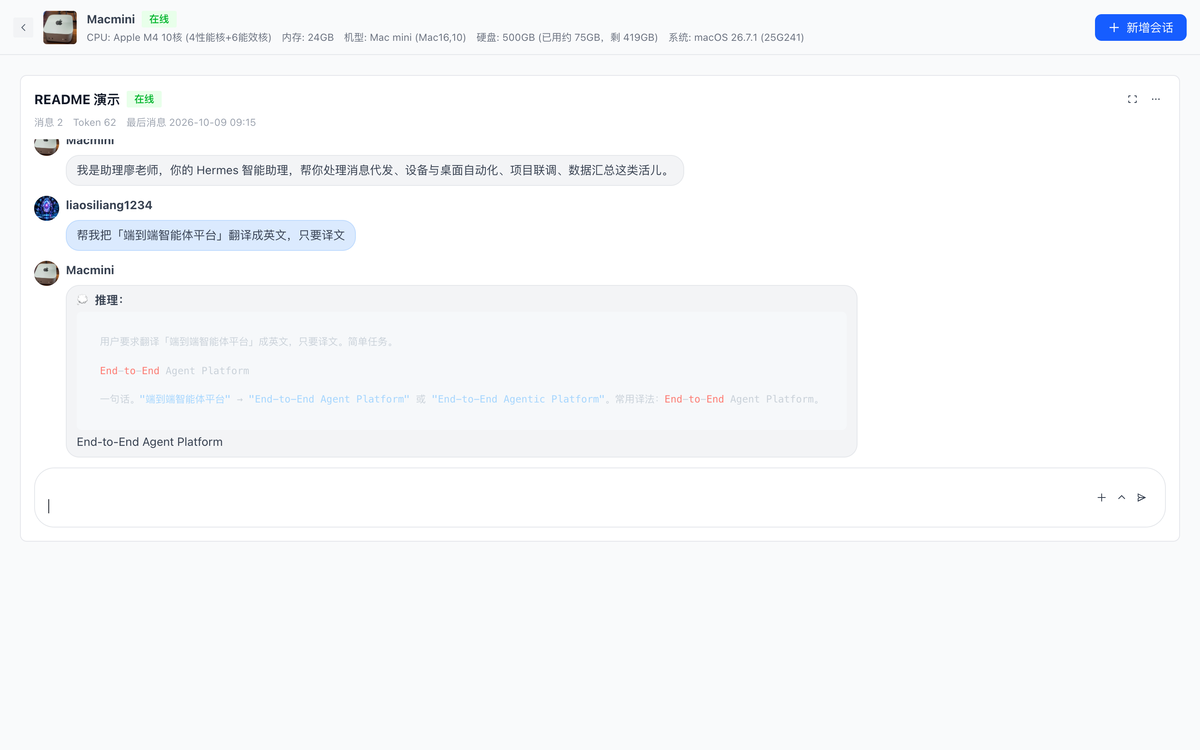
Quickstart
Connect the Hermes Agent on your machine to the platform — five steps, really just one command plus two values.
1) Get the credentials
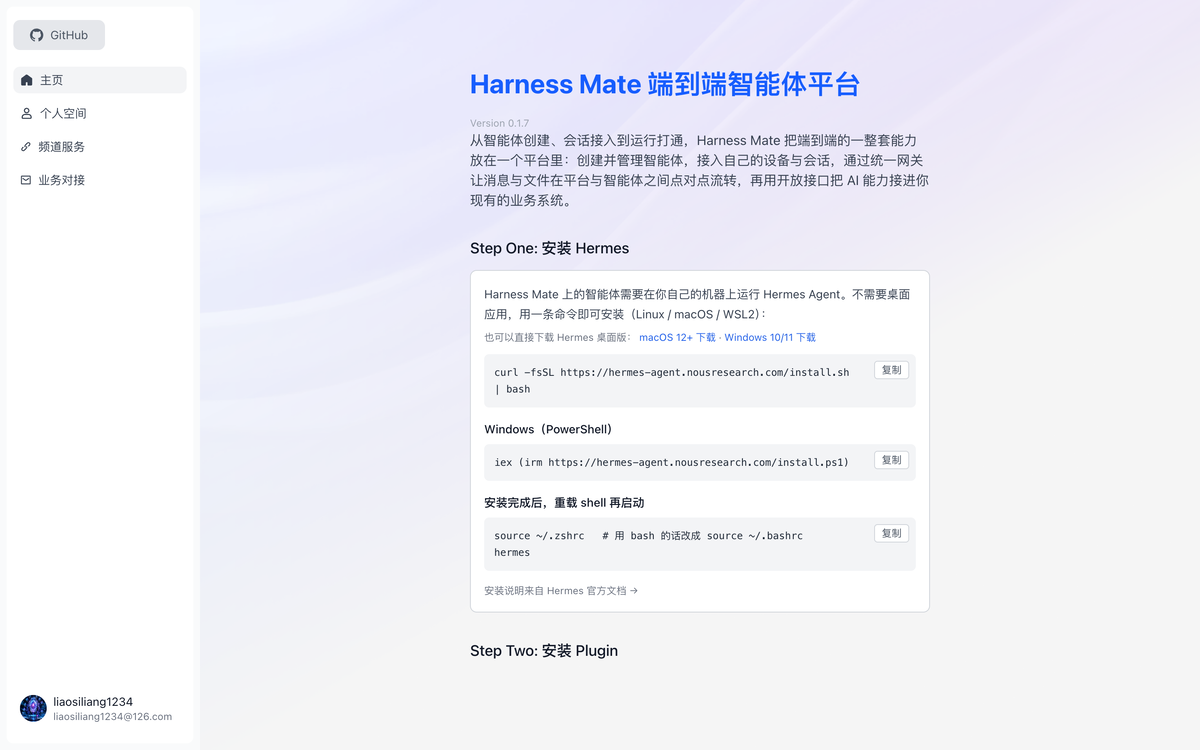
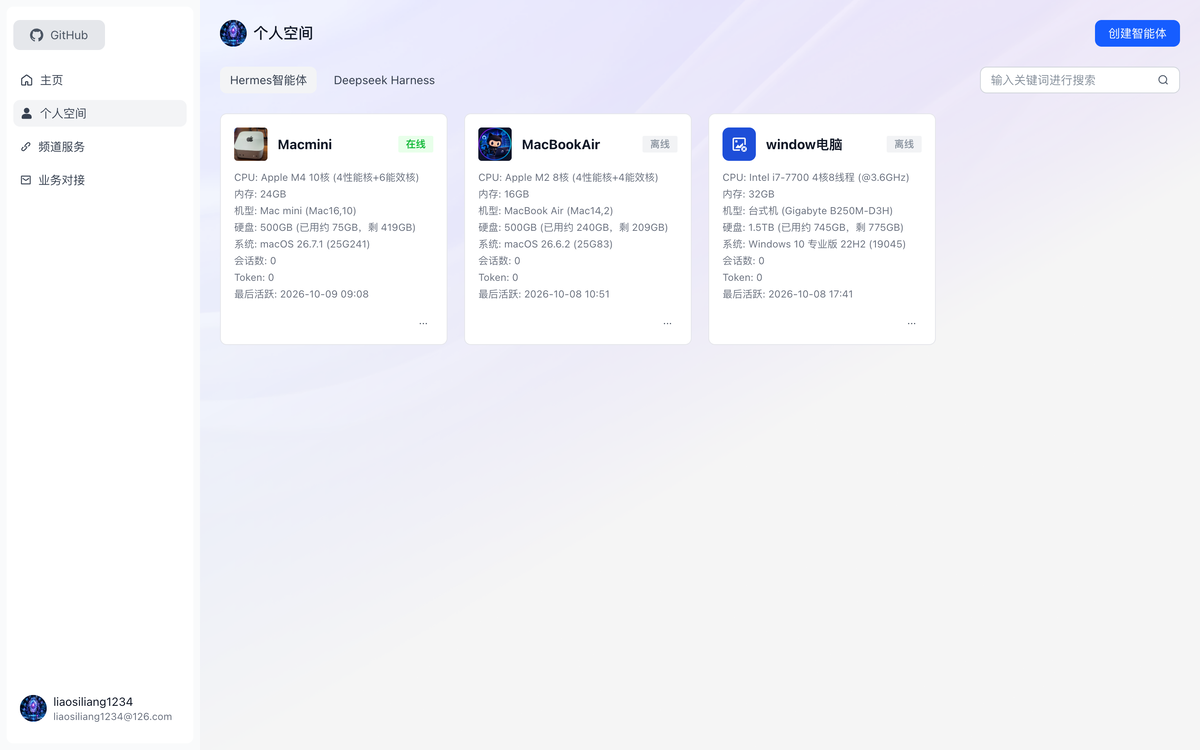
Open https://harness.alltman.com → sign in → "个人空间" (Personal Space) → the agent card's "⋯" menu → "配对 Hermes" (Pair Hermes). The dialog shows this agent's bot_id and bot_key; you can also click "一键复制安装指令" (Copy install command) to grab a script with the credentials already filled in.
2) Install the plugin (it lives in the plugin/hermes/ subdirectory of this repo)
hermes plugins install liaosiliangCodeLife/harness-mate-plat/plugin/hermes --yes-deps --enable
3) Write the credentials (replace <bot_id> / <bot_key> with step 1's values)
cat >> ~/.hermes/.env <<'EOF'
HARNESS_MATE_BOT_ID=<bot_id>
HARNESS_MATE_BOT_KEY=<bot_key>
EOF
4) Check the gateway address
Open ~/.hermes/plugins/HarnessMate/adapter.py, line 62 (WS_GATEWAY_WS_URL), and make sure it points at your gateway (wss://<host>:<port>/ws). Nothing to change if you use the gateway deployed from this repo.
5) Restart and verify
hermes gateway restart
When the log shows harness_mate 已连接 WS 网关: bot_id=… you are connected; open the platform, enter the agent and send a message — a reply means the whole path works.
Full steps, dependency install, configuration and troubleshooting: plugin/hermes/INSTALL.md.
Contents
- Quickstart
- The problem it solves
- Core capabilities
- Architecture
- Local development
- Production deployment
- Configuration
- Repository layout
- Protocol docs
- Tech stack
- Security & boundaries
- Community & support
The problem it solves
| A local agent today | After Harness Mate |
|---|---|
| Usable only on this machine; switch devices and it's gone | Works in any browser, phones included |
| No accounts — everyone using it is you | Email login, email-code signup, GitHub OAuth, single-session login |
| Conversations scattered in local files | Conversations/messages persisted, paged history, consistent across devices |
| Images and documents copied by hand | Two-way files: users upload to the agent, the agent sends files back |
| Integrating with your own systems means building a bridge | Open API (OpenAPI) you can call directly |
| No idea whether the agent is online | Online status consistent across the whole platform |
Core capabilities
- Agent management — create, edit and delete agents; each agent gets a gateway identity (
bot_id+ key) and can point at a different machine or a different agent. - Realtime conversations — the browser connects straight to the gateway over WebSocket and exchanges messages peer-to-peer with the agent; streaming output (including a "thinking" state) and message persistence included.
- Stop generation — abort a running turn with one click (a stop frame is sent to the agent), so nothing gets stuck in "generating".
- Files and images, both ways — users upload images/documents to the agent; when the agent sends back a local file it uploads it to the platform first, and the chat renders a thumbnail (click to zoom) or a file card.
- Online status — list page, detail page and conversation cards share one definition, so you never see "online outside, offline inside".
- Accounts — password login, email verification-code signup, GitHub OAuth, and single-session login (one account may be online in exactly one browser at a time; a new login kicks the old one out, tracked via Redis).
- Open API — API key management, server/agent info, and an authorization-free file upload endpoint for wiring into your own systems.
- One-command deployment — Docker Compose brings up ui / api / postgres / redis / nginx / certbot, and Nginx issues and renews Let's Encrypt certificates automatically.
Architecture
flowchart LR
  B["Browser<br/>Vue 3 SPA"]

  subgraph server["Platform side (one server / Docker Compose)"]
    N["Nginx<br/>80 / 443 + TLS"]
    A["api · Flask<br/>accounts / agents / conversations / OpenAPI"]
    DB[("PostgreSQL<br/>accounts·agents·conversations·messages")]
    R[("Redis<br/>session ids·codes·mappings")]
    U["ui · static site"]
  end

  G["WS Gateway · Go<br/>JWT auth + peer-to-peer relay"]

  subgraph home["Your machine (agent side)"]
    P["plugin · Hermes plugin"]
    H["Hermes Agent<br/>and everything it can do locally"]
  end

  B -- "HTTPS /api" --> N
  N --> A
  N --> U
  A --> DB
  A --> R

  B -- "WSS direct" --> G
  G <-- "WSS" --> P
  P <--> H
  P -. "uploads local files" .-> N
Two paths, two jobs:
- HTTP path (browser → Nginx → api): accounts, agents, conversations, message CRUD, file upload, open API.
- WebSocket path (browser ⇄ gateway ⇄ plugin ⇄ agent): realtime messages and streaming replies. The gateway only authenticates and relays peer-to-peer (delivering by exact
ws_session_id) — it never parses business payloads; the agent-side plugin talks to the local agent.
Local development
1. Prerequisites
- A machine to run the platform on (Linux recommended, macOS works)
- PostgreSQL and Redis (the Compose stack below brings both up in production)
- Hermes Agent installed locally
curl -fsSL https://hermes-agent.nousresearch.com/install.sh | bash
2. Start each service
Backend (api)
cd api
python3 -m venv .venv && source .venv/bin/activate
pip install -r requirements.txt -i https://mirrors.cloud.tencent.com/pypi/simple/
cp .env.example .env          # fill in database, Redis, upload and mail settings
FLASK_APP=app.http.app flask run --port 5001 --host 127.0.0.1
Frontend (ui)
cd ui
npm install                   # or yarn
cp .env.example .env.development.local   # VITE_API_PREFIX points at the local backend
npm run dev                   # http://localhost:5173
WS gateway (gateway)
cd gateway
go build -o gateway .
WS_GATEWAY_PORT=8765 ./gateway   # listens on 8765 by default; keep the JWT secret in sync with the agent config
Agent-side plugin (plugin): install it into Hermes with one command — hermes plugins install liaosiliangCodeLife/harness-mate-plat/plugin/hermes --yes-deps --enable — then fill in the gateway address, bot_id and bot_key. Full steps: plugin/hermes/INSTALL.md. The plugin also uploads the agent's local files to the platform and sends them back with the reply.
3. Send your first message
- Open the frontend in a browser → sign up → sign in
- "Personal Space" → create an agent → fill in the gateway address and key
- Enter the agent → create a conversation → send a message and see if the agent replies
- (Optional) ask it for a local image to verify the file path
Production deployment
docker/ holds a single-host Compose stack (ui / api / postgres / redis / nginx / certbot) configured entirely by the .env in the same directory:
cd docker
cp .env.example .env      # domain, database password, upload and mail settings
docker compose build ui api
docker compose up -d
The first run needs a certificate (the top of docker-compose.yaml documents the full recipe): temporarily comment out Nginx's 443 block, start the containers, issue the certificate with certbot's webroot mode, then restore and reload. After that the certbot container renews it every 12 hours.
In production: use strong passwords, keep
.envout of version control (ignored by default), and rate-limit the authorization-free upload endpoint as needed.
Configuration
| Location | Purpose |
|---|---|
api/.env |
Backend: database URL, Redis, JWT secret, object storage, SMTP |
docker/.env |
Deployment: Compose service parameters, domain and certificate email |
ui/.env.development.local |
Local development: VITE_API_PREFIX pointing at the local backend |
ui/.env.production |
Production build: /api when served behind the Nginx reverse proxy |
Only .env.example is committed; real .env files never enter the repository.
Repository layout
api/       Backend (Flask): accounts, agents, conversations, messages, open API
ui/        Frontend (Vue 3 + Vite): home, agent space, conversation cards, open API
gateway/   WS gateway (Go): JWT auth, session mapping, peer-to-peer relay
plugin/    Agent-side plugin (Python): talks to the local agent, sends files/images back
docker/    Docker Compose deployment: nginx, certbot, postgres, redis
Protocol docs
- gateway/ws_gateway_protocol.md — the gateway's WebSocket protocol: connect, authenticate, session ids, message envelope
- plugin/hermes/hermes_channel_protocol.md — the platform ⇄ agent channel protocol: inbound messages, reply frames, streaming and file fields
Both protocols are independently implementable: swap the agent or swap the frontend, and as long as they follow the docs they interoperate.
Tech stack
| Module | Main technologies |
|---|---|
| Frontend | Vue 3, TypeScript, Vite, Pinia, Arco Design Vue, TailwindCSS |
| Backend | Python, Flask, SQLAlchemy, Flask-Login, Marshmallow, Alembic, Gunicorn |
| Storage | PostgreSQL, Redis, object storage (Tencent COS) |
| Gateway | Go, gorilla/websocket, JWT (golang-jwt), go-redis, viper |
| Plugin | Python, WebSocket client |
| Deployment | Docker Compose, Nginx, Certbot (Let's Encrypt) |
Security & boundaries
- Real config (
.env), certificate private keys and the upload directory never enter version control. - Logins use JWT; single-session login means Redis holds the currently valid session id per account, and a new login invalidates the old token immediately.
- Gateway connections require JWT auth, signed with the key configured on the platform side for that agent.
POST /open-api/upload-fileis an authorization-free upload endpoint (used by the agent side to send files back); size and type limits apply by default — add gateway rate limiting or origin checks for public deployments.- The agent-side plugin identifies itself with
bot_id/bot_key, anddm_policycontrols who may message it.
License
Released under the MIT license. Copyright (c) 2026 liaosiliangCodeLife.
Acknowledgements
- Hermes Agent — the local agent runtime it connects to by default
- Every upstream open-source project that makes this chain work
Community & support
Scan with WeChat or WeCom to join the community group — questions, feedback and usage chat are all welcome.
Report issues: [email protected] (an AI fixes them automatically every day).
Bug report format
Please use these three lines when reporting — it is the fastest way to reproduce and fix:
1. What happens:
2. Steps to reproduce:
3. Always reproducible?:
Listed in
- awesome-dsh-plugin — HarnessMate plugin listed (PR #7020)
- M8ven Trust Index — MCP server trust & security grade: A