
lez-s/Materialist
lez-s/Materialist has 32 GitHub stars and 2 forks. GitHot measured 0 stars in 24 hours. Last checked 2026-11-09 05:33 UTC. Last push 2026-09-28.
Materialist: Physically Based Editing Using Single-Image Inverse Rendering
What you can do
- Single-image inverse rendering
- Material decomposition into albedo, roughness and metallic maps
- Environment map estimation
- Material editing capabilities
Measured star growth
- in 24h
- 0
- in 7 days
- Update delayed
- in 15 days
- Update delayed
- in 1 month
- Update delayed
Net star changes over overlapping periods, not daily totals. Missing measurements are left blank. Stars measure attention, not software quality.
README.md
OriginalMaterialist
Project Page | Paper (arXiv) | Paper (IJCV)
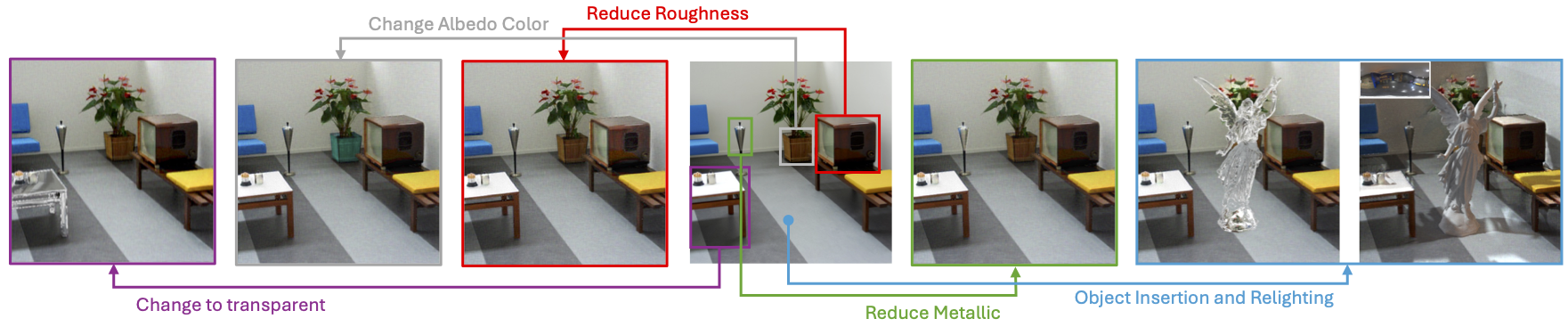 Materialist is an inverse rendering framework for material estimation and editing from single images. It leverages differentiable rendering techniques to accurately recover physically-based materials and lighting conditions from photographs.
Features
- Single-image inverse rendering
- Material decomposition into albedo, roughness and metallic maps
- Environment map estimation
- Material editing capabilities
- Specialized rendering for transparent and translucent materials
⚠️ Note: transparency editing in this repository is an approximation. The edited light paths do NOT truly pass through the object, so refraction can be inaccurate under strong or weak illumination and for geometrically complex objects.
Usage
1. Installation andExternal Dependencies
- Mitsuba
- PyTorch
Requirements
Materialist requires Python 3.10 and CUDA-compatible GPU hardware. Install dependencies with:
pip install -r requirements.txt
2. Inverse Rendering Pipeline
To reconstruct materials from a single image:
# Run the inverse rendering pipeline with default settings
./run_inverse_pipeline.sh
You can specify which example to process by entering the corresponding number when prompted.
3. Command Line Arguments
3.1 Inverse Rendering
--img_inverse_path: Path to the input image--save_name: Name for saving results--opt_order: Optimization order for material parameters (e.g., "rm a" for roughness+metallic then albedo)--use_mask: Use mask during optimization, this is used for material editing purposes--opt_env_from: start environment map optimization from this iteration.--env_coordinate_type: Environment-map MLP coordinates, eitherspherical(default) oruv.
3.1.1 Settings for Synthetic images
python inverse_img_w_mi.py --model_name=pos_mlp --opt_src=arm --opt_env_from=0 --opt_order=arm
3.1.2 Settings for real world images
⚠️ For real images, the following settings are recommended:
python inverse_img_w_mi.py --model_name=pos_mlp --opt_src=a --opt_env_from=2 --opt_order=rm a
if above settings do not yield good results, try optimize without using network, this will take longer time but usually yield better results:
python inverse_img_w_mi.py --model_name=none --opt_src=a --opt_env_from=2 --opt_order=rm a
3.2 Ablation Scripts and Examples
The ablation scripts are provided under scripts/. Each command below
uses a small example included in this repository and writes results to
examples/ by default so the outputs can be checked in place.
# Boundary duplication ablation from an example depth map
python scripts/bd_ablation_recon.py --mode both --radii 0.030 --min_angles 0.5 --spp 64

# FOV ablation using the bundled jinjya inverse-rendering output
python scripts/fov_ablation.py --mode jinjya --pct 1.0 --frames 1 --rotation_step 0

# Environment map inference: predict G-buffer with MatNet then infer envmap (fix the G-buffer during envmap optimization)
python scripts/infer_envmap.py --image_path examples/infer_envmap/example_img.exr --epochs 500 --env_h 64 --env_w 128

# Approximate transparency edit using jug, envmap57, and inpainted background
python scripts/edit_trans_ablation.py --ior 1.1
3.3 Rendering and Editing
# Render with default settings using example
python render_final.py --save_name="indoor" --mode="real"

# Render with transparency
python trans_edit.py --save_name="indoor"

# Render with shadow effects using rolling envmap
python render_final.py --save_name="jinjya" --mode='rolling' --env_path='envmaps/41.hdr'
--env_path: Path to environment map (HDR)--save_name: Name of saved results--mode: Rendering mode ("real" for rendering without changes or "oi" for object insertion, "rolling" for rolling environment map)--input_path: Custom path for material loading--save_path: Custom path for saving rendered images
4. Output
Results are saved to the output_imgs/{save_name}/ directory, including:
- Material maps (albedo, roughness, metallic)
- Environment maps
- Rendered images (PNG and HDR/EXR formats)
- Reconstructed mesh (.ply)
Citation
@article{wang2026materialist,
  title={Materialist: Physically Based Editing Using Single-Image Inverse Rendering},
  author={Wang, Lezhong and Tran, Duc Minh and Cui, Ruiqi and TG, Thomson and Dahl, Anders Bjorholm and Bigdeli, Siavash Arjomand and Frisvad, Jeppe Revall and Chandraker, Manmohan},
  journal={International Journal of Computer Vision},
  volume={134},
  number={6},
  pages={267},
  year={2026},
  publisher={Springer}
}
Acknowledgements
This project is built upon the work of many contributors. We acknowledge the use or modify of the following libraries and works: FIPT, SAM2, DepthAnything, Mitsuba. Specifically, for depth estimation, we adopted the weights from DepthAnything to better adapt to real world image inverse rendering. We also acknowledge the use of the Blender and BlenderProc for physical simulation purposes.
Explore related projects
ytdl-org/youtube-dl
Command-line program to download videos from YouTube.com and other video sites
141,500 starsexcalidraw/excalidraw
Virtual whiteboard for sketching hand-drawn like diagrams
135,396 starsgodotengine/godot
Godot Engine – Multi-platform 2D and 3D game engine
119,840 starsmrdoob/three.js
JavaScript 3D Library.
117,905 stars