
lewis-hui1202/WPS-AI
lewis-hui1202/WPS-AI has 96 GitHub stars and 30 forks. GitHot measured +1 stars in 24 hours and +2 in 7 days. Last checked 2026-11-22 08:25 UTC. Last push 2026-10-29.
Measured star growth
- in 24h
- +1
- in 7 days
- +2
- in 15 days
- Collecting history
- in 1 month
- Collecting history
Net star changes over overlapping periods, not daily totals. Missing measurements are left blank. Stars measure attention, not software quality.
About
WPS Office 全家桶(文字/表格/演示/PDF)AI 助手:挂 OpenAI 兼容 / Anthropic / Codex 多家模型,AI 通过工具调用直接读写文档;支持生图、MCP、中英双语,覆盖 Windows / macOS / Linux(含国产系统)。
AIREADME.en.md
OriginalWenxiaozhou · WPS Office Multi-host AI Assistant
🌐 Language: 中文 · English
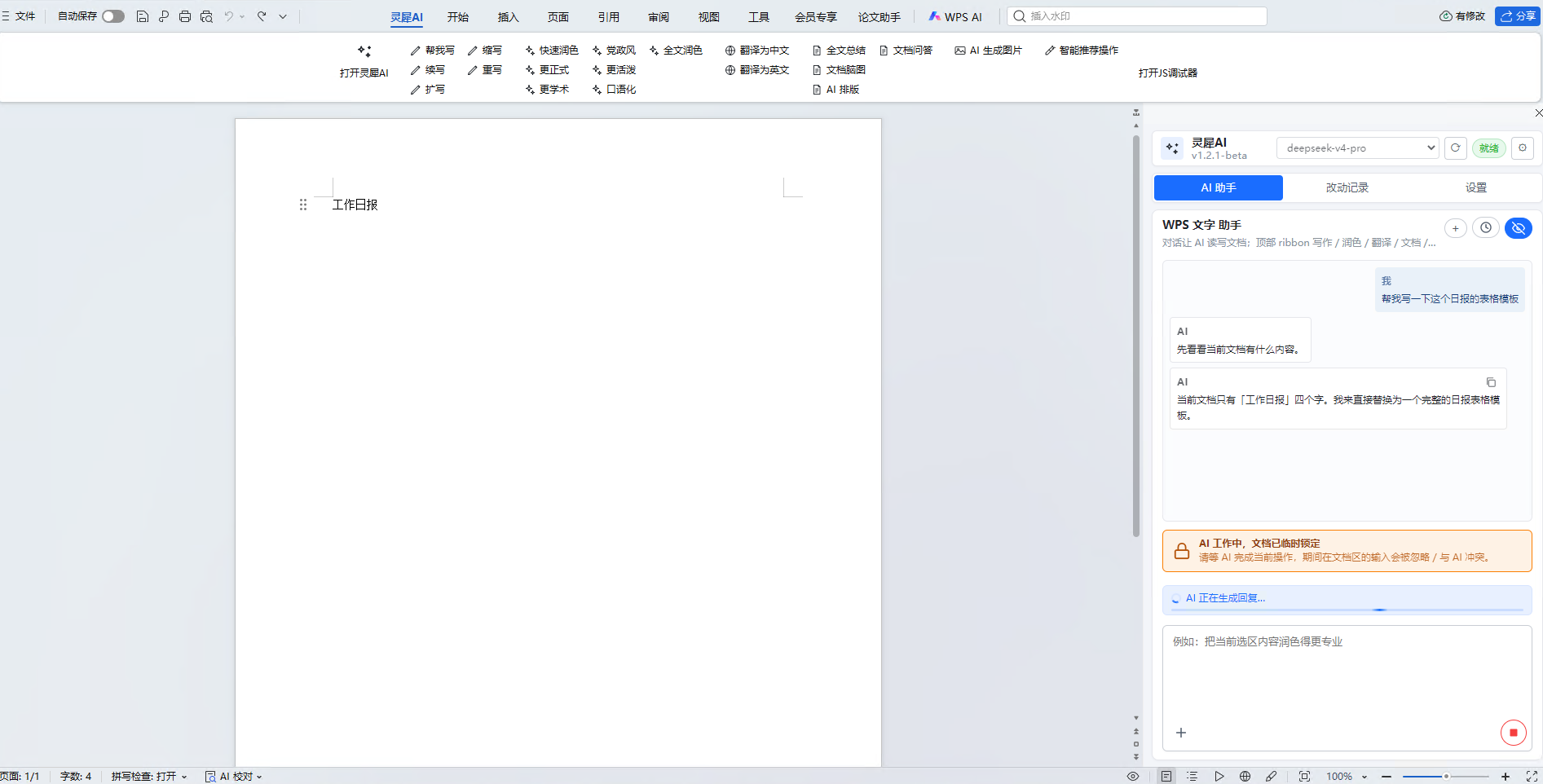
A single TaskPane for WPS Writer / Spreadsheet / Presentation / PDF, with multiple chat AI providers (Codex / OpenAI-compatible / Anthropic) + an image provider. AI invokes tools to read and write the document directly.
🤖 100% vibe-coded : architecture, provider adapters, PPT themes/charts, Word rendering, cross-platform installers, and docs — all iterated through dialog between Claude and human prompts. Not a single line was hand-typed. Feel free to fork and vibe yourself.
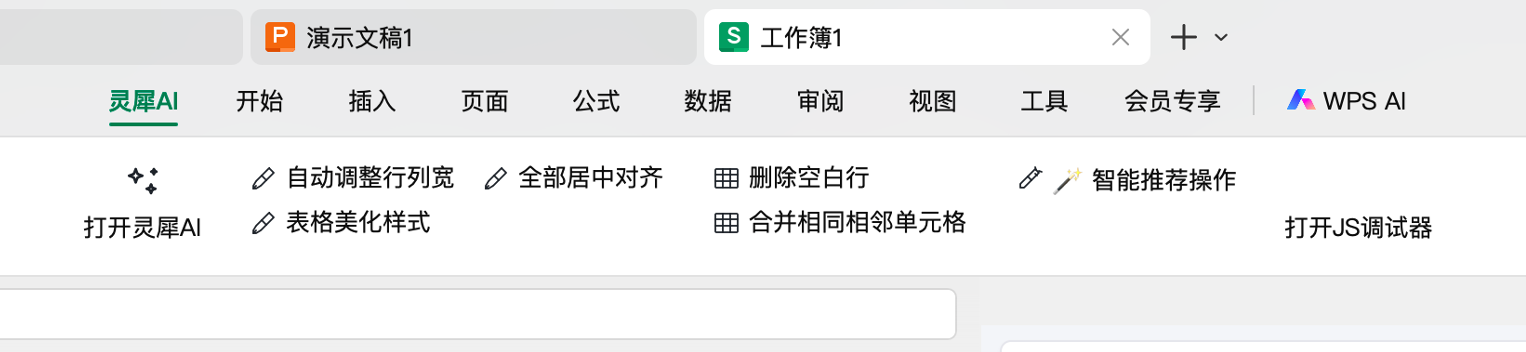
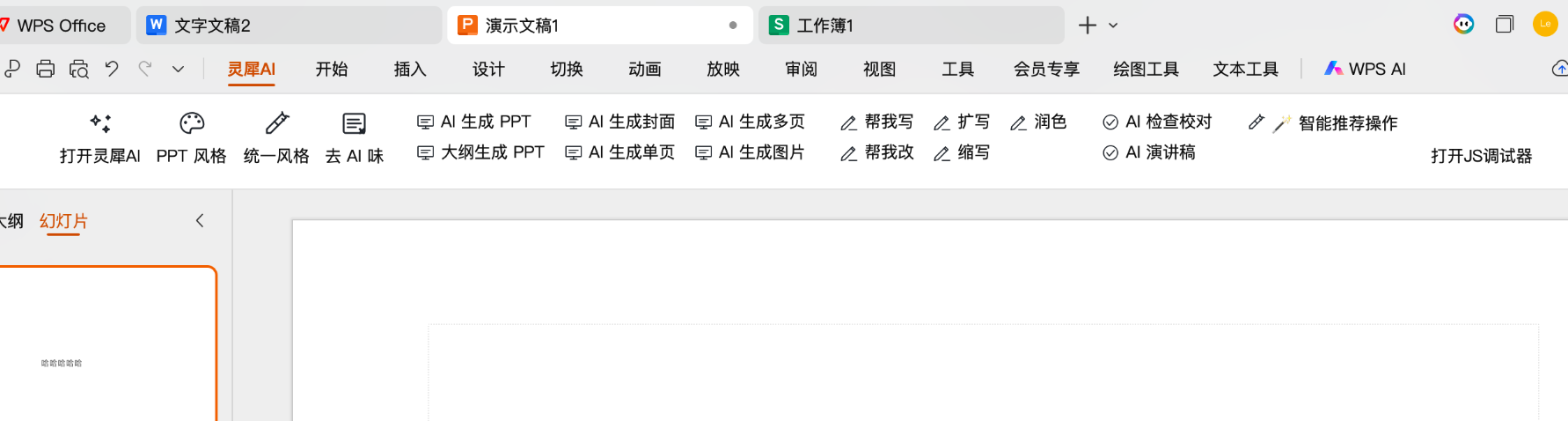
Screenshots
| WPS Writer | WPS Spreadsheet | WPS Presentation |
|---|---|---|
 |
 |
 |
Quick Start (5 min)
1. Download
| Platform | Installer | Size |
|---|---|---|
| Windows | lingxi-ai-1.3.0-setup.exe |
~30 MB |
| macOS | lingxi-ai-1.3.0.pkg (double-click to install) |
~35 MB |
Both bundle Node runtime — no separate Node install needed.
2. Install
- Windows: Temporarily disable antivirus real-time protection → double-click setup.exe → fully quit WPS → reopen WPS. The "文小舟" ribbon tab means success.
- macOS: Right-click .pkg → Open (Gatekeeper blocks unsigned packages on double-click) → enter system password → fully quit WPS → reopen.
For details (uninstall / upgrade / troubleshooting / installer build) see INSTALL.md.
3. Configure AI
- Click "Open Wenxiaozhou" in the ribbon → TaskPane opens on the right → ⚙ Settings (standalone 960×720 dialog)
- Chat panel → + Add Provider → pick one of 12 presets (baseURL pre-filled)
- Fill in API Key → ⚡ Test → close dialog → pick a model from the header dropdown and chat
Multiple providers concurrently: DeepSeek + Anthropic + Codex + Kimi can all be enabled; switch freely from the dropdown.
| Preset | baseURL (pre-filled) |
|---|---|
| Codex (ChatGPT OAuth) | (OAuth) |
| Anthropic / OpenAI | api.anthropic.com / api.openai.com |
| DeepSeek / Kimi / Qwen | DeepSeek / Moonshot / DashScope compatible |
| GLM / Doubao / SiliconFlow / OpenRouter | each provider's OpenAI-compatible URL |
| Local Ollama | http://localhost:11434/v1 (no key) |
| Custom | Fill URL + Key yourself |
System Requirements
| Item | Windows | macOS |
|---|---|---|
| OS | Windows 10 / 11 (x64) | macOS 10.15 Catalina+ (Intel + Apple Silicon) |
| WPS | WPS Office 12.x+ | WPS Office 5.x+ |
| Runtime | Bundled portable Node 22.x | Bundled darwin-x64 + arm64 Node |
| Permission | Installs into user dir by default | System password required (writes to /Library/Application Support/LingxiAI/) |
Not supported: WebOffice, mobile WPS, lower-versioned desktop clients — JSAPI add-ins require desktop client + the versions above.
Features
Cross-host
AI Integration
- Multiple chat providers concurrently (Codex / Anthropic / 11 OpenAI-compatible + custom); header dropdown grouped by provider
- 3 capability icons per model: 🖼 image / 📄 PDF / 💡 thinking
- Adjustable thinking budget (low / medium / high / off) mapped per protocol:
thinking.budget_tokens/reasoning_effort/reasoning.effort - PDF as multimodal attachment: Claude uses document block / OpenAI Files API / Codex input_file
- Streaming + tool-use loop: AI chains multiple tool calls within one turn
- Preview-confirm mode vs Direct-write mode: two safety levels
TaskPane
- Settings and PPT style preset are standalone WPS dialog windows (escape TaskPane width limits)
- One-tap detach / dock: floating window with 8 resize handles
- Modals adapt to screen resolution (no overflow on small screens)
Conversation
- Multi-conversation management + full history replay (reasoning + tool calls + text)
- Claude-Code-style tool call bubble: shows only the tail by default, disappears when the result arrives; full JSON available behind a "Developer log" toggle
- Progress bar includes the most recent reasoning/output tail
- AI-working doc-lock banner merged with progress indicator (no longer visually stacked)
- Attachments: image / PDF / text files
- System prompt customizable; supports "Skills" (4 built-in + .md/.txt import) injected into system prompt by scenario
Safety
- Hard doc lock while AI works (Word
Document.Protect/ ExcelUserInterfaceOnly) - Unsaved documents reject mutations (fail-fast before AI runs, no waiting for output)
- Per-turn document backup + one-click revert (auto-GC last 20)
- Change Log tab: grouped by file, expand to see args / before/after snapshots / errors
- Config import/export (API Key encrypted + version compat)
Writer / Spreadsheet / Presentation / PDF
| Host | At a glance |
|---|---|
| Writer | 6 quick-action groups (Write / Rewrite / Polish / Translate / Summarize / Smart) + markdown→Word native rendering (real tables + nested lists + paragraph indent reset) |
| Spreadsheet | Cell/range read-write, batch format, table beautify, autofit columns, AI formula/proofreading/data reshape |
| Presentation | 12 design-themed palettes + 8 shape templates + 4 SVG visual templates + 6 chart types + outline-to-PPT + HTML template system (freeform + ECharts + layered insert) + unified style + de-AI-isms |
| Bilingual translation (markdown side-by-side) + summary + outline-to-PPT + Q&A + smart action suggestions |
MCP Server (new in v1.4)
Settings → MCP → enable to expose WPS tools to external agents (Claude Code CLI / Claude Desktop / Cursor):
- One-click copy config JSON (auto-filled with plugin install path)
- Tools grouped by host
- Live status badge (Connected / Enabled-not-connected / Disabled)
Project Layout
plugin/
├── taskpane.html                  # main UI entry
├── main.js                        # script loader
├── manifest.json / ribbon.xml     # plugin declaration + ribbon
├── css/style.css
├── js/
│   ├── app.js                     # UI orchestration
│   ├── wps.js / hosts/*           # host dispatch + jsapi bridge per host
│   ├── providers/*                # provider registry + 12 presets + capabilities
│   ├── tools/*                    # AI-callable tools (grouped by host + registry)
│   ├── html-templates/*           # template system (cache / components / renderer / studio)
│   ├── mcp-bridge.js              # MCP bridge (plugin side)
│   └── skills.js                  # skills (built-in + import)
└── tools/
    ├── proxy-server.js            # CORS proxy + file ops + backup + MCP endpoints
    ├── mcp-server.js              # stdio MCP server (for external agents)
    ├── serve-permanent.js         # permanent-mode static server
    ├── build-variants.js          # multi-host variant build
    └── dev.js / gen-ribbon.js
Development
cd plugin
npm install
npm run dev:wps   # or dev:et / dev:wpp / dev:pdf
Spawns CORS proxy (3890) and wpsjs debug (3889); WPS launches automatically.
Add a tool — edit js/tools/<host>.js:
registry.registerTool({
  name: "wps_my_tool",
  hosts: ["wps"],                // or ["wps","et","wpp","pdf"]
  description: "...",            // the clearer, the more likely AI calls it
  parameters: { type: "object", properties: { ... }, required: [...] },
  handler: async (params) => ({ ok: true, ... })
});
Add a ribbon button — edit js/quick-actions.js, then npm run gen-ribbon.
Repack permanent mode — node tools/build-variants.js --out C:/path/dist-permanent.
Known Limitations
- WPS desktop only; Web/Mobile WPS unsupported
- Mac WPS WKWebView occasionally needs cache clear after permanent-mode reinstall (see INSTALL.md Q7)
- wpsjs debug registers one host at a time; restart to switch host during dev
- Codex OAuth is an unofficial reuse; may break if OpenAI changes auth policy
- Image provider hardcoded to toapis protocol; adapt in
providers/image.jsfor others
Feedback
When reporting a bug please include:
- OS + WPS version
- Which host, which tool triggered the issue
- Console errors (right-click TaskPane → Inspect / "Open JS Debugger")
- Last 50 lines of
~/.lingxi-ai/server.log(permanent mode)
Changelog
Full changelog in CHANGELOG.md.
- v1.4 (WIP): HTML template system (freeform + ECharts + layered insert) / Skills / MCP server / responsive modals / standalone PPT style preset window
- v1.3: PDF host / multi-provider management / settings dialog / free TaskPane layout
- v1.2.1: Multi-conversation / change log / doc lock / config encryption
- v1.1: Permanent install upgrade / Mac WKWebView cache fix / IME compat
- v1.0: First release (permanent install / 12 themes / 6 charts / multi-provider)
Explore related projects
Loading…