
leonid-shutov/tuigram
leonid-shutov/tuigram has 35 GitHub stars and 4 forks. GitHot measured +4 stars in 24 hours. Last checked 2026-11-17 04:26 UTC. Last push 2026-11-15.
Measured star growth
- in 24h
- +4
- in 7 days
- Collecting history
- in 15 days
- Collecting history
- in 1 month
- Collecting history
Net star changes over overlapping periods, not daily totals. Missing measurements are left blank. Stars measure attention, not software quality.
About
Terminal UI Client for Telegram 📟
Developer ToolsREADME.md
Original📟 tuigram — Telegram Terminal UI Client
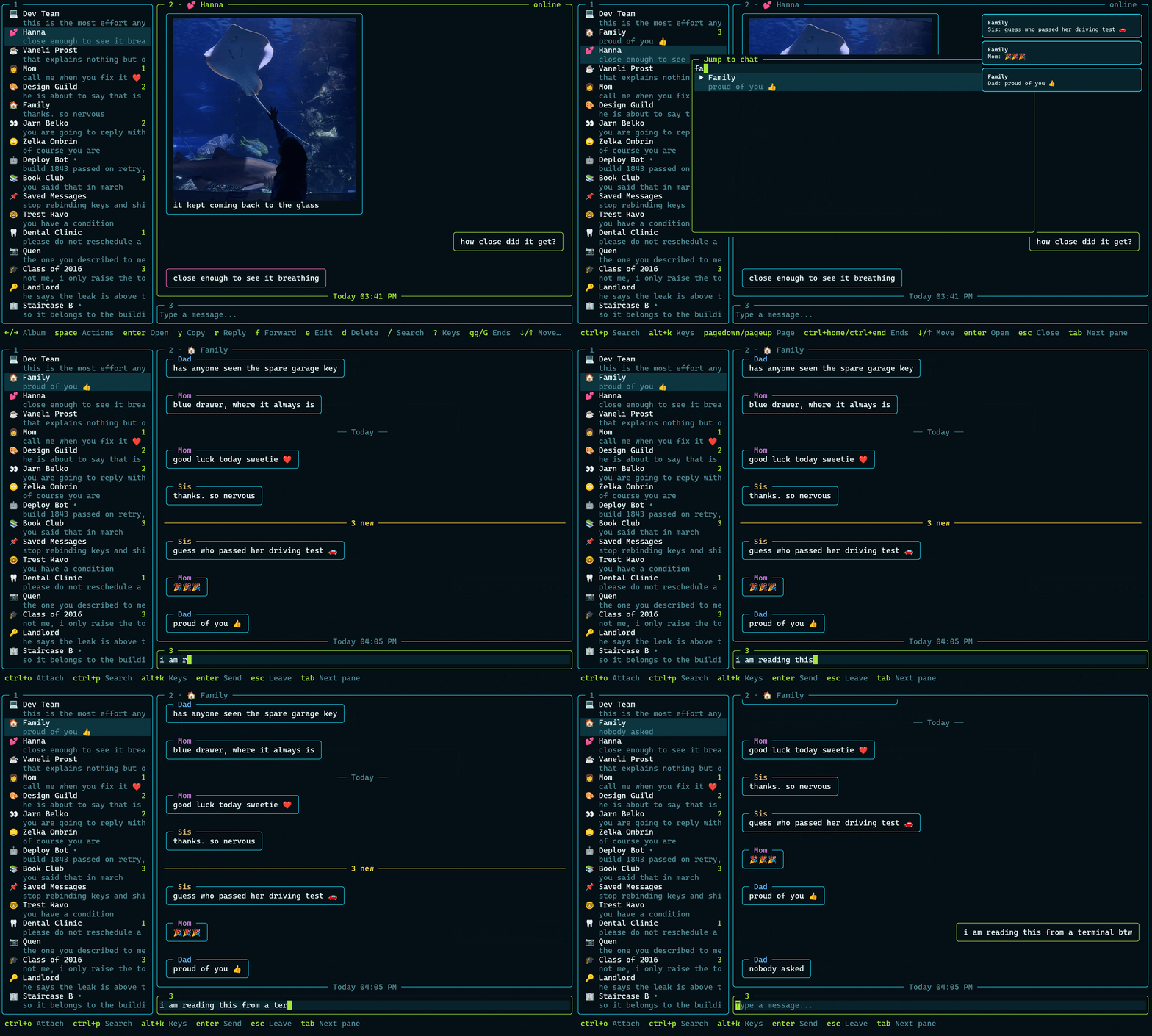
A lightweight Telegram client for the terminal, built on OpenTUI and mtcute, with Vim-flavored navigation.
Install
The quickest way, on Linux or macOS:
curl -fsSL https://raw.githubusercontent.com/leonid-shutov/tuigram/master/install.sh | bash
It needs nothing preinstalled: it brings its own Node.js into ~/.local/lib/tuigram and puts
tuigram in ~/.local/bin. Open a new terminal afterwards. tuigram upgrade updates it;
rm -rf ~/.local/lib/tuigram ~/.local/bin/tuigram removes it.
or with Homebrew:
brew install leonid-shutov/tap/tuigram
or if you already use mise, which installs Node.js 26 alongside it:
mise use -g node@26 npm:tuigram
or from npm, which needs a Node.js 26.4 or newer of your own:
npm install -g tuigram
Then run tuigram.
First run
The first launch shows a QR code: open Telegram on your phone → Settings → Devices → Link
Desktop Device and scan it. Press p on that screen to sign in with a phone number and code
instead. Later launches reuse the stored session and go straight to your chats.
Using your own API key
- open https://my.telegram.org and log in
- choose API development tools
- fill in any app title and short name, e.g.
tuigram - copy the
api_idandapi_hashshown on the next page
tuigram saves them to credentials.json (see Files) and uses them from then on. Your
own key always takes priority, so you can also supply it upfront — in that file, or in the
environment:
export TUIGRAM_API_ID=1234567
export TUIGRAM_API_HASH=0123456789abcdef0123456789abcdef
Keys
| Key | Does |
|---|---|
Tab / Shift+Tab |
cycle chat list → messages → message box |
1 2 3 |
jump straight to a pane (not while typing) |
alt+1 alt+2 alt+3 |
the same, and works while typing |
ctrl+p |
fuzzy chat search — from anywhere, including mid-message |
/ |
fuzzy chat search — from the chat list or the messages |
? |
list the focused pane's keys, searchable; picking one runs it |
alt+k |
the same, and works while typing |
j / k / ↑ / ↓ |
move through chats and messages |
J / K / Shift+↑ / Shift+↓ |
scroll a message too tall for the pane (its border reads "shift+↓/↑ scroll") |
gg / G |
jump to the first / last chat, or oldest / newest message |
h / l / ← / → |
previous / next folder in the chat list; previous / next picture in an album |
H / L |
narrow / widen the chat list |
f |
in the chat list: pick a folder from a searchable list |
e |
in the chat list: pick the chat's emoji from a searchable list |
Enter |
open the selected chat, open the selected message's media or link, or send the message |
space |
a menu of what you can do with the selected message; each action's key works in it too |
y / c |
copy the selected message's text |
v |
read the selected message in $VISUAL / $EDITOR, read-only |
r |
reply to the selected message |
f |
in the messages: forward the selected message to a chat you pick |
e |
edit the selected message, if it's yours |
d |
delete the selected message, for everyone or just for you |
ctrl+o |
attach a file from the message box |
Shift+Enter |
start a new line in the message box |
Esc |
leave the message box; cancel a reply or an edit; close the search |
ctrl+e |
edit config.json in $VISUAL / $EDITOR; changes apply when the editor closes |
! |
expand the error on screen, or dismiss it (not while typing) |
alt+e |
the same, and works while typing |
ctrl+r |
restart and reconnect (happens on its own after the machine wakes from sleep) |
shift+u |
upgrade tuigram, once a newer release is available (not while typing) |
shift+x |
dismiss that update notice (not while typing) |
ctrl+c |
quit |
On macOS, the alt+ keys need the terminal to send Option as Alt; out of the box, Option+letter
types a character instead (Option+U starts an umlaut), and the app never sees the key. shift+u,
!, ? and the other keys without Alt work either way. To turn it on:
- Terminal: Settings → Profiles → Keyboard → "Use Option as Meta key"
- iTerm2: Settings → Profiles → Keys → Left Option key → "Esc+"
- Ghostty:
macos-option-as-alt = true(already the default on U.S. layouts) - kitty:
macos_option_as_alt yes - Alacritty:
option_as_alt = "Both"under[window]
A window manager that binds Option+letter itself, as AeroSpace does out of the box, takes those keys before the terminal sees them, whatever it is set to.
Every binding is matched on the Latin key it sits on, so the whole keymap keeps working on a
Cyrillic layout without switching back — о moves down, пп is gg, and so on.
What is covered
- QR sign-in in the terminal, with phone + code and a 2FA password as fallbacks
- Live incoming messages, edits and deletions, and read-state sync in both directions
- Message formatting, with links that are clickable in terminals that support hyperlinks
- Reactions, typing indicators, and the selected message's date and time
- Read receipts that only speak up when there's news: a ✓ bar beside your messages the other side hasn't seen yet, which shortens as they read and goes once they've read it all (or a 🙈, if you'd rather have the monkey)
- Inline photo and video thumbnails — the stripped thumbnail travels inside the message and draws
instantly, then an 800px version downloads in the background; albums flip with
h/l - Rich previews for ~18 media types, in the chat list and in the message pane
- Fuzzy chat search, forgiving of a wrong keyboard layout
- Telegram chat folders
- Sending text and files; replying to, forwarding, copying, editing and deleting messages
- Desktop notifications; muted chats stay quiet
- Per-sender name colors in groups, and a stable per-chat emoji glyph you can change (
e) - Endless upward history paging
- 15 themes that paint their own background, so they look the same on any terminal
- A check for a newer release at startup, with a one-key upgrade (
shift+u)
Configuration
Optional, and read from $XDG_CONFIG_HOME/tuigram/config.json:
{
  "theme": "aqua-lime",
  "imageProtocol": "auto",
  "dialogEmoji": true,
  "hints": true,
  "receipt": "tick",
  "proxy": "socks5://user:pass@host:port",
  "updateCheck": true
}
| Key | Default | Values |
|---|---|---|
theme |
aqua-lime |
tokyo-night, blue-green, aqua-lime, daylight, nord, gruvbox, catppuccin, dracula, rose-pine, solarized-dark, mono, high-contrast, crt-amber, y2k, ascii-terminal |
imageProtocol |
auto |
auto, kitty, sixel, blocks, off |
dialogEmoji |
true |
true, false — turn off on fonts with no emoji coverage |
hints |
true |
true, false — set to false to hide the key hint bar and reclaim its row |
receipt |
tick |
tick, monkey — what heads the bar beside your messages the other side hasn't seen; tick is a plain ✓, monkey a 🙈 |
proxy |
(none) | a proxy URL — socks5://, socks4://, http:///https://, or a t.me/proxy?... MTProxy link; connects directly if unset |
updateCheck |
true |
true, false — check registry.npmjs.org (installer/npm/mise) or the tap's formula (brew) at startup; skipped when proxy is set |
daylight is the light theme. ascii-terminal draws its borders out of +, - and | for fonts
without box-drawing glyphs. Unknown keys and invalid values are ignored — each falls back to its
default — and a file that fails to parse falls back to the defaults entirely; either way, a line
is logged to tuigram.log (see Files below) so a typo doesn't go unnoticed.
Files
| What | Where |
|---|---|
| Settings | $XDG_CONFIG_HOME/tuigram/config.json (default ~/.config) |
| API credentials | $XDG_CONFIG_HOME/tuigram/credentials.json — mode 0600 |
| Session | $XDG_DATA_HOME/tuigram/session.db (default ~/.local/share) — mode 0600 |
| Chat emojis | $XDG_DATA_HOME/tuigram/emojis.json — the ones you picked; logout deletes it |
| Log | $XDG_STATE_HOME/tuigram/tuigram.log (default ~/.local/state), override with TUIGRAM_LOG |
| Cache | $XDG_CACHE_HOME/tuigram (default ~/.cache) — thumbnails and opened media, safe to delete |
Cached files that haven't been used for a week are deleted at startup.
Commands
tuigram            # start
tuigram logout     # revoke the session and delete it locally
tuigram upgrade    # check for and install a newer release
tuigram --help
tuigram --version
Development
npm install
npm run dev
npm run lint
npm run types
npm run fmt