
leichunfeng/WXTabBarController
leichunfeng/WXTabBarController has 1,087 GitHub stars and 206 forks. GitHot measured 0 stars in 24 hours. Last checked 2026-11-09 10:32 UTC. Last push 2018-07-19.
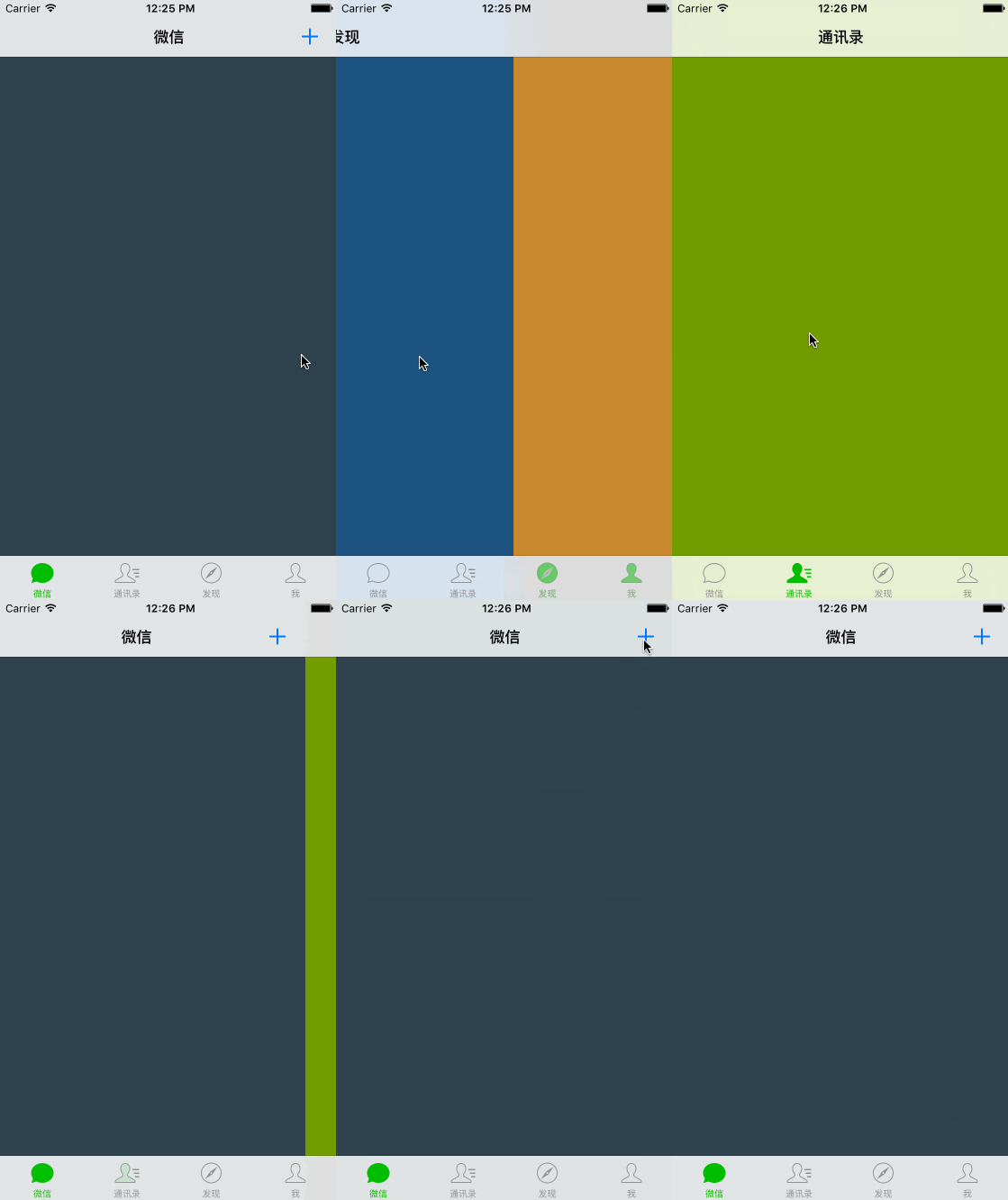
在系统 UITabBarController 的基础上实现安卓版微信 TabBar 的滑动切换功能
Measured star growth
- in 24h
- 0
- in 7 days
- Update delayed
- in 15 days
- Update delayed
- in 1 month
- Update delayed
Net star changes over overlapping periods, not daily totals. Missing measurements are left blank. Stars measure attention, not software quality.
README.md
OriginalWXTabBarController


单手操作 iPhone 6 Plus 切换 TabBar 一直是一件很痛苦的事情,而滑动切换是一种不错的解决方案,希望这种交互方式能够得到广泛地应用。
GIF
CocoaPods
你可以通过 CocoaPods 来安装 WXTabBarController :
pod 'WXTabBarController', '~> 0.1'
Usage
WXTabBarController 的用法与系统 UITabBarController 的用法是完全一致的:
- (BOOL)application:(UIApplication *)application didFinishLaunchingWithOptions:(NSDictionary *)launchOptions {
    self.window = [[UIWindow alloc] initWithFrame:[UIScreen mainScreen].bounds];

    self.window.rootViewController = self.navigationController;
    [self.window makeKeyAndVisible];

    return YES;
}

- (UINavigationController *)navigationController {
    if (_navigationController == nil) {
        UINavigationController *navigationController = [[UINavigationController alloc] initWithRootViewController:self.tabBarController];
        navigationController.navigationBar.tintColor = [UIColor colorWithRed:26 / 255.0 green:178 / 255.0 blue:10 / 255.0 alpha:1];
        _navigationController = navigationController;
    }
    return _navigationController;
}

- (WXTabBarController *)tabBarController {
    if (_tabBarController == nil) {
        WXTabBarController *tabBarController = [[WXTabBarController alloc] init];

        ViewController *mainframeViewController = ({
            ViewController *mainframeViewController = [[ViewController alloc] init];

            UIImage *mainframeImage   = [UIImage imageNamed:@"tabbar_mainframe"];
            UIImage *mainframeHLImage = [UIImage imageNamed:@"tabbar_mainframeHL"];

            mainframeViewController.title = @"微信";
            mainframeViewController.tabBarItem = [[UITabBarItem alloc] initWithTitle:@"微信" image:mainframeImage selectedImage:mainframeHLImage];
            mainframeViewController.view.backgroundColor = [UIColor colorWithRed:48 / 255.0 green:67 / 255.0 blue:78 / 255.0 alpha:1];
            mainframeViewController.navigationItem.rightBarButtonItem = [[UIBarButtonItem alloc] initWithImage:[UIImage imageNamed:@"barbuttonicon_add"]
                                                                                                         style:UIBarButtonItemStylePlain
                                                                                                        target:self
                                                                                                        action:@selector(didClickAddButton:)];

            mainframeViewController;
        });

        ViewController *contactsViewController = ({
            ViewController *contactsViewController = [[ViewController alloc] init];

            UIImage *contactsImage   = [UIImage imageNamed:@"tabbar_contacts"];
            UIImage *contactsHLImage = [UIImage imageNamed:@"tabbar_contactsHL"];

            contactsViewController.title = @"通讯录";
            contactsViewController.tabBarItem = [[UITabBarItem alloc] initWithTitle:@"通讯录" image:contactsImage selectedImage:contactsHLImage];
            contactsViewController.view.backgroundColor = [UIColor colorWithRed:115 / 255.0 green:155 / 255.0 blue:6 / 255.0 alpha:1];

            contactsViewController;
        });

        ViewController *discoverViewController = ({
            ViewController *discoverViewController = [[ViewController alloc] init];

            UIImage *discoverImage   = [UIImage imageNamed:@"tabbar_discover"];
            UIImage *discoverHLImage = [UIImage imageNamed:@"tabbar_discoverHL"];

            discoverViewController.title = @"发现";
            discoverViewController.tabBarItem = [[UITabBarItem alloc] initWithTitle:@"发现" image:discoverImage selectedImage:discoverHLImage];
            discoverViewController.view.backgroundColor = [UIColor colorWithRed:32 / 255.0 green:85 / 255.0 blue:128 / 255.0 alpha:1];

            discoverViewController;
        });

        ViewController *meViewController = ({
            ViewController *meViewController = [[ViewController alloc] init];

            UIImage *meImage   = [UIImage imageNamed:@"tabbar_me"];
            UIImage *meHLImage = [UIImage imageNamed:@"tabbar_meHL"];

            meViewController.title = @"我";
            meViewController.tabBarItem = [[UITabBarItem alloc] initWithTitle:@"我" image:meImage selectedImage:meHLImage];
            meViewController.view.backgroundColor = [UIColor colorWithRed:199 / 255.0 green:135 / 255.0 blue:56 / 255.0 alpha:1];

            meViewController;
        });******

        tabBarController.title = @"微信";
        tabBarController.tabBar.tintColor = [UIColor colorWithRed:26 / 255.0 green:178 / 255.0 blue:10 / 255.0 alpha:1];

        tabBarController.viewControllers = @[
            [[UINavigationController alloc] initWithRootViewController:mainframeViewController],
            [[UINavigationController alloc] initWithRootViewController:contactsViewController],
            [[UINavigationController alloc] initWithRootViewController:discoverViewController],
            [[UINavigationController alloc] initWithRootViewController:meViewController],
        ];

        _tabBarController = tabBarController;
    }
    return _tabBarController;
}
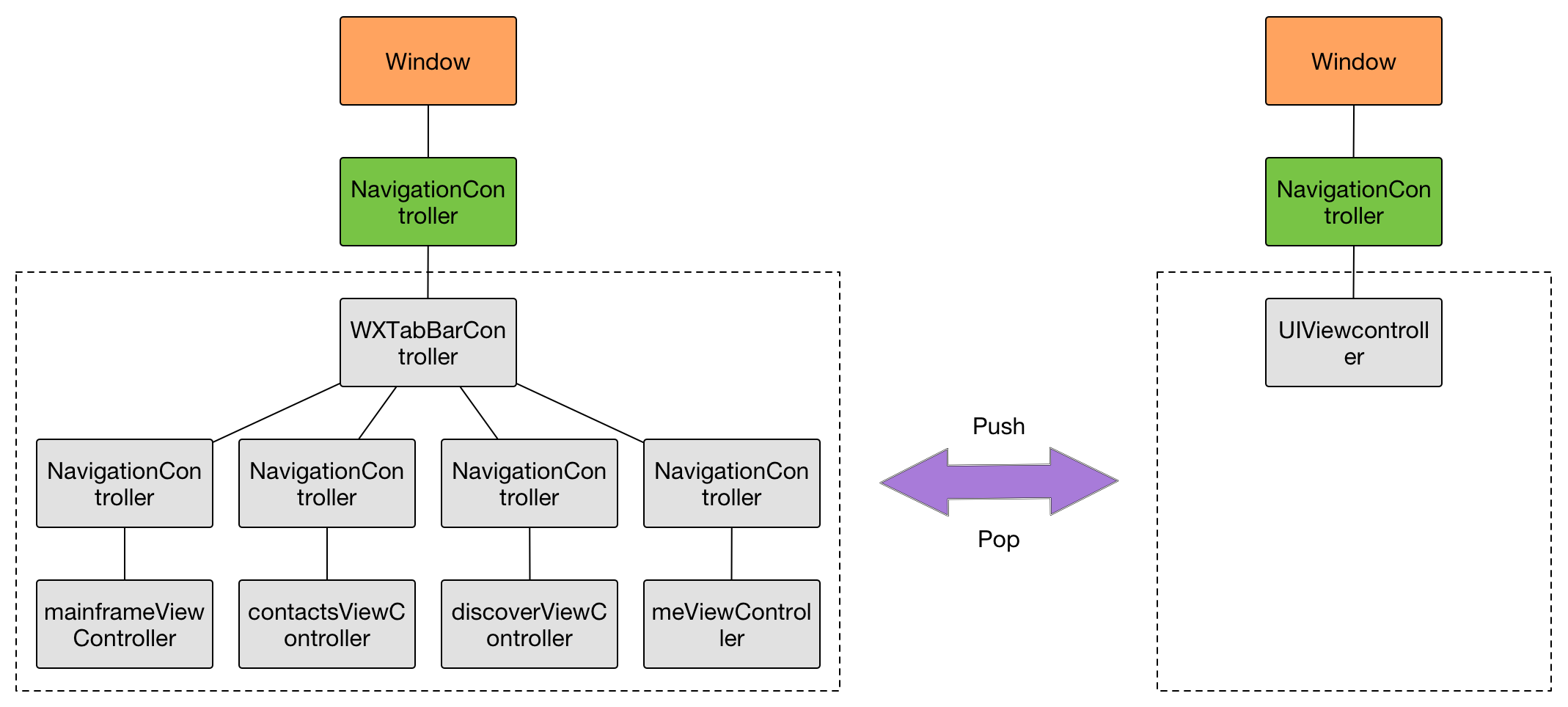
唯一一个需要注意的地方是,整个应用是由 WXTabBarController 的 navigationController 来进行导航的,而不是 Tab 页自己的 navigationController :
- (void)didClickAddButton:(id)sender {
    ViewController *viewController = [[ViewController alloc] init];

    viewController.title = @"添加";
    viewController.view.backgroundColor = [UIColor colorWithRed:26 / 255.0 green:178 / 255.0 blue:10 / 255.0 alpha:1];

    [self.navigationController pushViewController:viewController animated:YES];
}
为了更直观地理解这个约定,我们一起来看一下整个应用的导航层次结构图:
Application
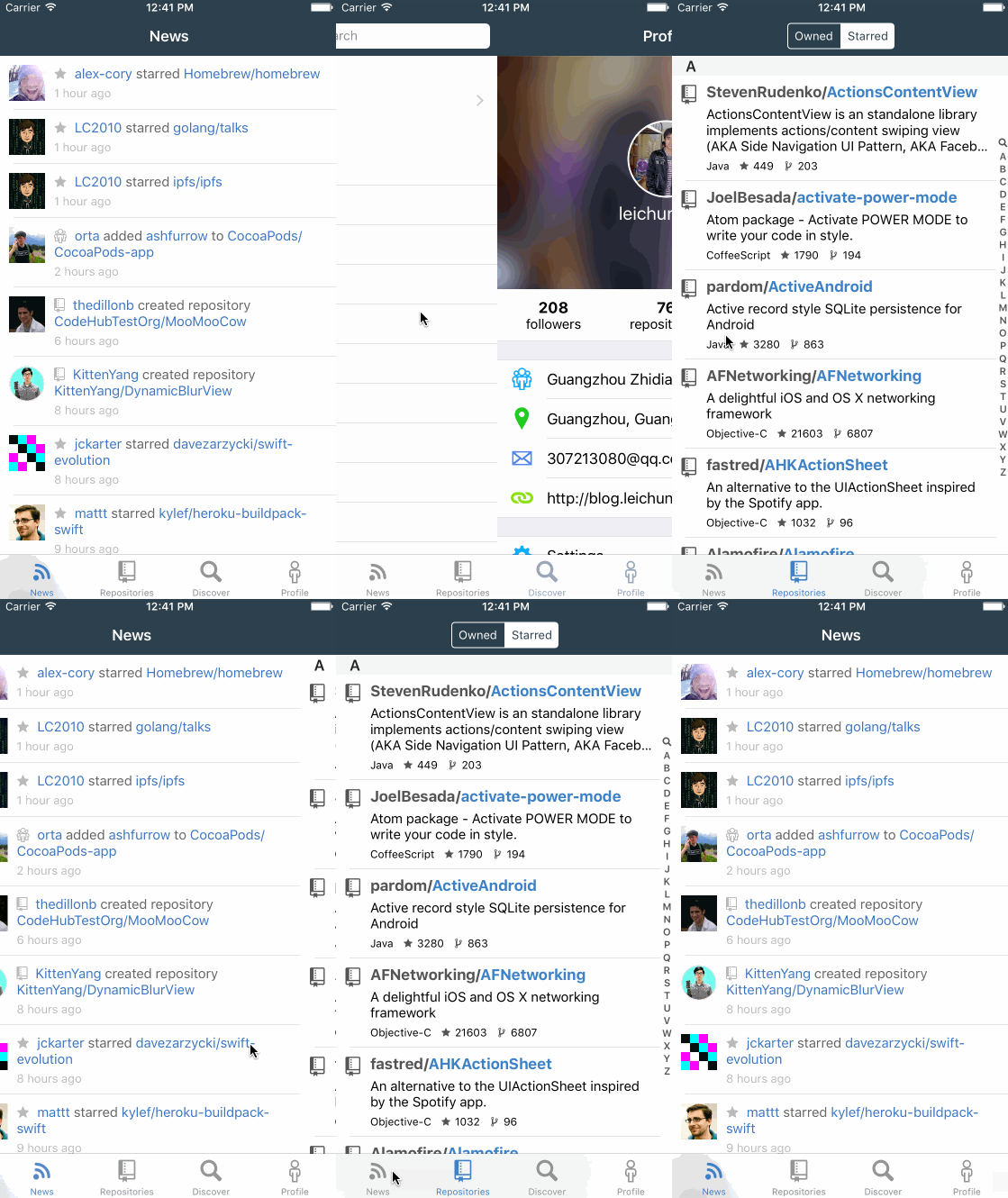
目前,WXTabBarController 已经在 MVVMReactiveCocoa 中正式使用,效果如下:
Contribution
如果你有兴趣为这个库贡献代码的话,请先 Fork 这个库,然后在自己的库上做修改,最后提交 Pull request :
git clone https://github.com/your-username/WXTabBarController.git
cd WXTabBarController
pod install
License
WXTabBarController is available under the MIT license. See the LICENSE file for more info.
Explore related projects
codecrafters-io/build-your-own-x
Master programming by recreating your favorite technologies from scratch.
561,398 starspublic-apis/public-apis
A collective list of free APIs
497,679 starsmorluto/rea
Reverse engineer anything with agents, from app behavior down to native binaries.
447,495 starsopenclaw/openclaw
The AI that really does things. Any OS. Any Platform. The lobster way. 🦞
394,261 stars