
legeling/PromptHub
legeling/PromptHub has 1,792 GitHub stars and 207 forks. GitHot measured 0 stars in 24 hours and +6 in 7 days. Last checked 2026-11-07 08:09 UTC. Last push 2026-11-02.
一款包含了 Prompt管理,Skill管理,Agent管理的一站式AI工具箱,助你高效管理提示词,一键分发skills ,一站式管理Agent资产,并实现云同步,备份,版本管理 | An all-in-one AI toolbox for prompt, agent, and skills management. Reuse prompts, distribute skills with one click, manage agent assets, and support cloud sync, backup, and version control
Measured star growth
- in 24h
- 0
- in 7 days
- +6
- in 15 days
- Collecting history
- in 1 month
- Collecting history
Net star changes over overlapping periods, not daily totals. Missing measurements are left blank. Stars measure attention, not software quality.
docs/README.en.md
Original
PromptHub
A local-first workspace for prompts, skills, and AI coding assets.





The latest stable release is 0.6.2, published on 2026-10-27.
Preview release:0.6.3-beta.1


简体中文 · 繁體中文 · English · 日本語 · Deutsch · Español · Français

PromptHub keeps your prompts, SKILL.md files, and project-level AI coding assets in one local workspace. It can install the same Skill into Claude Code, Cursor, Codex, Windsurf, Antigravity and a dozen other tools, gives prompts version history and multi-model testing, syncs through WebDAV, and stores complete snapshots in a self-hosted Web instance.
Your data lives on your machine.
Contents
- Download
- Screenshots
- What it does
- Getting started
- Self-hosted Web
- CLI
- Changelog
- Roadmap
- From source
- Repository layout
- Contributing & docs
- License / credits / community
模型服务合作伙伴
| APIMart | infistar.cc |
|---|---|
 |
 |
About our partners
Thanks to APIMart for sponsoring this project!
APIMart is a low-cost API platform for AI image & video generation — GPT-Image-2 from $0.006/image, 160+ images per dollar.
One async API covers both image and video: submit a task, get an ID, fetch results via polling or callback. Batch tens of thousands of images without timeouts, switch models without changing code.
Pay-as-you-go with no monthly fee — sign up here to get started.
PromptHub × infistar.cc 无限星河|全模型 API · 高效管理与测试 AI 资产
感谢 Infistar.ai 无限星河 赞助并为 PromptHub 提供模型服务支持!
⚡ 稳定支持多模型测试:提供企业级高并发通道与多节点冗余,价格低至官方渠道 1 折,满足 Prompt 测试、AI生成、翻译润色及多模型并行对比等场景。
🧠 一个 API Key 接入主流模型:全面支持 ChatGPT、Claude、Gemini、Kimi、GLM、DeepSeek 等模型,兼容 OpenAI 标准接口,可在 PromptHub 中快速完成Provider与模型配置。
🛠️ 赋能Prompt与Skill工作流:适用于Prompt优化、Skill生成、图片Prompt反推及不同模型效果对比,帮助用户更高效地管理和复用AI编程资产。
🎁 PromptHub用户专属福利:通过 专属推广链接 注册并完成首次调用,即可领取 [5美元等值测试额度 / 首充专属优惠]!
📥 Download
Latest stable: v0.6.2. Direct links point to the GitHub Latest stable assets; they will switch back to fixed-filename CDN links after the mirror is populated:
Create a full backup before upgrading; update self-hosted Web servers to 0.6.2 as well.
- Direct download — points to the GitHub latest stable assets so users do not hit an empty CDN mirror; it will switch back to fixed-filename CDN links after the mirror is populated.
- GitHub Releases — official release page with version archives, signatures, and full release notes.
| Platform | Direct download | GitHub Releases |
|---|---|---|
| Windows |   |
|
| macOS |   |
|
| Linux |   |
|
Apple Silicon vs Intel? M1/M2/M3/M4 →
arm64. Older Intel Macs →x64. Windows arch? Most boxes →x64. Only Surface Pro X-class ARM hardware →arm64.
macOS via Homebrew
brew tap legeling/tap
brew install --cask prompthub
For upgrades, use brew upgrade --cask prompthub. Don't mix Homebrew with the in-app updater, or Homebrew's recorded version may drift away from what's actually installed.
macOS security verification
macOS packages are signed with Developer ID and notarized by Apple. Install from GitHub Releases, the official mirror, or Homebrew. If macOS still cannot verify the app, download the current Release DMG again and reinstall.
Early 0.5.9 preview builds and older historical builds may not be signed and notarized. If you intentionally downloaded one of those builds and macOS reports that PromptHub is damaged or the developer cannot be verified, run:
sudo xattr -rd com.apple.quarantine /Applications/PromptHub.app
Then reopen the app. Replace the path if you installed it somewhere else.

Preview channel
Enable the preview channel in Settings → About to try upcoming builds. PromptHub checks both stable and preview releases and offers the newest version; for example, 0.6.0-beta.2 can upgrade to 0.6.0. Disable it to receive stable releases only. PromptHub never downgrades automatically. If an older installed preview does not detect 0.6.0, disable the preview channel and check again.
Screenshots
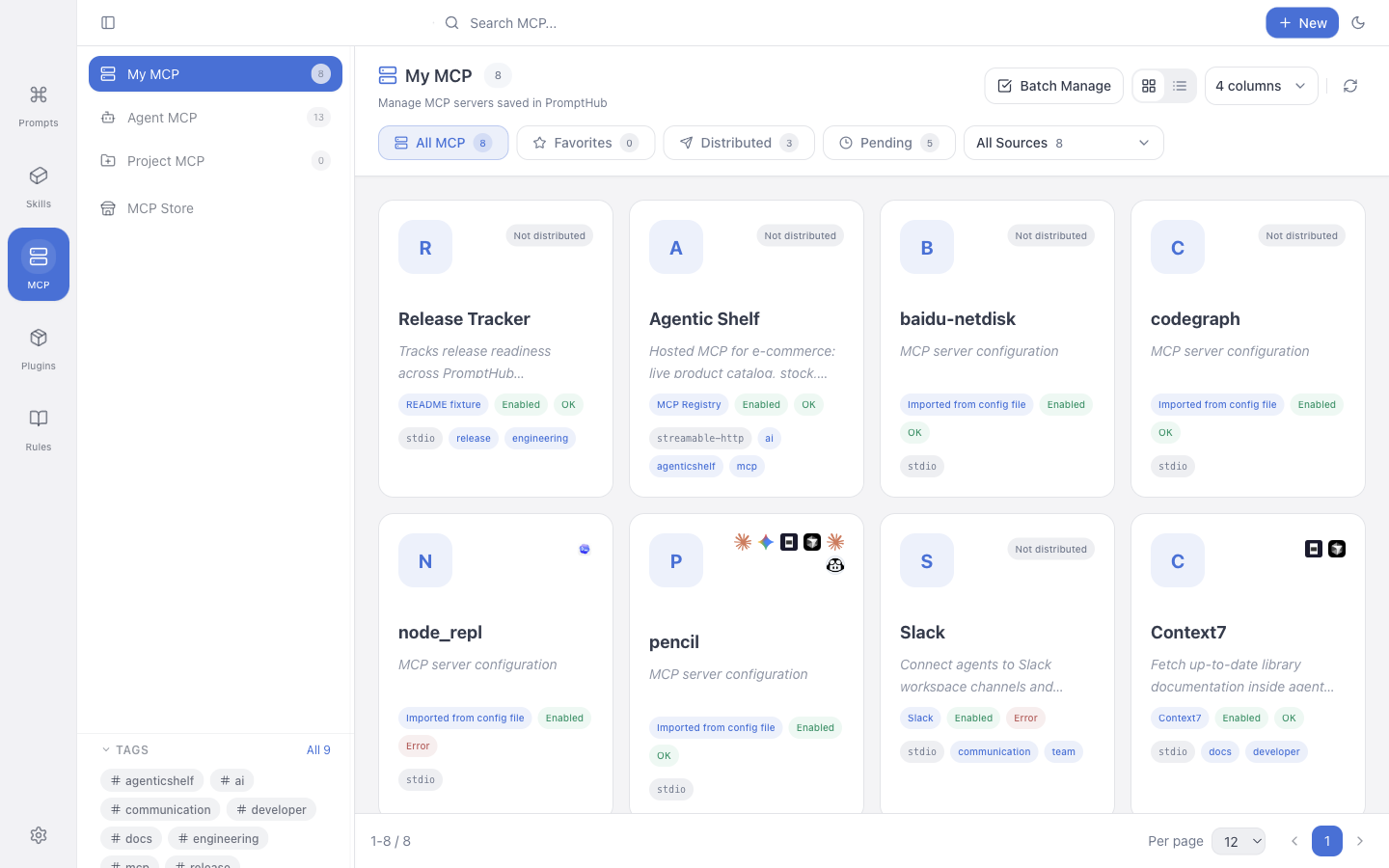
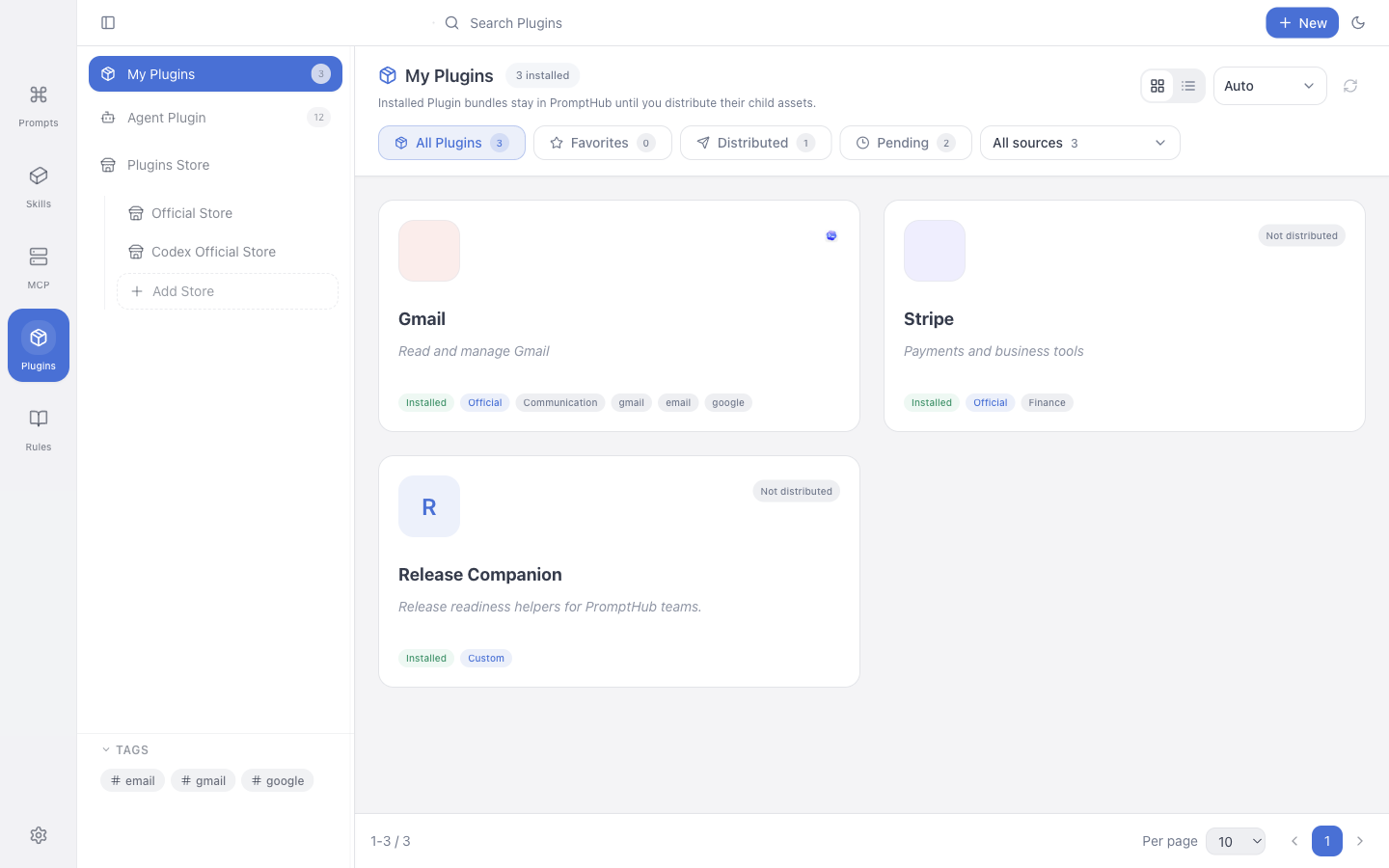
These historical 0.5.9 screenshots show the Prompt, Skill, MCP, Plugin and Rules workspaces; the 0.6.0 interface has since changed.
Two-column home

Skill store

Skill detail with one-click platform install

MCP workspace
Plugin workspace
Rules workspace

Project Skill workspace

Quick Add (manual / analyze / AI generation)

Appearance & motion preferences

What it does
📝 Prompt management
- Folders, tags, favorites with drag-to-reorder; full CRUD coverage
{{variable}}templating; copy / test / distribute pops a form to fill values- Full-text search (FTS5), Markdown rendering with code highlighting, attachments and media preview
- Desktop card view supports double-click inline editing for both user and system prompts
🧩 Skill store & one-click distribution
- Skill store with 20+ curated skills (Anthropic, OpenAI, etc.) plus stackable custom sources (GitHub repo / skills.sh / local folder)
- One-click install to Claude Code, Cursor, Windsurf, Codex, Antigravity, Kiro, Kilo Code, Cline, Qoder, QoderWork, CodeBuddy, Trae, Trae CN, OpenCode and 15+ more; Gemini remains an enterprise and paid-API compatibility target
- Local scan picks up existing SKILL.md files so you no longer copy-paste between tool directories
- Symlink / Copy modes — symlink for shared edits, copy for independent per-platform copies
- Per-platform skill directory override keeps scan and install on the same path
- AI translate & polish at the full SKILL.md level with sidecar storage, side-by-side and full-translation modes
- Safety policy controls content and AI scans for install/update globally, by channel, or by exact store; package path, archive, symlink, size, required-file, and fingerprint validation always remain active
- GitHub token for store and repo imports cuts down on anonymous rate-limit failures
- Tag filtering for installed skills and store browsing
📐 Rules (AI coding rules)
- One place to manage
.cursor/rules,.claude/CLAUDE.md, AGENTS.md and friends - Manually-added project rules grouped by directory
- Wired into ZIP export, WebDAV, self-hosted backup/restore, and Web import/export
🤖 Project & agent asset workspace
- Scans common project locations:
.claude/skills,.agents/skills,skills,.gemini, etc. - Per-project skill workspaces keep project context isolated from your global library
- Personal library, local repo, and project assets all in one switcher — no more jumping between tool directories
- Global prompt tag management: search, rename, merge, delete tags with database and workspace files in sync
🧪 AI testing & generation
- Built-in AI testing across major global and Chinese providers (OpenAI, Anthropic, Gemini, Azure, custom endpoints)
- Run the same prompt against multiple models in parallel, both text and image models
- AI skill generation, AI skill polish, Quick Add now generates structured prompt drafts directly
- Unified endpoint management and connection tests; precise error reporting for 504 / timeout / unconfigured
🕒 Versioning & history
- Every prompt save creates an automatic version; diff highlighting and one-click rollback included
- Skills carry their own version history with named versions, version diff and version-level rollback
- Rules snapshot history can be previewed and restored to a draft
- Skills installed from the store track a content hash so remote SKILL.md changes are detected with local-edit conflict protection
💾 Data, sync & backup
- Local-first: by default your data lives on your own machine
- Full backup / restore via the
.phub.gzcompressed format - WebDAV sync (Jianguoyun, Nextcloud, etc.)
- WebDAV / S3 live sync uses one selected source to prevent multi-writer conflicts
- Self-hosted PromptHub Web independently stores immutable snapshots; startup and scheduled jobs only upload and never pull or overwrite local data
- Desktop and Web versions must match exactly before backup; restore is explicit and first creates a local safety snapshot
🔐 Privacy & security
- Master password unlocks private content in the app
- Private folders hide content in the app; local files are not encrypted
- Cross-platform offline-friendly: macOS / Windows / Linux
- 7 UI languages: Simplified Chinese, Traditional Chinese, English, Japanese, German, Spanish, French
Getting started
Create your first prompt. Click + New, fill in title, description, system prompt and user prompt.
{{name}}makes a variable; copy or test will prompt you for it.Bring skills in. Open the Skills tab. Pick a few from the store, or hit Scan local to find existing SKILL.md files on your machine.
Install to AI tools. From a Skill's detail view, pick a target platform. PromptHub installs the SKILL.md into the platform's expected directory, either as a symlink (live edits) or a standalone copy.
Sync or back up (optional). Settings → Data configures WebDAV / S3 live sync, or a self-hosted PromptHub Web instance for independent recovery snapshots.
Self-hosted Web
PromptHub Web is a lightweight browser companion you can run on a NAS, VPS, or LAN box with Docker. It is not a managed cloud service. Use it to:
- Access your PromptHub data from a browser
- Store immutable desktop recovery snapshots without changing the live Web workspace
- Keep your data inside your own network
cd apps/web
cp .env.example .env
docker compose up -d --build
In .env, set at minimum:
JWT_SECRET: ≥ 32 random charactersALLOW_REGISTRATION=false: keep this off after you create the first adminDATA_ROOT: data root;data/,config/,logs/,backups/will be created beneath it
Default: http://localhost:3871. The first visit lands on /setup; the first user becomes admin.
To connect the desktop: Settings → Data → Self-Hosted PromptHub. Verify version and backup capability, create a remote snapshot, explicitly restore the latest snapshot, or enable upload-only startup / scheduled backup. Automatic jobs never pull, merge, or replace local data.
Detailed deploy / upgrade / backup / GHCR image / dev notes live in web-self-hosted.md.
In 0.6.2: Desktop and CLI share Core workflows for Skills, MCP and Plugins. Self-hosted Web and Cloudflare support resource storage, editing, versions, complete package import/export and sync. They do not distribute to Agents, scan server directories or install over SSH. The CLI is packaged and installed separately.
CLI
The CLI is for scripting, batch import/export, and automation. The desktop app does not install a prompthub shell command for you; pack and install it from the repo:
pnpm pack:cli
pnpm add -g ./apps/cli/prompthub-cli-*.tgz
prompthub --help
Or run from source without installing:
pnpm --filter @prompthub/cli dev -- prompt list
pnpm --filter @prompthub/cli dev -- skill scan
Resource commands (each takes --help):
prompt    list / get / create / update / delete / duplicate / search
          versions / create-version / delete-version / diff / rollback
          use / copy
          list-tags / rename-tag / delete-tag
          relation list|create|update|delete
          output-format list|create|delete|reorder
          (--parent-id on create/update for tree parent)

folder    list / get / create / update / delete / reorder

agent     list / get / enable / disable
          add / update / configure / reset / delete
          config list|read (read-only inspection with secret redaction)
          identity get|set

rules     list / scan / read / save / rewrite
          versions / version-read / version-restore / version-delete
          add-project / remove-project
          export / import

skill     list / get / import (alias: install) / delete / remove
          versions / create-version / rollback / delete-version
          export / scan / scan-safety / sync-from-repo
          update / check-update
          platforms / platform-status / distribute / redistribute / undistribute
          (aliases: install-md / uninstall-md)
          project-install / install-project
          repo-files / repo-read / repo-write / repo-delete / repo-mkdir / repo-rename

mcp       list / get / create / update / delete
          market / sources / install / import
          enable / disable / check / env-import
          export / apply / remove

plugin    list / get / market / sources / install / import / delete
          metadata / check / check-update / update / import-child-mcp
          targets / status / distribute / redistribute / undistribute
          versions / create-version / rollback / delete-version

ai        providers / provider-add / provider-delete
          models / model-add / model-delete
          routes / route-set / route-clear

workspace export / import
          (full SyncSnapshot: prompts, relations, output-formats,
           skills + skillFiles, MCP, plugins, rules, media)

sync      status / push / pull

doctor    database-lock [--recover]
Skill import, version snapshots, and distribution use the built-in ignore policy plus a root .prompthubignore, and block likely private keys, access tokens, and passwords before writing. Successful output is a bounded summary by default; use --full explicitly for Skill bodies and complete file snapshots.
Common global flags:
--output json|table— output format--summary— return a bounded summary (default)--full— return complete resource content--quiet— suppress successful stdout while preserving stderr errors--data-dir <path>— override the PromptHubuserDatadirectory--app-data-dir <path>— override the application data root--version|-v— print the CLI version
Changelog
Full changelog: CHANGELOG.md
v0.6.2 (2026-10-27, stable)
Adds workspace refresh with draft protection and tag ordering; unifies full backups and remote restore, fixes CLI detection and Agent provider configuration, and separates Antigravity desktop and CLI.
v0.6.1 (2026-10-21, stable)
Adds Plugin marketplace sources, native Codex plugin management and cross-platform resource management. Improves installation feedback, the update dialog and Skill file refresh; fixes startup migration of older credentials and adds copyable startup error logs.
v0.6.0 (2026-10-18, stable)
0.6.0 was published on 2026-10-18 with Windows, macOS, Linux and standalone CLI packages.
Storage, sync and upgrades: SQLite owns structured records while complete packages and history remain recoverable. Automatic WebDAV/S3 sync adds common baselines and conflict review, with fixes for historical startup migrations.
Context-menu quick tagging, batch tags, and tag usage counts, sorting, and filter jumps
Batch favorite, move, delete, and tag actions in table/card/gallery views, startup-folder restoration, and Ctrl+F / Cmd+F search
Collapsible source/notes, promoted reference-media access, empty-result filter reset, and localized security errors
Multi-term AND full-text search, root creation from the top bar, subtree folder consistency, and selection-driven tree expansion
Window-wide backup import preview, migration guidance, and Web folder-visibility inference with existing permission checks
v0.6.0-beta.2 (2026-09-03, preview)
- The image workbench adds whole-image editing, generated-output continuation, GPT Image edits, and an in-flow details panel
- Public GitHub, GitLab.com, and compatible Gitea Skills can use a bounded HTTPS archive fallback when Git is unavailable
- Rules restore preserves external edits and history, with stronger upgrade safety points, backup retention, and mixed Prompt recovery
- The updater adds automatic/official/mirror source switching, release notes, transfer metrics, and macOS tray update state
- Adds Doubao Work Skill support and fixes remembered close choices plus global OpenCode session discovery
- At the time of this preview, the stable release was
v0.5.9
v0.6.0-beta.1 (2026-08-20, replacement preview)
- The unified Agent workbench manages Skills, MCP, Plugins, Rules, providers/models, config files, quotas, and session history in one place
- File-first canonical authority, recovery candidates, self-heal, and a packaged Windows
0.5.9two-launch upgrade gate protect preview user data - Bounded SQLite temporary paths fix the post-upgrade second-launch failure; this refresh replaces the affected preview in place under the same beta tag
- Existing installs of the old
v0.6.0-beta.1must manually download and overwrite-install the fixed package because a same-version replacement does not trigger auto-update - At the time of this preview, the stable release was
v0.5.9
v0.5.9 (2026-07-09, stable)
- Plugin management stabilized: My Plugins / Plugin Store / Agent Plugin now follow Skill-style install, detail, version snapshot, source update review, batch action, Agent distribution, and child Skill / MCP import flows
- MCP management and sync expanded: MCP workspace, official template store, Agent target distribution, health checks, selective .env import, CLI MCP commands, and one-click resync design are consolidated
- Full Agent asset backup now includes My Skills, My MCP, My Plugins, Rules, and related data in self-hosted backup/restore
- Skill source update checks now use SHA-256 package fingerprints and three-way reconciliation, with fixes for registry fingerprints, content-url baselines, and URL credential redaction
- Plugin source updates and batch store updates now show diffs and require confirmation before replacing local packages
- Prompts can compose, sort, persist, and back up custom output format sequences
- macOS release flow is hardened with Developer ID signing, notarization, DMG/ZIP verification, and Gatekeeper checks
v0.5.9-beta.1 (2026-06-14, preview)
- MCP management workspace preview: local MCP library, official template store, agent-target distribution, health checks, selective .env import, and CLI MCP commands
- Prompt relationship tree and semantic relations: drag-to-group parent/child prompts, expand/collapse, parent labels, child counts, and detail-page relationship navigation
- Git Skill import fixes: SSH GitHub scans clone locally, URL changes can be rescanned, and HTTPS rate limits suggest SSH
- Skill image resource previews now support wheel zoom, grab-to-pan, fixed bottom-right controls, and fullscreen preview
- Skill version labels start at v1, and clicking the detail title copies the Skill name
v0.5.8 (2026-06-04)
- Added a dedicated image reverse-prompt workflow with vision models, preview/copy first, and optional reference-image persistence
- Reworked AI model settings around providers, model capabilities, and business routes
- Added ClawHub and skill.sh store support with remote search, categories, paging/loading, cache, and full Skill package installs
- Hardened the Skill lifecycle matrix across My Skills, Project Skills, Agent Skills, platform installs, copy/symlink, built-in Skills, and external symlinks
- Made GitHub, Gitea, and self-hosted Git update checks more accurate and ignored common cache files to reduce false positives
- Added a lightweight Skill file code view with syntax highlighting, line numbers, soft wrapping, and richer file icons
v0.5.8-beta.3 (2026-06-02, preview)
- Skill file views now use a lightweight code editor with syntax highlighting, line numbers, soft wrapping, and richer file icons
- GitHub-imported My Skills can now check source updates directly from the detail page and create a version snapshot before applying updates
- Cherry Studio, Agent Skill, Project Skill, copy / symlink, built-in Skill, and external symlink states were hardened further
- Prompt / Skill version history dialogs now use a more scannable table-style presentation
v0.5.8-beta.2 (2026-06-02, preview)
- Skill lifecycle actions were further hardened across Project Skills, Agent Skills, and platform install/uninstall paths
- The Project Skill detail delete action now uses a red destructive style by default
- Skill management view switches now use horizontal transitions, including project/agent internal selection changes
- GitHub Actions release jobs now run on Node 24
v0.5.8-beta.1 (2026-06-01, preview)
- Image Prompt Reverse now has its own entry point, uses a vision model to generate structured image prompts, and can keep the source image as a reference
- AI model services now use a provider-first three-column configuration flow that separates provider instances, model capabilities, and business routing
- The standalone CLI
--versionnow matches the package version0.5.8-beta.1 - Project Skill results now use a compact list with secondary actions moved to icon-only controls
v0.5.7 (2026-05-29)
- Prompt AI quick rewrite now uses one shared dialog across detail pages, detail modals, and context menus, with draft-first preview before save
- Same-name Skill variants are now treated as first-class identities, with unified managed container semantics
- Backup import restore, remote Git scanning, and AI Workbench verification persistence were hardened for the final release
scanRemoteGithubnow supports both HTTPS and SSH URLs for GitHub, Gitea, and self-hosted Git servers- The AI Workbench
Connectedendpoint state now persists after re-entering the page instead of falling back toUnverified
v0.5.7-beta.2 (2026-05-28, preview)
- Git store sources now support
branch / directory, remote branch suggestions, and GitHub / SSH / self-hosted Git repos - Project Skill import now supports advanced
copy / symlinkmodes with per-project preference memory - Agent management and Skill platform install now ship built-in
Kilo Codesupport instead ofRoo Code
v0.5.7-beta.1 (2026-05-26, preview)
- Unified the full built-in / custom agent configuration model so
Skill Settingscan overrideroot / skills / rules / agents / commands / configpaths directly - Added built-in
ClineandTrae CNpresets, and made the Rules workspace refresh immediately when agent configuration changes - Added direct project-local Skill deployment into agent folders, defaulting to
.agents/skillswith multi-target selection - Symlink installs that fall back to copy now show explicit warnings instead of looking like plain success
- Prompt detail inline editing now opens the exact field you double-clicked while staying closer to the normal detail layout
v0.5.6 (2026-05-12)
Features
- 🧭 Rules workspace. A dedicated Rules page on the desktop, managing both global rules and manually added project rules — search, snapshot preview, restore-to-draft, and ZIP export / WebDAV / self-hosted backup-restore / Web import-export.
- 📁 Project Skill workspace. Per-project skill workspaces that auto-scan the usual locations and let you preview / import / distribute skills in project context.
- 🤖 Quick Add can generate prompts with AI. In addition to analyzing an existing prompt, Quick Add can now generate a structured prompt draft from goals and constraints.
- 🏷️ Global prompt tag management. Centralized search / rename / merge / delete in the sidebar tag area, synced to both the database and the workspace files.
- 🔐 GitHub token for the Skill Store. Authenticated GitHub quota cuts down on anonymous rate-limit failures during store and repo imports.
Fixes
- ✍️ Card detail supports double-click editing for both user and system prompts
- 🪟 Update dialog flicker, unstable download button, and
minimizeOnLaunchnot honoring launch-at-login - ↔️ Skills three-column resizing, double-click reset, title wrapping, store search regressions
- 🔁 Rules / Skill extras / managed copies stay consistent across ZIP export, WebDAV, self-hosted backup-restore, and Web import/export
- 🖼️ Self-hosted Web login switched to one-time image captcha challenges
Improvements
- 🏠 Two-column home layout stably supports module visibility, drag sorting, and an independent background toggle
- ☁️ Only one active sync source drives automatic sync, avoiding multi-provider write conflicts
- ✨ Full motion system on the desktop renderer (duration / easing / scale tokens, four intent components —
<Reveal><Collapsible><ViewTransition><Pressable>, three user motion tiers). Framer-motion was dropped in favor oftailwindcss-animate; theui-vendorchunk went from 54 KB to 16 KB gzipped. - 🪶 Long lists (Skill list / Prompt gallery / kanban / inline prompt list) now use
@tanstack/react-virtual, retiring the hand-rolledsetTimeout-based chunk renderer.
Roadmap
v0.6.2 ← stable
Adds workspace refresh with draft protection and tag ordering; unifies full backups and remote restore, fixes CLI detection and Agent provider configuration, and separates Antigravity desktop and CLI.
v0.6.1
Adds Plugin marketplace sources, native Codex plugin management and cross-platform resource management. Improves installation feedback, the update dialog and Skill file refresh; fixes startup migration of older credentials and adds copyable startup error logs.
v0.5.9
- Plugin / MCP management now matches Skill-style flows across stores, Agent distribution, details, tag filters, update review, and safety checks
- Agent asset sync, network proxy, CLI project installs, and Skill source update checks are stable
- Prompt relationship trees, Windows Agent paths, Web captcha toggles, macOS signing/notarization, and release pipeline fixes ship to stable users
v0.5.8
- Image reverse prompts, provider/capability/route model settings, and image test flows are now stable
- Skill lifecycle handling is consolidated across stores, Git, agents, projects, platforms, copy/symlink, and built-in Skills
- ClawHub / skill.sh stores, source update checks, code view, file icons, and version history are refined
v0.5.7
- Prompt AI quick edit, same-name Skill variants, remote Git scanning, and AI Workbench verification were hardened
v0.5.6
See the changelog above.
v0.5.5
- Skill store install records content hash; remote SKILL.md change detection with local-edit conflict protection
- Full-document AI translation persisted as a sidecar, with full-translation and immersive side-by-side modes
- Data path switch now applies via a real relaunch
- Clearer AI test / translation error messages (504 / timeout / unconfigured)
- Web/Docker media upload fix;
local-image:///local-video://resolved automatically - Preview update lane hardened
- Issue forms auto-sync
version: x.y.zlabels
v0.4.x
- AI workbench with model management, endpoint editing, connection testing, scenario defaults
- skills.sh community store integration with rankings, install counts, and stars
- skill-installer god-class breakup, SSRF protection, URL protocol validation
- One-click skill install to a dozen platforms (Claude Code, Cursor, Windsurf, Codex, Cline, etc.)
- AI translation, AI skill generation, batch local scan
Pondering / planned
- Browser extension that pulls from PromptHub inside ChatGPT / Claude
- Mobile companion: view, search, lightweight edit-and-sync
- Plugin surface for local models (Ollama) and custom AI providers
- Prompt Store: reuse community-validated prompts
- Richer variable types: select boxes, dynamic dates
- User-uploaded skills
From source
Requires Node.js ≥ 24 and pnpm 9.
git clone https://github.com/legeling/PromptHub.git
cd PromptHub
pnpm install

# desktop dev
pnpm electron:dev

# desktop build
pnpm build

# self-hosted web build
pnpm build:web
pnpm build only builds the desktop app. The web bundle requires pnpm build:web.
| Command | Purpose |
|---|---|
pnpm electron:dev |
Vite + Electron dev environment |
pnpm dev:web |
Web dev server |
pnpm lint / pnpm lint:web |
Lint |
pnpm typecheck / pnpm typecheck:web |
TypeScript checks |
pnpm test -- --run |
Desktop unit + integration tests |
pnpm test:e2e |
Playwright e2e |
pnpm verify:web |
Web lint + typecheck + test + build |
pnpm test:release |
Desktop pre-release gate |
pnpm --filter @prompthub/desktop bundle:budget |
Desktop bundle budget check |
Repository layout
PromptHub/
├── apps/
│   ├── desktop/   # Electron desktop app
│   ├── cli/       # standalone CLI (built on packages/core)
│   └── web/       # self-hosted Web
├── packages/
│   ├── core/      # core logic shared between CLI and desktop
│   ├── db/        # shared data layer (SQLite schema, queries)
│   └── shared/    # shared types, IPC constants, protocol definitions
├── docs/          # public-facing docs
├── spec/          # internal SSD / design spec system
├── website/       # marketing site
├── README.md
├── CONTRIBUTING.md
└── package.json
Contributing & docs
- Entry point: CONTRIBUTING.md
- Full guide:
docs/contributing.md - Public doc index:
docs/README.md - Internal SSD / specs:
spec/README.md
Documentation follows risk: update the existing authoritative topic in place and keep one optional plan for work across sessions. See the documentation rules; separate proposal, design, and delivery files are not required.
License
Feedback
- Issues: GitHub Issues
- Ideas: GitHub Discussions
Built with
Electron · React · TailwindCSS · Zustand · Lucide · @tanstack/react-virtual · tailwindcss-animate
Contributors
Thanks to everyone who has contributed to PromptHub.
Star history
Community
Join the PromptHub community for support, feedback, release news, and early previews.

Discord is the recommended channel: announcements, support, release news.
QQ group (Chinese)
If you prefer QQ, the PromptHub QQ group is also open:
- Group ID:
704298939

Scan to join the PromptHub QQ group
Sponsor
If PromptHub is useful to your work, feel free to buy the author a coffee.

WeChat Pay |

Alipay |

Buy Me A Coffee |
Contact: [email protected]
Past sponsors are archived in docs/sponsors.md.
If PromptHub is useful to you, a ⭐ goes a long way.
Explore related projects
affaan-m/ECC
The agent harness performance optimization system. Skills, instincts, memory, security, and research-first development for Claude Code, Codex, Opencode, Cursor and beyond.
298,952 starsNousResearch/hermes-agent
The agent that grows with you
261,400 starsmultica-ai/andrej-karpathy-skills
A single CLAUDE.md file to improve Claude Code behavior, derived from Andrej Karpathy's observations on LLM coding pitfalls.
230,519 starsfirecrawl/firecrawl
Supercharge your AI agents with data from the web and beyond. Building the library for superintelligence. 🔥
199,303 stars