
leeyj/BookOasis_stable
leeyj/BookOasis_stable has 58 GitHub stars and 10 forks. GitHot measured 0 stars in 24 hours. Last checked 2026-11-15 21:09 UTC. Last push 2026-11-08.
Measured star growth
- in 24h
- 0
- in 7 days
- Update delayed
- in 15 days
- Update delayed
- in 1 month
- Update delayed
Net star changes over overlapping periods, not daily totals. Missing measurements are left blank. Stars measure attention, not software quality.
About
A lightweight, high-performance alternative to Kavita, Komga, and Stump for streaming books and comics (ZIP/CBZ/EPUB/PDF) directly from remote storage
Self-hostedREADME_EN.md
OriginalBookOasis (북 오아시스)






An ultra-lightweight, high-performance personal media server designed to let you binge-read books and comics in a web environment without delay, in ZIP/CBZ compressed file formats.
The server provides a light and fast runtime environment by minimizing third-party dependencies and leveraging Python's standard libraries.
Key Features
File-Safe Real-Time Streaming
- It does not pre-extract large compressed files (ZIP/CBZ) into the server directory.
- It uses the built-in
zipfilemodule to read the physical byte start offset only for the required pages and stream the data, innovatively blocking disk I/O and CPU consumption.
Minimal Dependencies
- It excludes heavy ORMs and third-party modules beyond Flask.
- It realizes a ultra-lightweight architecture with performance degradation-free by embedding high-performance connection pooling and precise queries into the built-in SQLite module.
Optimized Frontend Pipeline
- It supports Lazy Loading and Preloading for the next page, loading only the cards within the viewport, to ensure a seamless reading experience.
Flexible Metadata Plugins
- It supports the plugin architecture to control external information channels such as Naver Book.
- It allows integrating book descriptions, author information, and high-quality covers with a single click, and supports manual metadata editing and cover replacement.
Mobile Viewer Compatibility
- It supports the OPDS standard for integration with external viewer applications.
- It applies Basic Authentication security processing based on database authentication information.
Flexible Scan Ignore Filtering (
.bookoasisignore)- Configure ignore rules globally or per-folder via
.bookoasisignorefiles to exclude Synology NAS thumbnail directories (@eaDir/), recycle bins (#recycle/), or temporary files (*.tmp,*.sample.cbz) from disk scanning.
- Configure ignore rules globally or per-folder via
Notifications and Safe Scanning
- One 🔔 at the top shows scan results, running jobs and file problems (missing, corrupt, ...) as cards grouped by cause, with rescan and [Diagnose] right there.
- If a remote drive (rclone, etc.) disconnects or many files vanish at once, books are not moved to the trash until an admin confirms.
- The same information is available through MCP tools, and plugins can raise their own problems in the same notifications.
Listen (Supplementary)
- EPUB and TXT books can be read aloud right in the browser. No server resources are used, and your reading and listening positions carry over to each other.
- Fastest in WebGPU-capable browsers; the voice model is downloaded once on first use.
- On iPhone/iPad, iPhone 15 Pro / iPad mini 7 (A17 Pro) or newer is recommended. iPhone 14 and older stutter often and are not recommended.
- Optionally, the admin can let the server pre-generate books: listen to today's book as usual, and pre-generate tomorrow's the day before. Pre-generated books play on slower devices with almost no battery use.
🎨 Behind the Scenes: BookOasis Scan Engines
Here is the secret of how BookOasis handles massive libraries (100k+ books) instantly without UI freezing!
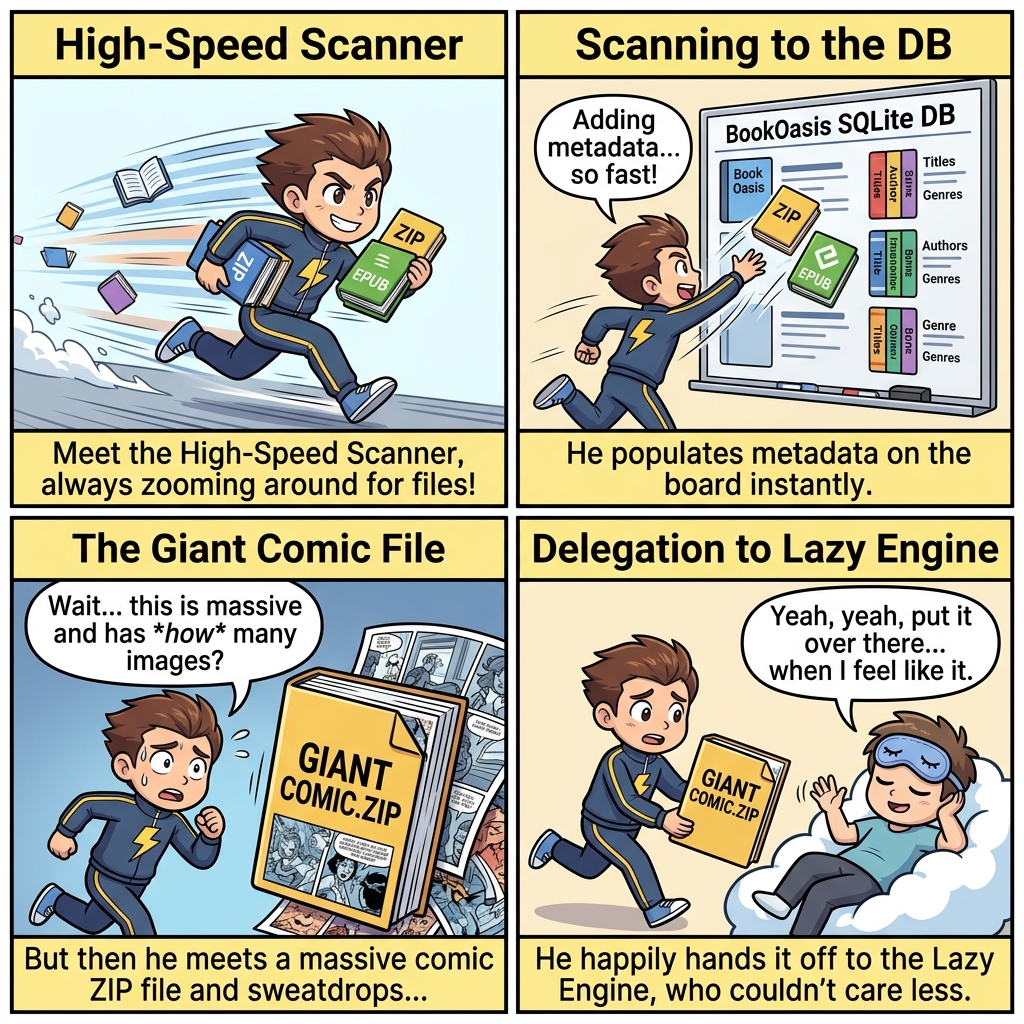
- High-Speed Scanner: Without extracting files, it quickly reads minimal zip header offsets to extract book metadata and seed the database.
- Lazy Engine: Large and complex comic ZIP files are deferred and processed asynchronously in the background, preventing main interface freezes.
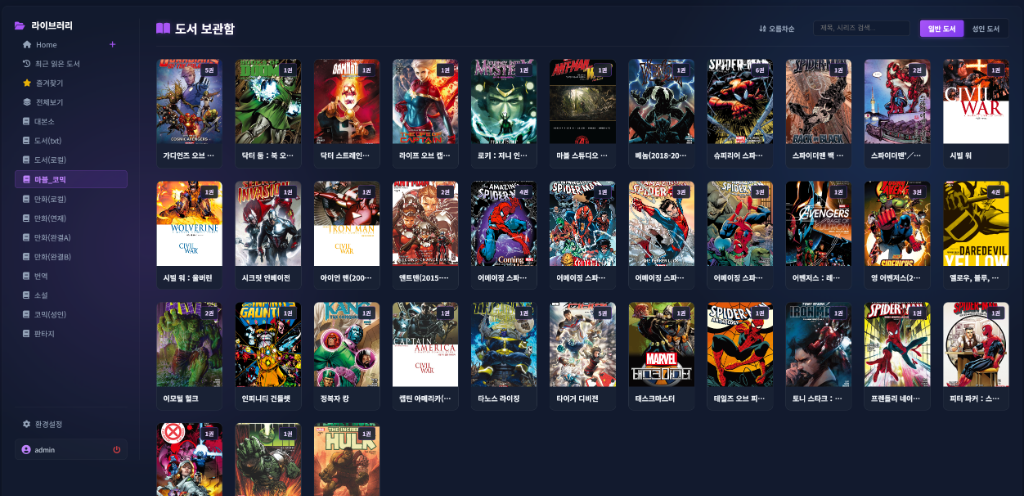
Dashboard Screen
Getting Started
For detailed environment configuration and installation methods, please refer to the technical documentation.
- Installation Guide: Setup Guide (docs/guide_installation_en.md)
- Step-by-step by setup: Synology NAS · Oracle free server · Connecting Google Drive (rclone)
- Admin and Settings: Admin Guide (docs/guide_admin_en.md)
- Mobile Viewer Integration: OPDS Integration Guide (docs/guide_opds_en.md)
- Architecture and Source Structure: Architecture Guide (docs/guide_architecture_en.md)
- Plugin Development: Plugin Guide (docs/guide_plugins_en.md)
- Standard Event Webhook Spec: API Endpoints Specification (docs/api_endpoints.md)
- Wiki Portal: Wiki Home (docs/index.md)
Outbound event webhooks (
book.new,book.read,book.finish) are format-aware. For EPUB/TXT, physical pages are not always stable, sototalPagesmay benull. Receiver implementations should prioritizeprogress(0-100).
Easy Operation (Docker)
Copy configuration template Copy the provided override template file for your local environment configuration.
cp docker-compose.override.example.yml docker-compose.override.ymlModify volume path Open the generated
docker-compose.override.ymland modify the host path to point to your actual book/comic library directory.services: bookoasis: volumes: - /path/to/your/comics:/data/comics:roRun container
docker compose up -d --build
Tip: Since
docker-compose.override.ymlis listed in.gitignore, your local path configuration won't be overwritten or cause conflicts when you pull updates from the remote repository.
Per security policy, operator-only deployment/update procedures are maintained in private internal documentation.
Direct Operation (Native Python)
🐧 Linux / macOS
# Activate the virtual environment and install dependencies
python -m venv venv
source venv/bin/activate
pip install -r requirements.txt

# Configure the settings file

# Set your own random long string to SECRET_KEY in the .env file to lock down session encryption.
# Locking this key ensures users remain logged in even if the server application process restarts.

# Start the server
python core.py
- Default behavior: in non-Docker environments, the scanner worker starts automatically and consumes queued
pendingtasks. - Disable if needed:
BOOKOASIS_ENABLE_EMBEDDED_WORKER=0 python core.py
🪟 Windows
For Windows environments, we provide a batch file that automatically handles directory creation, packages installation, and runs a production-ready web server (waitress) with a single click.
- Copy
.env.exampleto.envand fill in your settings. (SECURITY_KEY) - Double-click the
run_windows.batfile in the project root directory.
run_windows.batstarts both the web server and scanner worker together.Local Port:
http://localhost:5930
💾 Redis Cache Integration & Performance Guide (Optional & Recommended)
BookOasis supports a Hybrid Redis Cache Mode that safely intercepts real-time progress updates inside an in-memory (RAM) cache before syncing them to SQLite files. This drastically minimizes SQLite disk write operations, preventing database corruption (malformed files) and resolving I/O bottlenecks.
🐳 For Docker Users (Zero-Configuration)
docker-compose.ymlnatively integrates aredis:7-alpinecontainer service.- No need to configure
.env. Runningdocker compose up -dautomatically spins up the Redis container and securely hooks it up in an isolated bridge network. stop_grace_periodis set to1m(1 minute) to ensure Gunicorn and Scanner Workers safely write cached progress data back to SQLite on shutdown.
🖥️ For Native Python Users (Linux / Windows)
- Install and start Redis server on the host OS. (Ubuntu example:
sudo apt install redis-server -y) - Configure your connection URL in
.env:REDIS_URL=redis://127.0.0.1:6379/9- Tip: If sharing a Redis instance with other applications, point to a different DB index (e.g.,
/9) to secure isolation. All BookOasis keys will be prefixed withbookoasis:to prevent namespace collisions.
- Tip: If sharing a Redis instance with other applications, point to a different DB index (e.g.,
- If Redis is unavailable or fails to connect, BookOasis automatically falls back to SQLite-direct write mode with no crash or error.
🗄️ Database Selection Guide (SQLite vs MariaDB)
In addition to the default file-based SQLite engine, BookOasis officially supports the MariaDB enterprise database engine for large-scale libraries (100,000+ books) and multi-user / high-concurrency environments.
📊 Engine Comparison
| Feature / Characteristic | SQLite (Default) | MariaDB (Optional / Recommended) |
|---|---|---|
| Setup & Startup | Zero configuration (File DB) | Docker Compose or External MariaDB |
| Target Scale | Personal / Medium (under 50k books) | Large / Enterprise (100k+ books, heavy scanning) |
| Concurrency & I/O | File-level lock (Redis recommended) | Row-level locking for fast distributed I/O |
| Data Integrity | Single file storage | Full DB transactions, auto-recovery & verification |
🚀 Switching to MariaDB
Docker Users (Automated)
- Add
DB_ENGINE=mariadband connection details todocker-compose.override.yml. Upon container startup, required databases (media_general,media_adult,media_audiobook) and schemas are created automatically. - Detailed Guide: Docker MariaDB Migration Guide (docs/move_to_mariadb.md)
- Add
1-Click Data Migration (SQLite ➔ MariaDB)
- Migrate all existing books, audiobook progress, favorites, and user accounts from SQLite to MariaDB without data loss in one command:
python tools/migrator_sqlite_to_mariadb.py
🔑 Initial Login Credentials
- When logging in for the first time after server startup, use the following default administrator account:
- Username (ID):
admin - Password:
admin
- Username (ID):
- Security Recommendation: Please change the default admin password immediately after logging in by navigating to [Settings] > [Account Management].
🛡️ Proxy Header Auth (SSO) Guide
For overseas home-lab users and OIDC integration, we support Proxy Header Auth (Reverse Proxy Auto Login).
By trusting the HTTP headers (Remote-User or X-Forwarded-User) delivered after verification by an upstream reverse proxy authentication server (such as Authelia, Authentik, etc.), users can automatically log into BookOasis (SSO).
[!CAUTION] Critical Security Warning This feature MUST ONLY be enabled in a closed network environment where a reverse proxy (like Nginx, Authelia) protects and sets the headers! If you enable this option while exposed directly to the public internet without a proxy, malicious users can spoof the headers (e.g.,
Remote-User: admin) to hijack administrator privileges. This is a critical vulnerability. Only use this if you fully understand the risks.
Configuration Method:
- Log in with an admin account and navigate to the General Settings menu.
- Scroll down to find and toggle the Proxy Header Auth (Reverse Proxy Auto Login) option.
- Save the settings, and configure your upstream Nginx/Proxy server to pass the correct username header to BookOasis.
Optional security hardening (recommended):
PROXY_HEADER_TRUSTED_IPS: Trusted proxy source IP/CIDR whitelist (example:127.0.0.1,10.0.0.0/8,192.168.0.0/16)- When set,
Remote-User/X-Forwarded-Userheaders from non-whitelisted source IPs are ignored.
- When set,
PROXY_HEADER_DENY_DIRECT: Set to1to deny direct access without proxy headers (force reverse-proxy path)
These options can be configured via DB settings (
settingstable) or environment variables (.env). DB settings take precedence.
Nginx Configuration Guide
- Update global settings (nginx.conf) Requests passing through Cloudflare have significantly larger header sizes (cookies, authentication tokens, proxy headers, etc.) compared to normal requests. If Nginx's default header buffer size is too small, the server will reject requests and output 400 Bad Request or 414 Request-URI Too Large errors.
To prevent this, please add or expand the following settings within the http { ... } block of /etc/nginx/nginx.conf.
http {
    # ------------------------------------------------------------------
    # [Cloudflare and Large Headers Support] Expand buffer size significantly
    # Prevents 4XX errors when cookies and authentication headers are too long.
    # ------------------------------------------------------------------
    client_header_buffer_size 16k;
    large_client_header_buffers 4 64k;

    # ------------------------------------------------------------------
    # Proxy Header Hash Optimization
    # Prevents hash table overflow even when multiple complex X-Forwarded-* headers are sent.
    # ------------------------------------------------------------------
    proxy_headers_hash_max_size 1024;
    proxy_headers_hash_bucket_size 128;

    # (existing settings...)
}
- BookOasis Virtual Host Configuration (sites-available)
Write the following content into
/etc/nginx/sites-available/default(or the virtual host configuration block) and create a symbolic link tosites-enabledto apply it.
# ------------------------------------------------------------------
# Backend Persistent Connection Pool (0ms Socket Connection Overhead)
# ------------------------------------------------------------------
upstream bookoasis_backend {
    server 127.0.0.1:5930;
    keepalive 64; # Maintain 64 persistent backend connections
}

server {
    listen 80;
    server_name your-domain.com; # <== Change this to your own domain

    # Force redirect incoming HTTP requests to HTTPS (Security)
    if ($http_x_forwarded_proto = "http") {
        return 301 https://$host$request_uri/;
    }

    # ------------------------------------------------------------------
    # Gzip Text and SVG Compression (Speed up UI and JSON API)
    # ------------------------------------------------------------------
    gzip on;
    gzip_disable "msie6";
    gzip_vary on;
    gzip_proxied any;
    gzip_comp_level 6;
    gzip_types text/plain text/css application/json application/javascript text/xml application/xml image/svg+xml;

    # Maximum body size limit considering metadata plugin cover image uploads
    client_max_body_size 100M;

    # ------------------------------------------------------------------
    # Security Header Injection
    # ------------------------------------------------------------------
    add_header X-Frame-Options "SAMEORIGIN" always;         # Prevent clickjacking
    add_header X-Content-Type-Options "nosniff" always;     # Prevent MIME sniffing
    add_header Referrer-Policy "no-referrer-when-downgrade" always;

    # ------------------------------------------------------------------
    # 1. Cover Image Routing Optimization
    # ------------------------------------------------------------------
    # 1-1. Dynamic SVG Cover Generation API (Pass to Python backend)
    location /covers/fallback {
        proxy_pass http://bookoasis_backend;
        proxy_set_header Host $http_host;
        proxy_set_header X-Real-IP $remote_addr;
        proxy_set_header X-Forwarded-For $proxy_add_x_forwarded_for;
        proxy_set_header X-Forwarded-Proto $http_x_forwarded_proto;
    }

    # 1-2. Cover Image Static Serving Optimization (Bypass Python backend)
    location /covers/ {
        alias /path/to/media_server/covers/; # <== Change this to your installation path /covers/
        expires 1d;
        add_header Cache-Control "public, max-age=86400";
        sendfile on;
        tcp_nopush on;
    }

    # ------------------------------------------------------------------
    # 2. Main API & Web Service (WebSocket Support)
    # ------------------------------------------------------------------
    location / {
        proxy_pass http://bookoasis_backend/;

        # [Basic Proxy Header Settings]
        proxy_set_header Host $http_host;
        proxy_set_header X-Real-IP $remote_addr;
        proxy_set_header X-Forwarded-For $proxy_add_x_forwarded_for;
        proxy_set_header X-Forwarded-Proto $http_x_forwarded_proto;

        # [WebSocket and HTTP/1.1 Protocol Upgrade Support]
        proxy_http_version 1.1;
        proxy_set_header Upgrade $http_upgrade;
        proxy_set_header Connection "upgrade";

        # [CRITICAL] Large File Transfer Optimization (Disable Proxy Buffering)
        proxy_buffering off;

        # [Timeout Extension] Long-running operations for large scans
        proxy_read_timeout 300;
        proxy_connect_timeout 300;
        proxy_send_timeout 300;
    }
}
🎧 Audiobook Streaming Stability Guide (Nginx / Cloudflare)
Even when audiobook scanning is successful (BOOK_PROCESSED, duration_sec > 0), playback may still fail or show 0:00 if Range requests are transformed by a proxy/CDN layer or if cache behavior is incorrect.
Recommended settings
- Add a Cloudflare cache-bypass rule (recommended)
- Path example:
/api/media/audiobooks/*/tracks/*/stream
- Cache Level: Bypass
- Exclude audio stream URLs from transformation/optimization features (Transform/Minify/Polish, etc.)
- Disable buffering for streaming paths on Nginx (recommended)
- If you already use
proxy_buffering off;underlocation /, keep it enabled. - If you split streaming into a dedicated location, keep the same policy there.
location ~ ^/api/media/audiobooks/.*/tracks/.*/stream$ {
   proxy_pass http://bookoasis_backend;
   proxy_http_version 1.1;
   proxy_set_header Host $http_host;
   proxy_set_header X-Real-IP $remote_addr;
   proxy_set_header X-Forwarded-For $proxy_add_x_forwarded_for;
   proxy_set_header X-Forwarded-Proto $http_x_forwarded_proto;

   # Prevent audio buffering delays and stream stalls
   proxy_buffering off;

   # Support long listening sessions
   proxy_read_timeout 3600;
   proxy_send_timeout 3600;
}
Quick troubleshooting checklist
- In browser DevTools Network, verify stream requests return
206 Partial Content. - If stream requests repeatedly return
404, check runtime file access path/mount status first (before assuming DB metadata is wrong). - A failed playback attempt can be followed by a
current_time=0progress save, so confirm stream status codes before repeated retry tests.
Caddy Configuration Guide
If you use Caddy as your reverse proxy instead of Nginx, you can configure your Caddyfile as follows to optimize and connect. Caddy automatically issues and manages SSL certificates (HTTPS) and natively supports WebSockets and reverse proxy header passing.
Map your domain in the /etc/caddy/Caddyfile and configure it like this:
your-domain.com { # <== Change this to your own domain
    # ------------------------------------------------------------------
    # Gzip and Zstd Text Compression Settings (Speed up UI and JSON API)
    # ------------------------------------------------------------------
    encode gzip zstd

    # ------------------------------------------------------------------
    # Maximum Request Body Size Limit (Corresponds to Nginx's client_max_body_size 100M)
    # Limits file uploads, considering cover image uploads from metadata plugins, etc.
    # ------------------------------------------------------------------
    request_body {
        max_size 100mb
    }

    # ------------------------------------------------------------------
    # Main Application Proxy Routing
    # ------------------------------------------------------------------
    reverse_proxy 127.0.0.1:5930 {
        # [CRITICAL] Large File Transfer Optimization (Disable Proxy Buffering)
        # Configures the server to send data immediately without buffering, preventing
        # BookOasis's core 'offset-based real-time streaming' from being delayed.
        flush_interval -1
    }
}
After updating Caddyfile, reload the settings by running sudo systemctl reload caddy.
License and Trademark Info
- Open Source License: This project is licensed under the GNU AGPLv3 (Affero General Public License v3.0). Anyone is free to view, modify, and distribute the source code. If you provide a service (including over a network) based on this software, you must publicly disclose the modified source code under the same AGPLv3 license. For detailed terms, please refer to the LICENSE file.
- Trademark Guidelines: The name "BookOasis" and its official logos are protected trademarks of the original author. If you fork and redistribute this software, you must respect the copyrights, but you may not use the same name ("BookOasis") or official logo for your derivative works. You must rename it to avoid brand confusion.
Copyright © 2026 leeyj (Carls, [email protected]). All rights reserved.