
leeyeel/Sketch2Motion
leeyeel/Sketch2Motion has 388 GitHub stars and 56 forks. GitHot measured 0 stars in 24 hours. Last checked 2026-11-19 09:22 UTC. Last push 2026-08-26.
What you can do
- Image → Sketch → SVG → Animated MP4
- Animation duration (seconds)
- Subpath delay ratio (fractional delay between subpaths)
- Scale factor (zoom in/out)
Measured star growth
- in 24h
- 0
- in 7 days
- Collecting history
- in 15 days
- Collecting history
- in 1 month
- Collecting history
Net star changes over overlapping periods, not daily totals. Missing measurements are left blank. Stars measure attention, not software quality.
About
convert photo or sketch to motion video
Creative & MediaREADME.md
Original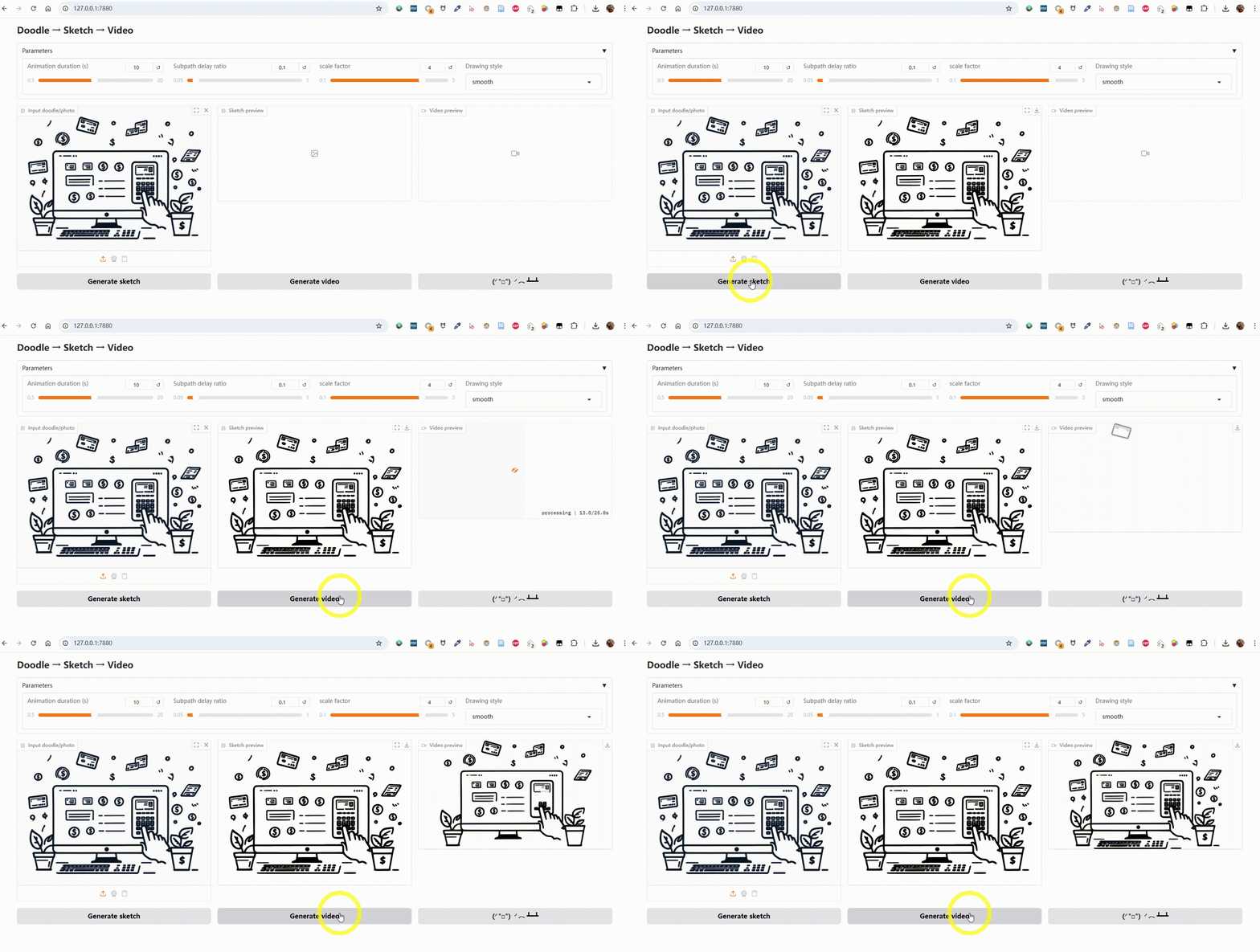
Sketch to Motion
Colorful Version Demo
| Input image | Colorful drawing animation |
|---|---|
 |
 |
Generate it with the color pipeline:
python sketch2svg_color.py input.png 16
python render_color.py input_color.svg --duration 5.0 --delay 0.05 --scale 3.55 --output-file output
The color pipeline quantizes the image into up to 16 colors, traces each color layer separately with potrace, and renders a colored drawing animation with Manim. Generated SVGs include their own background color, so they can be moved or shared without a companion file.
Convert a static image into a smooth drawing animation using Manim.
This project takes a doodle, photo, or sketch, converts it into an SVG vector graphic, and renders it into an animated MP4 video with Manim.
It also prepends the last frame to the start of the video, creating a short pause for a more polished look.
Features
- Image → Sketch → SVG → Animated MP4
- Adjustable animation parameters:
- Animation duration (seconds)
- Subpath delay ratio (fractional delay between subpaths)
- Scale factor (zoom in/out)
- Drawing style (
linear,smooth,there_and_back,wiggle) - Video format: landscape 16:9 (
1920x1080) or portrait 9:16 (1080x1920)
- High-quality vector rendering powered by Manim
- Optional color-preserving SVG and video generation
- Automatic last-frame prepend for a smooth intro
- Simple bilingual Gradio web interface (English / Chinese)
Installation
1. Clone this repository
git clone https://github.com/yourusername/sketch-to-motion.git
cd Sketch2Motion
2. Install Python dependencies
Make sure you have Python 3.9+ installed.
pip install -r requirements.txt
Key dependencies:
- Gradio
- Manim
- ffmpeg (must be installed and in your PATH)
- Potrace (must be installed and in your PATH)
Install Manim:
Install ffmpeg:
- Windows: Download from official site and add
binfolder to PATH - macOS:
brew install ffmpeg - Linux:
sudo apt install ffmpegor use your package manager
Install Potrace:
- macOS:
brew install potrace - Linux:
sudo apt install potraceor use your package manager
Usage
Launch the Gradio app
python app.py
Access the app at:
http://127.0.0.1:7880
3. Web interface workflow
- Use the Language / 语言 selector to switch between English and Chinese.
- Upload a doodle/photo as the Input image. Enable Preserve colors to use the color pipeline and choose its palette size.
- Click Generate sketch to convert it to SVG.
- Adjust Animation duration, Subpath delay ratio, Scale factor, and Drawing style.
- Choose the Video format (landscape is selected by default), then click Generate video to render and preview the animation.
- Download the generated MP4.