
lcy362/flint
lcy362/flint has 40 GitHub stars and 4 forks. GitHot measured 0 stars in 24 hours and +2 in 7 days. Last checked 2026-11-09 10:18 UTC. Last push 2026-11-04.
Flint · local-skills-hub — a local-first personal AI skills asset manager. Centralize, tag, deduplicate skills, and deploy them into agent and project directories via symlink/copy. Your files, your assets — never locked in.
What you can do
- Library - Browse / search / filter all skills; SKILL.md preview, tag editing, provenance; register / edit own and third-party repositories; collect from agents, import from directories, install from an npx command
- Agents - One card per actual skill directory (agents sharing a directory merge into one card and share one strategy); set active, override directories, one-click "Add from the vault" / delete, "Apply preset" one-shot deploy, per-skill symlink / copy
- Presets - A skill bundle (explicit members ∪ linked-tag matches); press "Apply preset" to deploy it into a directory once — later membership or tag changes need another apply
- Projects - Register a project + tags → tags act as the deployment policy; "Sync" copies the matches into .agents/skills (git-committable) and shares them by symlink into each agent's project directory; supports collect / takeover / push back to repository
Measured star growth
- in 24h
- 0
- in 7 days
- +2
- in 15 days
- Update delayed
- in 1 month
- Update delayed
Net star changes over overlapping periods, not daily totals. Missing measurements are left blank. Stars measure attention, not software quality.
README.md
OriginalFlint
English | 简体中文



Flint ·
local-skills-hubObsidian collects knowledge; flint sparks skills.
Your skills are yours.
Skills as a personal asset — data sovereignty included.
Flint is a local-first personal AI skills asset manager — it centralizes the skills used by all of your agents, with unified tagging, filtering, deduplication, and deployment into agent and project directories.
The point is data sovereignty: skills exist only as plain files on your local disk, following open formats and path conventions — no cloud, no account, no telemetry. Whether or not you keep using Flint, the asset is yours; move to another tool or ecosystem and it comes with you, at zero migration cost.
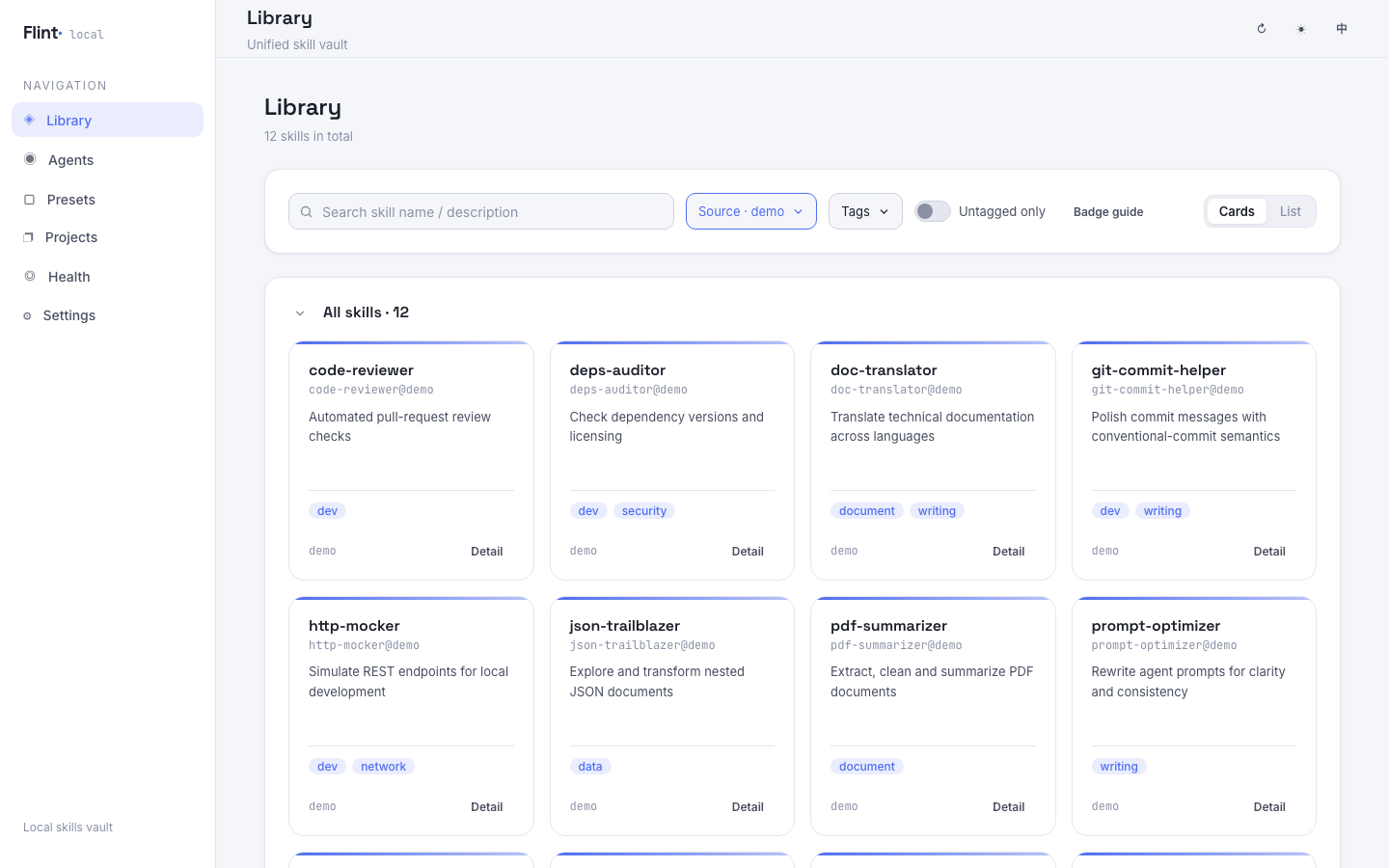
Manage, tag and distribute your AI skills across agents and projects — all local, all yours.
Why data sovereignty is the whole point
Next to the last generation of knowledge tools — Evernote, OneNote, Notion, and the generations before them — what sets Obsidian apart is not a feature list: it is local-first, with data sovereignty. The content belongs entirely to you, and it follows you for the long term whether or not you keep using Obsidian.
That is also exactly where the old pain lived. Moving from Evernote to OneNote, then from OneNote to Notion — every time a better tool turned up, or I needed one feature only the new tool had, the tedious migration cost left me wondering: is this data actually mine? Add to that the open formats and open ecosystem, which are what finally decoupled knowledge from whatever tool happened to be holding it.
Personal skill libraries are heading into the same situation. There is no shortage of skill managers on the market, and nearly all of them share one conspicuous problem: they bind your skills tightly to themselves — a shared registry, an account, a proprietary format, a directory layout only that one tool understands.
So Flint borrows Obsidian's answer and applies it to skills:
- Skills exist only as plain files on your disk — no cloud, no account, no telemetry.
- Formats and path conventions follow open ecosystem standards — a skill body is a
SKILL.mddirectory; metadata lives where the ecosystem already agrees on, not in a private database. - Data sovereignty is 100% yours — switch tools or switch ecosystems and your assets come with you, at zero migration cost, and keep working.
Not owning your skills has costs you pay every single day:
- Switching agents. Free tokens keep appearing everywhere — agent A today, agent B tomorrow — and the daily-report skill you wrote in A simply is not there in B. Installer-style tools such as
npxcan push skills into every agent you already have, but a new agent means doing it all over again, and your own skills never enter their inventory in the first place. - A fixed bill on every conversation. A company skill set easily runs to a hundred or two skills — frontend, backend, design, ops — of which you use a handful. Without fine-grained management you install all of them, and agents inject the name and description of every installed skill into the system prompt. At roughly 50–100 tokens each, 200 skills is a 10k–20k token fixed cost per conversation, multiplied by the dozens of turns in a single task. The token bill is the smaller half: the longer the candidate list, the greater the chance the model picks the wrong skill or misses it altogether — like hunting for your own wrench in a toolbox stuffed with other people's tools.
- Rework you cannot carry over. Skills written inside one tool's private store are skills you rewrite from scratch the day you move; the more you invest, the more expensive leaving becomes.
Why "Flint"
Obsidian is a naturally sharp volcanic glass that early humans knapped into blades — one of the earliest tool materials. The knowledge app Obsidian takes its name from this: may you hone what you have learned into a handy edge.
Flint is the other "tool stone", a companion to obsidian. Flint follows the same "stone as tool" naming lineage, only it polishes skills instead of knowledge, and maps flint's two properties onto the product's two core actions:
- Knapping — striking a raw stone into a precise, handy tool: gather scattered skills, deduplicate them, tag them, and turn them into reusable personal assets.
- Spark — flint striking steel produces sparks: deploy / distribute skills into agent and project directories so they are truly ignited and start doing work.
Every skill you collect is a piece of flint waiting to strike a spark.
A philosophy in line with Obsidian
Flint's core idea is exactly the same as Obsidian's — only the object of management changes from "knowledge" to "skills". Obsidian's own words about its philosophy:
Sharpen your thinking. The free and flexible app for your private thoughts.
Your thoughts are yours. "Obsidian stores notes privately on your device… No one else can read them, not even us."
Your knowledge should last. "Obsidian uses open file formats, so you're never locked in. You own your data for the long term."
Flint aligns with each of these:
| Obsidian's philosophy | Flint's counterpart |
|---|---|
| Local and private: notes live privately on your device; no one else can read them, not even the vendor | Skills exist only as plain files on your local disk — no cloud, no account, no telemetry; metadata lives where the open ecosystem agrees on, not in a proprietary database |
| Open formats, never locked in: open file formats mean you are never locked out and own your data long term | A skill's body is just a SKILL.md directory on disk — open, edit, diff, and commit it with git at any time; switch tools or ecosystems and the asset comes with you, never locked in by Flint |
| Sharpen your thinking: Obsidian makes your personal knowledge base sharper with use | Flint makes your personal skill library handier as it grows — collect, deduplicate, tag, then deploy in one click to the agents and projects that need it |
In one sentence: Obsidian lets you own and sharpen your knowledge; Flint lets you own and sharpen your skills. Both share the same underlying beliefs — local-first, files as assets, never locked in.
Documentation
| Document | Contents |
|---|---|
| This file / README.zh-CN.md | Quick start and feature overview |
AGENTS.md |
Development guide for AI coding assistants / contributors (architecture, conventions, commands) |
docs/PRD.md |
Product requirements (features, rules, acceptance criteria) |
docs/TECH.md |
Technical architecture (data model, sync engine, API, frontend) |
docs/RELEASE.md |
Release process (versioning, release notes, npm publishing) |
Core ideas
Make skills a personal asset — sovereignty included
Your skill repository is your own personal asset, not tied to any single system. It lives only on your local filesystem; manage and version it with git or anything you like. If you later move to another tool or ecosystem, the asset comes with you and keeps working — never locked in by this tool. Data sovereignty stays with you: the repository is a plain directory on disk, so Flint being uninstalled, replaced, or simply not running changes nothing about your skills.
Your skills are your files
A skill's body is just an ordinary directory on disk (SKILL.md), and metadata such as tags is stored in ways the open ecosystem agrees on, not in a private database. You can open, edit, diff, and commit these files at any time — you always hold all of the data.
Stay close to the open ecosystem
Tags and other metadata land in places the ecosystem already agrees on:
- Top-level
tagsin the skill file (recommended): written into the frontmatter of eachSKILL.md, natively read by 40+ tools including Claude Code and agentskills.io, and versioned together with the skill directory and git. - Staged here + migratable: tags not yet written back to frontmatter are staged in local config; the Library's "tag migration" or the Health page can write them back to
SKILL.mdin one click.
Reduce ecosystem fragmentation
When same-named skills come from multiple sources, deduplication keeps one copy; duplicates, divergence, and broken references are surfaced on the Health page and handled in place — avoiding the same skill ballooning into multiple copies across your environment.
Features at a glance
| Module | Capabilities |
|---|---|
| Library | Browse / search / filter all skills; SKILL.md preview, tag editing, provenance; register / edit own and third-party repositories; collect from agents, import from directories, install from an npx command |
| Agents | One card per actual skill directory (agents sharing a directory merge into one card and share one strategy); set active, override directories, one-click "Add from the vault" / delete, "Apply preset" one-shot deploy, per-skill symlink / copy |
| Presets | A skill bundle (explicit members ∪ linked-tag matches); press "Apply preset" to deploy it into a directory once — later membership or tag changes need another apply |
| Projects | Register a project + tags → tags act as the deployment policy; "Sync" copies the matches into .agents/skills (git-committable) and shares them by symlink into each agent's project directory; supports collect / takeover / push back to repository |
| Health | 6-dimension checkup (sync / duplicates / broken links / config / repositories / projects) with one-click fixes (confirm before running) |
| Settings | Interface language (English / Chinese), default install mode (symlink / copy), custom agents, log viewing / download / copy diagnostics |
First run
The workflow has two layers — "essential" and "advanced". Getting started takes four essential steps: install, register a repository, create a preset, and apply the preset to an agent.
✅ Essential workflow
1. Install
Requires Node.js ≥ 20.
From npm — no clone needed:
# One-shot run:
npx flint-skills-hub

# Or install globally; both command names are registered:
npm install -g flint-skills-hub
flint
The command returns as soon as the server answers: Flint keeps running in the background and the CLI exits (same model as ./start.sh). It prints the URL, the PID, and the log paths — stop the instance with kill <PID>. Running it again while an instance is up just re-opens the page instead of starting a second one.
Then open http://localhost:8787. Both commands are registered, with the same flags below.
2. Command reference
| Command | Description |
|---|---|
flint |
Start in the background and open the browser — the only overarching command |
flint <directory> / flint . |
Open the page straight on "register a third-party source": the path is filled in, the detection preview is already run, and nothing is saved until you confirm |
flint -p 9000 / flint --port 9000 |
Listen on a custom port (default 8787, or $PORT) |
flint -y / flint -r / flint --restart |
Force restart: stop the running Flint instance, then start fresh |
flint --no-open |
Start without auto-opening the browser (CI / headless) |
flint -f / flint --foreground |
Run in the foreground (log to the console) instead of detaching |
flint -h / flint --help |
Show usage |
flint -v / flint --version |
Print the installed version |
Same flags work with flint-skills-hub (e.g. flint-skills-hub -y). Ports held by other programs are never killed — Flint reports them and exits; only -y restarts a Flint instance.
| Environment variable | Meaning |
|---|---|
PORT |
Same as --port |
FLINT_CONFIG |
Config file path (default ~/.flint/config.json) |
FLINT_CLIENT_DIST |
Override the built Web UI directory |
FLINT_LOGS |
Log directory (default <config dir>/logs, i.e. ~/.flint/logs) |
Updating, and checking the version:
npm install -g flint-skills-hub@latest     # update the global install (pin it with @1.0.0 if you prefer)
flint -v                                   # print the version in use
npm ls -g --depth=0 flint-skills-hub       # what is installed globally
- A running instance is not hot-updated — restart it with
flint -y(orkill <PID>from the startup output, then start again). npxcaches packages, so ask for the version explicitly:npx flint-skills-hub@latest.- Running from a source checkout instead:
git pull && npm install && npm run build. - Updating never touches your data —
~/.flint/config.json, your repositories and your agents' skill directories are left as they are. - With nvm, every Node version keeps its own global packages: reinstall under the Node version you actually run
flintwith (which -a flintshows where the command comes from).
From source — one-click start (recommended):
./start.sh
The script checks the Node.js version, dependencies, and port availability, then opens the page in your browser once the frontend is ready; press Ctrl+C in the terminal to stop.
- The first run runs
npm installautomatically - If a port is occupied you will be prompted;
./start.sh -ykills the occupying process directly. See./start.sh -hfor options - Custom ports:
CLIENT_PORT=5174 SERVER_PORT=8788 ./start.sh
Or start manually:
npm install
npm run dev
- Frontend (Web UI): http://localhost:5173/
- Backend (API): http://localhost:8787/
Config and logs live in ~/.flint/ (config.json and logs/app.log).
2. Register a repository
A repository is the collection / source of truth for skills, mapped to a directory on disk. At the bottom of the Library page, in the "Repositories" section, click Register repository:
- Own repository: enter an ID and a directory path, choose a layout (
autodetection by default). The "Choose…" button next to the path field opens the native system directory picker. - Third-party repository: registered the same way and maintained as a read-only source (
linked); its skills can be "imported" into own repositories.
3. Create a preset
On the "Presets" page in the sidebar, click "New preset" and give it a name; open the detail page to add skills or link tags. A preset is a skill bundle.
4. Apply the preset to an agent
Open an agent's detail page:
- Pick your new preset under "Linked preset";
- Press "Apply preset" — every skill configured in that preset is deployed into the directory once (symlink or copy, following the directory's install mode).
From then on the directory is the source of truth: whatever physically sits there is what the agent sees. Skills are placed in a single shot — applying a preset and adding a skill are one-shot actions, and vault / preset changes never sync back on their own; run "Apply preset" again to pick up later membership or tag changes. Use the skills in projects or agents as needed.
A preset is only delivered to agents linked to it: no link means no follow — presets are never applied globally. An agent without a linked preset still works — use "Add from the vault" on its detail page to deploy skills one by one.
The active set is organisational: it marks a directory and scopes the Health check, rather than acting as a trigger. Directories outside it are labelled as such, and either way there is nothing to auto-sync.
At this point the minimal path "register repository → configure preset → deliver to agent" is complete, and your skills are live.
🔸 Advanced (optional)
- Collect skills: on an own-repository card, click "Add skills" → "Collect from agents", pick skills grouped by agent (select a whole group at once); the confirmation page merges candidates by name, and when the repository already has a same-named skill you can "keep as is" or "overwrite with an agent's version"; after confirming, each write path is shown before execution. You can also "Collect to repository" for a single skill on agent and project detail pages.
- Take over: replace entries in an agent directory with symlinks to the repository copy (keep only one body); in projects they are replaced with real copies (
.agentsis committed and self-contained across machines). - Import external directories: own repository "Add skills" → "Import from folders", add source directories (system picker available, one per line; flat / nested categories / indexed catalog structures are supported) → "Detect" → "Start import"; same names are deduplicated automatically, and source directories serve as data sources only and are not registered.
- Install from an npx command: on the Library page's "Repositories" section, click "Install from npx command" → paste the raw install command (e.g.
npx impeccable skills install, optionally with-y --project --providers=claude --no-hooks; Flint parses the package and arguments and adds--yesitself) → the command runs inside the Flint managed directory~/.flint/sources/<id>(auto-initialised as a git repository, with snapshots and rollback; live logs and download progress are shown while it runs — npm exposes no percentage, so the downloaded size is shown instead) → the detected skill root is pre-filled into the normal registration flow → after registering, distribute it like any other skill. Updating = the "Update" button on the source card re-runs the install command in one click (packages whose install and update commands differ can set a raw update command in the edit dialog). Note: installer behaviour is not controllable — if it bypasses the cage and writes to real agent directories, Flint will not clean it up; delete those entries on the Agents page or absorb them via "Collect + Takeover". So far only tested with impeccable — feedback welcome. - Browsing and filtering: all lists support "cards / list" views (cards by default; the preference is remembered globally); the Library's search, source, tag, and untagged filters live in one filter bar, with a "Reset" button appearing when filters are active.
- Tagging: click a card in the Library to open its detail; add or remove tags in the tag area; preview
SKILL.mdand view provenance right there. - Page state lives in the URL: top-level pages, detail views, and filter conditions are all encoded in the address bar, so refreshes and shared links restore the same view.
- Project-specific skills: register a path + tags in the "Projects" module; matching skills enter the project's
.agents/; changes can be "pushed back to the repository", and the project skill directory can be deployed into each agent's project-level directory. - Health and fixes: the "Health" page runs a 6-dimension checkup (sync / duplicates / broken links / config / repositories / projects) with one-click fixes (confirm before running).
- Sync strategy: symlink by default; switch to copy per agent or per skill on the agent detail page. A copy is independent, so after editing a skill in the vault re-run the deploy for that directory ("Apply preset" / "Add").
- Interface language: switch between English and Chinese on the "Settings" page; the change applies to UI copy and to messages returned by the server, and the preference is remembered locally.
Project structure
flint/  (local-skills-hub)
├─ start.sh          # One-click start (env / deps / port checks → start → open browser)
├─ README.md         # English guide (default, this file)
├─ README.zh-CN.md   # Chinese guide
├─ AGENTS.md         # Development guide (for AI assistants / contributors)
├─ docs/
│  ├─ PRD.md         # Product requirements
│  └─ TECH.md        # Technical architecture
├─ server/           # Backend (Node + TS + Express): scanning, sync, config, diagnostics
└─ client/           # Frontend (React + TS + Vite): Library / Agents / Presets / Projects / Health / Settings
Development
npm install            # Install dependencies (npm workspaces)
npm run dev            # Start frontend and backend together
npm run dev:server     # Backend only (tsx watch)
npm run dev:client     # Frontend only (vite)
npm run build          # Build: server (tsc) + client (vite build)
npm start              # Start the backend from build output
npm test               # Unit tests (vitest)
npm run smoke -w server  # End-to-end smoke
node bin/flint.mjs --no-open   # Run the CLI the way the npm package does (background)
- Ports: backend
8787(PORT), frontend5173(CLIENT_PORT); Vite proxies/apito the backend. - Unit tests run in a temp sandbox; the end-to-end smoke also uses a temp directory and never touches your machine.
- Release process: see
docs/RELEASE.md. - Config / log locations:
~/.flint/config.json,~/.flint/logs/app.log(override the config path withFLINT_CONFIG). - Logs are always written in English for easy searching and issue reporting; the interface supports English and Chinese.
See docs/TECH.md for architecture and conventions, and AGENTS.md for the development guide.
Explore related projects
codecrafters-io/build-your-own-x
Master programming by recreating your favorite technologies from scratch.
561,394 starspublic-apis/public-apis
A collective list of free APIs
497,674 starsmorluto/rea
Reverse engineer anything with agents, from app behavior down to native binaries.
447,457 starsopenclaw/openclaw
The AI that really does things. Any OS. Any Platform. The lobster way. 🦞
394,261 stars