
lbartworks/openvgal
lbartworks/openvgal has 58 GitHub stars and 14 forks. GitHot measured 0 stars in 24 hours. Last checked 2026-11-15 19:50 UTC. Last push 2026-11-14.
Measured star growth
- in 24h
- 0
- in 7 days
- Update delayed
- in 15 days
- Update delayed
- in 1 month
- Update delayed
Net star changes over overlapping periods, not daily totals. Missing measurements are left blank. Stars measure attention, not software quality.
About
Turn image folders into a walkable 3D art gallery in the browser. Free MIT engine; optional hosting at openvgal.com.
Self-hostedREADME.md
Original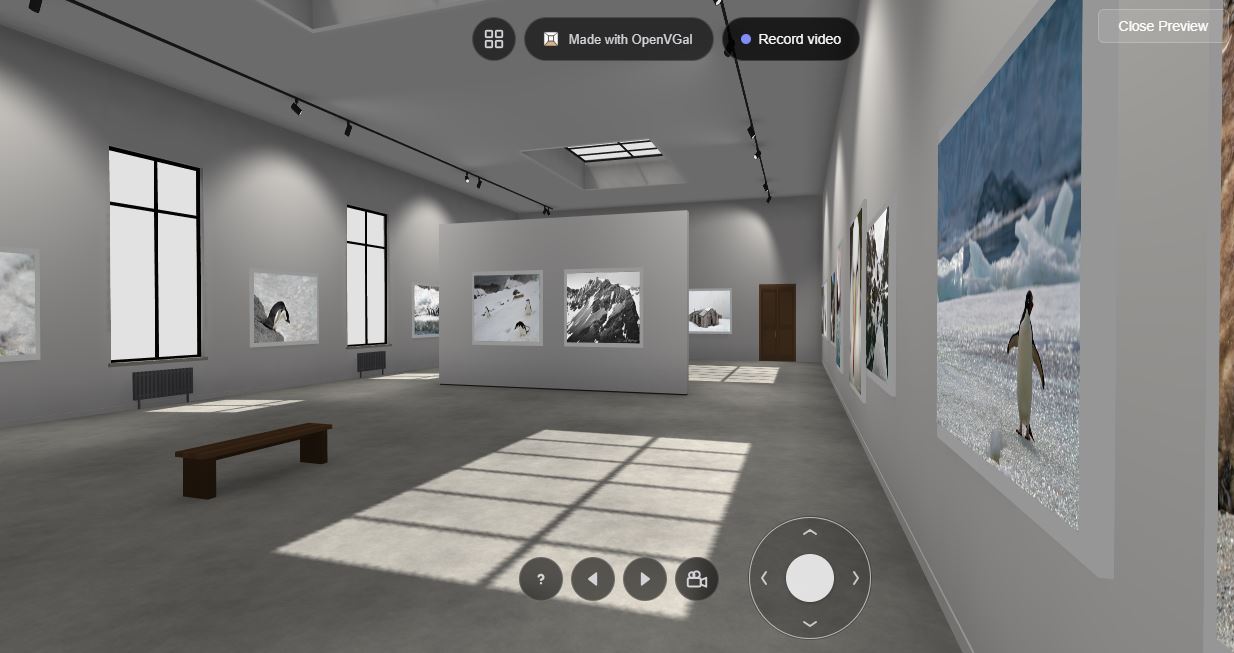
OpenVGal v5.3.1
OpenVGal turns your image folders into a walkable 3D art gallery that runs in any web browser, built on Babylon.js. Drop your folders into openvgal.com/create, build, and either download a self-contained gallery you can host anywhere or publish it on openvgal.com with a permanent link. The engine is free and MIT-licensed. Optional hosted plans from $9/month. Exported galleries contain no tracking. Version 5 brings a new, lighter viewer interface with an artwork info sheet and an on-screen joystick, built on the baked lighting introduced in version 4.
Website: openvgal.com | Clone of this repository: demo.openvgal.com | Create a gallery: openvgal.com/create | Live demo: nostromophoto.com/virtual/virtual.html

[!TIP] OpenVGal is free and built by one person in the open. If it is useful to you or your gallery, please consider sponsoring it. Sponsorship pays for new templates, features and fixes.

[!NOTE] v5 changes the viewer interface, not your galleries. Galleries built with v4 keep working as they are. Galleries viewed online get the new interface automatically; a downloaded ZIP keeps the interface it was built with until you download it again from the generator. Galleries made before v4 still need to be re-created.
What is this ?
OpenVGal started in June 2022 as a personal project to give myself, and anyone, a way to build interactive 3D virtual galleries programmatically. No 3D modeling skills, no gallery design, no browser code to deal with. Just organize your images in folders and the code figures out the rest.
Looking back the changes in 4 years are massive. Version 1 required Python and manual configuration. Version 2 brought executables and an Electron app to lower the barrier. Version 3 removed all of that — everything happens in the browser now. You go to openvgal.com/create, drop your folders, click build, and get a self-contained ZIP that works on any web server. No installs, no dependencies, no accounts. Version 4 brings a completely new light system, shadows and ambient occlusion, circumventing the limitations of Babylon JS while keeping efficiency and speed as a priority. OpenVGal intends to run on non-gaming hardware. Lightmaps are baked at runtime transparently to the user, this is a very experimental approach that other BabylonJS users may like.
For the rest, the philosophy has not changed: you own your gallery. The output is plain HTML + JS files. There is no lock-in, and exported galleries contain no tracking. Put the files on any server and they just work.
OpenVGal is MIT-licensed and developed in the open; sponsorship funds that work. There is also optional paid hosting at openvgal.com, from $9/month, for people who want a permanent URL without running a server — separate from this, and never required to use it.
Quick Start
- Organize your images into folders (one folder per gallery room). Hundreds of images per folder is not recommended.
- Go to openvgal.com/create
- Drop your image folders into the generator (each folder becomes a room)
- Click Build Gallery and preview your gallery in 3D
- Click Download ZIP
- Extract the ZIP on any web server and open
viewer.html
That's it. The ZIP contains everything: images, 3D room templates, PBR materials, the viewer, and configuration. Works in any subfolder, no configuration needed.
Customize before download
Click Customize in the generator to tweak each artwork before downloading: edit titles and subtitles, resize per artwork (S / M / L buckets or a free slider in cm or inches). Sizes are stored in real-world centimetres in building_v2.json so what you set is what visitors see.
Custom Logo
Replace materials/logo.png in the ZIP with your own image. Use white artwork on a black background (the white areas glow in the gallery). Recommended size: 1024x512 px, PNG format.
What's New in v5
- New viewer interface. The bottom bar is gone. The map, a "Made with OpenVGal" badge and the video recorder sit at the top; help, previous/next artwork, cinematic visit and music volume sit in one row at the bottom, beside an on-screen joystick for walking with a mouse or a thumb.
- Artwork sheet. Clicking an artwork flies to it and opens a panel with its title, subtitle, info fields and real dimensions.
- Elegant style. Walnut, microcement and soft daylight.
- Existing galleries. Galleries viewed online get the new interface automatically. A self-contained ZIP keeps the interface it was downloaded with; download it again from the generator to update it.
What's New in v4
- Baked lightmaps. When a template gallery loads, the viewer bakes its lighting into per-surface maps: the template's spotlights and area-light fixtures, hemispheric ambient, and soft contact shadows are computed once into a dedicated lightmap channel, and the materials are frozen. The result is softer, more grounded lighting than the previous real-time fixtures — and once baked, the runtime lights are switched off entirely. The fixture bulbs stay in the scene as decorative objects; the bake is the lighting.
- Baked templates only. Room templates now carry a dedicated lightmap UV channel. On load the viewer checks each template — the lightmap channel is present on every surface, and every light is a recognized gallery light — and refuses to render a stale or corrupt template rather than showing a broken room. This is the only supported template path in v4.
- Regenerate older galleries. Galleries generated before v4 use pre-bake templates and are no longer supported. Re-create them with the current generator at openvgal.com/create; the viewer shows a clear message if it loads an old gallery, so nothing renders half-broken.
- Self-contained galleries pass through untouched. A gallery loaded from a complete GLB (the
resourcefield) is rendered exactly as authored, with no runtime baking — so lighting you baked in Blender and shipped inside the GLB is preserved as-is. This feature is not tested but if you find bugs let me know.
What's New in v3
- Occupancy-driven layout. Wall and panel placement is now defined by
Occupancy_*planes inside each template GLB. The generator probes them once, packs artworks across the strips with width-aware density balancing, and walksselectionOrder(smallest → largest) to overflow into additional rooms automatically. Adding a new room shape is a Blender +catalog.jsonchange — no JS edit required. - Single
catalog.json. Replaces the oldstyles.json. One file undercdn/templates/catalog.jsondescribes shapes (with precomputed occupancies),selectionOrder, defaultminSpacing, and styles (each style maps shape → GLB). Build and edit it visually with the Catalog Manager. - Real-world artwork sizes.
widthandheightinbuilding_v2.jsonare now centimetres, not normalized 0–1. The viewer applies a single global2.5/120factor to convert cm to babylon scene units, so a 120 cm landscape print reads at the old 2.5 m default. - Customize before download. New per-artwork editor in the generator: edit title, subtitle, and size (S / M / L buckets or a free cm/inch slider, capped at 250 cm) without leaving the page.
- Post-download "ready" page. Downloading a ZIP now opens a small landing with a free-hosting walkthrough link, a future "host it for me" CTA, and one-click share buttons.
- Browser-based generator. No more Python, no more executables. Everything runs in the browser at openvgal.com/create.
- Self-contained ZIP output. The generated ZIP includes all assets. Drop it on a web server and it works. No CDN dependency, no external calls.
- CDN-first mode. A lightweight alternative: the ZIP contains only the JSON config and your images. Templates, materials, viewer code, and Babylon.js load from cdn.openvgal.com at runtime. Smaller ZIPs, and your galleries automatically pick up viewer updates.
- Gallery styles. Choose between Classic, Minimalist, and Dark gallery styles. Each style provides a coordinated set of templates (root, rooms with panels, rooms without panels, small rooms) with matching materials and lighting. Select a style in the generator before building.
- Template-driven lighting. Templates embed lighting configuration directly in the GLB file. Empty objects named
ambientLightUp_I{value}andambientLightDown_I{value}control ambient light intensity per template. Fixture meshes namedF_N_dx_dy_dz_I{value}define RectAreaLights — position, direction, and intensity are all read from the mesh name and bounding box. This lets each style (e.g. Dark) define its own lighting atmosphere without any code changes. - Gallery map. A visual overview of all rooms in a gallery. Click any room card to jump directly to it. Shows a thumbnail from the first artwork and the artwork count per room.
- Artwork plaques. Museum-style labels rendered below each artwork showing title and subtitle. Toggle them on or off from the viewer overlay or the generator settings.
- Live 3D preview. Preview your gallery directly in the generator before building.
- CDN architecture. Templates and materials are served from cdn.openvgal.com for the online tools. Self-contained ZIPs bundle everything locally.
- New landing page. openvgal.com has a proper homepage now.
- Electron app removed. It was a good experiment but the browser-based approach is simpler and more portable.
How It Works
OpenVGal uses a building_v2.json file to describe interconnected gallery rooms. Each room references a GLB template and contains items (artworks or doors to other rooms). The viewer loads templates, applies PBR node materials, places artwork textures at calculated positions, bakes the room's lighting into per-surface lightmaps, and handles navigation between rooms via door meshes.
The placement of artworks is driven by Occupancy_* planes baked into each template GLB — one plane per wall or panel side, defining the available strip's centre, normal, and width. This means you only need to barely identify where images can be placed and the automatic algorithm will figure out the rest.
The browser generator at /create automates all of this: it takes your image folders, runs the layout algorithm, generates the JSON, fetches templates and materials from the CDN, and packages everything into a deployable ZIP.
For a deeper dive into the JSON format, the layout algorithm, the material system, and how to create custom templates, see ARCHITECTURE.md.
Repository Structure
| Directory | Deploys to | Description |
|---|---|---|
site/ |
openvgal.com | Landing page + 3D viewer + generator + editors |
cdn/ |
cdn.openvgal.com | (to be deprecated) GLB templates + catalog.json + node materials + core scripts |
examples/ |
Not deployed | Sample galleries for testing |
reference/ |
Not deployed | Technical reference docs (mesh naming, runtime flow, template authoring) |
site/
The main web application:
index.html-- Landing pageviewer.html-- 3D gallery viewer (Babylon.js), includes gallery mapcreate/index.html-- Browser-based gallery generator (self-contained ZIP)create/customize.html,customize.js-- Per-artwork editor (size + metadata) lazy-loaded from the generatorready.html-- Post-download "your gallery is ready" page (hosting links + share buttons)hosting.html-- Coming-soon placeholder for the managed hosting servicetools/catalog-manager.html-- Visual editor forcdn/templates/catalog.json(drop a GLB to extractOccupancy_*strips)js/gallery-generator.js-- Occupancy-driven layout: width-aware fit + density-balanced spreadjs/gallery-page.js-- Shared drop-zone, preview, and ready-page helpers for both generator pagesjs/gallery-settings.js-- Gallery-wide settings (plaques, etc.)js/style-picker.js-- Style selection UI (readscatalog.json)room_builder_aux.js-- Room building, item placement (cm → babylon scene unit conversion), plaque renderingopenvgal-lighting.js-- Lighting system: ambient lights, RectAreaLights from template fixturesdeclarations.js-- Asset path configurationoverlay.js,overlay.html,overlay.css-- Viewer UI (button row, artwork sheet, help, cinematic visit, music volume)
cdn/
Static assets served with CORS headers. CI builds core/ at deploy time from site/ files (viewer scripts, overlay, icons, Babylon.js).
templates/-- GLB room templates in three styles (Classic, Minimalist, Dark variants), style thumbnails, andcatalog.json(shapes + selectionOrder + styles)materials/-- Babylon.js node material JSONs, PBR textures, logo, shadowcore/-- (built by CI, not in repo) Viewer scripts, overlay, icons, Babylon.js_headers-- CORS configuration
Local Development
Serve the site/ directory with any static server. For example, with Python (usually pre-installed):
python -m http.server 8000 --directory site
Or with Node.js:
npx serve site
Then open http://localhost:8000 (or the port shown in your terminal) to access the landing page, viewer, and generator.
Note: the file:// protocol will not work in Chrome due to cross-origin iframe restrictions. You need an HTTP server.
Usage Statistics
The public demo at demo.openvgal.com counts visits and finished builds anonymously, without cookies. A copy you host yourself sends nothing.
To count builds in your own analytics, listen for the openvgal:gallery-built event. The builder fires it on window once per finished gallery ZIP (after the download starts, or after the ZIP is handed to the host in embed mode), with no detail:
window.addEventListener('openvgal:gallery-built', () => {
  // report to your analytics here
});
Changelog
v5.3 (November 2026)
- Opt-in audience mode (
audience=1): a like button on the artwork sheet and neutral room/artwork messages to the hosting page
v5.2 (November 2026)
- Opt-in mail icon on the artwork sheet (
contact=1) that asks the hosting page to open its enquiry form
v5.1 (November 2026)
- New gallery styles: Japan, Black & White and Space
- Style picker name buttons laid out in an even grid
v5.0 (November 2026)
- New viewer interface replaces the bottom bar: top badge with map and recorder, bottom button row, on-screen joystick
- Artwork sheet with title, subtitle, info fields and dimensions
- Music volume slider replaces the on/off toggle
- Plaques follow the gallery's setting; the viewer toggle is removed
- Elegant style, refreshed classic entrance hall, door fixes in the classic and dark rooms, new classic and modern thumbnails
- The legacy Python CLI is no longer distributed
v4.4 (October 2026)
- Tour recorder: record a vertical clip that travels between artworks, then share or download it — available on every gallery and in the generator preview
- Exhibition title and description fields in the generator, shown in the gallery map
- Background music: set a track in the builder; it plays in the gallery with a toggle in the overlay
- The overlay can collapse to a top bar beside the map button
- Numbered filenames (
001_to999_) set the order images are placed in; the builder reports whether the sequence was recognized fully or partially, and the preview shows the numbers in the titles so placement can be checked - Plaques and door titles fit their artwork or door width, and school templates use far fewer lightmaps, fixing crashes on older iPhones
v4.3 (September 2026)
- Two new gallery styles: School and Warm
- The style picker shows one style at a time, with arrows, swipe and a row of style names to jump between them
- Images larger than 1600 px can be downsized in one click from the resolution warning; they are re-encoded in the same format, which also removes their metadata
v4.2 (September 2026)
- New "Skip the entrance hall" switch in the generator's gallery settings: with a single folder selected, the gallery opens straight into that room instead of an entrance hall. The hall carries the brand sign, so skipping it drops the sign too
- The manifest now records the style it was built on as
Technical.style, and the viewer resolves its entrance as the hall withparent: "none"rather than the nameroot. Existing galleries are unaffected — they already mark the entrance that way
v4.1 (August 2026)
- Overlay bar redesign: the artwork panel's three dead buttons (Buy print, Mint NFT, like) are gone, and a "Made with OpenVGal" mark now sits on its own row under the controls, linking to openvgal.com. Removing the dead controls is also what stopped the bar overflowing on portrait phones
- Both pack READMEs document how to remove the mark, and they differ by flavor: the self-contained ZIP resolves
overlay.htmllocally, the CDN-first pack needsoverlay.js
v4.0 (July 2026)
- Baked lightmap lighting: template galleries bake per-surface lightmaps at load time — spotlights and fixture area lights, hemispheric ambient, and soft shadows — then freeze materials for performance. Fixtures become decorative; the bake is the lighting
- Baked templates are the only supported template path; the viewer validates each template on load (lightmap channel present, only recognized gallery lights) and shows a clear in-viewer error for stale/corrupt templates instead of rendering a broken room
v3.4 (May–June 2026)
- Occupancy-driven layout: wall and panel placement read from
Occupancy_*planes in template GLBs; width-aware density-balanced packing replaces the old hardcoded rectangle algorithm - Single
catalog.json(shapes + selectionOrder + styles) replacesstyles.json; visual Catalog Manager for editing it - Real-world artwork sizes in centimetres in
building_v2.json(was normalized 0–1) - Customize editor in the generator: per-artwork size (S / M / L buckets or free cm/inch slider) and metadata
- "Ready" page after ZIP download with free-hosting walkthrough and share buttons
- Frame yaw uses
atan2(N.x, N.z)so artworks face correctly on walls at any angle, not just N/S/E/W - Unified pack builder: one kernel (
building_v2.json+ images atroom/filename) + a per-flavor step table replaces the separate full/CDN builders; full and CDN ZIPs are unchanged - New
cloudflavor (kernel only, every asset family referenced) — embed mode (?embed=1) now exports the cloud pack viaopenvgal:zip-ready(seedocs/embed.md) - Embed mode (
?embed=1): parent-driven export — the builder hides its own export buttons and exports onopenvgal:export-request, plus newopenvgal:gallery-readyandopenvgal:resizemessages; it also hides the step-3 export summary and "Show JSON preview" disclosure and relabels the export trigger to "Export gallery", so the host owns the post-export UI - Pre-3.4 → 3.4 migration tool: rescales normalised
width/heightin olderbuilding_v2.jsonfiles to real centimetres so they render correctly in the 3.4 viewer - Cinematic visit: fixed camera misalignment — the destination look-at is now computed from the artwork's arrival position (via a save/restore of camera pose), so legs land squarely in front of each artwork instead of accumulating a side-view drift
- Cinematic visit button is now a white movie-camera icon inline with the ◀/▶ arrows (no more overlap), with an indigo glow while the tour runs
- Fix the artwork-plaques toggle contrast on the light theme (the label was nearly invisible)
- Fix overlay icons in CDN / thin-client ZIPs by rewriting icon paths to the CDN base
- Bundle
openvgal-lighting.jsin the standard (self-contained) ZIP
v3.3 (March 2026)
- Gallery styles: Classic, Minimalist, and Dark — each with coordinated templates, materials, and lighting
- Template-driven lighting: ambient levels and RectAreaLight fixtures defined in GLB files via named empties/meshes
v3.2 (March 2026)
- CDN-first mode for lightweight ZIPs with automatic viewer updates
- Metadata editor for artwork titles and subtitles
- Gallery map for visual room navigation
- Artwork plaques (museum-style labels below each artwork)
v3 (February 2026)
- Browser-based gallery generator at openvgal.com/create
- Self-contained ZIP deployment (no external dependencies)
- Live 3D preview in the generator
- CDN for templates and materials (cdn.openvgal.com)
- New landing page and design system
- Electron app removed
- Repository restructured by deployment target
v2.2 (July 2025)
- Babylon.js library bundled for version stability (v8.25)
v2.1 (July 2025)
- Overlay with artwork information, navigation help, and automatic tour
- Redirect support for purchases/minting
v2.0 (April 2025)
- Electron app and standalone executables (Windows, macOS, Linux)
- Improved lighting and gallery design
v1.4 (March 2024)
- New loading bar for slow connections
- Small gallery template (T_small)
v1.0 (March 2024)
- Template-based architecture (GLB files instead of runtime geometry)
- Automatic item distribution across walls and panels
- Node materials for PBR rendering
- Multi-hall galleries with automatic splitting for large collections
v0.x (2022-2023)
- Initial release with Python-only workflow
- On-the-fly hall rendering
- Touch device support
- Artwork framing and metadata display
FAQ
Can I use this commercially? Yes. MIT license. No restrictions on how you use the generated galleries.
Can I add shadows or baked lighting?
Yes — as of v4 template galleries bake their own lighting. When a room loads, the viewer computes soft shadows, ambient, and the template's light fixtures into per-surface lightmaps and freezes the result, so you get grounded, shadowed lighting with no setup. If you want fully custom baked lighting, you can still design halls in Blender, bake your own textures, and load them as complete GLB files via the resource field in building_v2.json — the viewer renders those exactly as authored without re-baking.
Does it work on mobile? Yes. Touch devices are detected automatically. Navigation uses touch controls instead of keyboard/mouse.
Can I host the gallery on any server? Yes. The ZIP output is fully self-contained. Any static file server works (Apache, Nginx, Netlify, GitHub Pages, S3, etc.).
Do I need to keep the CDN connection?
It depends on which mode you used. The standard generator produces a fully self-contained ZIP with no CDN dependency. The CDN-first generator produces a lighter ZIP that loads templates, materials, and viewer code from cdn.openvgal.com at runtime, so it does need an internet connection.
TODO
- Support for VR devices
- Support for lightmaps — baked at load time for template galleries (v4) (early experiments)
- Alternative hall templates beyond rectangular halls
- Code to detect overlapping artwork or erroneous configurations (v3.4)
- Logo upload in the generator (currently: replace
materials/logo.pngmanually) - Occupancy-driven layout via
Occupancy_*planes +catalog.json(v3.4) - Real-world cm artwork sizes + per-artwork customize editor (v3.4)
- CDN-first deployment mode (v3.1)
- Metadata editor (v3.1)
- Gallery map (v3.1)
- Artwork plaques (v3.1)
- Browser-based generator (v3)
- Self-contained ZIP deployment (v3)
- Live 3D preview in generator (v3)
- Overlay with artwork info, navigation help, automatic tour (v2.1)
- Electron app and standalone executables (v2.0, later removed)
- Template-based architecture with GLB files (v1.0)
- On-the-fly hall rendering (v0.x)
- Touch device support (v0.x)
- Artwork framing and metadata display (v0.x)
License
MIT License. See LICENSE.
If you want to receive updates, subscribe to the newsletter