
l0o0/scholar-sketch
l0o0/scholar-sketch has 43 GitHub stars and 1 forks. GitHot measured 0 stars in 24 hours. Last checked 2026-11-15 01:53 UTC. Last push 2026-11-12.
What you can do
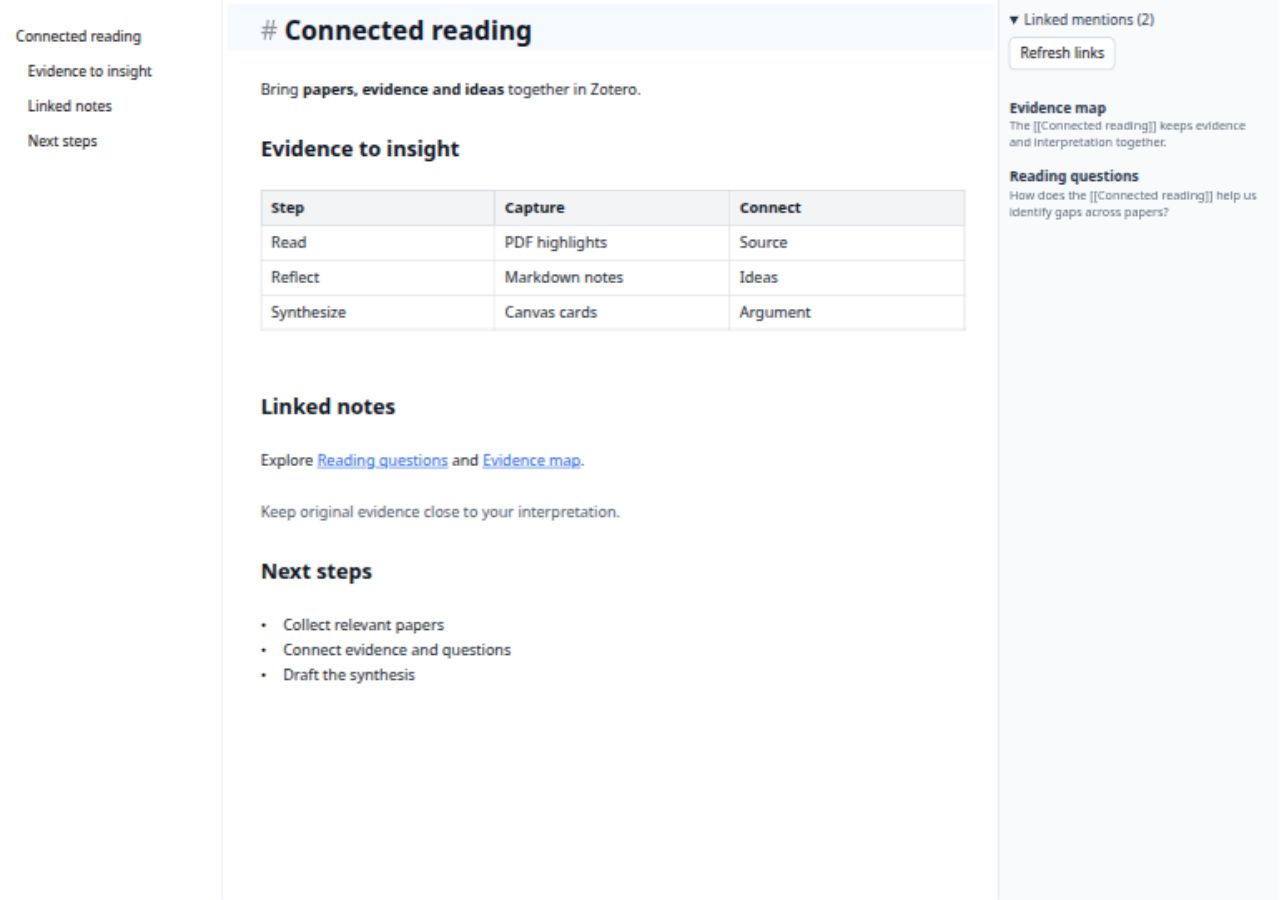
- Markdown editing: Live preview, source editing, and reading preview, with tables, images, math, and footnotes.
- Flowcharts in Markdown: write Mermaid flowcharts, sequence diagrams, and mind maps directly in .md notes, preview them as you write, and include them in HTML/PDF exports.
- Linked notes: [[Note]] links, an outline, backlinks, and library-wide full-text search.
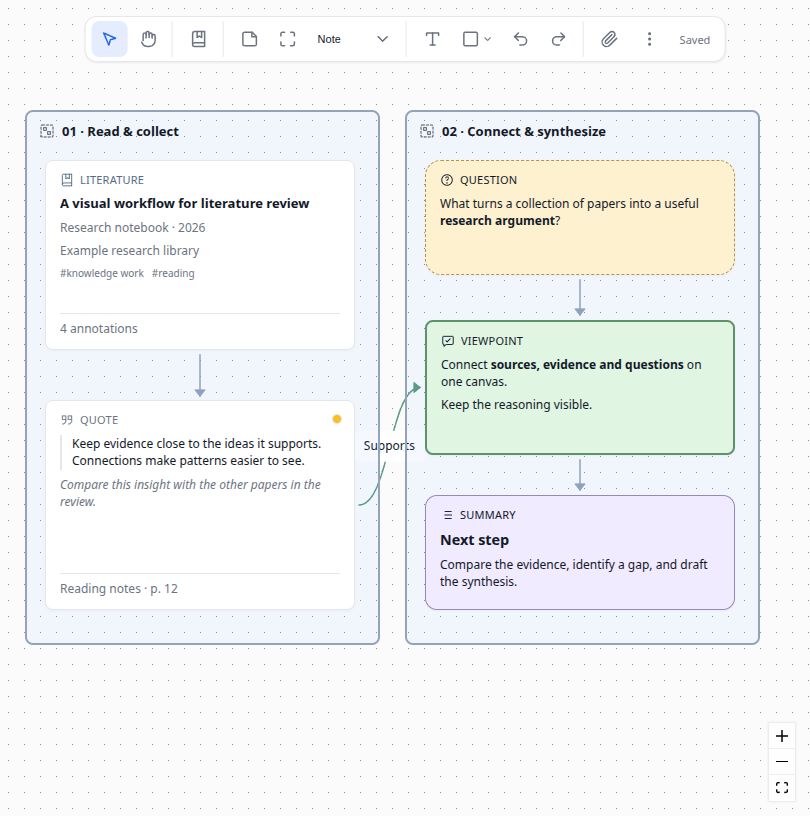
- Research whiteboards: organize papers, annotations, notes, and attachments with groups, connections, batch styling, and auto layout.
Measured star growth
- in 24h
- 0
- in 7 days
- Collecting history
- in 15 days
- Collecting history
- in 1 month
- Collecting history
Net star changes over overlapping periods, not daily totals. Missing measurements are left blank. Stars measure attention, not software quality.
About
Scholar Sketch 笔记与可视化白板插件,支持实时预览、双向链接,连接文献、PDF 注释与笔记。 Markdown notes and visual whiteboards for Zotero, with live preview, backlinks, and connected papers, PDF annotations, and notes.
ProductivityREADME.md
Original

Scholar Sketch
Markdown & Whiteboard for Zotero



Scholar Sketch extends Zotero with Markdown notes and visual whiteboards, connecting papers, PDF annotations, and ideas in one workspace.
Features
- Markdown editing: Live preview, source editing, and reading preview, with tables, images, math, and footnotes.
- Flowcharts in Markdown: write Mermaid flowcharts, sequence diagrams, and mind maps directly in
.mdnotes, preview them as you write, and include them in HTML/PDF exports. - Linked notes:
[[Note]]links, an outline, backlinks, and library-wide full-text search. - Research whiteboards: organize papers, annotations, notes, and attachments with groups, connections, batch styling, and auto layout.
- Zotero integration: drag papers onto a board, browse PDF annotations, or turn text annotations into Markdown notes.
- Portable files: native
.mdand JSON Canvas.canvasfiles; export notes with images for Obsidian and other tools, or boards as PNG, SVG, and Markdown. - Saving and recovery: autosave, local history, and file conflict checks, with tabs and standalone windows.
Install
Requires Zotero 9 / 10 / 11 for desktop.
- Download
scholarsketch-v{version}.xpifrom Releases. - In Zotero, open Tools → Plugins → gear → Install Plugin From File… and select the downloaded file.
Screenshots
Connect papers, annotations, and ideas on a research whiteboard.
Write Markdown with live preview and linked mentions.
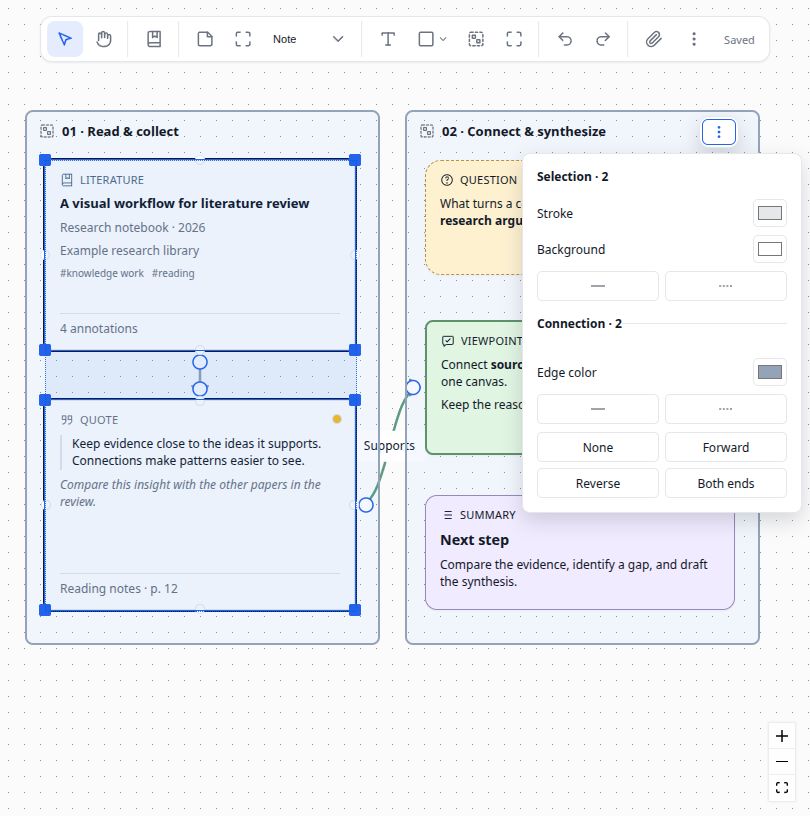
Batch styling for cards and connections
Quick start
- Write a note: click the Scholar Sketch toolbar button → New Markdown Note…. Select a paper first to attach the note to it, or clear the selection to create a standalone note in the current library or collection. Double-click its
.mdattachment to continue editing. Type[[to link another note. - Insert with slash commands: type
/in a blank paragraph, filter commands, then use ↑/↓ and Enter. Search keywords follow Zotero’s language; override English or pinyin in Markdown settings. - Convert existing Notes: select native Zotero Notes, then right-click → Scholar Sketch → Convert Notes to MD. The new attachments keep supported images and source links; originals are retained.
- Reference literature: type
[[and search by title. The picker shows Zotero item icons and filters for All, Regular items, Notes/attachments, and Open tabs. Open tabs includes attachments from every open tab in the current Zotero window and their parent items. Tab cycles filters immediately, Shift+Tab cycles backward, ↑/↓ selects a result, Enter inserts it, and Esc closes the picker. You can continue typing without leaving the editor. - Create a whiteboard: click the Scholar Sketch toolbar button → New Whiteboard…, drag in papers, and connect cards. Hold Space and drag to pan.
- Reuse a style: select a card or shape and click Format painter, then click a target. Double-click the brush for continuous use; press Esc to exit. The context menu also offers Copy style and Paste style, including pasting to multiple selected nodes with one undo step. Contents, references, and dimensions stay intact.
- Organize a collection or revisit a board: use New Whiteboard from Collection… or Recent Whiteboards below the separator in the same toolbar menu.
- Explore an example: choose Help → Scholar Sketch: Create Example Whiteboard.
Stored attachments follow Zotero file sync; linked attachments need separate syncing. Local history stays on the current device.
Inline HTML formatting
Markdown notes render attribute-free sup, sub, u, mark, kbd, b, strong, i, em, s, del, small, and code tags, plus br line breaks. For example, Reference<sup>9</sup> displays a superscript and H<sub>2</sub>O displays a subscript. Formatting tags require a matching closing tag and can contain Markdown or nested supported tags.
Live preview renders tags within the same line, including table cells. Move the cursor onto the line to edit its source. Reading preview and HTML/PDF exports share the same supported tags. Code examples, unsupported tags, and tags with attributes display as text.
HTML tables with formulas
Standalone HTML table blocks render in Live preview, reading preview, and HTML/PDF exports. Cells support Markdown, inline HTML formatting, and math, including $g_1$ and multiline display formulas. Both single-line and multiline table source are supported.
Supported structure includes table, caption, thead, tbody, tfoot, tr, th, and td. Positive integer colspan and rowspan values up to 1000 are rendered. Other table attributes are omitted from the rendered output. Incomplete tables remain visible as source.
Click a rendered table cell or focus the table and press Enter to edit its HTML source. Moving the cursor outside the table restores the preview. The original HTML remains in the Markdown file.
Flowcharts in Markdown
Write flowcharts, sequence diagrams, and mind maps directly in your .md notes using Mermaid—no need to draw and import a separate image. Add a fenced mermaid block:
```mermaid
flowchart LR
  A[Read papers] --> B[Take notes] --> C[Connect ideas]
```
Diagrams render in both live preview and reading preview. In live preview, move the cursor outside the block to see the diagram; click it to edit its source. HTML/PDF exports embed the rendered diagram, while the .md file keeps the editable Mermaid source.
Mermaid is bundled for offline use and loaded when needed. Invalid or overly complex diagrams retain their source with an explanation.
Documentation
- Complete user guide: Markdown, literature links, whiteboards, and shortcuts · 简体中文
- Links and export (Chinese)
- Saving and recovery (Chinese)
- Feature guide (Chinese)
Development and plugin integration
Start with contributor and agent rules, the maintenance workflow and pilot progress, and candidate verification and release promotion.
Use Node.js 22 (at least 22.16.0) and pnpm 9.15.9, matching CI.
pnpm install --frozen-lockfile
pnpm run verify      # Test ownership, lint, unit/fake tests, and build
cp .env.example .env  # Configure your Zotero development environment
pnpm start           # Build and launch Zotero
pnpm run build       # Build the XPI
Browser testing · Markdown API · Canvas API
Native Zotero acceptance is separate from Node/fake checks. CI builds candidates; maintainers explicitly approve and promote the verified package.
Feedback and contributions are welcome through Issues and pull requests.
Built with Zotero Plugin Template and markdown-it.