
kritiksoman/GIMP-ML
kritiksoman/GIMP-ML has 1,557 GitHub stars and 138 forks. GitHot measured 0 stars in 24 hours. Last checked 2026-11-08 04:13 UTC. Last push 2026-11-01.
AI for GNU Image Manipulation Program
Measured star growth
- in 24h
- 0
- in 7 days
- Collecting history
- in 15 days
- Collecting history
- in 1 month
- Collecting history
Net star changes over overlapping periods, not daily totals. Missing measurements are left blank. Stars measure attention, not software quality.
README.md
OriginalGIMP-ML: image generation and editing
Generate and edit images in GIMP 3 using Gemini models through OpenRouter or Google. Native dialogs live under Filters > GIMP-ML; no local models, GPU, or separate UI application are needed. Results become new layers by default, with optional undoable pixel replacement.
Plugin UI and generated output
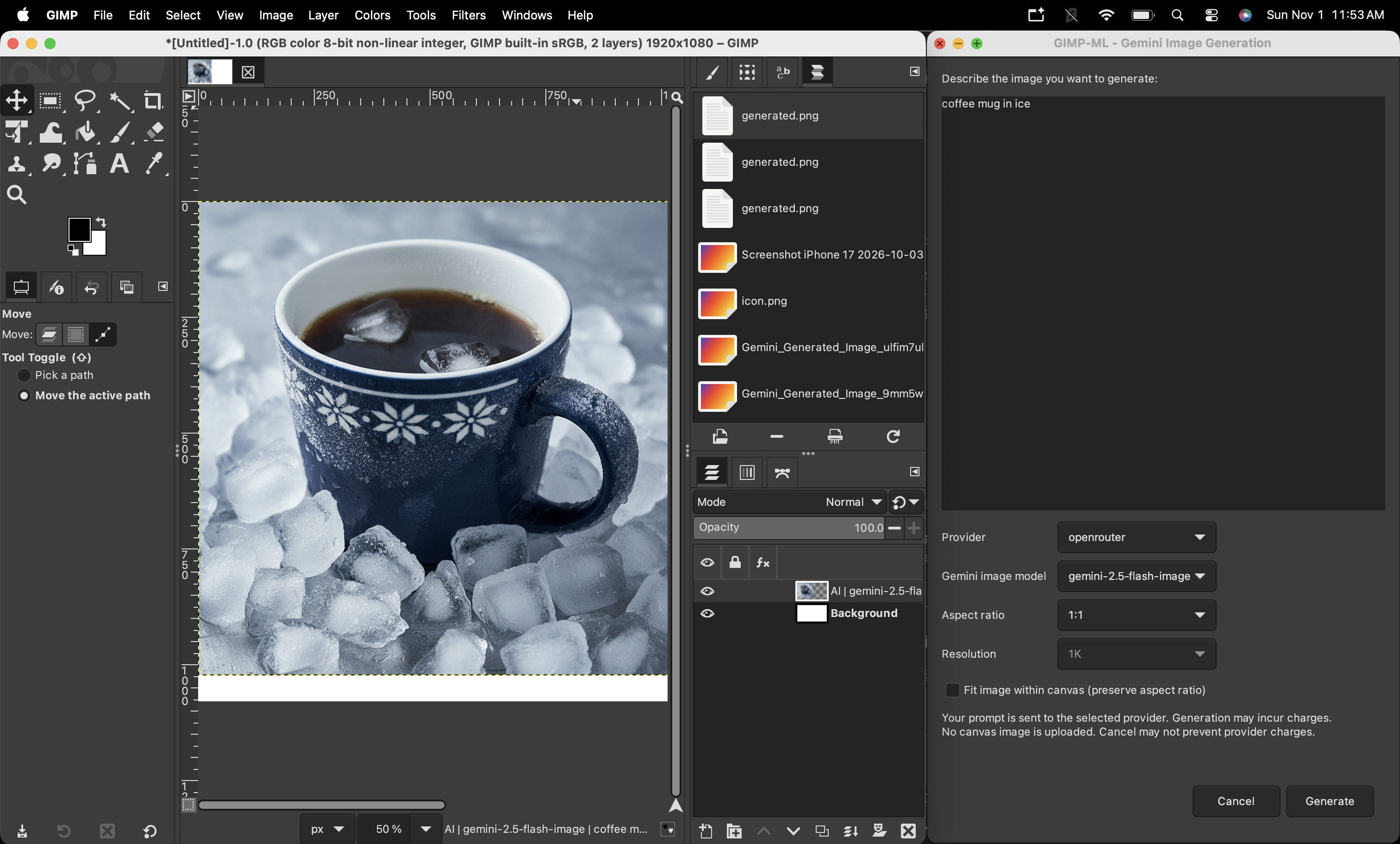
Earlier generation dialog in GIMP 3.2.4 on macOS: "coffee mug in ice" via
OpenRouter, gemini-2.5-flash-image, 1:1, 1K. The current version has separate
generation/editing commands and macOS Settings.
Install
Requirements: GIMP 3.0 or newer, a separate Python 3.10+ installation with
venv/pip, internet access, and a funded API account.
macOS disk image
On macOS 13 or newer, open GIMP-ML-macOS.dmg, fully quit GIMP (Cmd+Q), and
double-click Install GIMP-ML. If GIMP is not in /Applications/GIMP.app, use
Choose GIMP... to select it. Python from Homebrew or python.org must already be installed;
setup downloads dependencies and does not install Python itself.
The native installer contains an interactive terminal and an animated progress bar in one window; it does not launch Terminal.app. Output is streamed to the embedded terminal and the installation log. Ctrl+C interrupts setup. After setup finishes, the terminal becomes an interactive Bash shell for commands; click Done to close it before ejecting the disk image. Download times vary, so the progress bar is indeterminate rather than claiming a percentage.
The installer:
- Copies the backend to
~/Library/Application Support/GIMP-MLand creates its isolated.venv, so the disk image can be ejected after installation. - Queries GIMP 3 for its actual user plugin directory (including version-specific
directories such as
3.0or3.2) and installs the plugin there. - Adds that directory to GIMP's Preferences > Folders > Plug-ins search path
only if it is missing, preserving other entries and saving the original
preferences as
gimprc.gimpml-backupbefore the first change. - Requires no administrator password and does not modify GIMP.app or save API keys. The running-GIMP check applies only to the installing user, not other accounts.
Reopen GIMP and use Filters > GIMP-ML > Settings... to save your API key.
Rerun the installer for updates or after switching GIMP versions. Errors are
recorded in ~/Library/Logs/GIMP-ML/install.log and shown in the embedded terminal
on failure. To uninstall, remove gimpml-gemini from the discovered user plugin
directory and remove ~/Library/Application Support/GIMP-ML. The standard user
plugin search path should remain in GIMP's preferences.
This build is ad-hoc signed, not Developer ID signed or notarized. macOS may block a downloaded copy; only for a build you trust, use System Settings > Privacy & Security > Open Anyway. Public distribution without this warning requires Developer ID signing and Apple notarization.
Source installation
python3 scripts/install.py
The installer creates .venv and copies the plugin to GIMP's user plugin
directory without modifying GIMP's bundled Python or other plugins.
For custom paths:
python3 scripts/install.py --gimp "/path/to/gimp"
# Or bypass discovery:
python3 scripts/install.py --plug-in-dir "/your/GIMP/plug-ins"
Rerun the installer after moving the repository or updating plugin code. Then fully quit GIMP (Cmd+Q on macOS) and reopen it; closing a dialog alone does not refresh the installed plugin.
To use a permanent backend location and automatic search-path registration from the command line on macOS (with GIMP fully closed):
python3 scripts/install.py \
  --runtime-dir "$HOME/Library/Application Support/GIMP-ML" \
  --register-plugin-path
Credentials
On macOS, open Filters > GIMP-ML > Settings..., enter a provider key, and click Save to store it in Keychain. Each field has a clickable key-creation guide. Saved keys are never displayed: leave a field blank to keep its key, or check Remove saved with the field blank to delete it. Changes apply immediately; saving does not verify account access or credits.
Alternatively, set the selected provider's key in GIMP's inherited environment (required on other platforms):
export OPENROUTER_API_KEY=your-openrouter-key
export GEMINI_API_KEY=your-google-api-key
Only one provider key is needed; Google also accepts GOOGLE_API_KEY.
Environment variables override Keychain and are not removed by Settings.
Use Keychain when GIMP does not inherit your terminal environment. .env files
are no longer read; never put keys into gimpml/config.json.
Key-creation guides (also shown when a key is missing): OpenRouter · Gemini.
Use
The following commands are available under Filters > GIMP-ML:
| Command | Purpose | Requires an open image |
|---|---|---|
| Generate Image... | Text-only generation without image upload | No |
| Edit Selected Layer... | Edit one layer using a text prompt | Yes |
| Edit Visible Canvas... | Edit the visible canvas composite | Yes |
| Settings... (macOS only) | Save or remove provider API keys in Keychain | No |
Choose a command, enter a prompt, select the provider/model/size, and click Generate or Apply Edit. Editing requires RGB or grayscale, plus explicit upload consent each time the dialog opens.
- Generation: creates a new top layer, or a document if none is open. Fit image within canvas scales and centers without stretching or resizing the canvas; otherwise native output size is kept.
- Layer editing: requires one ordinary layer. Uploads its pixels, including those outside the canvas, without its opacity, blend mode, or mask.
- Canvas editing: uploads the visible composite within canvas bounds.
- Output: new layers preserve originals. Optional replacement requires an unlocked selected layer (content/alpha) and unlocked parent-group content. It preserves layer properties and masks, respects the selection, and is undoable. Canvas replacement crops the composite to the target layer; new layers are not selection-clipped.
Edited results fit the input bounds without stretching, with transparent padding if needed. Inputs are limited to 12 MiB / 32 million pixels; metadata is removed before upload. Editing is a whole-image operation, not a guaranteed pixel-preserving change, even with a selection.
gemini-2.5-flash-image supports 1K only; the other offered models support
1K/2K/4K. Defaults and the 10–600 second timeout are in
gimpml/config.json.
Privacy and billing: prompts go to the selected external provider; images are uploaded only for editing with consent. API use may incur charges. Cancellation prevents local changes but may not stop provider processing or billing. There are no automatic retries, provider switching, or stored conversations.
Architecture
flowchart TD
    Installer["scripts/install.py"] --> Plugin["GIMP 3 plugin<br/>Python/GI + GTK dialogs"]
    GIMP["GIMP 3"] --> Plugin

    Plugin --> Dialog["Generate Image / Edit Selected Layer /<br/>Edit Visible Canvas"]
    Dialog -->|"prompt and options"| Worker["Short-lived external Python worker"]
    Dialog -->|"editing only: explicit consent,<br/>private PNG export"| Input["Temporary input PNG"]
    Input -->|"local path in worker request"| Worker

    Worker --> Settings["gimpml.settings<br/>validate request and preferences"]
    Worker --> Adapter["gimpml.providers<br/>provider request and image validation"]
    Adapter -->|"resolve selected provider key"| Credentials["Worker environment → macOS Keychain"]
    Credentials -->|"selected key"| Adapter
    Adapter --> OpenRouter["OpenRouter Image API"]
    Adapter --> Google["Google Gemini API"]
    OpenRouter -->|"image response"| Adapter
    Google -->|"image response"| Adapter
    Adapter -->|"validated, normalized PNG"| Output["Temporary output PNG"]
    Output --> Plugin
    Plugin --> NewLayer["Insert as a new layer"]
    Plugin --> Replace["Replace selected-layer pixels<br/>as one undoable operation"]

    Plugin --> SettingsDialog["Settings dialog (macOS)"]
    SettingsDialog -->|"keys over stdin"| CredentialWorker["Short-lived credential worker"]
    CredentialWorker --> Keychain["macOS Keychain"]
    Keychain -->|"saved-key status"| SettingsDialog
GIMP's Python/GI plugin launches short-lived workers using requests, Pillow,
and macOS keyring. JSON travels over stdin/stdout; images use private temporary
files. Keys never appear in command-line arguments or logs. Responses are
validated, errors sanitized, and temporary files cleaned up on all outcomes.
No persistent server or localhost port is used.
Development and validation
Build the lightweight, Intel/Apple Silicon macOS installer on macOS:
python3 scripts/build_dmg.py
# Or choose a different output file:
python3 scripts/build_dmg.py --output /path/to/GIMP-ML-macOS.dmg
This requires Xcode with Swift 6.2+ and uses Swift Package Manager, codesign,
and hdiutil. The first build downloads the pinned MIT-licensed
SwiftTerm terminal component;
its license is included in the app. The DMG contains the native installer
and source payload, not your environment, credentials, or existing virtualenv.
It does not bundle Python or Python dependencies. Existing output files are not overwritten.
.venv/bin/python -m unittest discover -s tests -v
On macOS, run the offline GIMP integration test:
/Applications/GIMP.app/Contents/MacOS/gimp \
  -n -d -f -s -c --batch-interpreter=python-fu-eval \
  -b "exec(open('$(pwd)/tests/gimp_smoke.py').read())" --quit
Tests use mocked HTTP responses and local image fixtures, with no paid API calls. The integration test opens a temporary graphical GIMP instance to check dialogs, credentials, worker transport, cancellation, generation, and editing.
The three procedures are also available noninteractively:
python-fu-gimpml-generatepython-fu-gimpml-edit-layerpython-fu-gimpml-edit-canvas
All accept prompt, provider, model, aspect-ratio, and resolution.
Generation adds fit-to-canvas; editing adds output-mode (new-layer or
replace-layer) and allow-image-upload (must be true).
The legacy combined python-fu-gimpml-gemini procedure is no longer available.
License and citation
The project is MIT licensed. Provider terms apply to API use and generated images. Google-generated images may include SynthID watermarks.
This paper describes the legacy computer-vision plugins, not the current GIMP 3 implementation:
@article{soman2020GIMPML,
  title={GIMP-ML: Python Plugins for using Computer Vision Models in GIMP},
  author={Soman, Kritik},
  journal={arXiv preprint arXiv:2004.13060},
  year={2020}
}
Explore related projects
affaan-m/ECC
The agent harness performance optimization system. Skills, instincts, memory, security, and research-first development for Claude Code, Codex, Opencode, Cursor and beyond.
299,448 starsNousResearch/hermes-agent
The agent that grows with you
261,622 starsmultica-ai/andrej-karpathy-skills
A single CLAUDE.md file to improve Claude Code behavior, derived from Andrej Karpathy's observations on LLM coding pitfalls.
230,784 starsfirecrawl/firecrawl
Supercharge your AI agents with data from the web and beyond. Building the library for superintelligence. 🔥
199,551 stars