
krishnakanthb13/ai_cli_manager
krishnakanthb13/ai_cli_manager has 44 GitHub stars and 6 forks. GitHot measured 0 stars in 24 hours. Last checked 2026-11-15 00:56 UTC. Last push 2026-10-17.
What you can do
- Unified Launcher: Launch any supported AI CLI (Gemini, Claude, Copilot, etc.) with a single keystroke.
- 🔥 CLI Beast Mode: Launch up to 4 AI CLIs simultaneously in a perfectly aligned 2x2 grid (Windows Terminal or tmux).
- Smart Installation: Automated dependency checks (Node.js, Python, Git, curl) and one-click installs for missing tools.
- Pre-Launch Validation: Verifies a CLI is actually installed before attempting to launch — clear error messages guide you to fix it.
Measured star growth
- in 24h
- 0
- in 7 days
- Collecting history
- in 15 days
- Collecting history
- in 1 month
- Collecting history
Net star changes over overlapping periods, not daily totals. Missing measurements are left blank. Stars measure attention, not software quality.
About
Your central hub for AI coding assistants on Windows, Linux & macOS — install, manage & launch 16+ AI CLIs (Gemini, Claude, Copilot, Codex & more) from one unified interface, plus a 2x2 Beast Mode grid.
Developer ToolsREADME.md
Original🤖 AI CLI Manager
Your Central Hub for AI Coding Assistants on Windows & Linux.

Overview
AI CLI Manager (v1.2.50) is a powerful command-line utility designed to simplify the installation, management, and launching of various AI coding assistants. It bridges the gap between different AI tools, providing a unified interface and seamless Windows integration.
✨ Key Features
- Unified Launcher: Launch any supported AI CLI (Gemini, Claude, Copilot, etc.) with a single keystroke.
- 🔥 CLI Beast Mode: Launch up to 4 AI CLIs simultaneously in a perfectly aligned 2x2 grid (Windows Terminal or tmux).
- Smart Installation: Automated dependency checks (Node.js, Python, Git, curl) and one-click installs for missing tools.
- Pre-Launch Validation: Verifies a CLI is actually installed before attempting to launch — clear error messages guide you to fix it.
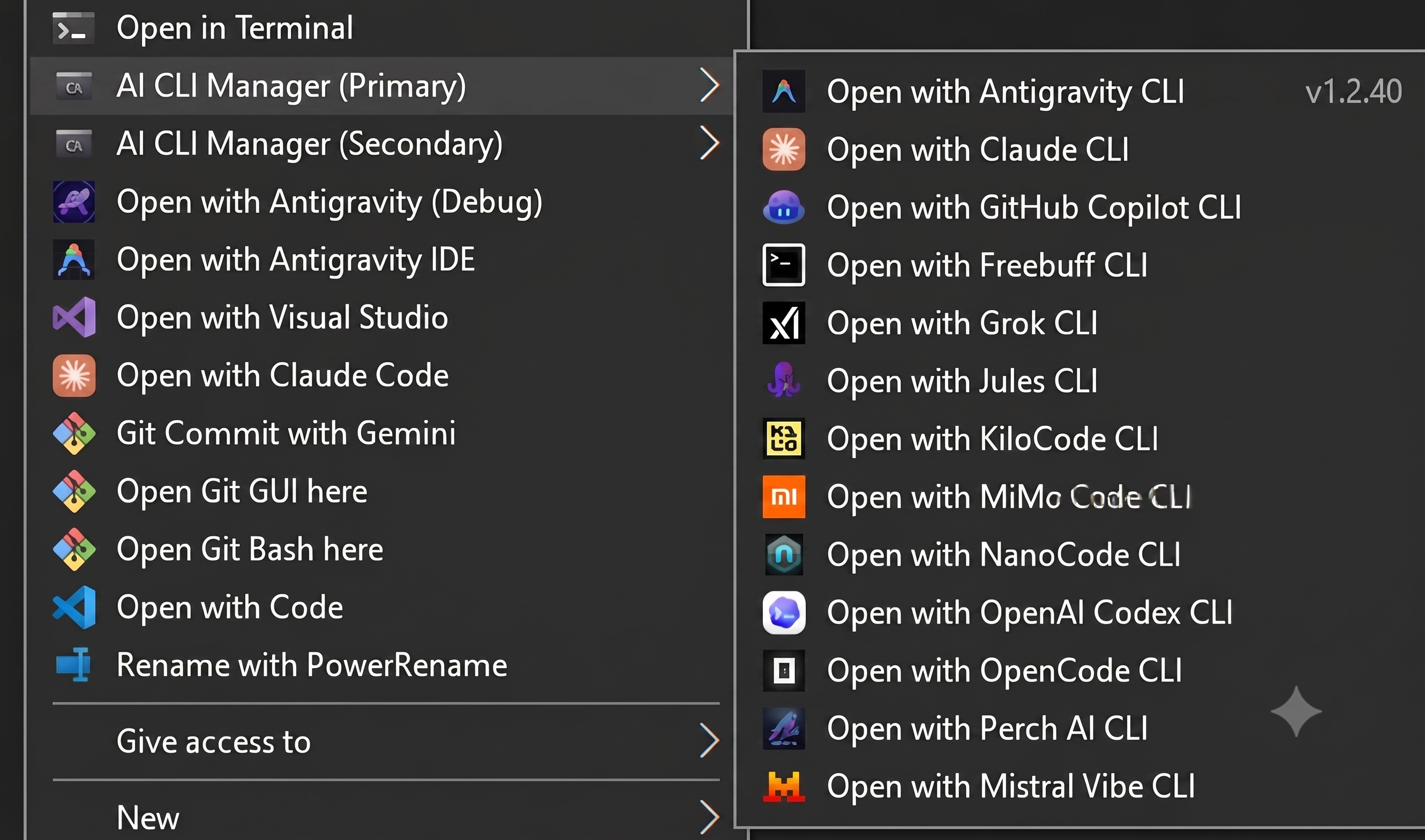
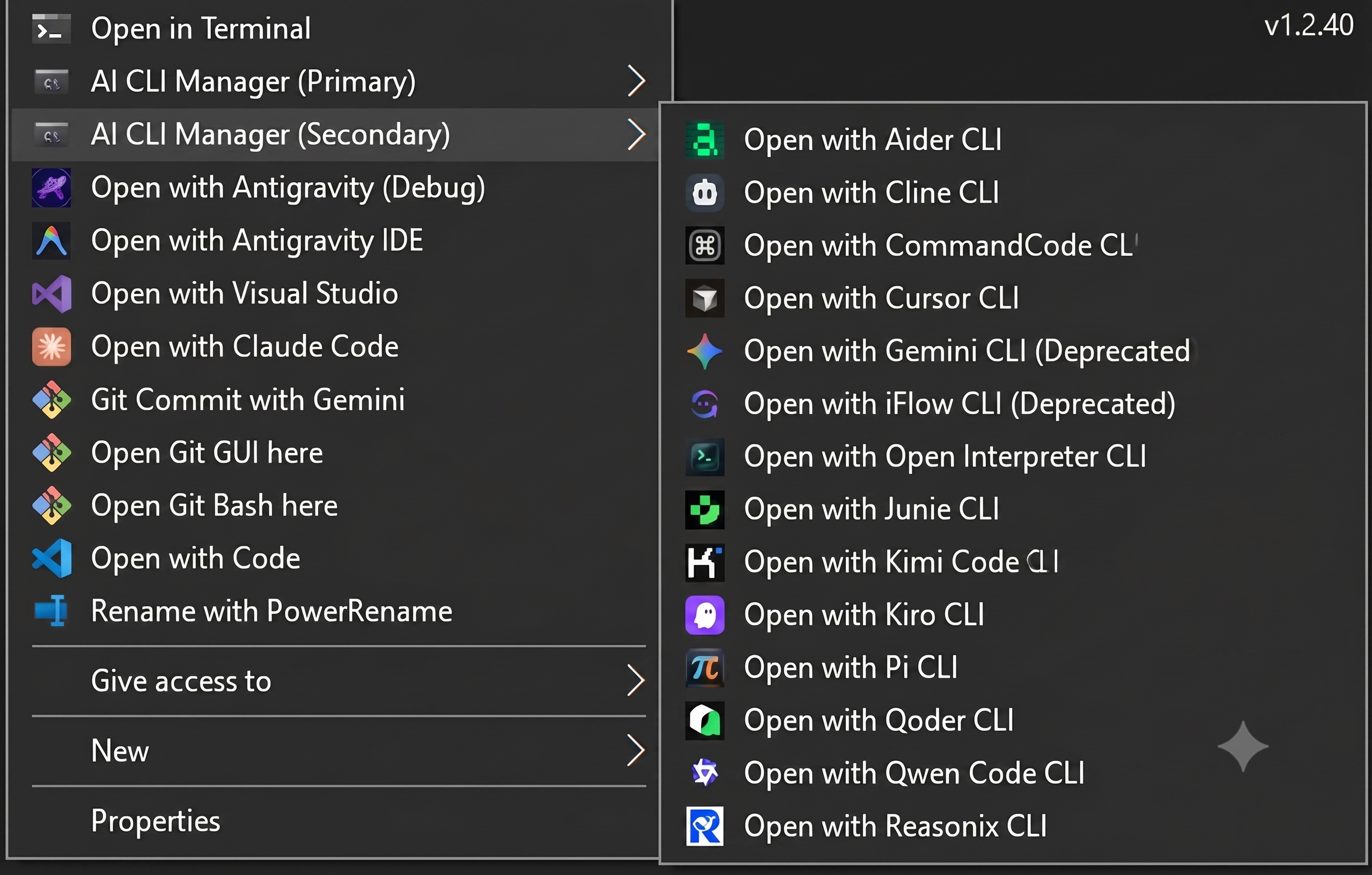
- Windows Integration: Add cascading "AI CLI Manager (Primary)" and "AI CLI Manager (Secondary)" menus to your right-click context menu in File Explorer to host all 28 tools without hitting Windows registry limits.
- Cross-Platform: Primary focus on Windows (Batch) with robust support for Linux & macOS (Shell).
- Session Awareness: Comprehensive logging and registry backup utilities for system safety.
🚀 Quick Start
💻 Windows (Primary)
- Full Suite (28 Tools): Double-click
AI_CLI_Manager.batto launch the complete manager with Primary & Secondary cascading context menus. - Focused Suite (13 Tools): Double-click
AI_CLI_Manager_0.batfor a curated setup featuring top primary agents under a single unified "AI CLI Manager (Focus)" context menu. - Elevate: The scripts automatically request Administrator privileges (
cmd /c) for system integrations. - Terminal: Automatically detects Windows Terminal; falls back to standard CMD if needed.
🐧 Linux & macOS
- Permission:
chmod +x AI_CLI_Manager.sh Multi_CLI_Grid.sh - Run:
./AI_CLI_Manager.sh - See LINUX_MAC_README.md for platform-specific details.
🔥 CLI Beast Mode (Grid View)
Beast Mode is for power users who need to orchestrate multiple AI agents at once. It launches 4 CLIs in a single session, split into quadrants.
🚀 How to Launch
- Windows: Run
Multi_CLI_Grid.bat(Requires Windows Terminal). - Linux/Mac: Run
./Multi_CLI_Grid.sh(Requires tmux).
🛠️ Configuration
- Select Layout: Choose from Preset Alpha (Copilot/Codex/Qoder/Antigravity), Preset Beta (KiloCode/Vibe/OpenCode/Qwen), or Custom Pick.
- Select Directory: Enter the path to your project folder when prompted.
- Go!: The grid opens instantly in that directory.
Note: Beast Mode supports all 28 tools (options 1–28), matching the main manager menu.
Tip: In
tmux(Linux/Mac), useCtrl+BthenDto detach from the grid without killing your active AI sessions.
📋 Supported Tools
The manager supports a wide range of industry-leading AI models and CLI agents:
| Tool | Package | Command | Installation |
|---|---|---|---|
| Gemini (Deprecated) | @google/gemini-cli |
gemini |
NPM |
| Jules | @google/jules |
jules |
NPM |
| Claude | Official Script |
claude |
PowerShell / Curl |
| OpenAI Codex | @openai/codex |
codex |
NPM |
| Mistral Vibe | mistral-vibe |
vibe |
PIP (Python) |
| GitHub Copilot | @github/copilot |
copilot |
NPM |
| Qwen Code | @qwen-code/qwen-code |
qwen |
NPM |
| Cline | cline |
cline |
NPM |
| iFlow (Deprecated) | @iflow-ai/iflow-cli |
iflow |
NPM |
| OpenCode | opencode-ai |
opencode |
NPM |
| KiloCode | @kilocode/cli |
kilocode |
NPM |
| NanoCode | nanocode-agent |
nanocode |
Git + Link |
| Junie | Official Script |
junie |
PowerShell / Curl |
| Kiro | Official Script |
kiro-cli |
PowerShell / Curl |
| Qoder | @qoder-ai/qodercli |
qodercli |
NPM |
| Antigravity | Official Script |
agy |
PowerShell / Curl |
| Aider | aider-chat |
aider |
PIP (Python) |
| Open Interpreter | open-interpreter |
interpreter |
PIP (Python) |
| MiMo Code | @mimo-ai/cli |
mimo |
NPM |
| Freebuff | freebuff |
freebuff |
NPM |
| Perch AI | perchai-cli |
perch |
NPM |
| CommandCode | command-code |
commandcode |
NPM |
| Pi | @earendil-works/pi-coding-agent |
pi |
NPM |
| Reasonix | reasonix |
reasonix |
NPM |
| Cursor | agent |
agent |
Native / CLI |
| Grok | Official Script |
grok |
PowerShell / Curl |
| Meta Muse Code | Official Script |
muse |
PowerShell / Curl |
Note on Installation: Smart Install (Option
I) automatically manages Node.js, Python, and Git. Git-based tools like NanoCode are cloned into the/Toolsdirectory and linked vianpm link.
🔮 Future Candidates
A list of notable AI CLIs under consideration for future integration:
| Name | Reason (TL;DR) |
|---|---|
| Devin CLI | High-autonomy agent featuring local execution and cloud VM handoff. |
| Amazon Q Developer | Powerful AWS-native assistant with command auto-completion and agentic workflows. |
| CrabCode | Open-source, Rust-based local agentic CLI with a Terminal User Interface (TUI). |
| mini-SWE-agent | Minimalist agentic framework achieving top benchmark results on SWE-bench. |
🛠️ Menu Guide
1. Management & Versions
ICheck and Install All: Scans for all supported tools and installs missing ones automatically.VShow Versions: Lists specific installed versions or marks them as[NOT INSTALLED].
2. Launch CLIs (1-28)
Launches the selected tool in the current directory (or a specified path) using the best available terminal emulator.
3. Context Menu Integration
AAdd to Windows Context Menu: (Pro-Tip 🔥) Adds cascading "AI CLI Manager (Primary)" and "AI CLI Manager (Secondary)" menus to Explorer.How to use: Right-click any folder or empty space > Hover over "AI CLI Manager (Primary)" or "AI CLI Manager (Secondary)" > Select your agent.
Why two menus? Windows has a strict built-in registry limit of 16 items per cascading subcommand menu. To accommodate all 28 tools, they are separated into two cascading menus:
Primary Cascading Menu (Sorted Alphabetically)
- Antigravity CLI (
agy) - Claude CLI (
claude) - CommandCode CLI (
commandcode) - Freebuff CLI (
freebuff) - GitHub Copilot CLI (
copilot) - Grok CLI (
grok) - Jules CLI (
jules) - KiloCode CLI (
kilocode) - Meta Muse Code CLI (
muse) - MiMo Code CLI (
mimo) - Mistral Vibe CLI (
vibe) - NanoCode CLI (
nanocode) - OpenAI Codex CLI (
openai) - OpenCode CLI (
opencode) - Perch AI CLI (
perchai)
Secondary Cascading Menu (Sorted Alphabetically)
- Aider CLI (
aider) - Cline CLI (
cline) - Cursor CLI (
cursor) - Gemini CLI (
gemini- Deprecated) - iFlow CLI (
iflow- Deprecated) - Junie CLI (
junie) - Kimi Code CLI (
kimi) - Kiro CLI (
kiro) - Open Interpreter CLI (
interpreter) - Pi CLI (
pi) - Qoder CLI (
qoder) - Qwen Code CLI (
qwen) - Reasonix CLI (
reasonix)
- Antigravity CLI (
BRemove Menu: Cleanly uninstalls registry entries.CRegistry Backup: Highly Recommended before using OptionA. Saves a.regfile to theLog Filesfolder.
4. System Utilities & Exit
DRestart Explorer: Instantly applies visual/registry changes.EDeep Refresh Icons: Force-clears icon cache if menu icons look broken.0/exit/quit/q: Cleanly terminates the manager and closes the terminal window.
🐧 Testing Linux Scripts on Windows
You can run AI_CLI_Manager.sh on Windows for cross-platform testing:
- Option 1: Git Bash: Right-click folder > "Open Git Bash Here" >
./AI_CLI_Manager.sh. - Option 2: WSL (Recommended): Navigate to your project folder (e.g.,
/mnt/c/Users/...) in your WSL terminal for a true Linux environment.
🔍 Troubleshooting & Logs
| Issue | Solution |
|---|---|
| "Access Denied" | Right-click > "Run as Administrator". |
| Menu not appearing | Use Option D (Restart Explorer). |
| Broken Icons | Use Option E (Deep Refresh). |
| PATH errors | Restart your computer after new tool installations. |
| "CLI not found in PATH" | Run Option I to install the missing tool, then retry. |
| Junie/Kiro install fails | Ensure curl (Linux/macOS) or internet access (Windows) is available. |
| Context menu icons persist after removal | Use Option E (Deep Refresh Icons) after removing the menu. |
- Logs:
AI_CLI_MG_YYYYMMDD_HHMMSS.loginLog Files/. - Backups:
AI_CLI_Backup_YYYYMMDD_HHMMSS.reginLog Files/.
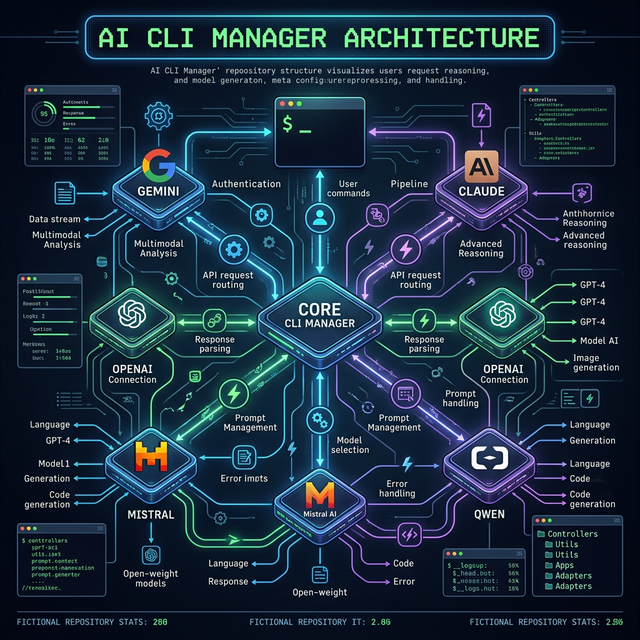
📊 Project Visual Overview
📚 Documentation Links
- 🛠️ Technical Documentation: Deep dive into architecture and logic.
- 🎨 Design Philosophy: The "Why" behind the tool.
- 🤝 Contributing Guide: How to help improve the tool.
- 🐧 Linux & macOS Guide: Platform-specific details.
⚖️ License & Credits
Licensed under the GNU General Public License v3.
Copyright (C) 2026 Krishna Kanth B