
kranz-org/kranz
kranz-org/kranz has 62 GitHub stars and 3 forks. GitHot measured 0 stars in 24 hours. Last checked 2026-11-15 10:03 UTC. Last push 2026-11-10.
Measured star growth
- in 24h
- 0
- in 7 days
- Collecting history
- in 15 days
- Collecting history
- in 1 month
- Collecting history
Net star changes over overlapping periods, not daily totals. Missing measurements are left blank. Stars measure attention, not software quality.
About
Keyboard-first local service orchestrator with a focused terminal UI
Developer ToolsREADME.md
Original
Kranz
A keyboard-first local service orchestrator with a focused terminal UI.


Kranz starts, observes, and stops a local development stack from one terminal. It understands dependency order, readiness and liveness, process groups, runtime ports, logs, one-shot actions, and detached infrastructure whose life is not tied to a local PID.
Each project runtime is owned by a separate user-level supervisor; the TUI, CLI, and MCP connect to it as clients. There is no system service or shared control plane. Use it for the processes you would otherwise spread across terminal tabs, alongside Docker Compose when containers remain the right home for infrastructure.
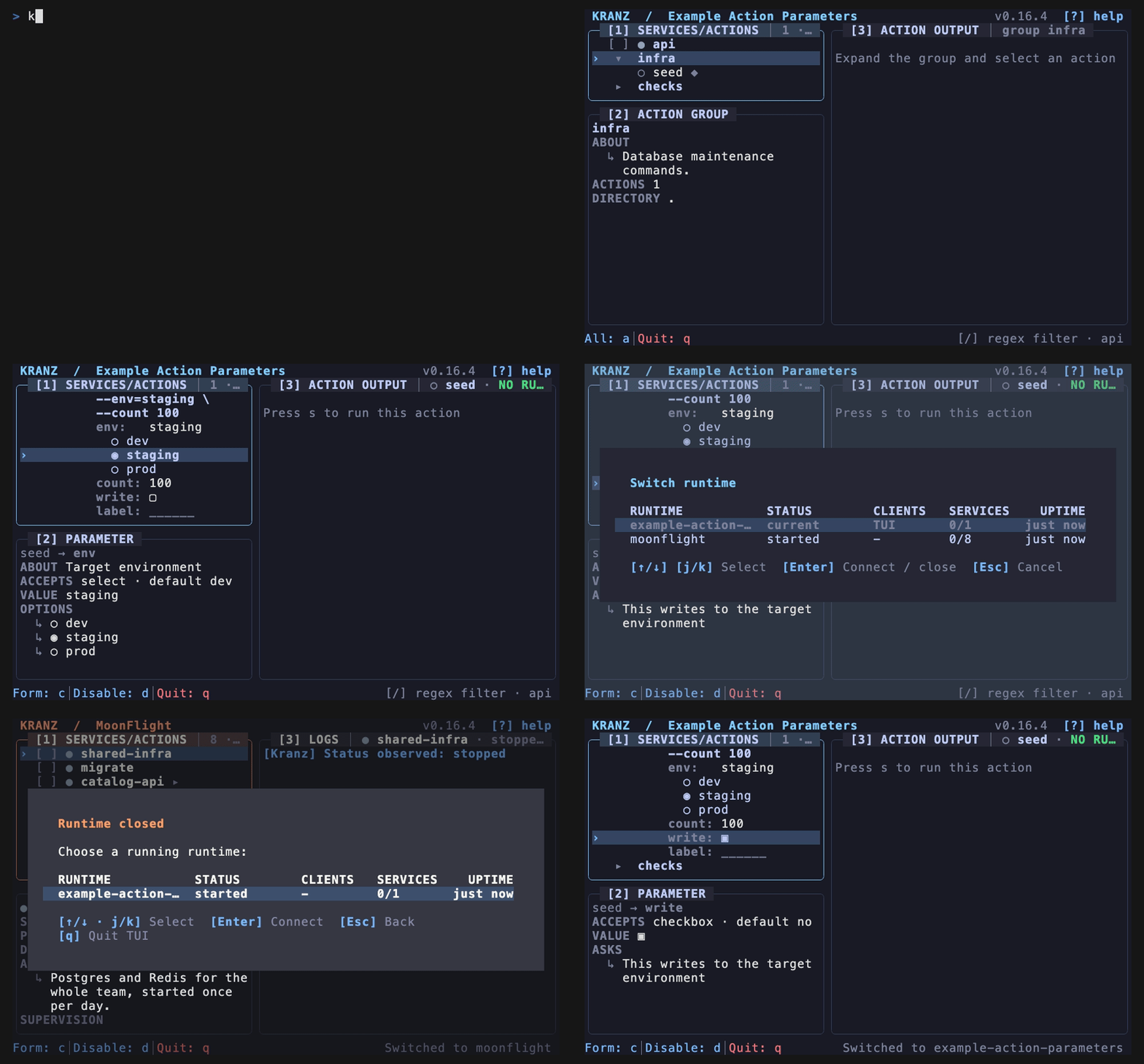
TUI, CLI, and MCP
Kranz exposes each runtime through three views:
- TUI — the keyboard-first operator view for services, details, logs, lifecycle plans, actions, health history, and notifications;
- CLI — the terminal and scripting view, including stable JSON results;
- MCP — the coding-agent view over the same application operations.
They use the same supervisor. A service restarted by a command or coding agent changes immediately in the open TUI; none of these views starts a second stack.
Large workspaces can compose independently runnable repository configs through
exact includes, globs, or bounded discovery. File-local defaults and relative
paths stay isolated; ordered --override layers, final protected values,
stable service IDs, provenance, and safe pending reloads remain identical in
the TUI, CLI, and MCP.
Coding agents join your live runtimes
Kranz MCP gives a coding agent the same services, actions, readiness, ports, bounded logs, and numbered run history visible in the TUI. It attaches to the existing runtimes instead of starting a second development stack.
- Shared runtimes — TUI, CLI, and MCP converge on the supervisor of the project addressed by each call.
- One view of the project — the same selectors, action runs, and logs.
- Clear ownership — disconnecting an attached agent does not stop the stack.
Register the existing binary once, globally, as a stdio MCP server running
kranz mcp. It takes no project: the runtime is chosen per call, so one
registration covers every project, and connecting creates nothing.
See Coding agents and your live runtimes for ownership behavior and examples, and the MCP reference for the exact resource, tool, cursor, confirmation, and error contracts.
For Claude Code, the Kranz plugin bundles the MCP connection with the agent skill. After installing the binary, add this repository as a plugin marketplace and install the plugin:
claude plugin marketplace add kranz-org/kranz
claude plugin install kranz@kranz
The standalone agent skill remains available for Codex, OpenCode, and other clients that support Agent Skills. Keep the plugin's copy of the skill synchronized with this source when updating it.
Quick start
Install on macOS or Linux:
brew install kranz-org/tap/kranz
Or with Go 1.26 or newer:
go install github.com/kranz-org/kranz/cmd/kranz@latest
Create a Procfile:
web: python3 -u -m http.server 8000 --bind 127.0.0.1
worker: while true; do date; sleep 2; done
Run kranz, press a to select everything, then s to start. Kranz discovers
the web listener automatically and shows both services' state and logs.
Already using a supported process-compose.yaml? Run kranz beside it. Use
native kranz.yaml when you need the complete lifecycle model.
Command line
The TUI is optional. Kranz includes a complete CLI for starting a project in the background, inspecting it from another terminal, acting on services, and returning stable JSON to scripts:
kranz init --from Procfile
kranz config check
kranz up -d
kranz status
kranz logs api --tail 20
kranz runs api
kranz logs api --run -1
kranz restart api
kranz down
Use kranz --help to discover commands, kranz COMMAND --help for command
options, and --output json for the versioned machine-readable envelope. See
Working from the command line
for a complete session and the CLI reference
for every command, option, output contract, and exit code.
What it handles
- Dependency-aware startup and reverse-order shutdown
- HTTP, TCP, and command readiness/liveness checks
- Process recovery with backoff and restart limits
- Managed and observe-only detached resources with start/stop/status/logs
- Service actions and project action groups with timeout and confirmation
- Typed action parameters shared by TUI, CLI, MCP, and prerequisites
- Prerequisites that must succeed before a service starts
- Runtime port discovery and ownership-aware conflict handling
- Searchable, pinnable, timestamped logs in a keyboard and mouse TUI; selection controls share the footer with right-aligned action status, and clearing a selection keeps the position reached while scrolling
- Your own log tools: shell pipelines for in-panel formatting, or a terminal viewer for selected runs
- In-place switching between live local runtimes with per-runtime TUI state
- Bounded per-service and per-action run history with provenance, exact output retention state, navigation, deletion, and export
- Procfile, native YAML, and conservative Process Compose loading
- Detected configuration changes with explicit reload and last-known-good fallback
- Exact CLI filters, bounded live watch, stable JSON, and Docker-style row templates for automation
- Draft-based configuration authoring with editable services, actions, appearance, and a final diff before writing
Documentation
- Getting started
- TUI · Terminal interface
- CLI · Command line
- MCP · Coding agents
- Configuration and lifecycle
- Configuration reference
- Annotated kranz.yaml
- CLI reference
- MCP server reference
- Keyboard shortcuts
- Troubleshooting
- Runnable examples
The documentation source lives in docs/ and is deployed to
kranz-org.github.io/kranz/ from main.
Development
make verify
make lint
npm install
npm run docs:dev
Release instructions are in docs/RELEASING.md.