
konstantinruge/notion-clone
konstantinruge/notion-clone has 2,954 GitHub stars and 326 forks. GitHot measured 0 stars in 24 hours. Last checked 2026-11-08 18:03 UTC. Last push 2023-10-15.
Edit Notes like in Notion.so. Full-Stack App using React/Express.
What you can do
- Slash Commands (Type / to turn the block into different content types)
- HTML Support (Use regular HTML tags like <a> in text blocks)
- Image Support (Upload images by using the /image command)
- Drag And Drop (Reorder blocks easily by drag and drop)
Measured star growth
- in 24h
- 0
- in 7 days
- Update delayed
- in 15 days
- Update delayed
- in 1 month
- Update delayed
Net star changes over overlapping periods, not daily totals. Missing measurements are left blank. Stars measure attention, not software quality.
README.md
Original📓 Notion Clone
Create and Edit Notes like in Notion
This clone tries to replicate some of the great note-taking features Notion has. If you don't know Notion.so yet, I highly recommend to check it out!
📌 Live Demo: notion-clone.kmuenster.com
📌 Medium Article: How To Build A Text Editor Like Notion
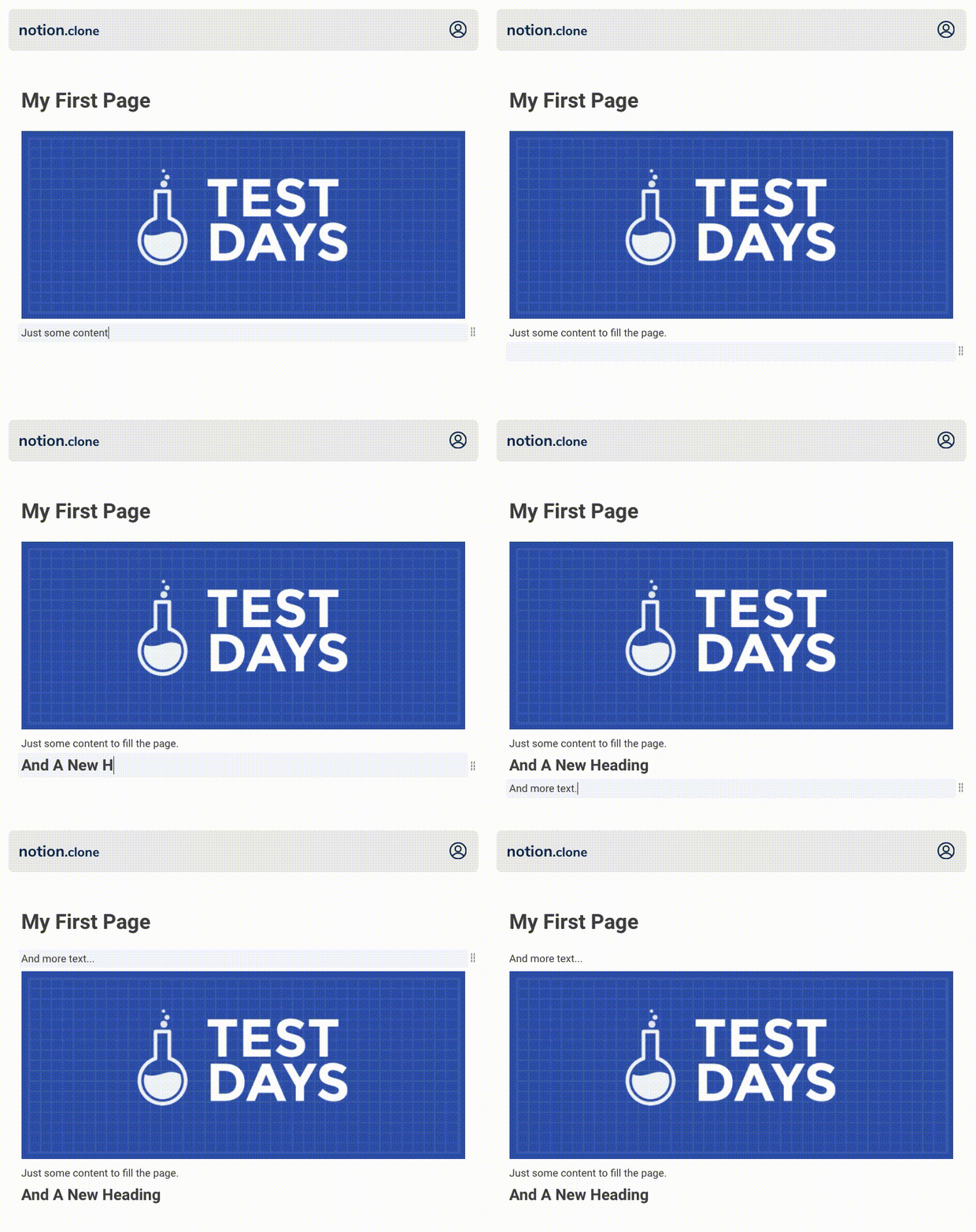
Features
- Slash Commands (Type
/to turn the block into different content types) - HTML Support (Use regular HTML tags like
<a>in text blocks) - Image Support (Upload images by using the
/imagecommand) - Drag And Drop (Reorder blocks easily by drag and drop)
- Guest Editing (Anyone can create public pages and share them via link)
- User Management (Create an account to create private pages)
- Scheduled Jobs (Delete inactive pages and accounts automatically)
Tech Stack
The frontend is built with Next.js and fully server-side rendered. On the backend, a REST API handles saving user content and user management.
Frontend
Next.js · React.js · SCSS/SASS
Backend
Express.js · MongoDB with Mongoose · Nodemailer · JWT (Cookie-based)
Installation
Clone the project
 git clone https://github.com/konstantinmuenster/notion-clone.git
 cd notion-clone
Add environment variables
Backend: Create an
.envfile in thebackenddirectory:FRONTEND_URL="http://localhost:3000" DOMAIN="localhost" JWT_KEY="yourSecretForTokenGeneration" PORT=8080 MONGO_URI="mongodb+srv://username:[email protected]/database?retryWrites=true&w=majority" MAIL_HOST="smtp.sendgrid.net" MAIL_PORT=465 MAIL_USER="apiKey" MAIL_SENDER="Your Name <[email protected]>" MAIL_PASSWORD="yourSendGridApiKey"Frontend: Create an
.env.localfile in thefrontenddirectory:NEXT_PUBLIC_API="http://localhost:8080" // references your Backend API endpointInstall and run backend (http://localhost:8080)
cd backend
npm install
npm start
Install and run frontend (http://localhost:3000)
cd frontend
npm install
npm run dev
Hosting
You can host the application on almost any provider that supports Node applications and custom domains. I decided to host the frontend on vercel.com and the backend on heroku.com. But you can host both, frontend and backend, on the same provider if you like to.
MongoDB Atlas
You have to create a new MongoDB cluster upfront. It will store all of your page and block data. You can create one for free on MongoDB Atlas.
Make sure, you create the following collections:
- pages
- users
Make sure, you allow network access to everyone (due to Heroku).
Backend
If you want to deploy the backend on heroku.com, create a new app in your preferred region on heroku.com.
Make sure, you add all production environmental variables for the backend. You can see which variables are needed in the Installation part of this readme.
Make sure, you add a custom domain for your backend API. Since the application uses a Cookie-based authentication, we have to run backend and frontend on the same domain. I, for example, run the frontend on www.notion-clone.kmuenster.com and the backend on api.notion-clone.kmuenster.com.
Want to run scheduled jobs? To delete inactive pages and users, I run scheduled jobs frequently. If you want this feature as well, you have to add more dynos to your application and run the job
$ node jobs/index.jsvia Heroku Scheduler.
Lastly, you can deploy your app using Heroku Git.
Make sure, that when you push the backend to Heroku, you make a Git subtree push since notion-clone is a mono-repo containing backend and frontend. So run git subtree push --prefix backend heroku master instead of git push heroku master. Thus, we only push the backend part.
Frontend
If you want to deploy the frontend on vercel.com, you can so easily using the Vercel CLI.
With the Vercel CLI, we don't have to make a subtree push, instead we can just switch to the frontend folder and run the vercel command to deploy:
cd frontend
vercel
This will lead you through the setup guide for your frontend application. Afterwards the app should be successfully deployed.
Make sure, you add the Backend API endpoint as a production environmental variable on Vercel.com.
Make sure, you add a custom domain for your frontend (that ideally matches the domain which you have specified in your backend environmental variables 😉)
About

Konstantin Münster – konstantin.digital
Distributed under the MIT license.
See LICENSE for more information.
Explore related projects
freeCodeCamp/freeCodeCamp
freeCodeCamp.org's open-source codebase and curriculum. Learn math, programming, and computer science for free.
458,782 starsdonnemartin/system-design-primer
Learn how to design large-scale systems. Prep for the system design interview. Includes Anki flashcards.
377,374 starsreact/react
The library for web and native user interfaces.
252,429 starsvuejs/vue
This is the repo for Vue 2. For Vue 3, go to https://github.com/vuejs/core
212,631 stars