
koelony/munia
About
OraType (formerly Typelite). Just say it. Free, open-source voice typing for macOS: speak in any app and get clean text. Runs on your computer or your own servers.
Developer ToolsWhat you can do
- Dictate - Speak, and clean text is pasted where you are typing. - Fn
- Translate - Speak, and it is written in another language. - Fn + ⇧
- Ask anything - Ask a question, or highlight text and say "make this shorter". Answers show in a panel above the pill. - Fn + Space
- Switch language - Change the translation target while you speak. - ⇧
Measured star growth
- in 24h
- 0
- in 7 days
- +2
- in 15 days
- +1
- in 1 month
- Collecting history
Net star changes over overlapping periods, not daily totals. Missing measurements are left blank. Stars measure attention, not software quality.
README.md
Original

OraType
Just say it. Press a shortcut in any app, speak, and clean text lands where you're typing.
Free and open source (MIT) · No account · No telemetry · Runs on your computer or your own servers
OraType was called Typelite until version 1.2.0.
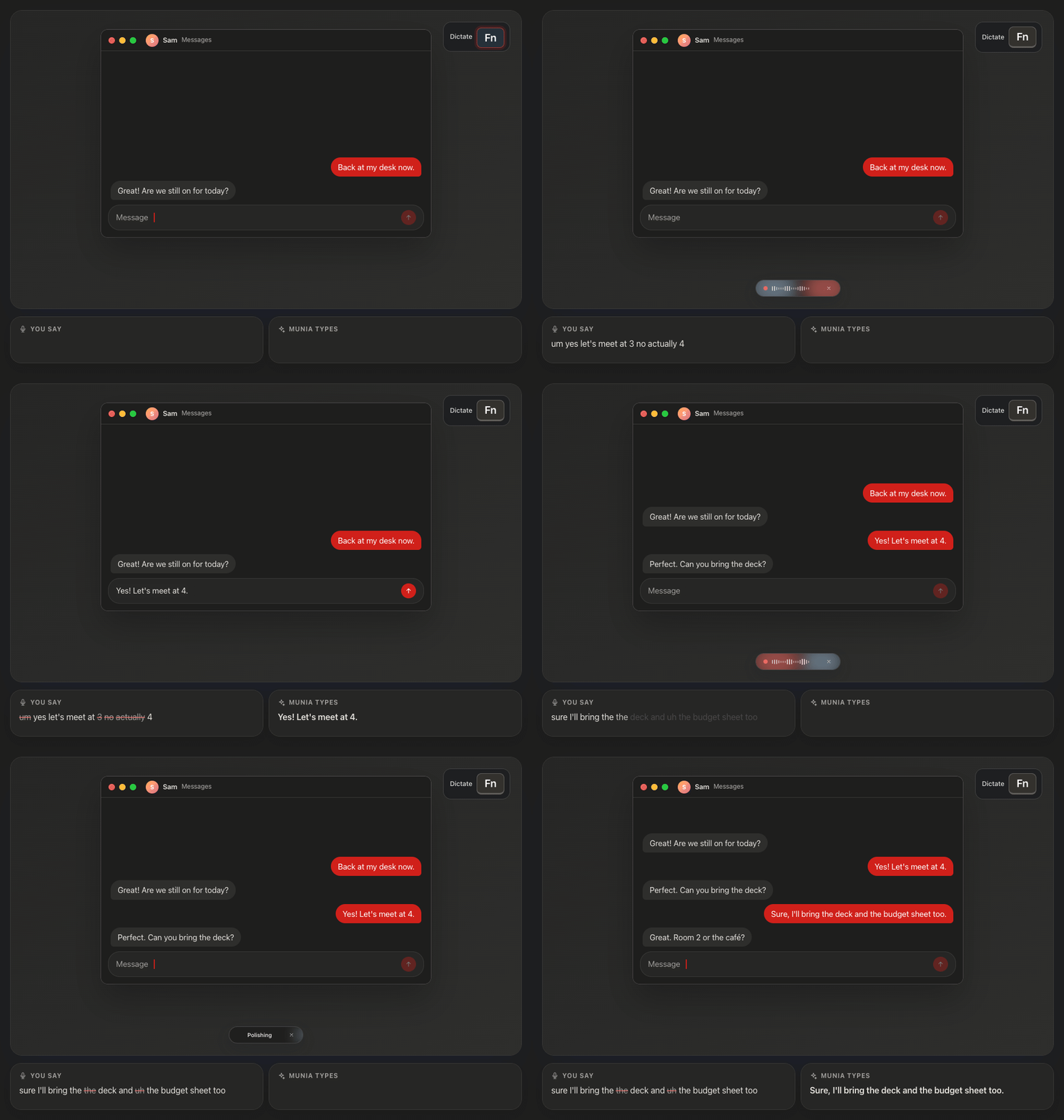
OraType is a voice keyboard for macOS. Hold or tap a shortcut and speak. OraType turns your speech into text, removes fillers, applies your self-corrections, adds punctuation and pastes the result where you are typing. It can also translate what you say, or answer a question about the text you have highlighted.
Quick start
Download
OraType 1.0 runs on Macs with Apple Silicon (M1 or later).
- Download
OraType_X.Y.Z_aarch64.dmgfrom the latest release. To check it, downloadSHA256SUMS.txttoo and runshasum -a 256 -c SHA256SUMS.txt --ignore-missing. - Open the DMG and drag OraType to Applications.
- Start it once as described in First launch.
Build from source
You need Rust (rustup), Node.js 20 or later, the Xcode Command Line Tools and CMake.
git clone https://github.com/sennett-lau/oratype.git
cd oratype
npm ci
npm run build:app      # builds llama-server, then the app
open src-tauri/target/release/bundle/macos/OraType.app
More detail is in the Contributing guide.
First launch
- Downloaded builds are not signed by Apple yet, so macOS blocks the first launch. Right-click
OraType.app and choose Open (on macOS 15 and later: System Settings → Privacy &
Security → Open Anyway), or run
xattr -dr com.apple.quarantine /Applications/OraType.apponce. - Allow Microphone and Accessibility when macOS asks. Accessibility lets OraType paste.
- Follow the guided setup: microphone, speech, AI, then a short hands-on tutorial.
OraType is macOS first and runs best on Apple Silicon.
What makes OraType different
Language presets and a router
Each of your languages can carry its own writing instructions. Pick a preset (for example Cantonese (Hong Kong), English or Mandarin (Taiwan)) from the shared preset catalogue. Your edits are kept, and updates are offered, never forced.
When you dictate, the router works out which language you spoke. It uses the language that speech recognition detected, plus hint words a preset carries, such as Cantonese particles. Only that language's instructions are added, so English dictation never gets Cantonese rules.
Presets are small Markdown files. If you speak a language well, you can improve them: see Contributing a language preset.
Translate with quick language switching
Choose up to three target languages. While you speak, press the Switch key (⇧ Shift by default) or click the language name on the pill to change the target. The recording keeps going. Highlight text and press Translate to replace it with its translation.
Built-in setup in one click
On Apple Silicon, both halves can run on your computer with nothing else to install. whisper.cpp handles speech recognition inside the app, and llama.cpp's server handles AI polish. Press Set up and OraType picks models that suit your hardware, downloads them and checks each download against a SHA-256.
Bring your own server or key
Prefer a GPU computer on your network or a cloud key? OraType works with any OpenAI-compatible speech or chat server (whisper.cpp server, Speaches, Ollama, LM Studio, OpenAI, Groq, OpenRouter and more) and with the Qwen Cloud and ElevenLabs speech APIs. Cloud services are opt-in and use your own key. See the Guides.
How it compares with Typeless
OraType is inspired by Typeless, a polished commercial product.
| Typeless | OraType | |
|---|---|---|
| Source | Closed | Open source (MIT) |
| Price | Free tier and paid plans | Free |
| Account | Sign-in required | None |
| Where speech and AI run | The Typeless cloud | Your computer, your own server, or a cloud service you pick |
| Languages | Built in | Presets from a public library, plus a router |
| Translate targets | Up to 3, switch from the pill | Up to 3, switch with a key or the pill while recording |
Features
| Feature | What it does | Default keys |
|---|---|---|
| Dictate | Speak, and clean text is pasted where you are typing. | Fn |
| Translate | Speak, and it is written in another language. | Fn + ⇧ |
| Ask anything | Ask a question, or highlight text and say "make this shorter". Answers show in a panel above the pill. | Fn + Space |
| Switch language | Change the translation target while you speak. | ⇧ |
| Cancel | Stop the current recording or processing. Nothing is pasted. | esc |
| The pill | Shows recording, transcribing and polishing on the screen you are working on. It never takes focus. | |
| Copy pill | When there is nowhere to paste, the result stays in the pill with a Copy button. | |
| Presets | Save several speech and AI setups, switch between them, and export or import them. | |
| Insights | Your speaking speed against your typing speed, time from speech to text, and how your presets compare. | |
| Typing nudge | After a minute of steady typing, a small hint suggests saying it instead. At most once a day. |
Keys are shown as macOS menus show them (⇧ is Shift). Every shortcut can be changed, and hold-to-talk is available too.
Screenshots
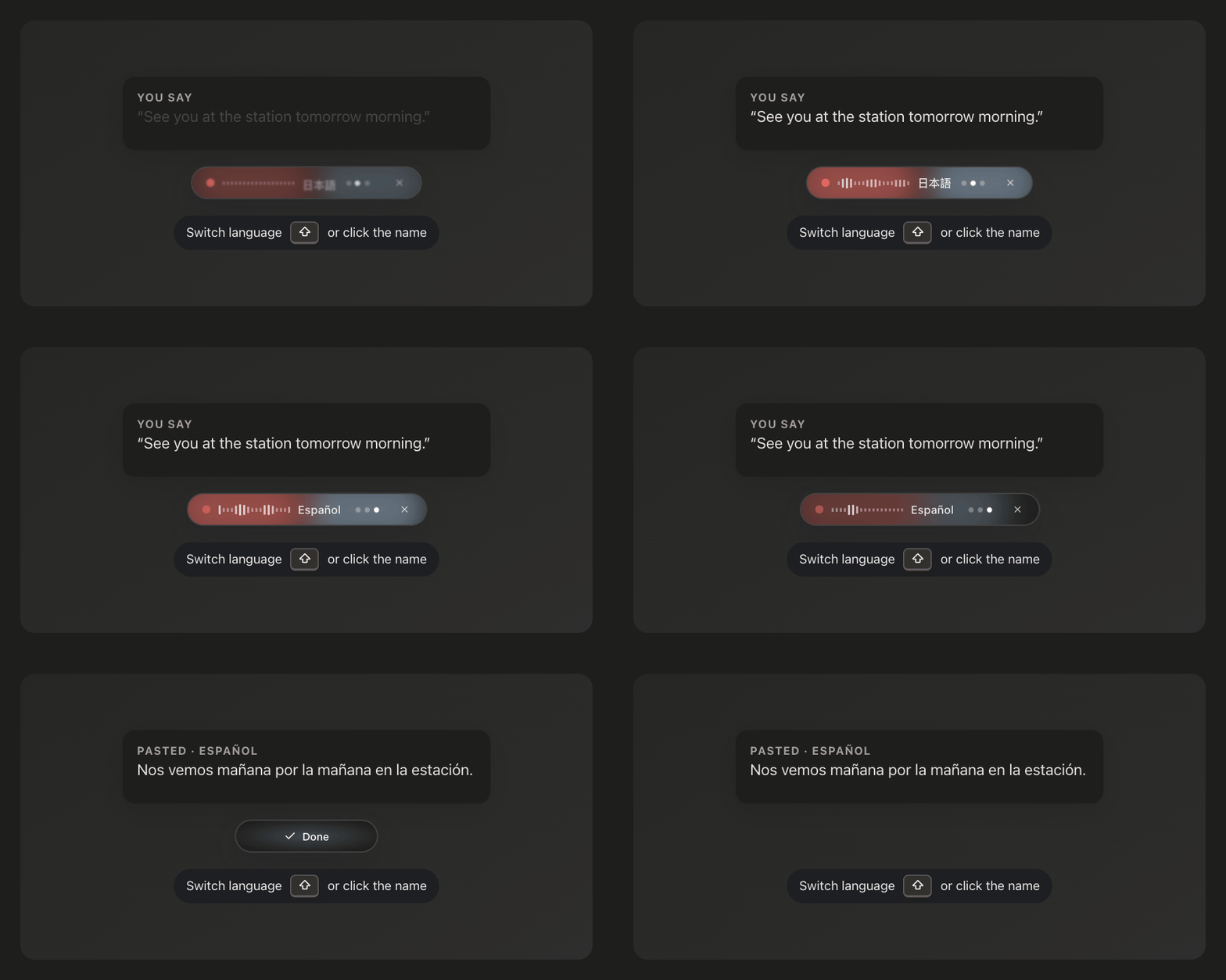 Translate: switch language while you speak |
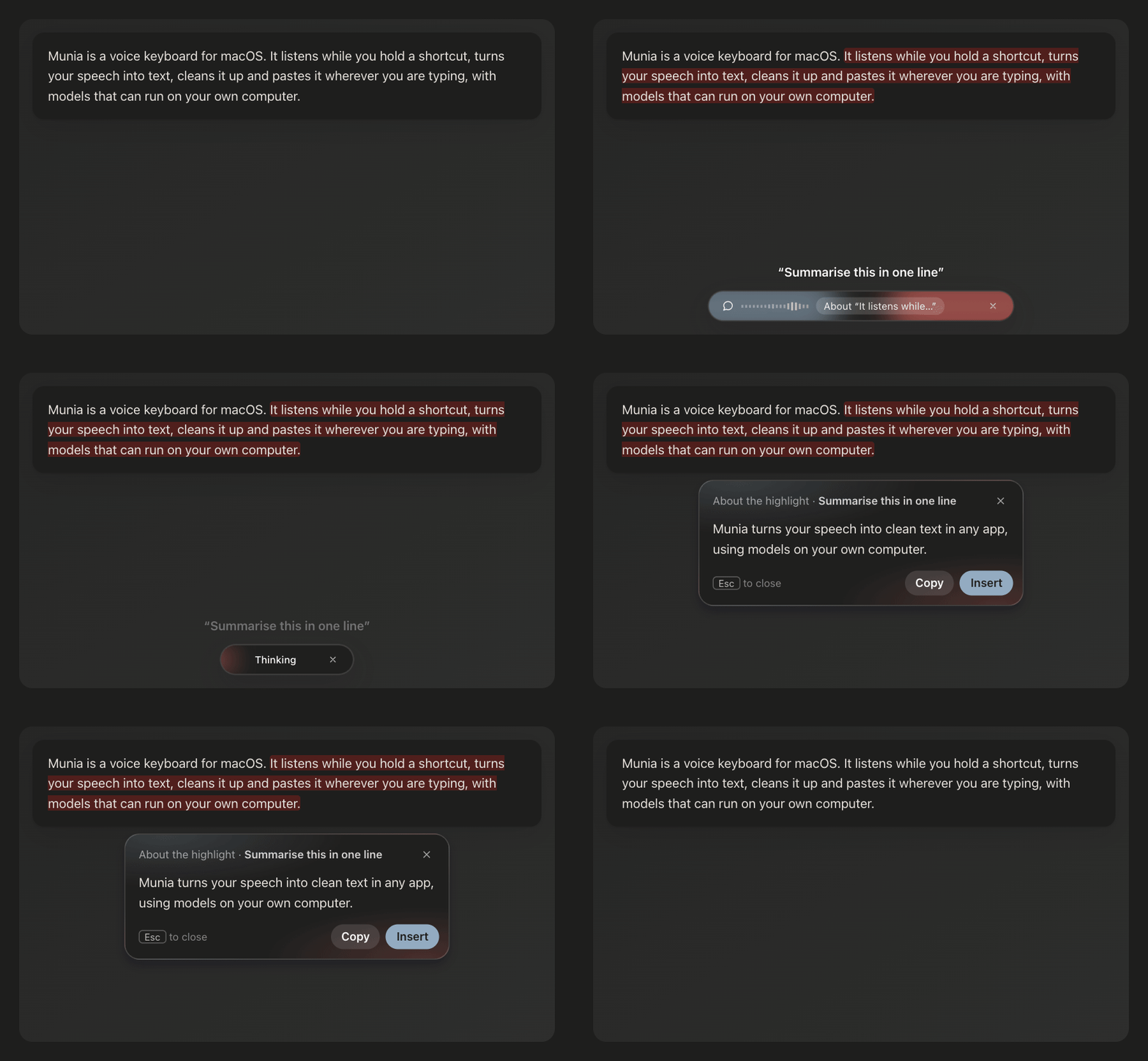 Ask anything: answers above the pill |
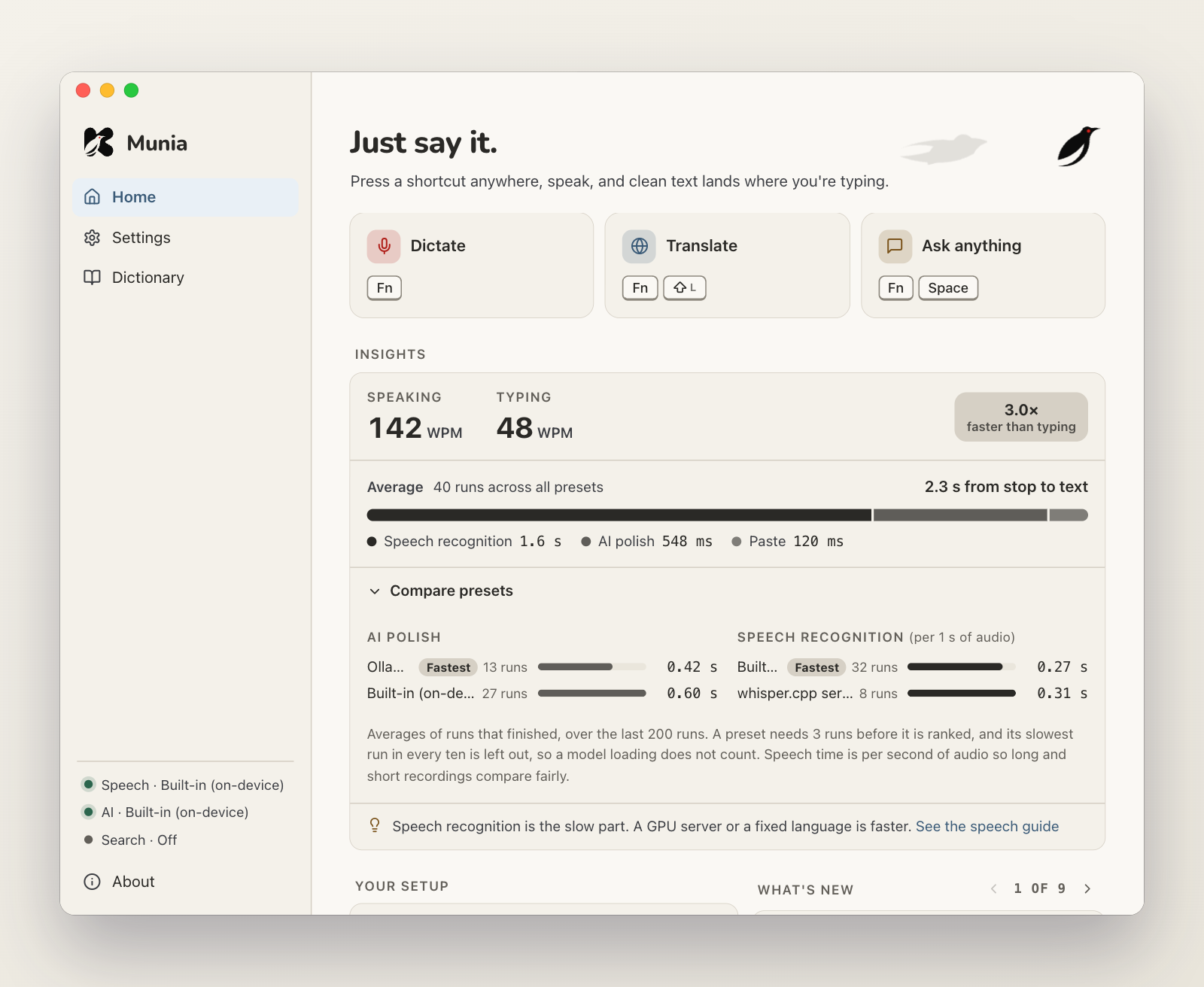 Home: shortcuts and Insights |
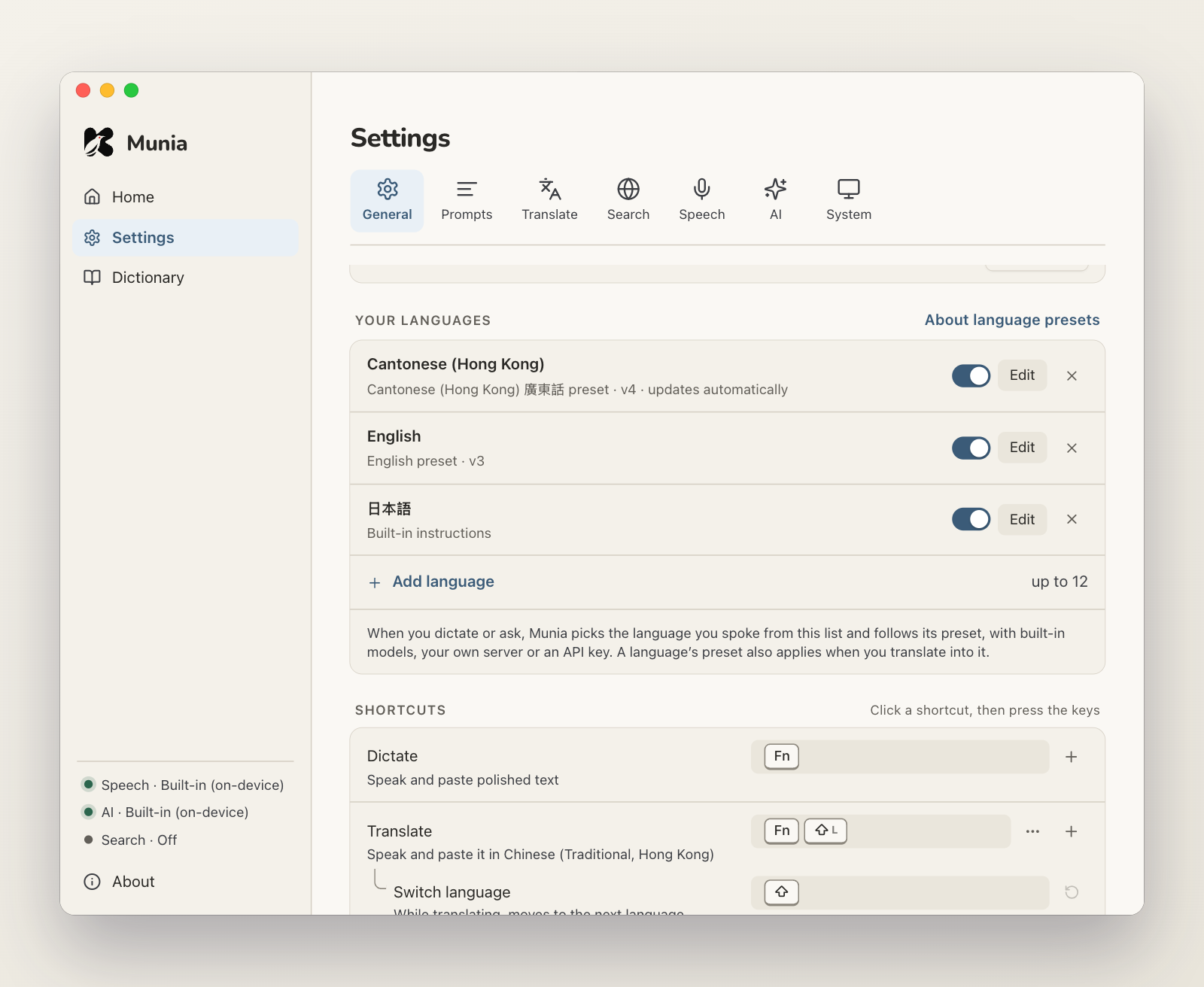 Languages: presets per language |
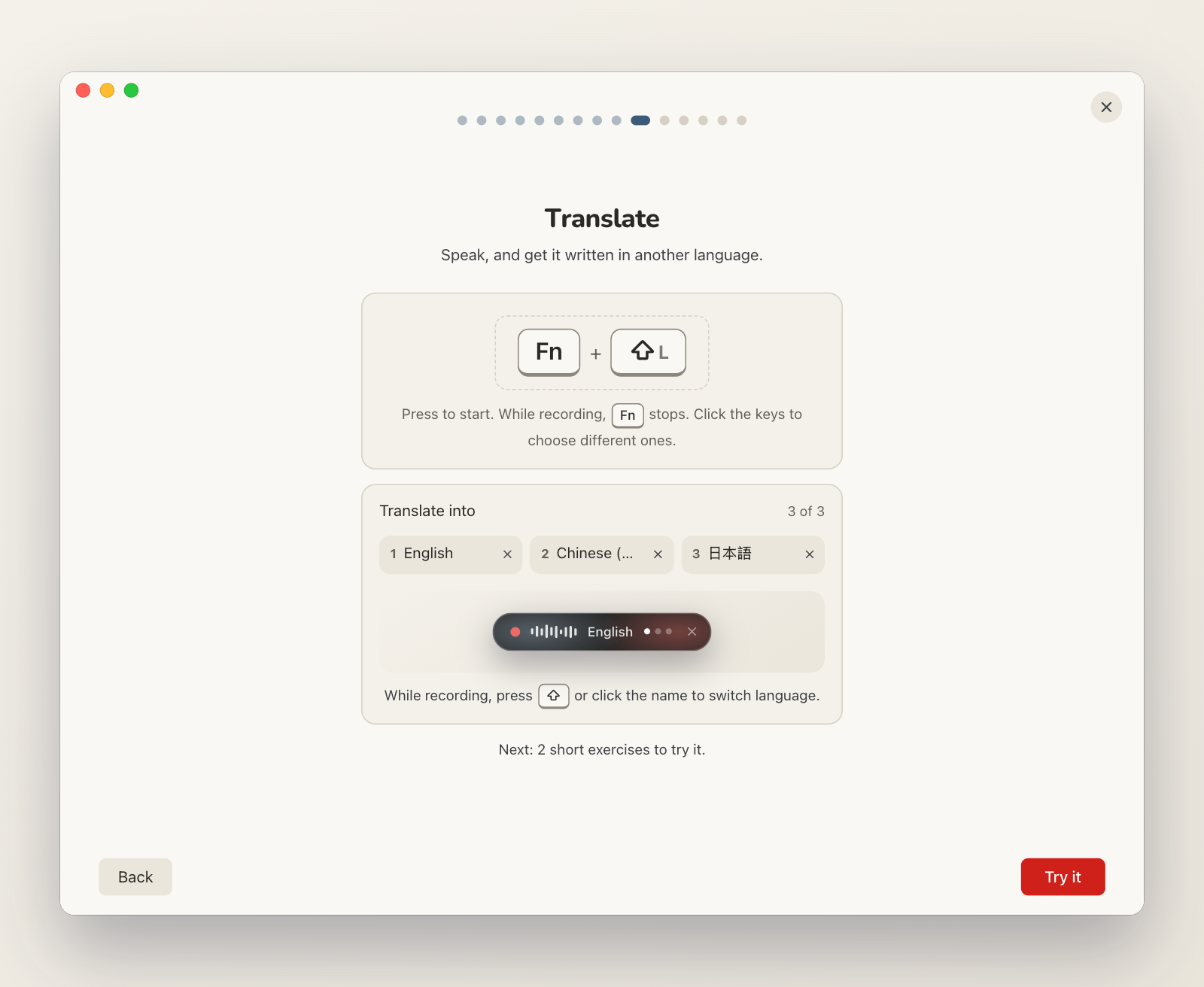 Guided setup with a hands-on tutorial |
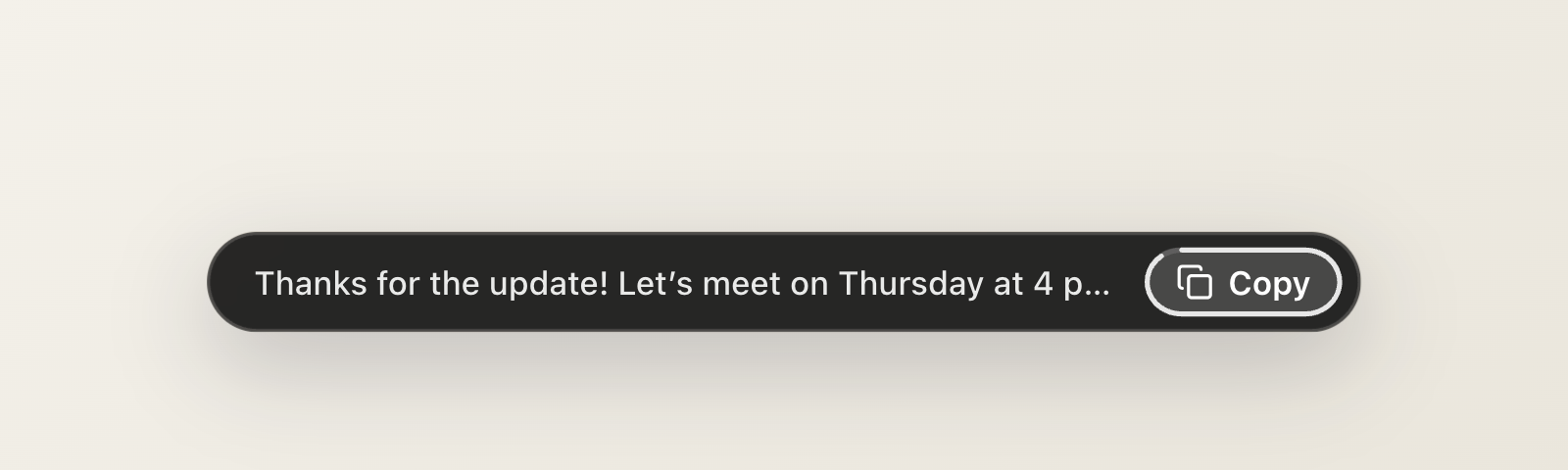 Copy pill: when there is nowhere to paste |
The images are rendered from the app's own components and the website's demos; see docs/media.
Documentation
| Document | Covers |
|---|---|
| Guides | Choose a setup: built-in, your own server, or a cloud key |
| Speech recognition | Connections and supported services |
| AI polish | Connections, services and turning off thinking |
| Choosing models | Speech and polish models by hardware |
| Languages | Guides per language, translation languages, presets and recognition |
| Sharing presets | Export and import your speech and AI presets |
| Benchmarks | Polish and speech speed on real setups, and how to measure yours |
| Code performance | Application baseline, runtime evaluations, recorded decisions and performance PR workflow |
| Preset catalogue | Every language preset in the library |
| Plans | How features are designed before they are built |
| Releasing | How maintainers cut a release |
Privacy
- No accounts, no analytics, no telemetry.
- No history of what you say. Insights keep only timings and a keystroke count (never which keys). You can turn typing measurement off, and Settings → System → Clear insights data deletes them.
- Logs (
~/Library/Logs/OraType/oratype.log) hold timings and errors, never your text. - Audio goes only where you point it: the built-in models, your own server, or a service you chose.
Related projects
- qwen3-asr-cantonese-hk: the OraType team's fine-tune of Qwen3-ASR-1.7B for Hong Kong Cantonese with English mixed in (Apache-2.0). OraType's built-in speech uses it for any language list with Cantonese. The repository has the BF16, GGUF, FP8 and NVFP4 weights and their benchmarks.
Contributing
Code, services, language presets and docs are all welcome. Start with the Contributing guide.
Licence
MIT. Third-party components and models are listed in the Third-party notices.
Explore related projects
Loading…