
klein-t/teebe
klein-t/teebe has 36 GitHub stars and 0 forks. GitHot measured +1 stars in 24 hours. Last checked 2026-11-14 21:48 UTC. Last push 2026-11-10.
Measured star growth
- in 24h
- +1
- in 7 days
- Collecting history
- in 15 days
- Collecting history
- in 1 month
- Collecting history
Net star changes over overlapping periods, not daily totals. Missing measurements are left blank. Stars measure attention, not software quality.
About
Native macOS git worktree manager and GUI. See every worktree in one window and watch files change live while Claude Code, Codex and Cursor agents work in parallel.
Developer ToolsREADME.md
Original

teebe
Git worktrees, without the IDE.
An open-source macOS app to see all git worktrees across all your repos in one window.
See which Claude Code, Codex and Cursor agents are working in each worktree and what
they are changing, live. Built for running several AI coding agents in parallel.



teebe.io · Install · What it does · Keyboard · Changelog
Install
brew install --cask klein-t/tap/teebe
Or use the install script:
curl -fsSL https://teebe.io/install.sh | bash
Or grab the latest build directly: teebe.zip or
teebe.dmg (both redirect to the current
release). Unzip it and drag it into
/Applications. teebe is not notarized yet, so macOS may block the first launch of
a downloaded copy: on macOS 15 or newer, open System Settings → Privacy & Security
and click Open Anyway; on macOS 14, right-click the app and choose Open. The
Homebrew cask and the install script skip this step. From then on teebe keeps itself
up to date via Sparkle.
Free and open source · macOS 14 or newer · Apple Silicon.
Why
Terminal agents are the fastest way to ship with AI, and also a black box: the
agent says "done" and you are left running git status across five worktrees to
find out what that means. Managing those worktrees usually means memorising
git worktree commands or opening a full IDE just to look at a branch.
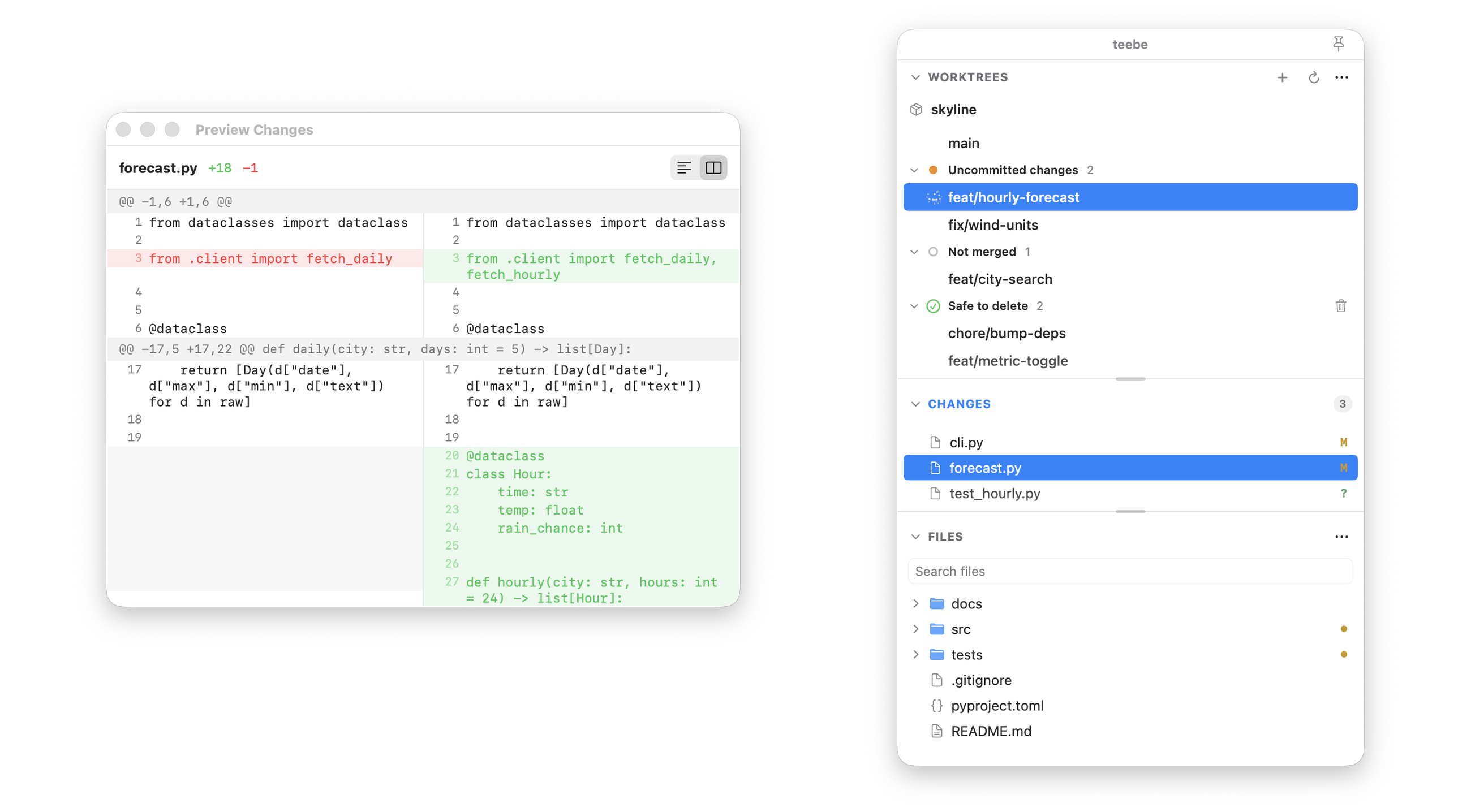
teebe is a small native window that sits beside your terminal and shows every worktree of every repo, which ones have an agent in them, what each one changed, and which are merged and safe to remove. Git clients like Fork or Sublime Merge center on one repo, lazygit lives in the terminal, and agent managers like Conductor run the agents for you. teebe only watches.
What it does
- Every worktree, every repo. All worktrees of all your repos in one list, each with a full file tree you can browse.
- Status at a glance. One mark per worktree: an agent working, uncommitted changes, commits not merged yet, or merged and safe to delete. Group and sort the list by status.
- Agent activity. See when Claude Code or Codex is working or waiting in a worktree, with optional notifications when a turn finishes. Files badge live as any agent or tool edits them.
- Merge detection that understands squash merges. Worktrees are checked against your default and integration branches, and a background fetch keeps it current.
- Cleanup in one step. Remove one worktree, or every one that is safe to delete, after a confirmation that lists them. Commits only that worktree still reached are kept in a hidden backup.
- New worktrees without the commands. Create one on a new or existing branch, from any starting point, in a folder teebe suggests.
- Diffs, one keystroke away. Press Space on a change to peek its diff,
unified or side by side. Return opens a file in the app you already use, and
⌘⇧C copies files as
@-refs for an agent prompt.
What it is not
- Not an agent runner or orchestrator: it does not start or steer agents, it watches them.
- Not a code editor: editing happens in your own apps.
- Not a full git client: no rebase, cherry-pick, or conflict resolution.
- Not cross-platform: macOS only.
How it compares with other worktree tools: teebe.io/compare/git-worktree-gui-mac.
Keyboard
teebe is built to be driven without the mouse. The essentials:
| Keys | Action |
|---|---|
⌘1 ⌘2 ⌘3 |
Focus WORKTREES / CHANGES / FILES (again to collapse) |
↑ ↓ |
Move the selection in the active section |
← → |
Collapse / expand a folder |
Space |
Peek a change's diff, or Quick Look a file |
Return |
Open the file · switch to the worktree · open the change |
⌘F |
Jump to file search |
⌘⇧C |
Copy the selected files as @-refs |
⌘, |
Settings |
The full list lives in the app under teebe → Keyboard Shortcuts.
Working with repositories
teebe is multi-repo and remembers whatever you had selected last.
- Add a repo: open the ··· menu in the WORKTREES header, choose Add Repository…, then pick the repo folder.
- New worktree: click + in the WORKTREES header.
- Switch repos: open the ··· menu and choose any repo you have added.
- Remove the current repo: ··· menu → Remove name.
State lives in ~/Library/Application Support/teebe/state.json. teebe never
writes into your repositories.
Uninstall
teebe is a self-contained .app with no installer, so removing it is just:
# 1. Quit teebe, then delete the app
rm -rf /Applications/teebe.app

# 2. Remove its saved state (added repos/worktrees, window layout)
rm -rf ~/Library/Application\ Support/teebe

# 3. Remove Sparkle's auto-update preferences and cache (optional)
defaults delete dev.teebe.app 2>/dev/null
rm -rf ~/Library/Caches/dev.teebe.app
Build from source
swift build           # builds TeebeCore + the Teebe app
swift test            # runs the Swift Testing suite (unit + git integration)
swift run Teebe       # launches the app
Requires macOS 14 or newer and a Swift 6 toolchain (built in Swift 5 language
mode). Git integration tests shell out to the system git against throwaway
temp repos. See CONTRIBUTING.md for the full setup.
Project layout
Sources/TeebeCore/is the pure, UI-independent core: models,GitClient(+ProcessGitClient), porcelain/diff/worktree/branch parsers, services,FileTreeBuilder,FSEventsWatcher, file ops,RepoGitQueue.Sources/Teebe/is the SwiftUI app:@Observableview models and thin views.Tests/holds the Swift Testing suites (TeebeCoreTests,TeebeTests), protocol fakes, and aGitFixturereal-git harness.
License
teebe is dual-licensed:
- GPL-3.0-or-later for open-source use; see
LICENSE. You may use, modify, and redistribute it freely, but any distributed derivative must also be GPL with full source. You cannot build a closed-source product on top of it. - Commercial license for embedding teebe in a proprietary product without the GPL's obligations, available from the author.
See LICENSING.md for details and contact. Contributions are
accepted under the Contributor License Agreement.
Listed in awesome-mac.