
kimikr/peek
kimikr/peek has 21 GitHub stars and 2 forks. GitHot measured +3 stars in 24 hours. Last checked 2026-11-17 14:51 UTC. Last push 2026-11-15.
Measured star growth
- in 24h
- +3
- in 7 days
- Collecting history
- in 15 days
- Collecting history
- in 1 month
- Collecting history
Net star changes over overlapping periods, not daily totals. Missing measurements are left blank. Stars measure attention, not software quality.
About
SwiftUI previews on a real iPhone, built on Linux. No Mac.
Developer ToolsREADME.md
Originalpeek
SwiftUI previews on a real iPhone, built on Linux. No Mac.
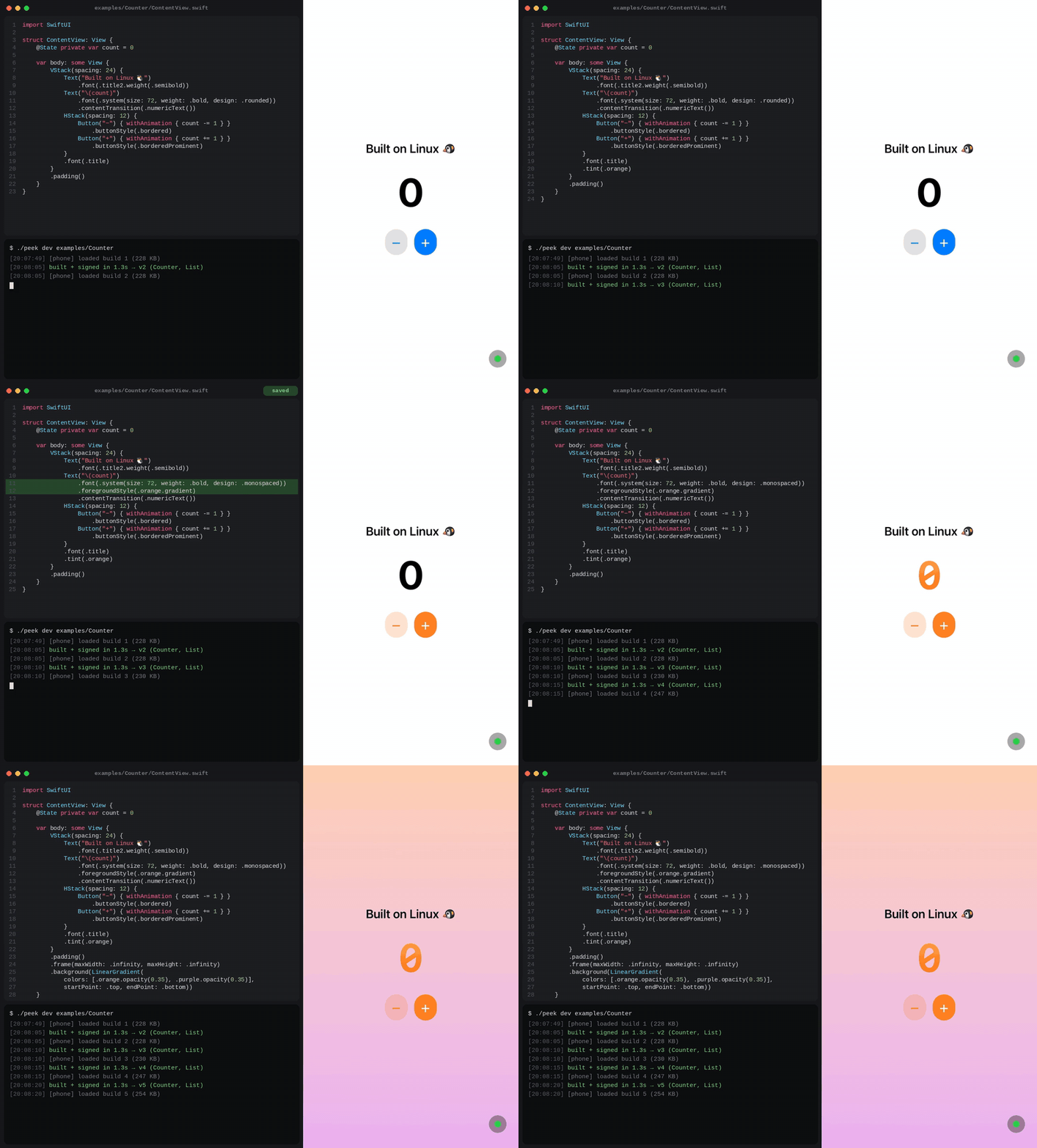
Save a file, and a second or two later the view on your phone is replaced with the new one. It is your real code, compiled by the real Swift compiler and drawn by the real SwiftUI on the device, so every API, animation and gesture behaves exactly as it will in your app.
- Fast, and keeps your state. Incremental builds: an edit in a 2,000-line app
is on the phone in 1–2 s, and when you only change function bodies the running
views are patched in place, so
@Statesurvives the reload. - Your whole app.
#Previewblocks, UIKit views and controllers, or the entire@mainApp (DocumentGrouptoo), with Swift, C, Objective-C, C++ and.xcframeworkdependencies, macros, resources, colour sets and asset symbols. - No Mac, no paid account. A free Apple ID and SideStore, AltStore or LiveContainer is enough.
- Logs and screenshots.
print()output shows up in your terminal, andpeek shotsaves a screenshot of the phone. - One file, no dependencies. The dev server is a single Python script (standard library only) next to xtool's Swift toolchain.
$ peek dev MyApp/
[12:06:52] built + signed in 1.3s → v1 (Counter, List)
Status: early. See what has been tested.
How it works
 Linux                                         iPhone
 ─────                                         ──────
 *.swift ──swiftc + iOS SDK──▶ preview.dylib
                 │ sign with your dev certificate
                 ▼
            peek dev server ── encrypted HTTP ──▶  Peek app: dlopen() → UIHostingController
peek devwatches your sources. On every change it cross-compiles them into an arm64 iOS dynamic library (#Previewblocks become entry points). Compilation is incremental: only the files an edit affects are compiled again, so a save in a 2,000-line app takes 1–2 s instead of 9.- It signs the library with your development certificate.
- The Peek app on the phone long-polls the server, downloads the new
library,
dlopen()s it and shows the preview.
Package dependencies are linked into a separate library that the phone downloads once and keeps, so each reload only carries your own code.
State survives body edits. Full builds are compiled so that any function
can be replaced later (the way Xcode previews work). When an edit only touches
the bodies of functions and computed properties (body included), peek sends
a small patch with just those bodies; the phone loads it into the running
build and re-renders, so views keep their identity and @State. Adding or
changing stored properties, types or signatures needs a full build, which
peek falls back to on its own (--no-hot always does full builds).
iOS refuses to load code that is not signed by a certificate in a provisioning profile on the device with the same Team ID as the running app. So the library must be signed with the certificate your sideloading store (SideStore / AltStore) signed the Peek app with. The app asks the store for that certificate once and sends it, encrypted, to your dev server.
The signature also has to carry the right identifier. A free Apple ID's
profile covers one explicit app ID, and iOS matches code that has no
entitlements of its own against it by signing identifier, so a library signed
under any other name is rejected as code signature invalid even with the
right certificate. The app therefore tells the server the bundle identifier of
the process it runs in, and the server signs every build under that name.
Requirements
On the Linux machine:
- Swift 6 toolchain and the Darwin Swift SDK, both from
xtool (
xtool setup) ldidandopenssl- Python 3.9+ (standard library only)
On the iPhone (iOS 17+):
- SideStore or AltStore, to install the Peek app, or LiveContainer set up in JIT-less mode, to run it without using one of your three app slots
- The phone and the Linux machine on the same Wi-Fi or the same Tailscale network
Quick start
# 1. Install peek (and ldid, if missing) into ~/.local
curl -fsSL https://raw.githubusercontent.com/kimikr/peek/main/scripts/install.sh | sh

# 2. Check that everything is in place
peek doctor

# 3. Start previewing
peek dev ~/.local/share/peek/examples/Counter
On the phone, install Peek-<version>.ipa from the releases
with SideStore or AltStore (they sign it for you), or add it to LiveContainer.
Use the app and the peek script from the same release; if they don't match,
the app says so. To build the app yourself: cd host && xtool dev build --ipa -c release.
peek dev prints a QR code and a pairing link. Scan the code with the Camera
app (Peek asks you to confirm the server) or paste the link into Peek. The
first time, tap Import from SideStore in the app to hand over the signing
certificate.
Inside LiveContainer. Install the IPA in LiveContainer instead. The store
cannot call back into a guest app, so export the certificate from the store as
a .p12 file and use Import a .p12 file…. It must be the certificate
LiveContainer itself is signed with.
Then edit examples/Counter/ContentView.swift and save.
Something not working? peek doctor checks the toolchain, the iOS SDK,
ldid, the signing certificate (and when it expires), the network addresses,
whether the dev server is running, which phones connected with which app
version, and does a test build.
What gets previewed
- Every
#Preview { ... }block (switch between them from the green dot menu in the app).@Previewableworks, and a preview may return a SwiftUI view, aUIViewControlleror aUIView. - Without any
#Preview: the whole app. The@mainApp's firstWindowGroupis shown as a view (--appforces this even when previews exist); aDocumentGroupopens one new, unsaved document. Other scenes are left out, scene modifiers (.commands,.defaultSize, …) are ignored, and@UIApplicationDelegateAdaptorcreates your delegate and callsapplication(_:didFinishLaunchingWithOptions:). - Otherwise
ContentView, or the firstViewstruct found. - Or say it explicitly:
peek dev . --root "SettingsView(model: .sample)".
What gets compiled
| You run | peek compiles |
|---|---|
peek dev File.swift |
just that file |
peek dev Folder/ |
every .swift file under Folder/Sources (or Folder/) |
peek dev Package/ (has a Package.swift) |
the app's target, linked against its package dependencies |
Build settings. In a package, the previewed target's Swift language mode
and swiftSettings (define, upcoming and experimental features, default
isolation, unsafeFlags) and linker settings are applied.
Package dependencies. In a package, peek first builds everything with
SwiftPM (swift build, the same way xtool does), links the dependencies into
one library the phone downloads once, and runs the macros SwiftPM built.
That first build is slow; after it, saving a file in the previewed target takes
the fast path again. Editing Package.swift or a dependency's sources triggers
the SwiftPM build again. Use --target to pick a target other than the app's.
C, Objective-C, C++ and binary dependencies. C-family targets are compiled by
SwiftPM and imported through their module maps. A target with
.interoperabilityMode(.Cxx) is compiled with C++ interoperability, and the
C++ standard library is linked when any target has C++ sources. Static libraries from
.xcframework binary targets are linked into the dependency library; dynamic
frameworks are signed and sent to the phone once.
Resources. Image("photo", bundle: .module), Bundle.module.url(...)
and custom fonts work: resource bundles (the previewed target's and its
dependencies') are sent to the phone alongside the build. Outside a package,
files in folders named Resources are bundled the same way. Asset catalogs
cannot be compiled without a Mac, so peek works around it: image sets are sent
as loose images, colour sets (light and dark) become generated code, and
Image("name"), UIImage(named:), Color("name") and UIColor(named:) with
a literal name of such an asset are pointed at them. The asset symbols Xcode
generates (Color(.brand), .foregroundStyle(.brand), Image(.logo),
UIColor(resource:), UIImage(resource:)) are generated the same way.
See examples/Weather for a package with a dependency and a resource.
While previewing
- Output.
print()and anything else written to stdout or stderr shows up in thepeek devterminal, prefixed with│. When a build crashes the app, its last output (afatalErrormessage, say) is sent the next time Peek starts. - Screenshots.
peek shotsaves what the phone is showing as a PNG (-o file.pngto name it). - Display. The menu (green dot) switches the preview between light and dark appearance and between text sizes, without touching the phone's settings.
- Errors. A compile error is shown over the last preview that worked. So is a build that fails to load: the previous one stays on screen.
Finding the server
The pairing link holds the server's addresses. On the same Wi-Fi the server
also advertises itself with Bonjour (_peek._tcp), so an already paired phone
finds it again when its address changes. Over Tailscale, the Tailscale address
in the link is used. Pair with peek link --qr at any time.
Limitations
- State resets on full builds. Body-only edits keep it; anything that changes the shape of your types (stored properties, new types or methods, signatures, resources) reloads the build and starts fresh.
- Rebuild time. The first build of a project compiles everything (about
9 s for 2,000 lines on a 2-core machine); after that an edit takes 1–2 s.
Every build is loaded under the same module name; if that causes trouble,
--no-incrementalbuilds each version as a module of its own. - Views that opt out of re-rendering (
Equatableviews,.equatable()) show a hot-patched body only once their inputs change. - Asset catalogs are not compiled: only image sets with one image per
scale (no dark or size variants) and colour sets are available. A
DocumentGroupthat only views documents shows a placeholder, since there is no document to open. - The preview lives in the Peek app's sandbox.
UserDefaults, the keychain and files are Peek's, so nothing your installed app has saved (settings, logins, caches) is there. Bundle.mainis the Peek app's bundle, soImage("name")withoutbundle: .module, yourInfo.plistkeys, URL schemes, app extensions and entitlements (HealthKit, push, iCloud, App Groups, …) are not your app's.- A crash in your view crashes the Peek app. When you open it again it
shows what the build printed last (a
fatalErrormessage, say) and loads the next build on its own. - Previewing Peek with Peek shows "The last build quit the app" in the inner copy, because both copies share one set of preferences.
- Old builds stay in memory until the app is restarted (dependencies are loaded once). When memory runs low, the green dot turns orange and the menu offers to quit Peek; open it again and the newest build loads.
- Free Apple IDs: the certificate changes when the store re-issues it; import it again when builds stop loading.
Security
- The dev server only listens while
peek devruns, and only on the addresses in the pairing link and on loopback, not on every interface. Use--bindto choose another one. - The pairing link contains a random 128-bit key that is shown on your terminal and never sent over the network. Requests are authenticated with HMAC-SHA256 over the method, path, time, body and the headers the server acts on. Everything the server sends (builds, compiler output, resources) and everything sensitive the phone sends (the certificate, screenshots) is encrypted with AES-256-CTR and authenticated with HMAC-SHA256, using keys derived from it.
- A pairing link opened from outside the app (Camera, Safari, another app) must be confirmed before Peek connects, and a certificate handed over by another app is only accepted right after you asked the store for it. A web page cannot silently point Peek at someone else's server.
- The certificate password never appears on a command line (
ps); files holding key material are created readable by you only. - Your signing certificate and private key are stored on the Linux machine in
~/.peek/cert.p12(mode 0600). Anyone who can read it can sign code that your phone will run inside sideloaded apps. Delete it when you are done on a shared machine. - The connection itself is plain HTTP, so the request lines (paths such as
/v1/dylib/12) and sizes are visible on the network; the contents are not. A request captured on the network could be replayed within its 5-minute window; that only repeats something the phone already did, and the reply is still encrypted.
Tested
| iPhone, iOS 27, Peek inside LiveContainer (SideStore, free Apple ID), Tailscale | ✅ loads and hot-reloads Counter, Peek itself, and two real apps (resources, a local package, the iOS 26 tab bar) |
| Builds on Linux: examples, three real apps, UIKit previews, App rewriting | ✅ |
Server test suite (python3 -m unittest discover tests) |
✅ |
On that phone: encrypted protocol, incremental reload, dependency library, print() output, peek shot, light/dark and text size |
✅ |
0.2 on that phone: hot patching keeps @State across body edits, chained patches, closure changes, fallback to a full build |
✅ |
0.2 C/Objective-C/C++ and .xcframework dependencies, colour sets, asset symbols, DocumentGroup |
✅ built on Linux; ⏳ not yet run on a device |
| Peek installed directly with SideStore / AltStore | ⏳ not yet |
| Bonjour discovery on a real Wi-Fi network | ⏳ not yet |
Development
python3 -m unittest discover tests     # tests (Python + openssl only)
./peek doctor                          # check the local setup
./peek build examples/Weather          # compile once, print errors
scripts/release-ipa.sh                 # unsigned IPA for a release
License
MIT