
kiki-ki/go-qo
kiki-ki/go-qo has 404 GitHub stars and 7 forks. GitHot measured +1 stars in 24 hours. Last checked 2026-11-12 10:23 UTC. Last push 2026-11-07.
qo is an interactive TUI to query JSON and CSV using SQL.
Measured star growth
- in 24h
- +1
- in 7 days
- Collecting history
- in 15 days
- Collecting history
- in 1 month
- Collecting history
Net star changes over overlapping periods, not daily totals. Missing measurements are left blank. Stars measure attention, not software quality.
README.md
Original🥢 qo


qo [cue-oh] noun.
- TUI tool for querying JSON, CSV using SQL.
- "query" what you need, and get it "out" to the pipeline.
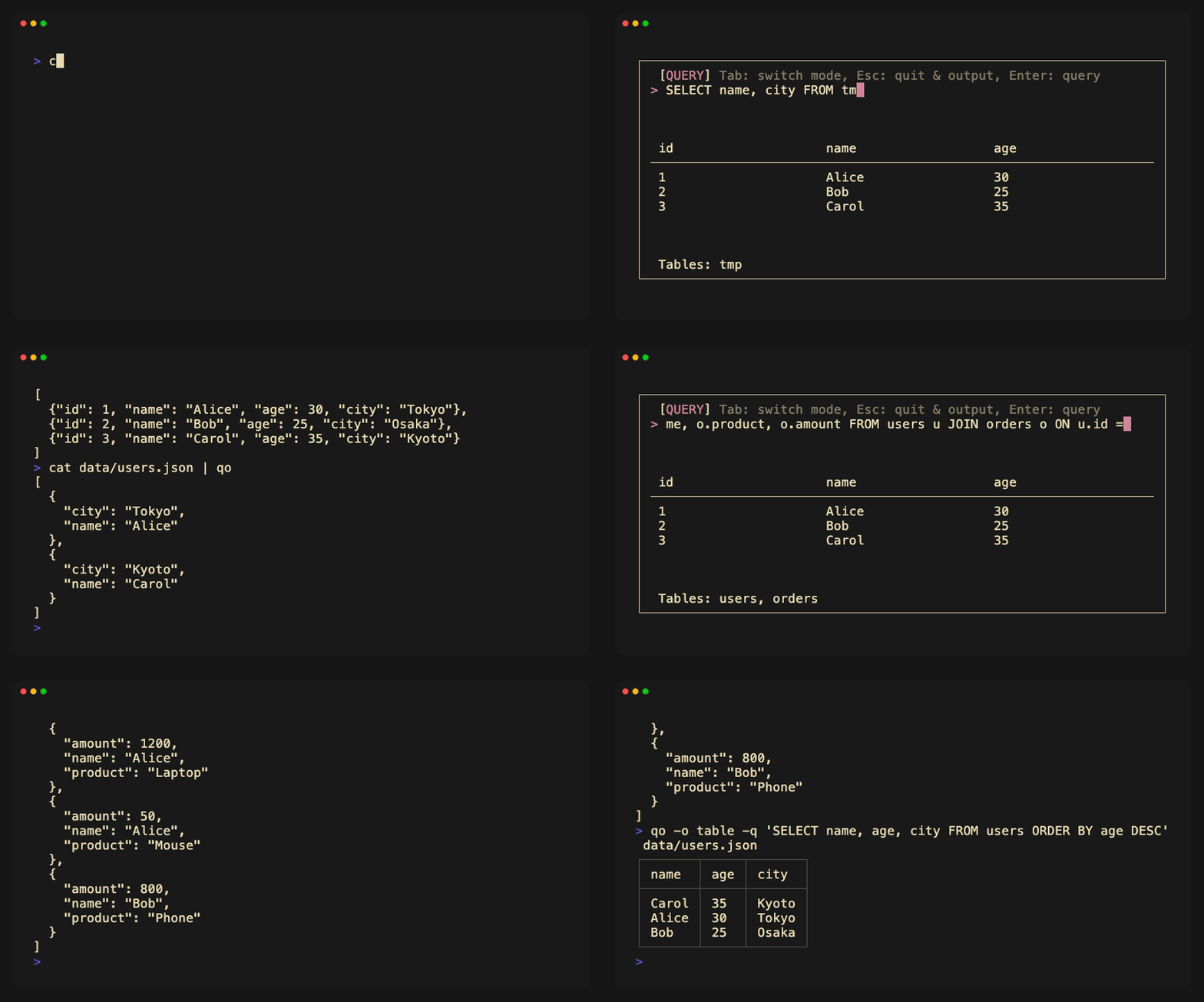
Why qo?
- Muscle Memory: Use the SQL syntax you've known for years.
- Pipeline Native: Reads from
stdin, writes tostdout. - Interactive: Don't guess the query. See the result, then hit Enter.
Install
macOS and Linux (amd64/arm64) are supported.
Homebrew (macOS)
brew install kiki-ki/tap/qo
Shell (Binary)
curl -sfL https://raw.githubusercontent.com/kiki-ki/go-qo/main/install.sh | sh
Git (Source)
# The binary will be located at ./bin/qo
git clone --depth 1 https://github.com/kiki-ki/go-qo.git && cd go-qo && make build
Usage
qo reads from file arguments, or from stdin when no files are given. Each file becomes a table named after it; stdin becomes tmp.
# Interactive mode (Open TUI)
cat x.json | qo
qo x.json y.json

# Non-interactive mode (Direct output)
cat x.json | qo -q "SELECT * FROM tmp WHERE id > 100"
qo -q "SELECT * FROM x JOIN y ON x.id = y.x_id" x.json y.json

# Pass - to read stdin alongside files
cat x.json | qo - y.json -q "SELECT * FROM tmp JOIN y ON tmp.id = y.tmp_id"
Pipe-Friendly TUI
TUI mode works seamlessly with pipes. Explore data interactively, then pass the result to other tools.
# Fetch JSON API > Filter interactively with qo > Format with jq
curl -s https://api.github.com/repos/kiki-ki/go-qo/commits | qo | jq '.[].sha'

# Explore > Filter > Compress
cat large.json | qo | gzip > filtered.json.gz
Query Logs & Aggregate
Use SQL to analyze structured data.
# Filter error logs
cat app.log | qo -q "SELECT timestamp, message FROM tmp WHERE level = 'error'"

# Aggregate sales by region
qo sales.csv -o csv -q "SELECT region, SUM(amount) FROM sales GROUP BY region"
Mix Formats
A file's format comes from its extension, so files of different formats can be joined. Reach for -i when an extension is missing or lying; it then applies to every input, stdin included.
qo -q "SELECT u.name, l.action FROM users u JOIN logs l ON u.id = l.uid" users.csv logs.json
qo -i csv -q "SELECT * FROM export" export.txt
Convert Formats
Transform between various formats.
qo -o csv data.json -q "SELECT id, name FROM data"      # JSON → CSV
qo -o json users.csv -q "SELECT * FROM users"           # CSV → JSON
qo -o jsonl data.json -q "SELECT * FROM data"           # JSON → JSON Lines
qo --no-header raw.csv -q "SELECT col1, col2 FROM raw"  # Headerless CSV
Options
| Flag | Short | Default | Description |
|---|---|---|---|
--input |
-i |
by extension | Input format: json, csv, tsv, psv ("json" includes "jsonl"). Applies to every input when set |
--output |
-o |
json | Output format: json, jsonl, csv, tsv, psv, table |
--query |
-q |
Run SQL query directly (Skip TUI) | |
--no-header |
Treat first row as data, not header (CSV/TSV/PSV only) |
UI Controls
| Key | Mode | Action |
|---|---|---|
Tab |
ALL | Switch between Query/Table mode |
Esc |
ALL | Output & Quit |
Ctrl+C |
ALL | Quit (Output nothing) |
Enter |
QUERY | Execute query |
↑ ↓ / j k |
TABLE | Scroll rows |
← → / h l |
TABLE | Scroll columns |
SQL Dialect
qo uses SQLite as its SQL engine. All queries follow SQLite syntax and support its built-in functions.
Querying Nested JSON
Use SQLite's json_extract() function to access nested fields in JSON data.
# Sample data: [{"user": {"name": "Alice", "age": 30}}, {"user": {"name": "Bob", "age": 25}}]

# Extract nested fields
qo data.json -q "SELECT json_extract(user, '$.name') AS name FROM data"
# Filter by nested value
qo data.json -q "SELECT * FROM data WHERE json_extract(user, '$.age') > 25"
For more details, see SQLite JSON Functions.
Built With
| Category | Library |
|---|---|
| TUI Framework | Bubble Tea |
| Styling | Lip Gloss |
| CLI | Cobra |
| SQL Engine | modernc.org/sqlite (Pure Go, CGO-free) |
License
MIT
Explore related projects
codecrafters-io/build-your-own-x
Master programming by recreating your favorite technologies from scratch.
562,095 starspublic-apis/public-apis
A collective list of free APIs
498,490 starsmorluto/rea
Reverse engineer anything with agents, from app behavior down to native binaries.
454,809 starsopenclaw/openclaw
The AI that really does things. Any OS. Any Platform. The lobster way. 🦞
394,406 stars