
kigner/audio.cpp-webui
kigner/audio.cpp-webui has 419 GitHub stars and 84 forks. GitHot measured +3 in 7 days. Last checked 2026-11-09 07:29 UTC. Last push 2026-10-24.
audio.cpp with a full-task WebUI - pure C++ audio-model inference engine powered by ggml. TTS, ASR/STT, VAD, voice conversion, speaker diarization, music generation. No Python dependency.
What you can do
- Speech synthesis and voice cloning - Enter text, choose a preset voice or reference recording, generate and listen; streaming models can play audio as it is generated
- Speech recognition and subtitles - Transcribe recordings or videos, inspect timestamps, correct text and export subtitles
- Video translation and dubbing - Transcribe, translate and review, generate speech per segment, then mix and export with optional background-music preservation
- Realtime voice chat - Choose a character and voice, then talk on your computer or scan a QR code to call from your phone on the same Wi-Fi; automatic language mode follows the language you speak
Measured star growth
- in 24h
- Update delayed
- in 7 days
- +3
- in 15 days
- Update delayed
- in 1 month
- Update delayed
Net star changes over overlapping periods, not daily totals. Missing measurements are left blank. Stars measure attention, not software quality.
README.md
Original
Aixora Audio
English · 中文
Your local audio studio
Speech synthesis · Speech recognition · Music and sound effects · Realtime voice · Video translation and dubbing
[!IMPORTANT] Aixora Audio 0.7.5 is available
Realtime voice calls from your phone, more supported models, an updated audio backend and bug fixes.
View the 0.7.5 release. Already using the 0.7.0 portable package? Run
update.bat. For a first installation, download the complete 0.7.0 package, then runupdate.bat.
User guide · Build from source · Python setup · Model support · Acknowledgments
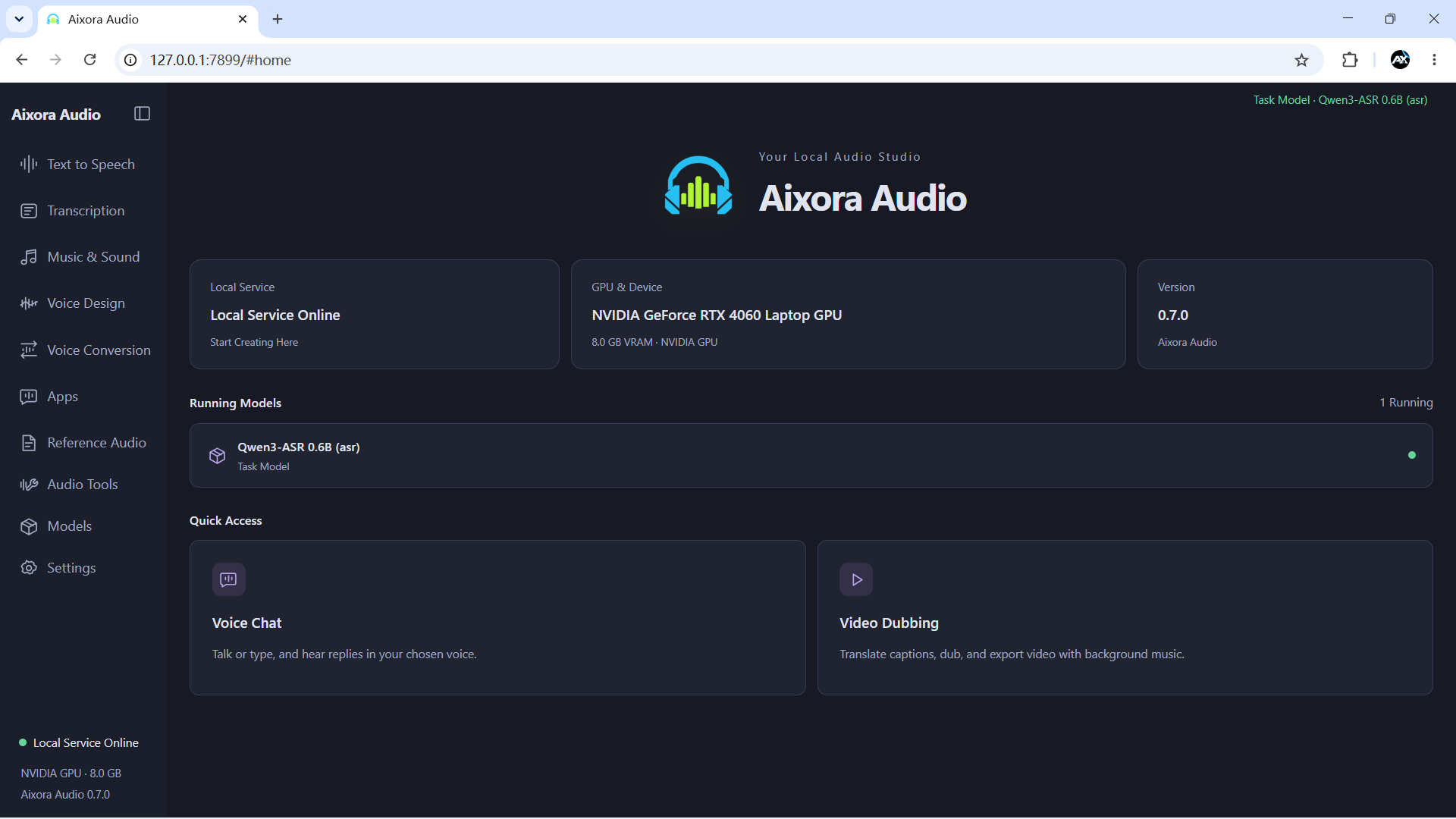
Aixora Audio brings local audio models into one workspace. Turn text into voiceovers, transcribe recordings into subtitles, translate and dub videos, or choose a character for a voice conversation. Audio models run locally through the C++ backend; conversation and translation can connect to a local or cloud language model you configure.
What you can do
| Feature | Workflow |
|---|---|
| Speech synthesis and voice cloning | Enter text, choose a preset voice or reference recording, generate and listen; streaming models can play audio as it is generated |
| Speech recognition and subtitles | Transcribe recordings or videos, inspect timestamps, correct text and export subtitles |
| Video translation and dubbing | Transcribe, translate and review, generate speech per segment, then mix and export with optional background-music preservation |
| Realtime voice chat | Choose a character and voice, then talk on your computer or scan a QR code to call from your phone on the same Wi-Fi; automatic language mode follows the language you speak |
| Global dictation | Dictate into other applications using a shortcut, with recognition status shown in a floating toolbar |
| Music, sound effects and voice design | Generate audio from prompts or lyrics, describe a voice, or convert speech and singing voices |
| Audio tools | Separate vocals and accompaniment, audition stems, enhance and denoise, classify sounds, detect wake words, align text and convert formats |
| Model and reference-audio management | Download, load and remove models, save reference recordings with transcripts, and inspect devices and logs |
Quick start
- Extract the complete Windows portable package and double-click
run_webui.batin its root directory. - Once the browser opens at
http://127.0.0.1:7899by default, install the models you need in Model center. - Open a task page, select and load a model, enter text or upload your material, then generate.
- Realtime voice chat and global dictation are under Scenarios. Configure the service URL, model name and API key in the relevant conversation or translation settings.
- For phone calls, open System settings → Mobile access on your computer, enable mobile access, and scan the QR code with a phone on the same Wi-Fi network.
The portable package includes Python and runtime dependencies. The launcher selects an available backend in CUDA → Vulkan → CPU order; you can override it with AUDIOCPP_BACKEND. Languages, reference inputs and parameters are shown for the selected model.
To update the portable package, exit the workspace and double-click update.bat. For everyday use, these are the two entry points. Keep _env.bat and webui/start_webui.bat: the launcher calls them automatically.
0.7.0 is a new full-package baseline. Older packages can still update to 0.6.0 through the legacy channel; install the full Aixora-Studio.zip to move to 0.7.0. From 0.7.0 onward, updates use GitHub with Hugging Face and hf-mirror as fallbacks. Full packages use the same filename in the Hugging Face repository; incremental archives retain their versioned audiocpp-* names. See the updater guide.
When finished, choose System settings → Exit workspace service, or run run_webui.bat --stop. Closing the browser leaves the service running.
See the English guide / 中文使用说明 for detailed instructions. For a source checkout, follow the build and Python setup below.
Build the C++ backend from source
The main instructions below target Windows x64 with PowerShell. To run from source, build the C++ backend first, then set up the Python environment in the next section. The C++ backend performs audio-model inference; Python hosts the Aixora Audio workspace, model downloads, realtime helpers and SpeakType.
1. Prepare the tools and source
| Tool | Requirement |
|---|---|
| Git | Used to clone the repository |
| Visual Studio Build Tools 2022 or later | Install Desktop development with C++, including MSVC x64, Windows SDK, CMake/Ninja and OpenMP support |
| CMake and Ninja | CMake 3.20 or later; the build script prefers the tools bundled with Visual Studio and also checks PATH |
| NVIDIA CUDA Toolkit (CUDA builds) | Install the full Toolkit with nvcc and an NVIDIA driver supporting your GPU; the driver alone is insufficient for compilation |
| Vulkan SDK (Vulkan builds) | Requires the SDK's glslc and a Vulkan-capable GPU driver; CPU builds need neither CUDA nor Vulkan SDK |
git clone https://github.com/kigner/audio.cpp-webui.git audio.cpp
cd audio.cpp
Run the remaining commands from the repository root. A standard Aixora Audio build uses the vendored dependencies. The optional external/audio.cpp-server-frontends submodule is disabled by default, so a recursive submodule checkout is unnecessary for this setup.
2. Choose and build a backend
NVIDIA CUDA:
.\scripts\build_windows.ps1 -Preset windows-cuda-release -Target audiocpp_server -Jobs 16
CPU only:
.\scripts\build_windows.ps1 -Preset windows-cpu-release -Target audiocpp_server -Jobs 16
Vulkan:
.\scripts\build_windows.ps1 -Preset windows-vulkan-release -Target audiocpp_server -Jobs 16
Aixora Audio requires audiocpp_server for inference. Build the following optional tools for command-line inference or GGUF conversion. These examples use CUDA; replace -Preset for another backend:
.\scripts\build_windows.ps1 -Preset windows-cuda-release -Target audiocpp_cli -Jobs 16
.\scripts\build_windows.ps1 -Preset windows-cuda-release -Target audiocpp_gguf -Jobs 16
Outputs are written to build/<Preset>/bin/, for example build/windows-cuda-release/bin/audiocpp_server.exe. The source launcher discovers these directories. Keep the source tree intact, especially model_specs/, webui/configs/ and the model-manager scripts.
-Jobs 16controls build parallelism; use-Jobs 4if memory is limited.- CUDA builds detect the local GPU architecture through
nvidia-smiby default. Use-CudaArchitecturesto specify a target when building for other devices. -ConfigureOnlyconfigures without compiling.-RunTestsalso builds and runs the C++ tests.- The full model set is compiled by default, but backend compatibility varies by model.
- Aixora Audio downloads models through
webui/model_manager_webui.py; it does not require-NativeModelManager. Model management for the upstream native WebUI is a separate feature.
3. Linux backend build (optional)
Install a C++17 compiler such as GCC 13+, CMake 3.20+ and Ninja/Make. From the repository root, build the CPU version with:
bash scripts/build_linux.sh --backend cpu --build-type Release --target audiocpp_server --target audiocpp_cli --target audiocpp_gguf
Outputs are written to build/linux-cpu-release/bin/. With the appropriate SDK installed, replace --backend cpu with --backend cuda or --backend vulkan. See the next section for running the Python workspace on Linux. SpeakType global dictation targets Windows.
Set up Python and launch Aixora Audio
Windows
Install 64-bit Python 3.11 (the project's development environment uses 3.11.9; the commands below use the Windows py launcher). After building the backend, run these commands from the repository root:
py -3.11 -m venv venv
.\venv\Scripts\python.exe -m pip install --upgrade pip
.\venv\Scripts\python.exe -m pip install -r webui\requirements.txt
.\venv\Scripts\python.exe -m pip check
webui/requirements.txt includes Python dependencies for Aixora Audio, realtime audio, SpeakType and the model-download tools. Windows desktop packages have platform markers. These commands use the virtual environment's interpreter directly, so Activate.ps1 is unnecessary. Installing Python packages with pip does not build the C++ backend.
Also install FFmpeg and FFprobe and add their executable directory to PATH, or place ffmpeg.exe and ffprobe.exe in webui/. They are used for non-WAV conversion, video input and dubbed-video export. A source checkout does not include the Python environment or these tools preinstalled in the portable package.
.\run_webui.bat
The launcher discovers the root venv. Open the URL printed in the startup log, normally http://127.0.0.1:7860; use the printed address if you configured a different port. Download a model in Model center, then load it on a task page. Model weights are not included in the source checkout.
To select a backend explicitly, set it before launching. Use cuda, vulkan or cpu, and build that backend first:
$env:AUDIOCPP_BACKEND = "cpu"
.\run_webui.bat
For a Python environment elsewhere, set AUDIOCPP_PYTHON to the full path of its python.exe. Aixora Audio starts its managed C++ service on port 8088 when needed; you do not need to start a separate backend process for the workspace.
Linux (optional)
Install Python 3.11 with venv support and FFmpeg/FFprobe. Microphone recording also needs the system PortAudio library. After building the backend, run from the repository root:
python3.11 -m venv venv
./venv/bin/python -m pip install --upgrade pip
./venv/bin/python -m pip install -r webui/requirements.txt
./venv/bin/python -m pip check
AUDIOCPP_BACKEND=cpu ./venv/bin/python webui/webui.py
Replace cpu in the last line if you built a CUDA or Vulkan backend. Open the workspace URL printed in the terminal and shut down the service from system settings when finished.
Setup troubleshooting
- PowerShell blocks the build script: run
Set-ExecutionPolicy -Scope Process Bypassin the current window and retry. This setting lasts only for that PowerShell process. - Build tools are missing: check the C++, Windows SDK, CMake/Ninja and OpenMP components in Build Tools; check
nvccfor CUDA orglslcfor Vulkan. - Server not found: confirm that
audiocpp_serverwas built and thatAUDIOCPP_BACKENDmatches your build. - Python modules are missing: rerun dependency installation and
pip checkwith the samevenv; do not install into a different system Python. - Video import or audio conversion fails: check that FFmpeg/FFprobe are on
PATHor inwebui/. For startup issues, readwebui/logs/startup.logor runrun_webui.bat --diagnostic.
Model support
Aixora Audio's Model center includes 129 model families and 184 model entries. The table below groups them by use. Select a model in the interface to see its versions, languages, reference inputs and parameters.
| Category | Supported models |
|---|---|
| Speech synthesis and voice design | OmniVoice, Pocket TTS, DotTTS (SOAR / MeanFlow / Edit), NeuTTS 2E, Qwen3-TTS (0.6B / 1.7B) MioTTS 1.7B, VoxCPM2, VibeVoice 1.5B, IndexTTS2 / IndexTTS2.5, Irodori-TTS (v4 / v3) MOSS-TTS-Local v1.5, MOSS-TTS-Nano 100M, Supertonic 3, Higgs Audio v3 TTS 4B, Fish Audio S2 Pro GLM-TTS, Llama-OuteTTS 1.0 1B, VieNeu-TTS v3 Turbo, Inflect Micro v2, DramaBox Confucius4-TTS, Habibi / F5-TTS, MagpieTTS Multilingual 357M, Chatterbox, MOSS-VoiceGenerator Audio8 TTS Preview 0.6B, AuK, BreezeTTS 2, Chatterbox Turbo, CosyVoice3 Echo-TTS, FireRedTTS3, KittenTTS Mini 0.8, Kitten TTS 2, Kokoro 82M KugelAudio-0-Open, Maya1, MiraTTS, MOSS-TTS-v1.5, MOSS-TTSD Piper TTS, sanoTTS Nano, Soprano, Sopro V2 Turbo, VoxCPM1, ZipVoice Fish Audio Drama 3 / Drama3-small, Ming 3.0 TTS 0.5B, Ming 3.0 Audio Tiny, XTTS v2, Voxtral 4B TTS Plapre 3, LFM2.5-Audio (English / Japanese), FireRedAudio |
| Speech recognition and audio understanding | Qwen3-ASR (0.6B / 1.7B), Citrinet ASR, Nemotron 3.5 ASR 0.6B, Higgs Audio v3 STT, Hviske (v5.3 / v6) VibeVoice ASR, Voxtral Mini 4B Realtime, Fun-ASR-Nano 2512, Parakeet-TDT 0.6B v3, Kroko Community ASR SenseVoice-Small, Audio8-ASR-0.1B, Audio Flamingo 3 / Next, Canary 180M Flash, Cohere Transcribe Confucius4-R2T2, CrisperWhisper 2.0, FireRedAudio, GigaAM ASR, Granite Speech 5.0 470M TurboCTC Index-Echo-S2TT, LFM2.5-Audio (English / Japanese), Moonshine Streaming ASR, MOSS-Transcribe-Diarize, Niagara ASR OWSM, OWSM-CTC, SAMSONE, VibeVoice-ASR-BitNet, VibeVoice ASR Streaming Ming 3.0 Audio Tiny, Whistle ASR |
| Music and sound effects | ACE-Step 1.5, Stable Audio 3 (Small Music / Small SFX / Medium), HeartMuLa 3B, MiniMax-H3, MiniMax Music 3 ControlFoley, MiDashengLM-Gen, YuE2 |
| Speech conversation | PersonaPlex, Ming 3.0 Audio Tiny |
| Voice conversion and audio codecs | MeanVC2, Vevo2, Seed-VC, RVC, MioCodec Tone Color VC |
| Source separation | HTDemucs, BS-RoFormer, Mel-Band RoFormer, HTDemucs 6-stem, SAM Audio, MossFormer2, TF-GridNet |
| Audio enhancement and restoration | Apollo, AudioSR, RNNoise, DeepFilterNet2, ZipEnhancer, GTCRN (Streaming / DNS3 / VCTK), FlashSR, RE-USE, Sidon v0.1 UniverSR |
| Voice activity and end-of-turn detection | Silero VAD, MarbleNet VAD, PulseVAD, FireRed VAD / Stream-VAD, Smart Turn v3.2 |
| Sound classification | AST AudioSet, CED (Base / Mini / Small / Tiny) |
| Wake-word detection | microWakeWord, OpenWakeWord, Sherpa Zipformer KWS (Chinese / English) |
| Speaker diarization | Sortformer Diarization 4spk, Nemotron 3 Diarization, Sortformer Diarization v2.1 |
| Subtitle and text alignment | Qwen3 Forced Aligner, MMS-300M Forced Aligner |
| Music transcription | MuScriptor Small, SheetSage2 |
Download models from Model center. Sound classification and wake-word detection are under Audio tools. MiraTTS and Sortformer v2 require manual weight installation.
Acknowledgments
Aixora Audio's audio inference backend is based on audio.cpp. Thanks to ShugoAI LLC and the upstream contributors. This project provides the Aixora Audio workspace, scenario applications, Windows launchers and portable-package updates.
See LICENSE for the code license.
Explore related projects
ytdl-org/youtube-dl
Command-line program to download videos from YouTube.com and other video sites
141,500 starsexcalidraw/excalidraw
Virtual whiteboard for sketching hand-drawn like diagrams
135,396 starsgodotengine/godot
Godot Engine – Multi-platform 2D and 3D game engine
119,840 starsmrdoob/three.js
JavaScript 3D Library.
117,983 stars