
kgrzybek/sample-dotnet-core-cqrs-api
kgrzybek/sample-dotnet-core-cqrs-api has 3,061 GitHub stars and 678 forks. GitHot measured 0 stars in 24 hours and -3 in 7 days. Last checked 2026-11-09 16:48 UTC. Last push 2024-02-27.
Sample .NET Core REST API CQRS implementation with raw SQL and DDD using Clean Architecture.
Measured star growth
- in 24h
- 0
- in 7 days
- -3
- in 15 days
- Collecting history
- in 1 month
- Collecting history
Net star changes over overlapping periods, not daily totals. Missing measurements are left blank. Stars measure attention, not software quality.
README.md
OriginalSample .NET Core REST API CQRS implementation with raw SQL and DDD using Clean Architecture.
CI

Give a Star! :star:
If you like this project, learn something or you are using it in your applications, please give it a star. Thanks!
Description
Sample .NET Core REST API application implemented with basic CQRS approach and Domain Driven Design.
Architecture Clean Architecture

CQRS
Read Model - executing raw SQL scripts on database views objects (using Dapper).
Write Model - Domain Driven Design approach (using Entity Framework Core).
Commands/Queries/Domain Events handling using MediatR library.
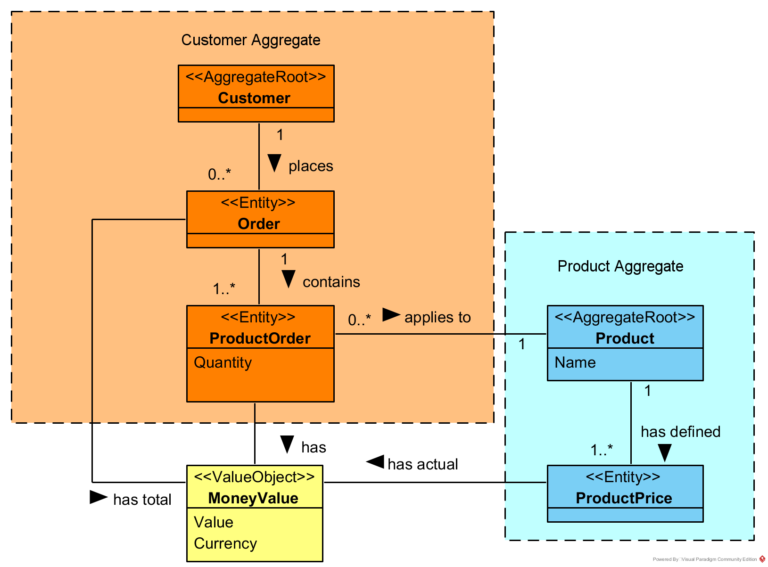
Domain
Validation
Data validation using FluentValidation
Problem Details for HTTP APIs standard implementation using ProblemDetails
Caching
Using Cache-Aside pattern and in-memory cache.
Integration
Outbox Pattern implementation using Quartz.NET
Related blog articles
Simple CQRS implementation with raw SQL and DDD
Domain Model Encapsulation and PI with Entity Framework 2.2
How to publish and handle Domain Events
Handling Domain Events: Missing Part
Cache-Aside Pattern in .NET Core
How to run application
- Create empty database.
- Execute InitializeDatabase.sql script.
- Set connection string (in appsettings.json or by user secrets mechanism).
- Run!
How to run Integration Tests
- Create empty database.
- Execute InitializeDatabase.sql script.
- Set connection string using environment variable named
ASPNETCORE_SampleProject_IntegrationTests_ConnectionString
- Run tests from project src/Tests/SampleProject.IntegrationTests
Explore related projects
Asabeneh/30-Days-Of-Python
The 30 Days of Python programming challenge is a step-by-step guide to learn the Python programming language in 30 days. This challenge may take more than 100 days. Follow your own pace. These videos may help too: https://www.youtube.com/channel/UC7PNRuno1rzYPb1xLa4yktw
78,423 starsgrafana/grafana
The open and composable observability and data visualization platform. Visualize metrics, logs, and traces from multiple sources like Prometheus, Loki, Elasticsearch, InfluxDB, Postgres and many more.
77,790 starsredis/redis
For developers, who are building real-time data-driven applications, Redis is the preferred, fastest, and most feature-rich cache, data structure server, and document and vector query engine.
77,309 starsapache/superset
Apache Superset is a Data Visualization and Data Exploration Platform
75,455 stars