
kevinnie2003/LOMAssistant
kevinnie2003/LOMAssistant has 144 GitHub stars and 13 forks. GitHot measured 0 stars in 24 hours, +9 in 7 days, and +30 in 15 days. Last checked 2026-11-18 03:36 UTC. Last push 2026-11-15.
Measured star growth
- in 24h
- 0
- in 7 days
- +9
- in 15 days
- +30
- in 1 month
- Update delayed
Net star changes over overlapping periods, not daily totals. Missing measurements are left blank. Stars measure attention, not software quality.
About
咖啡伴侣:《活侠传》全能Mod - AI陪玩、剧情回顾、分支自选、修改面板、存档优化 / 咖啡伴侶:《活俠傳》全能Mod - AI陪玩、劇情回顧、分支自選、修改面板、存檔優化 / Coffee Companion: All-in-One Mod for Legend of Mortal - AI companion, story overview, branch picking, stat editor, better saves / 珈琲のおとも:『活俠傳』オールインワンMod - AIお供、ストーリー振り返り、分岐選択、数値エディタ、セーブ改良 / 커피 동반자: 『활협전』 올인원 Mod - AI 동행, 스토리 회고, 분기 선택, 수치 편집, 저장 개선
AIREADME.en.md
Original
Coffee Companion
简体中文 · 繁體中文 · English · 日本語 · 한국어
A BepInEx 6 plugin for Legend of Mortal (活侠传). The name 咖啡伴侣 ("coffee companion") comes from 「咖啡」 (coffee), the players' nickname for the heroine 瑞杏 (Ruixing), whose name sounds like the Chinese coffee chain Luckin Coffee (瑞幸, Ruixing). It supports the latest version of the game and adds an AI companion, a story overview, branch picking, a stat editor, better saves and more.
The mod's own windows can be shown in English (AI-translated; screenshots below are in Chinese). It works with the English patches: the LLM English patch and velvetcakes' English patch (XUnity.AutoTranslator, loaded through the mod's BepInEx 5 compatibility layer). With either one installed the mod switches to English by itself; text from the game's own data, such as stat and quest names, is in English only when the patch translates it.


Install
The zip already contains BepInEx.
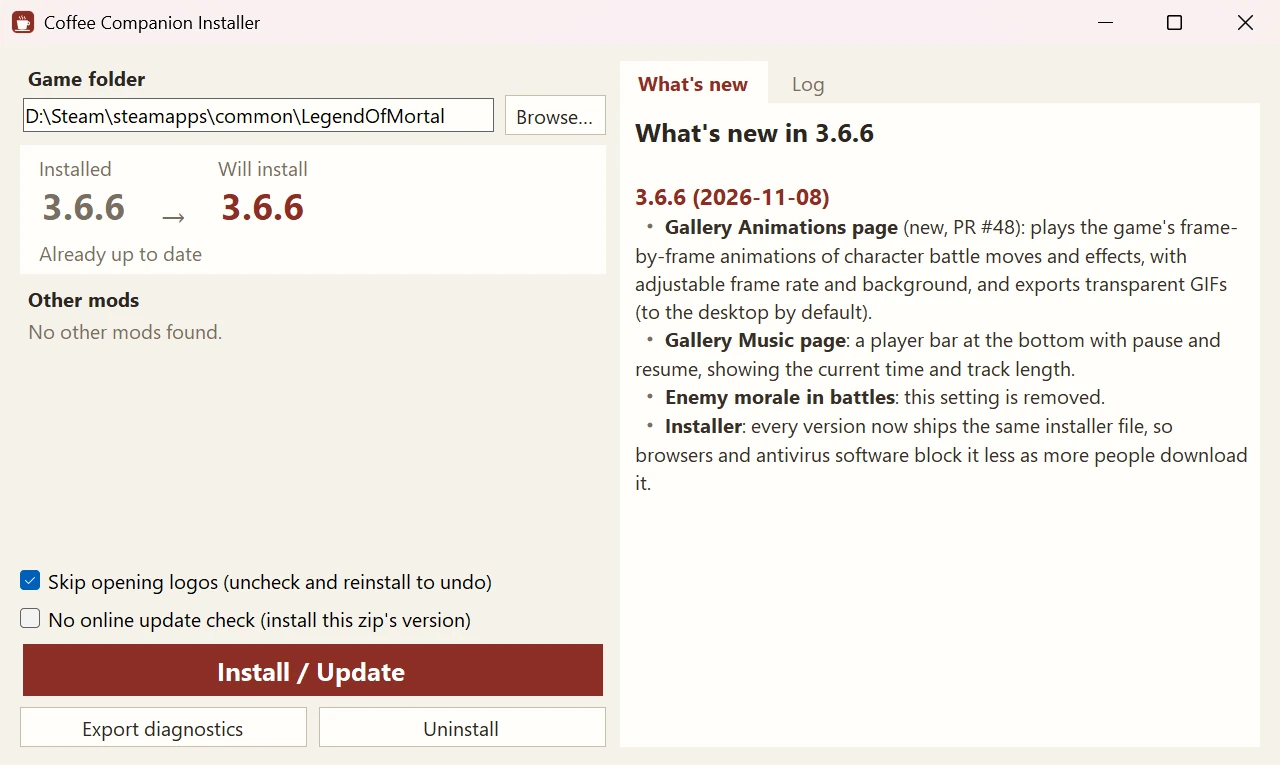
Installer (recommended): unzip and run 咖啡伴侣安装器 Installer.exe, then click Install / Update. It finds the game folder, downloads the latest version (or installs the bundled one if GitHub is unreachable) and moves old mods known to conflict to BepInEx\DisabledMods (not deleted). Run it again to update. The installer follows your Windows display language.
Manual: in Steam, right-click Legend of Mortal → Manage → Browse local files, and extract everything in the zip into the game folder, overwriting files. Remove older mods of the same kind (骰子大师, 多功能 Mod, 赵活系统) from BepInEx\plugins first.
Uninstall: run the installer and click Uninstall. Saves are not touched.
Hotkeys
| Key | Action |
|---|---|
| Tab | The Coffee Companion window (now, route map, story map, branch saves, save-anywhere, collection, stats, AI companion, settings) |
| F3 | AI companion tab |
| F8 | Settings; on the save screen, edit the note of the selected save |
| F9 | Stats page |
| F10 | Memo window |
| F5 / F7 / F6 | Save-anywhere: new save / load the latest / list all |
| F2 | Skip read dialogue until an unread line |
| F4 | Roll back to before the last story check |
| Right click | Hide the UI to view CGs |
| Gamepad L3 | Open / close the window |
| ESC | The game menu gets Skip turn, Win now and Export diagnostics |
All keys can be changed or unbound under Hotkeys on the settings page.
Features
AI companion (F3)
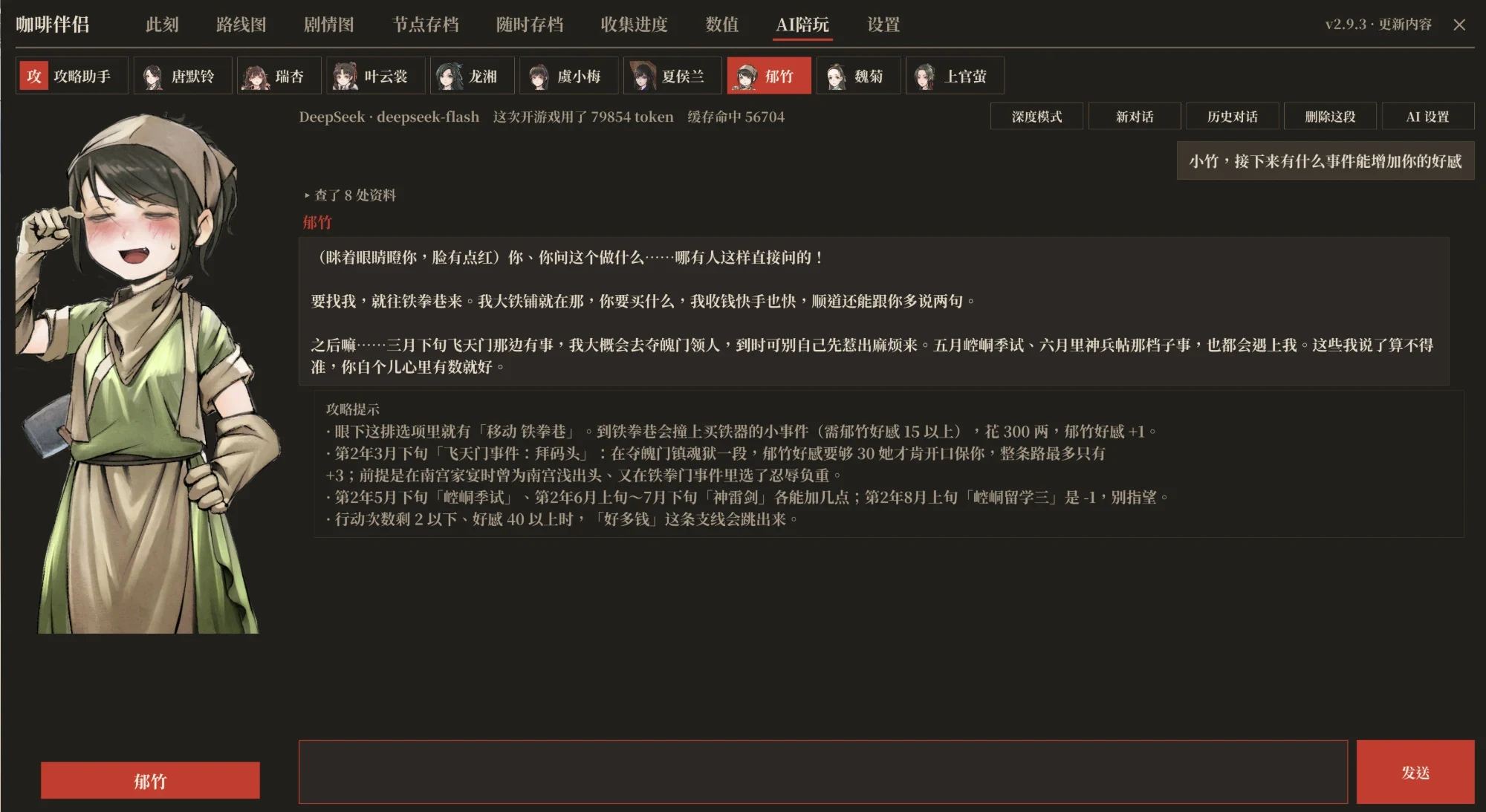
Connect a large language model with your own API key to ask about the story and strategy, or to chat with the heroines and the Eldest Brother. Supports DeepSeek, Kimi, Qwen, Zhipu GLM, SiliconFlow, OpenRouter, OpenAI, Claude, Gemini, local Ollama, and any OpenAI-compatible endpoint.
- Guide: looks up the game's own story data before answering: quests and their triggers, script branches and dialogue, affection and stat totals along each route, endings and deaths, romance routes, character bios, location events, duel conditions, plus your current progress and the options on screen.
- Heroines and the Eldest Brother: the nine romanceable heroines and Tang Buyi, the Eldest Brother, speak in their own voice, their portraits change expression with what they say, and how they address you follows the story. They only know the story you have read. When you ask for help, a separate guide tip follows the reply; you can also set them to chat only.
- Spoilers: Tell me anything / Only current and past / Hints only.
- Edits: when the AI wants to change stats, affection, your sweetheart, story flags or this mod's settings, it shows a card first; nothing changes until you confirm.
- Chats: each character's chats are stored locally; start new ones, switch between them, delete them, or export them to the desktop. Replies appear as they are written.
- Deep mode: switches to a stronger model that checks the facts before answering: more accurate, but costlier and slower.
- Cost and privacy: you pay the provider's own rates; the mod charges nothing. Your key and chats go only to the provider you choose, and the key is hidden in diagnostics exports.
Story overview (Tab)
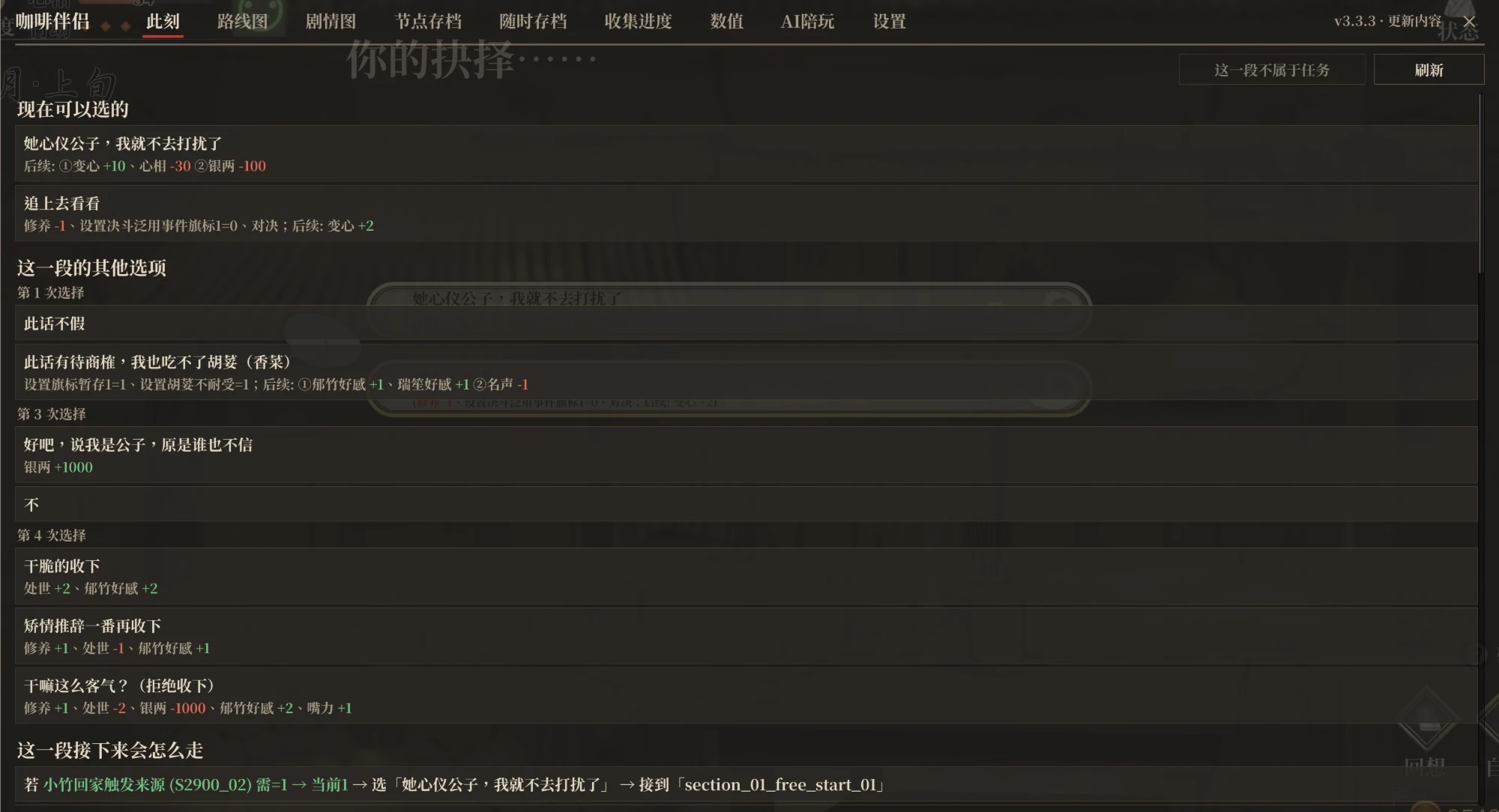
Now: every option and dice outcome of the current scene with its result, the branch conditions, whether the following dialogue has been read; the random events here with their odds and which you have not seen (pick the next one); your current quests, where to trigger them and what is still missing.
Route map: the whole main story laid out as one line along the calendar; branches split off above and below and come back to it where they rejoin, with the trigger condition on each split; side quests below; where several routes run side by side (the three study-abroad routes, your decision and so on) each keeps its own lane. Ticks mark what this playthrough has done, the red 「今」 seal marks the current main quest, the next stop has a gold ring, and "Back to now" jumps back to it. Click a stop to see where it leads next (when, where, conditions), its trigger conditions, its branches and its options (folded by default; unfold to see each option's conditions and results); a side quest step shows the next step and which main stop it rejoins. Search by quest, place, dialogue or flag (a flag result lists the scenes that change or check it); typing the first letters of the words, or Chinese pinyin initials, works too.
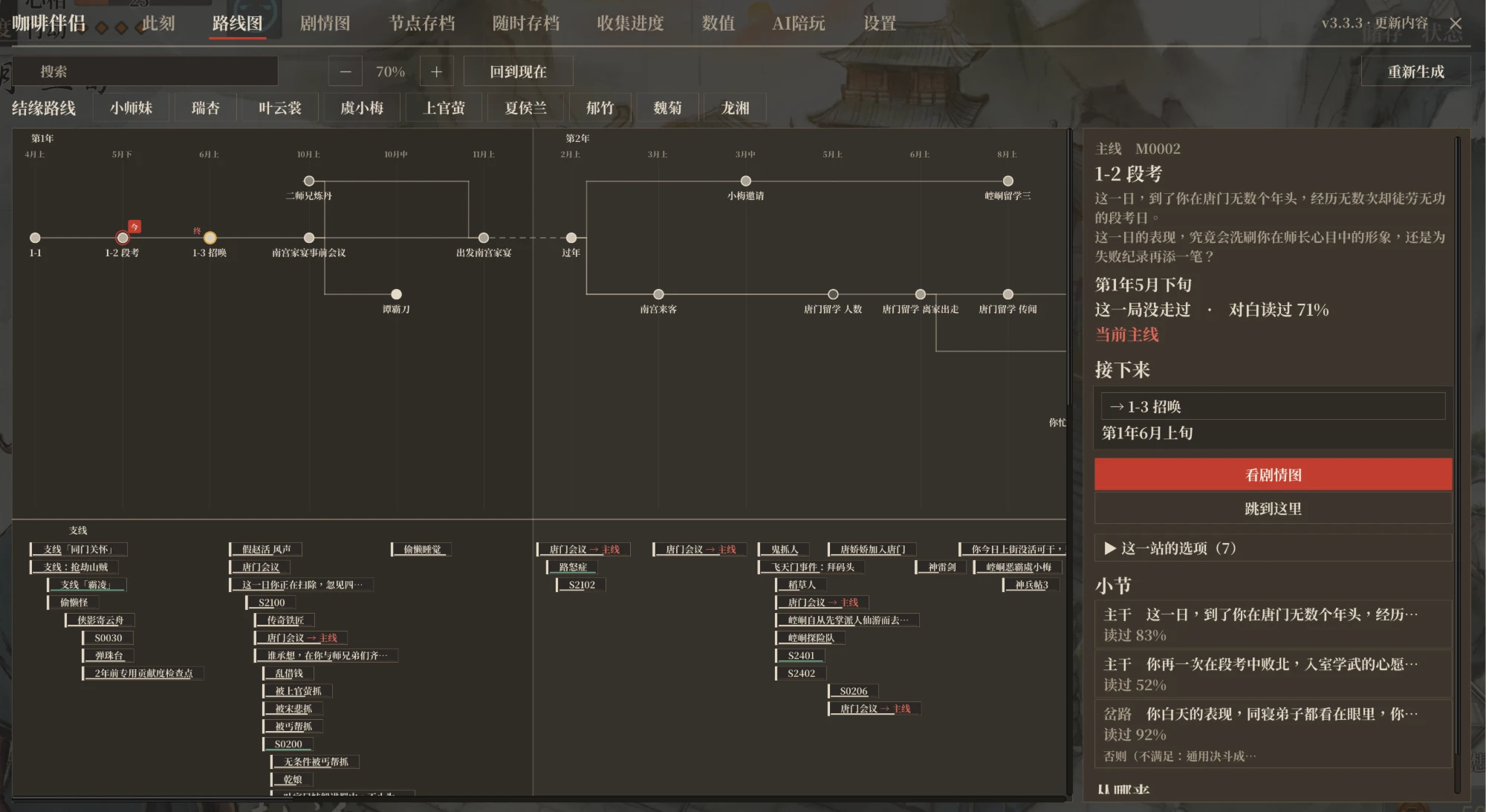
Romance routes: pick a love interest on the route map to light up only her scenes and see each step, whether it is done and where to get it.
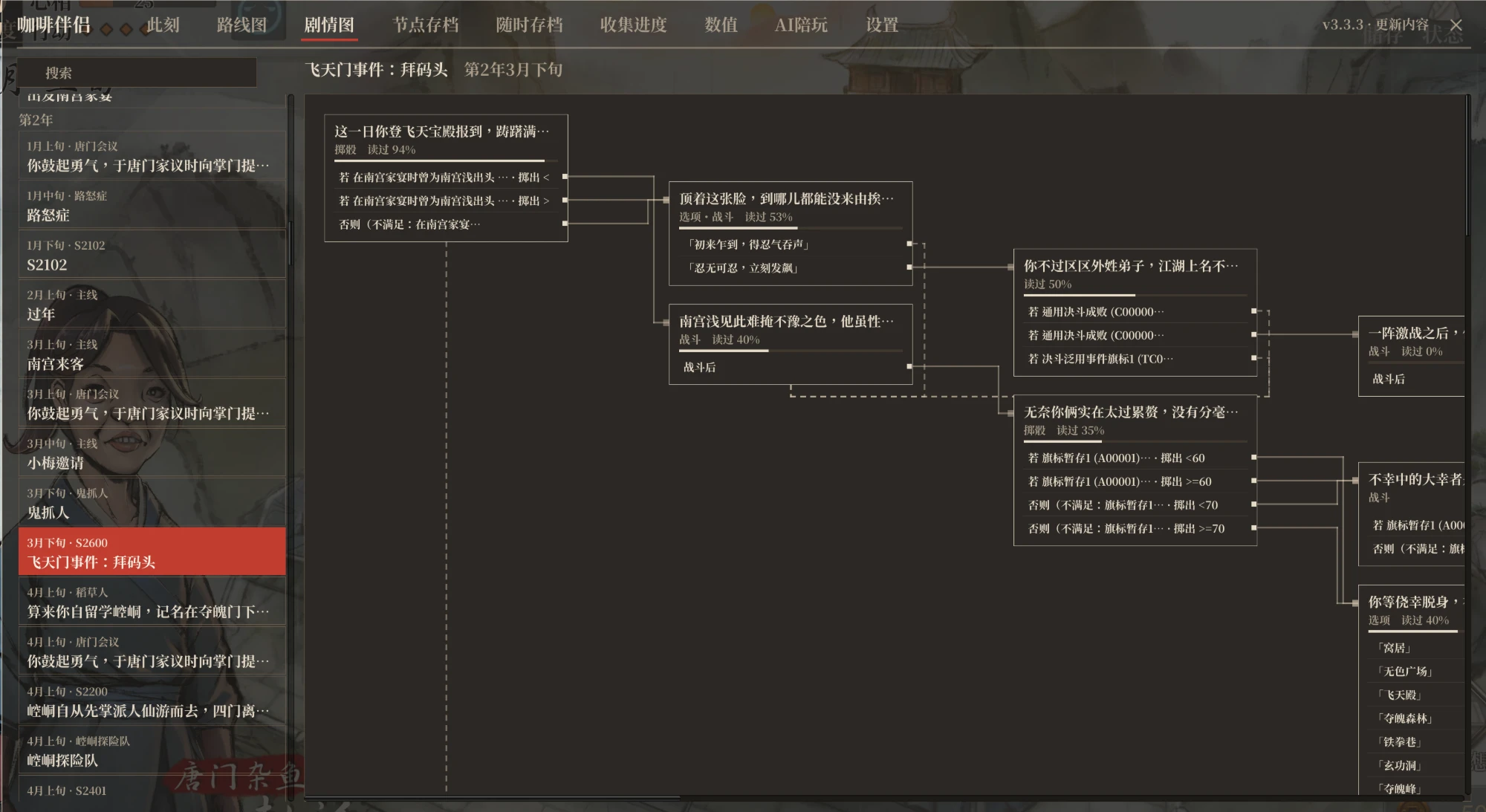
Story map: each quest as a flow chart. Every scene box lists its ways on (options, dice, conditions) one per row, with a line from that row to the scene it leads to; options that stay in the scene are listed too. Hover a row for the full condition and what it changes. Stories at places such as daily life in Kongtong and Qingcheng or Jiangling have story maps too, view-only.
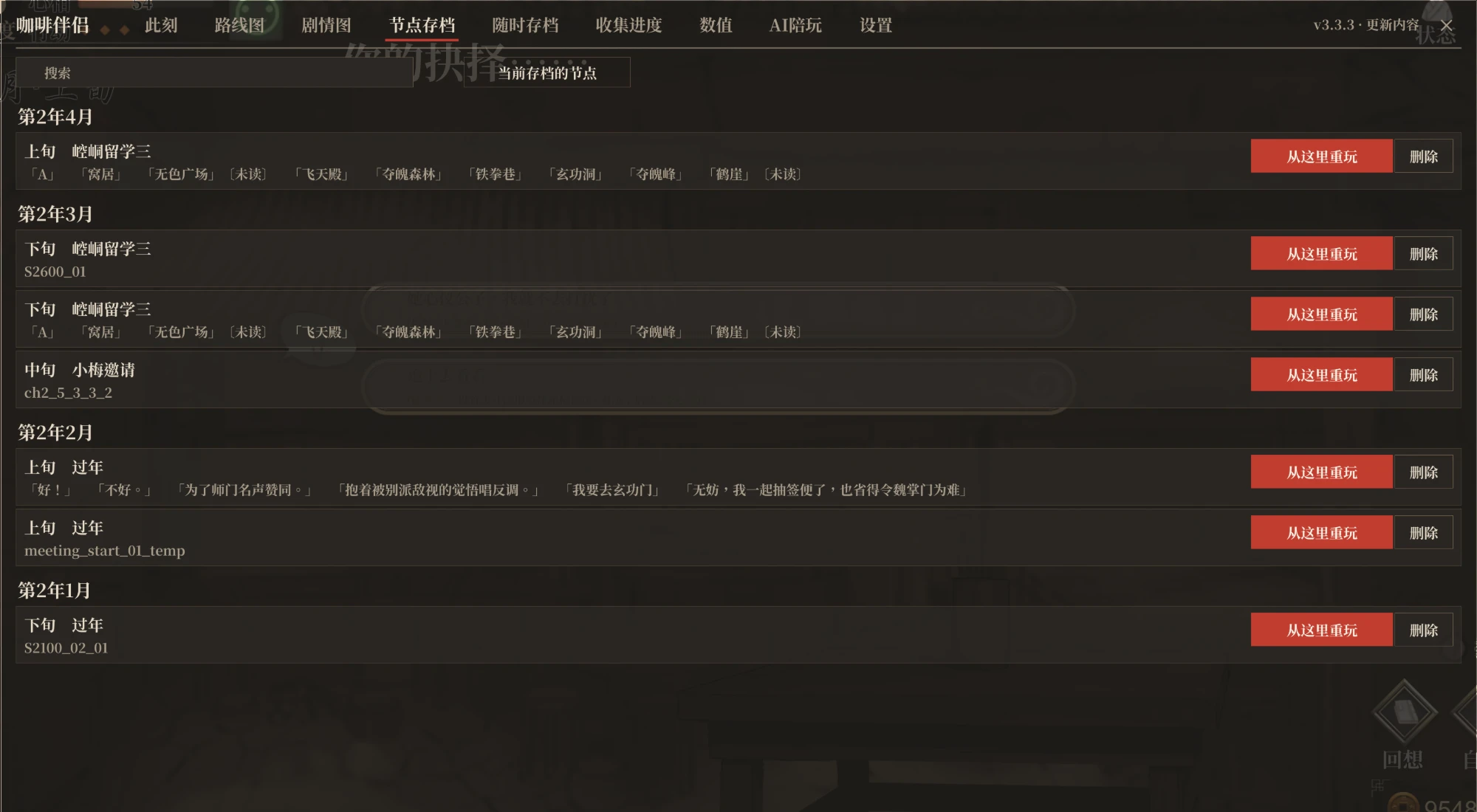
Branch saves: progress is recorded when the game autosaves at story save points and at the start of each period; click Replay from here to go back and try another path. Separate per save, uses no save slots, synced with Steam Cloud.
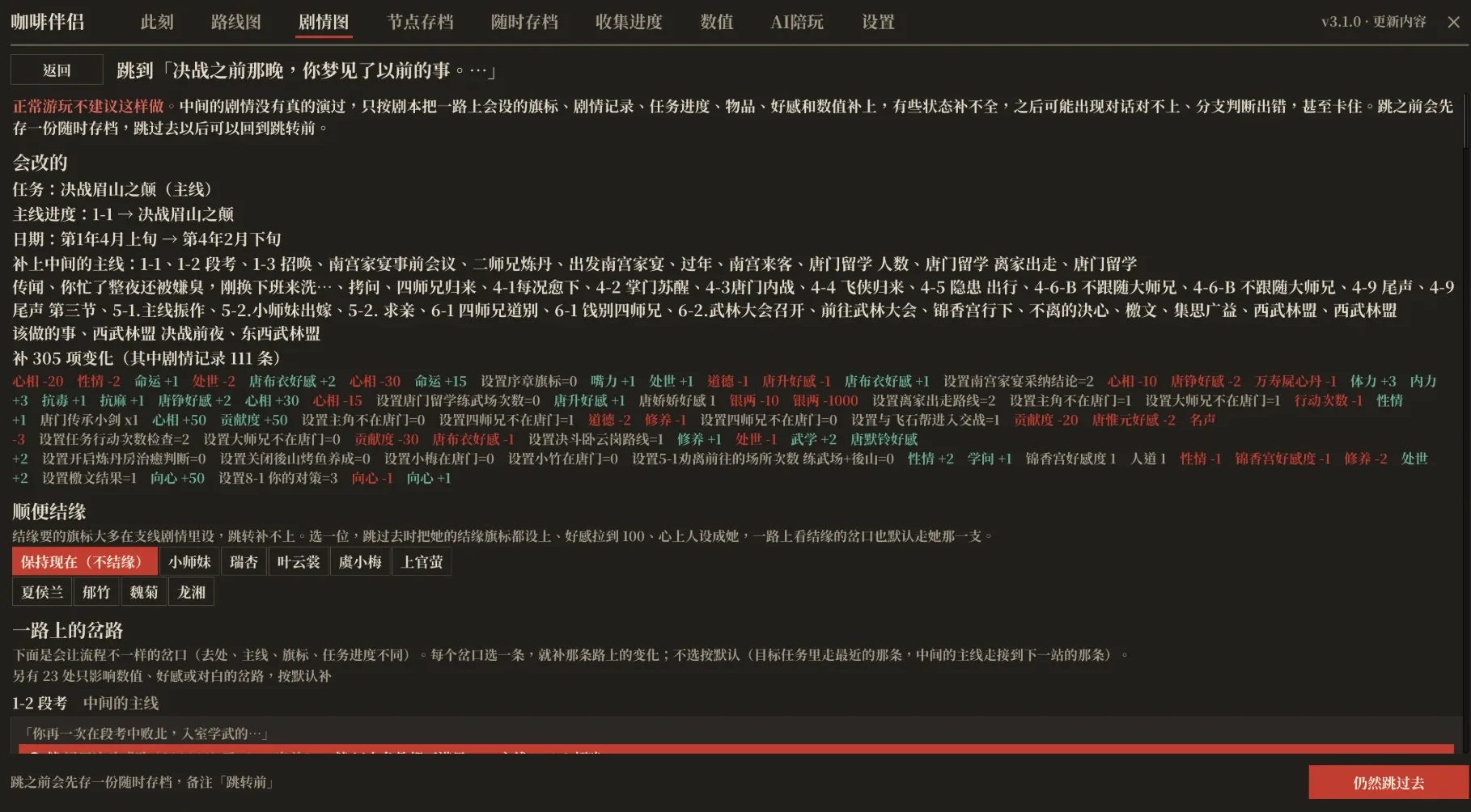
Story jump: pick a scene on the route map or story map and click Jump here to play from there, even one you haven't reached yet. Handy for filling in the story or collecting endings on another route. Before the jump you see the choices along the way that affect what comes later; the progress in between is filled in the way you pick, and you can bond with one of the heroines too. Condition checks inside the target scene default to the branch with unread lines; after the jump that branch is taken directly without changing values; with Change values to fit the chosen branch on, its conditions are filled in first, and the branch is taken directly when they can't be. A save-anywhere save is made first, so you can always go back. The story in between isn't actually played, so now and then things may not line up; not recommended for normal play.
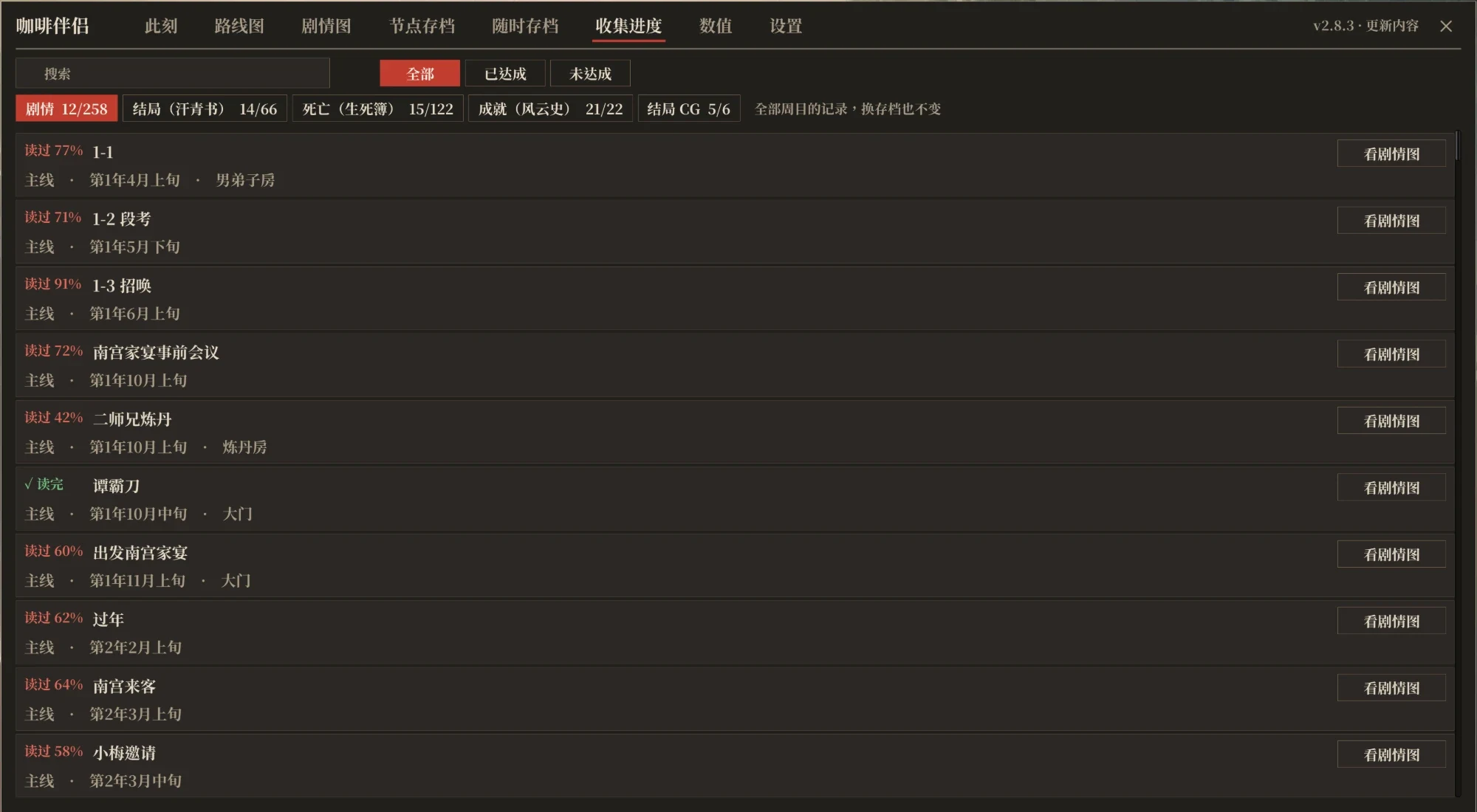
Collection: records from all playthroughs. Story counts how much of each quest's dialogue you have read; endings, deaths, achievements and ending CGs show their gallery numbers and whether you have them. For anything missing it says where and how to get it. Each entry lists the quests that lead to it; click one to open that quest's story map. On the ending CG page, Watch the credits replays the end credits in a story scene; press Esc to stop.
Story helpers
Pick dice results: click a line on the dice wheel to choose that result.
Option results: dialogue options and dice lines show what they will change; locked options show their real unlock conditions, and Unlock next to them sets the conditions. With Force options whose conditions aren't met on (only the All on preset turns it on), options that are hidden when their conditions aren't met are listed too, marked Conditions not met in red with the conditions on hover; locked options whose conditions can't be set get Force unlock, which unlocks them without changing flags. Option results in settings shows these always, only on hover (no spoilers unless you look), or never.
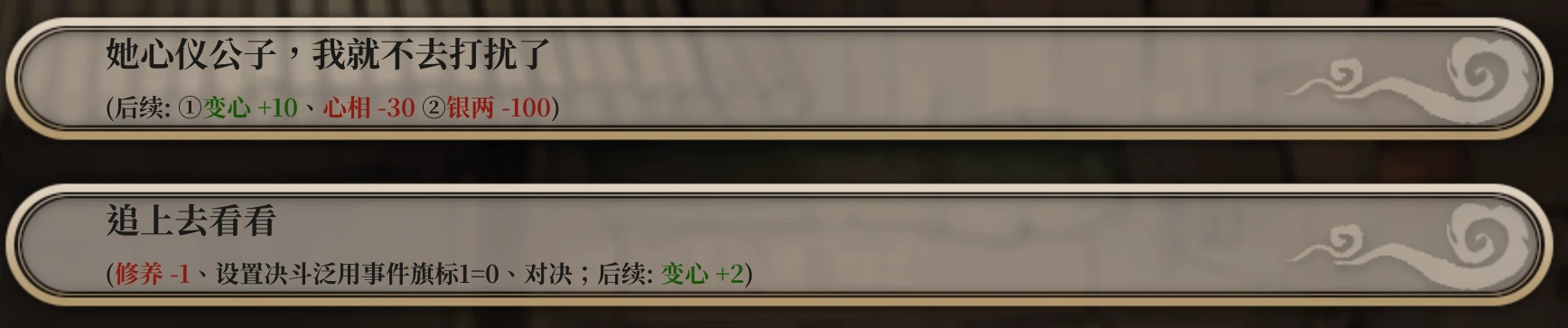
Read marks: dialogue options and dice lines show whether the lines that follow have been read (not seen, partly seen, seen). Toggle Read marks on options and dice in the settings; the Advanced and All on presets turn it on.
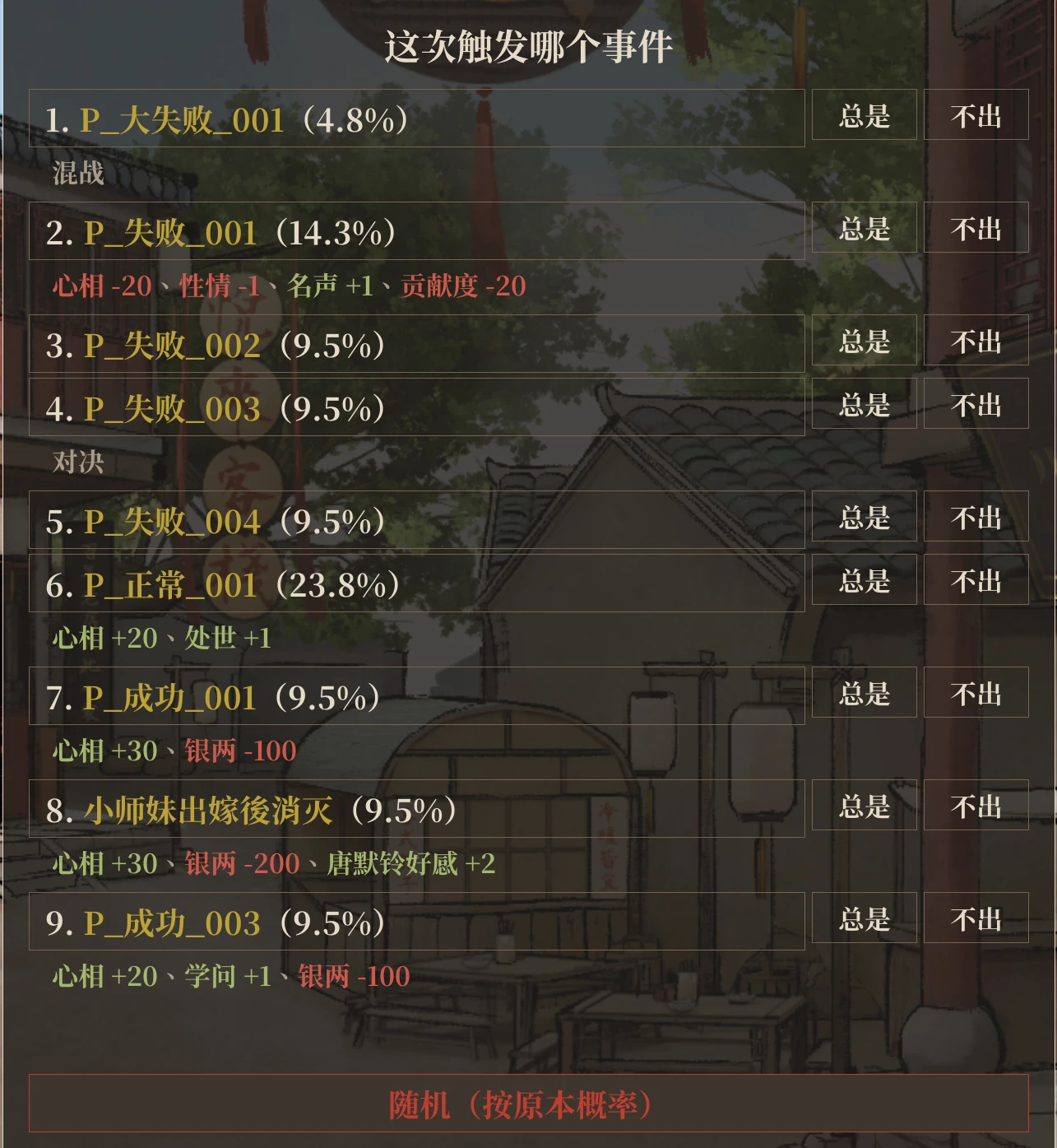
Pick random events (off by default): when working, wandering and so on, see each event's odds and changes (changes that depend on a condition show the condition), then choose which one triggers or roll with the normal odds. Events you haven't seen yet are marked Not seen. Branch checks that roll a random number also let you pick the path. Each event or path can be set to Always or Never; the rule is remembered and applies even with the picker off. With Force events whose conditions aren't met on in settings (only the All on preset turns it on), those events are also folded below with what they need; clicking one triggers it regardless, without changing flags.
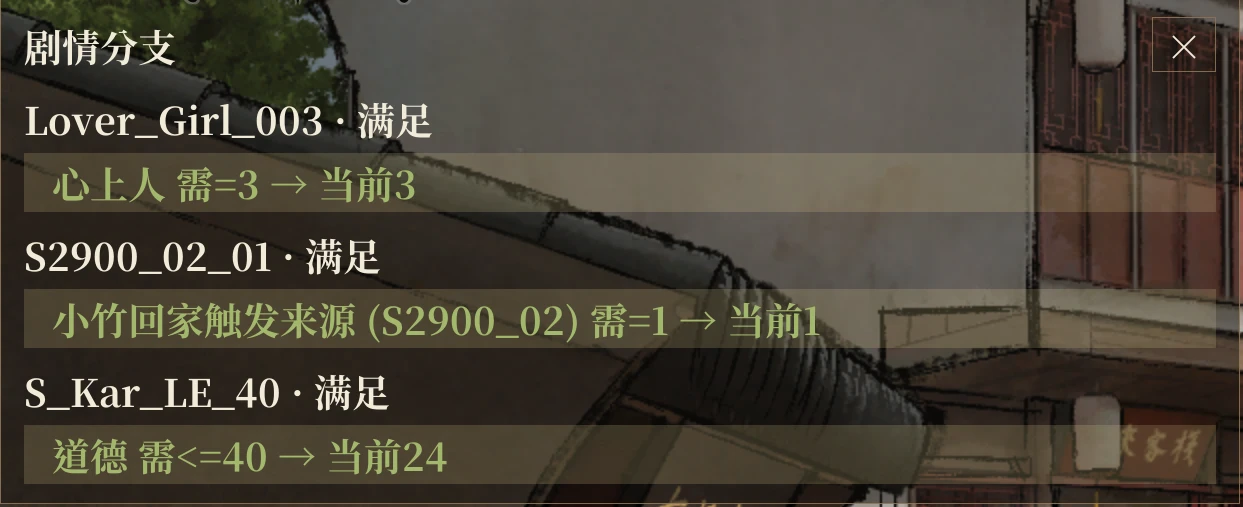
Pick the branch before a check (off by default; only the All on preset turns it on): at a story check that branches on conditions, the game stops first when another branch has unread lines or leads to a different scene. It lists each branch's conditions, current values and whether its lines were seen, and takes the branch you pick: by default values are left alone and only this one check goes that way; with Change values to fit the chosen branch on (off by default), stats, affection and flags are first changed just enough for that branch (the changes stay), and the branch is taken directly when they can't be. Checks with only one possible branch, or where other branches add nothing new, don't stop; with Stop for seen branches too on (off by default), it also stops when another branch has lines you've already seen. Fast-forward is stopped when it pops up.
Map event hints: hover over a building on the training map to see its main and side quests (can they trigger, conditions) and the odds of its random events; buildings with a quest you can trigger now stay lit. Turn on "Map hints: triggerable only" in settings to list only the quests that would trigger now; the rest are only counted. Inside a building, hover over an option such as chopping wood or training to see the random events it can roll, their odds and which you have not seen; the same goes for moving and peddling in the Go out list.
Time-limited story reminder: when a story whose conditions are met but hasn't triggered yet has 3 periods or fewer left in its window, the top left of the training map shows how many periods are left, until when, and where to go to trigger it; the Now tab marks these quests too. Assist and higher presets turn it on.
Memos (F10): a small window floating over the game that keeps track of "get this done by that date". Search for a condition among stats, affection, talents, facilities, items, flags, and the layers and progress of martial arts, forging and alchemy, then set a target and a deadline; the window shows the current value, progress and periods left, and notes at its top when a goal is met, stops being met, is about to be due or is overdue. It can be dragged, resized and collapsed.
Item uses (off by default, may reveal quest names): item descriptions in the bag and shops end with what using the item does and which stories check for it or take it. Setting: "Show item uses".
Branch panel (off by default, spoilers): lists the conditions of each branch check on the left, met in green and unmet in red.
Flag change notices (off by default, spoilers): a notice when the story changes a flag; how long it stays can be set.
Checks in the backlog: story checks, their conditions and your values are recorded in the backlog.
Hide UI for CGs: right-click in a story scene to leave only the background, CG and portraits; right-click, left-click or press any other key to restore.
Saves
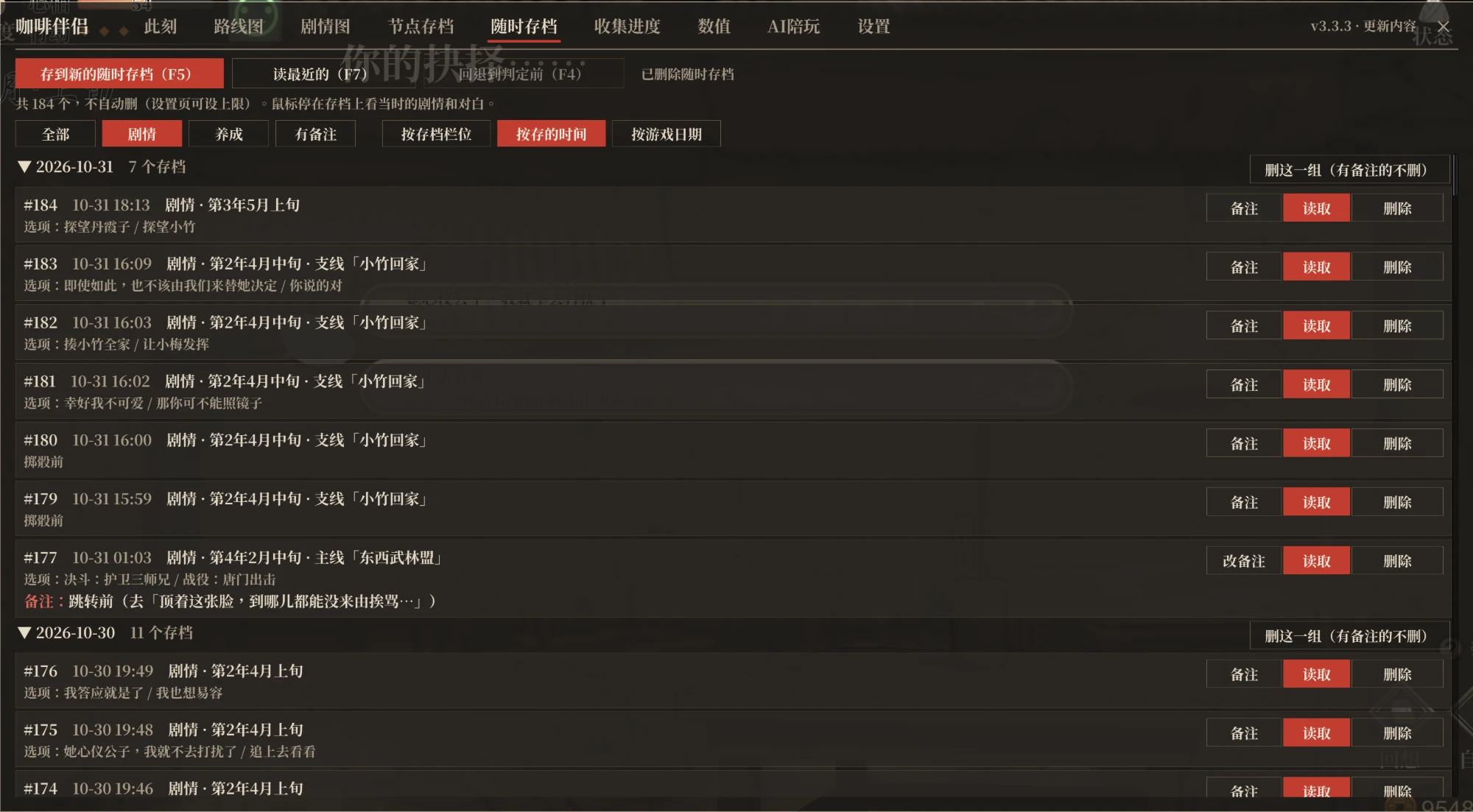
Save anywhere: save during dialogue, options, dice rolls or on the training map, without using the game's slots. F5 saves, F7 loads the latest, F6 lists them all (notes, the dialogue at that point, grouped by save slot, save time or game date, with filters and group delete); no limit by default, set one in Settings. Not available in combat.
Roll back: after seeing a check, press F4 to go back to the line before it, adjust stats with F9 and continue; the check is re-evaluated.
New save/load screen (can switch back to the original): a list with your love interest's portrait, date and note, and a detail pane with their full portrait (a shy expression once you have bonded with her in that save) and the first lines after loading; manual and auto saves on separate pages. It opens on the save you made last; a switch at the top right of the load page lists them by slot or newest first; with newest first, the save page starts with an empty slot.
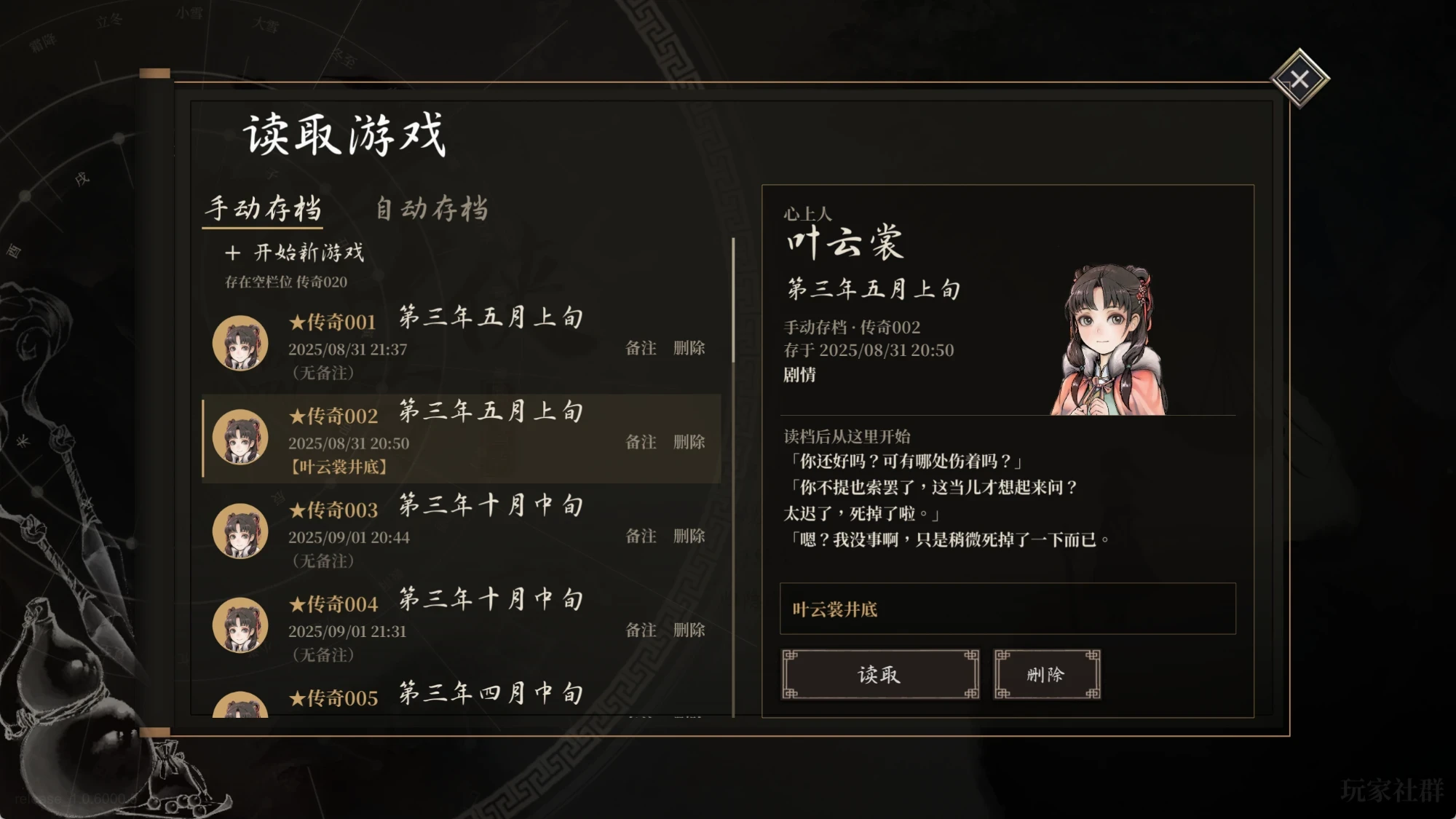
More slots: 100 manual saves (20 in the base game), 5 pages of legend slots (1 page of 12), and 5 extra old copies of each auto save.
Save notes, synced with Steam Cloud; notes from LOM_SaveSlotExpander are imported.
Training and combat
Switches in the training and combat groups of the settings page (F8):
- Game speed 1x / 2x / 3x / 5x (battles and lines that advance by themselves stay at normal speed; turn on "Speed up battles too" in settings to speed up battles as well)
- Action points: normal / not consumed / N per period
⚠️ The last two can make some story events not trigger or trigger early, and may block key main quests. Use with care and keep saves.
- Break the 100 stat cap; training, forging and alchemy use up no attempts or points, and forging and alchemy cost no silver
- Develop gear without story requirements (off by default): the forge and alchemy room can develop new gear and medicines before the story that unlocks them; level and sect size requirements still apply
- Duel invincibility and no damage to enemies; no damage to your side and no ultimate cooldown in battles
- Duel enemy forecast (off by default): shows the enemy's chosen move; the window can be moved and resized
- Pinball total score; the fourth senior brother sells every item (off by default)
Also:
- Skip turn: in the ESC menu on the training and study maps; uses one action without triggering events.
- Win now: in the ESC menu during duels and battles.
- Speed-ups: faster scene changes, loading and skipping, shorter pauses after stat changes, no idle wait between duel rounds.
- Skill list columns: in battle, a long skill list is split into columns.
Stats page (F9)
Stats, martial arts, sects, relationships (everyone), talents, training and crafting points, facilities, books, items and flags on one page; add, subtract or set any value, and search by name, ID, description, the first letters of the words or Chinese pinyin initials.
- Books and items: set the count directly; quests advance as if bought in a shop. Hover over a martial manual to see what each layer adds when learned; learned layers are ticked.
- Stats can be set below the bonus from manuals and the like, even below zero, and stay there through later story changes and loading.
- Your love interest is shown by name; mood, the four personality stats, yin-yang and silver each have a lock that keeps story and options from changing them; locks stay on across restarts and saves.
- Titles: pick any title or write your own.
- Flags: over a thousand, grouped by sect favour, characters, story and more.
- Reverse lookup: click a flag, book or item to list the scenes that change or check it; click a name under relationships to list the scenes that check it. Each links to the story map.
- Stat presets: values you change on the Stats tab are recorded; click "Stat presets" to save them as a preset. After loading another save or starting a new game, click Apply to set them all at once; values you didn't change are left alone.
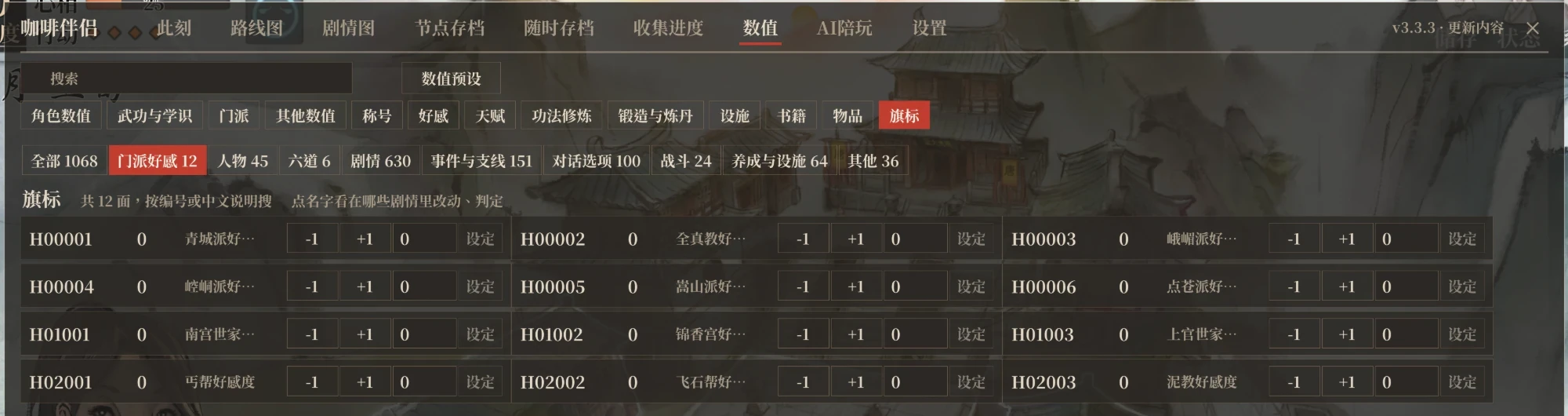
Changing values or flags at random can break the story; save first.
Other
- Gamepad: the whole window works with a gamepad (L3 opens it, the left stick moves the pointer, A clicks, LB / RB switch tabs); dice, skip turn and the event picker too.
- Interface: dark mode; Source Han Serif or Microsoft YaHei font; separate opacity for the main window, small windows and hint boxes; larger dialogue text.
- Languages: Simplified Chinese, Traditional Chinese and Korean following the game language, Japanese with the Japanese patch, English with an English patch; can also be chosen in settings.
- Export diagnostics: ESC → Settings → Export diagnostics packs logs and settings to the desktop (no saves); also in the installer.
- Conflict detection: warns about conflicting old mods at the top of settings (mods that only change the same game code alongside this one and work with it aren't flagged); if another mod uses the same key, this mod gives it up.
- Export legend: export this playthrough's legend as a txt at any time from Status → Legend.
- Faster start: the title animation is sped up, and the installer can skip the opening logos.
- Also: choose who appears on the title screen; the lecture hall shows how to reach each ending and death, or everything unlocked; the game can keep running in the background (off by default); the window's top right shows each version's changes and a red note when a new version is out.
FAQ
Found a bug? Run the installer again to make sure you are on the latest version. If it persists, export diagnostics and open an issue describing how it happened.
Nothing happens after installing? Quit Steam completely from the tray and start the game again. If it still does not work, use Export diagnostics in the installer.
Game in a folder with Chinese or other non-English characters? BepInEx fails to load there. Move the game folder to a path with only English letters and numbers (in Steam, right-click the game → Properties → Installed Files → Move install folder), then run the installer again.
Option results missing, dice cannot be picked? An older mod of the same kind is installed. The installer handles this; for manual installs, remove the old mods from BepInEx\plugins.
Works with other mods? Yes, mods whose features don't overlap can be installed alongside it. If a hotkey clashes, this mod gives way automatically, and you can bind another key under Settings > Hotkeys. If another mod ships its own BepInEx, run this mod's installer again after installing it.
Linux / Steam Deck? Install manually and add WINEDLLOVERRIDES="winhttp=n,b" %command% to the Steam launch options.
Settings
Everything is on the settings page of the window (F8). Changes are saved immediately; ones that need a restart are marked; hover over a name for details. Settings are also stored in BepInEx\config\LOMAssistant.cfg.
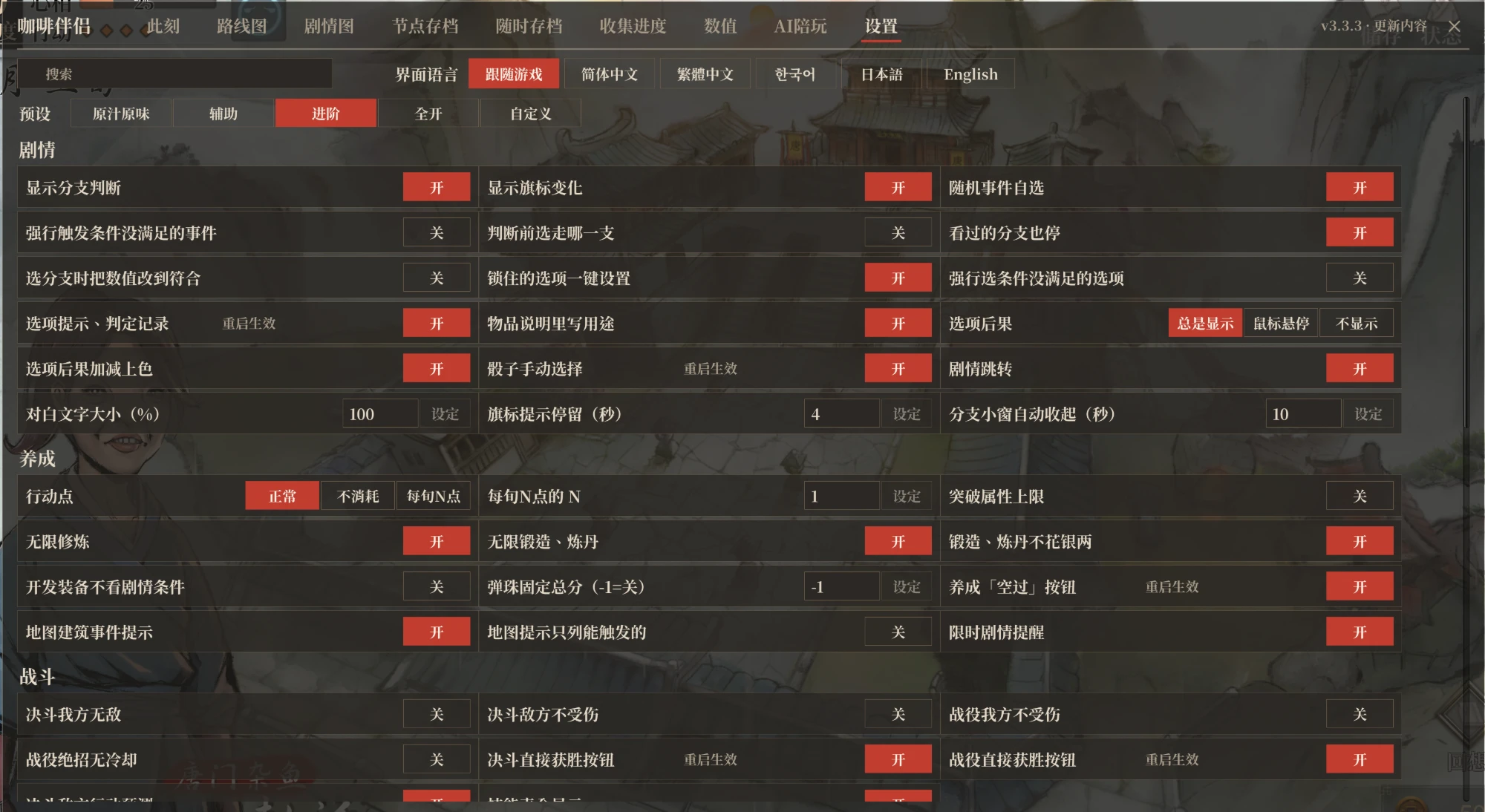
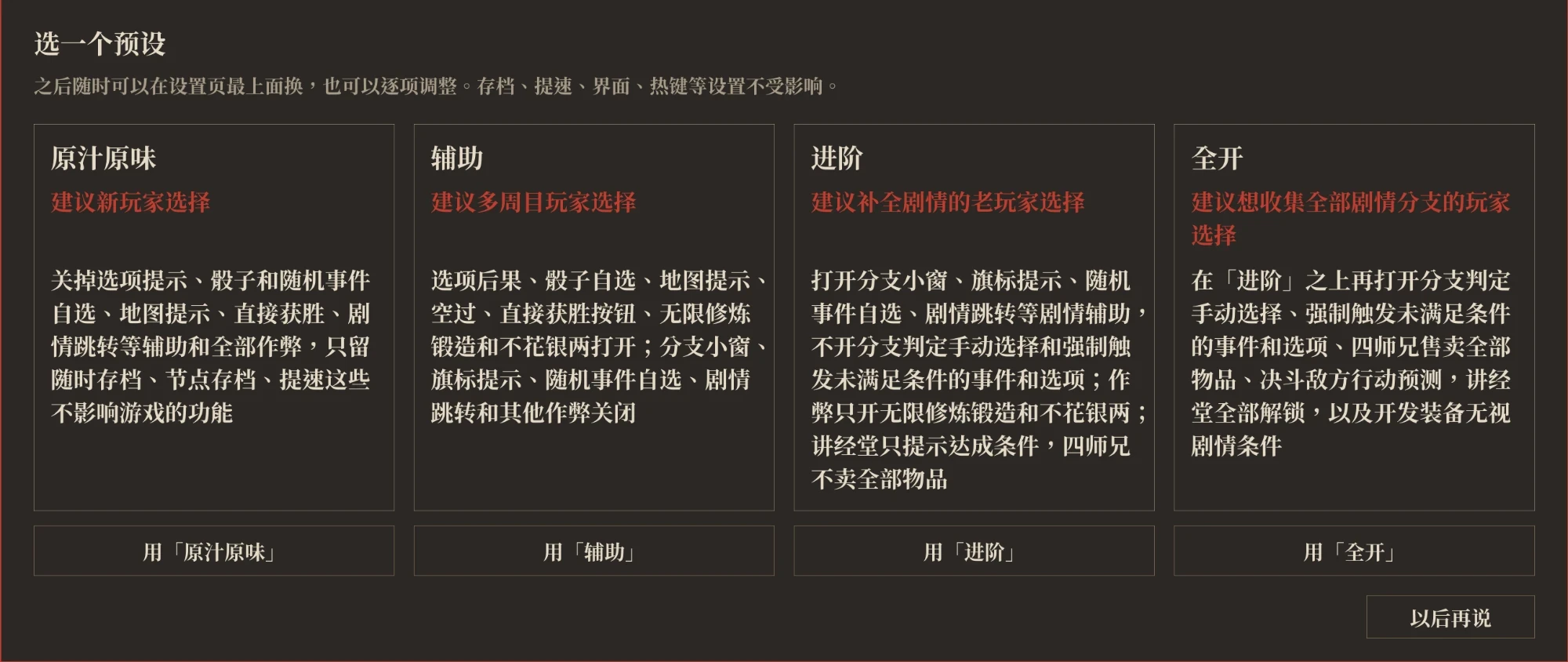
Presets: at the top of the settings page you can switch in one click to As intended, Assist, Advanced or All on. They only change story hints, life-sim and combat aids and cheats; saves, speed-ups, interface and hotkeys stay as they are. Changing any of those switches makes it Custom, which you can switch back to later. New players pick one the first time they open the window; if they don't, it stays on Assist.
Building
You need the .NET 8 SDK and a game folder with the mod installed (the build references the game's and BepInEx's assemblies; no game files are in this repository).
GAME="D:/Steam/steamapps/common/LegendOfMortal" DOTNET=/path/to/dotnet ./build.sh
DOTNET=/path/to/dotnet ./Installer/build-installer.sh
Credits
See the Chinese README. This project builds on 活侠传助手 by 爱死, takes ideas from 赵活系统 and code from LOM_SaveSlotExpander. The AI Companion tab takes ideas from 江湖夜话 (Jianghu Yehua) by Cpjjason, another AI mod for the game that lets you chat privately with its characters, who can give you items, teach you martial arts and remember past talks (video on Bilibili). Some personality traits and habits of the characters on the AI Companion tab draw on the 活侠传 fan character card by 夏呆呆 from the 类脑 community. Thanks to lxsb222-spec, blakceyes, NEXTAltair, pluvivanto, lockpick and F1-ZX for their pull requests, and to mahosalieri85-a11y and iampigcheng for their issues.