
keshon/melodix
keshon/melodix has 27 GitHub stars and 10 forks. GitHot measured +1 stars in 24 hours. Last checked 2026-11-19 21:14 UTC. Last push 2026-11-17.
Measured star growth
- in 24h
- +1
- in 7 days
- Collecting history
- in 15 days
- Collecting history
- in 1 month
- Collecting history
Net star changes over overlapping periods, not daily totals. Missing measurements are left blank. Stars measure attention, not software quality.
About
A self-hosted Discord music bot written in Go, built to keep playing through flaky streams, dead voice connections and gateway reconnects. It streams YouTube, SoundCloud and internet radio, and forwards compatible YouTube Opus audio to Discord without re-encoding it. Reliable as AK-47 (actually no)
Self-hostedREADME.md
Original



Melodix
A self-hosted Discord music bot written in Go, built to keep playing through flaky streams, dead voice connections and gateway reconnects. It streams YouTube, SoundCloud and internet radio, and forwards compatible YouTube Opus audio to Discord without re-encoding it.
Public music bots can disappear or stop supporting a source. Melodix is a small binary you run yourself, with your own Discord token, on your own machine. You control when it runs and when it gets updated.
What it does
- Plays YouTube, SoundCloud and internet radio, across as many servers as you put it in — one binary, one machine.
- Forwards compatible YouTube Opus audio without re-encoding. YouTube serves Opus, Discord wants Opus, so those packets go through as they are — less CPU, no second-generation quality loss, and no ffmpeg needed for that path. SoundCloud, radio and transcoding fallbacks take the ffmpeg route.
- Falls through when an extractor breaks, and they do break. Every track has several behind it — native, kkdai, yt-dlp — and a stream that dies mid-play reopens where it stopped rather than starting the song again.
- Survives Discord too. A silent gateway or a dead voice connection is spotted and recovered on its own, and the queue lives through the reconnect.
- Numbers everything it plays, so something from last week is
/play 42rather than a scroll back through chat. Turn the track cache on and a repeat never touches the network at all. - Keeps its state in a directory you choose — an embedded write-ahead log (datastore) that survives being killed mid-write. No database server, no migrations.
- Doubles as a terminal player: the same engine drives
melodix-cli, straight to your speakers, no Discord account involved.
See it work
| Pick the right hit | Queue a whole playlist | Replay from history |
|---|---|---|
 |
 |
 |
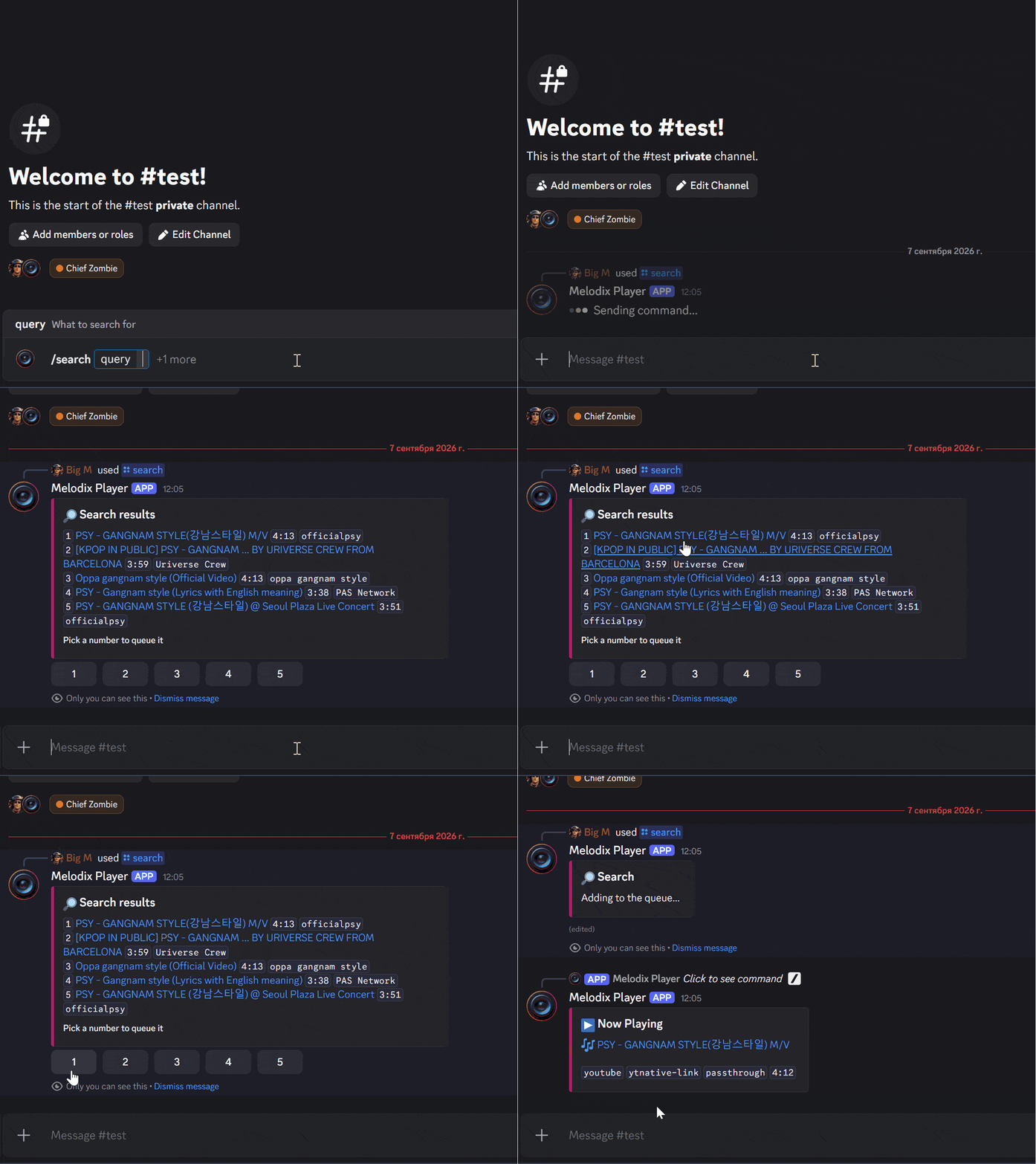
/search lists five results with uploader and length; one button press queues the one you meant. |
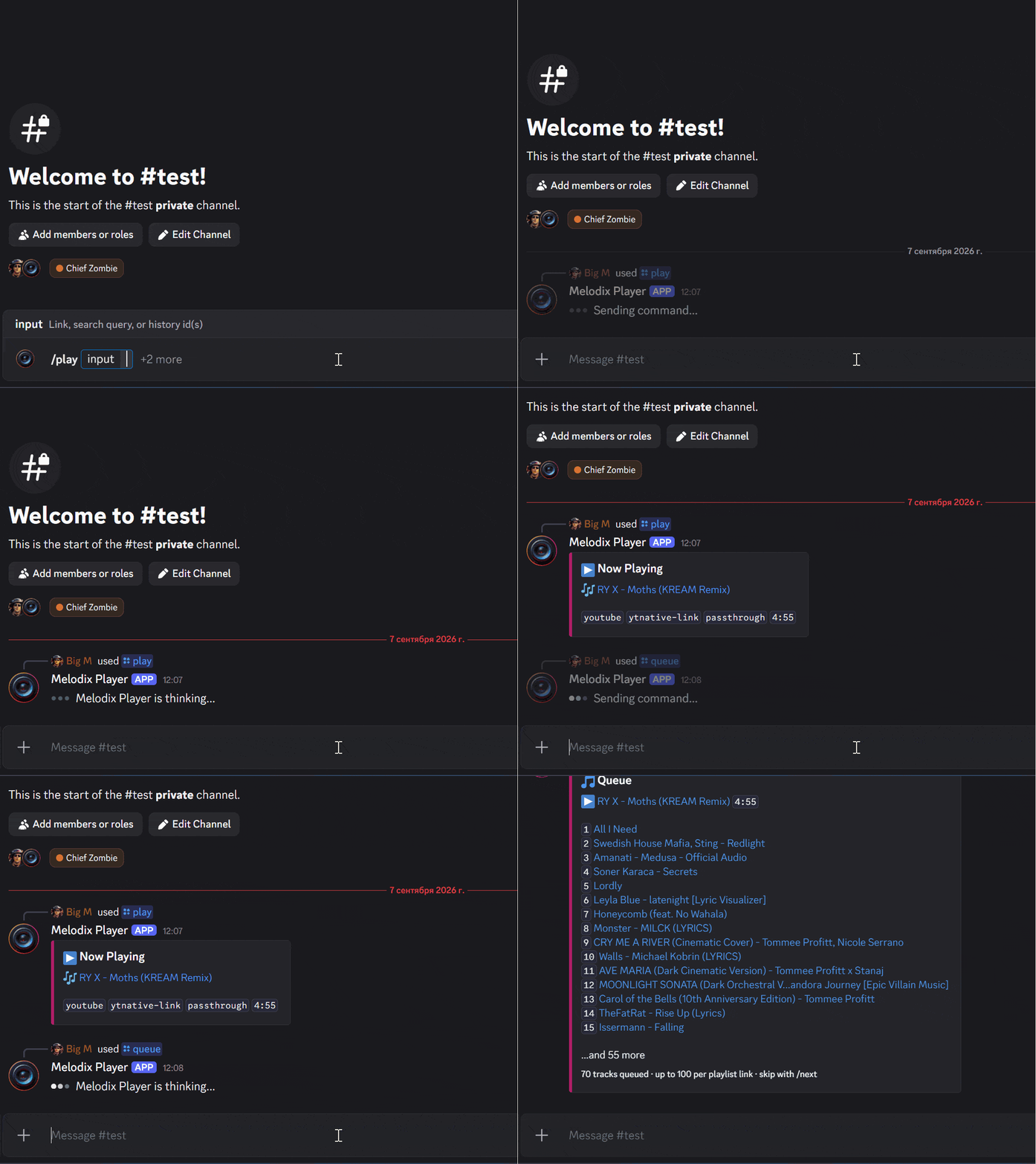
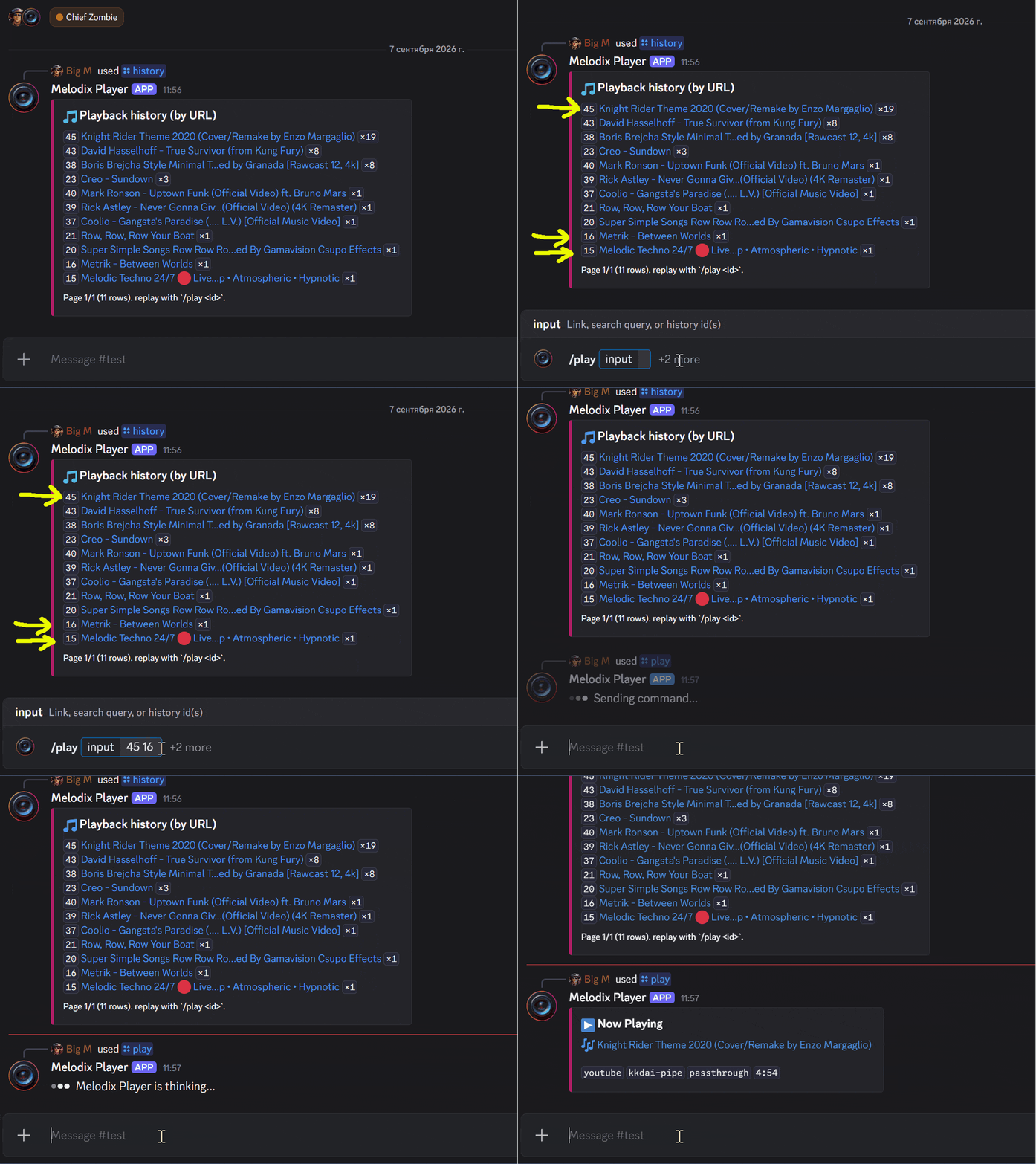
One link, 70 tracks queued behind the first. | /history gives every track an id, so /play 45 16 15 queues three of them straight back. |
Click any of them to play full size.
What it doesn't do
Melodix is built for music on servers you run yourself, for people you know. These are its current limits:
- No volume control or audio filters. Both mean decoding and re-encoding every packet, which is the one thing the audio path is built to avoid. Discord's own per-user volume still works.
- No web dashboard. Configuration is environment variables and slash commands. Nothing to log into, nothing listening on a port.
- No accounts, premium tier or telemetry. Your token, your machine, nothing phoning home.
- No Spotify, Apple Music or Tidal. Their audio is DRM-protected. Quietly substituting a YouTube search result is not supported either.
- No loop, shuffle or seek — yet. Nothing in the way; they just aren't built.
- No horizontal scaling. One process is one failure domain, sized for servers you know rather than for hosting hundreds. A full process restart loses the in-memory queue; use a service supervisor if you need automatic process recovery.
- Leaves the voice channel when the queue runs out.
Get it running
Start with the setup guide for complete Windows, Linux and macOS release steps, bot creation and first-playback checks.
Hear it before you install anything: the bot lives in the
Ctrl+Z Discord server — join a voice channel
and use slash commands in #music-spam.
To run your own, take a binary from the
releases page, put your token in
.env, keep the supplied assets/ directory beside the binary, and start it
from that directory. Nothing to compile, no Go runtime to install. Slash
commands sync automatically on startup.
For Docker Hub images or a local container build, follow the Docker guide. Both modes share configuration and storage.
From source instead, with Go 1.26 or newer:
# Discord bot — token from the Discord Developer Portal
go build -o melodix-discord ./cmd/discord
DISCORD_TOKEN=your-token INIT_SLASH_COMMANDS=true ./melodix-discord

# ...or the terminal player, no Discord account required
go build -o melodix-cli ./cmd/cli
./melodix-cli
FFmpeg is needed for SoundCloud, internet radio and transcoding fallbacks.
yt-dlp is a last-resort fallback, optional except for YouTube live broadcasts,
and it needs a JavaScript runtime on PATH for those YouTube calls. The full setup guide — creating
the bot, invite link, every config knob, Docker — is in
docs/running.md.
Commands
Use /help in Discord or help in the terminal for the current command list.
Command reference and examples
Discord
Information
- /about — Discover the origin of this bot
- /help — Get a list of available commands
- /help category — View commands grouped by category
- /help group — View commands grouped by group
- /help flat — View all commands as a flat list
Music
- /history — Show recently played tracks (replay by id with /play)
- /next — Skip to the next track
- /pause — Pause the current track
- /play — Play a music track
- /queue — Show what is playing and what is queued next
- /resume — Resume the current track
- /search — Search and pick a track to play
- /stop — Stop playback and clear queue
Settings
- /maintenance — Bot maintenance commands
- /maintenance ping — Check bot latency
- /maintenance export-data — Export the current server database as JSON
- /maintenance status — Retrieve statistics about the guild
- /settings — Server settings
- /settings commands log — Review recently used commands
- /settings commands status — Show enabled and disabled command groups
- /settings commands enable — Enable a command group
- /settings commands disable — Disable a command group
/play accepts links, search queries and playback-history IDs. For playlists,
search results and queue examples, use the playback guide.
Terminal
melodix-cli mirrors the bot's music commands. Search lists numbered results
and asks which one to queue. Playback history works too, except while the bot
is running on the same data directory.
Information
about— Discover the origin of this bothelp— Get a list of available commands (also?)
Music
history [timeline|counts] [page]— Show recently played tracks (replay by id with play)next— Skip to the next track (alson,skip)pause— Pause the current trackplay <link|query|history ids> [source=youtube|soundcloud|radio] [parser=…]— Play a music track (alsop)queue— Show what is playing and what is queued nextresume— Resume the current tracksearch <query> [source=youtube|soundcloud]— Search and pick a track to playstop— Stop playback and clear queue (alsos)
Under the hood
The playback engine (pkg/music) is a standalone Go library with no Discord in it: resolver → queue → recovery stream → sink. The Discord bot is one consumer of it, the CLI is another. If you're curious how the parser fallback and voice recovery actually work, docs/architecture.md walks through the whole thing.
House rules — naming, concurrency contracts, how to add a source or parser — are in docs/conventions.md, where every rule carries the check that enforces it or says plainly that nothing does.
Documentation
| Guide | Contents |
|---|---|
| Documentation index | Choose a task or contributor reference |
| Playback | Search, playlists, queue and history |
| Troubleshooting | Diagnose connection, audio and storage failures |
| Running | Setup, configuration, first-run checks and persistent data |
| Docker | Container build, environment forwarding and mounted data |
| Architecture | Components, playback pipeline, recovery and state |
| Conventions | Development, extension checklists and verification |
| Ownership | Lifecycle and concurrency contracts with enforcement limits |
| Music library | Using the playback engine from another Go program |
| Brand | Logo and asset sources |
License
MIT © Innokentiy Sokolov (Señor Mega / Big M)