
keith2018/TinyGPT
keith2018/TinyGPT has 132 GitHub stars and 21 forks. GitHot measured 0 stars in 24 hours. Last checked 2026-11-16 18:57 UTC. Last push 2026-06-23.
What you can do
- Fast BPE tokenizer, inspired by tiktoken
- CUDA inference with FP32 / FP16 / BF16 data types
- Paged KV Cache with auto-sizing
- Continuous Batching with chunked prefill
Measured star growth
- in 24h
- 0
- in 7 days
- Collecting history
- in 15 days
- Collecting history
- in 1 month
- Collecting history
Net star changes over overlapping periods, not daily totals. Missing measurements are left blank. Stars measure attention, not software quality.
About
Tiny C++ LLM inference implementation from scratch
Machine LearningREADME.md
OriginalTinyGPT
Tiny C++ LLM inference implementation from scratch.
Supported Models
- Llama 3.2
- Qwen 2.5
- Qwen 3
- Mistral
Features
- Fast BPE tokenizer, inspired by tiktoken
- CUDA inference with FP32 / FP16 / BF16 data types
- Paged KV Cache with auto-sizing
- Continuous Batching with chunked prefill
- Flash Attention via TinyFA
- Multi-GPU Tensor Parallel inference via NCCL
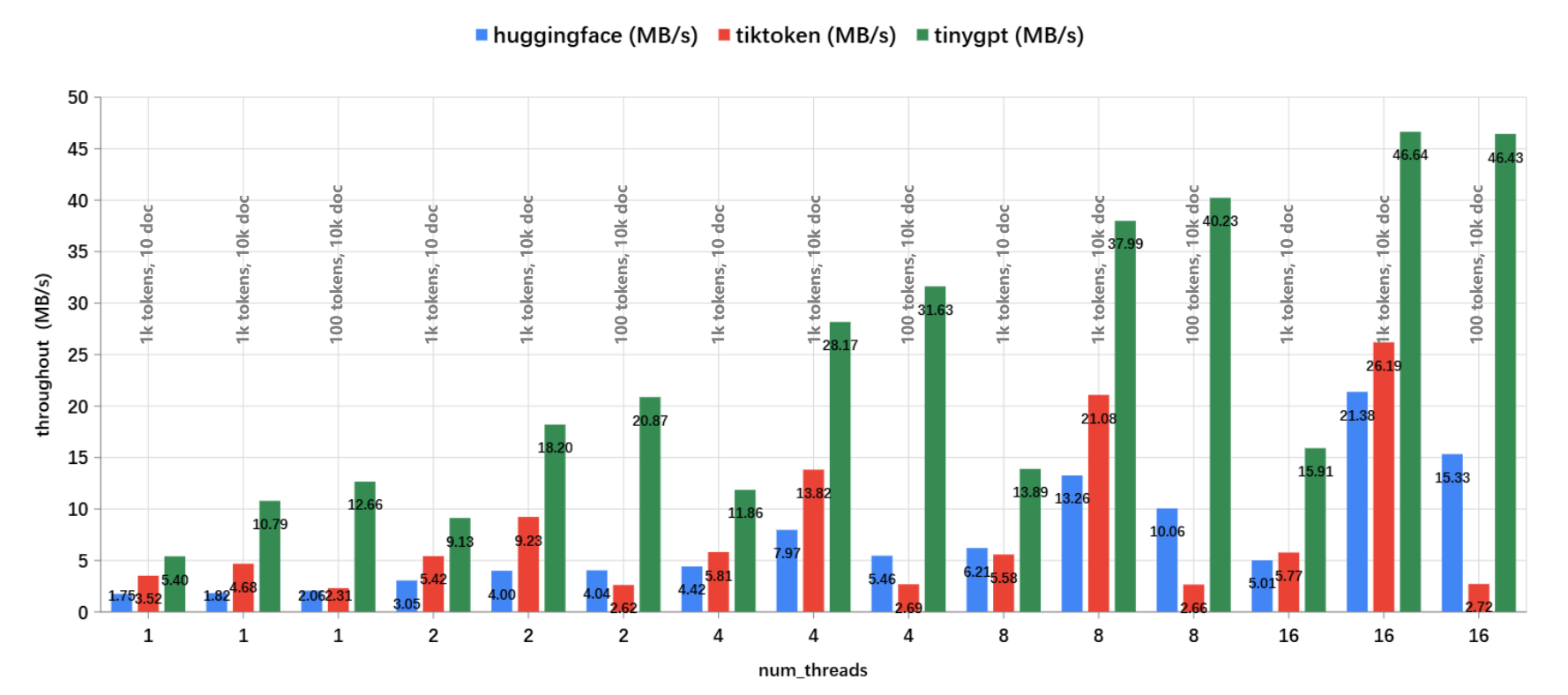
Tokenizer Benchmark
tinygpt::tokenizer is faster than both HuggingFace Tokenizers
and OpenAI tiktoken. The encoding speed was measured using
the benches/tokenizer.py script on a machine with
an Intel(R) Xeon(R) Platinum 8255C CPU @ 2.50GHz.
Getting Started
1. Clone the Repository
git clone --recurse-submodules https://github.com/keith2018/TinyGPT.git
cd TinyGPT
2. Download Model Files
Download model files from HuggingFace:
git clone https://huggingface.co/meta-llama/Llama-3.2-1B
git clone https://huggingface.co/meta-llama/Llama-3.2-3B
git clone https://huggingface.co/Qwen/Qwen2.5-0.5B
git clone https://huggingface.co/Qwen/Qwen2.5-3B
git clone https://huggingface.co/Qwen/Qwen3-1.7B
git clone https://huggingface.co/mistralai/Mistral-7B-v0.3
3. Build
mkdir build
cmake -B ./build -DCMAKE_BUILD_TYPE=Release
cmake --build ./build --config Release
Examples
The examples/ directory contains independent sub-projects that can be built and run separately.
Tokenizer
Benchmark the BPE tokenizer encoding speed:
cd examples/tokenizer/bin
./TinyGPT_example_tokenizer
Inference
Run model inference with configurable parameters:
cd examples/inference/bin
./TinyGPT_example_inference --model /path/to/model
Available options:
| Option | Default | Description |
|---|---|---|
--model <path> |
(required) | Path to HuggingFace model directory |
--device <cpu|cuda> |
cuda |
Device type |
--dtype <fp32|fp16|bf16> |
bf16 |
Data type |
--max-tokens <n> |
32 |
Max new tokens to generate |
--temperature <f> |
0.8 |
Sampling temperature |
--top-p <f> |
0.9 |
Top-p (nucleus) sampling |
--input <text> |
The future of AI is |
Input prompt text |
--max-graph-batch <n> |
64 |
Max batch size for CUDA Graph capture |
--tensor-parallel <n> |
1 |
Tensor parallel size (number of GPUs) |
--tp-init <s> |
env:// |
TP init method (e.g. tcp://host:port) |
Server
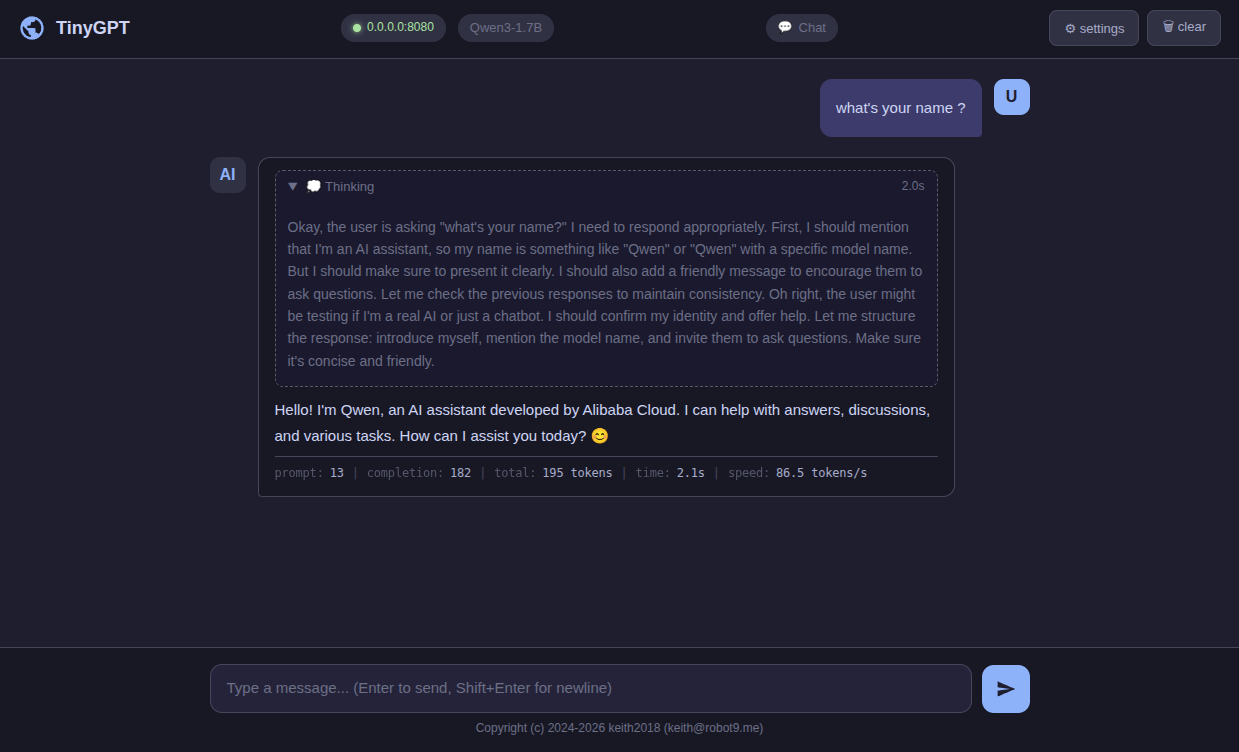
TinyGPT includes an OpenAI-compatible API server with a built-in Web UI.
Start the Server
cd server/bin
./TinyGPT_server --model /path/to/model
Available options:
| Option | Default | Description |
|---|---|---|
--model <path> |
(required) | Path to HuggingFace model directory |
--host <addr> |
0.0.0.0 |
Server host address |
--port <port> |
8080 |
Server port |
--max-tokens <n> |
4096 |
Max new tokens per request |
--temperature <f> |
0.7 |
Sampling temperature |
--top-p <f> |
0.9 |
Top-p sampling |
--min-p <f> |
0.0 |
Min-p sampling |
--chat-template <s> |
auto | Custom chat template (Jinja2 string or file path) |
--web-dir <path> |
auto | Path to web UI directory |
--max-batch-tokens <n> |
8192 |
Max tokens per batch step |
--prefill-chunk-size <n> |
512 |
Max prefill tokens per step per sequence |
--max-graph-batch <n> |
64 |
Max batch size for CUDA Graph capture |
--tensor-parallel <n> |
1 |
Tensor parallel size (number of GPUs) |
--tp-init <s> |
env:// |
TP init method (e.g. tcp://host:port) |
API Endpoints
The server implements the following OpenAI-compatible endpoints:
GET /v1/models— List available modelsPOST /v1/completions— Text completionsPOST /v1/chat/completions— Chat completions (supports streaming via SSE)
Web UI
Once the server is running, open http://localhost:8080 in your browser to access the built-in Web UI.
Multi-GPU Inference (Tensor Parallel)
TinyGPT supports multi-GPU inference via Tensor Parallelism over NCCL. Each rank runs as a
separate process and is pinned to one GPU (cuda:RANK). Both the inference example and the
server support TP — pass --tensor-parallel <N> to enable it.
By default the init method is env://, which reads the following environment variables on
each process:
RANK— rank id of this process (0 .. N-1)WORLD_SIZE— total number of ranks (must equal--tensor-parallel)MASTER_ADDR— host of rank 0MASTER_PORT— port on rank 0 used for rendezvous
Alternatively, pass --tp-init tcp://host:port to use a TCP rendezvous instead of env vars.
Launch Example (single-node, 2 GPUs)
Start one process per GPU. For the server, only rank 0 binds the HTTP port; other ranks run as workers driven by rank 0 via NCCL collectives.
# Rank 0 (also serves HTTP on :8080)
RANK=0 WORLD_SIZE=2 MASTER_ADDR=127.0.0.1 MASTER_PORT=29500 \
  ./TinyGPT_server --model /path/to/model --tensor-parallel 2

# Rank 1 (worker)
RANK=1 WORLD_SIZE=2 MASTER_ADDR=127.0.0.1 MASTER_PORT=29500 \
  ./TinyGPT_server --model /path/to/model --tensor-parallel 2
The same pattern applies to TinyGPT_example_inference. Note that tensor parallel requires
--device cuda and models without tied word embeddings.
Python Binding
# pip install .

import tinygpt

enc = tinygpt.Tokenizer()
enc.init_with_config("tokenizer.json", "tokenizer_config.json")
ids = enc.encode("This is a test")
Dependencies
| Library | Purpose |
|---|---|
| TinyTorch | Tensor operations |
| TinyFA | Flash Attention |
| RapidJSON | JSON parsing |
| pcre2 | Regex |
| utf8proc | Unicode |
| ankerl::unordered_dense | HashMap |
| moodycamel::ConcurrentQueue | Concurrent queue |
| cpp-httplib | HTTP server |
License
This code is licensed under the MIT License (see LICENSE).