
kasvith/tic has 70 GitHub stars and 14 forks. GitHot measured 0 stars in 24 hours. Last checked 2026-11-15 22:57 UTC. Last push 2026-11-08.
What you can do
- Floating sticky notes — borderless, draggable, resizable panels; optional float-on-top and show-on-all-Spaces per note. Positions and state are remembered across launches.
- Multiple lists — create from the menu bar, ⌘N, the in-note +, or the Dock menu. New lists are auto-named List 1, List 2, …
- Rich tasks — subtasks up to 3 levels (completing a parent completes its children), multiline notes (Shift-Return), and inline Markdown (**bold**, *italic*, `code`, ~~strike~~, links). Tap to edit; drag to reorder, or drag right to nest.
- Solid or Liquid-Glass notes — per-note color themes, or a translucent material that shows the desktop through it.
Measured star growth
- in 24h
- 0
- in 7 days
- Update delayed
- in 15 days
- Update delayed
- in 1 month
- Update delayed
Net star changes over overlapping periods, not daily totals. Missing measurements are left blank. Stars measure attention, not software quality.
About
FREE Floating, Stickies-style task lists for macOS.
ProductivityREADME.md
Original
Tic
Floating, Stickies-style task lists for macOS.




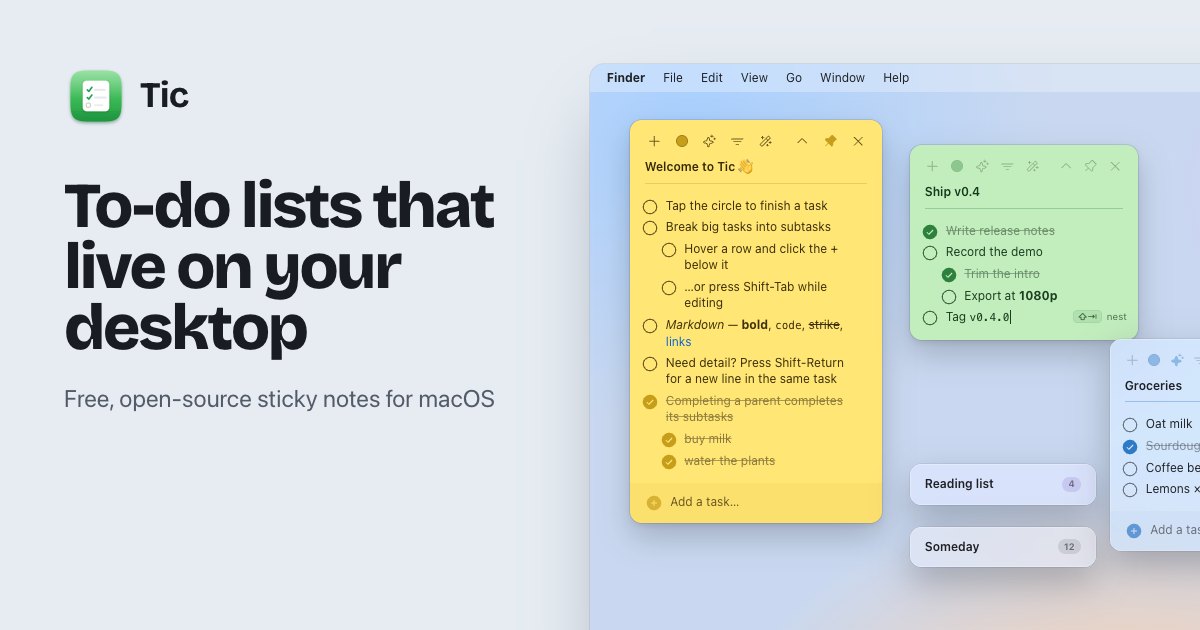
Tic keeps your lists on the desktop as floating sticky notes instead of buried behind a menu bar click — glance at them, check things off, drag them around. Each note is its own checklist.
Features
- Floating sticky notes — borderless, draggable, resizable panels; optional float-on-top and show-on-all-Spaces per note. Positions and state are remembered across launches.
- Multiple lists — create from the menu bar, ⌘N, the in-note +, or the Dock menu. New lists are auto-named List 1, List 2, …
- Rich tasks — subtasks up to 3 levels (completing a parent completes its children),
multiline notes (Shift-Return), and inline Markdown (
**bold**,*italic*,`code`,~~strike~~, links). Tap to edit; drag to reorder, or drag right to nest. - Solid or Liquid-Glass notes — per-note color themes, or a translucent material that shows the desktop through it.
- Roll-up — double-click a note's title bar to collapse it to just the header.
- Raycast-style search palette — a floating, centered command palette to search/open/delete any list, with keyboard navigation.
- Launch at Login, a custom menu-bar icon, and a native Dock identity.
Requirements
macOS 14 (Sonoma) or later, on Apple silicon.
Install
Paste this in Terminal:
curl -fsSL https://tic.kasvith.me/install.sh | sh
It installs Tic to /Applications (or ~/Applications on a non-admin account) and opens it. Run it
again any time to update. Tic isn't notarized, and macOS adds a quarantine flag to apps downloaded in
a browser, which makes Gatekeeper block the first launch; curl doesn't add that flag, so this
just works. The script is short and readable: site/public/install.sh.
Or download it by hand: get the .dmg from the
latest release, move Tic.app to
/Applications, then clear the quarantine flag once:
xattr -c /Applications/Tic.app
(Alternatively: right-click Tic.app → Open → Open.) To have Tic open automatically, enable
Launch at Login from its menu-bar menu.
Build from source
Tic is a Swift Package — no .xcodeproj needed.
swift run                 # build + launch (dev)
swift build -c release    # release build
swift test                # run the test suite (Swift Testing)
./scripts/package.sh      # assemble dist/Tic.app (add --open to launch it)
open Package.swift        # edit in Xcode
Usage
- The menu-bar icon lists your recent lists (with a More Lists submenu for the rest) and opens Search Lists…, New List (⌘N), and Launch at Login.
- Hover a note to reveal its controls: color, solid/glass, float-on-top, roll-up, + new list, and close. Click the title to rename; the bottom field adds tasks (Return keeps focus).
- Hover a task to reveal a ✕ (delete) and, below it, a + line — click it to add a subtask nested under that row. An empty task you don't fill in disappears when you click away.
Keyboard shortcuts
| Shortcut | Action |
|---|---|
| Return | Finish editing a task / add the typed task |
| Shift-Return (or ⌥ Return) | New line within the same task |
| Shift-Tab | Make the task a subtask (nest one level deeper) |
| ⌃ Shift-Tab | Un-nest a subtask (move it back out) |
| ⌘N | New list |
| Double-click the title bar | Roll the note up / down |
You can also drag a task to reorder it, or drag it right to nest it — the drop indicator
shows where (and at what level) it will land. The relevant chord (⇧⏎ line, ⇧⇥ nest) shows as a
tiny keycap hint right in the field while you're editing, so you don't have to memorise this table.
Architecture
SwiftUI views hosted inside AppKit NSPanels (the only way to get true desktop-sticky behavior),
backed by SQLite via GRDB. An AppModel coordinator bridges the menu bar to the window layer.
See CLAUDE.md for the full breakdown.
Stack: Swift 6 · SwiftUI + AppKit · GRDB (SQLite) · SMAppService (login item).
Development & releases
CI (
.github/workflows/ci.yml) builds, tests, and lints on every push/PR.Changelog is generated from Conventional Commits with git-cliff (
cliff.toml) and kept inCHANGELOG.md.Releases are tag-based: push a
v*tag and the release workflow buildsTic.app, generates release notes, and publishes a GitHub Release with the zipped app.git tag v0.1.0 && git push origin v0.1.0
Icon source art lives in Assets/ (AppIcon / Flat / MenuBar).
License
Released under the MIT License. © 2026 Kasun Vithanage.