
kaima2022/Health-reminder
kaima2022/Health-reminder has 293 GitHub stars and 25 forks. GitHot measured 0 stars in 24 hours, +4 in 7 days, and +8 in 15 days. Last checked 2026-11-18 01:48 UTC. Last push 2026-10-22.
Measured star growth
- in 24h
- 0
- in 7 days
- +4
- in 15 days
- +8
- in 1 month
- Collecting history
Net star changes over overlapping periods, not daily totals. Missing measurements are left blank. Stars measure attention, not software quality.
About
This is a high-performance desktop application developed using Rust and Tauri, designed to help you stay focused on your work while scientifically managing sedentary time, hydration, and eye rest through intelligent task scheduling and multi-dimensional reminders.一款基于 Rust 与 Tauri 开发的高性能桌面应用,旨在通过智能化的任务排程与多维提醒,帮助你在专注工作的同时,科学地进行久坐、补水与用眼休息。
ProductivityREADME.en.md
OriginalHealth Reminder



Minimalist, Precise, Efficient — A health guardian app tailored for modern office workers
中文 | English
Introduction
In today's fast-paced digital era, a healthy body is the cornerstone of high productivity. Health Reminder is a high-performance desktop application built with Rust and Tauri, designed to help you take breaks from sitting, stay hydrated, and rest your eyes through intelligent task scheduling and multi-dimensional reminders.
Showcase
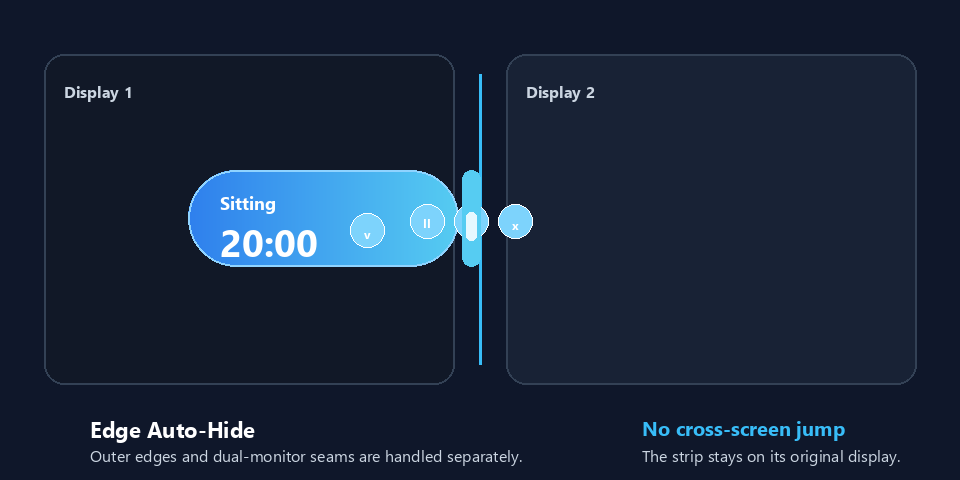
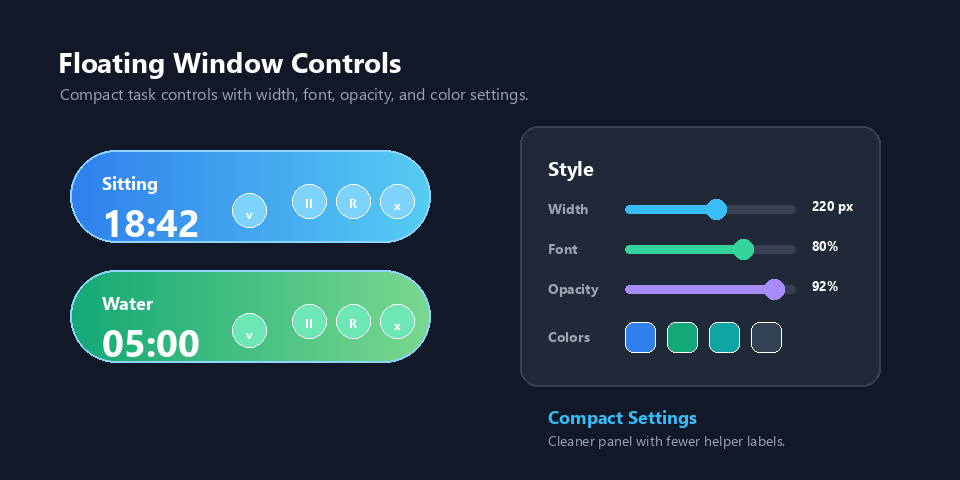
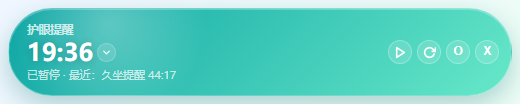
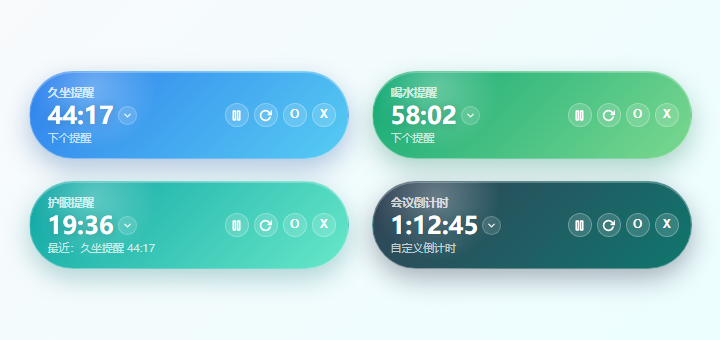
v1.8.0 Floating Edge Auto-Hide & Style Controls
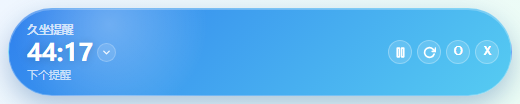
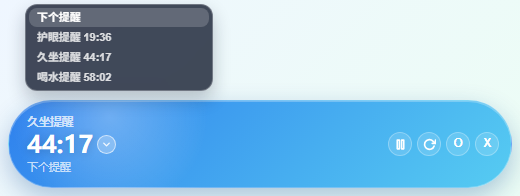
v1.7.0 Floating Window & Daily Reminders
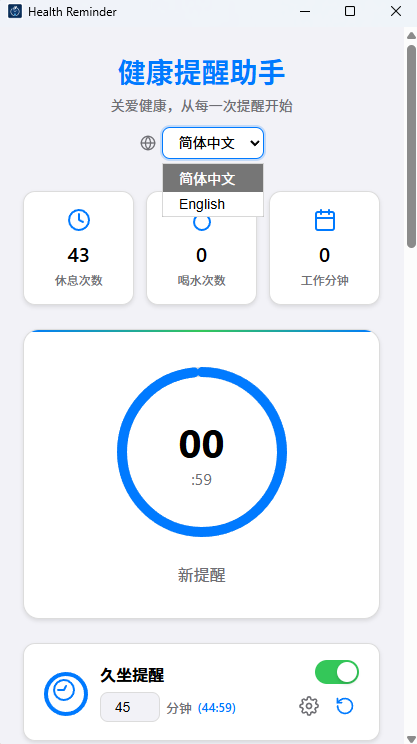
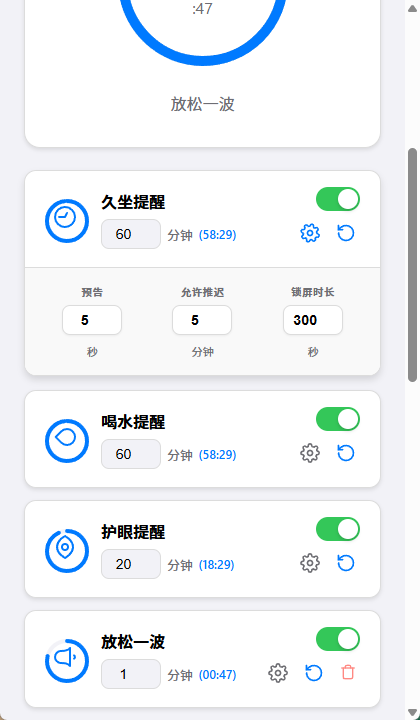
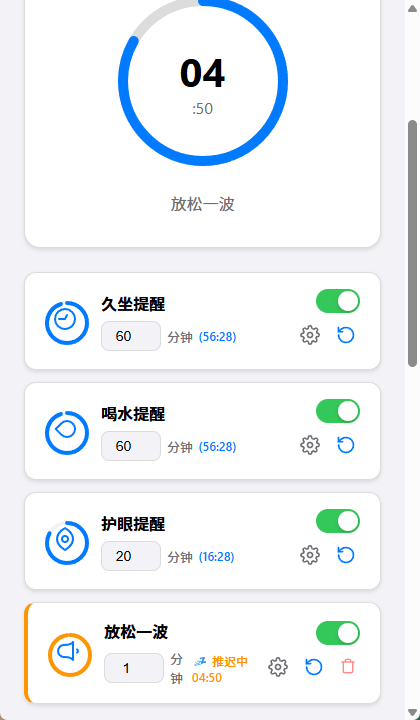
Main Interface (Dashboard) & Custom Task Scheduling (Tasks)
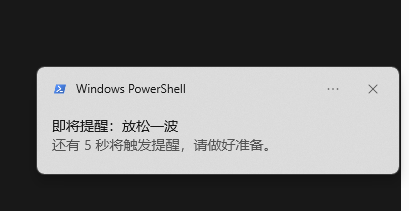
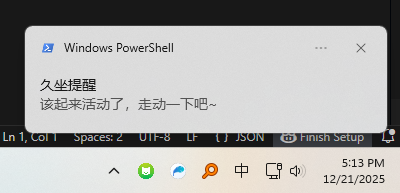
Pre-notifications & Popups (Notifications)
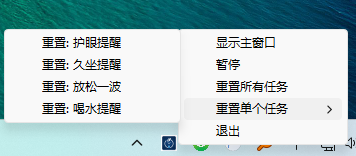
System Tray
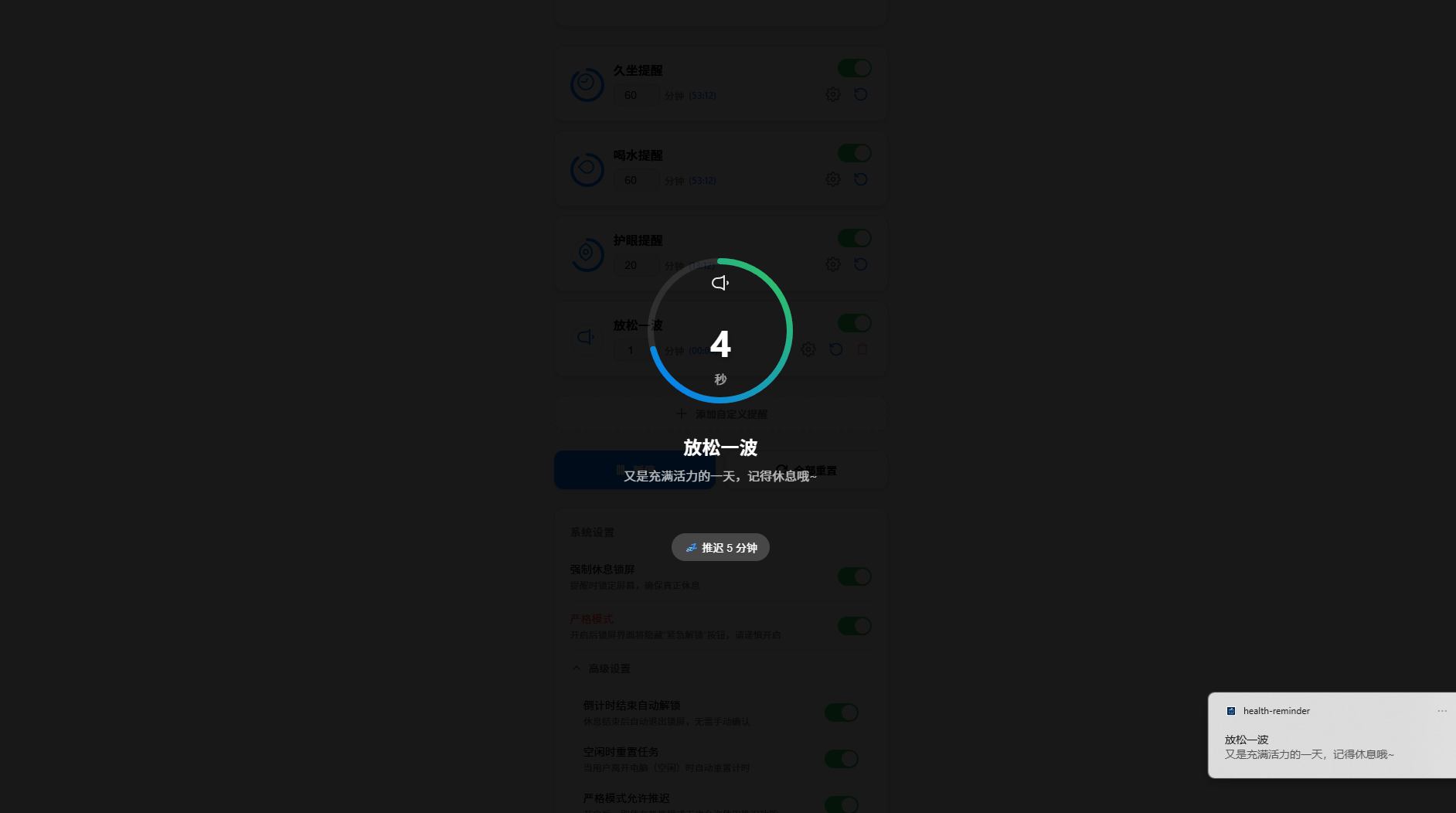
Multi-Monitor Lock Screen (Supports Strict Mode)
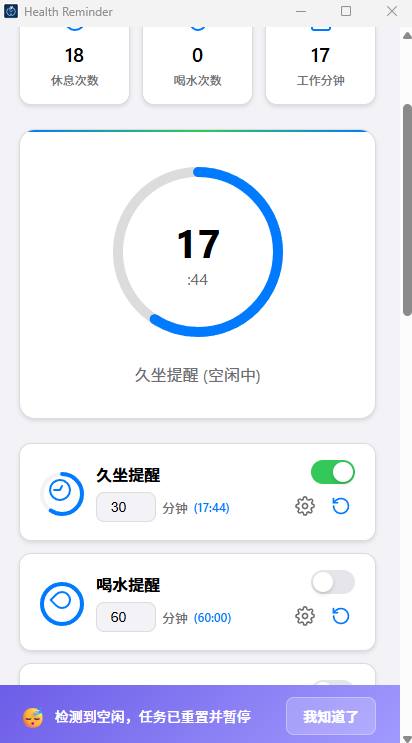
Idle Detection - Auto Pause and Reset When Idle
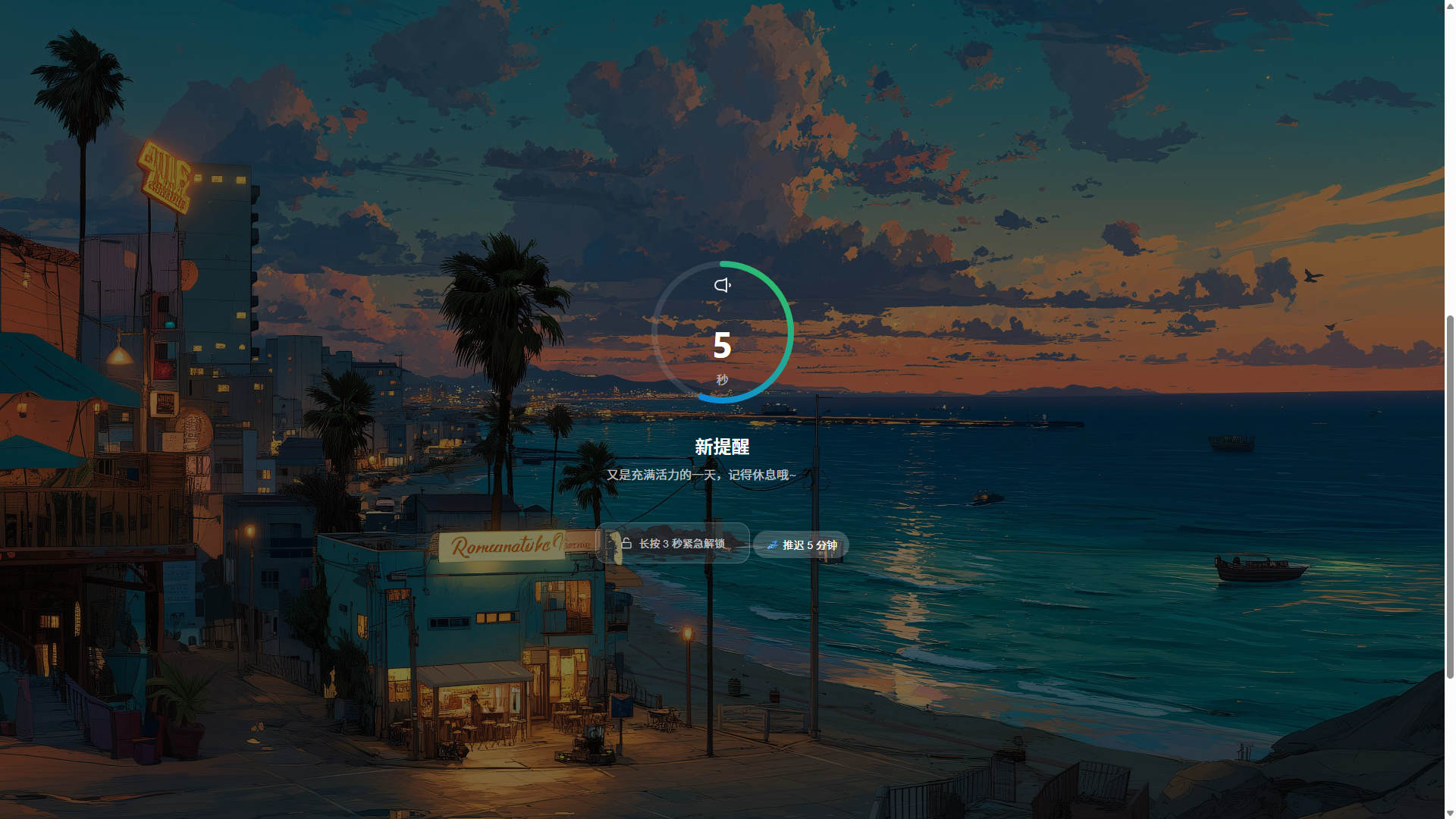
Custom Lock Screen Background
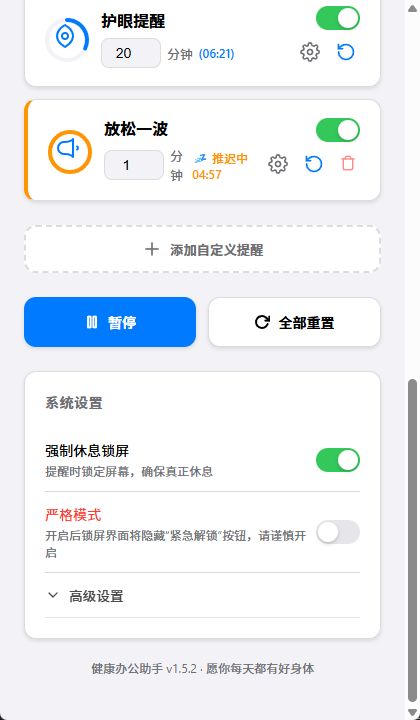
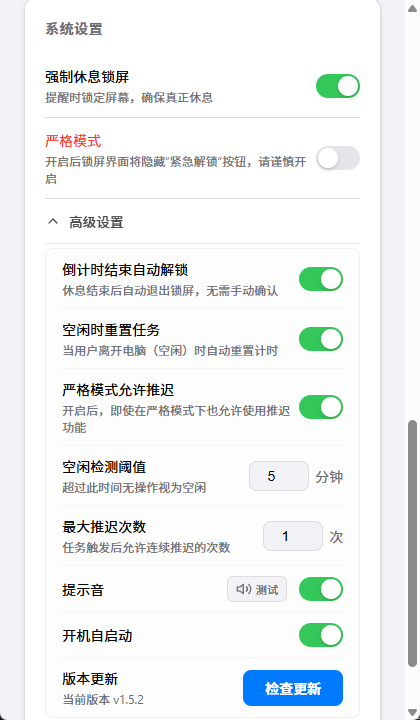
Settings Interface (Simple & Advanced Settings)
Why Do You Need It?
1. It Actually Makes You Rest
- Full-screen rest reminders: When a task is due, the rest screen covers the desktop even if the main window is minimized to the tray, pulling your attention away from work.
- Multi-monitor coverage: Extended and mirrored displays show the rest screen together and remain on top so a second monitor cannot become an easy escape.
- Force Rest Mode: Normal mode keeps the 3-second emergency unlock control. Force Rest Mode hides only that control while preserving reminder and snooze behavior.
- Flexible rest completion: Confirm manually when the countdown finishes, or enable automatic unlock to return to work without another click.
- Lock-screen input guard: Keyboard input, mouse wheel events, and unrelated clicks are intercepted during the rest countdown to reduce accidental background interaction.
- Personalized rest screen: Configure the rest duration for each task and use a local image as the synchronized lock-screen background across displays.
- Reliable countdown freezing: App lock screens, system locks, global pause, per-task pause, and idle periods freeze the relevant countdowns so they resume without drift.
2. Thoughtful Without Being Intrusive
- Advance notice: Configure a separate warning time for every task so you can save your work before the full-screen reminder appears.
- Controlled snooze: Set the snooze duration per task and limit repeated snoozes globally, with an accurate countdown while a task is deferred.
- Nearby task merging: Combine tasks that are close to triggering into one rest period using a configurable threshold, avoiding back-to-back interruptions.
- Smart idle detection: After the computer is idle for a configurable period, selected tasks can reset and pause so they do not trigger immediately when you return.
- Media handling policy: On Windows, leave media untouched, pause only sessions explicitly identified as video, or pause all active media. Music is uninterrupted by default.
- Layered notification fallback: Native notifications, in-app messages, and sound work together; permission or delivery failures fall back visibly instead of silently losing a reminder.
- Custom reminder sounds: Select, test, replace, or clear a local audio file, with the default sound retained as a fallback if playback fails.
- Silent auto-start: Launch with the operating system and go directly to the tray without opening the main window at login.
3. Simple and Easy to Use
- Complete task system: Use the built-in sitting, water, and eye-rest reminders or add any number of custom tasks that run independently.
- Interval and daily schedules: Trigger tasks every few minutes or at multiple daily
HH:mmtimes, such as 11:00 exercise and 21:00 foot bath. - Fine-grained task controls: Enable, pause, resume, and reset tasks individually while configuring interval, warning, snooze, rest duration, and idle-reset behavior.
- Quick bulk actions: Pause, resume, or reset everything from the main window or tray, and reset a specific task directly from the tray submenu.
- Accurate background timing: Timers run in the Rust backend rather than depending on UI refreshes, keeping reminders punctual while minimized or tray-resident.
- Two floating-window modes: Keep the next health reminder visible or run a titled custom countdown toward a target date and time.
- Floating task controls: Switch the displayed task from the task menu, then pause, resume, or reset it without affecting other reminders.
- Customizable floating window: Adjust position, width, font size, opacity, background, and text color, with blue, green, teal, dark-blue, and transparent themes.
- Edge auto-hide: Collapse the floating window at a screen edge and reveal it on hover, with dual-monitor seam handling to reduce accidental hiding and cross-screen jumps.
- Practical tray menu: Show the main window, toggle the floating window, pause or resume, reset tasks, and quit, while the tray tooltip shows remaining times.
- Themes and languages: Switch between light and dark themes and between Chinese and English, including synchronized tray and multi-monitor lock-screen text.
- Easy updates and cross-platform packages: Use automatic checks, manual checks, or in-app updates, with installers for Windows, macOS, and Linux plus Scoop support on Windows.
Technical Architecture
This product pursues minimal memory usage and startup speed:
- Backend: Rust (Tauri 2.0) - Provides secure, high-performance system-level capabilities.
- Frontend: Vite + Vanilla TypeScript - Minimalist rendering logic ensuring zero-latency UI response.
- Communication: Tauri IPC - High-speed async frontend-backend communication protocol.
- Styles: CSS Variables (Modern Design System) - Silky smooth Apple-style UI.
Download & Installation
Option 1. Installer Package
You can directly go to GitHub Releases to download the latest installer for your system. Supports Windows (.exe), macOS (.dmg), and Linux (.deb, .AppImage).
Option 2. Windows Scoop Install or Update
# Add bucket (first time only)
scoop bucket add health-reminder https://github.com/kaima2022/Health-reminder

# Install
scoop install health-reminder

# Update
scoop update health-reminder
Build from Source
If you wish to compile and run this project from source, ensure you have the Rust toolchain and Node.js environment installed.
1. Development Mode
# Install dependencies
npm install

# Start development server and application
npm run tauri dev
2. Build Installer
# Build production version for current system
npm run tauri build
Roadmap
- Statistics View: View weekly/monthly health achievement rates.
- More System Sounds: Support custom upload of reminder sounds.
- Focus Mode Integration: Smart silent mode when computer is in fullscreen work or gaming.
Version History
Multiple Update Methods: Auto Check || Manual Check || Installer Update || Scoop Update

Scoop update command
scoop update health-reminder
v1.9.2 (2026-10-17)
- Update proxy (#30): Added a persistent custom proxy setting for update checks and downloads, supporting HTTP, HTTPS, and SOCKS5, plus a proxy connectivity test.
v1.9.1 (2026-10-07)
- Lock-screen reset timing fix (#28): Resetting a task during the lock screen no longer causes the next countdown to add the break duration after unlock.
- Silent auto-start fix (#29): Notification permission requests are deferred during silent startup and the main UI renders immediately, avoiding a blank window when Windows opens the permission flow while the app is hidden.
- Tray restart action: Added a Restart application item so the app can be quickly recovered from the tray.
v1.9.0 (2026-08-28)
- Lock-screen reminder behavior (#27): Due reminders now always open the full lock screen whether Force Rest Mode is enabled or not. Force Rest Mode now only hides the hold-to-unlock control and no longer changes the reminder surface.
- Lock-screen media policy (#27): Added Do Not Pause, Pause Detected Video Only, and Pause All Media options. Media is unchanged by default; video-only mode pauses sessions explicitly reported as video by Windows while music and unknown media continue playing.
v1.8.7 (2026-08-27)
- Linux lock-screen stability fix (#26): Lock watchdog access to windows and monitors now runs on Tauri's main thread, preventing GTK/GDK memory corruption and crashes caused by background-thread calls.
- More robust lock-window recovery: Monitor reconciliation releases the lock-screen state before scanning and writes back only for the current lock generation, reducing contention and deadlock risk when displays change.
v1.8.6 (2026-08-20)
- Lock-screen media pause fix (#25): On Windows, the app now pauses playing browser media sessions before the lock screen starts and only sends pause commands to local player windows that are confirmed to be producing audio, preventing already-paused players from being toggled back into playback.
- Lock-screen startup robustness: Media pause coordination has a short timeout so a slow system media API or player response cannot delay the lock screen.
v1.8.5 (2026-08-13)
- Emergency unlock reliability (#24): The 3-second emergency unlock now uses pointer capture and a fixed deadline timer, reducing cases where focus changes or dropped pointer events make the long press fail.
- Mirrored-display lock-screen fix (#24): Multi-monitor lock windows are now deduplicated by monitor geometry so duplicated/mirrored displays no longer create overlapping slave lock windows for the same desktop area.
v1.8.4 (2026-08-13)
- Lock-screen exit reliability (#21): Tightened the ordering between task reset and backend lock-screen release so the app no longer bounces between the lock screen and main UI around zero-countdown boundaries.
- Media playback coordination (#22): On Windows, active media sessions are paused before the break lock screen starts, reducing cases where video or music keeps playing during a rest.
- Robustness maintenance: Notification dismissal now guards against repeated clicks, batched task resets refresh countdowns once, and the Rust backend is clean under strict clippy checks.
v1.8.3 (2026-08-12)
- Security maintenance (CVE-2026-31812): Updated
quinn-protofrom0.11.13to0.11.14to fix a remote denial-of-service risk in QUIC transport parameter parsing. - Release handling: External automated scan PR #20 was not merged; the maintainer reapplied the equivalent fix on
mainand validated it locally.
v1.8.2 (2026-08-11)
- Lock-screen trigger reliability (#19): Fixed missed lock screens around very short rest durations and zero-countdown timing boundaries by letting the frontend confirm and acknowledge pending backend triggers.
- Lock-screen input guard (#19): During the lock-screen countdown, keyboard input, mouse wheel events, and clicks outside lock controls are intercepted to reduce accidental background-window actions.
v1.8.1 (2026-07-03)
- Floating appearance hotfix: Removed the outer floating-window shadow and softened the resize hint so transparent/light themes look cleaner.
- Tighter edge auto-hide trigger: Reduced the docking detection range so the floating window hides only when it is actually close to the edge.
v1.8.0 (2026-07-03)
- Floating edge auto-hide (#18): Added edge auto-hide and hover-to-reveal behavior, with separate handling for outer screen edges and the seam between two monitors to avoid cross-screen jumping.
- Floating interaction stability (#18): Collapsed handles no longer enter drag/resize accidentally, and hidden strips pin back to their original edge if moved.
- Floating appearance settings: Added narrower width, font size, opacity, background color, and text color controls while keeping the settings panel compact.
v1.7.5 (2026-06-13)
- v1.7 stability maintenance: Unified freeze handling for global pause, per-task pause, system lock, app lock screen, and idle state so floating-window countdowns stay stable while paused.
- Update and release experience fixes (#13, #14): Fixed snooze countdown rounding, dark-mode dropdowns, reminder copy after language switches, notification fallback, the floating-window main-window button, version display, concurrent release builds, and unreadable update-check error toasts.
v1.7.0 (2026-06-07)
- Floating countdown window (#12, #16): Added a compact always-on-top pill window for the next health reminder or a custom target countdown, with blue, green, teal, and dark themes.
- Floating task control (#16): The chevron opens a task picker, pause/resume applies only to the currently displayed task, and the default mode still surfaces the nearest active reminder.
- Daily reminders (#15): Custom tasks now support both
intervalanddailyschedules, with multiple dailyHH:mmtrigger times.
v1.6.2 (Maintenance)
- Custom notification sound (PR #10): Select a local audio file while keeping the system sound fallback.
- Silent auto start (#9): Boot startup can hide directly to the tray.
- Notification diagnostics (#13): System notification failures now fall back to in-app reminders instead of failing silently.
- Release links (#14): Updater, Scoop manifest, and docs now consistently use
kaima2022/Health-reminder.
v1.6.1 (2026-02-04)
- Dark theme palette: Improved dark theme colors and contrast for better night use.
- Logo white border removed: Cleaned up icon edges (including iOS AppIcon).
- Idle banner shows time: Idle banner now displays idle duration.
v1.6.0 (2026-01-31)
- Custom Lock Screen Background: Added lock screen background customization feature. Select a local image as your lock screen background in settings.
- Multi-screen Background Sync: Secondary screen lock screens now display the custom background image, consistent with the main screen.
- Linux Multi-monitor Lock Enhancement: Optimized Linux multi-monitor lock mechanism with 200ms watchdog detection frequency, improved X11/Wayland compatibility.
- Fix: Fixed Tauri v2 dialog plugin return value causing image path to not save correctly.
v1.5.9 (2026-01-27)
- Idle Reset Notification Banner: Added a beautiful purple notification banner that appears when idle is detected and tasks are reset. Click "Got It" to dismiss.
- UI Optimization: Moved "Idle Detection Threshold" setting below the "Reset & Pause Tasks When Idle" toggle. The threshold setting is now hidden when the toggle is off, resulting in a cleaner interface.
- Wording Improvement: Renamed "Reset Tasks When Idle" to "Reset & Pause Tasks When Idle" for more accurate description of the feature behavior.
v1.5.8 (2026-01-20)
- Timer Fix: Fixed an issue where other disabled tasks' remaining time would abnormally increase after snoozing a task (affected timer_resume, timer_set_system_locked, and timer_set_lock_screen_active time compensation logic).
- Scoop Installation Fix: Fixed incorrect URL and hash placement in Scoop bucket file that prevented installation.
- CI/CD Fix: Fixed GitHub Action bucket update script not correctly updating architecture.64bit.url and hash.
v1.5.7 (2026-01-16)
- Merge Tasks Feature: Added "Merge Tasks" functionality. When multiple tasks are about to trigger close together (configurable threshold), the system proactively merges them into a single break session. This prevents constant interruptions and solves the annoyance of "just sat down and another alarm rings".
- Lock Screen Optimization: The lock screen now displays the names of all merged tasks, so you know exactly what the current break covers.
- Logic Fixes: Fixed issues where snooze and unlock actions during merged tasks did not correctly clear all related pending tasks.
v1.5.6 (2026-01-13)
- Bug Fixes: Fixed an issue where the lock screen might malfunction when the interface is minimized.
v1.5.5 (2026-01-13)
- macOS Fix: Fixed an issue where clicking the Dock icon would not restore the main window.
v1.5.4 (2026-01-10)
- Internationalization (i18n): Added Chinese/English language switching, quick toggle in the top-right corner
- Multi-language Tray Menu: Tray right-click menu supports real-time language switching
- Multi-screen Lock Screen Language Sync: Fixed issue where secondary screen lock screen displayed different language than main screen
- English README: Added README.en.md English documentation
v1.5.3 (2026-01-09)
- Lock Screen Keep-alive & Fix: Fixed issue where forced lock screen window could be minimized or lose focus on Windows 10 (Watchdog mechanism).
- Snooze Feature: Added "Snooze" function with customizable snooze duration (default 5 minutes), correctly displaying snooze countdown.
- Auto Exit Lock Screen: Added "Auto unlock when countdown ends" option, no manual confirmation needed to exit lock screen.
- Strict Mode: Added strict mode - in strict mode, you must rest properly, no exit allowed. Take care of your body!
- Strict Mode Enhancement: Added "Allow snooze in strict mode" option; snooze button hidden by default in strict mode, supports setting maximum snooze count.
- Pre-notification: Added pre-notification before task triggers (default 5 seconds before), configurable per task.
- UI/UX Upgrades:
- Advanced Settings Collapse: Less frequently used system settings are now in a collapsible "Advanced Settings" panel for a cleaner interface.
- Card Settings Optimization: Restructured task card footer settings bar with Grid layout, collapsed by default, expandable with one click.
- Right-click Menu Enhancement: Tray right-click menu now includes "Reset Single Task" submenu.
- Performance Optimization: Reduced memory usage during long-term operation.
v1.5.2 (2026-01-04)
- Cross-platform Idle Detection: Added system idle detection supporting Windows, macOS, and Linux.
- Auto Reset on Idle: Automatically resets enabled task countdowns when user is inactive beyond threshold.
- Configurable Idle Threshold: Supports customizing idle detection threshold (1-60 minutes) in settings.
- Per-task Control: Each task can independently enable/disable idle reset functionality.
- UI Optimization: Unified task card footer area styling for better visual consistency.
v1.5.1 (2025-12-27)
- Backend Timer Refactor: Moved timing logic from frontend JavaScript to Rust backend, solving timer throttling issues caused by macOS App Nap and window minimization.
- Cross-platform Precise Timing: Uses system-level thread timer, unaffected by WebView throttling, consistent behavior across Windows/macOS/Linux.
- Guaranteed On-time Reminders: Reminders trigger on time even when app is in background or minimized.
v1.5.0 (2025-12-26)
- Auto Update System: Automatic new version detection on startup, manual check in settings, version status display, one-click update installation.
- Secure Signature Verification: Uses asymmetric encryption signature mechanism, GitHub Actions auto-builds, signs and generates update files.
- Improved User Experience: Toast messages replace popups, auto-dismiss after 3 seconds, smooth non-interrupting operation.
v1.4.9 (2025-12-25)
- Timer Stops on Lock: Pauses all task timers during lock screen to prevent missing reminders while resting.
- Tray Pause Function: Right-click menu adds "Pause/Resume" option for quick timer control.
v1.4.8 (2025-12-24)
- Multi-monitor Lock Screen: Lock screen covers all monitors, preventing work on secondary screens.
- Manual Confirmation: Manual click required to confirm rest completion after lock screen countdown ends.
- Auto Minimize: Software automatically minimizes to tray after lock screen ends.
- Scoop Installation Support: Windows users can install and update via Scoop package manager.
v1.4.7 (2025-12-23)
- Forced Rest Lock Screen: Added lock screen feature, fullscreen lock when reminder triggers, ensuring real rest.
- Configurable Lock Duration: Supports 10s / 20s / 30s lock screen duration options.
- Emergency Unlock: Long press 3 seconds for emergency unlock, preventing delays for urgent tasks.
- Auto Popup: Window automatically pops up during lock screen, even when minimized to tray.
v1.4.6 (2025-12-22)
- Dual Icon Fix: Fixed issue showing two icons.
- Tray Hover Tooltip: Mouse hover shows remaining time for all tasks.
- Right-click Menu Enhancement: Right-click menu adds "Reset All Task Times" function.
- Version Display Fix: Fixed software version display issue.
v1.4.4 (2025-12-21)
- Package Optimization: Fixed Linux Debian package naming convention issues, bundled complete runtime dependency declarations.
- Logic Fix: Implemented non-blocking timing, next round starts immediately after reminder triggers without waiting for user click.
- Feature Implementation: Fully completed "System Settings" module including real auto-start control and sound test functionality.
- CI/CD Enhancement: Optimized GitHub Actions scripts, supports macOS Apple Silicon native builds.
v1.3.0 (2025-12-21)
- UI Rewrite: Fully adopted Apple design language, restructured dashboard and task cards.
- Notification System: Fixed Tauri 2.0 system notification failure, integrated native Rust notification plugin.
- Input Optimization: Refactored rendering engine for partial refresh, solved focus loss issue when modifying minutes.
v1.0.0 (2025-12-20)
- Initial release with basic sitting, drinking water, and eye rest countdown features.
License
This project is licensed under the MIT License. You are free to use, modify, and distribute.
Star History
© 2025 Health Reminder. Wishing you good health every day.