
kaijiabo/open-sunsama
kaijiabo/open-sunsama has 162 GitHub stars and 36 forks. GitHot measured +4 stars in 24 hours and +26 in 7 days. Last checked 2026-11-10 23:09 UTC. Last push 2026-11-05.
Open-source Sunsama alternative: a daily planner with kanban, time blocking, and focus mode that Claude and ChatGPT can use. One-click MCP connector (OAuth), REST API, web/desktop/mobile apps, self-hostable.
Measured star growth
- in 24h
- +4
- in 7 days
- +26
- in 15 days
- Update delayed
- in 1 month
- Update delayed
Net star changes over overlapping periods, not daily totals. Missing measurements are left blank. Stars measure attention, not software quality.
README.md
Original
Open Sunsama
Daily planning, done right.
The open-source daily planner for time-blocking, focused work, and seamless AI integration.
AI native: control it from any agent, including Claude, ChatGPT, Cursor, Claude Code, or any MCP client, with one URL and no API key.




Website · Docs · Connect your AI · Self-host · Download apps
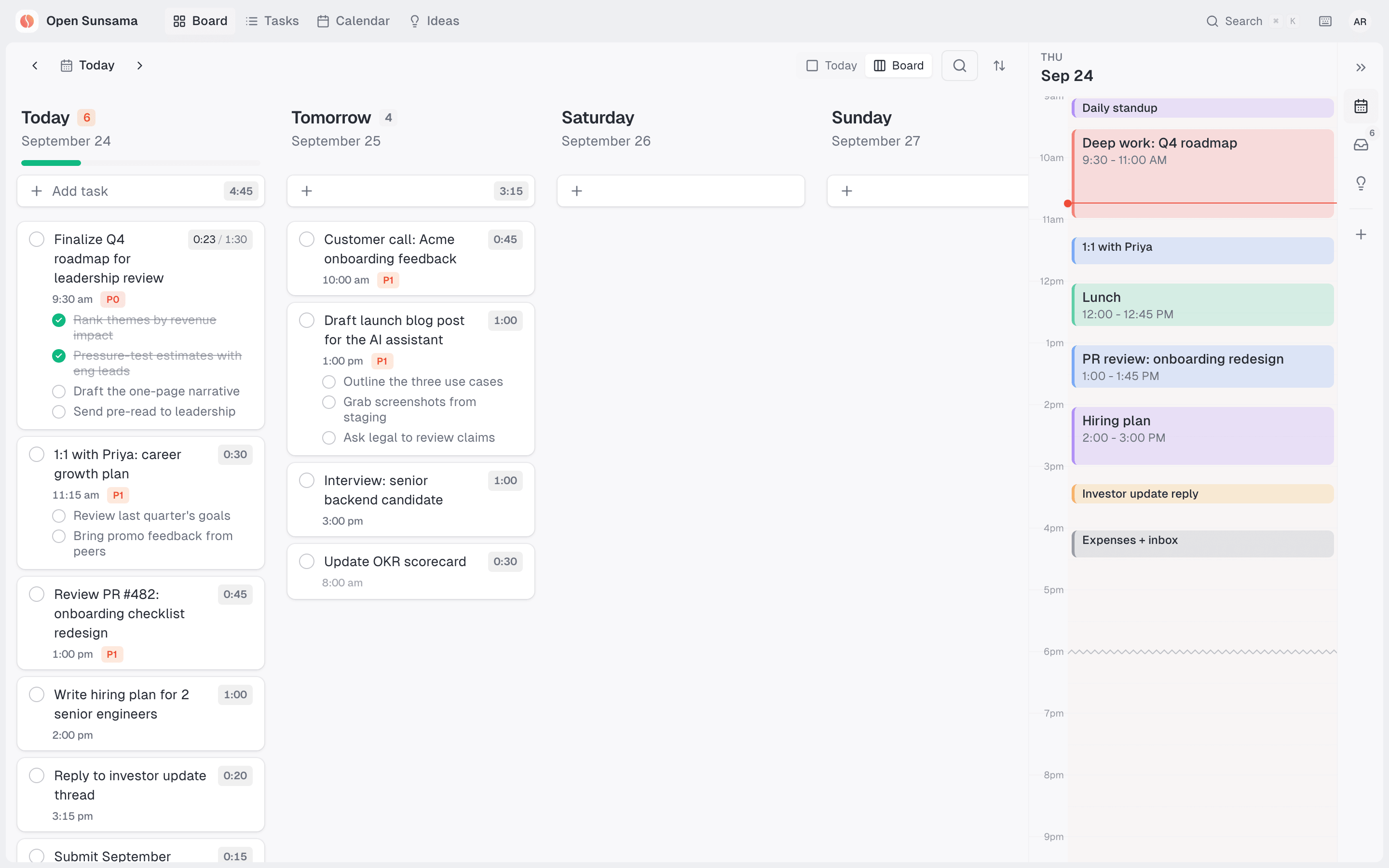
A real Thursday for a Head of Product: a prioritized board, subtasks, estimates, and a time-blocked schedule. The backlog waits one click away in the right rail.
✨ Why Open Sunsama
Most planners are closed boxes that your AI assistant can't see into. Open Sunsama is built to be driven by AI as much as by you:
- 🤖 Your AI plans with you. Claude and ChatGPT can read your schedule, create and prioritize tasks, time-block your day, and close things out through a secure one-click connector.
- 🗓️ Sunsama-style daily planning. A kanban board of days, drag-and-drop time blocking, focus mode with a timer, and rollover of unfinished work.
- 🔓 Open source and self-hostable. Run it on your own server, read every line, and extend it through a full REST API.
- 🖥️ Everywhere you work. Web, desktop (macOS, Windows, Linux), and mobile, with light and dark themes and keyboard-first navigation.
🔌 Connect Claude or ChatGPT in 30 seconds
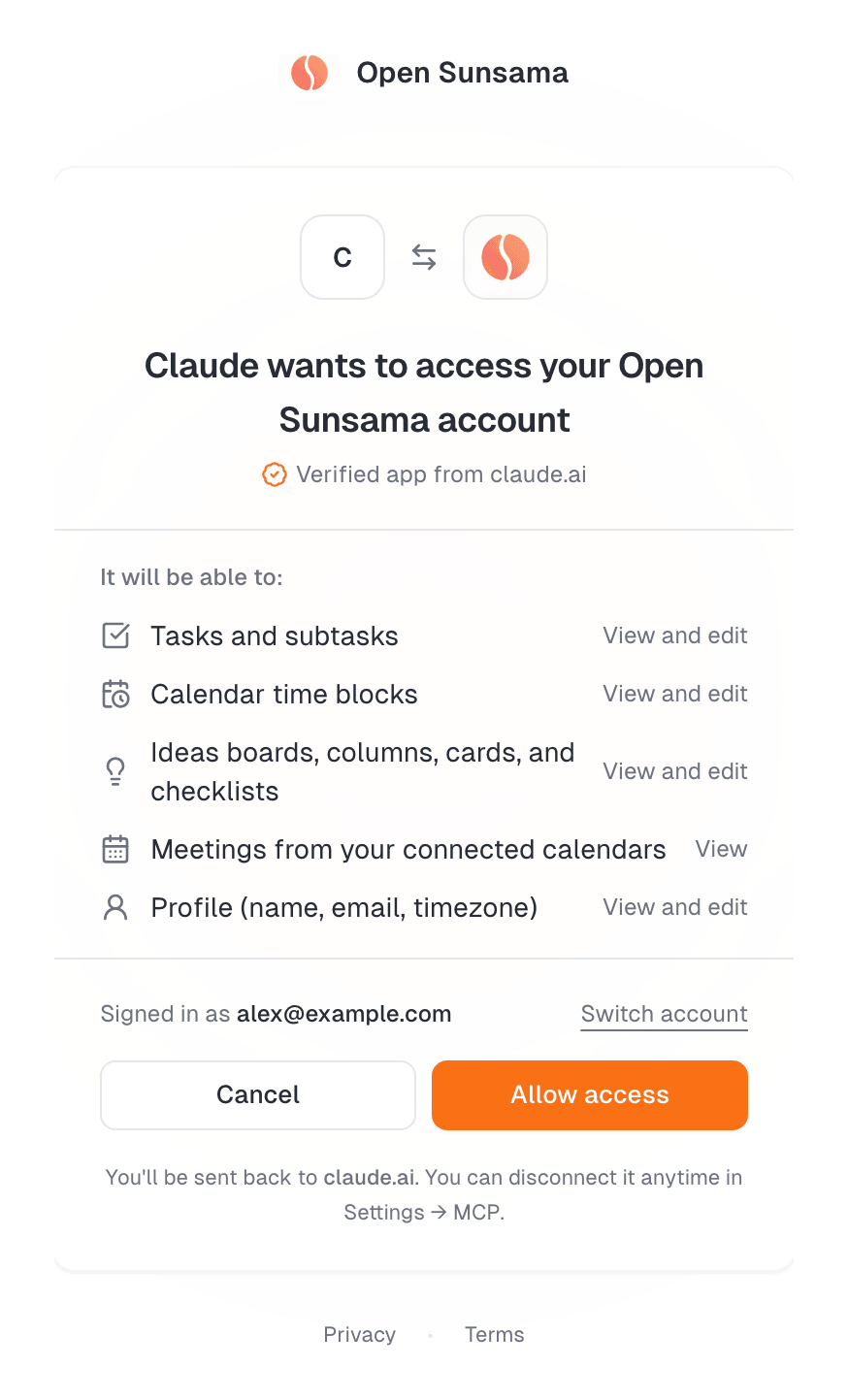
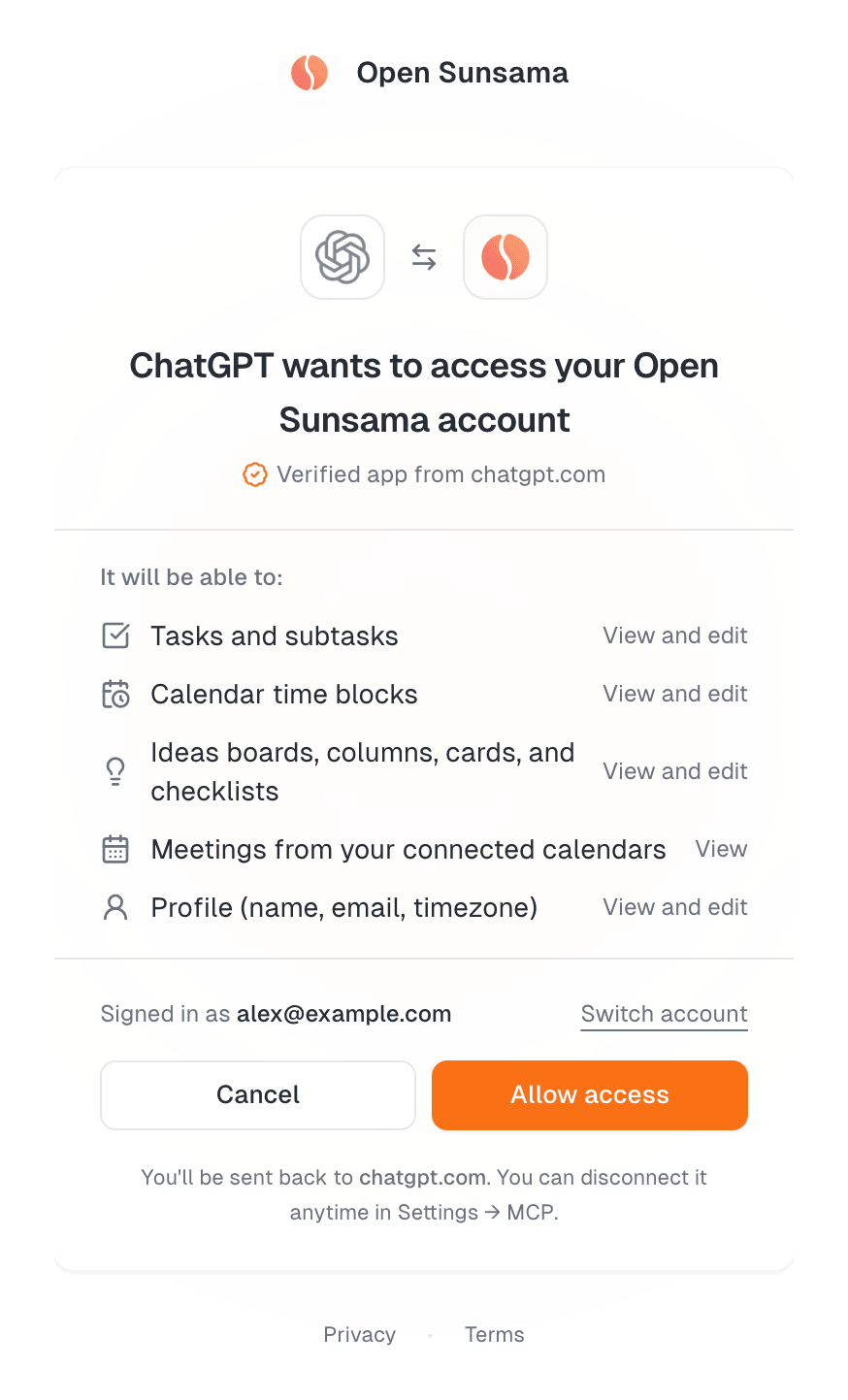
Paste one URL into your AI assistant, sign in, and click Allow access. That's it: no API keys and no config files.
https://api.opensunsama.com/mcp
Claude (web, Desktop, and mobile)
|
ChatGPT (paid plans, developer mode)
|
 |
 |
Coding assistants connect the same way:
| Client | Install |
|---|---|
| Claude Code | claude mcp add --transport http open-sunsama https://api.opensunsama.com/mcp, then run /mcp → Authenticate |
| Cursor |  |
| VS Code |  |
| Any MCP client | Add the URL as a Streamable HTTP server with OAuth |
Then just ask:
"What's on my plate today? Move anything that isn't a P0 or P1 to tomorrow."
"Block 9–11am tomorrow for deep work on the launch plan and link it to that task."
"Add subtasks to 'Board deck': metrics slide, roadmap slide, asks."
How the connection stays secure
- Standard OAuth 2.1 with PKCE. Claude and ChatGPT are identified by their published client metadata (CIMD), so the consent screen shows a verified badge. Other clients register with dynamic client registration.
- Scoped, short-lived tokens. Access tokens expire hourly and refresh automatically. Refresh tokens rotate, and replaying an old one revokes the whole grant.
- Least privilege. Connector tokens only reach tasks, time blocks, and your profile. They can't touch API keys, passwords, uploads, or calendar accounts.
- Annotated tools. Every tool is marked read-only or destructive, so assistants ask before deleting anything.
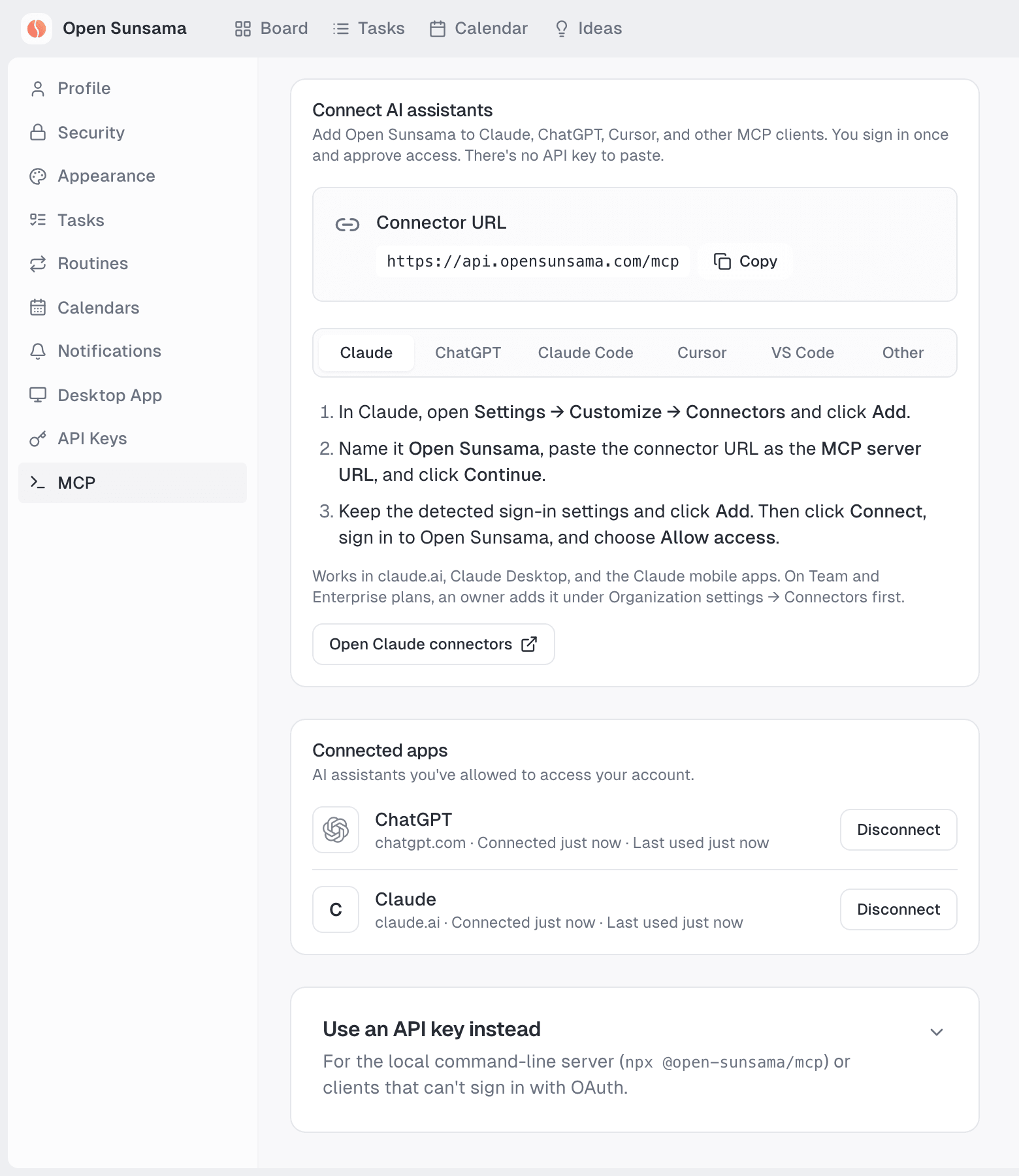
- One-click disconnect under Settings → MCP → Connected apps.
Prefer an API key? The local server still works
{
  "mcpServers": {
    "open-sunsama": {
      "command": "npx",
      "args": ["-y", "@open-sunsama/mcp"],
      "env": { "OPENSUNSAMA_API_KEY": "os_your_api_key_here" }
    }
  }
}
You can also send a key to the hosted server as an X-API-Key header. See Local server & API keys.
🎬 See it in action

▶ Watch the full-quality video (MP4) · ▶ Watch the narrated 1-minute tour
🧭 Everything you need to plan a focused day
Time-block your weekDrag tasks onto the calendar and see your whole week at a glance. Blocks link back to their tasks, so estimates meet reality. 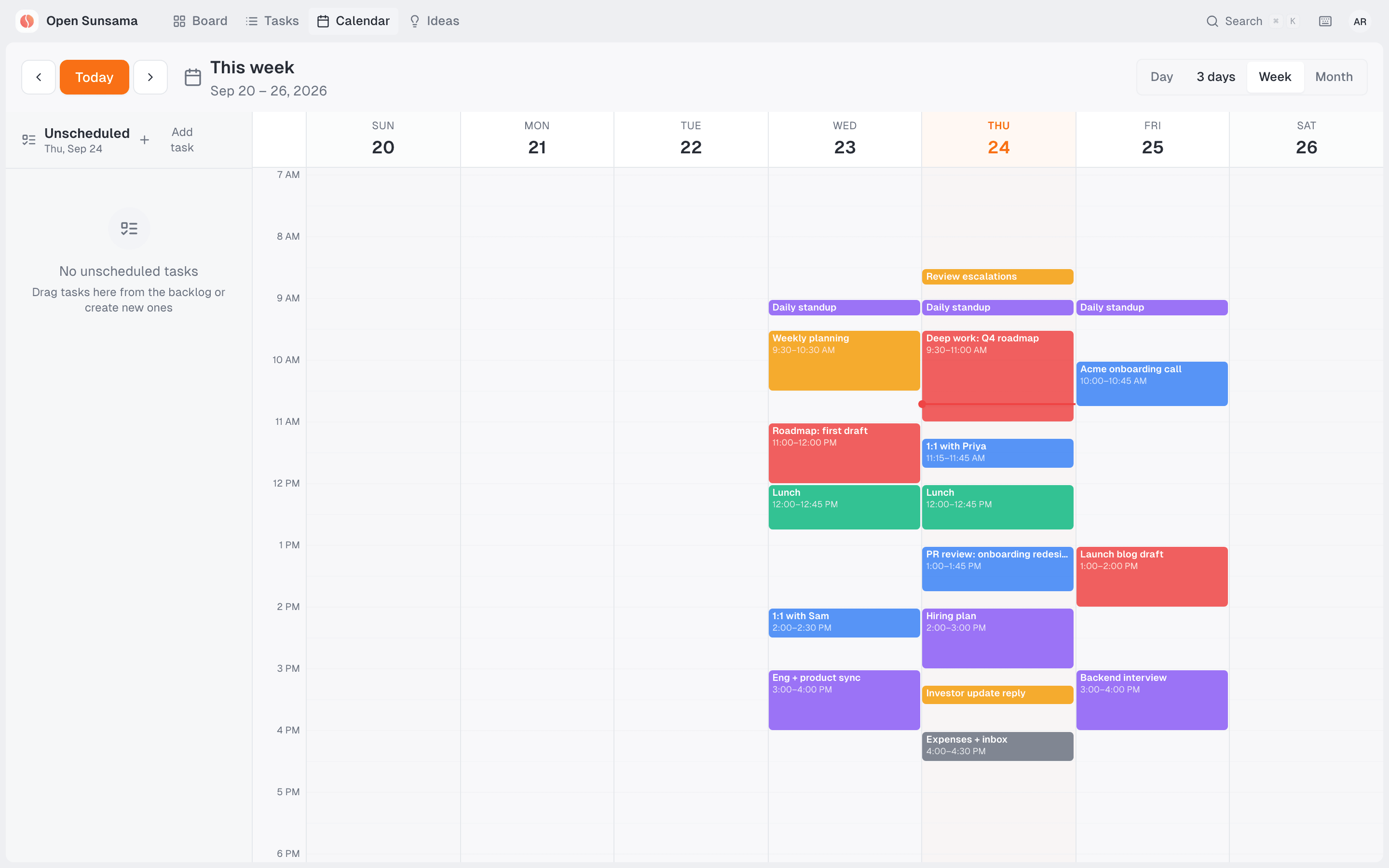 |
Dig into any taskSubtasks, rich-text notes, attachments, priority, estimate, and a timer, all in one keyboard-friendly modal. 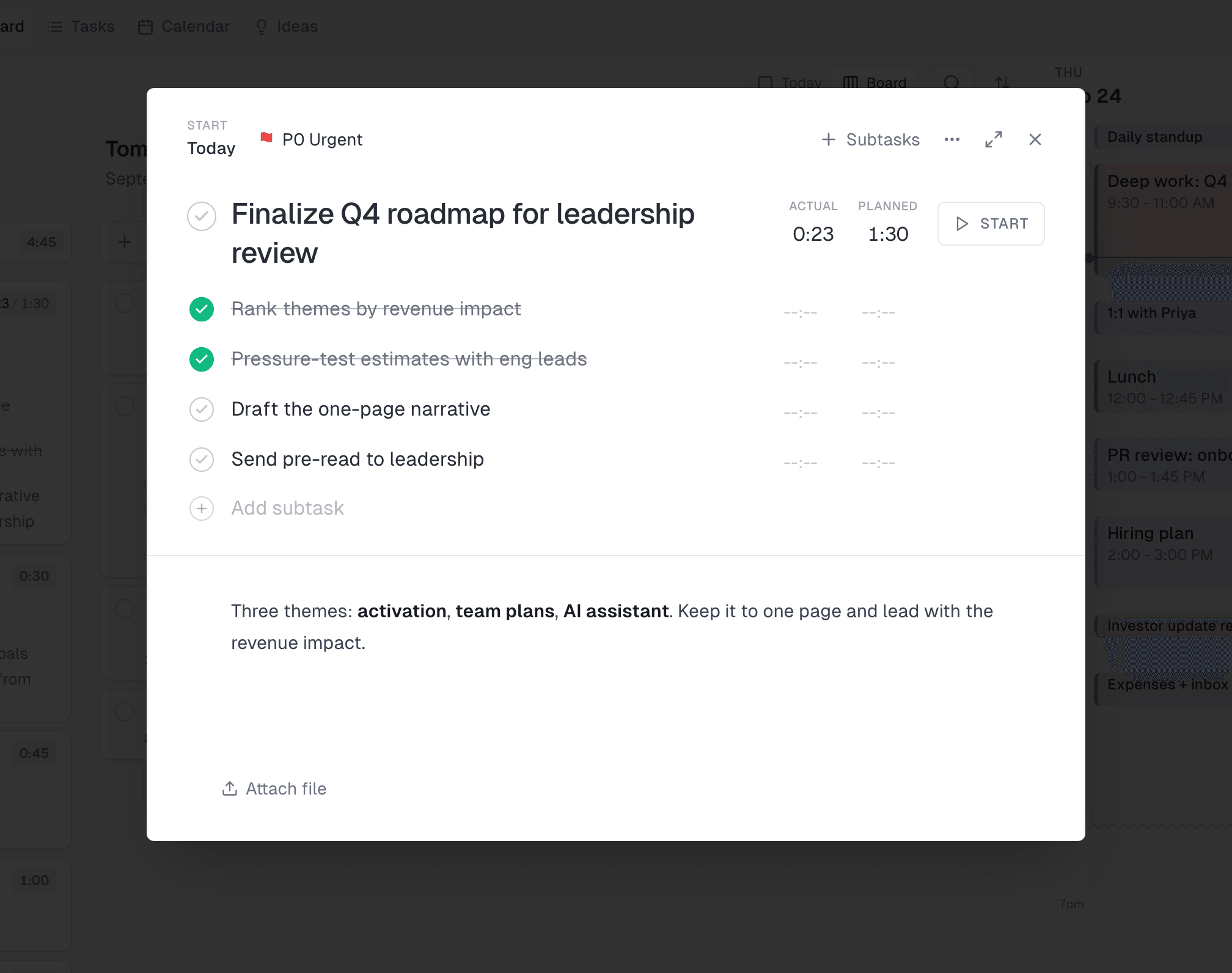 |
Focus modeOne task, one timer. Track actual time against your estimate while everything else fades away. 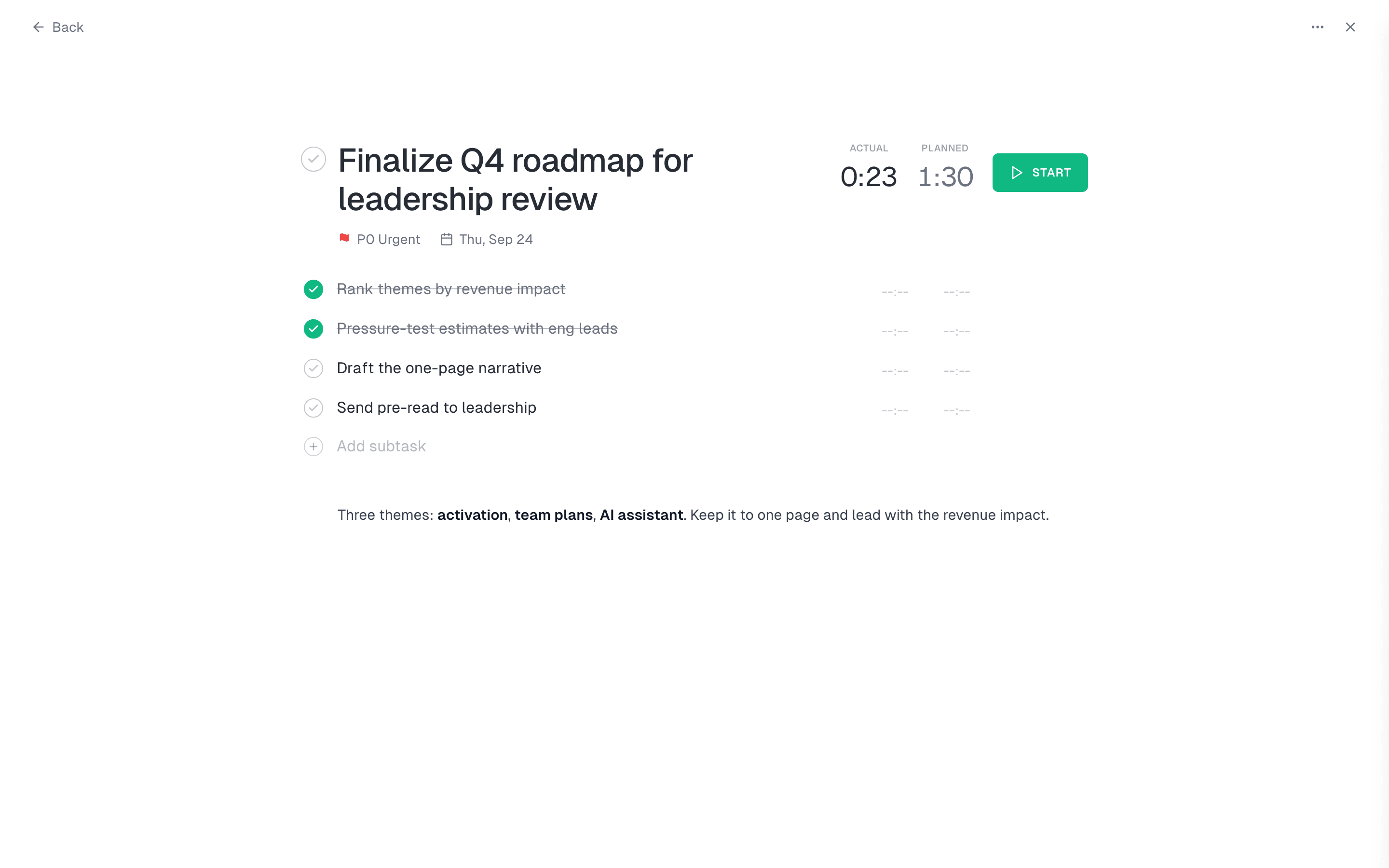 |
⌘K for everythingJump to any task, idea, or setting in a keystroke. Search spans tasks, ideas, and events. 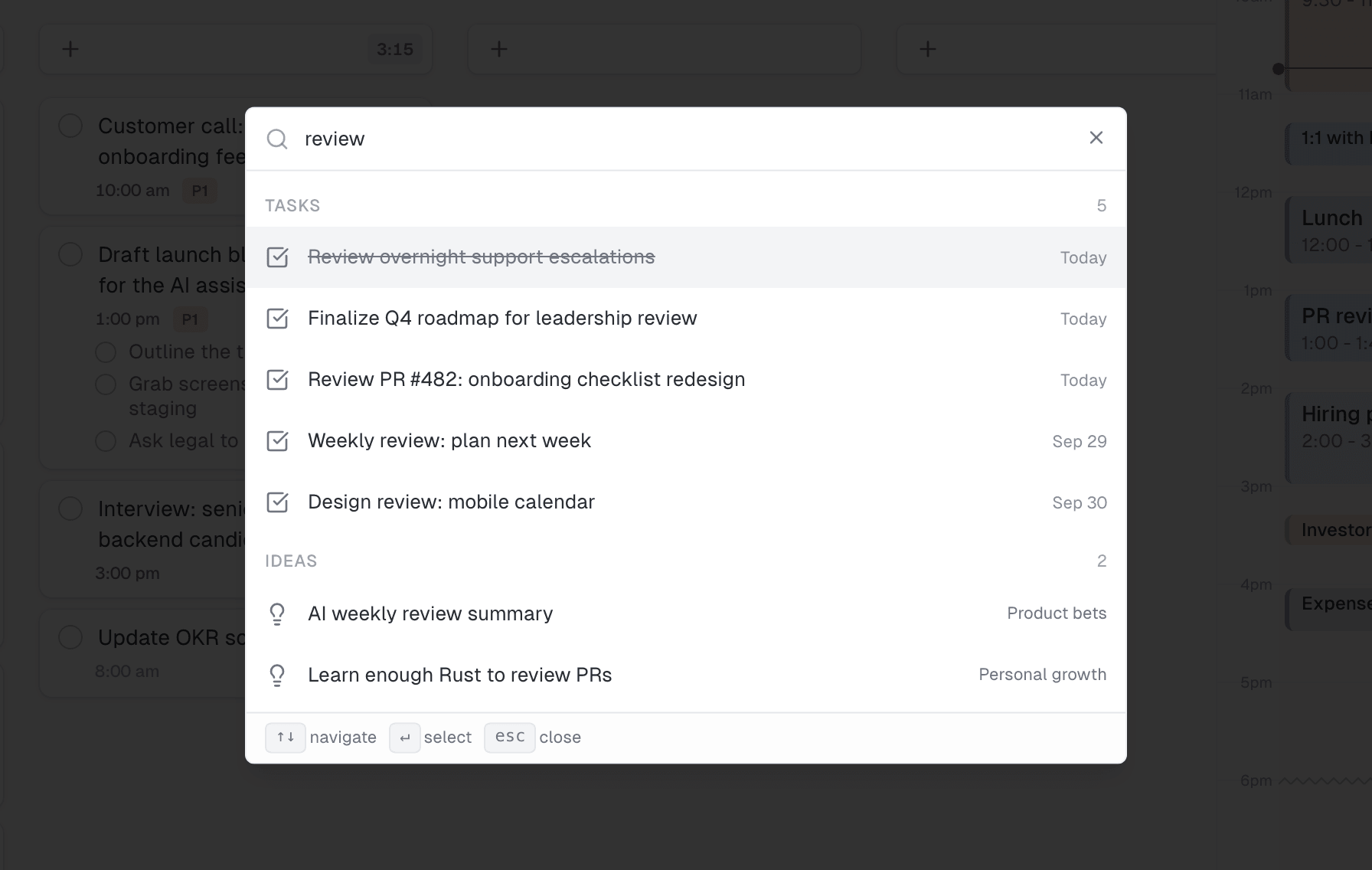 |
Every task, one listFilter active, completed, or everything, grouped by day with subtask progress. 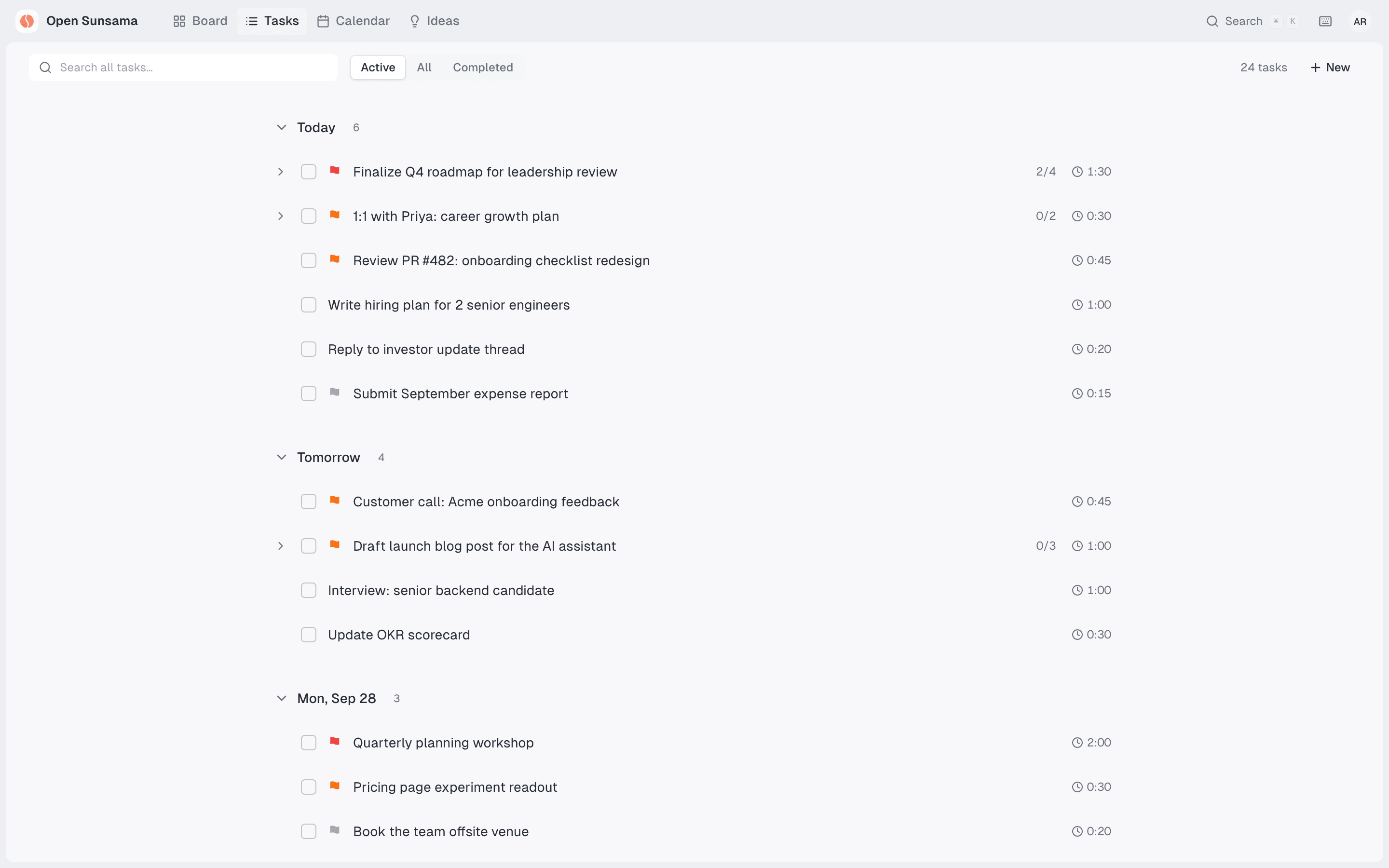 |
Ideas: your someday boardsTrello-style boards for bets and side projects. Promote an idea to a real task when it's time. 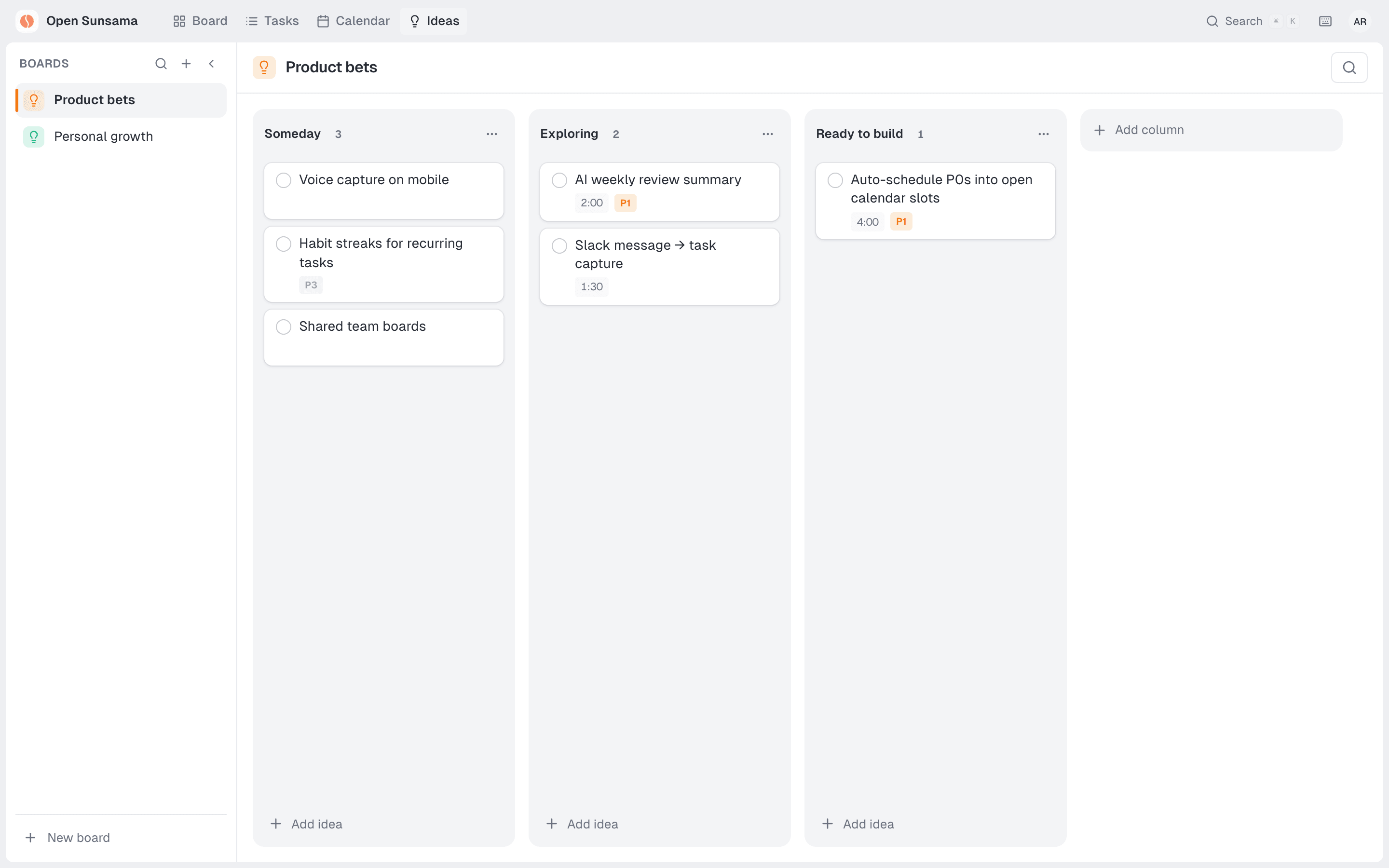 |
|
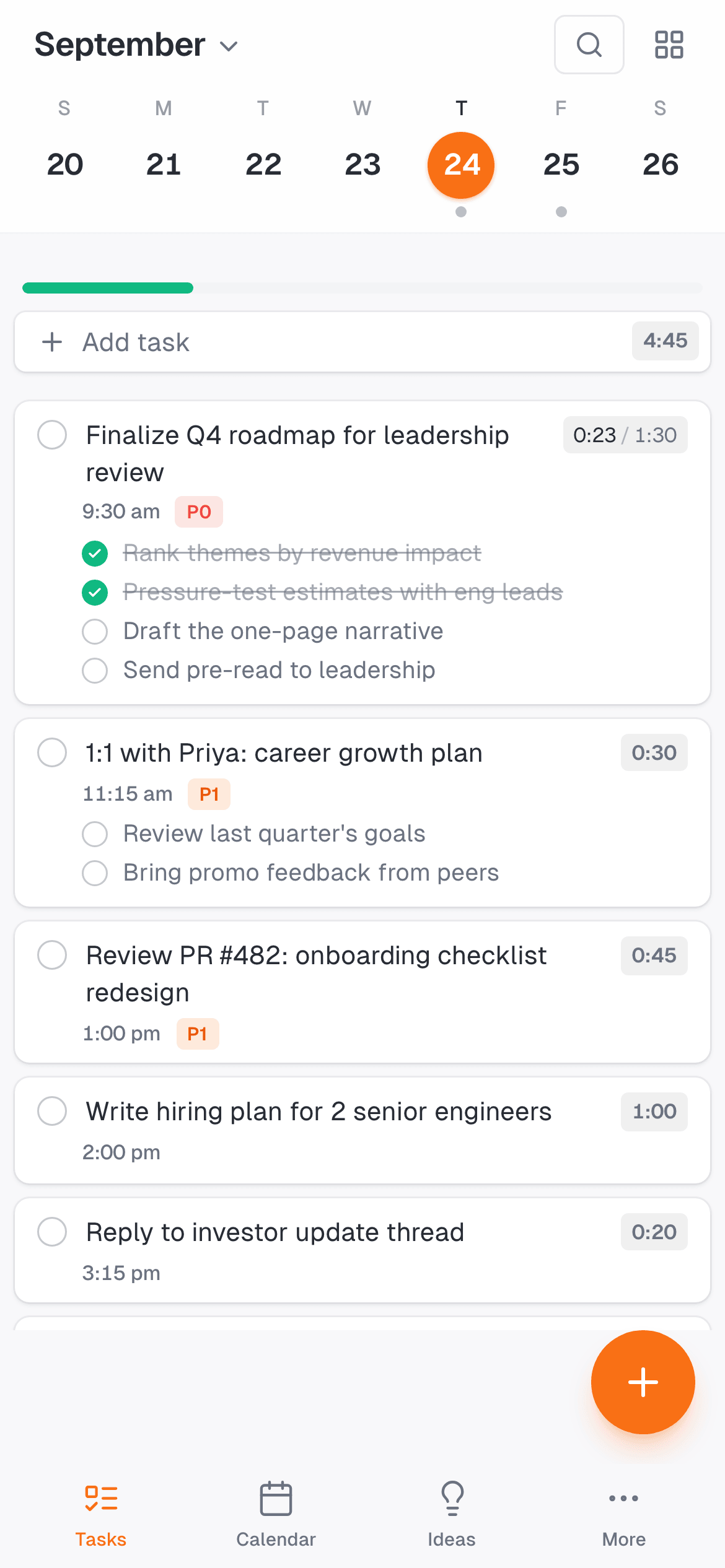
Works on every screen
|
🆚 How it compares
| Open Sunsama | Typical closed planners | |
|---|---|---|
| Open source & self-hostable | ✅ | ❌ |
| AI native: control it from any agent over MCP | ✅ | ❌ |
| One-click Claude & ChatGPT connector (OAuth) | ✅ | Rare |
| Full REST API with scoped keys | ✅ | Limited |
| Daily planning board + time blocking | ✅ | ✅ |
| Focus timer, routines, rollover | ✅ | Varies |
| Web, desktop, and mobile apps | ✅ | ✅ |
Switching from another tool? Read the comparisons: Sunsama · Motion · Akiflow · Reclaim · Todoist
👥 Built for people who plan their day
- Founders and managers juggling roadmaps, 1:1s, hiring, and customer calls, who want one place to decide what matters today.
- Engineers who live in Cursor, Claude Code, and the terminal and want their planner reachable from there.
- Remote and async teams time-blocking across time zones.
- ADHD and neurodivergent planners who need structure, visual time, and gentle rollover instead of guilt.
- Privacy-minded teams who want to self-host their planner and keep data on their own servers.
🛠️ MCP tools
24 tools, available through the hosted connector and the local server:
| Category | Tools |
|---|---|
| Tasks | list_tasks get_task create_task update_task complete_task uncomplete_task delete_task schedule_task reorder_tasks |
| Time blocks | list_time_blocks get_time_block create_time_block update_time_block delete_time_block link_task_to_time_block get_schedule_for_day |
| Calendar events (read-only) | list_calendar_events |
| Subtasks | list_subtasks create_subtask toggle_subtask update_subtask delete_subtask |
| Profile | get_user_profile update_user_profile |
🧩 REST API
Everything in the app is available over HTTP, with JWT or scoped API keys:
curl -X POST https://api.opensunsama.com/tasks \
  -H "X-API-Key: os_your_key" -H "Content-Type: application/json" \
  -d '{"title": "Ship v2.0", "priority": "P0", "scheduledDate": "2026-10-01", "estimatedMins": 120}'
Scopes: tasks:read tasks:write time-blocks:read time-blocks:write ideas:read ideas:write user:read user:write. See the API reference.
🚀 Get started
Cloud: create an account at opensunsama.com, then connect your AI.
Self-host with Docker:
git clone https://github.com/kaijiabo/open-sunsama.git
cd open-sunsama
docker compose up -d --build   # PostgreSQL, Redis, API on :3001, web app on :3000
Open http://localhost:3000 and create your account. The API creates the database tables on start, and the MCP connector is at http://localhost:3001/mcp. The self-hosting guide covers running on a server with your own domain, optional integrations, and backups. The desktop and mobile apps connect only to opensunsama.com, so self-hosters use the web app.
Run from source
Prerequisites: Bun 1.4.2 (run mise install when using mise) and PostgreSQL 15+ (Homebrew's postgresql@17, or a hosted database such as Neon or Supabase). S3-compatible storage is optional, for file uploads.
git clone https://github.com/kaijiabo/open-sunsama.git
cd open-sunsama
mise install
bun install

# API on :3001 and web app on :3000. Tables are created on start;
# Redis, email, background jobs and OAuth stay off.
DEV_DATABASE_URL=postgresql://localhost:5432/opensunsama bun run dev:local
To run with integrations turned on, copy apps/api/.env.example to apps/api/.env, fill it in, and use bun run dev.
| Service | URL |
|---|---|
| Web app | http://localhost:3000 |
| API | http://localhost:3001 |
| MCP connector | http://localhost:3001/mcp |
| Drizzle Studio | http://localhost:4983 |
For calendar sync, follow the Google Calendar setup guide.
Seed a demo workspace
scripts/readme-media/seed-demo.ts fills an account with a realistic week (tasks, subtasks, time blocks, and ideas) through the REST API. It's the same data behind these screenshots:
DEMO_API_URL=http://localhost:3001 DEMO_PASSWORD='Choose-a-strong-1' bun run scripts/readme-media/seed-demo.ts
🏗️ Tech stack
| Layer | Technologies |
|---|---|
| Frontend | React 19, Vite, TanStack Router + Query, Tailwind CSS, Radix UI, Tiptap |
| Backend | Hono 4, Drizzle ORM, PostgreSQL, PG Boss jobs, Zod, OAuth 2.1 authorization server |
| AI | Model Context Protocol (Streamable HTTP + stdio), 24 annotated tools |
| Desktop / mobile | Tauri 2, Expo |
| Infra | Bun workspaces, Turborepo, Docker, Railway |
open-sunsama/
├── apps/
│   ├── api/        # Hono REST API, OAuth server, and the /mcp endpoint
│   ├── web/        # React + Vite app, docs, and marketing site
│   ├── desktop/    # Tauri v2 desktop app
│   └── mobile/     # Mobile apps
├── packages/       # database (Drizzle), types, api-client, utils
└── mcp/            # MCP tools + the npx stdio server
🗺️ Roadmap
- Daily planning board, priorities, subtasks, and rich notes
- Time-blocking calendar with day, 3-day, week, and month views
- Focus mode, routines (recurring tasks), and rollover
- Calendar sync: Google Calendar, Outlook, and iCloud
- Ideas boards and a ⌘K command palette
- Desktop and mobile apps
- MCP server (local stdio) and REST API with scoped keys
- One-click Claude & ChatGPT connector (hosted MCP + OAuth)
- Team workspaces
- Integrations (Linear, GitHub, Jira, Notion)
- Analytics dashboard
- AI auto-scheduling
Have an idea? Open a feature request. Found a bug? Report it.
❓ FAQ
What is Open Sunsama?
An open-source daily planner and task manager inspired by Sunsama. You plan each day on a kanban board, time-block tasks on a calendar, and work through them in focus mode. It's also an MCP server, so AI assistants like Claude and ChatGPT can manage your tasks and schedule for you.
Is it an open-source Sunsama alternative?
Yes. It covers Sunsama's daily-planning loop (a kanban board, time blocking, focus mode, and calendar sync), the code is on GitHub, and you can self-host it. On top of that, any AI agent can run it over MCP. See License for the terms.
How do I connect it to ChatGPT or Claude?
Add
https://api.opensunsama.com/mcp as a custom connector in Claude, or as a plugin connection in ChatGPT's developer mode. Then sign in and click Allow access. Step-by-step guides: Claude and ChatGPT.
What is MCP?
The Model Context Protocol is an open standard for connecting AI assistants to tools and data. Open Sunsama's MCP server gives assistants 24 tools to read and update your tasks, subtasks, and time blocks.
Can my AI delete my tasks without asking?
Destructive tools are annotated as such, so Claude and ChatGPT ask for confirmation before running them. You can revoke an assistant's access at any time under Settings → MCP.
Does it work with Cursor, VS Code, and Claude Code?
Yes. Use the one-click buttons above for Cursor and VS Code, or run
claude mcp add --transport http open-sunsama https://api.opensunsama.com/mcp for Claude Code.
🤝 Contributing
Contributions are welcome! Open an issue, ask in Discussions, or send a PR. See CONTRIBUTING.md.
git checkout -b feature/amazing-feature
bun run dev && bun run typecheck && bun run lint
git commit -m "feat: add amazing feature"
📄 License
Open Sunsama uses a custom non-commercial license. It covers personal, educational, non-profit, and open-source use, plus evaluation. Commercial use by for-profit companies requires an enterprise license. See LICENSE.
If Open Sunsama helps you plan better days, please give it a ⭐. It helps others find it.
Made by Circo · opensunsama.com
Explore related projects
freeCodeCamp/freeCodeCamp
freeCodeCamp.org's open-source codebase and curriculum. Learn math, programming, and computer science for free.
458,987 starsdonnemartin/system-design-primer
Learn how to design large-scale systems. Prep for the system design interview. Includes Anki flashcards.
377,570 starsreact/react
The library for web and native user interfaces.
252,468 starsvuejs/vue
This is the repo for Vue 2. For Vue 3, go to https://github.com/vuejs/core
212,534 stars