
kaievns/halmak
kaievns/halmak has 1,113 GitHub stars and 33 forks. GitHot measured -1 in 7 days. Last checked 2026-11-11 00:09 UTC. Last push 2024-01-09.
The final version of the AI designed keyboard layout
What you can do
- Build based on the real world hand movements analysis
- Nearly maximal possible typing efficiency
- Very low overall fingers movement distance
- Very low same finger / same hand usage overheads
Measured star growth
- in 24h
- Update delayed
- in 7 days
- -1
- in 15 days
- Collecting history
- in 1 month
- Collecting history
Net star changes over overlapping periods, not daily totals. Missing measurements are left blank. Stars measure attention, not software quality.
README.md
OriginalHalmak Keyboard Layout
This is an AI designed keyboard layout that was built within the keyboard-genetics project. More details and a documented process can be found on the blog Nikolay Rocks.
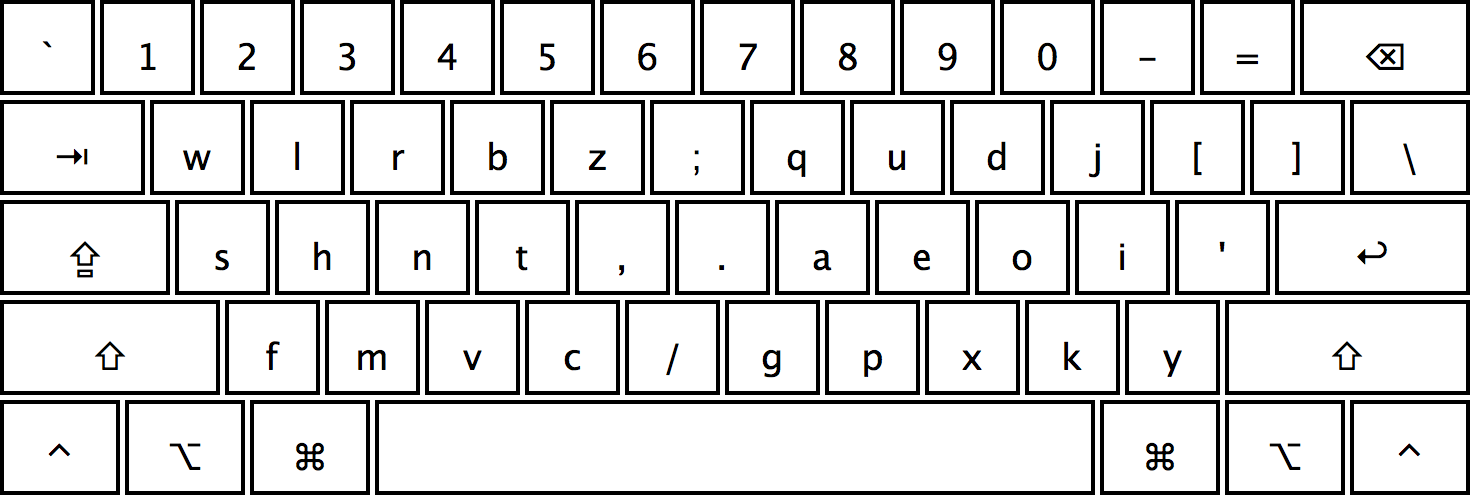
Features
- Build based on the real world hand movements analysis
- Nearly maximal possible typing efficiency
- Very low overall fingers movement distance
- Very low same finger / same hand usage overheads
- Very low overall horizontal hands movement
- Highly symmetrical design that accounts for individual fingers strength
- Designed with the modern, web based English in mind
Comparisons
During the research I've identified the following results: in terms of efficiency
QWERTY-0%(baseline)Dvorak-+77%Colemak-+84%Workman-+101%Halmak-+134%
Please refer to the article Halmak Reborn for the more detailed breakdown of the results.
All scripts are opensourced and can be verified in the keyboard-genetics repository.
The Name
The name is a combination of HAL-9000, as a reference to the layout being
designed by an AI. And, Dvorak as a gratitude to Mr. Dvorak for his dedication
to the layouts optimizations process. The letter m in between is just to make
it sound nicer. Or is it!?...
Installation
- Git clone all the stuff somewhere
- Copy
Halmak.bundleinto your/Library/Keyboard Layoutsfolder (create if it is missing) - Sign out, Sign in
- Go to the keyboard preferences and add the
Halmaklayout - Ask here in issues if nothing works
Android installation for physical keyboards
- Install Extra Physical Keyboard Layouts from the Play Store
Source code is available on github - Connect a physical keyboard to your Android device e.g. via bluetooth or OTG
- Select the Halmak layout in your system menu e.g. System > Language and Input > Physical keyboard > Keyboard Name
Integrations
Karabiner Elements
To enable virtual key mapping for Halmak on your macOS machine via Karabiner Elements, you can use the following configuration inside your simple_modifications section of your $HOME/.config/karabiner/karabiner.json file:
{ "from": { "key_code": "q" }, "to": [{ "key_code": "w" }] },
{ "from": { "key_code": "w" }, "to": [{ "key_code": "l" }] },
{ "from": { "key_code": "e" }, "to": [{ "key_code": "r" }] },
{ "from": { "key_code": "r" }, "to": [{ "key_code": "b" }] },
{ "from": { "key_code": "t" }, "to": [{ "key_code": "z" }] },
{ "from": { "key_code": "y" }, "to": [{ "key_code": "semicolon" }] },
{ "from": { "key_code": "u" }, "to": [{ "key_code": "q" }] },
{ "from": { "key_code": "i" }, "to": [{ "key_code": "u" }] },
{ "from": { "key_code": "o" }, "to": [{ "key_code": "d" }] },
{ "from": { "key_code": "p" }, "to": [{ "key_code": "j" }] },
{ "from": { "key_code": "a" }, "to": [{ "key_code": "s" }] },
{ "from": { "key_code": "s" }, "to": [{ "key_code": "h" }] },
{ "from": { "key_code": "d" }, "to": [{ "key_code": "n" }] },
{ "from": { "key_code": "f" }, "to": [{ "key_code": "t" }] },
{ "from": { "key_code": "g" }, "to": [{ "key_code": "comma" }] },
{ "from": { "key_code": "h" }, "to": [{ "key_code": "period" }] },
{ "from": { "key_code": "j" }, "to": [{ "key_code": "a" }] },
{ "from": { "key_code": "k" }, "to": [{ "key_code": "e" }] },
{ "from": { "key_code": "l" }, "to": [{ "key_code": "o" }] },
{ "from": { "key_code": "semicolon" }, "to": [{ "key_code": "i" }] },
{ "from": { "key_code": "z" }, "to": [{ "key_code": "f" }] },
{ "from": { "key_code": "x" }, "to": [{ "key_code": "m" }] },
{ "from": { "key_code": "c" }, "to": [{ "key_code": "v" }] },
{ "from": { "key_code": "v" }, "to": [{ "key_code": "c" }] },
{ "from": { "key_code": "b" }, "to": [{ "key_code": "slash" }] },
{ "from": { "key_code": "n" }, "to": [{ "key_code": "g" }] },
{ "from": { "key_code": "m" }, "to": [{ "key_code": "p" }] },
{ "from": { "key_code": "comma" }, "to": [{ "key_code": "x" }] },
{ "from": { "key_code": "period" }, "to": [{ "key_code": "k" }] },
{ "from": { "key_code": "slash" }, "to": [{ "key_code": "y" }] }
Kinesis Advantage 2
To enable native key mapping for Halmak on your Kinesis Advantage 2
- Download our
1_qwerty.txtfile - Program+Shift+Escape to enable power user mode (should see 4 LED flashes)
- Program+F1 to mount to the keyboard as a drive (should see a few flashes)
- Drag the downloaded
1_qwerty.txtfile intoADVANTAGE2/active - Open Disk Utility, right-click on the drive, select Eject (must be "Eject", as unmount will not write the file)
- Program+F3 to enable QWERTY, then Program+1 to enable our Halmak modification of QWERTY
Refer to the Kinesis Advantage 2 support page for assistance.
Type Fu
To learn Halmak, we have an integration for Type Fu.
- Download our
Halmak.tflfile - Open Type Fu
- Preferences
- Keyboard
- Hamburger menu
- Import from File
- Select the file you downloaded from the first step
Copyright & License
Again, I'm not sure if there is a point to this. But I guess it's MIT.
Copyright (C) 2016 Nikolay Nemshilov
Explore related projects
codecrafters-io/build-your-own-x
Master programming by recreating your favorite technologies from scratch.
561,641 starspublic-apis/public-apis
A collective list of free APIs
498,007 starsmorluto/rea
Reverse engineer anything with agents, from app behavior down to native binaries.
450,446 starsopenclaw/openclaw
The AI that really does things. Any OS. Any Platform. The lobster way. 🦞
394,311 stars