
kadevin/ilab-conjure
kadevin/ilab-conjure has 735 GitHub stars and 120 forks. GitHot measured +3 stars in 24 hours, +12 in 7 days, and +15 in 15 days. Last checked 2026-11-10 02:03 UTC. Last push 2026-11-06.
本地优先的多模型 AI 图片生成工作台,支持 GPT Image、Gemini、图像编辑、素材库、模板与并发任务。Local-first AI image workbench for GPT Image & Gemini, with editing, reusable assets, templates and task history.
Measured star growth
- in 24h
- +3
- in 7 days
- +12
- in 15 days
- +15
- in 1 month
- Collecting history
Net star changes over overlapping periods, not daily totals. Missing measurements are left blank. Stars measure attention, not software quality.
README.en.md
OriginaliLab CONJURE
Multi-model AI image generation workbench · GPT Image / Gemini · Gallery, templates, history, and concurrent tasks.








English · 中文 · Downloads / Releases
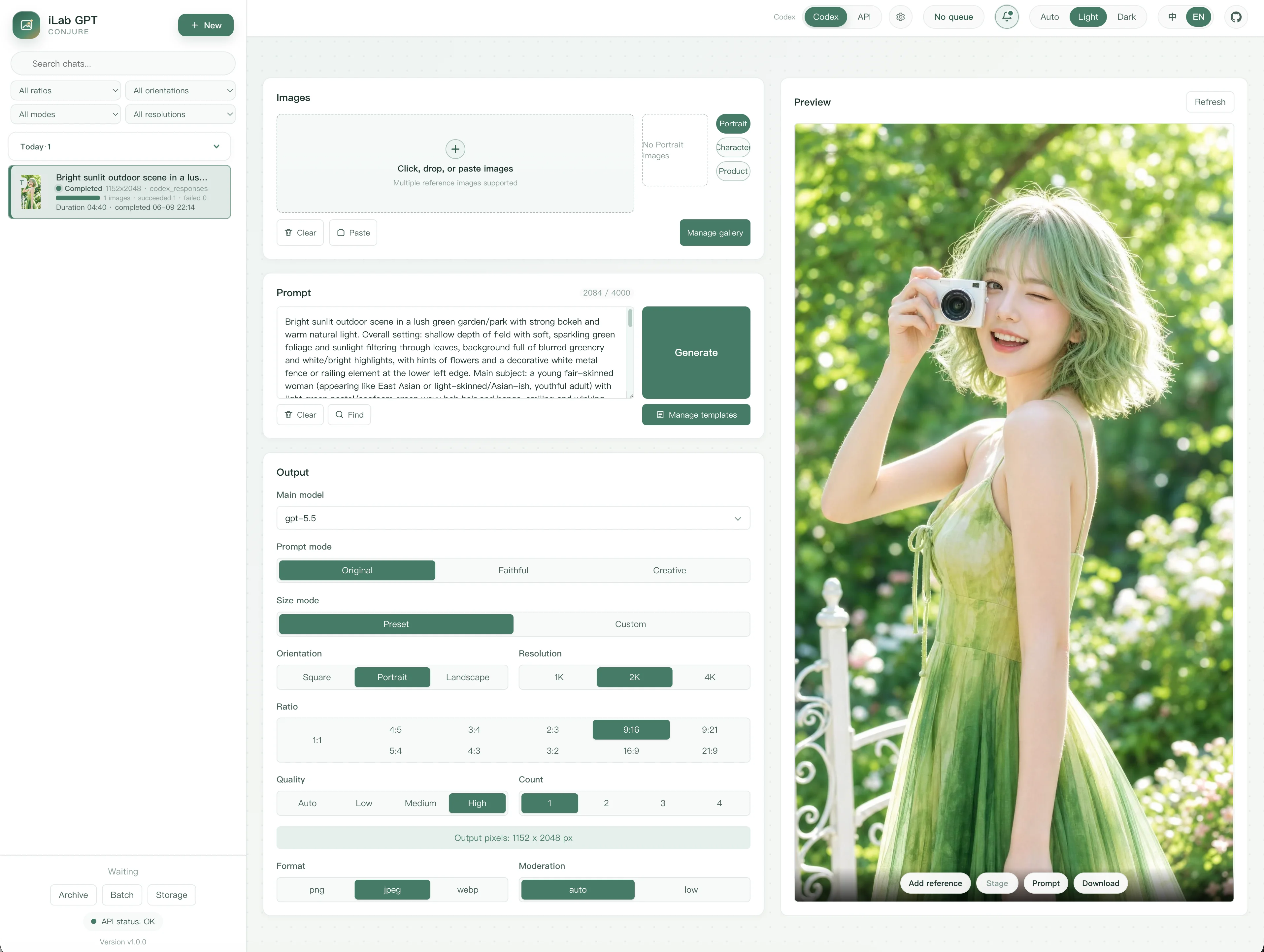
Overview
iLab CONJURE is a local-first AI image workbench for GPT Image, Gemini, and personal Codex workflows. Generate, edit, and organize images in the WebUI, or automate tasks with the CLI.
Start with an app package, or install from source. API mode is recommended for provider integrations. This tool is not intended as a public multi-user service.
Features
- Multi-model generation: Text-to-image, references, and image editing, with configurable providers, remote model names, and concurrency limits.
- Prompts and assets: A reusable gallery, recent uploads, image/color/snippet references, prompt templates, and a layered image editor.
- Output controls: Size, ratio, quality, count, and format, plus parameter locking and model-supported transparency or web search.
- Tasks and history: Concurrent queues, multi-image results, retries, search, favorites, tags, batch management, and ZIP export.
- Interface and settings: Compact responsive layouts, light/dark themes, 14 language options, proxies, storage, notifications, and configuration backup.
- Local tools: macOS and Windows standard/portable packages, tray or menu-bar launchers, and a CLI.
Models and channels
GPT Image supports Image 2 and the 2.5/2.6 Flare and Sunburst models with separate remote model bindings. Existing bindings do not upgrade automatically; Codex channels remain on Image 2. Gemini includes Nano Banana Pro, 2.1, 2, and 2 Lite; 2.1 supports 1K/2K/4K, up to 14 reference images, and Google Search.
Responses channels offer a main model, defaulting to gpt-6-luna, with gpt-6.1-terra among the choices when supported by the provider. Saved choices are preserved; switch older gpt-5.4-mini selections manually. Direct Image channels do not use a main model. Fetching a provider's model list only helps fill the form; it neither saves settings nor verifies image generation support.
GPT Image transparency is available for PNG/WebP through native parameters or prompt compatibility, depending on the channel. Results without actual transparency are kept with a notice, without automatic regeneration.
Authentication modes
API mode (recommended): Configure the provider's Base URL, API key, model name, and API mode in System Settings.
Codex / ChatGPT OAuth (advanced local mode): Reuse a local login with Codex Image or Codex Responses. This personal workflow uses internal endpoints, not an officially recommended API integration; availability and account usage rules may change.
Keep credentials, prompts, images, task databases, and logs out of Git. See SECURITY.md for security boundaries.
App packages
Find published versions in Downloads / Releases or the latest official GitHub release.
| Platform | Install and launch |
|---|---|
| macOS | Choose the arm64 or x64 DMG for your Mac, drag the app into Applications, and open it. |
| Windows | Extract the x64 App ZIP into a normal user directory and run iLab GPT CONJURE.exe. |
| Portable | Extract the platform ZIP and run Start iLab GPT CONJURE.app or .exe. |
Packages include Python, dependencies, and frontend assets; normal use does not require Node.js. Standard app data lives in ~/Library/Application Support/iLab GPT CONJURE on macOS or %APPDATA%\iLab GPT CONJURE on Windows. Portable data stays in the adjacent data/ folder.
Updates: macOS standard and portable launchers offer user-confirmed updates with signature and file-hash checks. Windows standard ZIP updates are manual. Quit the old instance before replacing files and preserve data folders. If dependency installation fails, check the network or download a complete package; do not reset gallery, settings, or task data.
Legacy migration and macOS opening tips
The project was renamed from iLab GPT CONJURE to iLab CONJURE in v0.7.0. Some package, executable, and data-folder names retain the old name. On first launch, the standard app can copy adjacent portable data after confirmation, without deleting the original or automatically overwriting existing standard data.
macOS standard v0.6.1 and earlier require one manual installation of an updater-enabled version. Portable v0.5.4 and earlier users should download a complete package. Portable updates preserve data/ and back up replaced files to .backup/. The bundled Start WebUI Portable and Update WebUI Portable scripts remain available for terminal troubleshooting and manual updates.
macOS builds use ad-hoc signing, without Developer ID signing or notarization. After checking the download source, right-click the app, choose Open, and confirm the system prompt. For an extracted portable folder, you can also use:
xattr -dr com.apple.quarantine /path/to/ilab-gpt-conjure_macos_portable_arm64
# Use the corresponding macos_portable_x64 folder on Intel Macs
Requirements
For source installs only: use Python 3.11.18, 3.12.16, 3.13.18, 3.14.10, 3.15.2, or a newer patch on the corresponding branch, and pip 26.2.2+ for dependency installation. Node.js is only needed for frontend changes; its version is in .node-version.
Install
These commands use a macOS/Linux shell. In Windows PowerShell, replace python3 with py -3 (or python without the Python Launcher), and .venv/bin/python with .venv\Scripts\python.exe.
git clone https://github.com/kadevin/ilab-conjure.git
cd ilab-conjure
python3 codex_image/runtime_security.py
python3 -m venv .venv
.venv/bin/python codex_image/runtime_security.py --installer
.venv/bin/python -m pip install --require-hashes -r requirements-webui.txt
If --installer reports an outdated pip, upgrade it below, then rerun the installer check and dependency installation commands. Startup checks do not modify global Python or pip; updating packages does not upgrade the interpreter. Older environments also need updated locked dependencies to meet Pillow and certifi security requirements.
Upgrade an older pip in the project environment
Run from the project directory, substituting the Python path above in Windows PowerShell. This downloads a fixed wheel over HTTPS, verifies its SHA-256, and installs only into the project virtual environment. Download or verification failures stop installation; TLS verification stays enabled.
.venv/bin/python -c "
import hashlib, pathlib, subprocess, sys, tempfile, urllib.request
url = 'https://files.pythonhosted.org/packages/3f/06/3e4420302363fbb71be3c7f35ce042f54bfca330e3e66b3a2e3c4cca579f/pip-26.2.2-py3-none-any.whl'
expected = 'fd7f4dfa8190e014013b9f08f3e973f4e4c26ffd179a204895533a7254813a70'
with tempfile.TemporaryDirectory() as folder:
    wheel = pathlib.Path(folder) / 'pip-26.2.2-py3-none-any.whl'
    with urllib.request.urlopen(url, timeout=60) as response:
        data = response.read()
    if hashlib.sha256(data).hexdigest() != expected:
        sys.exit('SHA256 mismatch; installation stopped')
    wheel.write_bytes(data)
    subprocess.run([sys.executable, str(wheel) + '/pip', 'install', '--no-index', '--no-deps', str(wheel)], check=True)
"
Start the WebUI
Open Start WebUI.command on macOS or Start WebUI.bat on Windows, then visit http://127.0.0.1:8787/. To start manually:
.venv/bin/python -m codex_image.webui.server codex_image.webui.app:app --port 8787 --no-access-log
LAN access: Enable it in System Settings → Network and restart, then use the displayed address on other devices. It is off by default; enabling or disabling requires a restart, while saving does not interrupt tasks. Use trusted networks only: visitors need no login and can access or modify shared settings, tasks, and gallery data. Omit --host for manual startup to follow this setting; explicit --host 127.0.0.1 stays local. Some browser features are unavailable over HTTP.
WebUI usage
- Select a model and provider; configure API access, networking, and preferences in System Settings.
- Upload, drag, or paste references, or choose recent uploads and gallery images.
- Write a prompt, insert references or templates as needed, set output parameters, and start generation.
- Track tasks on the left and review/download results on the right. Open History Library to search, favorite, tag, or export tasks in bulk.
GPT Image 2.6 adds complexity, extra-high/maximum quality, and SVG/GIF outputs through the Images API. SVG/GIF are generation-only. GIF frame count (2–64) and frame duration (20–2000 ms) live in More options, alongside the calculated total duration; high resolutions lower the frame limit to fit the local decoding budget. SVG batches use one output per request. Image 2.5/2.6 Images API edits support a separate transparent markup layer on the first reference image; markup is sent separately from the original and cannot be combined with a mask.
In compact mode, transparency and compression are under the extra-options icon beside Format. JPEG/WebP compression ranges from 50% to 100%.
Stopping a task interrupts local requests and waiting slots, but the provider may still generate and bill. Generated images and history are retained. Opening History Library in the same tab preserves inputs for your return; after reusing a task, Restore draft can recover the original inputs.
Network and downloads
Choose system, direct, or custom HTTP(S) proxy routing. Request timeouts range from 1–30 minutes (default 10), and retry counts from 0–5 (default 2), applying to later tasks after saving. Image-download or DNS retries do not resubmit generation; requests already sent with an uncertain outcome are not automatically replayed.
If Clash/Mihomo Fake-IP DNS prevents downloading a generated image, enable Fake-IP DNS compatibility for image downloads. It is off by default and queries Cloudflare for affected image hostnames only, without changing system or LAN DNS.
Storage paths and existing data
Storage-path changes require a restart and do not move data. If history appears empty, restore the original paths under Storage & Notifications → Original default folders and restart. Before relocating, back up and quit, then copy the complete input/output directories, including gallery, references, and source data. Do not copy only images or one database, or overwrite existing destination data.
The macOS standard app preserves custom paths. Portable migration rebases only paths inside the old data/; external folders stay unchanged. The original path settings are retained in .migration/webui-settings-before-path-rebase.json, and original data is not deleted.
User configuration backup and restore
Under Storage & Notifications → Configuration backup and restore, select chips, gallery, templates, or system settings and export a ZIP. Each backup is a complete snapshot of the selected sections, downloadable for 24 hours after creation. Discarding it or reaching expiry removes the temporary server copy.
You can switch to other settings tabs from backup and restore. After restoring configuration, unsaved network, storage, and provider edits are preserved with a notice.
Restore validates the archive and previews its contents. Additive restore keeps existing data, skips duplicates, and creates copies for conflicting resources. Replacement restore affects selected sections only, previews deletion/reference impact, and requires another confirmation. Empty backup resource groups cannot replace nonempty local groups; running or queued tasks may also block gallery or settings replacement.
API keys are excluded by default; explicitly including them produces an unencrypted ZIP. OAuth sessions are never backed up. Local template thumbnails are included, external images remain URLs, and missing assets or invalid paths are skipped with warnings. Restored storage paths require a restart. Use History Library's separate task backup for generated tasks and historical images.
Public gallery
Save uploaded or generated images as reusable references, with categories, names, usage notes, replacement, and drag sorting. Select images in the gallery or search with @. Assets stay local; deleting an item may leave missing references in older tasks.
Prompt chips
| Type | Purpose |
|---|---|
@ |
Search current references and the gallery to insert an image mention; gallery images are also attached as references. |
# |
Insert a hexadecimal color such as #FF6600. |
~ / ~ |
Insert a saved prompt snippet, expanded to its full text when submitted. |
Use arrow keys to select, Enter to confirm, and Esc to close. Selected text can be saved as a snippet, then viewed, edited, or expanded for reuse.
Image mentions resolve to actual reference order and are deduplicated; pasted plain @Image 1 text does not bind an image. Removing an upload mention keeps the image; removing the last gallery mention detaches that gallery reference. Removing a reference image also removes its mentions; Restore inputs can recover them. Missing references must be reselected or removed. Templates turn upload mentions into placeholders such as {{Image 1}}.
Prompt templates
Open Manage Prompt Templates to save and reuse longer prompts, with categories, favorites, thumbnails, and import/export. Insert adds visible prompt text; Replace overwrites it. Templates never inject hidden prompts and are stored by default in output/webui-prompt-templates.json.
CLI
.venv/bin/python -m codex_image generate --prompt "A clean product photo of a ceramic mug" --out output/mug.png
References, editing, masks, and dry runs are supported; see --help for all options.
Development
See CONTRIBUTING.md for development and checks, RELEASES.md for packaging and releases, and dependency security notes for runtime baselines. After TypeScript or CSS changes, regenerate and include the assets under codex_image/webui/static/.
License
Licensed under GNU AGPLv3. Modified versions offered over a network must provide corresponding source under the license. This covers code, not rights to the project name, logo, assets, credentials, user content, or third-party model/API services.
Contact And Custom Work
Connect on WeChat to discuss AI coding and image workflows, or custom local tools, business websites, and agent apps. Mention iLab CONJURE or custom development when adding the contact.

Explore related projects
ytdl-org/youtube-dl
Command-line program to download videos from YouTube.com and other video sites
141,500 starsexcalidraw/excalidraw
Virtual whiteboard for sketching hand-drawn like diagrams
135,396 starsgodotengine/godot
Godot Engine – Multi-platform 2D and 3D game engine
119,840 starsmrdoob/three.js
JavaScript 3D Library.
117,983 stars