
jverdi/JVFloatLabeledTextField
jverdi/JVFloatLabeledTextField has 7,128 GitHub stars and 720 forks. GitHot measured -1 stars in 24 hours. Last checked 2026-11-07 09:42 UTC. Last push 2023-04-17.
UITextField subclass with floating labels - inspired by Matt D. Smith's design: http://dribbble.com/shots/1254439--GIF-Mobile-Form-Interaction?list=users
Measured star growth
- in 24h
- -1
- in 7 days
- Collecting history
- in 15 days
- Collecting history
- in 1 month
- Collecting history
Net star changes over overlapping periods, not daily totals. Missing measurements are left blank. Stars measure attention, not software quality.
README.md
OriginalJVFloatLabeledTextField


JVFloatLabeledTextField is the first implementation of a UX pattern that has come to be known the "Float Label Pattern".
Due to space constraints on mobile devices, it is common to rely solely on placeholders as a means to label fields. This presents a UX problem, in that, once the user begins to fill out a form, no labels are present.
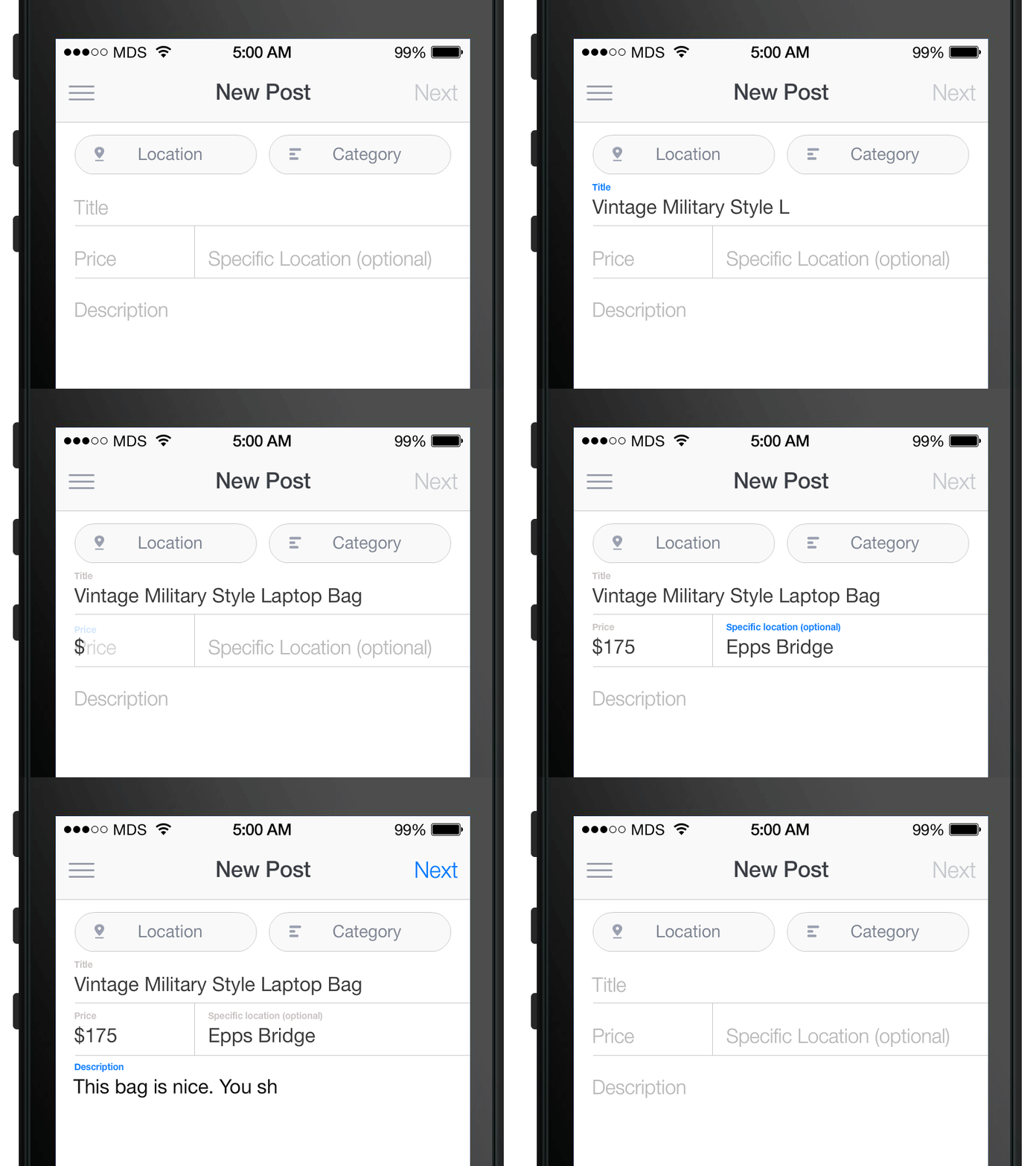
This UI component library, which includes both a UITextField and UITextView subclass, aims to improve the user experience by having placeholders transition into floating labels that hover above the fields after they are populated with text.
Credits for the concept to Matt D. Smith (@mds), and his original design:
The component is officially supported for iOS 9 and greater.
Getting started via CocoaPods
sudo gem install cocoapods
Create a Podfile in your project directory:
pod init
Add the following to your Podfile project's target:
pod 'JVFloatLabeledTextField'
Then run CocoaPods with pod install.
Finally, include JVFloatLabeledTextField.h and JVFloatLabeledTextView.h in your project.
Getting started via Carthage
brew update
brew install carthage
Create a Cartfile in your project directory that contains:
github "jverdi/JVFloatLabeledTextField"
Then run carthage with carthage update and add JVFloatLabeledText.framework to your project from the Carthage/Build/iOS directory.
Finally, include JVFloatLabeledText.h in your project:
#import <JVFloatLabeledText/JVFloatLabeledText.h>
Getting started via SPM (Xcode 11+)
Click File -> Swift Packages -> Add Package Dependency, enter JVFloatLabeledText repo's URL.
After select the package, you can choose the dependency type (tagged version, branch or commit). Then Xcode will setup all the stuff for you.
If you're a framework author and use JVFloatLabeledTextField as a dependency, update your Package.swift file:
let package = Package(
    dependencies: [
        .package(url: "https://github.com/jverdi/JVFloatLabeledTextField", from: "1.2.2")
    ],
)
Additional References
How the Float Label Pattern Started - Matt D. Smith
Float Label Pattern - Brad Frost
Material Design - Floating Labels - Google
Ports and Alternate Implementations
Android - Henrik Sandström
Android - Kaushik Gopal
Android - Kevin Johnson
Xamarin.iOS - Greg Shackles
Xamarin.Android - Johan du Toit
CSS Jonathan Snook
JQuery / Zepto.js - Achmad Mahardi
JQuery - Mike Mitchell
AngularJS - Dave Ackerman
Bootstrap plugin - Matt Powell
JavaFX - Andy Till
Swift - Dirk Fabisch
Swift - Fahim Farook
Swift - Neeraj Kumar
Swift - Jimmy Jose
Swift - Skyscanner (Daniel Langh, Gergely Orosz, Raimon Lapuente)
ObjC - Arthur Ariel Sabintsev
ObjC - Rob Phillips
4D - Maurice Inzirillo
Appcelerator Titanium - The Smiths
B4i - Erel Uziel
Added a port? Let me know - @jverdi
Explore related projects
freeCodeCamp/freeCodeCamp
freeCodeCamp.org's open-source codebase and curriculum. Learn math, programming, and computer science for free.
458,706 starsdonnemartin/system-design-primer
Learn how to design large-scale systems. Prep for the system design interview. Includes Anki flashcards.
377,220 starsreact/react
The library for web and native user interfaces.
252,356 starsvuejs/vue
This is the repo for Vue 2. For Vue 3, go to https://github.com/vuejs/core
212,631 stars