
jundizhou/easy-stock
jundizhou/easy-stock has 1,794 GitHub stars and 197 forks. GitHot measured +80 in 7 days and +175 in 15 days. Last checked 2026-11-09 12:27 UTC. Last push 2026-11-02.
A股行情分析与AI智能投研智能体:股票分析、量化交易分析、盘后复盘桌面工作台——easy stock
Measured star growth
- in 24h
- Update delayed
- in 7 days
- +80
- in 15 days
- +175
- in 1 month
- Update delayed
Net star changes over overlapping periods, not daily totals. Missing measurements are left blank. Stars measure attention, not software quality.
README_EN.md
Original

easy-stock: An AI Research Workbench for the China A-Share Market
A local-first desktop workbench for market discovery, stock research, portfolio inspection, and AI portfolio optimization
English | 简体中文
Let AI actually understand the market — and make every judgment traceable to evidence.
Turn intraday observation, post-market review, and long-term insight into one continuously evolving research system.
Download · Why · Core Features · How AI Helps · Architecture · Getting Started · Discussions · Contributing · License







Why easy-stock
An AI-era stock terminal shouldn't just bolt a chat box onto a legacy quote app.
Traditional market software is good at showing prices, changes, and turnover. What is actually hard about A-share trading is understanding the structure behind the numbers: What is today's main theme? Is the theme broadening? Did the limit-up ladder extend higher? Did yesterday's strongest stocks get follow-through? Is the trend still intact? Is market sentiment repairing or fading?
easy-stock is an AI-native workbench that speaks this language. It unifies quotes, themes, limit-up pools, news, and post-market reviews into a single local-first research pipeline:
| AI-native capability | How easy-stock does it |
|---|---|
| Sense the market | Aggregates Kaipanla, Eastmoney, Sina, Cailianpress and other sources into one unified model of quotes, K-lines, themes, limit-ups, and news |
| Understand structure | Turns trends, themes, limit-up ladders, sentiment, volume/price, and relative strength into a computable domain model |
| Execute tasks | Scheduled jobs, a built-in browser, and agents that discover articles, deduplicate, archive, and distill opinions |
| Build memory | Keeps articles, summaries, sentiment history, analysis records, model sessions, and research caches on your machine |
| Verify conclusions | Preserves scoring dimensions, theme sources, original URLs, timestamps, and degradation state — every conclusion can be traced back to evidence |
easy-stock does not make decisions for you. It gives you better perception, faster research, and a judgment system that compounds over time.
Note: The app UI and docs are currently Chinese-first (the product targets the China A-share market, where data sources and market microstructure are highly localized). English localization is on the roadmap; the codebase, architecture, and this README are English-friendly.
Core Features
Compared with v1.5.0, the current main branch includes fixes for news and earnings-disclosure evidence assessment, portfolio optimization recovery, and score presentation. These fixes are not included in the v1.5.0 installers.
01 · Automated Post-Market Review Digest
Let AI collect and organize what multiple market writers actually said
Post-market reviews from well-known A-share commentators are scattered across Xueqiu, TaoGuba, and WeChat. Manually visiting each profile, filtering for today's articles, and copying text is a time sink. easy-stock organizes all of it into a unified review timeline:

Once collection finishes, one click generates a "today's consensus" report — distilling shared focus areas, key disagreements, market facts, and conditions to verify in the next session:
Scheduled reviews use the Shenzhen Stock Exchange calendar and run on the calendar day before each trading session, at 22:00 Beijing time by default (configurable). The article window extends from the latest completed close to the scheduled time. Select Feishu and/or DingTalk for complete Markdown analysis, including every author's views but excluding article bodies and evidence details; long reports are split automatically. Keep the app running and the computer awake, and sync articles beforehand. Missed runs catch up only before 09:30 on the target trading day and wait for any active review. The calendar refreshes daily, with complete cached months usable for up to seven days during outages; without a usable calendar, scheduling pauses and retries.

The goal is not "AI guessing what rises tomorrow" — it is turning dozens of unstructured articles into a readable, verifiable opinion map you can keep tracking.
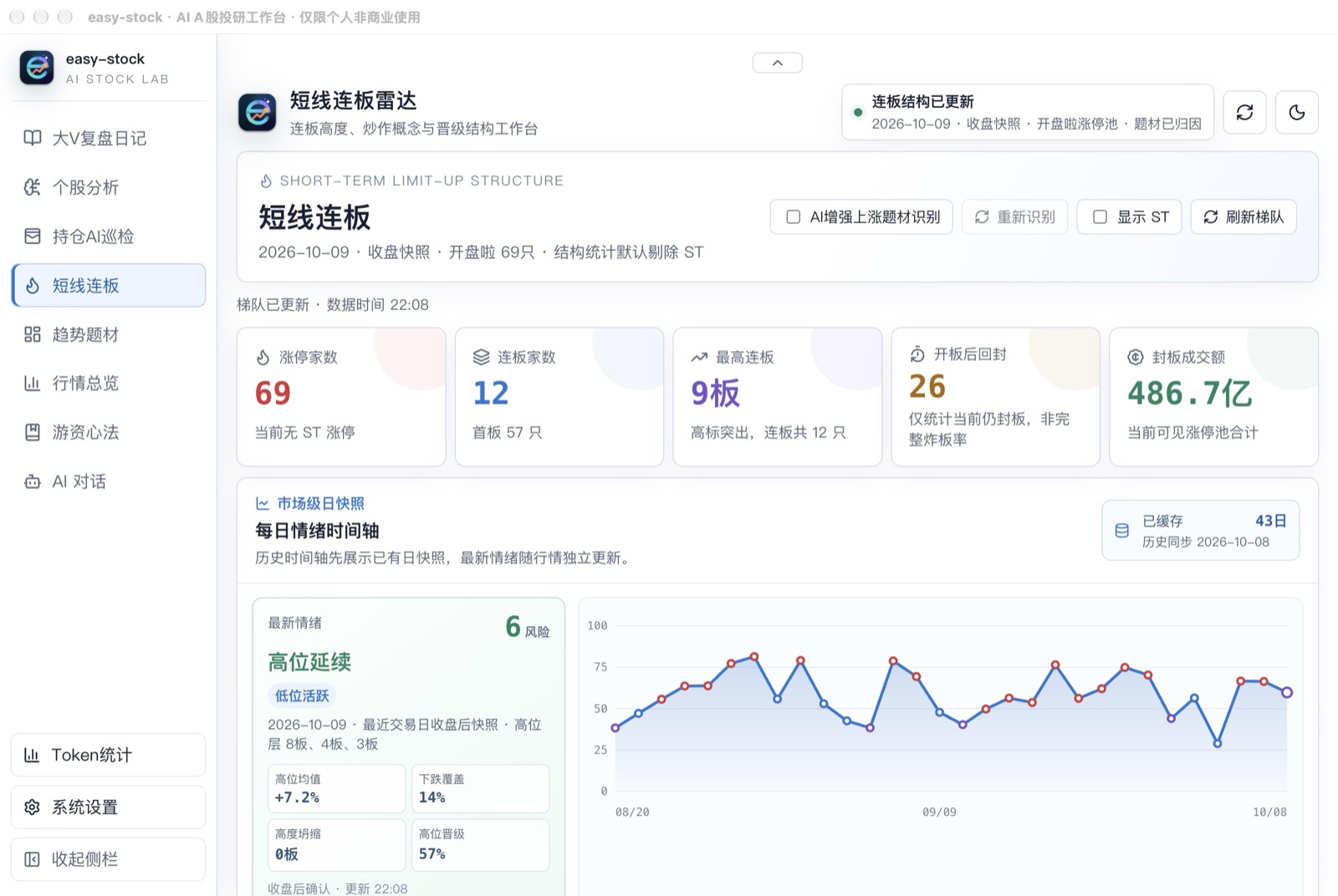
02 · Limit-Up Ladder & Sentiment Cycle Analysis
See the ladder, the promotion rate, and where you are in the sentiment cycle
A-share daily price limits vary by board and stock status. Reading the limit-up ladder—how many stocks reached the limit, for how many consecutive sessions, and which rung failed—is central to short-term market analysis. easy-stock puts the limit-up pool, consecutive limit-up ladder, yesterday's follow-through, promotion rates, and sentiment history in one view, with a built-in algorithm for sentiment-cycle staging:
03 · Theme Radar
Identify the market's real leading themes from sector moves
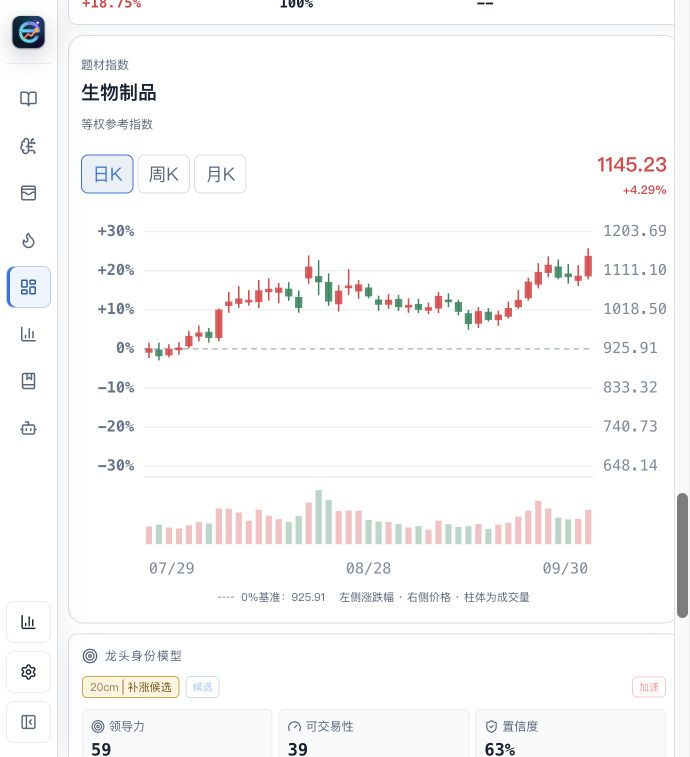
Aggregates theme rankings, momentum strength, money flow, market breadth, and streak duration; breaks down industry chains, concept nodes, and sub-directions through a theme map; and combines AI reads of the market trend, theme stage, and conditional entry points for trend stocks.
Daily, weekly, and monthly theme-index candles with volume help track the sector as a whole. The interface distinguishes provider indices from equal-weight reference indices.

View the theme-index candlestick example
04 · Market Overview
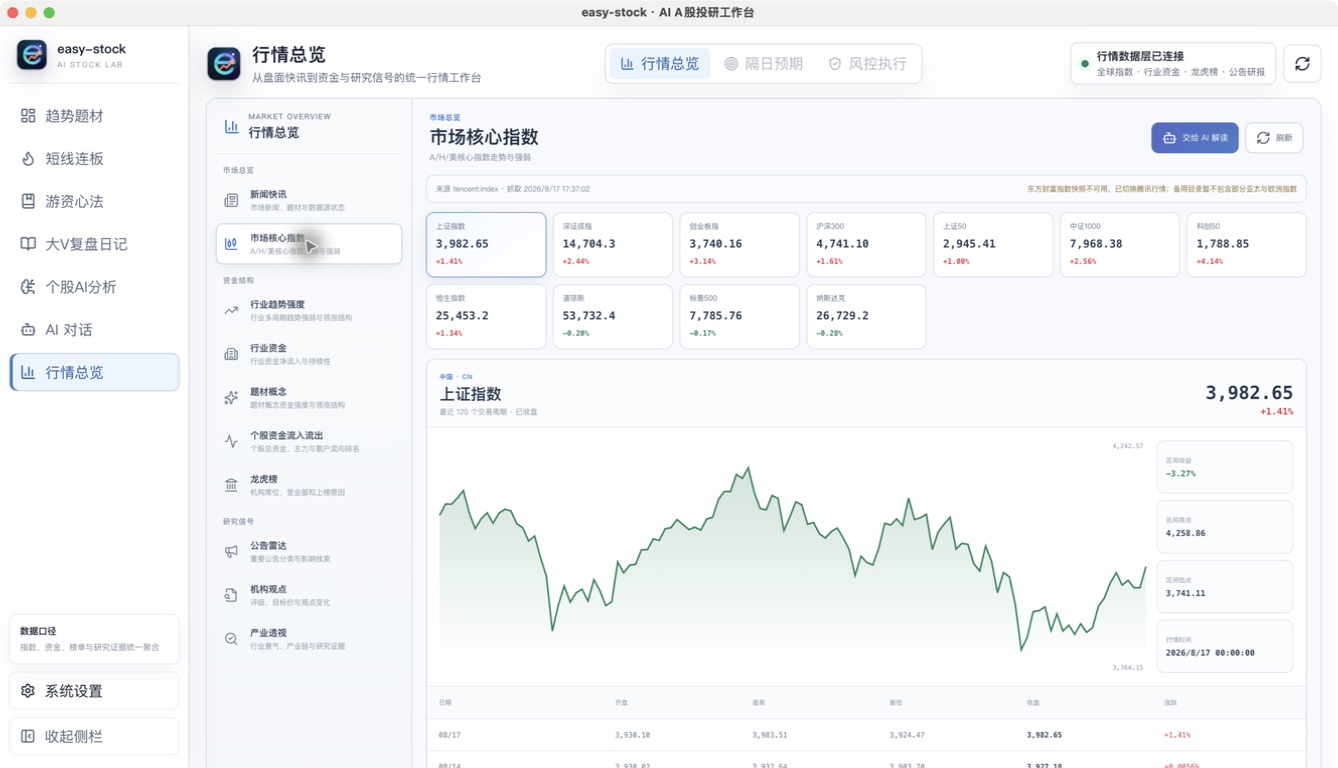
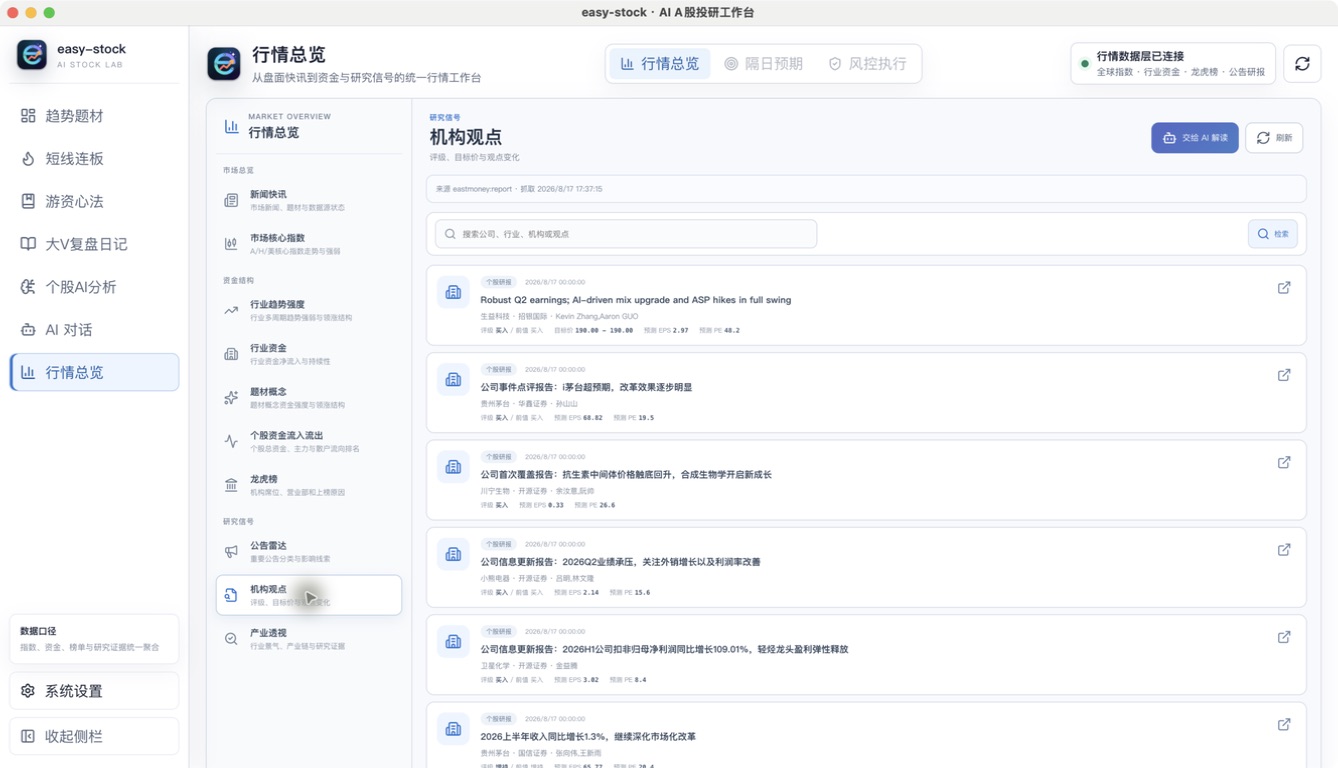
One traceable map of indices, money flow, leaderboards, and research signals
Core indices, news flashes, industry trend strength, sector money flow, themes, per-stock inflows/outflows, the Dragon-Tiger list, announcement radar, institutional views, and industry research — unified into a single research entry point. Every page keeps its data source and fetch time, and you can hand the current context straight to AI for interpretation, instead of hopping between quote terminals and news pages.
05 · Tiered Stock Research
Choose your research purpose, horizon, and depth
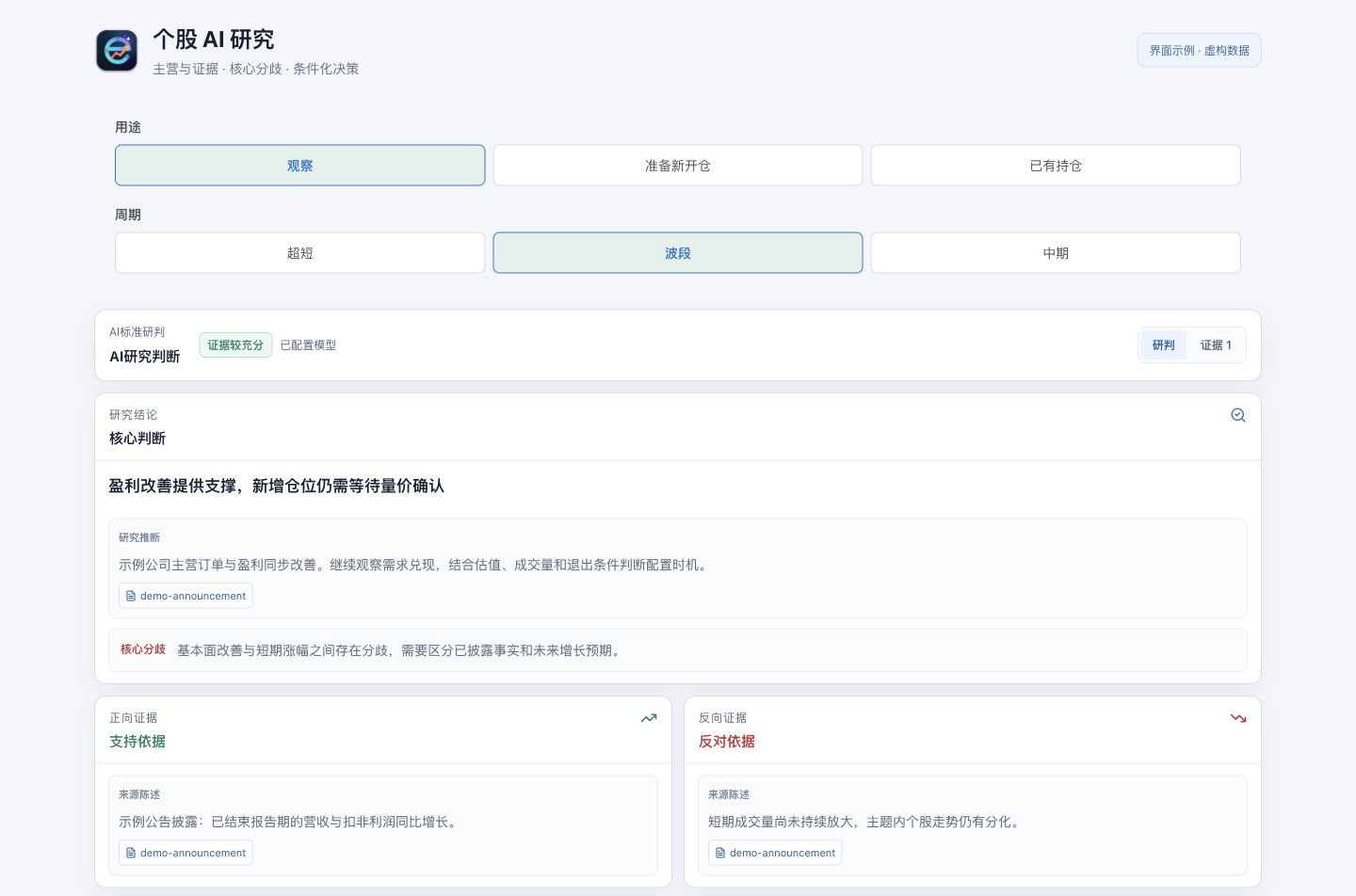
Select observation, a potential new position, or an existing holding; choose a short, swing, or medium-term horizon. Cost is optional for existing holdings.
| Research mode | Use case |
|---|---|
| Quantitative preview | Inspect prices, trends, and a quantitative baseline without calling an AI model |
| Quick AI assessment | Summarize the main thesis and questions that need checking |
| Standard AI assessment | Compare business drivers, catalysts, supporting evidence, and counter-evidence |
| Deep AI research | Investigate core disagreements further and develop scenarios and follow-up checks |
Reports distinguish source statements, third-party opinions, and research inferences. They retain citations and evidence timestamps alongside the business thesis, disagreements, counter-evidence, confirmation conditions, and invalidation conditions. Completed research stages are saved and can be resumed when recovery requirements are met.
06 · Portfolio AI Inspection
Evaluate individual research in the context of the whole portfolio
Save multiple portfolio plans: click + above the setup form to add one, then switch between plans to edit their separate stocks, weights, costs, and research settings. Plans can be renamed or deleted, and changes are saved locally.
DingTalk and Feishu robot settings support stock AI research and manual portfolio inspection notifications. Both send complete Markdown results without evidence or source details, splitting long reports automatically. With failure alerts enabled, failed or incomplete tasks send their status and available results; tasks without a report send a status explanation.
Each plan supports scheduled inspections every 3 days, weekly, monthly, or every N days/weeks/months, with a start date and execution time in Beijing time. Select DingTalk and/or Feishu to receive complete Markdown inspection results through enabled robots in Settings, excluding evidence and source details and splitting long reports into numbered messages; leave both unchecked to save reports only. Failure alerts follow the system notification setting. Schedules use the holdings and research settings saved with them; save the schedule again after changing a plan. The app must be running and the computer awake. Missed runs are consolidated into one catch-up inspection, active inspections finish before the next starts, and monthly dates beyond the end of a month use its last day. Deleting a plan stops its future scheduled inspections.
Choose an aggressive, balanced, or steady style, set a holding horizon, and add up to 10 stocks. Total assets default to CNY 500,000 and are editable. Costs default to a valid quote fetched when adding a stock and can be overridden. Whole-share quantities are estimated from assets, weights, and costs; the form shows current prices, market values, and per-stock and aggregate profit/loss. Unallocated funds remain cash. Inspection reuses valid AI stock reports from the past 24 hours, researches missing stocks, and produces a portfolio conclusion. Individual stock research can also be refreshed separately.
View portfolio setup: plans, assets and P/L, trading style, weights, and costs
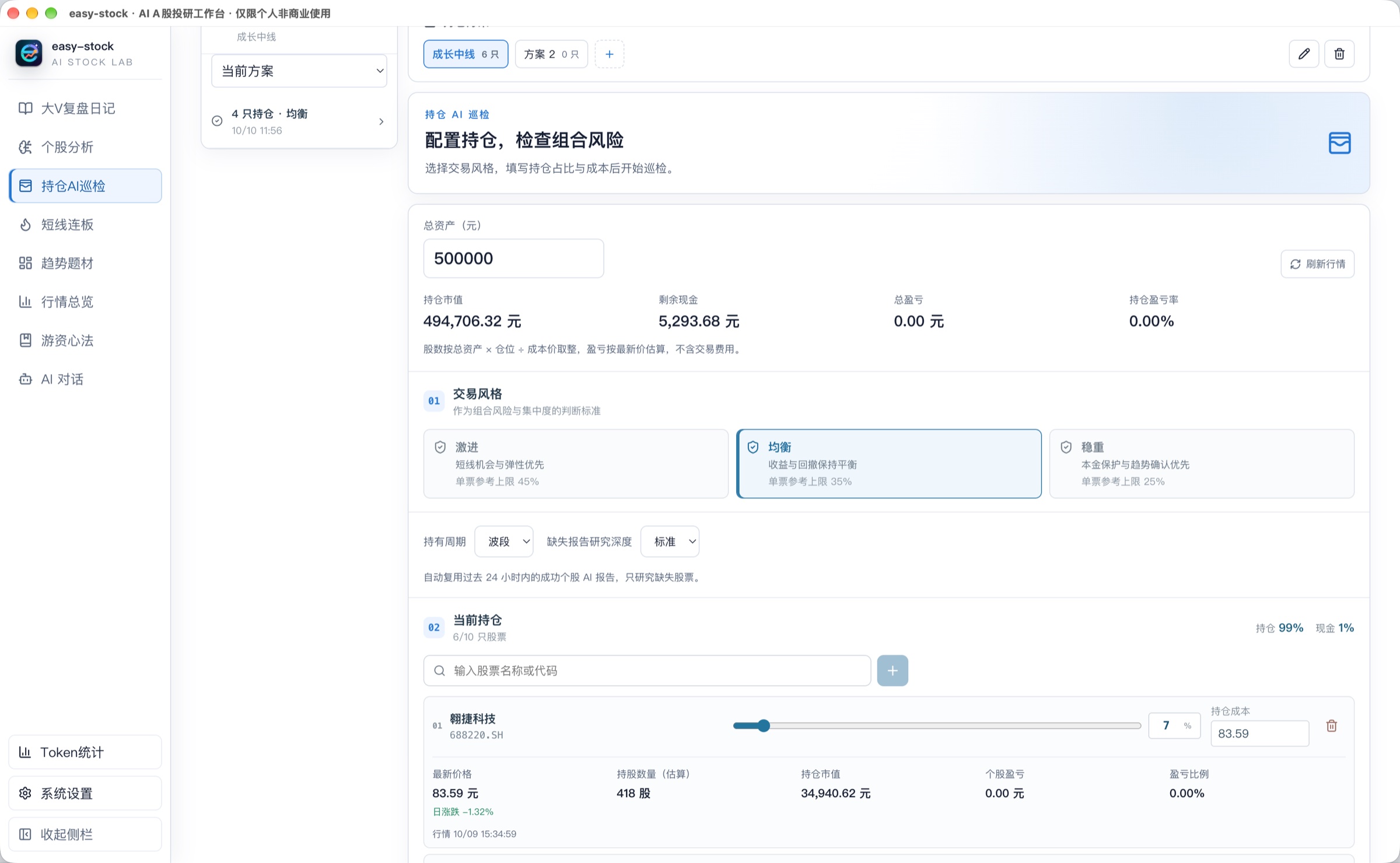
The setup screenshot shows a saved plan with market value, remaining cash, and P/L at the top, followed by trading style, research settings, and per-stock weights and costs. Share quantities and market values are estimates based on the inputs and quotes.
AI explains four scoring dimensions; the application recomputes and validates their fixed-weight total: holding thesis 35%, portfolio structure 25%, risk management 25%, and strategy fit 15%. Scoring evaluates the stock portfolio itself. Being fully invested, the cash percentage, and total exposure do not add or subtract points; concentration uses weights within the stock portfolio.
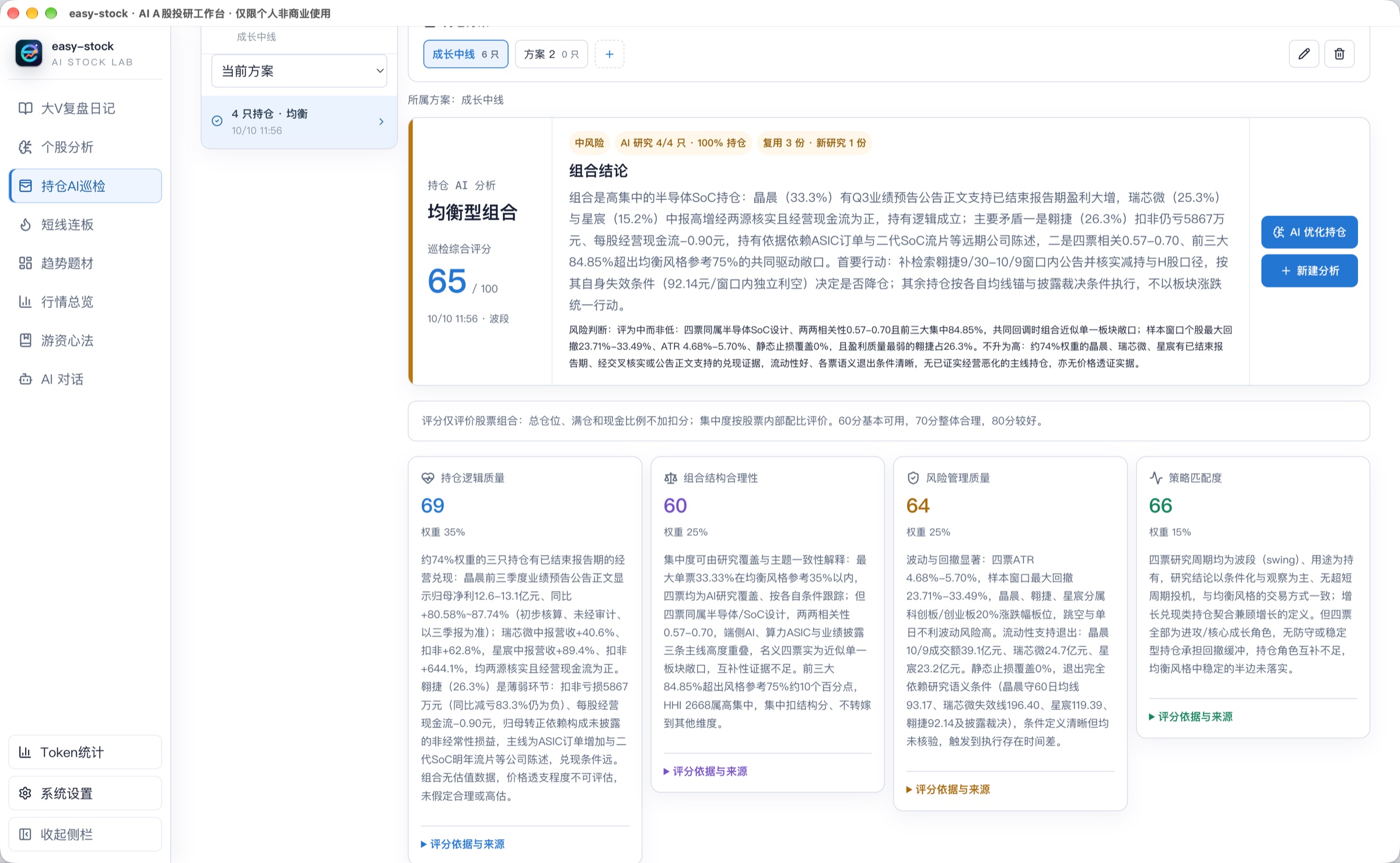
The inspection shown covers 4 holdings, reusing 3 reports and researching 1 stock anew. It scores 65 with medium risk. The four cards explain the holding thesis, portfolio structure, risk management, and strategy fit, with expandable scoring evidence and sources.
The report also retains per-stock judgments, common drivers, historical correlations, research sources, and confirmation and invalidation conditions. Existing stock reports open directly. Tasks run in the background, with reports and recovery state saved locally.
07 · AI Portfolio Optimization
Compare the original and proposed portfolios—and explain where the capital goes
Start optimization from an inspection report. Candidate screening, stock research, investment comparisons, allocation search, and independent review produce target weights, funding sources, and entry and exit conditions. The process compares adding to existing holdings with introducing new stocks.
- Capital constraints: total stock exposure and cash remain fixed. Cumulative replacement is capped at 70% of the optimization chain's initial stock allocation, with at most 2 new stocks and 10 target holdings.
- Paired review: original and proposed portfolios are independently scored using the same evidence and market snapshot. Improvement uses that review's scores. The earlier inspection score remains separate; two AI evaluations may differ.
- Substantive improvement: investment value, structure, trading eligibility, and risk constraints are checked together. A higher score alone does not qualify a proposal. Results may be conditional, a qualified alternative, or no adjustment.
- Saved progress: stock judgments, investment comparisons, and review blocks are saved separately. Recovery continues missing work; restarting can still reuse valid research.
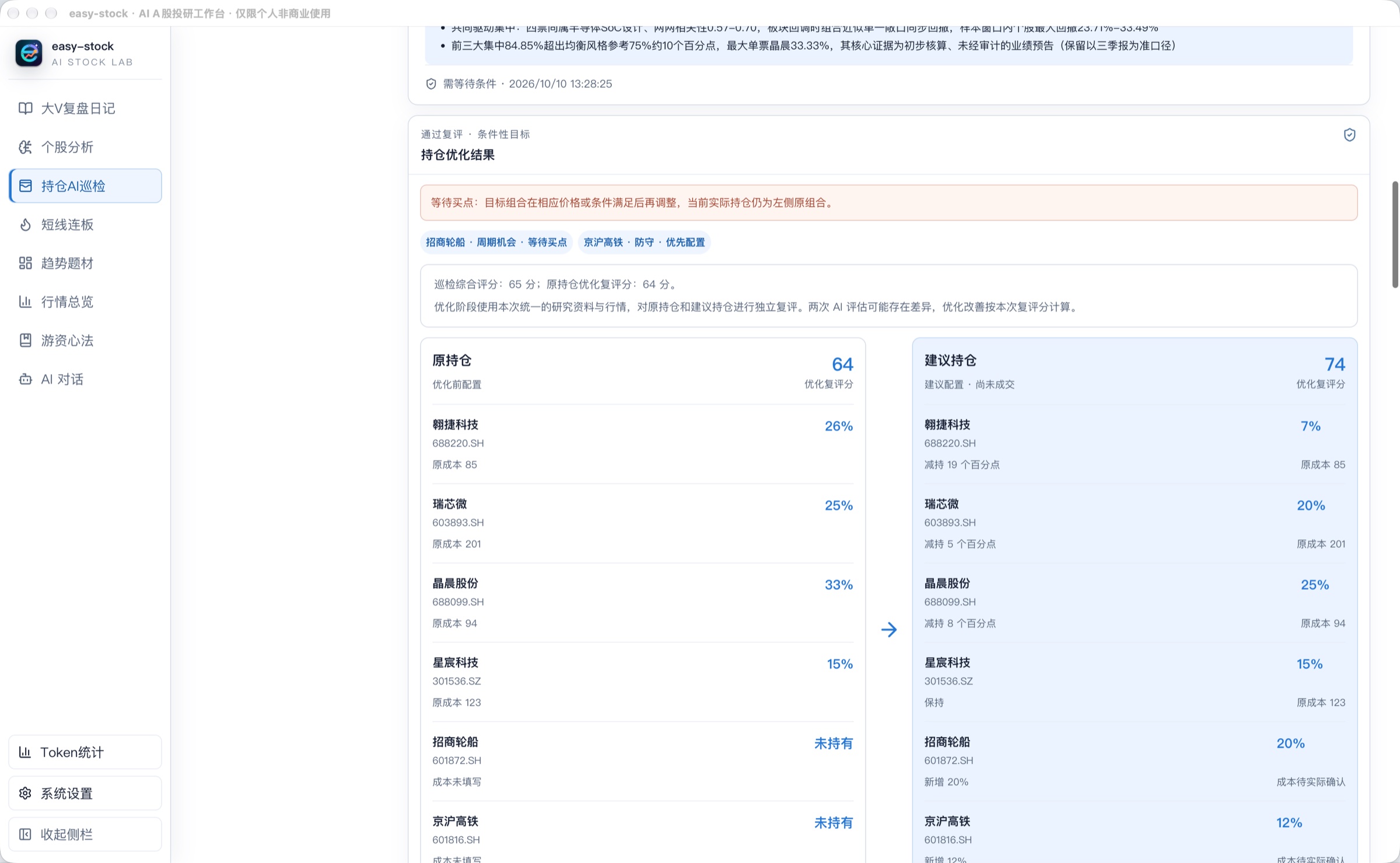
The screenshot retains the original inspection score of 65 and separately shows optimization review scores of 64 for the original holdings and 74 for the proposal: a 10-point improvement in the paired review. The side-by-side view shows reductions, unchanged weights, and additions. The pending-entry notice means the target requires price or other conditions to be met; the proposed allocation has not been executed.
Applying a proposal starts a new inspection of its target holdings. It does not place orders or change actual positions. Scores evaluate current research evidence; they are not expected returns or win probabilities.
08 · Trading Wisdom Library & AI Copilot
Turn hard-won trading experience into durable, re-readable knowledge — and let AI learn how you research

The Daily Research Loop
| Stage | What easy-stock provides |
|---|---|
| Intraday discovery | Market overview, trend themes, live quotes, theme map, limit-up ladder, and data source status |
| Stock research | Quantitative preview and tiered AI research, business drivers, evidence and counter-evidence, conditions, and scenarios |
| Portfolio inspection | Valid report reuse, four-dimensional scoring, concentration and correlation risks, per-stock judgments, and sources |
| Portfolio optimization | Candidate screening, investment comparisons, allocation search, paired review, and conditional proposals |
| Post-market review | Sentiment timeline, yesterday's follow-through, promotion structure, and limit-up ladder analysis |
| Information gathering | Automatic profile sync from commentators, article import, text cleaning, and local archiving |
| AI distillation | Per-article summaries, per-author synthesis, cross-author consensus, disagreements, and next-session watch conditions |
| Long-term accumulation | Article library, trading wisdom, stock analysis records, AI sessions, and local research memory |
How AI Augments A-Share Research
1. From "looking at data" to "understanding market structure"
easy-stock first organizes themes, ladders, limit-up reasons, trends, relative strength, and sentiment history into a domain model — then hands that structure to AI. The model never faces isolated numbers; it faces market evidence with A-share semantics.
2. From "manual browsing" to "agents that act"
Desktop Browser Bridges first reuse persistent Electron sessions to visit subscribed Xueqiu or TaoGuba profiles and read articles. Without a desktop bridge, the selected agent can collect content through agent-browser. The Go review service normalizes metadata, deduplicates, archives, and distills the articles.
3. From "single summaries" to "an opinion network"
The system first synthesizes each author's core views, then aggregates across authors for the day's consensus and disagreements — separating market facts, minority expectations, shared focus, and conditions to verify next session.
4. From "generic chat" to "an A-share research copilot"
AI sessions use a local shared agent service with a choice of Hermes or Codex. The runtimes share model profiles, reasoning settings, Skills, and MCP configuration while keeping their native sessions separate. Business tasks bind their runtime and model configuration for model calls, session continuation, tools, and task context. OpenAI, DeepSeek, Qwen, Moonshot, Anthropic, and custom compatible endpoints can be configured; Codex requires a Responses connection.
5. From "one-off Q&A" to "a long-term research flywheel"
| Perceive | Understand | Act | Remember | Verify |
|---|---|---|---|---|
| Live quotes, themes, articles | AI identifies structure, views, disagreements | Auto-sync, analyze, draft plans | Local articles, history, sessions | Verify next session against prices and sources |
Every verification becomes context for the next round of research. Over time the system accumulates not just more data, but a research process and a body of judgment that fits the way you work.
AI-Native Architecture
The Go backend collects market data, computes quantitative baselines, organizes evidence, and runs business workflows. A shared agent service selects Hermes or Codex from the application settings. Data services and AI reasoning are separate dependencies: quantitative previews need no model call, while deep stock research builds questions, retrieves evidence through Go, generates judgments and conditions, and validates references.

| Layer | Responsibility |
|---|---|
| AI research workbench | React + TypeScript: market overview, trend themes, limit-up ladder, tiered stock research, portfolio inspection and optimization, review digest, trading wisdom, and AI copilot |
| Local Go API | HTTP queries and background job polling; WebSocket quotes and AI events; local authentication, request validation, and request logging |
| Domain services and orchestration | Theme fusion, ladder and sentiment calculations, inflection evaluation, stock research, portfolio report reuse and scoring, candidate screening and optimization review, viewpoint consensus, next-day verification, and scheduled sync |
| Data and local evidence | Source adapters and fallbacks, unified market models, theme attribution, versioned snapshots with source and time metadata; SQLite stores reviews, research jobs, portfolio inspections and optimization checkpoints, sentiment history, and theme caches |
| Shared agent service | Shared model profiles, reasoning settings, Skills, and MCP; Hermes or Codex selection; task-bound configuration, session resumption, approvals, clarification, and token usage. Codex uses its native App Server and requires a Responses connection |
| Electron desktop host | Bundled Go / Hermes / Codex / Python; local ports and startup tokens; Preload / IPC; Xueqiu and TaoGuba Browser Bridges, agent-browser fallback, and WeChat link parsing; logs, updates, and backups before installation |
| External ecosystem | Market and research data sources, content platforms, public review feeds and trading wisdom, plus model providers or compatible endpoints called directly by the selected runtime |
Stock research saves stage checkpoints and can resume when model configuration and evidence still match. Portfolio inspection first reuses successful stock reports completed within 24 hours, then fills missing research before generating a portfolio report. Portfolio optimization saves stock judgments, investment comparisons, and review checkpoints so recovery can continue missing work. See the current architecture and code entry points (Chinese).
Getting Started
Users
No Node.js, Go, or Python required. Grab the installer or archive for your OS from GitHub Releases.
For first-time setup (LLM API keys, Xueqiu/TaoGuba login for content sync), see the User Guide (Chinese). To add or enable local skills, see the Skill Installation Guide (Chinese).
Developers
To run, debug, test, or build from source, see the Developer Guide (Chinese — architecture diagrams and code are language-neutral).
Configure Feishu and DingTalk custom group bots under Settings → Notifications, with signatures, keywords, and test messages. See Notification setup (Chinese) for setup and supported events.
Community & Contributing
- Discussions, research methods, and use cases: GitHub Discussions
- Bugs and data issues: open an issue with your OS, app version, and reproduction steps
- Feature requests: describe the scenario and the outcome you expect
- Code and docs contributions: start with the Contributing Guide and the Roadmap
- Chinese-speaking chat: QQ group 422158208
- Security issues: follow the Security Policy and report privately
License
The original backend, frontend, desktop app, and documentation of easy-stock are licensed under the PolyForm Noncommercial License 1.0.0.
- Personal learning, research, experimentation, and other non-commercial use, modification, and distribution are allowed, provided the license and copyright notice are retained.
- Any direct or indirect commercial use — including production deployment, paid services, SaaS, paid consulting or training, integration into commercial products, or resale — requires separate written permission from the author.
- Third-party dependencies, data sources, and bundled materials remain under their original licenses and terms of service.
- easy-stock is source-available software, not OSI open source.
Disclaimer
This project is for learning, research, and information organization only. It is not investment advice, a promise of returns, or a trading basis. Markets carry risk, and AI output and third-party data may be delayed, incomplete, or wrong — always verify against original sources, judge independently, and own your decisions.
Local first · Evidence based · Human in control
Explore related projects
affaan-m/ECC
The agent harness performance optimization system. Skills, instincts, memory, security, and research-first development for Claude Code, Codex, Opencode, Cursor and beyond.
300,818 starsNousResearch/hermes-agent
The agent that grows with you
262,455 starsmultica-ai/andrej-karpathy-skills
A single CLAUDE.md file to improve Claude Code behavior, derived from Andrej Karpathy's observations on LLM coding pitfalls.
231,873 starsfirecrawl/firecrawl
Supercharge your AI agents with data from the web and beyond. Building the library for superintelligence. 🔥
200,444 stars