
juhokoskela/GlassEQ
juhokoskela/GlassEQ has 34 GitHub stars and 2 forks. GitHot measured 0 stars in 24 hours. Last checked 2026-11-15 00:35 UTC. Last push 2026-10-10.
What you can do
- Four EQ modes: parametric, 10-band graphic, 31-band graphic, and convolution (a minimum-phase FIR built from a response curve or impulse response).
- Linked or independent stereo channels, with a per-profile preamp and a headroom indicator.
- Live frequency-response graph while you edit. Click Compare to switch between Filters off and Filters on, with their volumes matched.
- Guided profile import from pasted or saved EqualizerAPO, AutoEq, and REW settings, plus mono or stereo WAV impulse responses. Separate left and right text or mono WAV files can be combined into one stereo profile.
Measured star growth
- in 24h
- 0
- in 7 days
- Collecting history
- in 15 days
- Collecting history
- in 1 month
- Collecting history
Net star changes over overlapping periods, not daily totals. Missing measurements are left blank. Stars measure attention, not software quality.
About
Native macOS 26 equalizer
Creative & MediaREADME.md
OriginalGlassEQ
A native macOS equalizer that processes your entire system audio in real time without installing a virtual audio device, a loopback driver, or a system extension.




Get GlassEQ beta for macOS 26 and Apple Silicon. See the installation notes below.
What makes GlassEQ different
Most system-wide equalizers on macOS work by installing a virtual output device that you have to select and manage yourself, e.g. eqMac, or loopback drivers in the Soundflower / BlackHole family. Your real output gets hidden behind a fake one, and routing breaks every time you switch headphones or unplug.
GlassEQ takes a different route. It uses Core Audio process taps, Apple's modern system-audio-capture API to read the system mix directly, apply EQ to it, and replay the processed audio to the output you're already using.
- No virtual device, no driver, no system extension. GlassEQ's tap and its aggregate device are both private, so nothing new ever shows up in your Sound settings. It's an ordinary sandboxed app that asks for one thing: audio-capture permission.
- macOS stays in charge of routing. GlassEQ observes the default output and follows it. You never pick an output inside the app.
- Per-output profiles. Each device gets its own EQ curve, matched automatically by its Core Audio UID. Plug in your studio monitors and the monitor profile loads, switch to AirPods and their profile takes over.
- Light and real-time-safe. Ordinary filters use a hand-written biquad cascade; convolution profiles use partitioned minimum-phase FIR filtering without adding fixed buffering. The audio render path never allocates, locks, or touches disk, and profile edits hot-swap without dropping a sample.
- Native to macOS 26. A menu bar app built on the system's Liquid Glass styling with a separate settings window for editing.
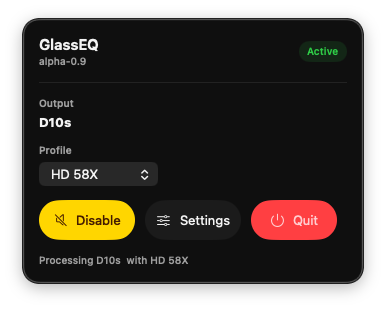
GlassEQ lives in the menu bar and follows whatever output macOS is using.
Download & install
Download GlassEQ-beta-0.9.3-macos26-arm64.zip from the beta-0.9.3 release. To install:
- Unzip it.
- Move
GlassEQ.appto/Applications. - Open it from Finder.
The beta is ad hoc-signed and not yet notarized (you can help change that), so macOS asks you to confirm the first launch: open System Settings → Privacy & Security, find the GlassEQ notice, and click Open Anyway. It opens normally after that.
On first run GlassEQ asks for system audio capture permission — that's what lets it read and equalize the system mix. Grant it and you're set.
About this beta
GlassEQ is an early beta: Apple Silicon only, tested on macOS 26, with no automatic updates or crash reporting yet. Expect the occasional rough edge, and please report any hardware-specific audio issues you run into. See the beta testing guide, distribution notes, and beta-0.9.3 release notes before installing a build.
How it works
- GlassEQ opens a private, muted process tap for the current physical output stream. The tap excludes GlassEQ itself, pulling the dry system mix out of that route without creating a feedback loop.
- On normal-rate routes, GlassEQ places that tap and the physical output in one private aggregate device. One Core Audio callback applies EQ and writes directly to the output on the same clock.
- Low-rate Bluetooth headset modes begin on a separate-clock compatibility path with a bounded ring buffer, drift servo, and realtime sample-rate conversion. Once the route's clock settles, GlassEQ tests the normal low-latency aggregate and returns to compatibility mode if its timing becomes unstable.
- GlassEQ switches backend automatically when the output device, stream, or headset sample rate changes.
The normal fast path has low, predictable latency without a separate playback queue. The built-in diagnostics report tap-to-output latency from Core Audio's I/O timestamps alongside frame delivery, callback sizes, underruns, dropped input, and saturation. Headset mode reports its bridge occupancy, clock correction, sample-rate conversion, and output timing separately.
The current low-latency path requires the output's preferred pair to occupy one native mono or stereo hardware stream. Audio routed to a different device or a distinct system-alert output is outside that tap.
Features
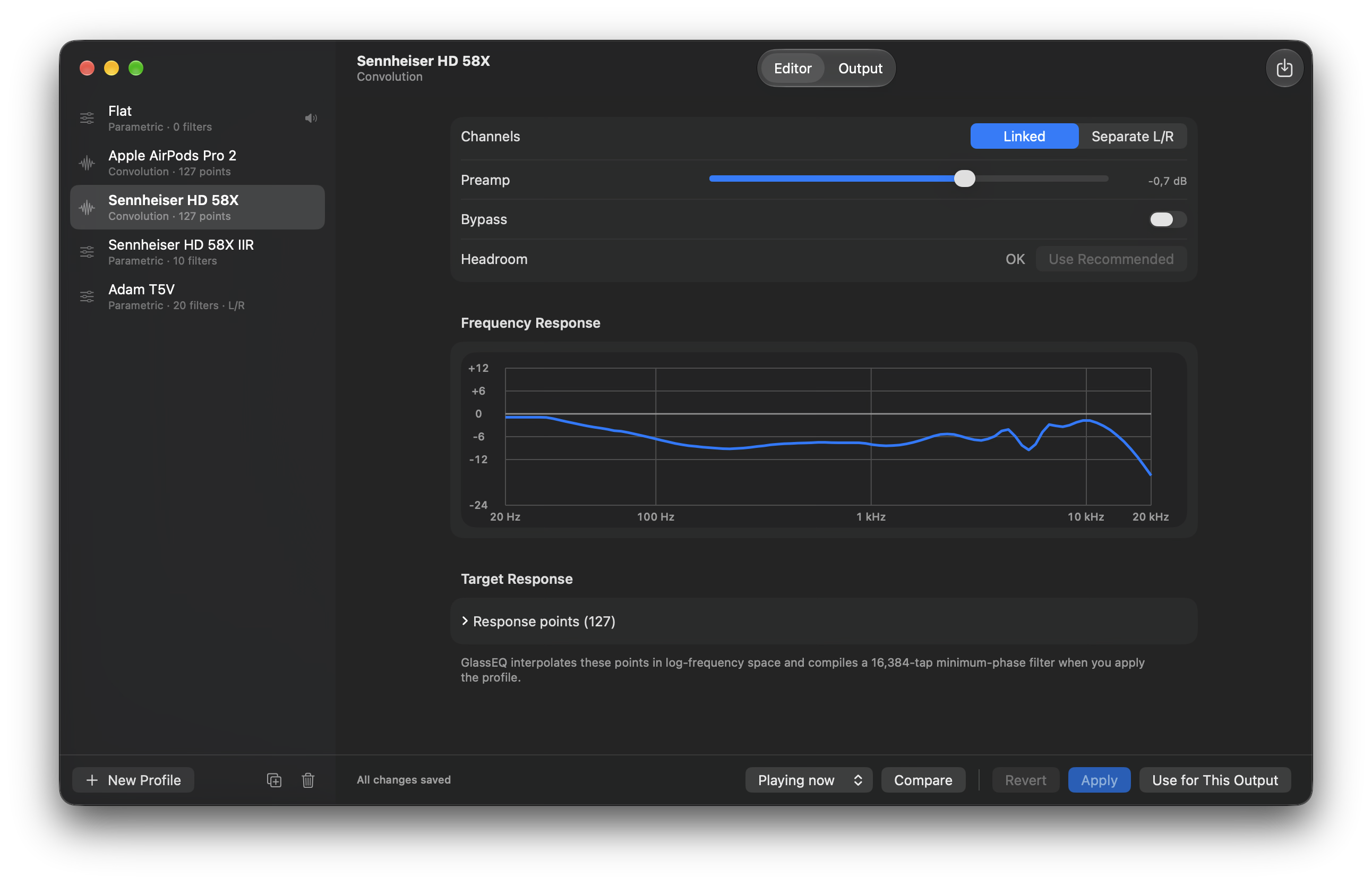
- Four EQ modes: parametric, 10-band graphic, 31-band graphic, and convolution (a minimum-phase FIR built from a response curve or impulse response).
- Linked or independent stereo channels, with a per-profile preamp and a headroom indicator.
- Live frequency-response graph while you edit. Click Compare to switch between Filters off and Filters on, with their volumes matched.
- Guided profile import from pasted or saved EqualizerAPO, AutoEq, and REW settings, plus mono or stereo WAV impulse responses. Separate left and right text or mono WAV files can be combined into one stereo profile.
- Built-in AutoEq search that imports a recommended headphone result as either a convolution profile or editable parametric filters.
- Per-output profile mapping by Core Audio device UID, with a fallback profile for unmapped devices.
- Soft-clip saturation that tames overshoot instead of hard-clipping.
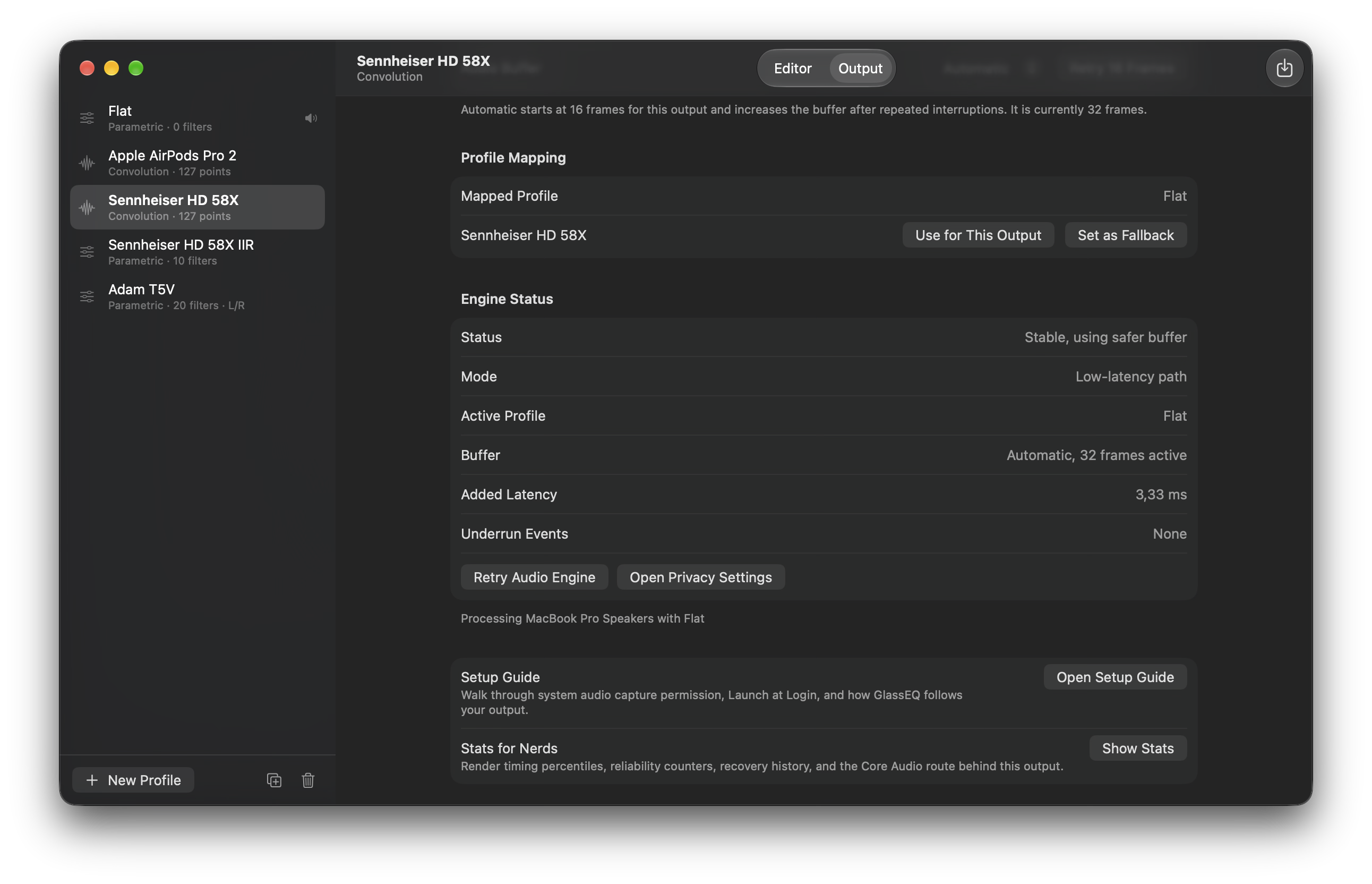
- Built-in diagnostics for frame delivery, underruns, dropped input, callback sizes, saturation, latency, clock correction, and fallback buffering.
Memory footprint
During normal listening GlassEQ is just a menu bar app and the audio engine, consuming around 25-30 MB of memory. The EQ editor runs as a separate helper process that's launched only while the settings window is open and terminated when you close it, so the SwiftUI interface never weighs on the always-on audio path.
Security & privacy
- Sandboxed: audio capture is the only privacy permission GlassEQ requests. A file chosen through the import panel is readable only through that user action.
- The settings helper must be inside the app bundle and pass code-signature integrity plus signing-identifier checks before launch and again after launch. Developer ID builds also require the same signing team; ad hoc builds rely on bundle containment, identifier checks, and the private token-authenticated pipe. AutoEq downloads normally run in the helper; if GlassEQ falls back to an in-process settings window, the main app performs them instead. The helper has no shared profile storage.
- No telemetry, no analytics, no cloud sync. Diagnostics run locally and print device details only to your terminal.
Known limitations
- AirPlay outputs are not yet supported. The DSP engine currently fails to start on AirPlay receivers and GlassEQ stops processing that route; macOS keeps routing normal system audio to the AirPlay device. Switching to any other output (built-in, USB, Bluetooth, HDMI) restores processing cleanly.
- Stereo processing. GlassEQ processes a stereo stream. On multi-channel interfaces it plays to the device's preferred stereo pair (configurable in Audio MIDI Setup → Configure Speakers) and writes silence to the remaining channels — the same routing macOS uses for system audio. There is no surround/per-channel EQ, and preferred-pair changes apply on the next output switch.
- Bluetooth headset modes initially use a higher-latency separate-clock compatibility path to avoid periodic combined-aggregate timestamp faults while the route settles. Promotion to the low-latency path is experimental; please report the device model, macOS version, and steps if a route still produces jitter.
- AirPods Pro 2 on macOS 27.0 can use a 256-frame audio buffer after playback even when 32 frames are selected. GlassEQ then reports “32 selected, 256 frames active.” This behavior was reproduced outside GlassEQ and on the same Mac after upgrading from macOS 26.6.2. Retrying the audio engine or quitting the player did not restore the smaller buffer in these tests. No reliable workaround is established. See the measurements and Apple feedback reference.
- Imported impulse responses retain their source sample rate and contain at most 16,384 taps per channel. They can remain in the profile library for another route, but Apply, A/B comparison, and current-output mapping require a matching active DSP processing rate. On separate-clock Bluetooth routes, the DSP rate can differ from the physical output rate. If a mapped route later changes processing rate, GlassEQ keeps the mapping and leaves normal unprocessed playback active until the rate matches again. It never silently resamples or truncates the impulse response.
- No automatic updates, no crash reporting, no x86_64 build.
Supported target: macOS 26.0 or newer, Apple Silicon / arm64 only.
Support the project
GlassEQ's source is released under GPL-3.0-or-later. The current beta is ad hoc-signed and still needs the Gatekeeper workaround described above. Sponsorship helps cover the Apple Developer Program membership and other release costs required for a Developer ID-signed, notarized app.
If you'd like to help get there, the Sponsor button at the top of this repository goes directly toward that cost. Every bit helps move GlassEQ from "ad hoc-signed beta" to "double-click to open."
Build from source
Pinned toolchain
- Xcode: 27.0, build 27A266a.
- SDK: macOS 27.0.
- Swift: Xcode-bundled Swift 6.4.
- SwiftPM:
// swift-tools-version: 6.4. - Deployment target: macOS 26.0.
CI uses the xcode-27 runner and selects Xcode 27.0 explicitly. Swift 6.3.3 crashes while optimizing the noncopyable DSP storage, so building requires Swift 6.4 or later.
Setup
After installing Xcode, accept the license:
sudo xcodebuild -license
Then verify, test, and run:
xcodebuild -version
swift --version
swift test
swift run GlassEQ
swift run GlassEQDiagnostics 2
GlassEQDiagnostics runs a short smoke test against the current default output and prints local device details plus capture/playback metrics.
Formatting and lint
swift format format --in-place --recursive Sources Tests Scripts Package.swift
./Scripts/check-swift.sh
./Scripts/analyze-swift.sh
See Swift tooling policy for the toolchain, enforced checks, and local exceptions.
Creating a beta build
./Scripts/build-release-app.sh
The script builds a release app bundle, embeds the app icon and GPL text, ad hoc-signs the bundle, and writes a ZIP under .build/dist/. The ZIP also contains the full license, the exact Git revision and build inputs, and a machine-readable Corresponding Source archive generated from the clean commit used for the build.
Gatekeeper assessment is expected to fail because the beta is not Developer ID signed or notarized:
codesign -d --entitlements :- .build/release-app/GlassEQ.app
spctl --assess --type execute --verbose=4 .build/release-app/GlassEQ.app
The entitlements output should include com.apple.security.app-sandbox, com.apple.security.device.audio-input, com.apple.security.files.user-selected.read-only, and com.apple.security.network.client, all set to true.
Architecture
macOS owns output switching, GlassEQ follows it. Normal-rate routes use a muted device-scoped tap and physical output in one aggregate callback and clock. Bluetooth routes at 24 kHz or below start on a separate capture/playback clock bridge, then attempt the combined path after the device clock settles; a timing failure returns them to the bridge for that output transition. GlassEQ disables unused physical input streams and never records the microphone. The render path stays free of allocation, locks, disk, logging, and SwiftUI state. The Core Audio bridge is isolated under GlassEQAudio so device-format and hardware work can be hardened without disturbing the UI and profile code.
See Docs/Architecture.md for the full ownership model and runtime flow.
What GlassEQ doesn't do
GlassEQ intentionally does not implement per-app routing, a virtual output selector, plugin hosting, microphone recording, telemetry, or cloud sync.
License
Unless otherwise noted, GlassEQ's source code and documentation are released under the GNU General Public License, version 3 or later.
The GlassEQ name, logo, app icon, and other product branding are trademarks of Juho Koskela. The source license does not grant permission to brand an independently built or modified distribution as GlassEQ. See the GlassEQ trademark policy.
Copyright (c) 2026 Juho Koskela.