
jslint-org/jslint
jslint-org/jslint has 3,656 GitHub stars and 471 forks. GitHot measured 0 stars in 24 hours. Last checked 2026-11-06 18:23 UTC. Last push 2026-10-24.
JSLint, The JavaScript Code Quality and Coverage Tool
Measured star growth
- in 24h
- 0
- in 7 days
- Update delayed
- in 15 days
- Update delayed
- in 1 month
- Update delayed
Net star changes over overlapping periods, not daily totals. Missing measurements are left blank. Stars measure attention, not software quality.
README.md
Original JSLint, The JavaScript Code Quality and Coverage Tool
Douglas Crockford [email protected]
Status
| Branch | master (v2026.10.30) |
beta (Web Demo) |
alpha (Development) |
|---|---|---|---|
| CI |  |
 |
 |
| Coverage |  |
 |
 |
| Demo | |
|
|
| Artifacts |  |
|
|
Web Demo
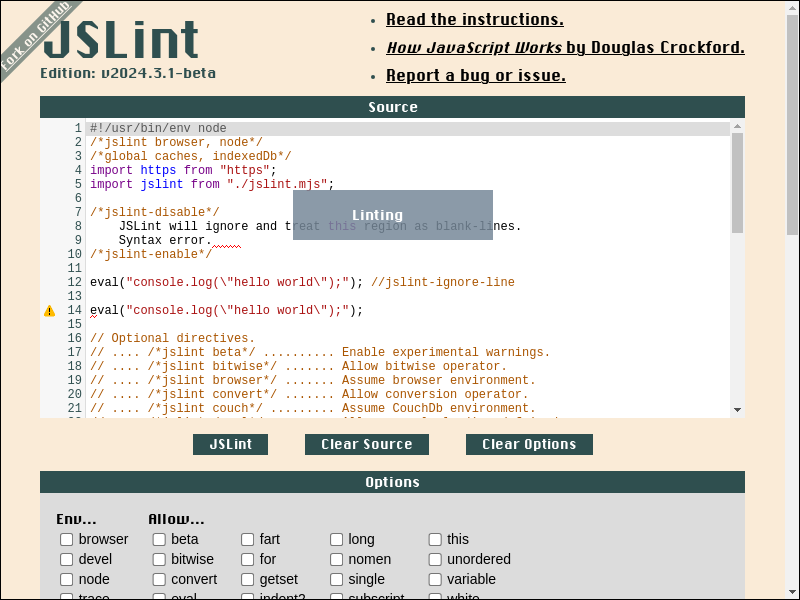
Web Demo Archived
Table of Contents
Quickstart Install
To install, just download and save https://www.jslint.com/jslint.mjs to file:
#!/bin/sh

curl -L https://www.jslint.com/jslint.mjs > jslint.mjs
- shell output

To run jslint.mjs in shell:
#!/bin/sh

printf "console.log('hello world');\n" > hello.js

node jslint.mjs hello.js
- shell output

To import jslint.mjs in ES Module environment:
#!/bin/sh

node --input-type=module --eval '

/*jslint devel*/

// Import JSLint in ES Module environment.

import jslint from "./jslint.mjs";

let globals = ["caches", "indexedDb"];
let options = {browser: true};
let result;
let source = "console.log(\u0027hello world\u0027);\n";

// JSLint <source> and print <formatted_message>.

result = jslint.jslint(source, options, globals);
result.warnings.forEach(function ({
    formatted_message
}) {
    console.error(formatted_message);
});

'
- shell output

To import jslint.mjs in CommonJS environment:
#!/bin/sh

node --eval '

/*jslint devel*/
(async function () {
    let globals = ["caches", "indexedDb"];
    let jslint;
    let options = {browser: true};
    let result;
    let source = "console.log(\u0027hello world\u0027);\n";

// Import JSLint in CommonJS environment.

    jslint = await import("./jslint.mjs");
    jslint = jslint.default;

// JSLint <source> and print <formatted_message>.

    result = jslint.jslint(source, options, globals);
    result.warnings.forEach(function ({
        formatted_message
    }) {
        console.error(formatted_message);
    });
}());

'
- shell output

To JSLint entire directory in shell:
#!/bin/sh

# JSLint directory '.'

node jslint.mjs .
- shell output

Quickstart Autofix Whitespace
To autofix whitespace in shell:
#!/bin/sh

printf '
/*jslint devel*/
console.log(
"hello world");
' > hello_autofix.js

node jslint.mjs jslint_autofix=hello_autofix.js

cat hello_autofix.js
- shell output

To autofix whitespace in javascript:
#!/bin/sh

node --input-type=module --eval '

/*jslint devel*/
import jslint from "./jslint.mjs";
let result;
let source = (`
/*jslint devel*/
console.log(
"hello world");
`);

result = jslint.jslint(source, {autofix: true});
console.log(result.autofixed);

'
- shell output

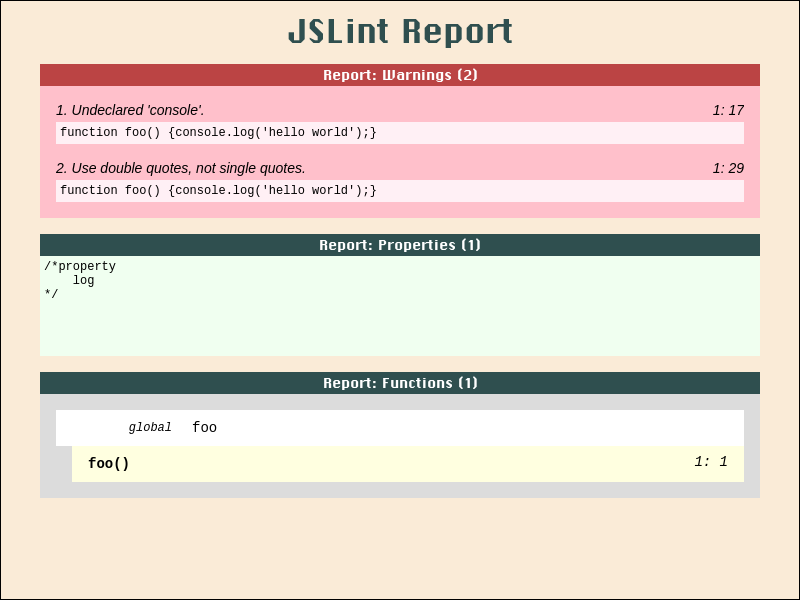
Quickstart JSLint Report
To create a JSLint report in shell:
#!/bin/sh

printf "function foo() {console.log('hello world');}\n" > hello_report.js

# Create JSLint report from file 'hello_report.js' in shell.

node jslint.mjs \
    jslint_report=.artifact/jslint_report_hello.html \
    hello_report.js
- shell output

- screenshot file .artifact/jslint_report_hello.html
To create a JSLint report in javascript:
#!/bin/sh

node --input-type=module --eval '

/*jslint devel*/
import jslint from "./jslint.mjs";
import fs from "fs";
(async function () {
    let result;
    let source = "function foo() {console.log(\u0027hello world\u0027);}\n";

// Create JSLint report from <source> in javascript.

    result = jslint.jslint(source);
    result = jslint.jslint_report(result);
    result = `<body class="JSLINT_ JSLINT_REPORT_">\n${result}</body>\n`;

    await fs.promises.mkdir(".artifact/", {recursive: true});
    await fs.promises.writeFile(".artifact/jslint_report_hello.html", result);
    console.error("wrote file .artifact/jslint_report_hello.html");
}());

'
- shell output

- screenshot file .artifact/jslint_report_hello.html
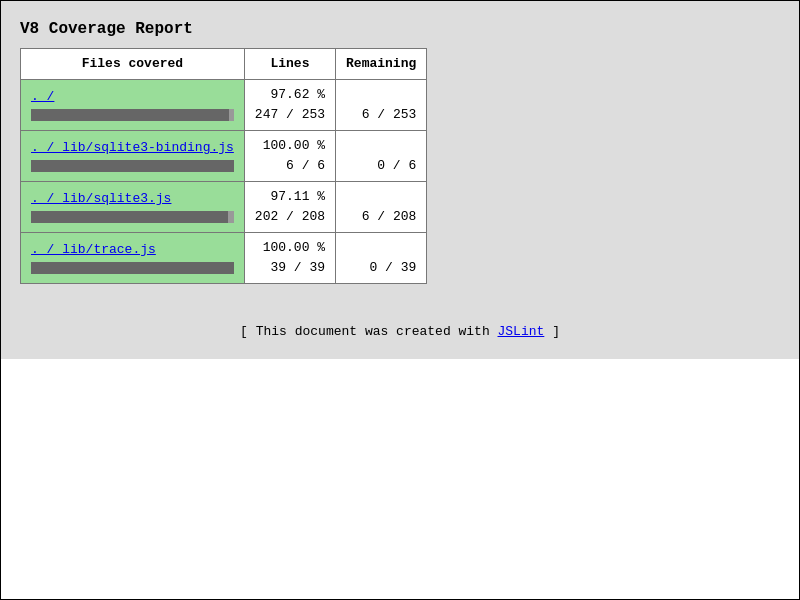
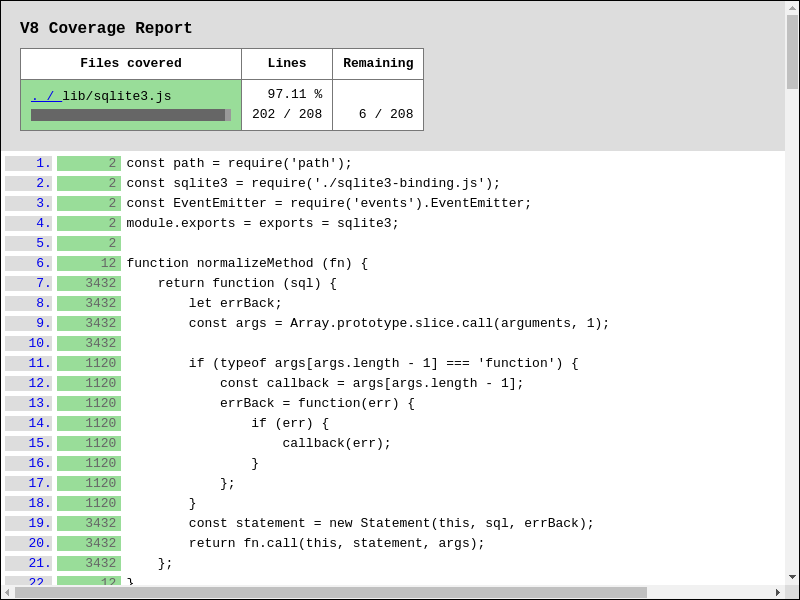
Quickstart V8 Coverage Report
To create V8 coverage report from Node.js / Npm program in shell:
#!/bin/sh

git clone https://github.com/tryghost/node-sqlite3 node-sqlite3-sh \
    --branch=v6.0.1 \
    --depth=1 \
    --single-branch

cd node-sqlite3-sh
npm install

# Create V8 coverage report from program `npm run test` in shell.

node ../jslint.mjs \
    v8_coverage_report=../.artifact/coverage_sqlite3_sh/ \
        --exclude=tes?/ \
        --exclude=tes[!0-9A-Z_a-z-]/ \
        --exclude=tes[0-9A-Z_a-z-]/ \
        --exclude=tes[^0-9A-Z_a-z-]/ \
        --exclude=test/**/*.js \
        --exclude=test/suppor*/*elper.js \
        --exclude=test/suppor?/?elper.js \
        --exclude=test/support/helper.js \
        --include=**/*.cjs \
        --include=**/*.js \
        --include=**/*.mjs \
        --include=li*/*.js \
        --include=li?/*.js \
        --include=lib/ \
        --include=lib/**/*.js \
        --include=lib/*.js \
        --include=lib/sqlite3.js \
    npm run test
- shell output

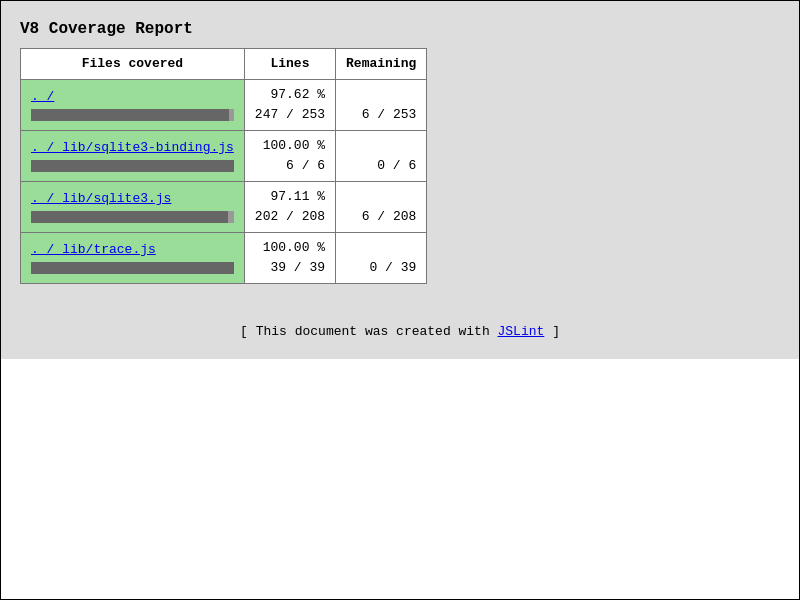
- screenshot file .artifact/coverage_sqlite3_sh/index.html
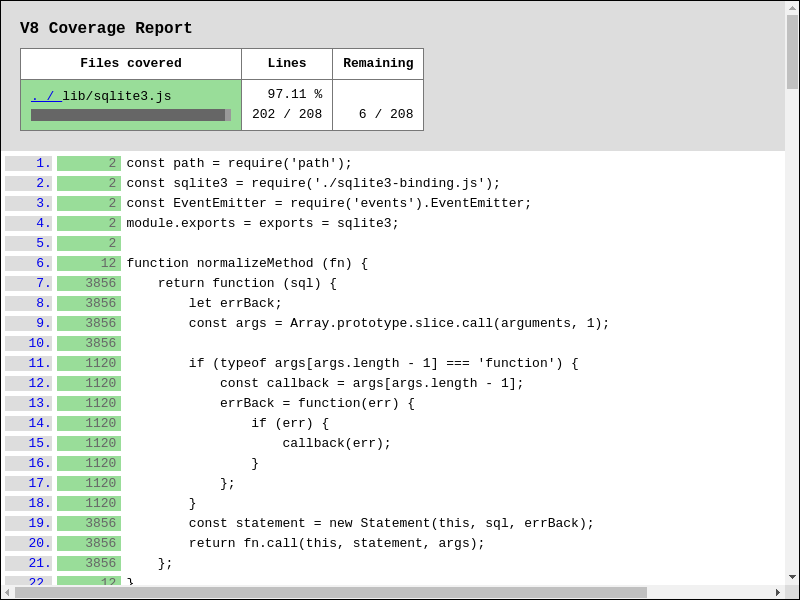
- screenshot file .artifact/coverage_sqlite3_sh/lib/sqlite3.js.html
To create V8 coverage report from Node.js / Npm program in javascript:
#!/bin/sh

git clone https://github.com/tryghost/node-sqlite3 node-sqlite3-js \
    --branch=v6.0.1 \
    --depth=1 \
    --single-branch

cd node-sqlite3-js
npm install

node --input-type=module --eval '

/*jslint node*/
import jslint from "../jslint.mjs";
(async function () {

// Create V8 coverage report from program `npm run test` in javascript.

    await jslint.v8CoverageReportCreate({
        coverageDir: "../.artifact/coverage_sqlite3_js/",
        processArgv: [
            "--exclude=tes?/",
            "--exclude=tes[!0-9A-Z_a-z-]/",
            "--exclude=tes[0-9A-Z_a-z-]/",
            "--exclude=tes[^0-9A-Z_a-z-]/",
            "--exclude=test/**/*.js",
            "--exclude=test/suppor*/*elper.js",
            "--exclude=test/suppor?/?elper.js",
            "--exclude=test/support/helper.js",
            "--include=**/*.cjs",
            "--include=**/*.js",
            "--include=**/*.mjs",
            "--include=li*/*.js",
            "--include=li?/*.js",
            "--include=lib/",
            "--include=lib/**/*.js",
            "--include=lib/*.js",
            "--include=lib/sqlite3.js",
            "npm", "run", "test"
        ]
    });
}());

'
- shell output

- screenshot file .artifact/coverage_sqlite3_js/index.html
- screenshot file .artifact/coverage_sqlite3_js/lib/sqlite3.js.html
Quickstart JSLint in CodeMirror
Download and save
jslint.mjs,jslint_wrapper_codemirror.jsto file.Edit, save, and serve example html-file below:
<!DOCTYPE html>
<html lang="en">
<head>
    <meta charset="utf-8">
    <title>CodeMirror: JSLint Demo</title>

<!-- Assets from codemirror. -->

    <link rel="stylesheet" href="https://cdnjs.cloudflare.com/ajax/libs/codemirror/5.65.21/codemirror.css" integrity="sha512-7vaQ4LLdaXd2IuMd4MUQ6LRFIGbEwJI1aq6KYqL3RjbdQyUkRFhwZKmqmkBXurTFdGlx687lTN8FSJfX6Df8Gw==" crossorigin="anonymous">
    <link rel="stylesheet" href="https://cdnjs.cloudflare.com/ajax/libs/codemirror/5.65.21/addon/lint/lint.css" integrity="sha512-rx8Dv9UY+C/6Qsech6A5L2ka9ugVuQfdGlNitUbYtbuEMjfo5JapbOyUOwRAwvl7GmZfYiP5t4qOE5+d8aKgbA==" crossorigin="anonymous">
    <script defer src="https://cdnjs.cloudflare.com/ajax/libs/codemirror/5.65.21/codemirror.js" integrity="sha512-ksE4KDA1cKB0p1MTQsoUZ5lpj+KvHOreU76sE+4RsG92LiyIE7gUrnT3Dt+O7CrC2aJzG17UsOh7apakp7lyJw==" crossorigin="anonymous"></script>
    <script defer src="https://cdnjs.cloudflare.com/ajax/libs/codemirror/5.65.21/mode/javascript/javascript.js" integrity="sha512-VgqsGo4zxSK9KBf4c3RWpFWkRfBEeIUb2p5VqKtDj7sXdTyTyx38jVVJSriVU12pS5hG5J69FDi/LDsQ5Y1Ldw==" crossorigin="anonymous"></script>
    <script defer src="https://cdnjs.cloudflare.com/ajax/libs/codemirror/5.65.21/addon/lint/lint.js" integrity="sha512-HzWWmsisNY6OUHWrNyo4yiHkGs6CUGEwI8Pu+q9tCWkmeWtvWa7D1gHTx9Oj0LQdldSKd4yffFA4PObCeKi9ew==" crossorigin="anonymous"></script>

<!-- Assets from jslint. -->

    <script type="module" src="./jslint.mjs?window_jslint=1"></script>
    <script defer src="./jslint_wrapper_codemirror.js"></script>
<style>
body {
    background: #bbb;
    color: #333;
    font-family: sans-serif;
    margin: 20px;
}
.JSLINT_.JSLINT_REPORT_ {
    margin-top: 20px;
}
#editor1 {
    height: 300px;
    width: 100%;
}
</style>
</head>


<body>
    <h1>CodeMirror: JSLint Demo</h1>
    <h3>
This demo will auto-lint the code below, and auto-generate a report as you type.
    </h3>

<!-- Container for codemirror-editor. -->

    <textarea id="editor1">console.log('hello world');</textarea>

<!-- Container for jslint-report. -->

    <div class="JSLINT_ JSLINT_REPORT_"></div>


<script type=module>
window.addEventListener("load", function () {
    let editor = window.CodeMirror.fromTextArea(document.getElementById(
        "editor1"
    ), {
        gutters: [
            "CodeMirror-lint-markers"
        ],
        indentUnit: 4,
        lineNumbers: true,
        lint: {
            lintOnChange: true, // Enable auto-lint.
            options: {
                // browser: true,
                // node: true
                globals: [
                    // "caches",
                    // "indexedDb"
                ]
            }
        },
        mode: "javascript"
    });

// Initialize event-handling before linter is run.

    editor.on("lintJslintBefore", function (/* options */) {
        // options.browser = true;
        // options.node = true;
        // options.globals = [
        //     "caches",
        //     "indexedDb"
        // ];
        return;
    });

// Initialize event-handling after linter is run.

    editor.on("lintJslintAfter", function (options) {

// Generate jslint-report from options.result.

        document.querySelector(
            ".JSLINT_REPORT_"
        ).innerHTML = window.jslint.jslint_report(options.result);
    });

// Manually trigger linter.

    editor.performLint();
});
</script>
</body>
</html>
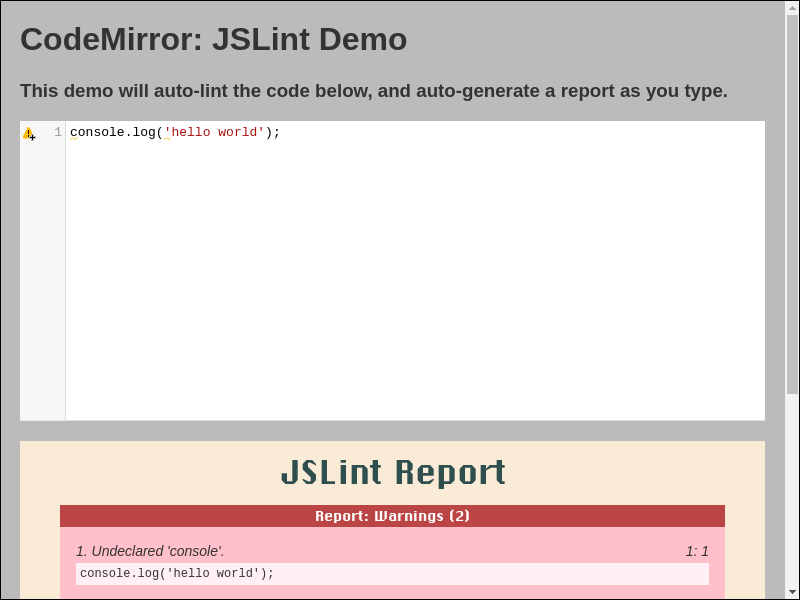
- Live example at https://www.jslint.com/jslint_wrapper_codemirror.html
Quickstart JSLint in Vim
- Download and save
jslint.mjs,jslint_wrapper_vim.vimto directory~/.vim/ - Add vim-command
:source ~/.vim/jslint_wrapper_vim.vimto file~/.vimrc- If above files were saved to custom-directory, then use that directory instead, e.g.:
- save
jslint.mjs,jslint_wrapper_vim.vimto directory~/vimfiles/ - vim-command
:source ~/vimfiles/jslint_wrapper_vim.vim
- save
- If above files were saved to custom-directory, then use that directory instead, e.g.:
- Vim can now jslint files (via nodejs):
- with vim-command
:SaveAndJslint - with vim-key-combo
<Ctrl-S> <Ctrl-J>
- with vim-command
- screenshot

Quickstart JSLint in VSCode
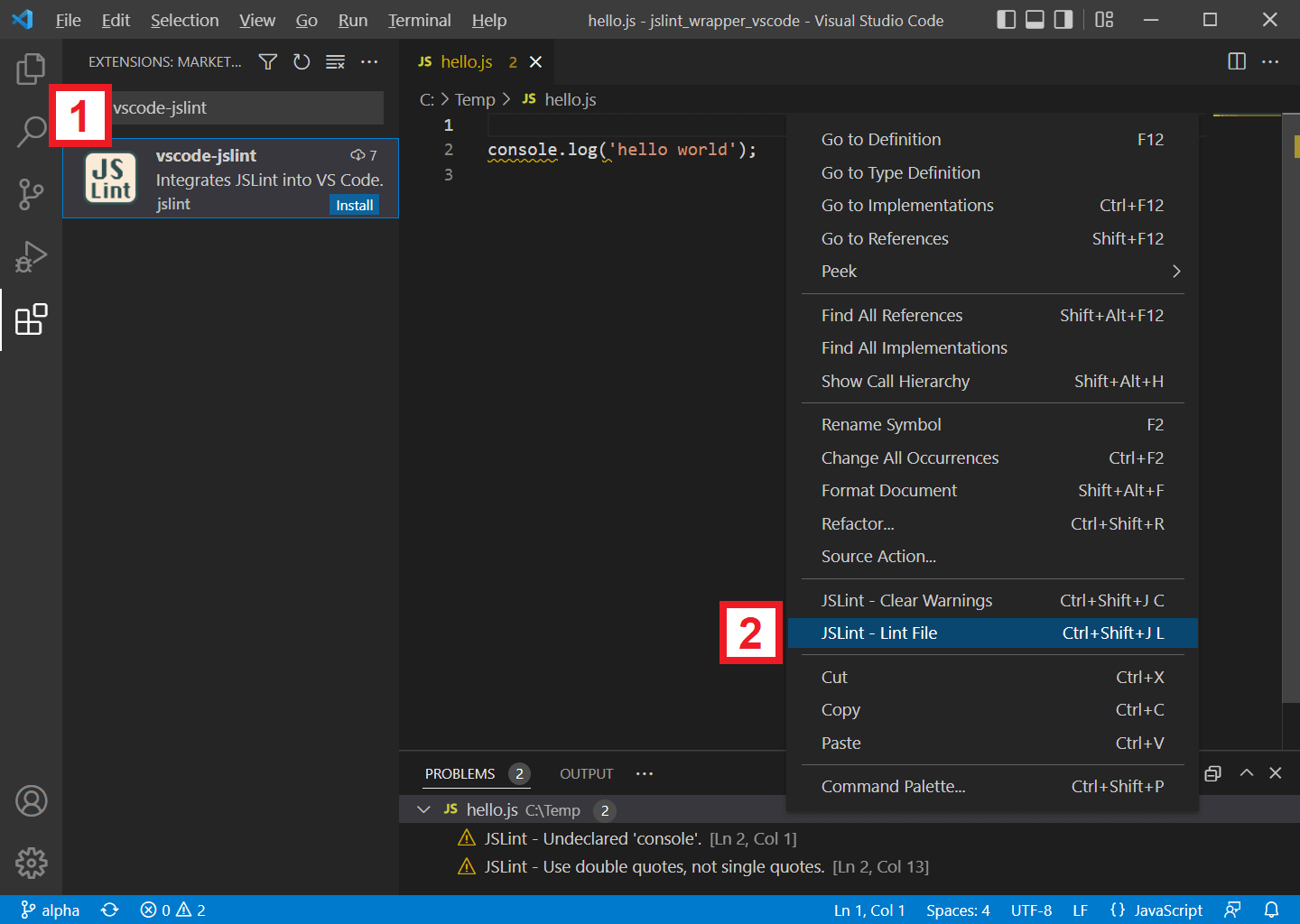
- In VSCode, search and install extension
vscode-jslint - In VSCode, while editing a javascript file:
- right-click context-menu and select
[JSLint - Lint File] - or use key-binding
[Ctrl + Shift + J], [L] - or use key-binding
[Cmd + Shift + J], [L]for Mac
- right-click context-menu and select
- In VSCode, to autofix whitespace in file:
- right-click context-menu and select
[JSLint - Autofix Whitespace] - or use key-binding
[Ctrl + Shift + J], [A] - or use key-binding
[Cmd + Shift + J], [A]for Mac
- right-click context-menu and select
- screenshot
Documentation
- jslint.mjs contains the jslint function. It parses and analyzes a source file, returning an object with information about the file. It can also take an object that sets options.
- index.html runs the jslint.mjs function in a web page.
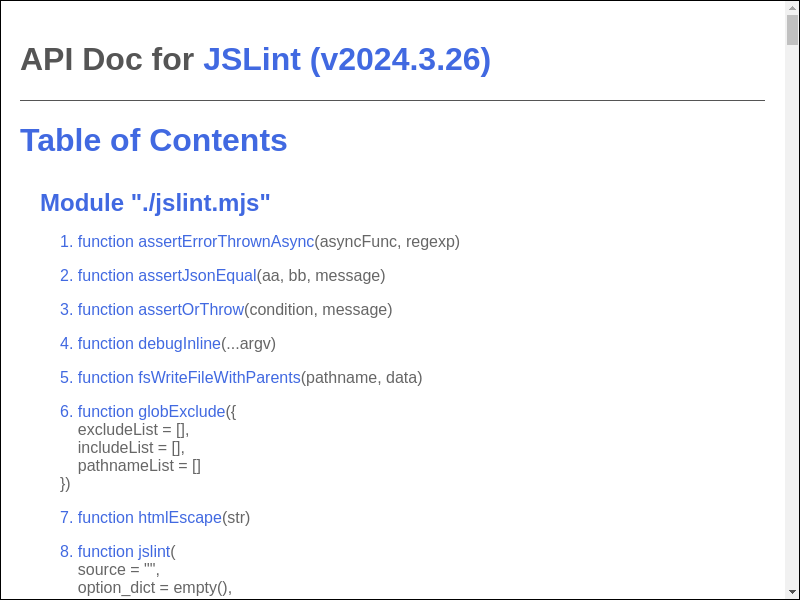
API Doc
Directive
/*jslint*/
/*jslint beta*/
/*jslint beta*/
// Enable experimental warnings.
// Warn if global variables are redefined.
// Warn if const / let statements are not declared at top of function or
//    script, similar to var statements.
// Warn if const / let / var statements are not declared in ascii-order.
// Warn if named-functions are not declared in ascii-order.
// Warn if cases in switch-statements are not in ascii-order.
/*jslint bitwise*/
/*jslint bitwise*/
// Allow bitwise operator.

String(0 | 1);
/*jslint browser*/
/*jslint browser*/
// Assume browser environment.

localStorage.getItem("foo");
/*jslint convert*/
/*jslint convert*/
// Allow conversion operator.

String(new Date() + "");
String(!!0);
/*jslint couch*/
/*jslint couch*/
// Assume CouchDb environment.

registerType("text-json", "text/json");
/*jslint devel*/
/*jslint devel*/
// Allow console.log() and friends.

console.log("hello");
/*jslint eval*/
/*jslint eval*/
// Allow eval().

eval("1");
/*jslint fart*/
/*jslint fart*/
// Allow complex fat-arrow.

const foo = async ({bar, baz}) => {
    return await bar(baz);
};
await foo();
/*jslint getset*/
/*jslint getset, this, devel*/
// Allow get() and set().

let foo = {
    bar: 0,
    get getBar() {
        return this.bar;
    },
    set setBar(value) {
        this.bar = value;
    }
};
console.log(foo.getBar); // 0
foo.setBar = 1;
console.log(foo.getBar); // 1
/*jslint indent2*/
/*jslint indent2*/
// Use 2-space indent.

String(
  "hello"
);
/*jslint long*/
/*jslint long*/
// Allow long lines.

String("aaaaaaaaaaaaaaaaaaaaaaaaaaaaaaaaaaaaaaaaaaaaaaaaaaaaaaaaaaaaaaaaaaaaaaaaaaaaaaaaaaaaaaaaaaaaaaaaaaaaaaaaaaaaaaaaaaaaaaaaaaaaaaaaaaaaaaaaaaaaaaaaaaaaaaaaaaaaaaaaaaaaaaaaaaaaaaaaaaaaaaaaaaaaaaaaaaaaaaaaaaaaaaaaaaaaaaaaaaaaaaaaaaaaaaaaaaaaaaaaaaaaaaaaaaaaaaaa");
/*jslint node*/
/*jslint node*/
// Assume Node.js environment.

require("fs");
/*jslint nomen*/
/*jslint nomen*/
// Allow weird property name.

let foo = {};
foo._bar = 1;
/*jslint single*/
/*jslint single*/
// Allow single-quote strings.

String('hello');
/*jslint subscript*/
/*jslint subscript*/
// Allow identifiers in subscript-notation.

let foo = {};
foo["bar"] = 1;
/*jslint this*/
/*jslint this*/
// Allow 'this'.

function foo() {
    return this;
}
foo();
/*jslint trace*/
/*jslint trace*/
// Include jslint stack-trace in warnings.

console.log('hello world');
/*
1. Undeclared 'console'.
console.log('hello world');
Error
    at warn_at (...)
    at warn (...)
    at lookup (...)
    at pre_v (...)
    at jslint.mjs
2. Use double quotes, not single quotes.
console.log(...);
Error
    at warn_at (...)
    at lex_string (...)
    at lex_token (...)
    at jslint_phase2_lex (...)
    at Function.jslint (...)
    at jslint.mjs
*/
/*jslint unordered*/
/*jslint unordered*/
// Allow unordered cases, params, properties, variables, and exports.

let foo = {bb: 1, aa: 0};

function bar({
    bb = 1,
    aa = 0
}) {
    return aa + bb;
}

export {
    foo,
    bar
};
/*jslint variable*/
/*jslint variable*/
// Allow unordered const and let declarations not at top of function-scope.

let aa = "hello";
String(aa);
let bb = "goodbye";
String(bb);
/*jslint white*/
/*jslint white*/
// Allow messy whitespace.

String(
"hello"
);
/*global*/
/*global foo, bar*/
// Declare global variables foo, bar.

foo();
bar();
/*property*/
/*property foo, bar*/
// Restrict property-access to only .foo, .bar.

String({bar: 1, foo: 2});
/*jslint-disable*/ ... /*jslint-enable*/
/*jslint-disable*/

JSLint will ignore and treat this region as blank-lines.
Syntax error.

/*jslint-enable*/
//jslint-ignore-line
// JSLint will ignore non-fatal warnings at given line.

eval("1"); //jslint-ignore-line
/*coverage-disable*/ ... /*coverage-enable*/
/*coverage-disable*/

// JSLint will ignore code-coverage in this region.

if (false) {
    console.log("hello world");
}

/*coverage-enable*/
//coverage-ignore-line
// JSLint will ignore code-coverage at given line.

if (false) {
    console.log("hello world"); //coverage-ignore-line
}
ECMAScript Feature Support
- https://github.com/tc39/proposals/blob/main/finished-proposals.md
- https://github.com/lukehoban/es6features
Package Listing

Changelog

License
- JSLint is under Unlicense License.
- CodeMirror editor is under MIT License.
- Function
v8CoverageListMergeis derived from MIT Licensed v8-coverage.
Devops Instruction
pull-request merge
update
.github/workflows/ci.yml.github/workflows/publish.ymlto:- latest nodejs-lts version @ https://nodejs.org/en/about/previous-releases
update
CHANGELOG.md- copy recent
<commit entries>to<CHANGELOG.md entries>ordered by impact - run
# re-run until version propagates npm run test2 # re-run until version propagates sh jslint_ci.sh shGithubPrCreate alpha beta # v20yy.mm.dd __pr_beta_pre git push upstream alpha -f- verify ci-success @ https://github.com/kaizhu256/jslint/actions
- verify ci-success @ https://github.com/jslint-org/jslint/actions
- copy recent
goto https://github.com/jslint-org/jslint/compare/beta...kaizhu256:jslint:branch-p20yy.mm.dd
- click
Create pull request - input
Add a title *with:<CHANGELOG.md entry #1> - input
Add a descriptionwith:Fixes #xxx. This PR will: <CHANGELOG.md entry #1> This PR will additionally: <CHANGELOG.md entry extra> <screenshot> - click
Previewand review - verify:
- base respository:
jslint-org/jslint - base:
beta
- base respository:
- click
Create pull request- verify ci-success @ https://github.com/jslint-org/jslint/actions/workflows/ci.yml
- click
wait awhile before continuing ...
- click
Squash and merge- verify ci-success @ https://github.com/jslint-org/jslint/actions
- run
sh jslint_ci.sh shGithubPrCleanup git push upstream alpha -f- verify ci-success @ https://github.com/kaizhu256/jslint/actions
- verify ci-success @ https://github.com/jslint-org/jslint/actions
- click
Delete branch
- click
branch-master commit
update
.github/workflows/ci.yml.github/workflows/publish.ymlto:- latest nodejs-lts version @ https://nodejs.org/en/about/previous-releases
update
CHANGELOG.md- verify
<CHANGELOG.md entries>ordered by impact - run
# re-run until version propagates npm run test2 # re-run until version propagates sh jslint_ci.sh shGithubPrCreate alpha master # v20yy.mm.dd __pr_master_pre git push upstream alpha -f- verify ci-success @ https://github.com/kaizhu256/jslint/actions
- verify ci-success @ https://github.com/jslint-org/jslint/actions
- verify
goto https://github.com/jslint-org/jslint/compare/beta...kaizhu256:jslint:branch-v20yy.mm.dd
- click
Create pull request - input
Add a title *with:# v20yy.mm.dd - input
Add a descriptionwith:<CHANGELOG.md entry #1> <CHANGELOG.md entry extra> - click
Previewand review - verify:
- base respository:
jslint-org/jslint - base:
beta
- base respository:
- click
Create pull request- verify ci-success @ https://github.com/jslint-org/jslint/actions/workflows/ci.yml
- click
wait awhile before continuing ...
- click
Squash and merge- verify ci-success @ https://github.com/jslint-org/jslint/actions
- run
sh jslint_ci.sh shGithubPrCleanup git push upstream alpha -f- verify ci-success @ https://github.com/kaizhu256/jslint/actions
- verify ci-success @ https://github.com/jslint-org/jslint/actions
- click
Delete branch - run
git push origin beta:master git push upstream beta:master- verify ci-success @ https://github.com/kaizhu256/jslint/actions
- verify ci-success @ https://github.com/jslint-org/jslint/actions
- click
branch-master publish
- goto https://www.npmjs.com/package/@jslint-org/jslint/access
- click
Github Actions - input
Organization or user*with:jslint-org - input
Repository*with:jslint - input
Workflow filename*with:publish.yml - click
Set up connectionorUpdate Package Settings
- click
- run
git push upstream beta:master- verify ci-success @ https://github.com/jslint-org/jslint/actions
- run
- goto https://github.com/jslint-org/jslint/releases/new
- input
Tag: Select tagwith:v20yy.mm.dd- click
Create new tagand clickCreate - verify correct-year
v20yy.mm.dd - select
Target: master
- click
- input
Release titlewith:v20yy.mm.dd - <CHANGELOG.md entry #1>- select
Previous tag: Auto - click
Generate release notes
- select
- input
Writewith:<CHANGELOG.md entry #1> <CHANGELOG.md entry extra> **Full Changelog**: ... - click
Previewand review - click
Latest - click
Publish release- verify ci-success @ https://github.com/jslint-org/jslint/actions
- verify email-notification
Successfully published @jslint-org/[email protected]
- input
vscode-jslint qa
# build vscode-jslint
sh jslint_ci.sh shCiVscePackageJslintWrapperVscode

# open vscode and debug
code \
    --disable-extensions \
    --extensionDevelopmentPath=\
'C:\Users\<username>\Documents\jslint\.artifact\jslint_wrapper_vscode'
vscode-jslint publish
- goto https://github.com/jslint-org/jslint/tree/gh-pages/branch-beta/.artifact/jslint_wrapper_vscode
- click
vscode-jslint-20yy.mm.dd.vsix - click
Rawto download
- click
- goto https://marketplace.visualstudio.com/manage/publishers/jslint
- move mouse to version-number, right-click, and select
Update - upload downloaded file
vscode-jslint-20yy.mm.dd.vsix - click 'Upload'
- verify email-notification
[Succeeded] Extension publish on Visual Studio Marketplace - vscode-jslint
- verify email-notification
- move mouse to version-number, right-click, and select
Explore related projects
affaan-m/ECC
The agent harness performance optimization system. Skills, instincts, memory, security, and research-first development for Claude Code, Codex, Opencode, Cursor and beyond.
298,704 starsNousResearch/hermes-agent
The agent that grows with you
261,269 starsmultica-ai/andrej-karpathy-skills
A single CLAUDE.md file to improve Claude Code behavior, derived from Andrej Karpathy's observations on LLM coding pitfalls.
230,361 starsfirecrawl/firecrawl
Supercharge your AI agents with data from the web and beyond. Building the library for superintelligence. 🔥
199,303 stars