
josefchen/muster
josefchen/muster has 58 GitHub stars and 1 forks. GitHot measured 0 stars in 24 hours and 0 in 7 days. Last checked 2026-11-18 00:14 UTC. Last push 2026-10-21.
Measured star growth
- in 24h
- 0
- in 7 days
- 0
- in 15 days
- Collecting history
- in 1 month
- Collecting history
Net star changes over overlapping periods, not daily totals. Missing measurements are left blank. Stars measure attention, not software quality.
About
Never keep an agent waiting. A free, open-source Mac menu bar app for Claude Code, Codex and Cursor: see which session needs you and answer it with one keystroke.
ProductivityREADME.md
Original
Muster
Never keep an agent waiting.
A free, open-source Mac menu bar app for your Claude Code, Codex and Cursor sessions.
Download for Mac ·
brew install --cask josefchen/tap/muster ·
agentmuster.app ·
Changelog ·
简体中文
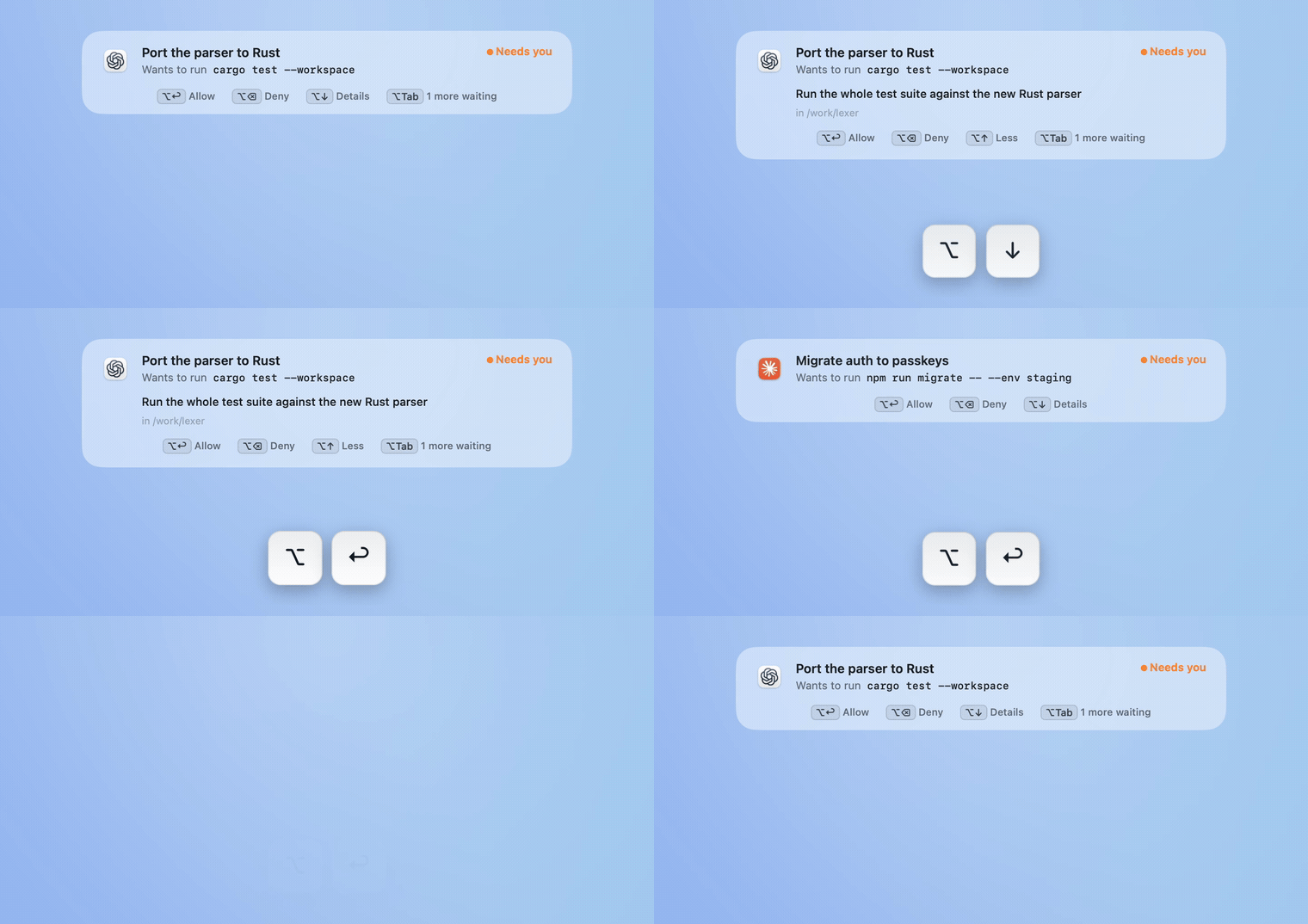
Two agents ask. ⌥↓ shows why, two presses of ⌥↩ answer them, and you never left what you were doing. Recorded from the app.
If you run a few coding agents at once, the slow part isn't the agents. It's noticing which one has been waiting on you for ten minutes. Muster sits in the menu bar, tells you the moment one needs you, and lets you answer without switching apps.
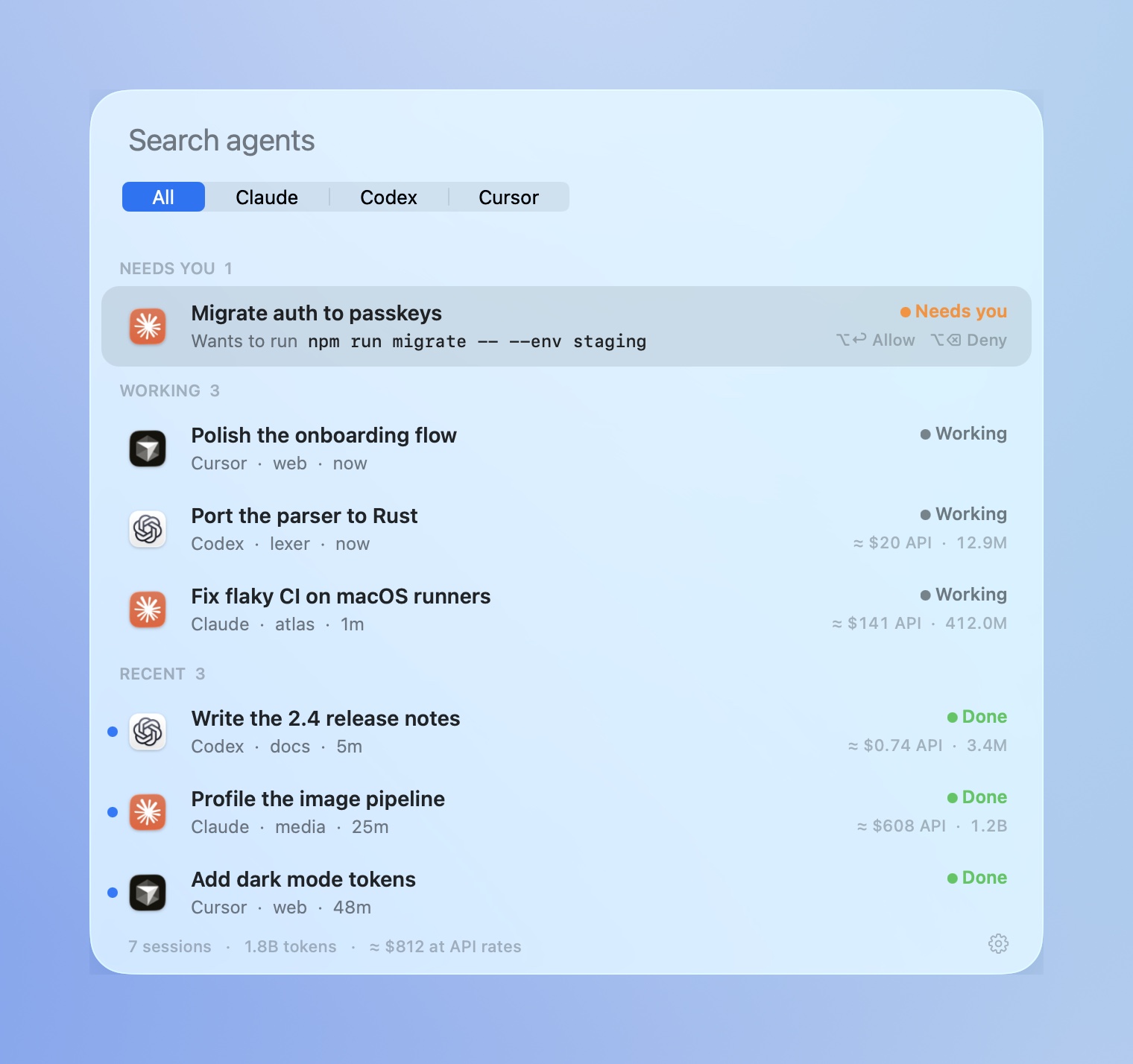
See who needs you. |
Answer from anywhere. |
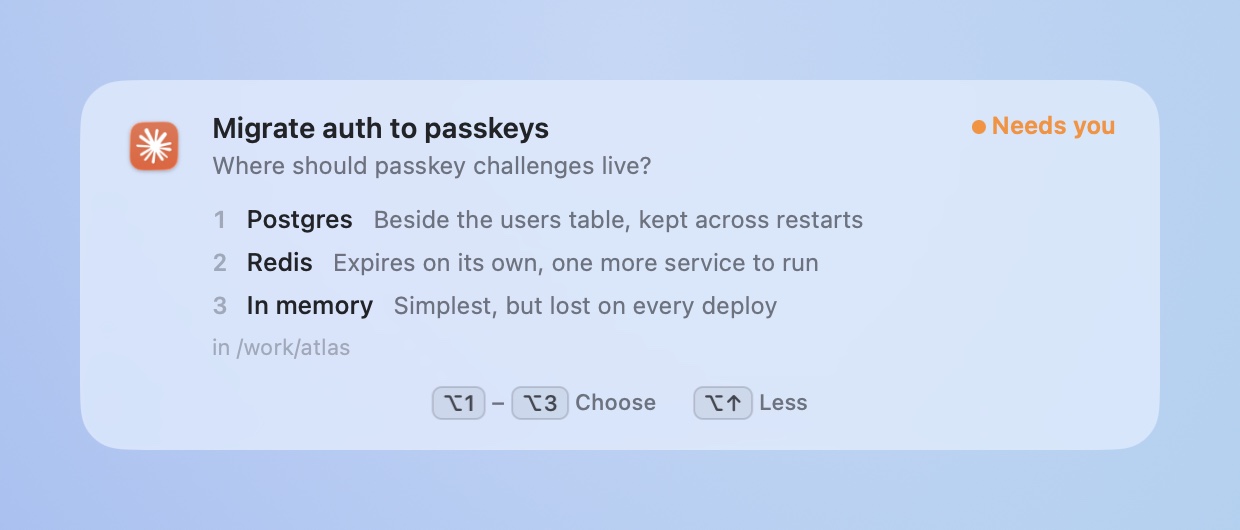
See why before you answer. |
Your keys stay yours. |
⌥Tab to any agent. |
Find any session. |

Native AppKit and Liquid Glass · macOS 14+ · Apple silicon and Intel · no accounts or app analytics · MIT
Install
Download Muster.dmg and drag it to Applications, or:
brew install --cask josefchen/tap/muster
macOS 14 or later, Apple silicon or Intel. Liquid Glass needs macOS 26.
Answer prompts from Muster
Turn it on per agent in Settings → Answer prompts from Muster.
| What you can answer | |
|---|---|
| Claude Code | Permission requests, multiple-choice questions, plan approvals |
| Codex | Approval requests (enable and trust the Muster hook in Codex Settings → Hooks, or /hooks in the CLI) |
| Cursor | Opens the prompt in Cursor |
The tour and Settings show each connection's progress. For Codex, Muster reads the client's hook status when supported, so a disabled, untrusted or changed hook stays pending. It never enables or trusts hooks on your behalf.
Use Copy check prompt, paste it into a local agent session that asks for approval, and answer the request from Muster. The connection is verified only when the request arrives, the answer is delivered, and the same session resumes in its transcript. The sample alert in the tour is practice and does not verify anything. Full access or automatic approval can skip this test because no permission request is made.
You can choose Set up later and use switching and search immediately. Unfinished answering setup remains visible in Settings and the menu. Verification records the last successful check, rather than a continuous connection: changed hooks require another check, and evidence older than a day is no longer marked current.
Muster adds one hook to the agent's own settings and removes exactly that when you turn it off. Beside the file it keeps .muster-original, the file as it was before Muster first changed it, and .muster-backup, the file before the latest change. A symlinked settings file stays a link, and a file Muster can't parse is left alone. Claude's native dialog stays live alongside Muster, and the first answer wins. If Muster isn't running, the agent asks as usual. Hooks talk to Muster on 127.0.0.1 with a per-install token.
Shortcuts
| Keys | |
|---|---|
| ⌥ Tab | Switch. Tap to step, release to open, or click a row |
| ⌥ ↩ · ⌥ ⌫ · ⌥ 1–9 | Allow · deny · answer the prompt on the alert or in the switcher |
| ⌥ ↓ · ⌥ ↑ | Unfold the alert's details · fold them |
| ⌃ ⌥ Space | Search every session |
Muster takes ⌥↩, ⌥⌫, the arrows and the digits only while a prompt or the switcher is on screen, and lets go of them while you type in another app, so they keep working in your editor. Both shortcuts can be changed in Settings. Scripting: muster://search, muster://next, muster://settings, muster://welcome, muster://whats-new.
Why not just a notification?
Claude Code can notify you on its own in some terminals, and a few lines of settings add a sound or a banner anywhere else; this guide compares every option. A notification tells you that something happened. With several sessions running you still have to work out which one, find its window and type the answer. Muster shows which one, answers it from where you are, and does the same for Codex and Cursor.
How it works
Muster reads the session files each app already writes. Local sessions need no configuration.
| App | Read from |
|---|---|
| Claude (desktop, CLI, SSH sessions) | ~/.claude/projects transcripts and Claude's session list |
| Codex (app and CLI) | ~/.codex/state_*.sqlite threads and rollout logs |
| Cursor | The Agents window's chat list and agent transcripts |
Everything is opened read-only. File system events trigger a rescan, at most once a second; transcripts are read incrementally, only the bytes added since the last look.
Remote sessions (1.4, in development). Open Settings → Remote sessions and enable an SSH alias, or add user@hostname. Muster discovers explicit aliases from your SSH config without connecting; only enabled hosts are contacted. Each host needs Python 3 and noninteractive SSH access from this Mac. If SSH needs a password, a new host key confirmation or an unlocked key, connect in Terminal first.
The remote reader runs in memory and polls every three seconds. It reads recent Codex, Claude Code and Cursor data, then sends titles, project paths, status and question previews over encrypted SSH. Summaries stay in memory on the Mac. If a connection drops, the last summaries are marked offline while Muster reconnects. Search by host name to find its sessions.
Recorded questions open in the agent on that host. Codex links include the SSH host; other agents offer an SSH command to copy. Monitoring alone installs no hooks, so it can show only requests recorded in session data. It does not report remote token costs. Recent history covers three hours, up to 500 sessions per host; read failures and truncation appear in Settings.
Optional remote approvals. From a source checkout on your Mac, run python3 scripts/remote-approvals.py enable vml (replace vml with an enabled host). This installs a small Python hook on that host and adds entries to Claude Code's settings and Codex's hooks, preserving other settings and saving original files beside them. Review and trust the Muster PermissionRequest hook in Codex's /hooks screen. Recent Claude Code versions reload hooks when settings change; older clients may need a new session.
Live requests and your answers travel over the same SSH connection. The remote hook uses a private Unix socket; no TCP listener or SSH forwarding is added. Commands and question choices are held in memory while the request waits. If Muster disconnects, the hook returns no decision and the agent asks normally. A 30-second heartbeat timeout also releases requests if the Mac stops responding while SSH remains open. Opening the remote session from Muster hands its waiting request back to the agent. Cursor requests still open in Cursor.
Run python3 scripts/remote-approvals.py disable vml to remove this Mac's remote hooks. No background service is installed on the remote host.
Agent Relay on this Mac. Relay's installer removes Muster's hooks, and two blocking hooks would hold the agent until both returned. When Relay's hook is there, turning answering on in Muster shares it instead: one hook per agent sends each request to both, the first answer goes back to the agent, and the other copy is withdrawn. It covers Claude Code and Codex together, keeps your other hooks, and turning it off puts Relay's own hooks back. Switching to the agent's own window releases both copies so the agent asks natively. Codex asks you to review and trust the changed hook once.
Sharing approvals with Agent Relay on a host. If the host already has Agent Relay's Python approval hook, run python3 scripts/remote-approvals.py enable vml --share-with-agent-relay. This explicitly lets Muster's hook invoke that existing Relay client. Both receivers get the request; the first answer returns to the agent and withdraws the other copy. Unavailable receivers and empty responses do not override an answer. Opening the session from Muster releases both copies so the agent can ask natively. Relay can still answer while Muster is closed.
Sharing preserves unrelated policy hooks and saves Relay's original hook definitions in a private file on the host. Disabling Muster's remote approvals restores those definitions. If another installer adds independent Relay hooks again, rerun the enable command to consolidate them. Review the existing Relay client before enabling sharing; it keeps its own account and authentication settings.
Cost estimates
Public list prices for the standard API tier, bundled and dated in Settings. Claude is priced message by message, including subagents, with 5-minute and 1-hour cache writes kept apart. Codex is priced from its running totals; OpenAI's long-context tier isn't applied, so Codex figures are a floor. Cursor records no token counts on disk.
Use your own prices from Settings → Use my own prices…, which writes ~/Library/Application Support/Muster/pricing.json.
Privacy
No accounts or app analytics. Optional SSH monitoring contacts only hosts you enable and transfers session summaries to this Mac; it does not copy full transcripts or raw tool payloads, forward your SSH agent, or install remote hooks. SSH keys and host trust remain managed by SSH. Host settings and read/unread timestamps keyed by session ID are saved on this Mac. Session titles, project paths and question previews stay in memory.
The update check asks GitHub for the latest release when you click Check for Updates, or once a day if you leave "Updates" on in the welcome tour (or tick it in What's New, or turn it on in Settings). The local prompt server listens on 127.0.0.1 only and needs a token that lives in your user defaults and the agents' hook settings.
The website keeps aggregate daily page-load and download-click counts, with no cookies or visitor identifiers. It honors Do Not Track and Global Privacy Control. See the privacy page and measurement guide.
Build from source
git clone https://github.com/josefchen/muster.git && cd muster
./build.sh            # build, install to ~/Applications, launch
./test.sh             # reader tests against fixture files
scripts/e2e.sh        # end-to-end: the real app against a fake home folder
scripts/e2e.sh drives the built app the way the agents and you would (transcripts, hook requests, the switcher, deck and alert) without touching your own agents or settings; --soak [minutes] checks CPU and memory under load, and --ui replays real keystrokes and clicks (it takes over the keyboard while it runs).
scripts/release.sh <version> builds a universal, signed and notarized DMG and writes its GitHub release notes from CHANGELOG.md, and scripts/site.sh deploy publishes agentmuster.app and its changelog page to Cloudflare. scripts/capture-stills.sh, scripts/record-scene.sh, scripts/record-answer.sh and scripts/tour.sh regenerate the screenshots, the videos and the welcome tour from demo mode (Muster --demo). Muster opens and plays each scene itself, so they need Screen Recording and nothing else.
See CONTRIBUTING.md.
MIT License. Muster is independent and not affiliated with Anthropic, OpenAI or Anysphere.