
jorjanion/WristKey
jorjanion/WristKey has 13 GitHub stars and 0 forks. GitHot measured +1 stars in 24 hours. Last checked 2026-11-15 22:40 UTC. Last push 2026-11-10.
Measured star growth
- in 24h
- +1
- in 7 days
- Update delayed
- in 15 days
- Update delayed
- in 1 month
- Update delayed
Net star changes over overlapping periods, not daily totals. Missing measurements are left blank. Stars measure attention, not software quality.
About
Proximity auto-lock and hands-free unlock for Windows 11/10 using Apple Watch via BLE. Mac-like Auto Unlock with AES-128 IRK RPA & DPAPI security.
SecurityREADME.md
Original
WristKey
Proximity Auto-Lock & Hands-Free Unlock for Windows 11 / 10 using Apple Watch via BLE
The seamless macOS Auto Unlock experience brought natively to Windows.






🌐 Languages / Idiomas:
English (Main) |
Español |
Français |
Português |
Deutsch |
Italiano |
简体中文 |
한국어 |
日本語
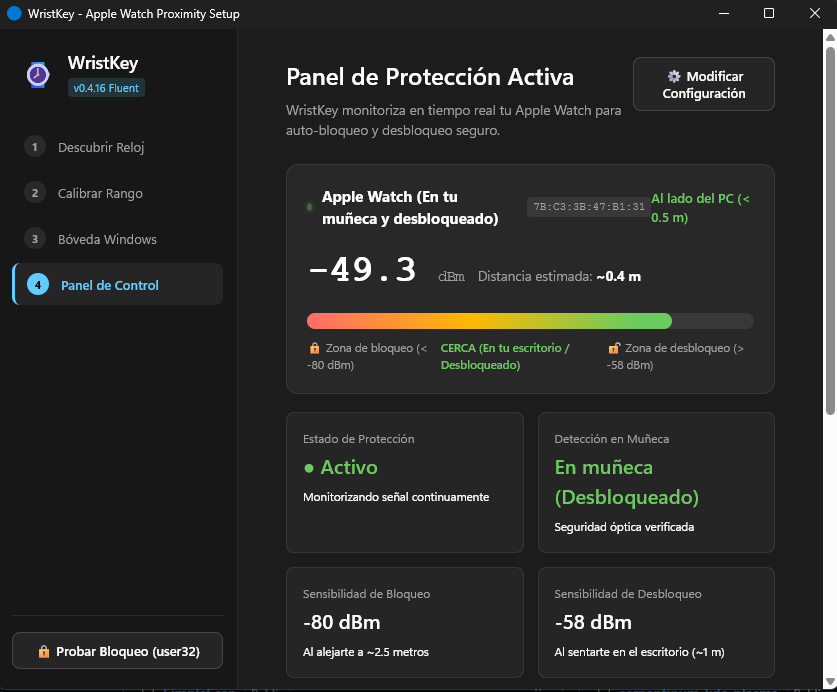
Real-Time Active Protection Panel · Continuous RSSI tracking and optical on-wrist validation
⚡ Why WristKey?
Windows includes a feature named Dynamic Lock, but it falls short for daily productivity. WristKey overcomes these limitations by implementing genuine proximity tracking through Apple Continuity protocol analysis:
| Feature | Windows Dynamic Lock | WristKey |
|---|---|---|
| Walk-Away Auto-Lock | ❌ Slow (waits up to 1-2 minutes) | ✅ Instant & Configurable (asymmetric RSSI filter) |
| Approach Auto-Unlock | ❌ Not supported (lock only) | ✅ Hands-Free Automatic Unlock (Credential Provider) |
| On-Wrist Optical Check | ❌ None (remains active on desk/charger) | ✅ Continuity 0x004C Verified (revokes access when taken off) |
| Battery Consumption | ❌ High (continuous classic Bluetooth polling) | ✅ Ultra-Low Power (passive BLE advertisements) |
| Address Privacy (RPA) | ❌ Fails when BLE MAC rotates | ✅ Hardware AES-128 IRK Resolution (ah(IRK, prand)) |
| Credential Security | N/A | ✅ Encrypted via Windows DPAPI (never in plaintext) |
Similar to the native Auto Unlock feature in macOS and watch-unlock-rs in Linux, WristKey continuously monitors your Apple Watch in the background via Bluetooth Low Energy (BLE):
- 🔒 Automatically locks your PC whenever you step away from your desk.
- 🔓 Wakes the display and logs you back in the moment you sit down.
- 🛑 Optical On-Wrist Security: If you take off the watch or lock it with a passcode, access is immediately revoked.
📥 Installation
Download the official standalone installer from the GitHub Releases page:
Run the .exe installer. It includes language selection during setup (English, Spanish, French, Portuguese, German, Italian, Chinese, Korean, Japanese) and allows switching languages at any time directly within the application.
⚠️ Why Does Windows SmartScreen Show a Warning?
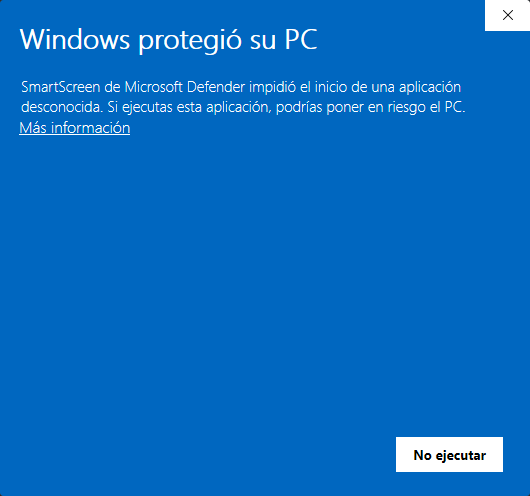
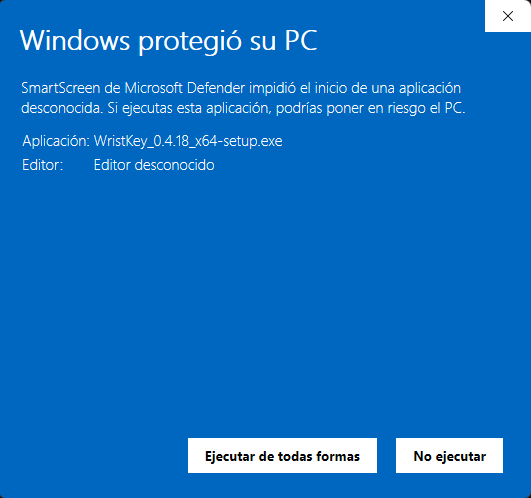
When running the installer for the first time on Windows 11 or 10, Microsoft Defender SmartScreen may display a blue warning screen ("Windows protected your PC"):
| Step 1: Click on "More info" | Step 2: Click "Run anyway" |
|---|---|
 |
 |
Why does this happen?
- Cloud Telemetry Reputation: SmartScreen is Microsoft's telemetry-based reputation system. Each newly compiled release (
v0.5.0, etc.) produces a fresh binary with a unique cryptographic hash that hasn't accumulated tens of thousands of downloads in Microsoft's telemetry database yet. - Cost of EV Code Signing Certificates: To suppress warnings on newly compiled desktop apps, Microsoft requires developers to buy an Extended Validation (EV) Code Signing Certificate, which costs $300 to $500 per year through enterprise certificate authorities (DigiCert, Sectigo). For independent, community-driven open-source projects, this cost is prohibitive.
- 100% Verifiable Security & Privacy:
- WristKey is 100% Open Source.
- You can inspect every line of Rust code directly in this repository.
- User credentials are encrypted locally on your machine via Windows DPAPI (
CryptProtectData) tied to your Windows user account master key. - Zero third-party telemetry, tracking, or external network requests.
How to proceed with installation:
- On the initial SmartScreen dialog, click the underlined link: "More info" ("Más información").
- The "Run anyway" ("Ejecutar de todas formas") button will appear in the bottom-left corner; click it to proceed.
🏗️ Architecture & Security
- RPA Resolution (AES-128 IRK):
Apple devices rotate their Bluetooth MAC address every ~15 minutes (Resolvable Private Address). WristKey resolves RPAs against the paired watch's Identity Resolving Key (IRK) using hardware AES-128 (
ah(IRK, prand)per Bluetooth SIG Core Spec). - Apple Continuity Telemetry (0x004C):
Parses Apple Continuity frames (
type 0x10 Nearby Info). If you take off the watch or lock it, watchOS asserts the lock flag; WristKey denies access until re-authenticated on wrist. - DPAPI Credential Encryption:
Login credentials used for automatic unlock are stored using Windows DPAPI (
CryptProtectData), encrypted with your user account master key. Plaintext passwords are not stored on disk. - Named Pipe IPC:
Authentication between the daemon and the Windows Credential Provider communicates over a restricted local Named Pipe (
\\.\pipe\WristKeyUnlockPipe).
Apple Watch (BLE Advertisement)
  │  (RPA rotated every 15 min + Apple Continuity telemetry)
  ▼
Windows BLE Watcher (WinRT)
  ▼
RPA Resolver (AES-128 IRK matching via Bluetooth Core Spec)
  ▼
Apple Continuity Parser (0x004C / 0x10 Nearby Info)
  │  Verifies watch is on wrist and unlocked (Action Code 0x0A / 0x0B)
  ▼
RSSI Asymmetric EMA Filter & Hysteresis State Machine
  ├── Walk Away (RSSI < -80 dBm or Off-Wrist)  ──> LockWorkStation()
  └── Approach  (RSSI > -58 dBm and On-Wrist)  ──> Wake Screen & Unlock via Credential Provider
CLI Usage
The repository includes a command-line tool (wristkey-cli) for diagnostics, signal calibration, packet inspection, and headless background execution.
Building from Source
Prerequisites:
- Windows 11 or Windows 10 (version 1903+)
- Bluetooth 4.2+ adapter with LE support
- Rust (edition 2021+)
# Clone the repository
git clone https://github.com/jorjanion/WristKey.git
cd WristKey

# Run unit and cryptographic tests
cargo test
Commands & Diagnostics
1. Real-Time Packet Scanner (--scan)
Scans for nearby BLE advertisements and decodes Apple Continuity payloads (0x004C), showing RSSI, frame types, and raw bytes:
cargo run -p wristkey-cli -- --scan
2. Signal & Distance Calibrator (--calibrate)
Displays a live visual RSSI signal meter and estimated distance in meters:
cargo run -p wristkey-cli -- --calibrate
3. Extract Paired IRK Keys (--list-keys)
Queries HKLM\SYSTEM\CurrentControlSet\Services\BTHPORT\Parameters\Keys to dump paired Bluetooth LE Identity Resolving Keys (requires Administrator terminal):
cargo run -p wristkey-cli -- --list-keys
4. Verify Cryptographic Engine (--verify-crypto)
Validates the local ah(IRK, prand) AES-128 implementation against the official Bluetooth SIG Core Specification test vectors:
cargo run -p wristkey-cli -- --verify-crypto
5. Continuity Telemetry Inspector (--telemetry)
Real-time decoding of Nearby Info flags (on-wrist state, user activity, auto-unlock eligibility, Wi-Fi status, and auth tags):
cargo run -p wristkey-cli -- --telemetry
🤝 Contributing & Community
We welcome contributions from the community! Check out our CONTRIBUTING.md guide to get started with bug reports, feature requests, and Pull Requests.
Troubleshooting
- Bluetooth Adapter Not Recognized: Ensure your PC's Bluetooth adapter supports Bluetooth Low Energy (BLE 4.2 or higher).
- Wrist Detection Disabled on Watch: In the Apple Watch app on your iPhone, go to Passcode and ensure Wrist Detection is toggled ON.
- Display Does Not Wake: Ensure Windows Power & Sleep settings allow peripheral wake events.
License
Licensed under either of:
- Apache License, Version 2.0 (LICENSE-APACHE)
- MIT License (LICENSE-MIT)
at your option.