
jonasnlt/twistel
jonasnlt/twistel has 7 GitHub stars and 2 forks. GitHot measured 0 stars in 24 hours. Last checked 2026-11-15 17:14 UTC. Last push 2026-11-09.
Measured star growth
- in 24h
- 0
- in 7 days
- Collecting history
- in 15 days
- Collecting history
- in 1 month
- Collecting history
Net star changes over overlapping periods, not daily totals. Missing measurements are left blank. Stars measure attention, not software quality.
About
Drag a file, hold a key, pick from a ring – local file conversion and tools for macOS.
SecurityREADME.md
Originaltwistel
Convert and edit files on your Mac with a ring menu, right where you drag them.
Personal project, provided as-is. I may update it occasionally, but there's no schedule and no support.
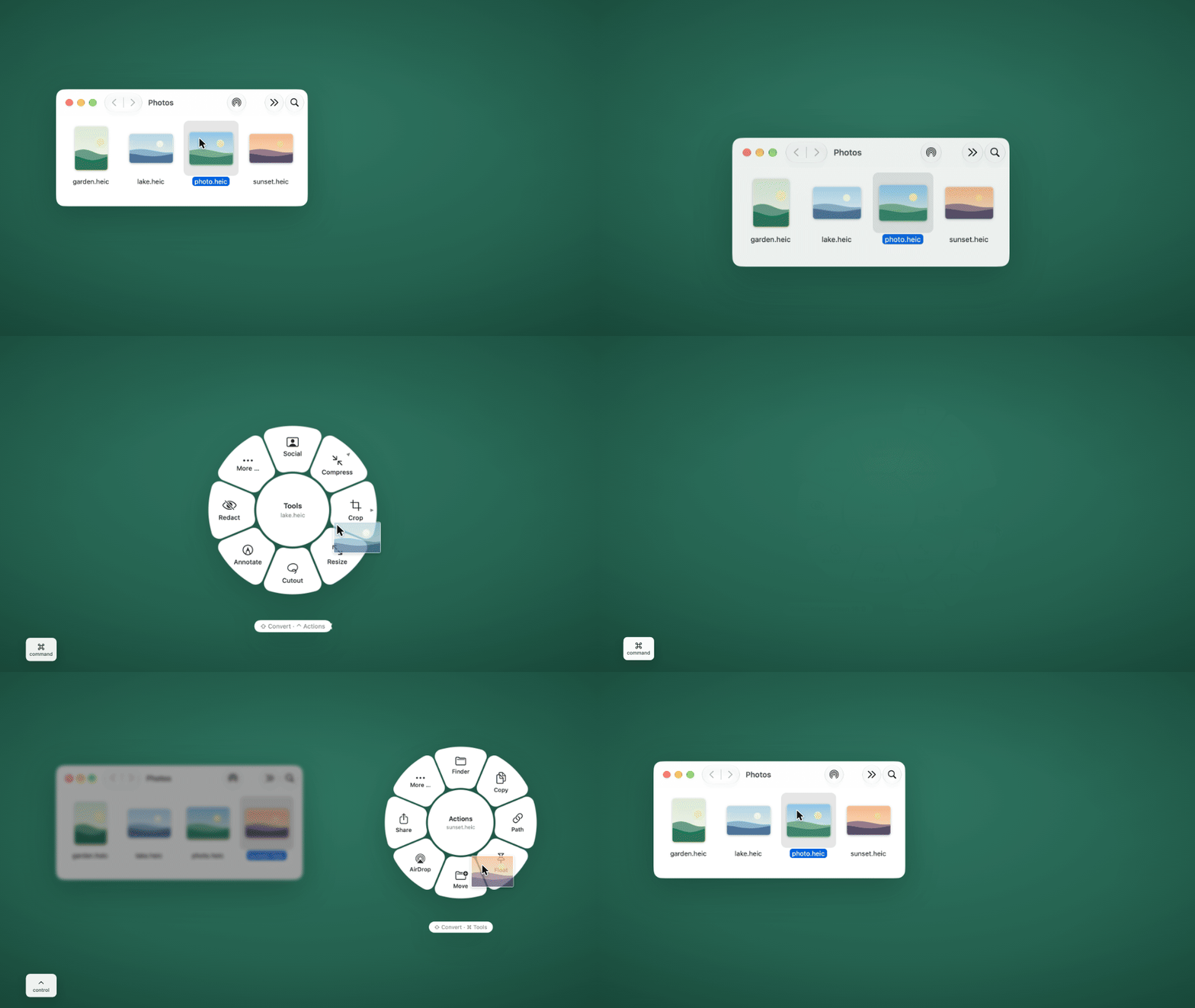
Drag one or more files in the Finder, hold a key, and a ring appears around the pointer. Drop the files on an option: the result appears as a new file next to the original. Everything runs on your Mac. Nothing is uploaded, and the app itself never connects to the internet.
How it works
Drag files in the Finder and hold a key while dragging:
| Key | Ring | What it offers |
|---|---|---|
| ⇧ Shift | Convert | the formats the selection can be converted to |
| ⌘ Command | Tools | e.g. compress, crop, sign a PDF, recognize text |
| ⌃ Control | Actions | Show in Finder, copy, copy path, pin, move to …, AirDrop, share; under “More …”: checksum, duplicate, open in Terminal |
- Move onto an item and let go. A small pill at the top of the screen shows the progress, then a card offers Open, Show in Finder and Undo.
- Switch rings while dragging by holding another key, or with a mouse by scrolling over the ring: one wheel step (or one swipe on a Magic Mouse) is one ring, up or down, sideways too. Letting go outside the ring cancels.
- Crop, Rotate and Compress have presets: rest the pointer on the item for a moment, or move out over its edge, and a fan of presets opens outside it. Drop the files on a preset and it runs at once: aspect ratios 1:1, 4:3, 3:2, 16:9, 9:16 and 4:5 (the cut follows faces, people or the main subject, like the social media presets), 90° left or right and 180°, at most 1, 5, 10 or 25 MB, and 1080p or 720p for videos. Customize … opens the tool’s window. A size limit is kept for sure: a result that doesn’t fit is not saved, a note says why.
- The last item, “More …”, lists everything that works for the file, with a search field.
- Tools with settings open a small window that remembers your last values; Return starts. Hold ⌥ Option as well when you let go to run the tool straight away with the last values.
- Keys, ring items (favorites per file type) and their order can be changed in Settings.
Without dragging: Choose Files … in the menu bar icon’s menu, or right-click files in the Finder and pick Convert with twistel, Tools in twistel or Actions in twistel at the very bottom (with many services installed, under Services or Quick Actions).
The app lives in the menu bar and has no Dock icon. It needs neither Accessibility nor Input Monitoring permission.
The interface is in English and German. It follows the system language (German on a Mac set to German, English otherwise) and can be switched in Settings › General.
Features
Convert
314 conversions between these formats:
| Kind | Formats |
|---|---|
| Images | JPG, PNG, WebP, HEIC, TIFF, SVG (read only), AVIF, BMP, to PDF; ICO and ICNS icons with all their sizes (write only, from PNG, JPG, HEIC and SVG) |
| Audio | MP3, M4A, WAV, FLAC, OGG, Opus, AIFF, WMA |
| Video | MP4, MOV, MKV, WebM, AVI, WMV, GIF, audio track as MP3 |
| Documents | PDF, DOCX, DOC, ODT, RTF, RTFD (read), text clipping (read), HTML, Markdown, TXT, EPUB |
| Spreadsheets | XLSX, XLS, ODS, CSV, TSV |
| Presentations | PPTX, PPT, ODP |
| Subtitles | SRT, VTT |
| Archives | ZIP, TAR, GZIP, RAR and 7Z (read only) |
Converting a PDF to Word, Markdown, EPUB or Excel recognizes the page layout (headings, lists, tables, columns, highlighter marks) and reads scanned pages with text recognition.
Tools
42 tools, among them:
- Any file: compress, edit metadata
- Images: edit photo, add background, crop, redact, resize, rotate and flip, combine into a PDF, collage, social media & sharing presets, cut out subject
- Images and PDFs: recognize text (OCR), read QR codes, annotate
- Video: trim, crop, change speed, join, save frames, split, redact, social media presets, burn in subtitles, remove the sound (the picture is copied, not encoded again)
- Audio: normalize loudness, visualize, trim, channels, bleep out
- Audio and video: transcribe (text, SRT, VTT) with whisper.cpp
- PDF: merge, reorder pages, split, extract images, password, watermark, page numbers, archive as PDF/A, redact (with a check afterwards), sign, compare
Requirements
- macOS 26 (Tahoe) or later.
- A Mac with Apple silicon (M1 or later). The app is built for Apple silicon only; Intel Macs are not supported.
- Optional: free helper programs from Homebrew for some formats and tools (see below).
Installation
- Download
twistel-1.1.0.dmgfrom the Releases page. - Open the DMG and drag twistel onto Applications. Start it from there: the Finder’s right-click entries only appear for the copy in Applications.
- First start (“Open Anyway”): the app is not notarized by Apple (that needs a paid developer account), so macOS warns the first time: “twistel” Not Opened. Apple could not verify “twistel” is free of malware …. Click Done (not Move to Trash), then open System Settings › Privacy & Security, scroll down to Security and click Open Anyway next to the note about twistel. Confirm with your password or Touch ID and choose Open Anyway once more. From then on twistel opens normally.
An icon appears in the menu bar, and the introduction opens on the first start. The checksums of the download are in
SHA256SUMS.txt on the Releases page. A step-by-step guide (permissions, the speech model, uninstalling) is in
docs/INSTALLATION.md.
There is no automatic update check; Check for Updates … in the menu bar icon’s menu opens the Releases page in your browser.
Optional helper programs
Much of the work is done with Apple’s own frameworks (ImageIO, PDFKit, AVFoundation, Vision). For the rest, twistel calls free programs if you have installed them. None of them is built into or shipped with the app. If one is missing, twistel tells you where it is needed and how to install it. Install Homebrew, then:
| Command | What for | Without it |
|---|---|---|
brew install ffmpeg |
audio and video beyond Apple’s formats (writing MP3, FLAC, OGG, Opus, WMA, MKV, WebM, AVI, WMV, GIF, WebP, AVIF), loudness, audio visualizer, audio for transcription | these conversions and tools say that ffmpeg is missing |
brew install --cask libreoffice |
Word, Excel, PowerPoint and OpenDocument with their real layout; DOC, XLS, PPT, ODS, ODP | Word, RTF and HTML go through Apple’s simpler text system (no headers, some images and tables lost); spreadsheets and presentations are not available |
brew install ghostscript |
strong PDF compression (text stays selectable), PDF/A | compression with Apple’s simpler method; no PDF/A |
brew install qpdf |
set and remove PDF passwords (AES-256) | PDF password is not available |
brew install whisper-cpp |
transcription and subtitles from speech (also needs a speech model, see docs/INSTALLATION.md) | Transcribe is not available |
brew install poppler |
an additional check after redacting a PDF | the check runs without this one reader |
brew install unar |
open RAR archives | RAR only if macOS’s built-in tar can open it, otherwise a note (7Z needs nothing: macOS’s tar opens it) |
Privacy
- No network access: twistel contains no networking code. The release build links no networking frameworks and calls no
networking APIs, and every release is checked for this before it is published (
scripts/check-no-network.sh). There is no telemetry, no analytics, no update check and no online feature. Share and AirDrop are handled by macOS when you choose them, and Check for Updates … and the link in the About window only hand an address to your browser. - Helper programs run without internet: twistel starts every helper program inside a macOS sandbox (
sandbox-exec) that blocks all network access, including name lookups (DNS). If that lock does not work on a Mac, twistel does not start the program at all and says so, instead of running it unprotected. - Your originals stay untouched: results are written to a temporary folder and only moved next to the original at the end. After an error, a cancellation or a full disk, no half-written file is left behind.
- Programs are never started through a shell with file names in the command.
- Log:
~/Library/Logs/twistel/twistel.logcontains file names (without the folders they are in) and steps, never passwords or file contents. PDF signatures are stored in this Mac’s keychain only, not in iCloud.
Known limitations
- Not notarized: macOS asks you to confirm the first start (see Installation). After rebuilding twistel yourself, macOS may ask once more before it reads saved signatures from the keychain.
- HDR video becomes SDR when converted, on purpose, so the result looks the same and plays everywhere.
- HDR images are processed with 8 bits per channel. They keep their color space, but smooth gradients can show banding. Edit metadata does not touch the pixels and keeps the HDR gain map of iPhone photos.
- Cut out subject uses Apple’s subject detection; very fine hair can lose single strands.
- Office files look best with LibreOffice installed; without it, Apple’s text system loses headers and some images and tables.
- Transcription needs whisper.cpp and a speech model of 1.6 to 3.1 GB; a Mac with 8 GB of memory should use the smaller model.
- Changing rings by scrolling is made for a mouse. On a trackpad it needs a click held while scrolling with two fingers.
- 7Z archives with a password can’t be opened (twistel says so).
- Pages, Numbers and Keynote files are not supported.
- Tested on macOS 27 so far; macOS 26 is the minimum the app is built for.
Building it yourself
The Command Line Tools are enough; Xcode is not needed.
xcode-select --install          # once, if the Command Line Tools are missing
./scripts/build.sh              # debug build: ".build/debug/twistel dev.app"
./scripts/build.sh --release    # release build: .build/release/twistel.app
./scripts/release.sh            # finished version in dist/: app, ZIP, DMG, checksums
The scripts use the macOS 26.5 SDK of the Command Line Tools (SDKROOT=/Library/Developer/CommandLineTools/SDKs/MacOSX26.5.sdk;
another SDK can be set with SDKROOT). The app icon is prebuilt in Resources/; only scripts/icon.sh needs Xcode, to rebuild it
from Icon/AppIcon.icon.
The debug build is called twistel dev (bundle ID io.github.jonasnlt.twistel.debug, “DEV” badge on the icon, no Finder
services unless built with TWISTEL_DEV_SERVICES=1); the release build is twistel (io.github.jonasnlt.twistel). They keep
separate settings, and only one of them runs at a time. scripts/release.sh checks the signature, the hardened runtime and that
the release build contains no debug parts and no networking code.
Layout of the source code:
Sources/App         start, menu bar, settings, test access
Sources/Core        jobs and progress, helper programs, time limits, log, error messages
Sources/Formats     formats and conversion routes
Sources/Engines     converting: image, audio, video, document, office, subtitles, archive
Sources/Operations  what is behind the tools
Sources/Radial      detecting drags and the ring menu
Sources/Tools       tool windows
Sources/UI          colors and shapes
License
Copyright (C) 2026 jonasnlt
This program is free software: you can redistribute it and/or modify it under the terms of the GNU General Public License as published by the Free Software Foundation, version 3 (GPL-3.0). It is distributed in the hope that it will be useful, but WITHOUT ANY WARRANTY; without even the implied warranty of MERCHANTABILITY or FITNESS FOR A PARTICULAR PURPOSE. See the LICENSE file for details.
The app contains code from Satsuma by plyght under the MIT License; its notice is kept in LICENSES/Satsuma-MIT.txt. The helper programs are separate programs with their own licenses and are not part of twistel; see THIRD-PARTY.md.
Contributing
Issues are open, but I may not respond or fix anything. Pull requests are not accepted. Please report security problems privately (see SECURITY.md).
Acknowledgments
- Based on Satsuma by plyght (MIT License).
- Thanks to the people behind FFmpeg, LibreOffice, Ghostscript, qpdf, whisper.cpp, Poppler and The Unarchiver.
Deutsch
Mit der kostenlosen Mac-App twistel lassen sich Dateien umwandeln und bearbeiten: Datei im Finder ziehen, dabei eine Taste halten und im Ringmenü auf eine Option fallen lassen. Das Ergebnis liegt als neue Datei neben dem Original, alles bleibt auf dem Mac. Die Oberfläche gibt es auf Deutsch und Englisch. Installation: siehe docs/INSTALLATION.md (Englisch).