
jiaoyingxing/resojot
jiaoyingxing/resojot has 50 GitHub stars and 1 forks. GitHot measured 0 stars in 24 hours and +1 in 7 days. Last checked 2026-11-10 01:28 UTC. Last push 2026-10-30.
Resojot / 应声记 - an Obsidian voice notes plugin
Measured star growth
- in 24h
- 0
- in 7 days
- +1
- in 15 days
- Update delayed
- in 1 month
- Update delayed
Net star changes over overlapping periods, not daily totals. Missing measurements are left blank. Stars measure attention, not software quality.
README-en.md
OriginalResojot




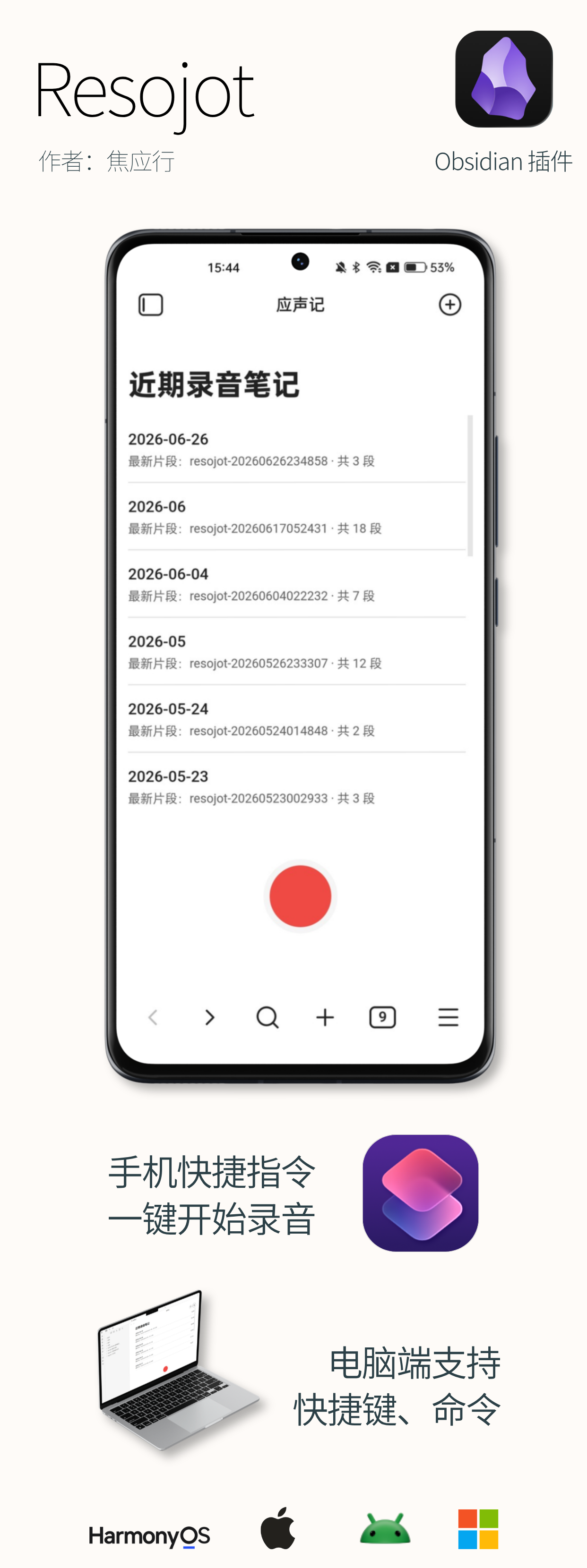
Resojot helps you record, transcribe, and organize audio in Obsidian, so spoken content becomes searchable, usable notes faster.
1. Overview
flowchart TB
    A["Record"]
    B["Save audio and note"]
    C["Transcribe"]
    D["Polish, title, Todos"]
    E["Manage progress and retries"]
    A --> B --> C --> D --> E
2. Core Capabilities
Features marked 🔒 require a license key; everything else is available right after installation.
| Capability | Description |
|---|---|
| Built-in recording | Record right inside Obsidian: start with one click from the Workbench, use shortcuts and commands on desktop, or URL shortcuts on mobile (add the ready-made iOS shortcut from Settings → Tools → Quick launch). Recording data is protected by a local cache — if saving fails nothing is lost, and it is restored automatically after the plugin restarts. |
| Automatic note library storage | When a recording ends, the audio is saved automatically and a Markdown note is created: transcript, polished text, Todos, and summaries are written into the same note in separate sections. Where recordings go, how they are named, and which template is used are all configurable. |
| Automatic transcription | Once a transcription service is configured, recordings turn into text automatically. Words that often come out wrong can be added to a local dictionary and are corrected automatically afterwards; the dictionary can be exported and migrated between devices. When one service fails, Resojot automatically tries the next eligible one. |
| Live transcription 🔒 | Choose “Record and transcribe live” from the Workbench and sentences appear while you speak; after stopping, the complete audio is still saved and follow-up processing continues. |
| Live translation 🔒 | Pick a target language from the Workbench “+” menu and translation runs while you record: translated and original lines are written into the note together, with Chinese, English, Japanese, German, French, Korean, or Spanish as the target. Requires both transcription and polish licenses; a title is generated automatically when you stop. |
| Long-recording transcription 🔒 | Recordings beyond 5 minutes are transcribed in segments with visible progress; unfinished parts resume after the app reopens; after another interruption the task stops and can be retried manually. |
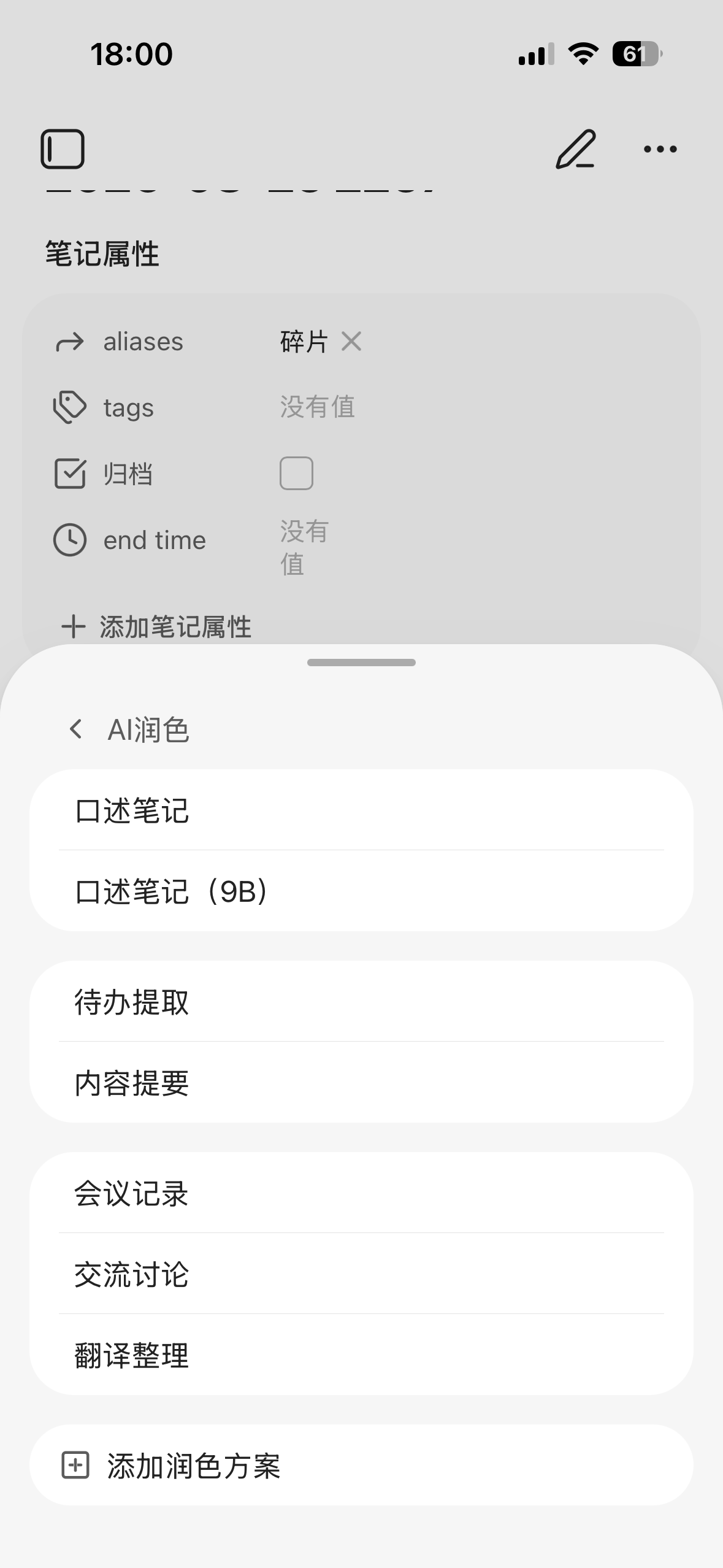
| AI polish and organization | Finished transcripts are automatically cleaned up into readable notes, with optional titles and one-sentence summaries; extracted Todos are collected into a Todo note 🔒 automatically. You can also polish manually, extract Todos, or correct wording from a note at any time. |
| Audio queue | The Workbench shows recent recording notes; the Audio queue shows the state of each recording in one place — retry failures, recover missing notes, and clean up orphan attachments. |
3. Quick Start
Installation (choose one):
- Obsidian Community Plugins (recommended): Settings → Community plugins → Browse → search Resojot, then install and enable
- BRAT: install BRAT, choose Add Beta plugin, and enter
https://github.com/jiaoyingxing/resojot; it then updates automatically from GitHub Releases - Manual: download
main.js,manifest.json, andstyles.cssfrom GitHub Releases, put them into.obsidian/plugins/resojot/in your vault, reload community plugins, and enable Resojot
First use:
- Set up a service: the first row under Recordings is a first-run guide. Enter one SiliconFlow API key and Resojot configures and validates both transcription and polish, then lets you choose where to save and start; the row disappears after one completed transcription and polish. You can also choose a transcription service yourself in the plugin settings; the setup guides and free API guides in the knowledge base can help
- Start recording: start your first recording from the button at the bottom of the Workbench; after saving, transcription and polish run automatically based on your settings
Without a license key you can still use recording, notes, and transcription and polish for recordings up to 5 minutes; see License and Privacy below for the full boundary.
4. Supported Services
| Type | Supported |
|---|---|
| Transcription (ASR) | Local Transcription Service (OpenAI-compatible; Windows desktop can install or manage a FunASR setup) Cloud OpenAI-compatible endpoint SiliconFlow Doubao ASR Tencent Cloud ASR Aliyun DashScope ASR Xiaomi MiMo ASR OpenAI Azure Speech Google Speech-to-Text Google Gemini |
| Polish (LLM) | SiliconFlow Doubao Qwen DeepSeek Xiaomi MiMo OpenCode Command Code OpenAI / ChatGPT Gemini Anthropic / Claude Ollama Custom OpenAI-compatible endpoint |
[!NOTE] A Resojot license does not include any third-party cloud service quota. Service availability, model access, costs, and request limits are determined by the provider you configure.
5. Advanced and Desktop Capabilities
Features marked 🔒 require a license key; everything else is available right after installation.
| Capability | Description |
|---|---|
| Local transcription | On Windows desktop, install FunASR with one click and its runtime environment is prepared automatically; you can also use an already-installed FunASR. Models are downloaded on demand on first use. |
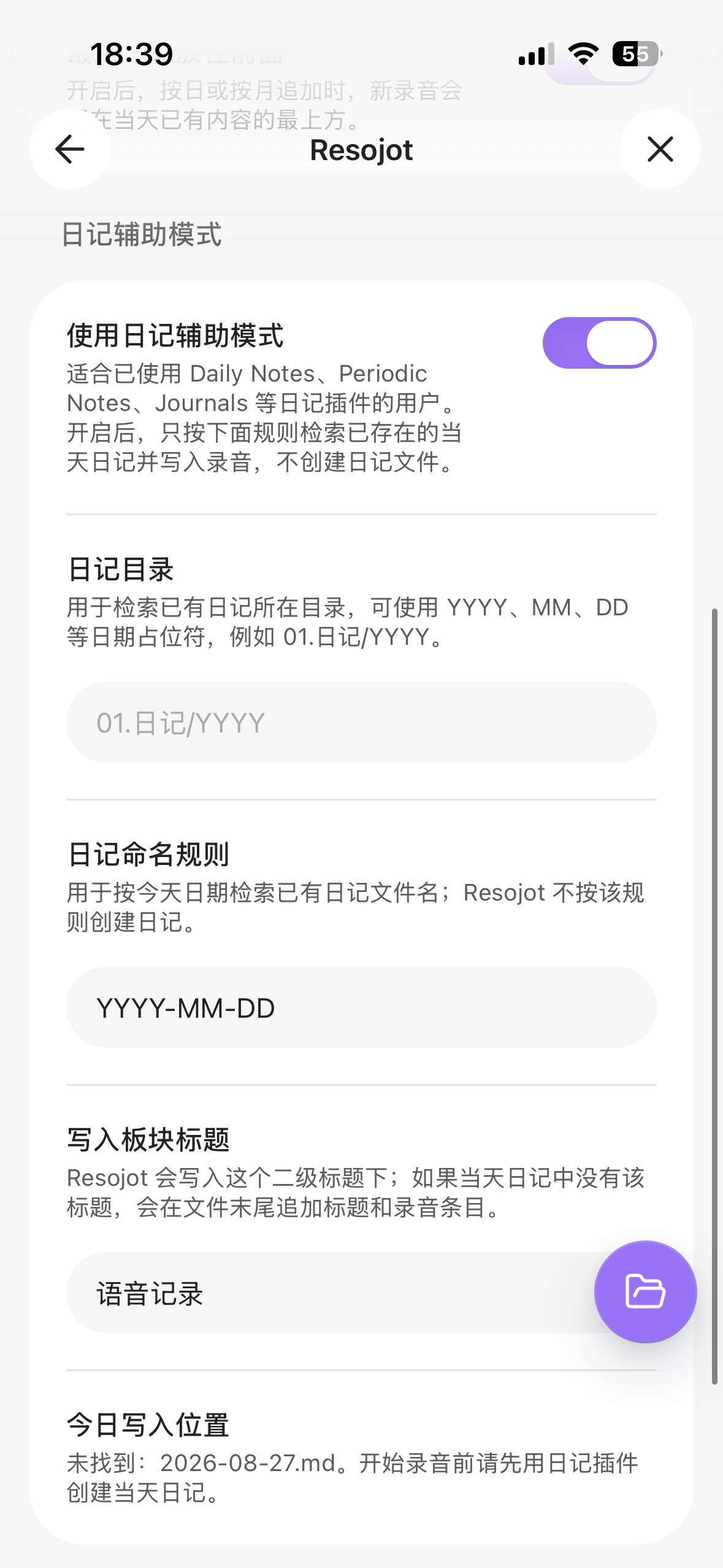
| Journal assist | Write recordings into the current day's note already created by Daily Notes, Periodic Notes, Journals, or similar tools. Resojot finds the note and writes into it; it does not take over journal creation. |
| Recording display | The recording indicator floats globally, so you can keep taking notes while recording: choose a top strip, a full-screen overlay, or no indicator. Regular and computer-audio recording share the same display settings. |
| Windows dictation 🔒 | On Windows, hold a hotkey to speak and release to insert the text into the current app. Recordings can be retained per settings; failed entries return to the Audio queue. |
| Computer audio 🔒 | Record the sound your computer is playing, including through headphones; on macOS 15+ the microphone can be recorded at the same time. |
| Speaker labeling 🔒 | After transcription, Resojot distinguishes speakers and writes the text back with per-sentence “Speaker N:” prefixes. Some providers, such as Aliyun DashScope ASR, return their own speaker labels and are used directly without downloading components; otherwise get the recognition components from Settings → Tools → Speaker recognition on first use (about 38 MB, once per vault). Very long recordings are not covered: the components handle up to about 90 minutes, and Aliyun DashScope up to 2 hours. |
| Existing audio 🔒 | Import audio from the current device, process audio in the current note, or re-transcribe completed results. |
| Bilibili link import 🔒 | On desktop, paste a public single-video Bilibili link from the Workbench “+” menu; confirm the title, author, duration, and source, and Resojot downloads the audio, creates a note, and starts transcription. Requires yt-dlp on the machine (ffmpeg optional); Resojot only detects and calls it and does not install or update it. Multi-part videos import part 1 by default; add ?p=N to the link for another part. Not available on mobile. |
6. Platforms and Versions
| Capability | Requirement |
|---|---|
| Standard Resojot features | Obsidian 1.11.4+; Windows, macOS, iPhone, and Android; Simplified Chinese and English interfaces |
| Multi-device layout | Phones, tablets, and computers each get a purpose-designed interface; on tablets and desktop multi-window, the Workbench and Settings adjust to the window width |
| Windows dictation | Windows desktop only |
| Computer-audio recording | Windows and macOS 13+ desktop; macOS 15+ can include the microphone |
| Local FunASR management | Desktop; Windows can install FunASR with one click, including its runtime environment, or manage an installed FunASR |
| Bilibili link import | Desktop; yt-dlp installed on the machine, ffmpeg optional |
| Resojot CLI | Official Obsidian desktop installer 1.12.7+ with Command line interface enabled |
7. Selected Interface Previews
The features shown in the desktop screenshots below are also available on mobile. Resojot adapts the layout to the screen.
7.1 Desktop Screenshots
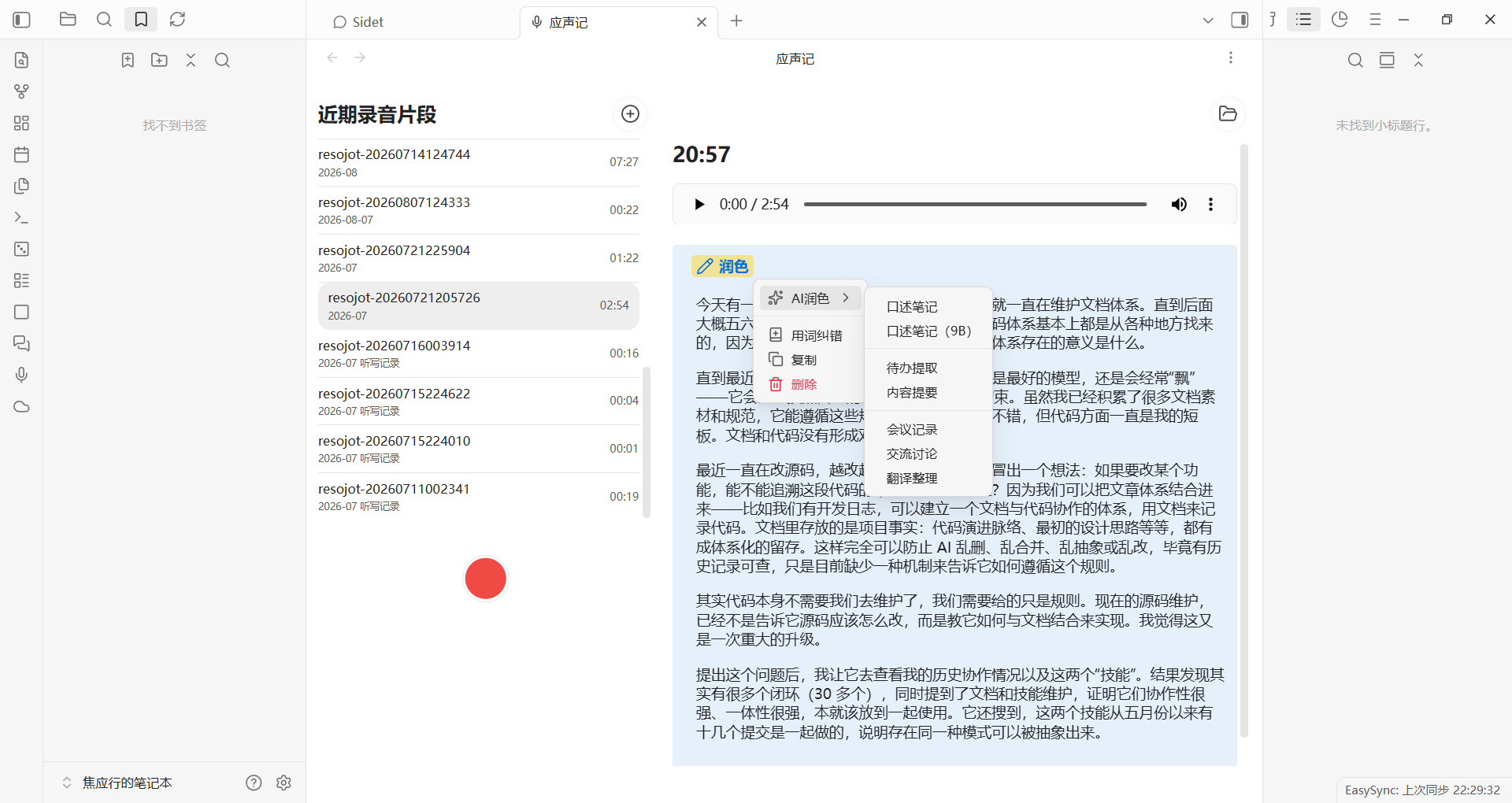
Transcript and polish actions
Open “AI polish,” or use “Correct wording,” copy, and delete.
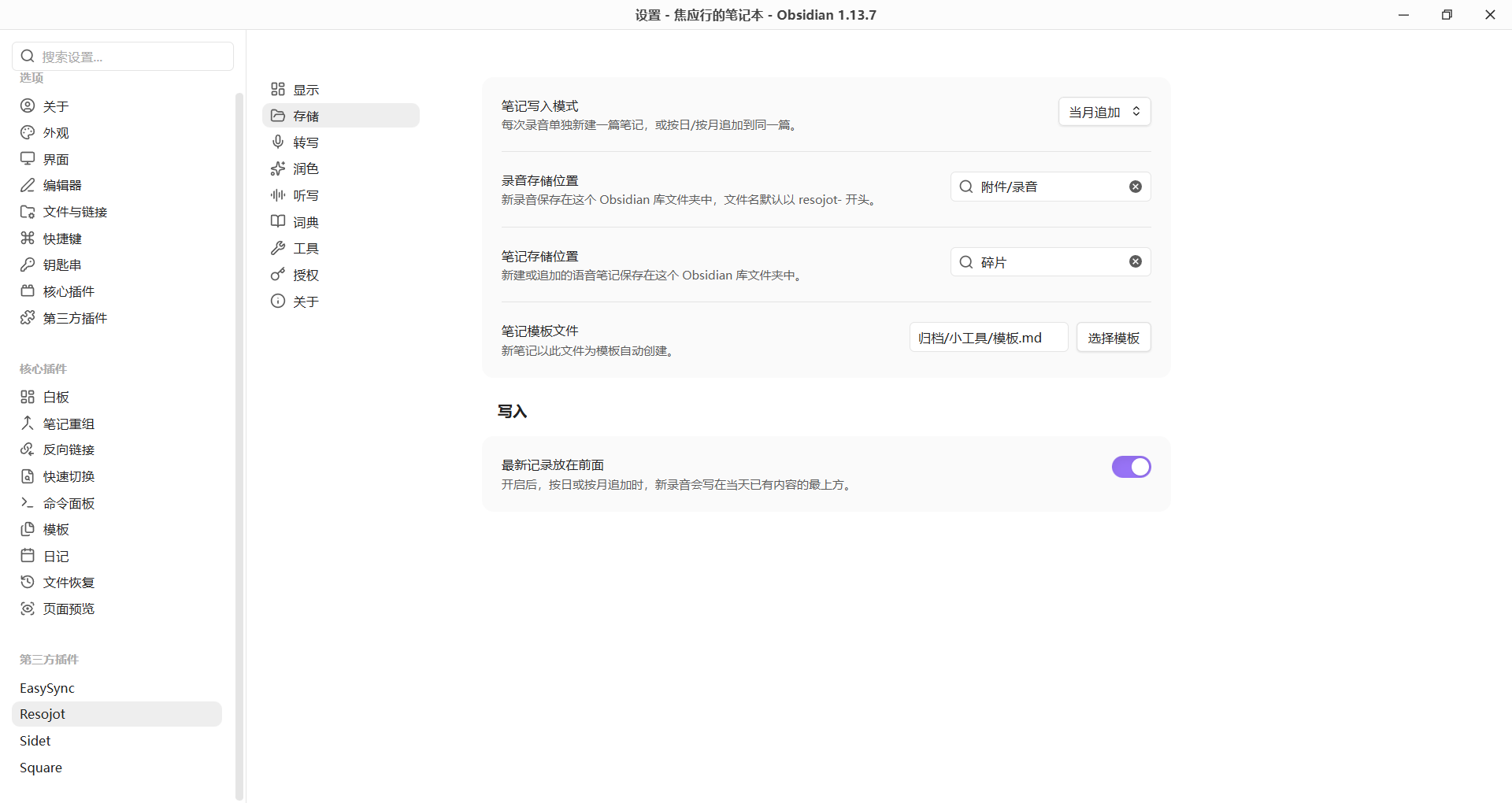
Storage and writing
Choose the writing mode, audio and note folders, templates, and append order.
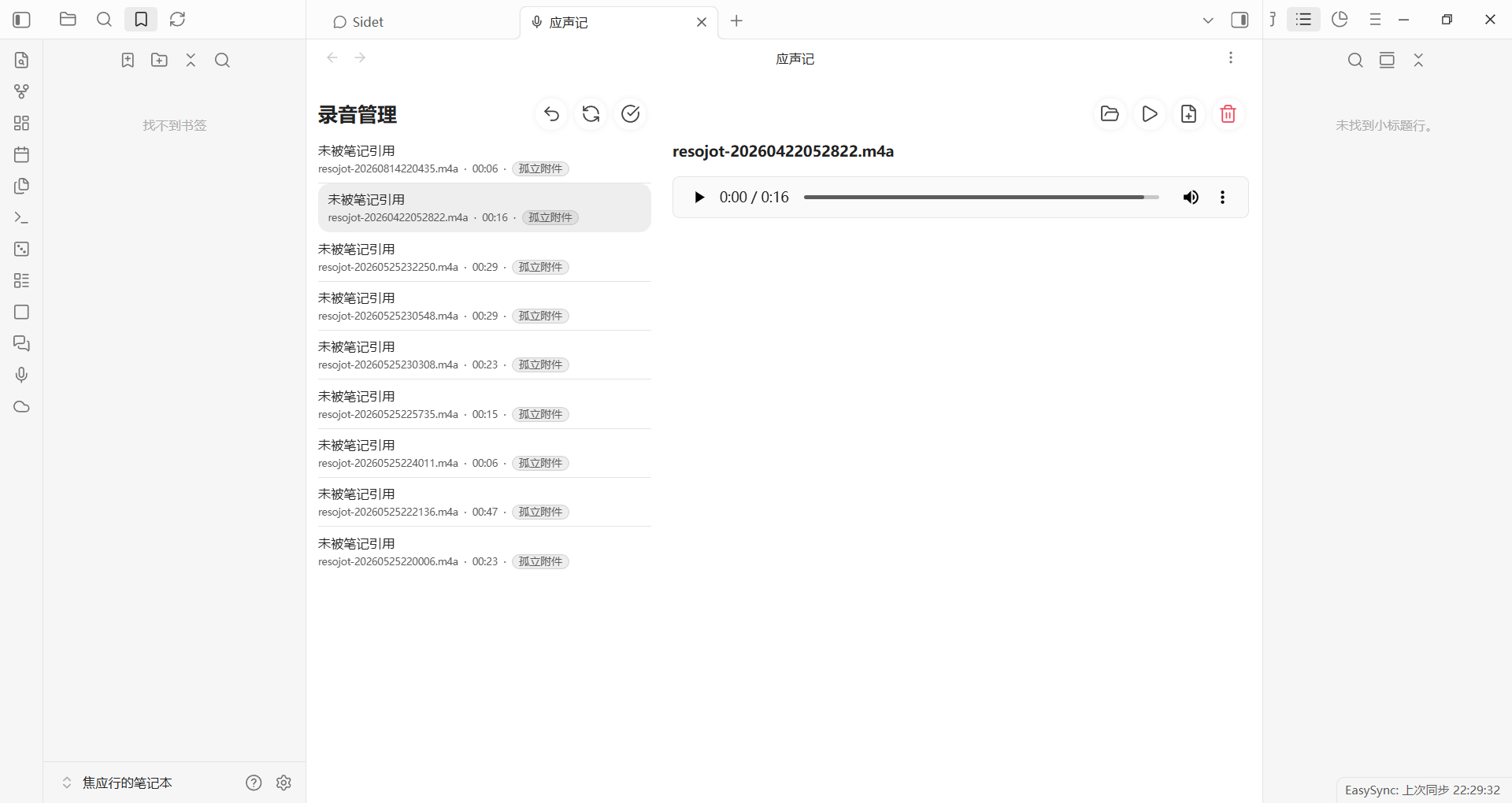
Desktop Audio queue
Review failure reasons, retry status, and per-recording details in one place.
7.2 Mobile Screenshots
| Scenario | Preview |
|---|---|
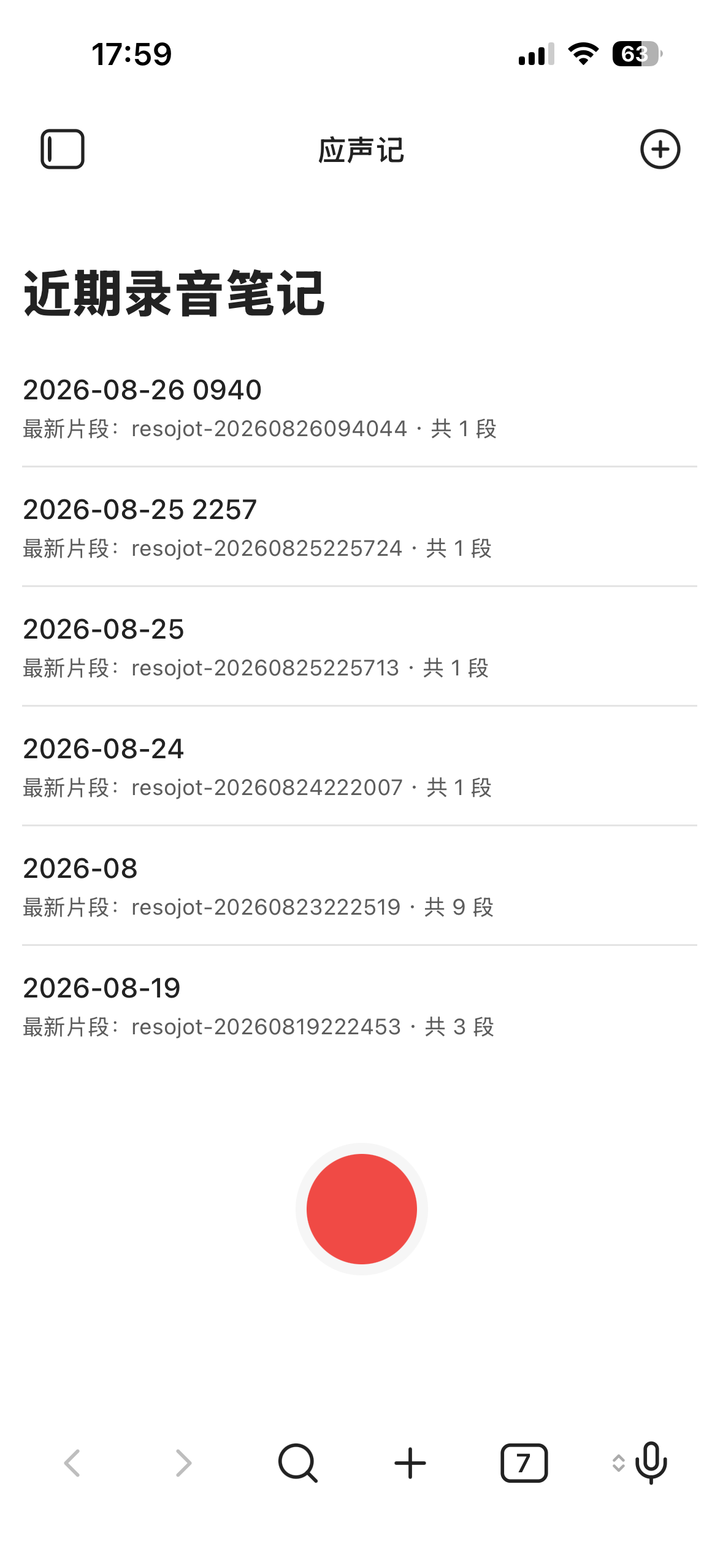
| Mobile Workbench Review recent recording notes and start recording from the button at the bottom. |
 |
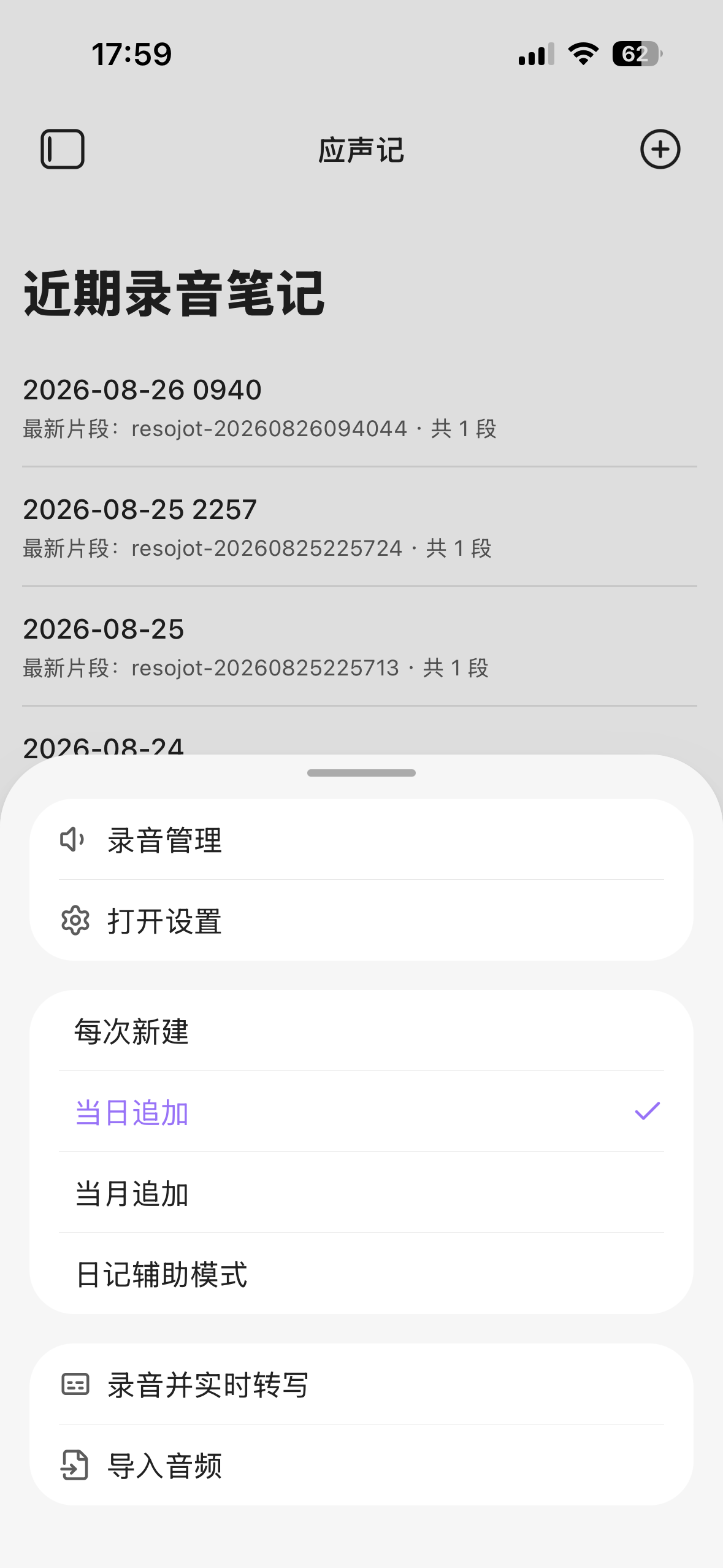
| Workbench quick menu Open the Audio queue and settings, switch among four writing modes, or import from the current device on the mobile Workbench. |
 |
| Journal assist mode Locate an existing journal by folder, date format, and target heading. |
 |
| AI polish and add-on processing Open “AI polish” from a note's content action menu to apply or create polish profiles, extract Todos, or generate summaries. |
 |
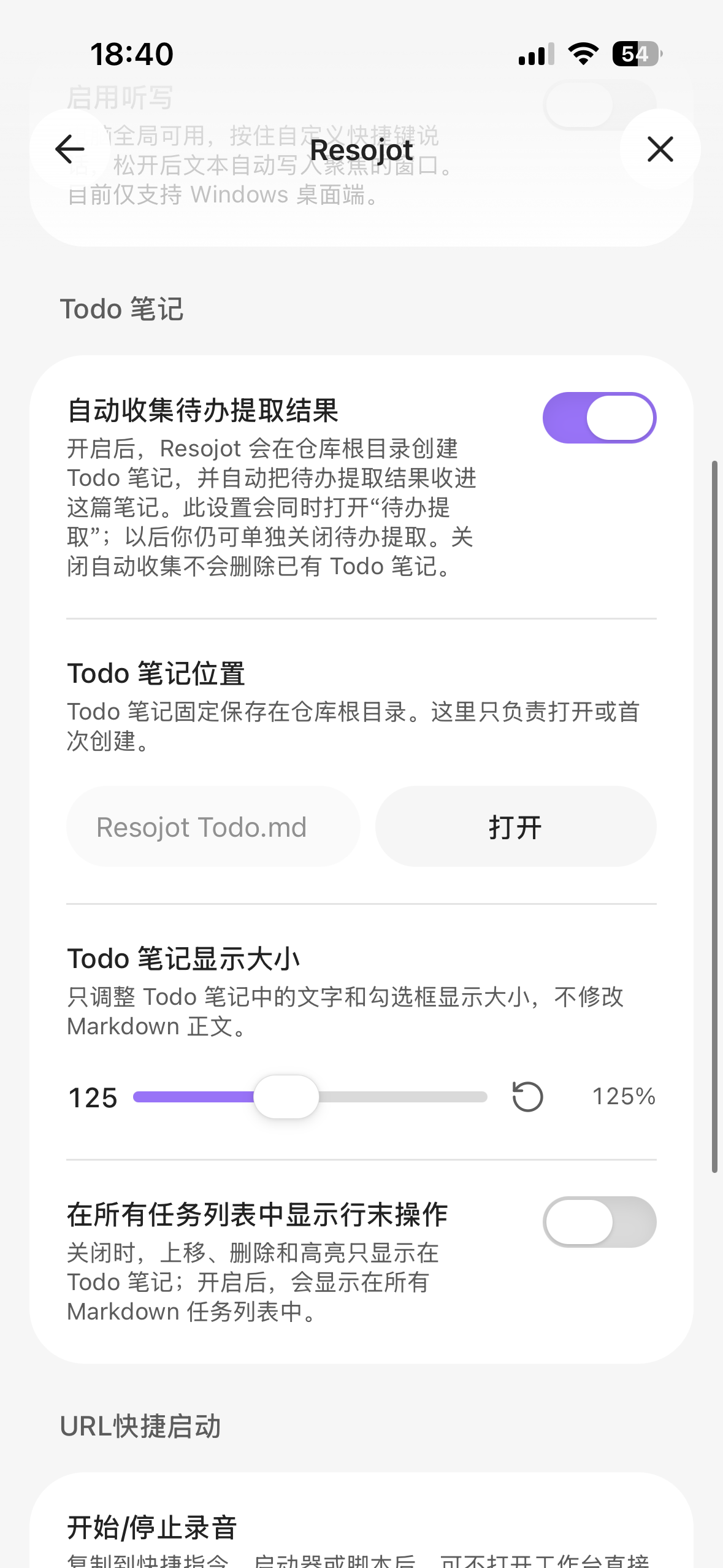
| Todo notes Control automatic collection, note location, display size, and line-end task actions. |
 |
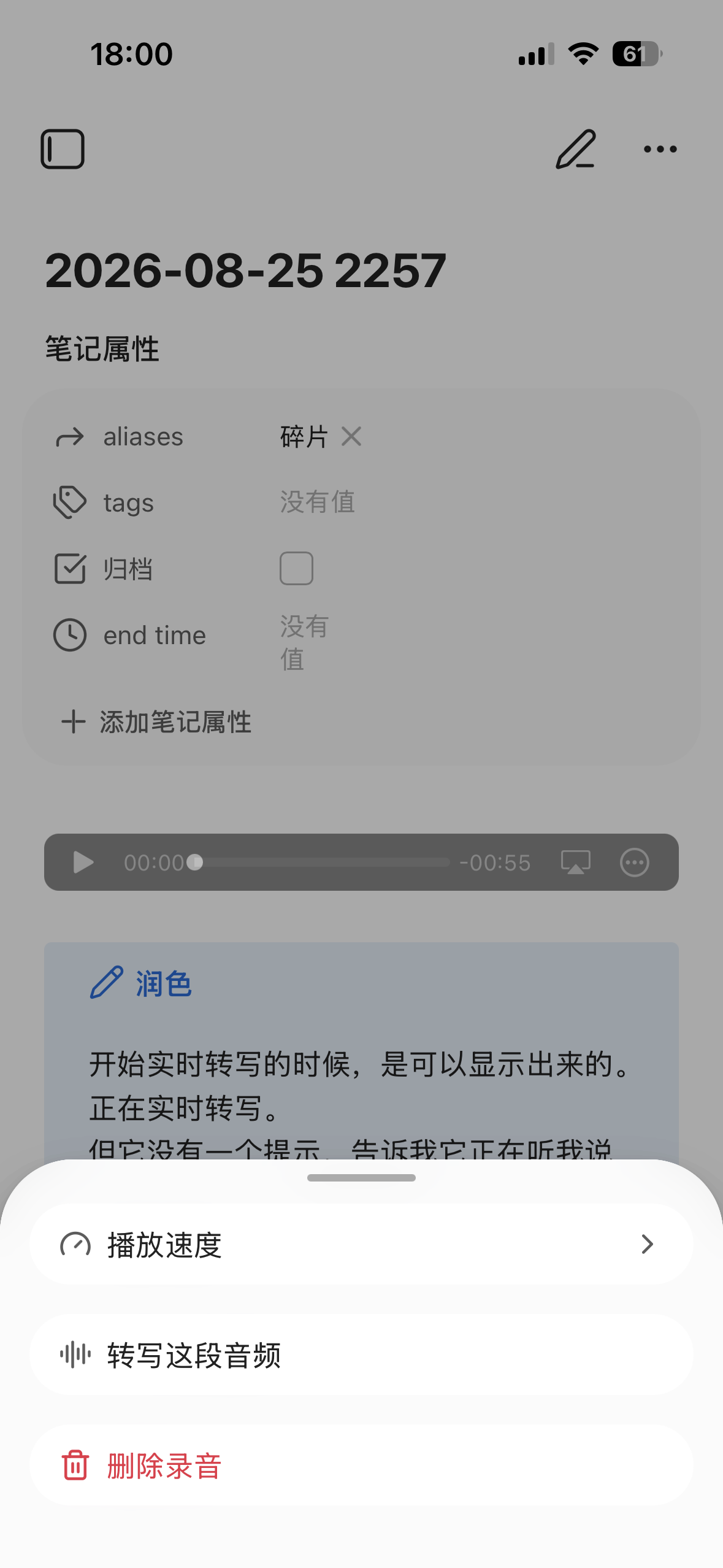
| Audio bar menu Adjust playback speed, transcribe this audio, or delete the recording; the audio file is kept while the note still references it. |
 |
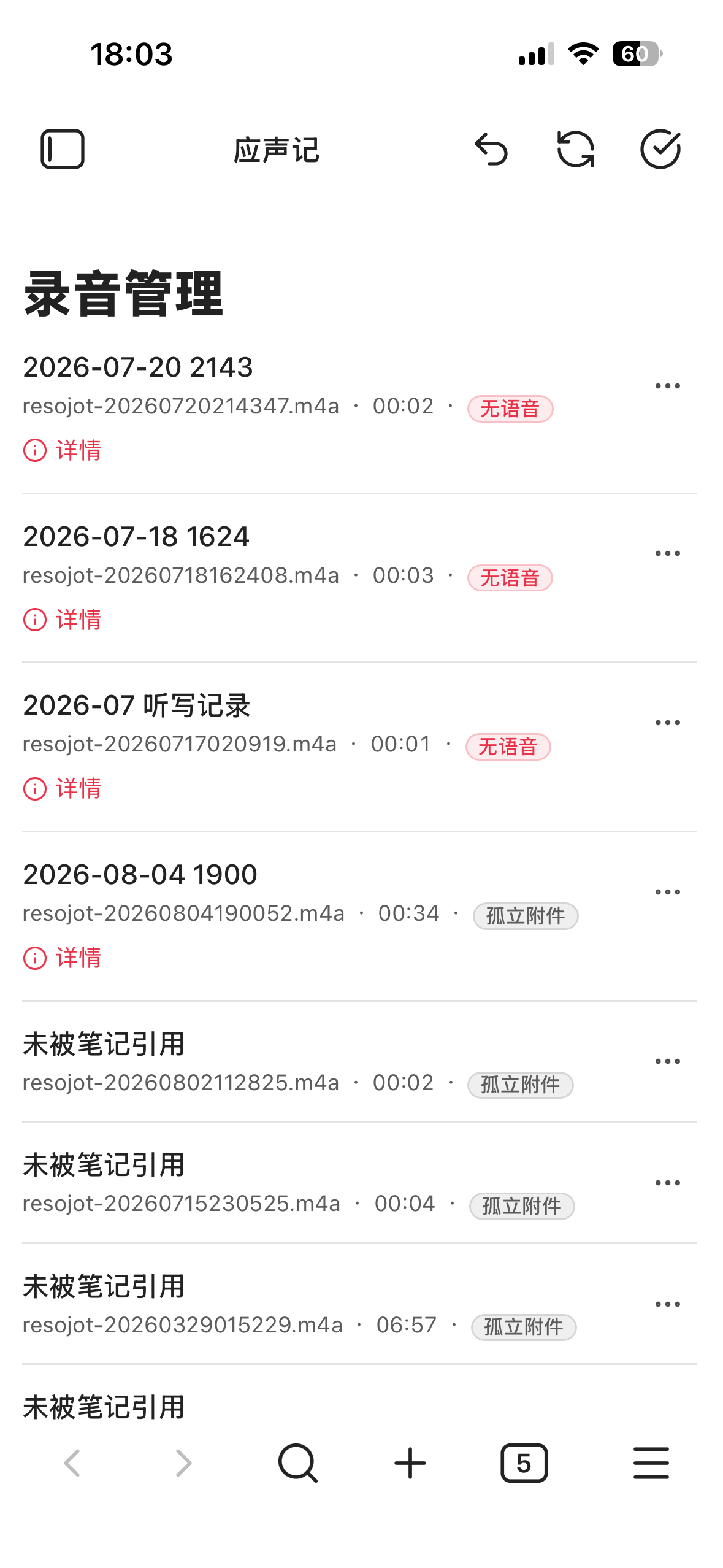
| Mobile Audio queue Review cancelled, no-speech, missing-note, and orphan-attachment states on mobile. |
 |
8. Resojot CLI (Testing feature)
Codex, Claude Code, and other external agents can call Resojot through the official Obsidian CLI. An agent can check the current environment and plugin capabilities, start or stop recordings, process existing audio in the vault, query, retry, or cancel jobs, and retrieve result notes and artifacts. It can also read storage and polish settings, inspect FunASR status, read and update the terminology dictionary, audit the Audio queue, and preview a bounded segment from a selected recording.
Before changing settings, restoring notes, retrying tasks, or cleaning up items, Resojot generates an exact plan. The agent needs to explain the plan and impact to the user and submit it only after confirmation; before execution, Resojot checks again whether the target objects or settings have changed.
- Requires the official Obsidian desktop installer
1.12.7+with Settings → General → Command line interface enabled; Obsidian and the target vault must stay open while it is used, and CLI is unavailable on mobile - Previewing a recording without an existing transcript may send the selected segment to the current transcription service and may incur service costs
- CLI does not expose API keys, license keys, or internal queues; its public contract and operation scope may still change during testing
Minimal capability discovery:
obsidian vault="<vault-name-or-id>" resojot
obsidian vault="<vault-name-or-id>" resojot:capabilities
obsidian vault="<vault-name-or-id>" resojot:schema command=resojot:process-audio
If the terminal is already inside the target vault, vault=... can be omitted. Treat the current resojot:schema output as the source of truth for command parameters.
9. License and Privacy
9.1 License status
| Status | Available features |
|---|---|
| Free | Recording, audio saving, basic Markdown notes and templates; transcription of recordings up to 5 minutes with automatic polish and title generation; manual polish and todo extraction on existing transcripts; using existing polish profiles |
| 🔒 License required | Transcribing recordings beyond 5 minutes, imported-audio transcription, computer-audio recording, desktop dictation, real-time transcription, live translation, Todo collection, speaker labeling, and managing polish profiles |
- To get a license key, search Xiaohongshu for 焦应行
- License keys are verified locally through signature validation; license duration and supported versions are shown in the plugin's License details
9.2 Data and storage
| Data | Stored in |
|---|---|
| 🎙️ Audio files and Markdown notes | Your Obsidian vault (local) |
| ⚙️ Plugin settings, dictionary, license state, and pending task state | Local Obsidian plugin data |
| 🔑 Provider API keys, polish API keys, and license key | Obsidian SecretStorage, separated by device and vault |
- Resojot does not include client-side telemetry
- If you enable cloud transcription or cloud polish, the processed audio or text will be sent to your configured provider
- An exported dictionary Markdown file is a plain-text transfer file that may be read by sync, backup, or search tools; import requires confirmation and never silently replaces the active dictionary
[!CAUTION] Do not publish
.obsidian/plugins/resojot/data.json. It may contain settings, queue state, license state, and legacy provider credentials from older versions.
9.3 Network use disclosure
| When | Where | Purpose |
|---|---|---|
| Update check at startup (one version lookup) | raw.githubusercontent.com (GitHub raw files, primary); data.jsdelivr.com (fallback); acceleration mirrors gh-proxy.com, ghfast.top, wget.la (fallbacks when the primary is unreachable) |
Reads the latest Resojot version number to notify you when a new version is available. One request is sent when the primary succeeds; fallbacks and mirrors are only tried after a failure. The plugin never downloads or installs updates by itself; updating is always your call via the official Community Plugins directory, BRAT, or GitHub Releases. |
| Fetching speaker recognition components (Settings → Tools → Speaker recognition, manual click) | github.com (this plugin's Releases page); acceleration mirrors gh-proxy.com, ghfast.top, wget.la; fallback hf-mirror.com |
Downloads the speaker recognition models and runtime components (about 38 MB, once per vault). Multiple sources are tried simultaneously and the first to finish wins; each file is hash-verified after download to guard against corruption or tampering. |
| One-click FunASR local transcription setup (Windows only, manual click) | www.python.org, bootstrap.pypa.io, pypi.org, plus the Tsinghua, Alibaba, USTC and Tencent PyPI mirrors |
Downloads the official Python runtime and FunASR's official installer. On first use, FunASR itself downloads its model files from its official model sources. |
| Cloud transcription / cloud polish (automatic once a provider is configured) | The provider endpoint you configure in Settings | Sends audio to transcribe or text to polish; see section 4 for the provider list. The plugin never routes through any relay server. |
Beyond the table above, the plugin connects to no other remote services: no telemetry, analytics or ads. The mirrors and fallback sources only serve the same public files, improving download success on restricted networks.
9.4 File write locations
| What | Where | When |
|---|---|---|
| Audio files, Markdown notes, dictionary exports | Folders you configure inside the vault | When using the feature |
| Diagnostic reports | Vault root, filename starting with "Resojot 诊断报告" | Only when you generate one |
| Transcription temp files, rolling diagnostics, Todo metadata, iOS key mirror | Hidden in-vault folder .resojot-temp/ |
When using the feature; recreated automatically if deleted |
| Dictation helper (Windows, .exe) and computer-audio recording helper (macOS), bundled with the plugin and hash-verified before being written | In-vault plugin folder .obsidian/plugins/resojot/ |
On first use of dictation or computer-audio recording, and on helper updates |
| FunASR local transcription runtime | Outside the vault: %LOCALAPPDATA%\Resojot\funasr-runtime under the Windows user profile |
Only when you use one-click FunASR setup on Windows; delete the folder if you stop using it |
Except for the last row, everything the plugin writes stays inside your vault.
9.5 Release file note
- The plugin is distributed as closed source. To protect the licensing mechanism from being located and cracked, release files are minified and lightly obfuscated at packaging time; this only guards the license-verification logic — it does not hide features and collects no data.
- The plugin contains no third-party analytics, reporting or advertising components.
10. Feedback and Support
- Setup guides, free API guides, and usage tips: Resojot 应声记 knowledge base
- Bugs, reproducible issues, and feature requests: GitHub Issues
- Community and product updates: search Xiaohongshu for 焦应行
11. License
- Distributed as a closed-source plugin
- Speaker recognition runs on onnxruntime-web (MIT License); recognition models come from each publisher's public release, and their licenses and terms follow the publisher's documentation
- Installation and updates are available through Obsidian Community Plugins, BRAT, or GitHub Releases
- See LICENSE
Explore related projects
ytdl-org/youtube-dl
Command-line program to download videos from YouTube.com and other video sites
141,500 starsexcalidraw/excalidraw
Virtual whiteboard for sketching hand-drawn like diagrams
135,396 starsgodotengine/godot
Godot Engine – Multi-platform 2D and 3D game engine
119,840 starsmrdoob/three.js
JavaScript 3D Library.
117,983 stars