
jhonlinus/nas-dash
About
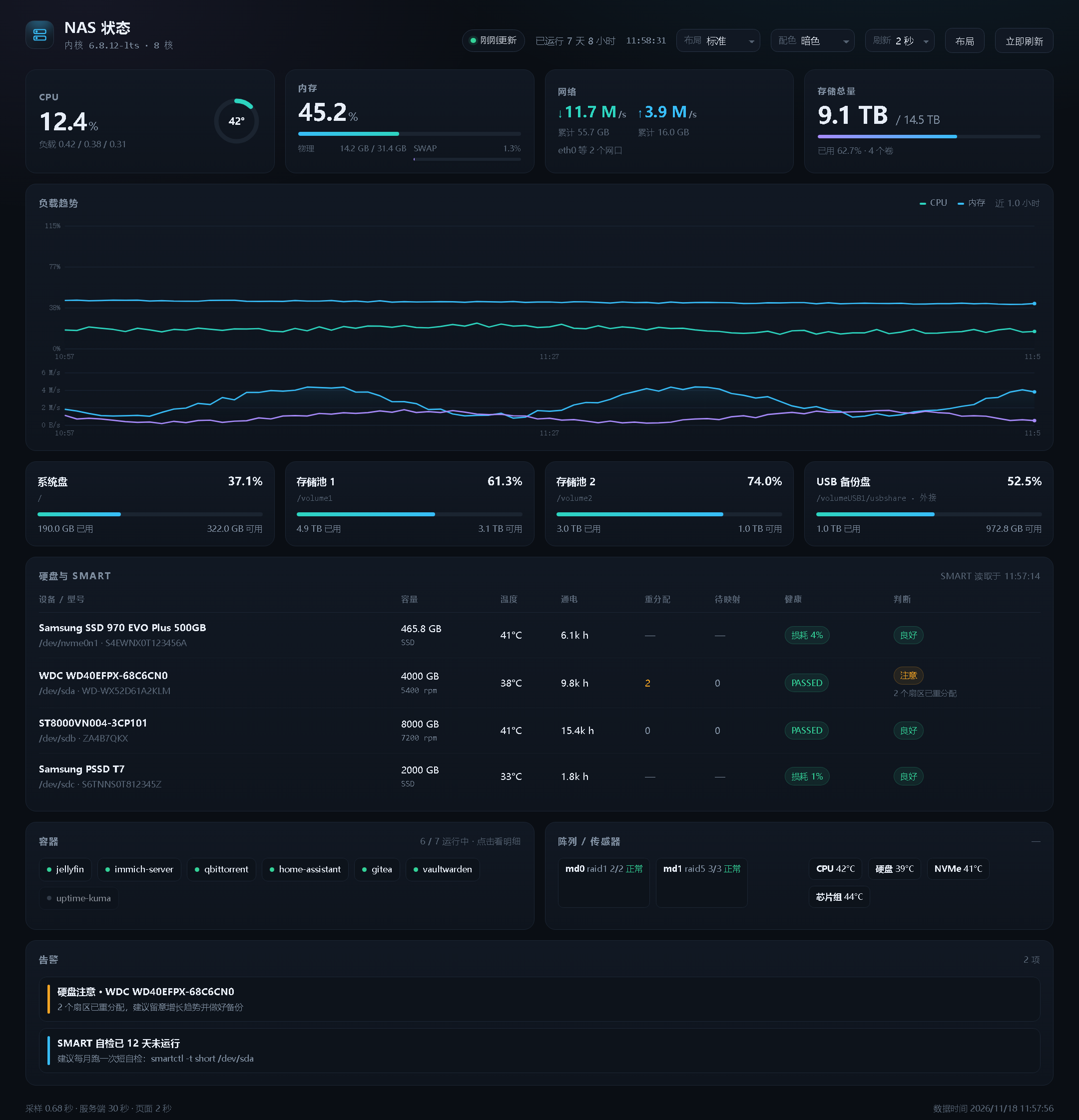
Zero-dependency NAS dashboard: one Python file + one HTML file. CPU / memory / network / volumes / SMART / containers / RAID / sensors, with history, warnings and a drag-and-drop layout — plus a fnOS (FeiNiu) app package.
Self-hostedMeasured star growth
- in 24h
- 0
- in 7 days
- +1
- in 15 days
- Collecting history
- in 1 month
- Collecting history
Net star changes over overlapping periods, not daily totals. Missing measurements are left blank. Stars measure attention, not software quality.
README.en.md
OriginalNAS Dash




A NAS dashboard in one Python file and one HTML file. No third-party packages, no frontend build step. It reads /proc, /sys, df, smartctl and docker, samples every 5 seconds, keeps a short history, raises warnings, and ships a ready-to-install fnOS (FeiNiu) app package.
Why
There is no shortage of NAS monitoring — what's missing is the "just upload it and it runs" kind. The trade-offs here:
- No dependencies. No Docker, no Node, no database, no Prometheus. A NAS almost always has
python3; copy two files and you're done. - Read-only. It doesn't touch system config or write to disks; the only writes are its own history files.
- Cheap to sample. About 110 ms of CPU per round. SMART is throttled separately (5 min by default) so the panel doesn't keep waking your drives.
- Fine on weak hardware. Low-memory devices and old iPads get a degraded mode: no backdrop blur, DPR capped at 1.5, 5-second refresh by default.
- The dashboard itself is adjustable. Modules can be dragged, resized and hidden; themes and density switch instantly; the layout lives in
localStorage.
Features
| Module | What it shows | Source |
|---|---|---|
| Overview | CPU usage/temp, memory + swap, network rate, total capacity | /proc/stat, /proc/meminfo, /proc/net/dev, df |
| Trend | Last hour of CPU / memory / network | Server-side ring buffer (8640 points) |
| Volumes | Per-mount usage, free space, internal vs external | df -kP |
| Disks & SMART | Model, capacity, temperature, power-on hours, reallocated/pending sectors, health verdict | smartctl (auto -d sat for USB bridges) |
| Containers | Status and image, click through for per-container CPU / memory / network | docker ps + cgroup v2 |
| RAID / sensors | mdadm array state, board/CPU/drive/NVMe temps | /proc/mdstat, sensors |
| Warnings | swap pressure, filling volumes, reallocated sectors, high temps, overdue self-test | Built-in rules, sorted in the UI |
Interaction:
- Layout: drag to reorder, cycle 1/2/3/6-column width, hide modules, reset to default.
- Four themes (night / paper / mono / glass) and three density levels.
- Refresh interval 1–60 s, persisted in
localStorage; polling pauses in background tabs. - ETag / 304 responses: unchanged data is never re-sent.
Quick start
1. Run it on the NAS (recommended)
mkdir -p /opt/nasdash && cd /opt/nasdash
curl -fsSLO https://raw.githubusercontent.com/jhonlinus/nas-dash/main/nasdash.py
curl -fsSLO https://raw.githubusercontent.com/jhonlinus/nas-dash/main/index.html
python3 nasdash.py --mode local --port 8066
Open http://<nas-ip>:8066. It binds to 127.0.0.1 by default; add --bind 0.0.0.0 for LAN access.
2. Watch a remote NAS from your laptop
python3 nasdash.py --mode ssh --remote 'ssh -o BatchMode=yes [email protected] {cmd}' --port 8066
--remote is any command template that runs a command non-interactively — a bastion script, docker exec, sshpass, whatever:
--remote 'python3 jssh.py exec my-nas {cmd}'
--remote 'docker exec nas-dash {cmd}'
3. systemd
sudo install -m 755 nasdash.py /opt/nasdash/nasdash.py
sudo install -m 644 index.html /opt/nasdash/index.html
sudo install -m 644 deploy/nas-dash.service /etc/systemd/system/
sudo systemctl daemon-reload && sudo systemctl enable --now nas-dash
Listens on 127.0.0.1:8066; put a reverse proxy in front of it.
4. fnOS (FeiNiu) app
fnos/ is a complete fpk project, and a prebuilt package is included:
- App Center → Settings → Install app manually → pick
fnos/dist/nasdash-*.fpk - A "NAS 状态面板" icon appears on the desktop
It is served through the fnOS gateway at /app/nasdash/, so it uses no port and works over FN Connect from outside. Details in fnos/README.md (Chinese).
5. Docker (experimental)
docker compose up -d
Inside a container, /proc and df show the container's own view, so only part of the metrics are meaningful. Host data requires pid: host plus bind mounts for /sys and docker.sock — see the comments in docker-compose.yml.
Options
| Flag | Default | Description |
|---|---|---|
--mode |
local |
local samples the host; ssh delegates to --remote |
--remote |
empty | Command template for ssh mode; {cmd} is the placeholder |
--port |
8066 |
TCP port, 0 disables TCP |
--bind |
127.0.0.1 |
Bind address; use 0.0.0.0 in containers or for LAN access |
--sock |
empty | Extra Unix socket listener (fnOS gateway, e.g. $TRIM_APPDEST/app.sock) |
--auth |
empty | HTTP Basic auth as user:pass; empty = no auth |
--interval |
30 |
Server-side sampling interval in seconds |
--redact |
off | Hide drive serial numbers |
--no-sample |
off | Serve the cached snapshot without sampling (UI work, screenshots) |
--no-gateway-trust |
off | Ignore the login identity injected by the fnOS gateway |
--debug |
off | Log HTTP requests to data/requests.log |
The data directory defaults to data/ next to the script and can be overridden with NASDASH_DATA.
Security
The defaults are "loopback only, no auth" — i.e. reachable from the NAS itself. Exposing it means putting an authenticating proxy in front:
location / {
    auth_basic "NAS Dash";
    auth_basic_user_file /etc/nginx/dash.pass;

    proxy_pass http://127.0.0.1:8066;
    proxy_set_header Host $host;
    # identity headers injected by the fnOS gateway — strip them on public entry points
    proxy_set_header X-Trim-Userid "";
    proxy_set_header X-Trim-Username "";
    proxy_set_header X-Trim-Isadmin "";
    limit_except GET { deny all; }
}
A full example lives in deploy/nginx.conf.example.
Three things worth repeating:
- Never expose
--bind 0.0.0.0 --port 8066to the internet. The panel shows container names, volume usage and drive health. --redactonly hides serial numbers, it is not authentication.- Gateway trust (
X-Trim-*) is only honoured from 127.0.0.1, so a reverse proxy must clear those headers.
How it works
        every N seconds                          per request
 ┌──────────────────────────┐          ┌──────────────────────────┐
 │ one bash sampling script │          │ /api/snapshot → last snap │
 │  @@HOST @@MEM @@CPU ...  │  ──────► │ /api/history  → points    │
 │ parsed into a dict       │  cache   │ /api/refresh  → sample now│
 └──────────────────────────┘          └──────────────────────────┘
              │                                      │
              └──────────► data/history.json ────────┘
- Sampling is a single bash round trip that prints
@@SECTIONblocks; Python parses them. One process spawn per round, which matters insshmode. - Container metrics skip
docker stats(fixed 2-second latency, worse with more containers) and read cgroup v2cpu.stat/memory.currentdirectly — cost is nearly independent of container count. - The frontend is vanilla JS + Canvas: no framework, no build step.
- Weak devices get
<html data-lite>(navigator.deviceMemory <= 2or iOS < 16), which disablesbackdrop-filter, caps DPR and relaxes the refresh interval.
Layout
.
├── nasdash.py              # server: sampling + parsing + HTTP (single file, no deps)
├── index.html              # frontend: layout, charts, themes (single file, no build)
├── Dockerfile
├── docker-compose.yml
├── deploy/
│   ├── nas-dash.service
│   └── nginx.conf.example
├── docs/
│   ├── screenshot.png
│   └── 1panel.md           # 1Panel site layout notes (Chinese)
└── fnos/                   # fnOS app project (fpk)
Compatibility
- OS: any Linux with
/proc(Synology, fnOS, TrueNAS, regular distros). BSD/macOS untested. - Python: 3.8+, standard library only.
- Optional tools:
docker,smartctl,sensors,mdadm. Missing ones just leave their module empty. - Windows:
--mode sshonly; local sampling needs/proc. - Privileges: SMART and
docker psneed root (or the docker group + a setuidsmartctl). Running unprivileged just hides those two modules.
Known limitations
- History lives in memory + one JSON file, 8640 points (~12 h at 5 s). No long-term storage; use Prometheus if you need that.
- Warnings are UI-only — no push notifications. Poll
/api/snapshotand forward thewarningsarray if you want them elsewhere. - Single host only, no aggregation.
License
MIT © 2026 JhonLinus
Explore related projects
Loading…