
jev-chat/jev-chat-jarvis
jev-chat/jev-chat-jarvis has 8,328 GitHub stars and 1,329 forks. GitHot measured +10 stars in 24 hours and +75 in 7 days. Last checked 2026-11-11 13:53 UTC. Last push 2026-11-05.
The chat decision assistant: before you reply, Jev reads the chat, judges intent and risk, and drafts replies you fill in with one tap. You press send. Android · Windows · macOS · iOS | 聊天辅助决策工具:先看懂对方再回复,发不发由你。
Measured star growth
- in 24h
- +10
- in 7 days
- +75
- in 15 days
- Update delayed
- in 1 month
- Update delayed
Net star changes over overlapping periods, not daily totals. Missing measurements are left blank. Stars measure attention, not software quality.
cn/README.en.md
Original
Jev Chat Assistant · Chinese Edition (Android)
← Back to overview · Download v1.7 APK · Changelog · Privacy policy
简体中文 · English · Tiếng Việt
Screenshots
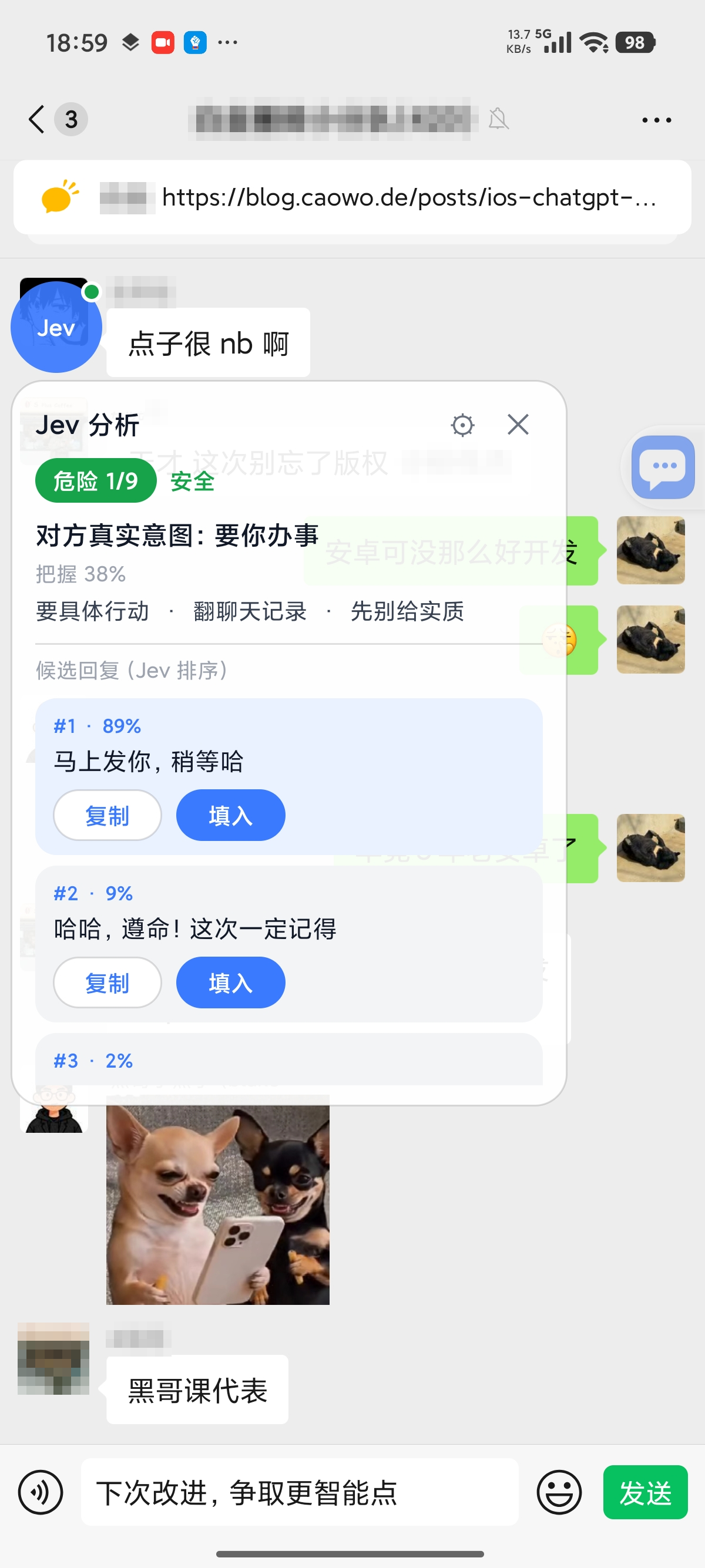 Overlay: risk level, the other person's intent, and three ranked replies |
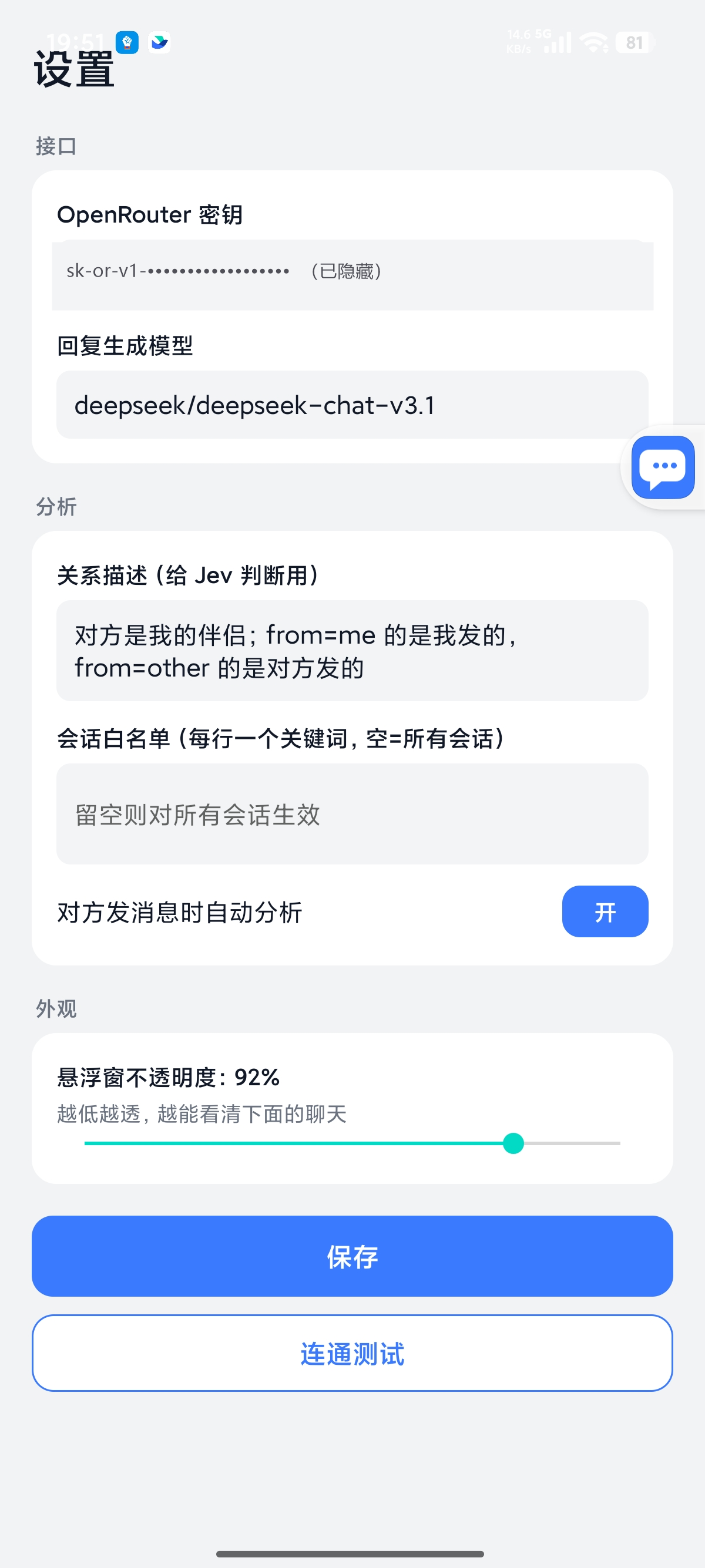 Settings: separate API configurations for assessment, replies, and vision |
Why Jev?
- It assesses the conversation before drafting a reply. Most tools simply ask a model to write a response. Jev first uses an assessment model to identify the other person's intent, gauge the risk, and decide whether a reply can wait. That assessment guides its suggestions.
- It leaves your chat apps alone. No hooking, modified app packages, access to app APIs or accounts, or database reads. Jev uses Android's accessibility service to read the conversation currently visible on your screen.
- You're always in control of sending. Jev only fills in the text field. It never sends messages automatically or interacts with transfers, red packets, or payment collection.
- One core, multiple platforms. Tested on real devices with QQ and X; Feishu uses OCR to read message text; WhatsApp is verified against screen recordings. Adding another app takes an adapter of just a few dozen lines.
- It has context about your contacts and your life. A local knowledge base and contact profiles supply relevant notes and conversation history during analysis, keeping replies consistent with the background you've provided.
- Choose your own APIs. Configure assessment, reply generation, and vision separately, using your own keys and API allowances. Requests go directly to your chosen providers.
- Local privacy controls. API keys stay in the app's private storage. Chat content is sent to your configured APIs only during analysis and is neither saved to disk nor written to logs by default.
Supported Platforms
| Platform | Status | How messages are captured | Notes |
|---|---|---|---|
| QQ for Android | Full workflow supported | Accessibility nodes | Tested with version 9.3.50 in group chats; one-to-one support is inferred from the same UI structure |
| X / Twitter DMs | Full workflow supported | Parses content-desc on Compose nodes |
Tested with version 12.25 in Chinese; the English UI has not been verified |
| Feishu / Lark | OCR fallback verified on a real device | Reads message bubble bounds through accessibility, then extracts text with offline ML Kit OCR | Message text is custom-rendered and absent from the accessibility tree. Since v1.3, each bubble is processed with OCR; read status is used to identify the sender |
| One-to-one chats (beta) | Accessibility nodes | One-to-one chats only; group chats are not read and WhatsApp is never screenshotted; replies follow the language of the other person's latest message. Reading rules by @smgonthebeat (#73), verified against WhatsApp 2.26.38.73 recordings | |
| Any other app | Manual capture supported | Full-screen OCR via "Scan screen once" in the overlay menu | Manual only; all text is treated as coming from the other person, with a notice in the panel |
| Desktop / web | Planned | Screenshots with OCR / vision | Same core, different capture method |
Jev only reads conversations on your own device that you are authorized to view. It is not designed to target any particular platform.
Use at your own risk: Using Jev inside third-party apps such as QQ, Feishu, X, or WhatsApp may not comply with those apps' terms of service, and your account could be restricted or banned. Decide for yourself whether to use it.
Quick Start
1. Install the app. A signed release APK is included in the repository: apk/jev-assistant-v1.7-release.apk. Requires Android 11 or later and an ARM64 (arm64-v8a) device. Downloads for other versions are available under Releases.
adb install -r apk/jev-assistant-v1.7-release.apk
2. Add your API key. Open the app, go to Settings, and find the API section. It has three cards: Assessment API, Reply API, and Vision API. For the simplest setup, enter an OpenRouter API key under Assessment API and leave the other two blank; they will inherit the same key. To change the reply model (the default is deepseek/deepseek-chat-v3.1; Gemini and OpenAI are subject to regional restrictions in mainland China), choose a preset under Reply API, such as OpenRouter, DeepSeek, or Tongyi-compatible, or enter a custom URL. Each card has its own connection test.
3. Enable permissions. Follow the guide on the home screen to enable:
- Accessibility, to read messages. After upgrading to v1.3 or later, toggle the accessibility service off and back on to enable screenshot capture.
- Display over other apps, to show the analysis overlay.
- Autostart and unrestricted battery usage. Both are essential on Xiaomi / HyperOS; otherwise, the system may freeze Jev in the background and prevent it from reading messages.
If you previously installed a debug build, uninstall it before installing the release build because their signatures differ. Uninstalling removes your API keys and settings. Xiaomi / HyperOS also resets the overlay permission after a reinstall, so enable it again using the home screen guide.
Features
Conversation Assessment and Suggested Replies
- In about one second, the assessment model returns the other person's intent, a risk level from 1 to 9, what they want, whether you should reply right away, and the best next action, along with confidence scores.
- The generation model drafts three conversational replies. The assessment model ranks them by suitability and assigns each a percentage score.
- Tap a reply in the overlay to copy it or insert it into the text field. Insertion uses
ACTION_SET_TEXT, with clipboard paste as a fallback. Jev never sends the message.
Knowledge Base and Contacts
Open Settings, then Analysis, then "Knowledge Base and Contacts."
- Notes: Each note has a title, content, tags, and an option to always include it. Notes marked for inclusion are sent with every analysis. Other notes are included only when their title or a tag appears in the conversation title or the last six messages, up to five matching notes. Import multiple notes by pasting text with blank lines between entries; the first line of each entry becomes its title.
- Contacts: Store a name, aliases (one per line), relationship, and notes. A profile is applied when the conversation title matches the name or an alias. Matching ignores case, leading and trailing whitespace, and member counts at the end of group names. Long-press the floating bubble to save the current conversation as a contact.
- History: "Record chat history (stored locally only)" is off by default. When enabled, each analysis includes the most recent N messages (30 by default), excluding messages already visible on screen.
- Deletion: The knowledge base and history live in the app's private directory. Use "Clear knowledge base and history" in Settings to delete both. Neither is written to logs or committed to Git.
- The top of the overlay panel shows "Knowledge base: N entries · History: M messages" so you can see how much context was included.
APIs and Models
- Set a separate URL, key, and model for assessment, replies, and vision.
- The built-in "Bocha Jev" assessment preset appears first as of v1.4, ahead of OpenRouter, TypeSafe Direct, and Custom. Selecting it fills in
https://jev.bocha.cnand modelbocha-jev-v1, which uses the same protocol as TypeSafe. The settings screen displays the official URL with a copy button. The service is currently free for a limited time. Fresh installs default to Bocha Jev; existing assessment configurations retain their provider and key. - The "Vercel" assessment preset uses
https://ai-gateway.vercel.sh/typesafeand modeltypesafe-ai/jev. Supply a Vercel AI Gateway key. It uses the same protocol as TypeSafe Direct (POST /v1/systemone). - The "OpenCode Zen" assessment preset uses
https://opencode.ai/zenand modeljev-1.13, with free output and input at $0.042 per million tokens. An assessment uses roughly 1,000 input tokens. Supply an OpenCode Zen key. This also uses the TypeSafe Direct protocol (POST /v1/systemone). For free input as well, manually switch tojev-1.13-free, a limited-time option with restricted functionality. - Built-in presets include OpenRouter, TypeSafe Direct, Vercel, OpenCode Zen, DeepSeek, and Tongyi-compatible services. Each card has a connection test.
- A single key is enough: leave the reply and vision settings blank to inherit the assessment API configuration.
- On upgrade from an older version, your existing key is migrated to the new three-card layout once.
Message Capture and OCR
- Each supported app has its own adapter. The service selects one based on the foreground package name; the adapter's only job is to turn the current window into a conversation title and message list.
- If the accessibility tree contains no message text, Jev automatically takes a screenshot and reads it with ML Kit's offline Chinese OCR model. Images are not uploaded, and Google Play services are not required.
- Screenshot capture is rate-limited and backs off after failures. It does not take continuous screenshots every second, and it avoids capturing its own overlay during recognition.
- You can manually select "Scan screen once" in the overlay menu in any app.
FAQ
Will it send messages for me?
No. Jev only puts your chosen reply into the text field. You always press Send yourself. It never interacts with transfers, red packets, or payment collection.
Do I need root or Xposed? Could my account get banned?
No root access or extra modules are needed. Jev does not modify chat app packages, inject code into their processes, or access their APIs or account systems. It only reads UI content exposed by Android's accessibility service, much like a screen reader.
Are my conversations uploaded?
Chat content is sent only when you trigger an analysis, and only to the model APIs you configure in Settings. The project operates no servers of its own and does not collect your chats, save them to disk, or write them to logs by default. Chat history is disabled by default; if you enable it, it stays in the app's private directory on your phone.
What if the floating bubble disappears or Jev stops reading messages?
The phone's Android variant has probably frozen the background process. Check that accessibility, overlay permission, autostart, and unrestricted battery usage are all enabled. The last two are especially important on Xiaomi / HyperOS. Reinstalling resets the overlay permission, so enable it again through the home screen guide. Tapping somewhere in the conversation usually gets things working again.
Why can't it read Feishu messages? Does it work with other apps?
Feishu draws message text using custom controls, so the text is missing from the accessibility tree. Since v1.3, Jev uses offline OCR on each message bubble. For apps without a dedicated adapter, select "Scan screen once" from the overlay menu. Jev can then analyze the full-screen OCR result, but it cannot distinguish your messages from the other person's.
Does it cost anything?
The app is free and open source. Model requests use your own API keys, and any usage charges are billed directly by your provider. The project does not handle payments.
Why has it stopped responding after an update?
Turn the accessibility service off and back on in Android's system settings. Screenshot support was added in v1.3, and the service needs to reconnect before it can use that capability.
How It Works
QQ / X / Feishu --(accessibility nodes)--> Capture recent messages
                                                    |
                          +-------------------------+-------------------------+
                          v                                                   v
             Jev assessment (7 questions)                      Generation model drafts 3 replies
             Intent / risk / needs / action / reply now?                      |
                          +-------------------------+-------------------------+
                                                    v
                                       Jev ranks the 3 replies
                                                    v
                                  Translucent overlay displays results
                                                    v
                                       Copy / insert (never send)
- Capture: One adapter per app, selected by foreground package name. Each adapter turns the current window into a title and a list of messages identifying who said what. Everything downstream is shared. When the tree has no message text, screenshots and offline OCR provide a fallback, with rate limits and failure backoff to prevent continuous capture.
- Assessment: Jev answers multiple-choice, scoring, and yes/no questions. All questions are sent in one request, with results in about one second. When knowledge base entries match, the state includes
background(relationship, contact notes, and matching notes) andhistory(past messages). - Replies: A generation model drafts three replies, which Jev ranks. The prompt requires replies to remain consistent with the knowledge base and avoid inventing facts it does not contain.
- Insertion: Uses
ACTION_SET_TEXT, falling back to the clipboard andACTION_PASTE. It never sends.
Adding support for another chat app
- Implement
ChatAppAdapterincapture/ChatAppAdapter.kt. Setpkgto the app's package name. Haveextract(root, res)read the title and message list from the accessibility tree, returningMsg(side, text)entries wheresideismeorother. Returnnullwhen the current window is not a conversation. - Add an entry to
adaptersincapture/ChatCaptureService.kt. - Assessment, reply generation, the overlay, and text insertion work without further changes.
Start with adb shell uiautomator dump to see what the target app exposes. The existing adapters illustrate how to handle different capture patterns:
| App | Accessibility tree | Adapter behavior |
|---|---|---|
| Nodes are available and have IDs | Reads message text from id/mjn and the title from id/371; identifies the sender by which side's avatar the bubble sits next to |
|
| X | Compose nodes without IDs; text is empty |
Parses content-desc in the form 发件人:正文。时间。Read (sender, body, time, read status); sender 你 ("you") identifies your messages |
| Feishu | Custom-rendered message text, absent from the tree | Reads bubble_content_container bounds and read status from the tree, then runs OCR on each bubble |
Returning null means the window is not a conversation. Returning an empty message list means it is a conversation, but the tree contains no message text. Only the latter triggers the OCR fallback.
QQ and X each use a single Activity throughout the app. To detect a conversation, check the tree for expected nodes such as the input field; the Activity name is not enough.
Building and project structure
Requires JDK 17 and the Android SDK (platform 35 / build-tools 35).
./gradlew assembleDebug      # app/build/outputs/apk/debug/app-debug.apk
./gradlew assembleRelease    # Requires signing properties outside the repo; set JEV_KEYSTORE_PROPS to their path
app/: Android app written in Kotlin using traditional Views.capture/: Accessibility capture, including per-app adapters inChatAppAdapter.kt, dispatch and foreground keep-alive inChatCaptureService.kt, and screenshots and offline recognition inocr/.jev/: Jev client and question sets.overlay/: Floating UI.core/: Configuration and data models, including knowledge base storage and context assembly incore/kb/.KnowledgeActivity: Knowledge base management screen for notes and contacts.
tools/jev/: Jev question sets and calibration tooling in Python.docs/: Design and acceptance documentation.apk/: Signed release APKs.
Known Limitations
- Background restrictions on some Android variants: Xiaomi / HyperOS may kill the background process even with a foreground service, autostart, and unrestricted battery usage enabled. The bubble may briefly disappear; interacting with the conversation usually restores it.
- Feishu relies on OCR: Its custom-rendered message text is absent from the accessibility tree, which exposes only bubble bounds. Since v1.3, Jev runs offline OCR on each bubble and uses read status to identify the sender. If it gets the sender wrong, use "Save as contact" and explain the issue in the contact notes, or disable automatic analysis and use manual analysis instead.
- X has only been tested with the Chinese UI: Parsing has been verified with
:,上午/下午(AM / PM), andReadas they appear in the Chinese UI. An English fallback exists but has not been verified. - Group chats: Analysis assumes a one-to-one conversation, so its interpretation of "the other person" and relationship settings may be inaccurate in groups.
- Chinese conversations: Jev is trained primarily in English. Assessment questions are in English, while chat content stays in Chinese. For better calibration, label a set of your own real conversations; see
tools/jev/. - Knowledge base retrieval uses title and tag substring matching, not semantic search. Tag notes carefully so they can be found. History is deduplicated by sender and exact message text, so the same person repeating the same message is recorded only once.
- OCR requires system permission to take screenshots: Xiaomi / HyperOS may deny screenshot access to the accessibility service; the panel shows the reason when capture fails. Protected windows (
FLAG_SECURE) cannot be captured. - OCR only reads what is visible: It cannot recover the hidden portion of a truncated message, and recognition errors are possible.
- Larger APK: The bundled offline Chinese ML Kit model increases the APK size from about 12 MB to about 27 MB. Builds support
arm64-v8aonly.
Sponsors, community, related projects and license: see the overview.
Explore related projects
affaan-m/ECC
The agent harness performance optimization system. Skills, instincts, memory, security, and research-first development for Claude Code, Codex, Opencode, Cursor and beyond.
301,596 starsNousResearch/hermes-agent
The agent that grows with you
262,830 starsmultica-ai/andrej-karpathy-skills
A single CLAUDE.md file to improve Claude Code behavior, derived from Andrej Karpathy's observations on LLM coding pitfalls.
232,346 starsfirecrawl/firecrawl
Supercharge your AI agents with data from the web and beyond. Building the library for superintelligence. 🔥
200,932 stars