
jeffreycayao/Dev-Labs
jeffreycayao/Dev-Labs has 69 GitHub stars and 28 forks. GitHot measured +1 stars in 24 hours. Last checked 2026-11-17 18:53 UTC. Last push 2026-11-14.
Measured star growth
- in 24h
- +1
- in 7 days
- Collecting history
- in 15 days
- Collecting history
- in 1 month
- Collecting history
Net star changes over overlapping periods, not daily totals. Missing measurements are left blank. Stars measure attention, not software quality.
About
DevLabs™ Free, open source and local-first. A multi-agent harness that works with the AI subscriptions you already pay for. It turns the terminal coding CLIs you already run into a team:.
Developer ToolsREADME.md
Original
DevLabs™
An office of AI coding agents, running on your machine
Free, open source and local-first. A multi-agent harness that works with the AI subscriptions you already pay for. It turns the terminal coding CLIs you already run into a team: each agent gets a desk, a terminal, memory and an inbox, and an orchestrator named Ramon keeps the floor moving while you're away.
Wraps Claude Code, OpenAI Codex, Antigravity and Gemini CLI, xAI Grok, Kimi Code, Qwen, OpenCode, Crush, pi, GitHub Copilot CLI and Cursor, with bring-your-own keys and local models. Philippine edition, with connectors for Pancake POS and Webcake.
Electron · React · TypeScript · Three.js (React Three Fiber) · xterm.js · node-pty






⬇ Download for macOS, Windows or Linux
No account, no sign-in, no license key. Every installer is on the releases page.
New here? Start with the User Guide.
A fork of Munder Difflin by Chaitanya Giri, released under the same MIT License.
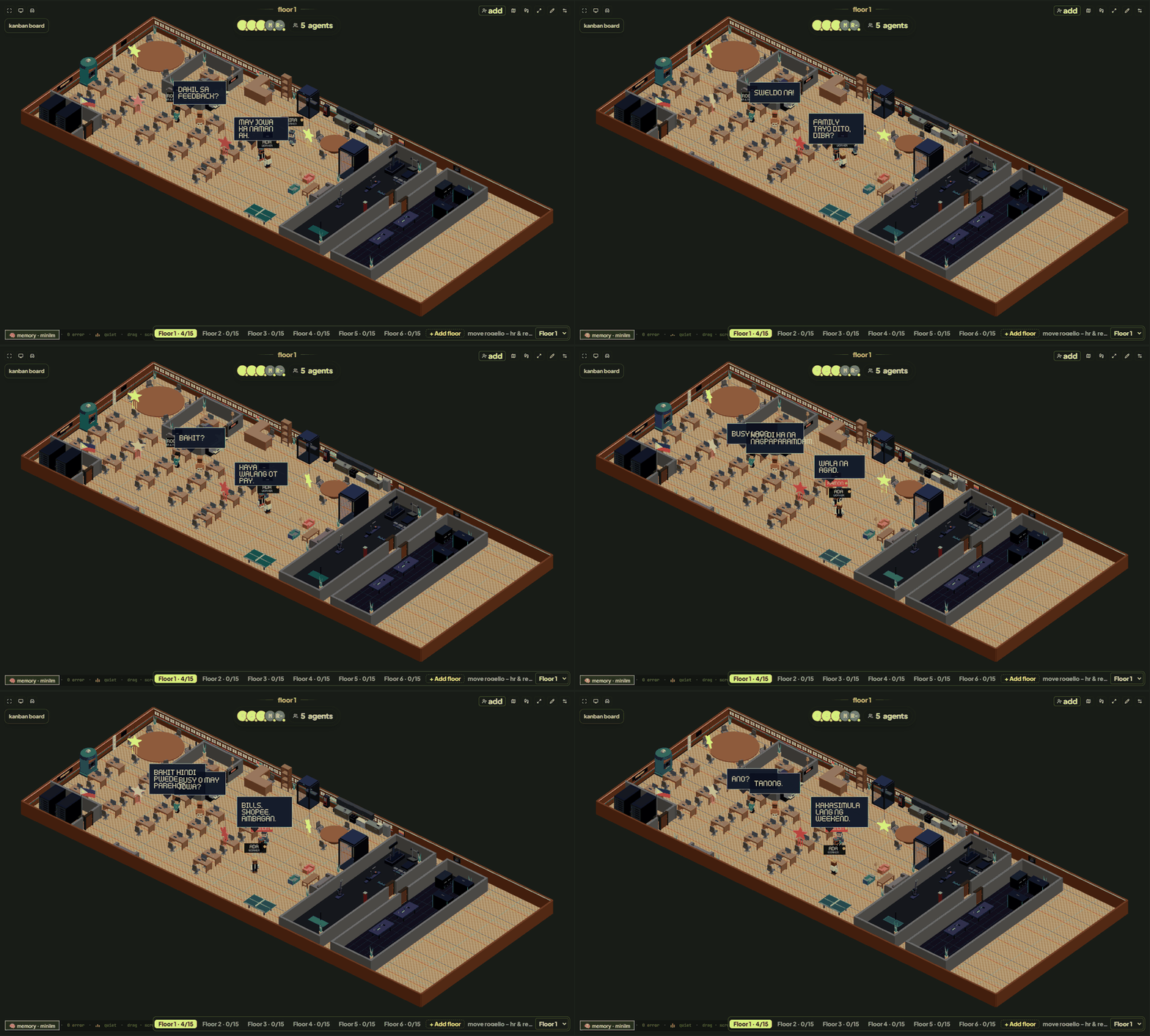
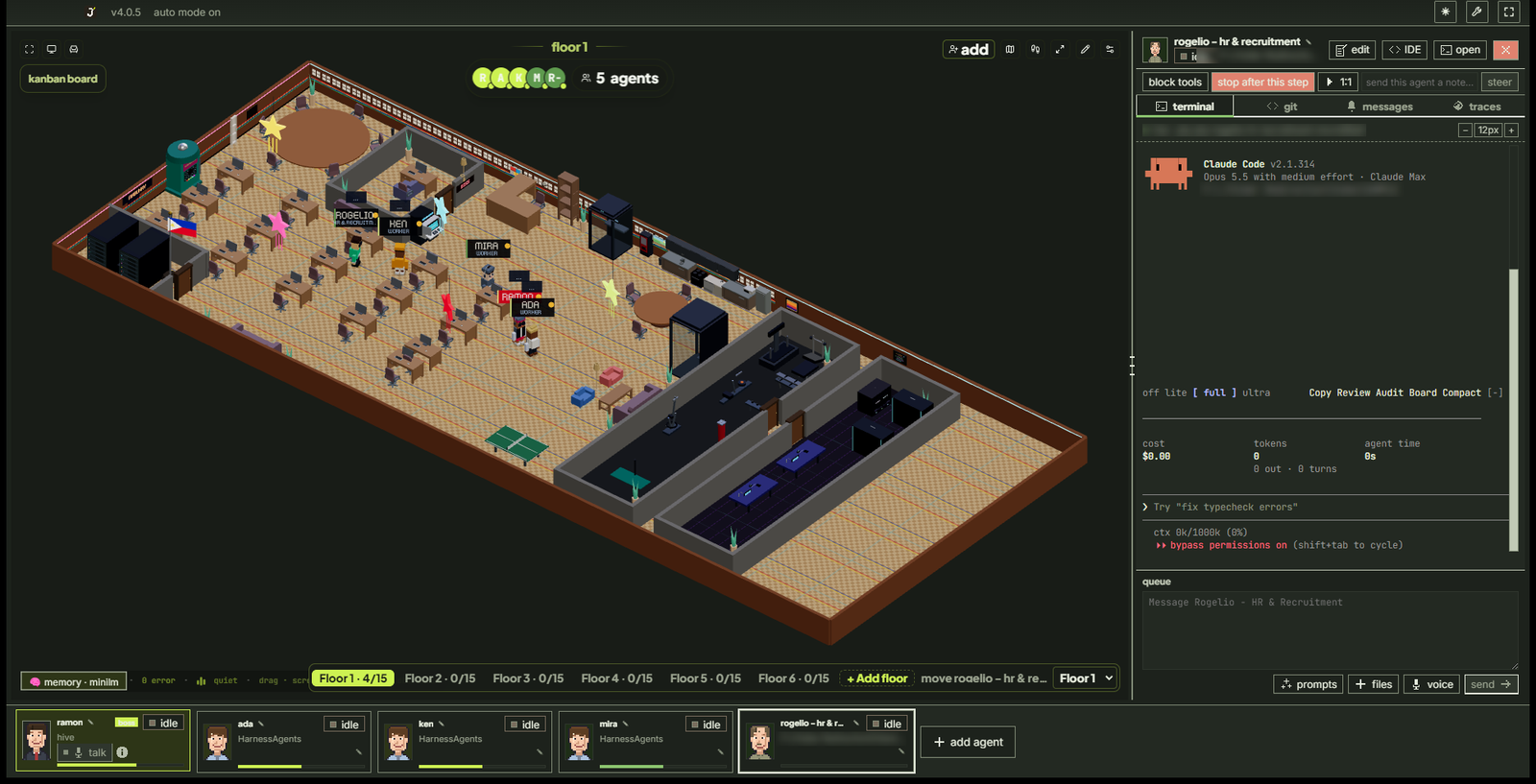
Use it in 5 minutes (no coding needed)
- Install an AI tool you like and sign in to it. Claude Code is the easiest start. DevLabs uses your own AI account; it doesn't sell AI.
- Download DevLabs from devlabs.atmt.dev and open it.
- Answer the 4 quick setup questions. The suggested answers are fine. Choose ask first if you want agents to check with you before they change anything.
- Click Ramon (the manager with the red name tag) and type what you want in plain words, for example "Make a one-page website for my bakery, as an HTML file."
- Watch the office. An agent walks to its desk and gets to work. When it's done, your file appears in Ramon's deliveries tab. Approve it, or ask for changes.
Everything else is in the plain-language User Guide.
[!NOTE] Your agents, one office, one manager. DevLabs takes the terminal-agent CLIs you already run (
claude,codex,agy,gemini,grok,kimi,qwen,opencode,crush,pi,copilotandcursor-agent) and turns them into a self-coordinating team: each agent gets long-term memory, a mailbox and a desk in a 3D office, and Ramon at the head desk plans the work and hands it out while you watch. He runs the floor; you still run him.
Contents
- Supported agents
- What it is
- How it works
- Features
- Getting started
- Architecture
- Roadmap
- Contributing
- Telemetry
- License
- Acknowledgements
Supported agents
Bring the CLI you already pay for. Every one of these runs as a real process in its own terminal, on your existing subscription and its limits. If it runs in a terminal, it can run here.
Claude Code Codex · GPT Antigravity · Gemini Gemini CLI Grok · xAI Kimi Code Qwen OpenCode Crush · Charm Pi GitHub Copilot Cursor + any custom command
Plus any model through OpenCode, Crush or pi: GLM (Z.ai Coding Plan), DeepSeek, and local models through Ollama.
What it is
DevLabs is a desktop app that wraps real terminal-agent CLIs as fully capable agents, wires them into a hive of shared files, and puts Ramon, the orchestrator, in charge. Ramon is the one agent you brief to get things done.
- Every terminal is an agent. Each
claude,codex,agy,grok,opencodeor custom session runs as a real process in a pseudo-terminal (node-pty), rendered with xterm.js. - Every agent is an avatar. Sessions appear as characters in a 3D office (Three.js), with a Philippine flag, a BOSS office for Ramon and Pinoy office chismis.
- The hive coordinates them. Agents read their memory and drain a mailbox; the router moves messages between inboxes; Ramon assigns, adjudicates and escalates only what needs you.
- Memory that lasts. Markdown memory per agent, mined into a shared, searchable store, so agents remember across sessions.
How it works
            you ── talk to ──►  ┌─────────────┐
                                │    Ramon    │  orchestrator at the head desk
                                │ (god agent) │  roster · routing · adjudication
                                │             │  board · task ledger
                                └──────┬──────┘
                                       │ assigns · routes · escalates
              ┌────────────────────────┼────────────────────────┐
              ▼                         ▼                         ▼
        ┌───────────┐            ┌───────────┐            ┌───────────┐
        │  agent A  │  message   │  agent B  │  message   │  agent C  │
        │ provider  │ ─────────► │ provider  │ ─────────► │ provider  │
        │  + memory │            │  + memory │            │  + memory │
        └───────────┘            └───────────┘            └───────────┘
              └──────── shared hive: memory · mailbox · board · log ────────┘
- You hire agents: each is a normal terminal process with its own working folder, identity and engine.
- Agents collaborate through the hive: a local git repo of plain files. They write to their own
outbox/; the router delivers into the recipients'inbox/. Only the harness commits, so agents never fight over git's lock. - Ramon runs the floor: he reads every request, settles routine ones himself and escalates only the critical ones (spend, destructive operations, scope changes) to you.
- Everything is visible: watch the floor, read any terminal live, type back into it, browse its files and its git history.
See HIVE.md for the multi-agent design, SPEC.md for the terminal and
event plane, and DESIGN.md for the visual system.
Features
Talk to one agent, not twelveRamon is the only agent you brief. He plans the work, hands it to the right agent, routes the traffic between them and escalates the few things that actually need you. Turn on Talk to brief him by voice. |
Hire a whole team as one fileA floor is a team of agents you can import or export as one |
Hire one agent in a few clicksPick the engine, the model and the autonomy, give it a desk, and it starts working. Share a single agent as a hire manifest or link; importing only fills in the form, and you still press start. See docs/hires. |
Let agents work in your shopConnections let agents work inside Pancake POS (orders, products, stock, sales), Webcake (landing pages), GitHub and more. Keys stay encrypted on your computer, and for hosted connectors the agent never sees the key at all. See CONNECTORS.md. |
A whole building, not just one floorOpen a new floor for another repo or folder, each with its own agents, tasks and memory, up to 200 floors at once. Ramon manages the building, and agents on different floors can message each other. |
Autonomy with a leashSet how far each agent may go on its own. Token budgets per agent and per floor, approvals for spend and destructive operations, and a circuit breaker that steers, constrains, then stops anything that loops or runs away. |
Finished files come back to youAgents hand back finished work (HTML, Markdown, PDF, DOCX, images, spreadsheets, slides) as Deliveries. Review them in the Command Center tray and save them where you want. |
Set up onceThe onboarding wizard checks what you already have and offers to install what's missing. A missing CLI shows as an Install card in the agent's terminal instead of an error. |
The floor
- Every terminal is a real agent. Twelve engines or a custom command, each in its own PTY, rendered with xterm.js.
- Every agent is an avatar in a 3D office, with desks, a kitchen, a gym, a QA lab, a server room and a BOSS office for Ramon.
- Office floors you can add and delete. Up to 15 agents per office floor; + Add floor opens a new one and − Delete floor removes an empty one (the floors above move down, keeping their layouts).
- Per-agent git worktrees. Optional isolation so parallel agents never collide on a branch; the base checkout's
node_modulesis linked in. - New project floor. Settings → General opens a clean floor for an existing repo or folder.
- Reset with backup. Clear a floor's agents, tasks and memory, with an optional restorable ZIP.
- A building you can ride. Floors are stacked like a building with status-lit windows; click one and an elevator takes you there. Smooth zoom and pan, and the scene only redraws when something moves.
- Office themes. Export the layout as one
.office-theme.json, import one (checked against a strict schema, with a preview, backup and undo), or let your own AI design one.
Memory and coordination
- The hive: per-agent memory, atomic-file mailboxes, a shared board, an append-only event log and single-committer git.
- Shared memory search across every agent, plus a knowledge graph of your own documents.
- Restart & Continue: redraw a garbled terminal without losing the conversation.
- Agent Browser: agents drive a real headless Chrome (Vercel's agent-browser) to open, read and use websites, each in its own session. On by default; one switch turns it off.
- 268 ready-made personas from agency-agents, plus freelancer roles (client relations, proposals, contracts, invoicing, portfolio) and six DevLabs skills (3D games, Three.js, Anime.js, UI/UX, DevOps, security research).
- ATTITUDE.md: write once how agents should talk to you; every new agent follows it.
Control and safety
- Human gates: spend, scope and destructive operations come to you. Steer mid-run or stop gracefully.
- Circuit breaker: a steer → constrain → stop ladder for agents that loop, repeat errors or blow their budget.
- Budgets and cost: per-agent token caps and real cost read from transcripts.
- Your keys never reach agents: every key is encrypted by your OS. Connector keys and AI provider keys (for OpenCode, Crush, Pi, Qwen) go through a local proxy, so agents only get a temporary pass.
- Feature switches: Settings → General → Features turns each optional feature off.
- Resource use: Settings → General shows DevLabs' CPU and memory per agent. Firing an agent closes everything it started, and Ramon can fire agents for you.
Command Center
- Kanban tasks, an Ask me inbox for agent questions, weekday schedules, live fleet monitoring, memory search, activity log and Deliveries.
- Skills: browse and install skills from the DevLabs skills repository. Each file is checked against a pinned commit and SHA-256 hash.
- Built-in Monaco IDE: file tree, editor tabs and git rails (changes, history, compare) with a commit graph and diffs.
Getting work in and out
- Slack and webhooks: message a channel or POST a webhook, and Ramon picks up the work and replies in the thread. Inbound servers listen on your computer only and are reached through a tunnel.
- Voice: talk to Ramon through OpenAI's Realtime API or Google's Gemini Live with your own key, or dictate into the message box with Free Flow (Groq Whisper).
- Your language: English, Simplified Chinese and Arabic, with right-to-left layout for Arabic.
- Updates in one click from the public releases feed; no GitHub account or token needed.
Getting started
Download the app
Most people want this one. DevLabs is free and open source, with no account or sign-in. Installers for macOS, Windows and Linux are on devlabs.atmt.dev and the releases page. Install it, open it, and the wizard takes you the rest of the way.
You still need at least one agent CLI on your computer, signed in with that company's account. Settings → Prerequisites lists what's missing.
Build from source
Everything below is for contributors and for people who want an unreleased build.
Prerequisites
- macOS, Windows or Linux.
- Node.js 18+ and npm.
- A C/C++ toolchain for the native modules (
node-pty,better-sqlite3): Xcode Command Line Tools on macOS, Visual Studio Build Tools (C++ workload) on Windows. - At least one supported agent CLI on your
PATH.
Install and run
git clone https://github.com/jeffreycayao/Dev-Labs.git
cd Dev-Labs
npm install        # postinstall rebuilds the native modules against Electron
npm run dev        # launches the app with hot reload
No toolchain on Windows? Install with npm install --ignore-scripts, run
node node_modules/electron/install.js, fetch the prebuilt SQLite binary with
npx prebuild-install --runtime electron --target <electron-version> inside
node_modules/better-sqlite3, then run node tools/patch-node-pty-conpty.cjs.
Other scripts
| Script | What it does |
|---|---|
npm run typecheck |
TypeScript checks (main + renderer) |
npm run test:focused |
Node test suite |
npm run build |
Production build |
npm run dist |
Build installers into dist/ |
npm run version:patch / :minor / :major |
Raise the app version before every source push. See RELEASE.md |
If
node-ptyfails to load after an Electron upgrade, runnpm installagain (thepostinstallhook rebuilds it against the current Electron).
Architecture
Two data planes feed one renderer: a terminal plane that owns the PTYs, the filesystem and git,
and an event plane that runs the hive, the hook server and the router. The renderer reaches both
only through one typed bridge (window.cth).
The diagrams and the module-by-module map are in docs/ARCHITECTURE.md.
Contributors and AI coding agents should read AGENTS.md first. Brand names, slugs
and the release repo are in src/shared/brand.ts; colors in
src/renderer/src/design/tokens.css.
Roadmap
Shipped through v3.0.0: open source under MIT with no account, the J monogram rebrand, new
project floors, agents that stay hired, Deliveries, a building of up to 200 floors, floors and hires
as shareable files, Pancake POS and Webcake connectors, the skills library, Restart & Continue for
every engine, and English, Simplified Chinese and Arabic. Full history in
CHANGELOG.md.
Next up:
- Connectors for every engine: today connectors attach to Claude Code agents only.
- More Philippine business connectors and ready-made floors.
- One code editor: move the remaining CodeMirror editors to Monaco.
- Filipino interface language.
Contributing
Contributions are welcome. Start with CONTRIBUTING.md and
AGENTS.md. The short version: fork, npm install && npm run dev, keep
npm run typecheck and the tests green, put every UI string in all three languages, and derive any
new UI from the DESIGN.md tokens.
Questions or bugs: open an issue. Security
problems: see SECURITY.md.
Everyone whose code is in this project is listed in CONTRIBUTORS.md,
including Chaitanya Giri and the Munder Difflin contributors whose work this fork is built on.
Telemetry
Official builds can send a small set of anonymous usage events (app opened, agent started,
feature used), never prompts, code, file paths or agent output. Turn it off in Settings or with
DO_NOT_TRACK; builds you compile yourself send nothing. The full event list is in
TELEMETRY.md, and the Privacy Policy covers the rest.
License
[!IMPORTANT] Asset licensing. The bundled pixel art (tilesets and maps) is Modern Interiors - RPG Tileset [16X16] by LimeZu, used under the Complete Version licence. Credit to LimeZu is required by that licence and must stay in place. The office cast is not LimeZu art; it is drawn in code in
portraitArt.ts. Seesrc/renderer/src/assets/ATTRIBUTION.md.
The source code is licensed under the MIT License, © 2026 Chaitanya Giri and
jepoy.dev. The MIT grant covers the code only; the bundled pixel art is licensed
separately and carved out in LICENSE-ASSETS. Other third-party components are
listed in THIRD_PARTY_NOTICES.md. Claude, Codex, Gemini, Cursor and
other names belong to their owners and are used only to describe compatibility.
Acknowledgements
- Munder Difflin by Chaitanya Giri and its contributors: the open-source harness this app is forked from.
- LimeZu for the Modern Interiors pixel-art tilesets (Complete Version licence).
shahar061/the-officefor the office tileset and map vendoring.- Developer: Jeffrey Cayao (jepoy.dev · facebook.com/jeffcayao.social), who extends, localizes and maintains DevLabs.
- Brand colors by Vee Trimidal (facebook.com/veetrimidal).
- Claw3D by Luke The Dev (MIT) for the 3D office this one is built from, with furniture models and the kenpixel font by Kenney (CC0).
- Git (GPL-2.0) by Linus Torvalds, Junio C Hamano and the Git community, Git for Windows, Git LFS and the GitHub CLI, which DevLabs drives from your own installation (none are bundled).
- Fonts: Press Start 2P, Inter, Plus Jakarta Sans and JetBrains Mono (SIL Open Font License).
- Bundled agent skills: SkillSpector by NVIDIA, ponytail by DietrichGebert and security-audit by Cloudflare. The DevLabs-written skills for 3D game development, Three.js and Anime.js describe those MIT-licensed libraries without bundling them.
- agency-agents by Michael Sitarzewski and contributors (MIT): the 268 personas under Add agent → Agency ship verbatim in
resources/agency-agents, and the freelancer role templates (client relations, proposals and quotes, contract review, scope guardian, invoicing, handover, portfolio) adapt its instruction patterns. - driver.js by Kamran Ahmed (MIT) for the guided tour (Help → Take a tour).
- Connectors: the Model Context Protocol reference servers, Context7 by Upstash, and the hosted MCP servers of Fireflies.ai, systeme.io, HighLevel, Pancake POS and Webcake.
- Agent Browser: agent-browser by Vercel Labs (Apache-2.0), run from npm on demand (pinned, not bundled) together with the Chrome for Testing it downloads.
- Electron · React · Three.js · React Three Fiber · xterm.js · node-pty · electron-vite · Monaco · better-sqlite3 · i18next · Lucide · Zustand for the libraries this is built on.