
jeemok/better-npm-audit
jeemok/better-npm-audit has 144 GitHub stars and 31 forks. Star changes are not measured yet. Last checked 2026-11-11 01:13 UTC. Last push 2026-11-05.
The goal of this project is to provide additional features on top of the existing npm audit options
Measured star growth
- in 24h
- Update delayed
- in 7 days
- Collecting history
- in 15 days
- Collecting history
- in 1 month
- Collecting history
Net star changes over overlapping periods, not daily totals. Missing measurements are left blank. Stars measure attention, not software quality.
README.md
OriginalBetter NPM Audit
npm audit fails your build on every known vulnerability, including the ones you have already reviewed and can't fix yet. better-npm-audit wraps npm audit (and pnpm audit) so you can accept a vulnerability with a reason and an expiry date, and the build only fails on what is new.





- Accept a vulnerability by ID, module name (with wildcards or a version range) or dependency tree, with notes and an expiry date
- Fail only on vulnerabilities at or above a severity level
- Machine-readable
--jsonoutput and stable exit codes, for CI and AI agents - Works with npm and pnpm
Quick start
npx better-npm-audit audit
Or add it to your project, so it runs in your CI:
npm install --save-dev better-npm-audit
{
  "scripts": {
    "audit": "better-npm-audit audit"
  }
}
npm run audit exits 0 when nothing unhandled is found at or above --level (default info), and 1 otherwise. To accept a vulnerability you have reviewed, add its ID to a .nsprc file with a note and an expiry, or ignore a module with -m. You can also install it globally (npm install -g better-npm-audit).
Requires Node.js 18 or later. On Node.js 14.6 - 16, use version 3: see Version support.
What it looks like
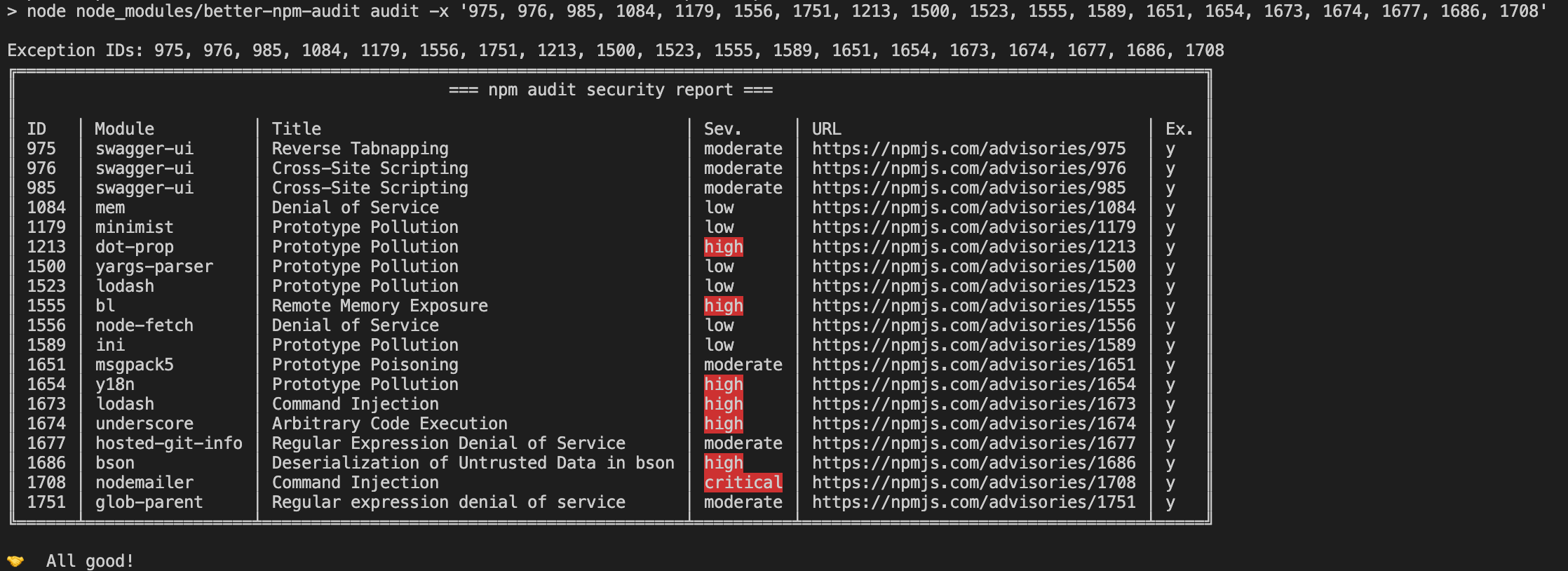
Unhandled or newly reported vulnerabilities will be highlighted:
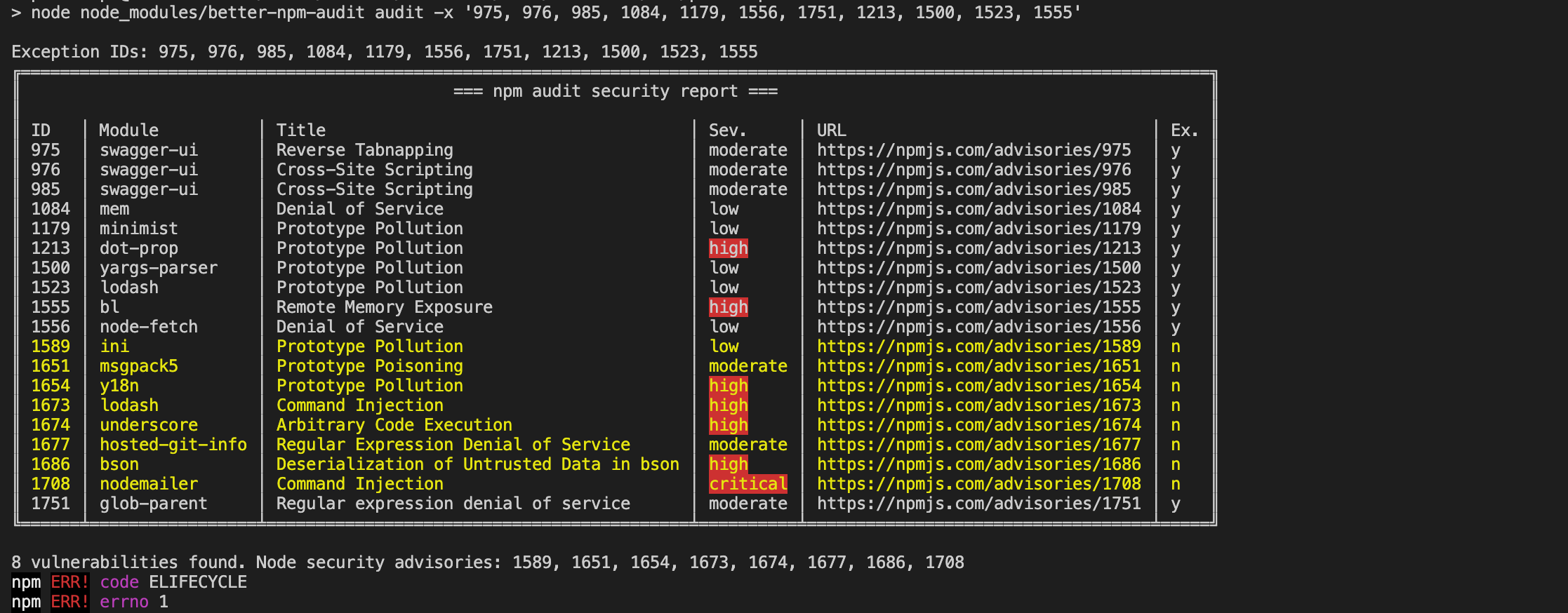
Unused exceptions will be notified:
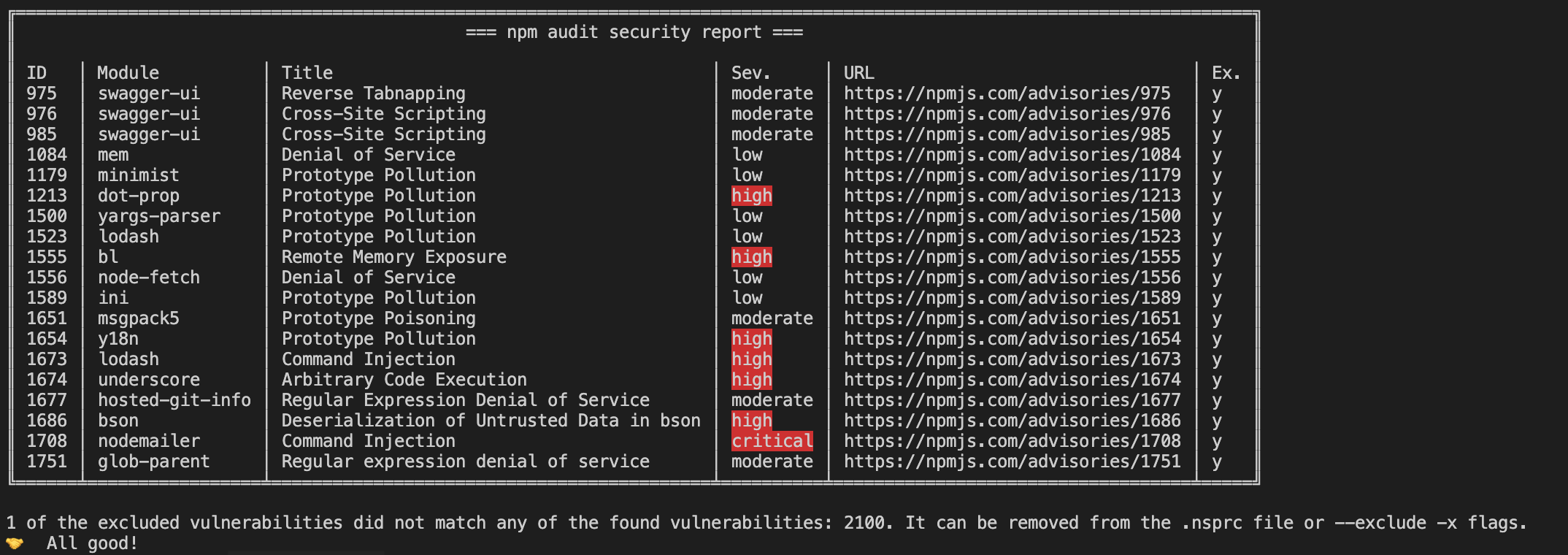
Managing exceptions with .nsprc
You may add a file .nsprc to your project root directory to manage the exceptions. The file can be written as JSON or YAML (.nsprc is read as YAML, which also accepts JSON). For example:
{
  "1337": {
    "active": true,
    "notes": "Ignored since we don't use xxx method",
    "expiry": 1615462134681
  },
  "4501": {
    "active": false,
    "notes": "Ignored since we don't use xxx method"
  },
  "CWE-471": "CWE ID is acceptable",
  "GHSA-ww39-953v-wcq6": "GHSA ID is acceptable",
  "https://npmjs.com/advisories/1213": "Full or partial URL is acceptable too"
}
The same exceptions in YAML:
'1337':
  active: true
  notes: Ignored since we don't use xxx method
  expiry: '2025-12-31'
CWE-471: CWE ID is acceptable
Generating exceptions with JavaScript
Instead of a static .nsprc, you can put a .nsprc.cjs (or .nsprc.js) file in your project root. It exports an object with the same structure, or a function (sync or async) that returns one, so you can build the exceptions from an API or another file:
// .nsprc.cjs
module.exports = async () => {
  const response = await fetch('https://example.com/approved-advisories.json');
  return await response.json(); // { "1337": { "notes": "...", "expiry": "2026-12-31" }, ... }
};
If both exist, the JavaScript file wins and .nsprc is ignored. The file is run with your user's permissions, so only use it in a project you trust. If it throws, or doesn't return an object, the audit exits with an error.
Fields
| Attribute | Type | Description | Default | Examples |
|---|---|---|---|---|
active |
Boolean | If the tool should use it for exception | true |
true |
expiry |
String | Number | Human-readable date string, or a UNIX timestamp in seconds or milliseconds | - "2020-01-31" - "2020/01/31" - "01/31/2021, 11:03:58" - "1 March 2016 15:00" - "1 March 2016 3:00 pm" - "2012-01-26T13:51:50.417-07:00" - "Sun, 11 Jul 2021 03:03:13 GMT" - "Thu Jan 26 2017 11:00:00 GMT+1100 (Australian Eastern Daylight Time)" - 1615462134681 |
|
notes |
String | Notes related to the vulnerability. |
Note: the
expiryexamples above are shown as JSON, so date strings must be double-quoted (YAML is more relaxed, e.g.expiry: '2025-12-31'). A number is read as seconds since the epoch if it is below 100 billion (any 10-digit Unix timestamp), and as milliseconds otherwise (13 digits). Before 4.2.0, numbers were always read as milliseconds.
When using a .nsprc file, a report will be displayed when it starts running:
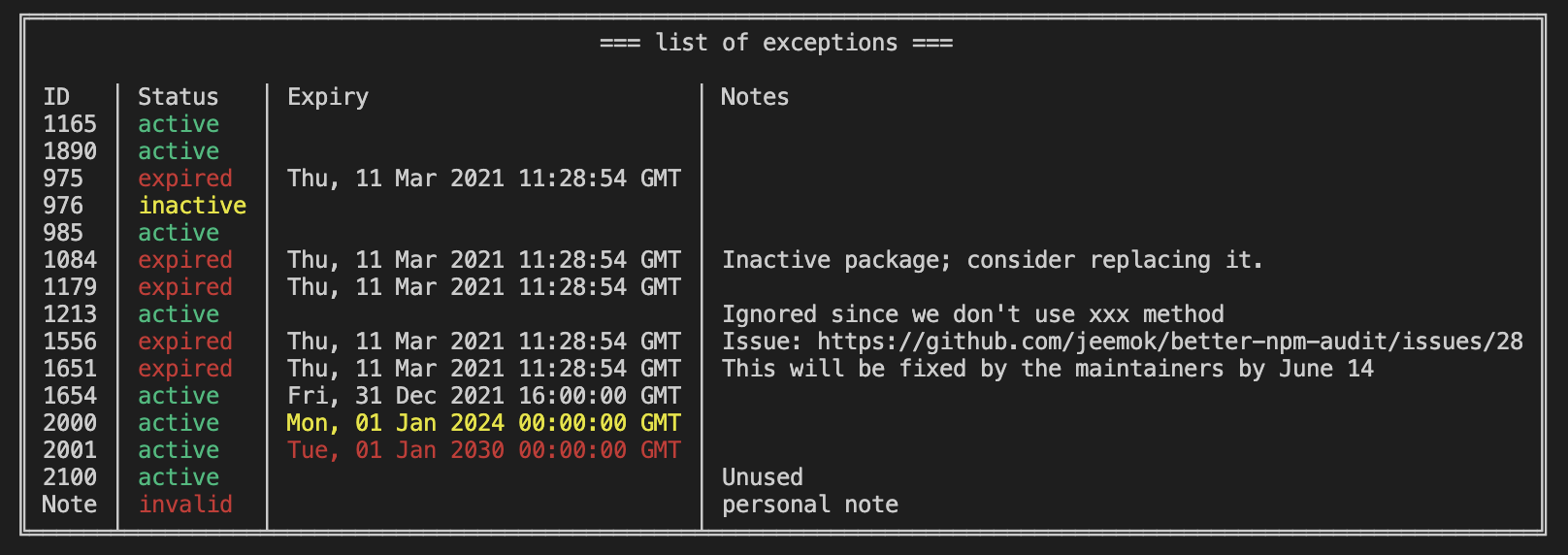
Note: the expiry date will be styled in yellow and red color if it is detected more than one or five years ago.
Usage
Filter vulnerability table
You can filter the vulnerability table to show only vulnerabilities at or above a specified severity level using the --filter-table flag. This is useful for reducing noise in the output while maintaining the original audit behavior for exit codes.
# Filter table to show only high and critical vulnerabilities
better-npm-audit audit --filter-table high

# Filter table to match the audit level
better-npm-audit audit --level moderate --filter-table

# Set different levels for exit behavior vs table display
better-npm-audit audit --level high --filter-table moderate
Note: The --filter-table flag only affects what vulnerabilities are displayed in the table. The audit level (--level) still controls the exit behavior and vulnerability counting.
Ignore a module at a specific version
--module-ignore accepts a version or semver range after the name, so the ignore stops applying when you upgrade:
better-npm-audit audit -m [email protected],@myscope/*@^2.0.0
The ignore applies only if every installed copy of the vulnerable module satisfies the range. The installed versions come from the audit report on npm 6 and pnpm, and from package-lock.json on npm 7+ (lockfile version 2 or 3). If a version can't be determined, the ignore is not applied and it is listed as an unused exception.
Ignore a package and its dependencies
--ignore-dependencies-of ignores a package and the vulnerable modules that it brings in, for example a build tool you've judged safe:
better-npm-audit audit --ignore-dependencies-of node-sass
A vulnerable module is ignored only if every way it is installed goes through one of the named packages. If your project also depends on it directly, or through another package, it is still reported. The package itself is ignored too. Names can use * wildcards and be comma separated; versions (as in --module-ignore) are not supported here. It does not appear in the unused exceptions message when nothing matches, so check the table after you add it.
Production or dev dependency
Add the Scope column to see whether each vulnerability is reachable from your production dependencies (prod) or only from devDependencies (dev):
better-npm-audit audit --include-columns Module,Severity,Scope
To work this out, the tool runs a second audit with --omit=dev (--prod on pnpm) and marks everything that appears in it as prod. That doubles the audit time, which is why the column is opt-in. With --production every vulnerability is prod and no second audit runs. The scope is also in the --json output.
JSON output
Use --json to get the result as a single JSON document on stdout, for example to feed a dashboard or another script. The table and all other messages go to stderr, and the exit code is unchanged (1 if there are unhandled vulnerabilities, otherwise 0).
better-npm-audit audit --json > audit.json
better-npm-audit audit --json 2>/dev/null | jq '.summary'
{
  "passed": false,
  "auditLevel": "info",
  "summary": { "total": 2, "unhandled": 1, "bySeverity": { "moderate": 1, "critical": 1 } },
  "unhandledIds": ["1097677"],
  "unusedExceptionIds": [],
  "unusedExceptionModules": [],
  "vulnerabilities": [
    {
      "id": "1097677",
      "module": "minimist",
      "title": "Prototype Pollution in minimist",
      "paths": ["minimist"],
      "severity": "critical",
      "url": "https://github.com/advisories/GHSA-xvch-5gv4-984h",
      "fix": "Major",
      "excepted": false
    }
  ]
}
vulnerabilities always lists everything found; --filter-table and --include-columns only affect the table. If the audit output can't be processed, the document is { "passed": false, "error": "..." } and the exit code is 1.
Using it from scripts and AI agents
Everything an agent needs is in --json, the exit code and --help:
better-npm-audit audit --json -l high 2>/dev/null
- Exit code:
0means nothing unhandled at or above--level;1means unhandled vulnerabilities, or the audit could not run (no lockfile, registry unreachable, invalid config). - stdout has one JSON document and nothing else; the table and messages are on stderr. Read
passedfirst, thenunhandledIds. A failure to audit is{ "passed": false, "error": "..." }. - Each vulnerability has
id,module,title,paths,severity,url,fix(Yes,Major,No,N/A),scope(prod,dev, orN/A; add-i Scopeto fill it) andexcepted.fix: "Yes"meansnpm audit fixcan resolve it,Majormeans it needs a breaking upgrade. - Triage order: fix what you can (
fixisYes), then decide on the rest. Ignore a finding only when you know it doesn't apply, and record why in.nsprcwithnotesand anexpiry(--require-notes --require-expirymakes the audit fail when they're missing). Prefer-m pkg@versionover-m pkgso the ignore ends when the package changes. - Don't put exceptions on the command line (
-x,-m) for anything that should last: they leave no note or expiry. Edit.nsprc(or.nsprc.cjs) instead. - Run
better-npm-audit audit --helpfor the current flags. A short machine-readable summary of this section is inllms.txt.
pnpm
If your project has a pnpm-lock.yaml and no package-lock.json, better-npm-audit runs pnpm audit instead of npm audit, and everything else (exceptions, --level, --json, ...) works the same. pnpm must be installed. To choose explicitly, use --package-manager pnpm (or npm). --production becomes --prod and --skip-optional becomes --no-optional. This was tested with pnpm 10; Yarn is not supported.
Options
| Flag | Short | Description |
|---|---|---|
--exclude |
-x |
Exceptions or the vulnerabilities ID(s) to exclude; the ID can be the numeric ID, CVE, CWE or GHSA ID |
--module-ignore |
-m |
Names of modules to exclude; supports * wildcards, e.g. @myscope/*, and an installed version or range, e.g. [email protected] (see below) |
--ignore-dependencies-of |
Ignore vulnerabilities in modules that are only installed through these packages (see below); supports * wildcards |
|
--level |
-l |
The minimum audit level to validate; Same as the original --audit-level flag |
--filter-table |
-f |
Filter the vulnerability table to show only vulnerabilities at or above the specified level. Accepts a level (info, low, moderate, high, critical) or can be used as a boolean flag to filter by the audit level |
--production |
-p |
Skip the devDependencies |
--skip-optional |
Skip the optionalDependencies |
|
--json |
Print the result as JSON on stdout; the table and other messages go to stderr | |
--package-manager |
npm or pnpm; detected from the lockfile by default |
|
--registry |
-r |
The npm registry url to use |
--include-columns |
-i |
Columns to include in report. Available columns: ID, Module, Title, Paths, Severity, URL, Fix (opt-in; Yes, Major or No, N/A on npm v6), Scope (opt-in; prod or dev, see below), Ex. (e.g. -i Module,Title,Severity) |
--require-notes |
Fail if any .nsprc exclusion has no notes (also fails when --exclude is used, as it cannot carry notes) |
|
--require-expiry |
Fail if any .nsprc exclusion has no expiry date (also fails when --exclude is used) |
|
--max-expiry-days |
Fail if any .nsprc exclusion expires more than this many days from today |
Environment Variables
| Variable | Description |
|---|---|
NO_COLOR |
Support the no-color standard to allow users use the tool without colored output. |
NPM_CONFIG_AUDIT_LEVEL |
Used in setting the audit level. Note: this will be disregard if the audit level flag is passed onto the command. |
Version support
| Version | Node.js | Status | Install |
|---|---|---|---|
| 4.x | 18 or later | Current. New features and fixes. This is the latest release |
npm i better-npm-audit |
| 3.x | 14.6 or later | Maintenance: security and critical fixes only, until May 2027 | npm i better-npm-audit@3 |
| 2.x and older | - | End of life, no fixes | - |
Should I use 4.x?
Yes, if you run Node.js 18 or later (check with node -v). 4.x is where all development happens and it is what npm i better-npm-audit installs.
If you are on Node.js 14.6 - 16, pin version 3 so you don't get 4.x by accident, for example npm i -D better-npm-audit@3 or npx better-npm-audit@3 audit. Node.js 14 and 16 are end-of-life upstream, so we recommend upgrading Node.js.
What changed from 3.x to 4.x?
Breaking: 4.x requires Node.js 18 or later. That is the only breaking change. Flags, the .nsprc format, output and exit codes are the same as in 3.13.1, so upgrading is a matter of updating Node.js and the version in your package.json or CI script.
Only in 4.x (3.x will not get these):
| Since | Feature |
|---|---|
| 4.1.0 | --json output |
| 4.1.0 | pnpm support (pnpm audit, detected from the lockfile) |
| 4.1.0 | JavaScript exceptions config (.nsprc.cjs / .nsprc.js) |
| 4.1.0 | --module-ignore pkg@version, --ignore-dependencies-of, and the Scope column |
3.13 and 4.0 have the same features: YAML .nsprc, --filter-table, --skip-optional, --module-ignore wildcards, the Fix column and the exception policy flags (--require-notes, --require-expiry, --max-expiry-days). The changelog has the full list.
End of life for 3.x
Version 3 gets security and critical fixes until May 2027, six months after 4.x became latest on npm (November 2026). After that it is end of life and the v3 branch is archived. Please plan to move to Node.js 18+ and 4.x before then.
npm audit formats
npm 7 (2020) changed the npm audit output, in both the table and --json, and dropped identifiers such as cves, cwe and github_advisory_id, leaving mostly the advisory URL. better-npm-audit reads both formats: v6 (advisories) and v7 and later (vulnerabilities), plus the v6-style output of pnpm audit. CI runs the tests and a real audit against the latest npm on every change, so a new npm release that changes the output shows up quickly.
| Docs | Link |
|---|---|
| npm 7 release notes | https://github.blog/2020-10-13-presenting-v7-0-0-of-the-npm-cli/ |
Official npm audit docs |
https://docs.npmjs.com/cli/commands/npm-audit |
Sample JSON outputs of each format are in the codebase: v6, v7, v8 and pnpm.
Changelog
You can find the changelog here.
Contributors
Ian Wright, Edwin Taylor, Maarten Hus, Alex Burkowsky, David M. Lee, Kyle Clark, Guillermo Pincay, Grzegorz Pawłowski, CSLTech, Paul Clarkin, mgdodge, Ricky Sullivan, Sam Gregory, Tristan WAGNER, Zak, Eric Cornelissen, Gaurav Chinavle, WhittJS, Suraj Balwani, BL4CK570RM, PersonligaPersson, FreddieDev
If you like this project,

Explore related projects
trimstray/the-book-of-secret-knowledge
A collection of inspiring lists, manuals, cheatsheets, blogs, hacks, one-liners, cli/web tools and more.
257,596 starsHack-with-Github/Awesome-Hacking
A collection of various awesome lists for hackers, pentesters and security researchers
125,103 starsswisskyrepo/PayloadsAllTheThings
A list of useful payloads and bypass for Web Application Security and Pentest/CTF
82,583 starscaddyserver/caddy
Fast and extensible multi-platform HTTP/1-2-3 web server with automatic HTTPS
78,959 stars