
jayin92/toefl-prep-tool
jayin92/toefl-prep-tool has 7 GitHub stars and 1 forks. GitHot measured +1 stars in 24 hours. Last checked 2026-11-14 18:58 UTC. Last push 2026-11-13.
Measured star growth
- in 24h
- +1
- in 7 days
- Collecting history
- in 15 days
- Collecting history
- in 1 month
- Collecting history
Net star changes over overlapping periods, not daily totals. Missing measurements are left blank. Stars measure attention, not software quality.
About
Local practice app for the TOEFL iBT (2026 format): timed Drills, exam-condition Simulations and Full-Test Runs for all four sections, with AI-scored Speaking and Writing. Unofficial; not affiliated with ETS.
AIREADME.md
OriginalTOEFL Prep Tool
English | 繁體中文
A practice app for the TOEFL iBT® test in the format ETS introduced in January 2026. It runs on your own computer and covers all four sections: timed Drills, exam-condition Simulations and full-length Full-Test Runs, with Speaking and Writing scored by AI and Reading and Listening scored from the answer key.
It is for test takers preparing on their own who want realistic practice and specific feedback: what cost each point, a rewrite of their own answer, and an estimate of where each section stands.
Every band and score this app shows is an unofficial estimate, not a TOEFL score. TOEFL and TOEFL iBT are registered trademarks of ETS. This project is not affiliated with ETS and is not endorsed by it.
Screenshots
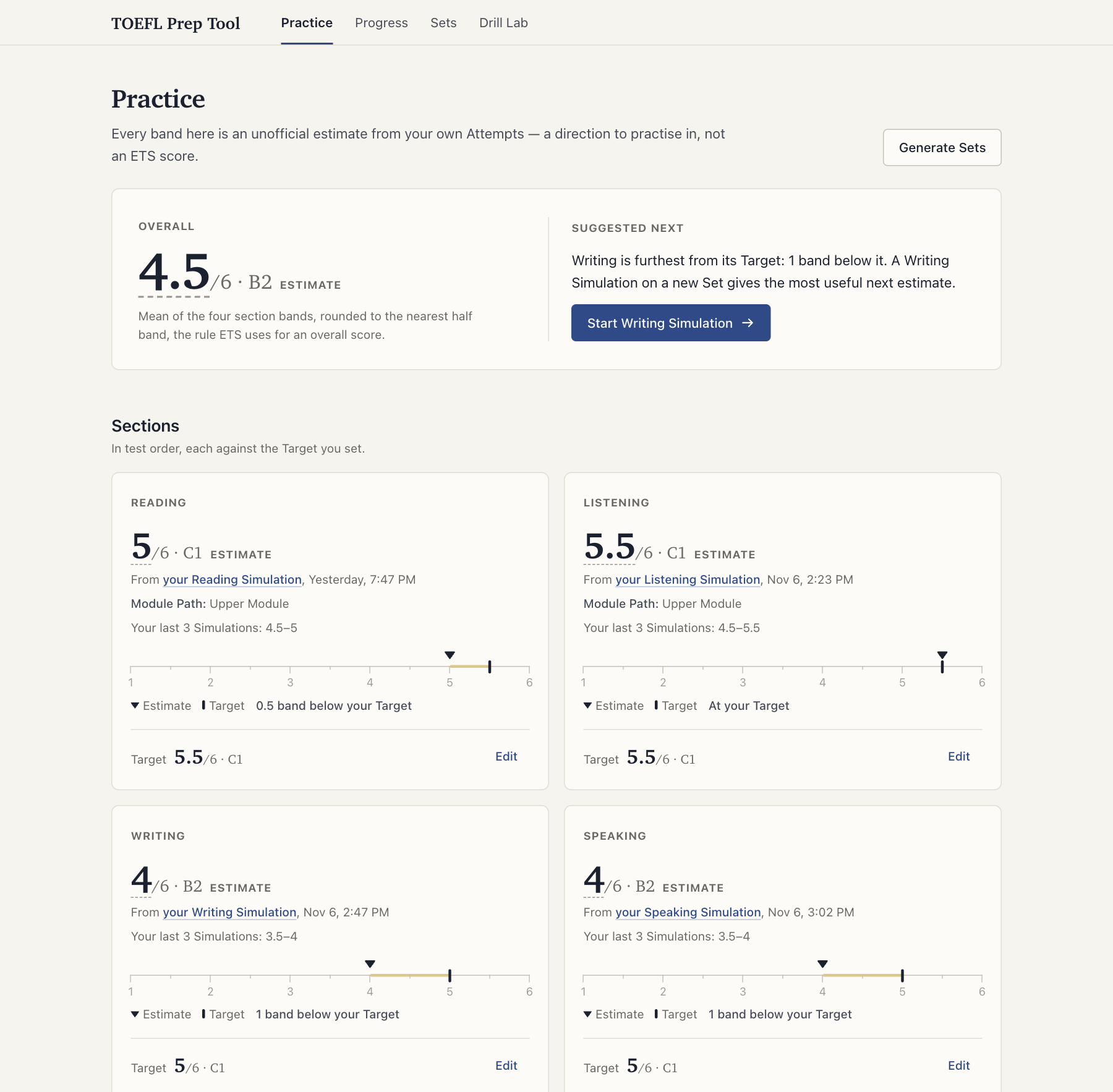
The Dashboard: a Band Estimate for each section against the Target you set, and one suggested next step.
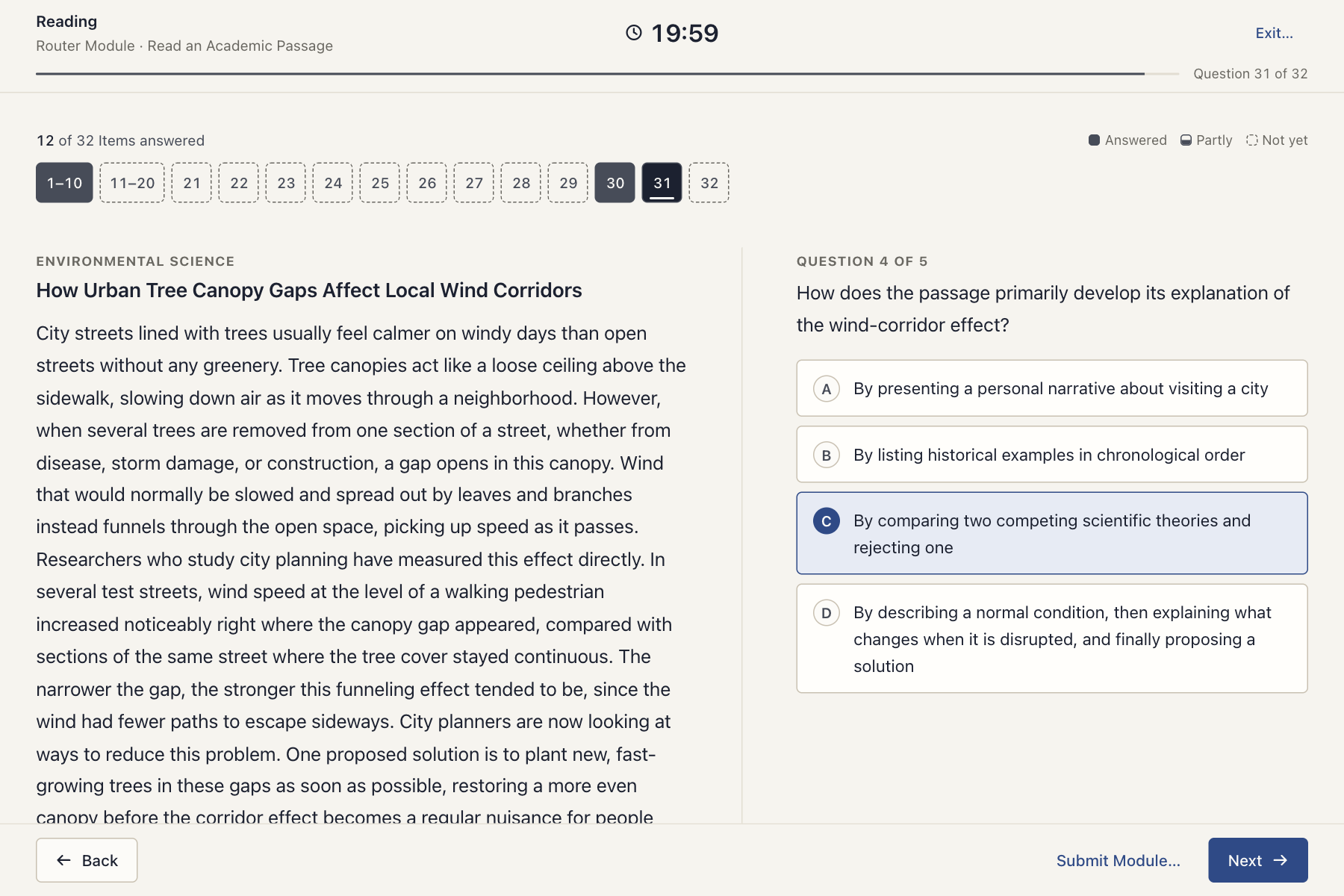
A Reading Simulation, part-way through its Router Module.
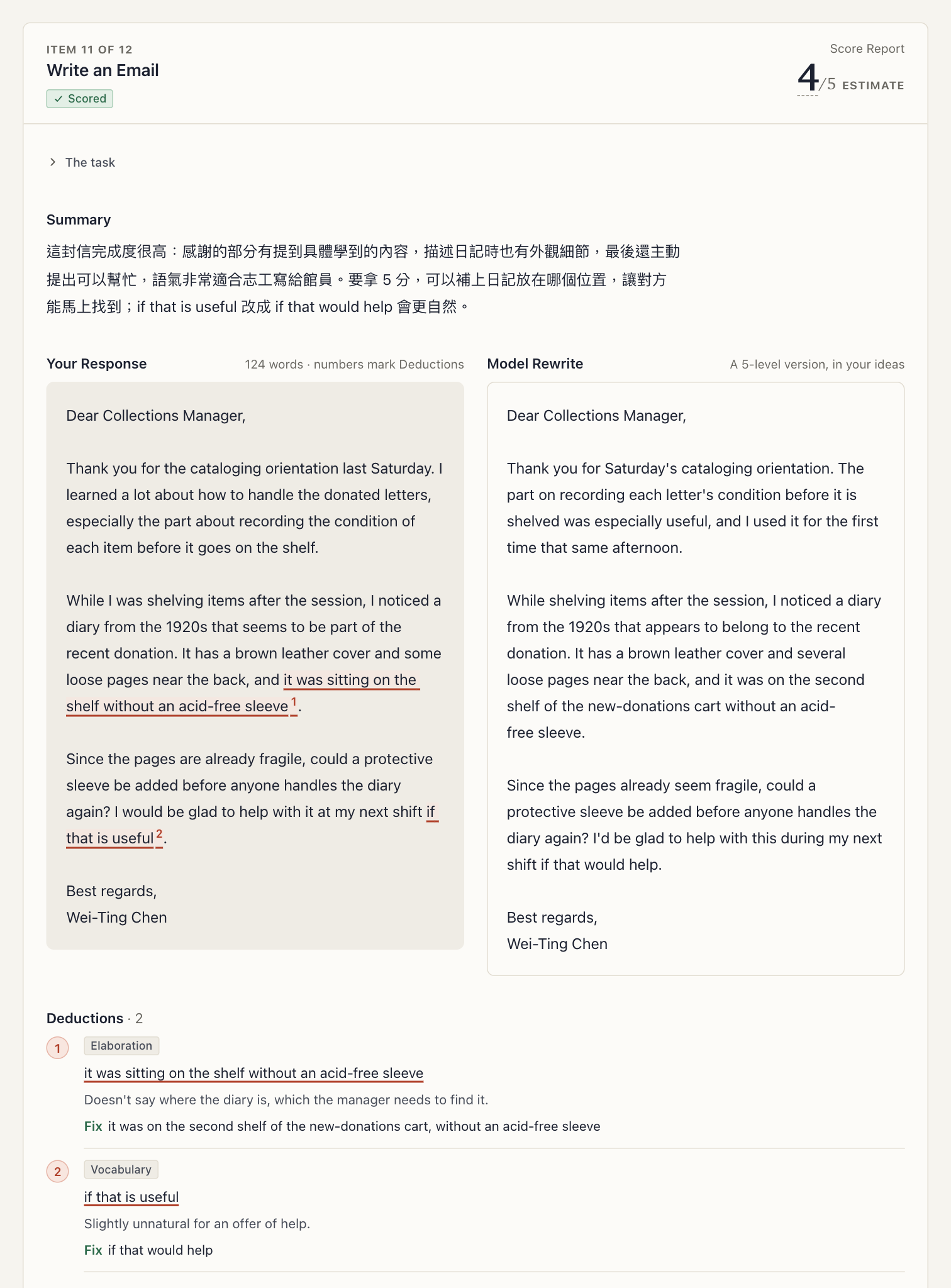
An Attempt review: the Score Report for an email, with each Deduction marked in the Response and a Model Rewrite beside it.
These show the demo data (npm run demo), an invented User's practice, not anyone's real history.
Quick start
Set up with a coding agent
If you already use Claude Code or Codex, it can do the setup. Clone the repository, start the agent from the repo root and paste:
Set up this TOEFL prep app so I can practise. Read README.md first. Check that Node matches .nvmrc
and that ffmpeg is on PATH, and tell me which of `claude auth status` / `codex login status`
succeeds. Run `npm ci`, copy .env.example to .env, and tell me which lines of .env to fill in
myself. Never ask me to paste an API key into this chat. Then run `npm start` and tell me when
http://localhost:5173 is up. If anything fails, show me the exact error before working around it.
Set up by hand
You need Node.js at the version in .nvmrc (24) and Chrome. Recording uses
the browser's MediaRecorder, and Chrome is the browser this is tested in.
git clone https://github.com/jayin92/toefl-prep-tool.git
cd toefl-prep-tool
nvm use            # or install the Node version in .nvmrc another way
npm ci
cp .env.example .env
npm start
Open http://localhost:5173. npm start builds the client first, so the first start takes a
moment. The .env file must exist even if you leave it as copied.
Just want a look first? Run npm run demo to see every screen of the app (the Dashboard's Band
Estimates, Score Reports with their Deductions marked, Full-Test Run reports) filled with three weeks
of invented practice, with no API keys or CLI needed. It runs in its own temporary directory and on
its own ports, never touches your practice data, and is described in
docs/demo-data.md.
What works straight away, with no keys: Reading and Listening Drills and Simulations, with their review and Band Estimates; scoring runs entirely on your machine. Build a Sentence Drills work too. The bank ships with Sets for all four sections.
What each piece adds:
- Claude Code or the Codex CLI, logged in. You need one of them to generate new Sets, and to score Speaking and Writing: it runs the Arbiter, which writes the final Score Report. Either works on its own.
- A Gemini API key for Speaking scoring (transcription and one Judge), a Writing Judge, and generating Speaking and Listening Sets.
- An OpenAI API key for the second Speaking Judge, scene illustrations for new Speaking Sets, and the OpenAI Writing Judge when Codex is not available.
- ffmpeg and ffprobe on your
PATH, for Speaking recordings and for generating Speaking and Listening Sets.
The app's Setup checklist shows what is ready and what each missing piece turns off. The same report
is at http://localhost:8787/api/setup-status. Put keys in .env and restart. Every other setting
is documented in .env.example.
Pages
| Page | Path | What it is for |
|---|---|---|
| Dashboard | / |
The Setup checklist, one suggested next step, Band Estimates against your Targets, the next unattempted Sets, Full-Test Runs, recent Attempts, generating Sets |
| Progress | /progress |
Trends per Task Type, your most common Deductions, how closely the two Judges agree, the full Attempt log |
| Sets | /sets |
The whole Set bank, with a Simulation launcher per section |
| Drill Lab | /drill-lab |
Backward buildup over Listen and Repeat sentences: practice only, never scored into a band |
| Drill | /speaking/:setId and likewise for the other sections |
Relaxed practice: pick Task Types, see feedback as you go |
| Simulation | /simulate/:section |
One section under exam conditions, feedback at the end |
| Full-Test Run | /full-test/:runId |
All four sections in exam order, one combined report |
| Attempt review | /attempts/:id |
Every Response, its score, Deductions, Model Rewrite or Explanation, and the Attempt's band |
Practise with npm start. npm run dev restarts the server whenever a source file changes, which is
right for development and wrong in the middle of a Simulation.
How scoring works
- Reading and Listening are scored on your machine against each Set's answer key, with a pre-written Explanation (錯題解析) per Item. Their Simulations are two-stage adaptive, like the real test: the Router Module's score picks an easier or a harder second module.
- Speaking and Writing go to two independent AI Judges, Gemini and OpenAI. Speaking Judges hear your recording, not just a transcript. An Arbiter, Claude or Codex, then commits its own score before reading the Judges' scores, and reconciles the three into a Score Report. The report has a 0–5 score, the Deductions with quotes from your Response, a summary in Traditional Chinese, and a Model Rewrite built from your own ideas.
- A Band Estimate appears only for an Attempt whose every Item is scored (a skipped Item counts as 0), across every Task Type of the section. The Overall band appears only when all four sections have one.
docs/architecture.md has the full pipeline. The decisions behind it are in
docs/adr/.
Cost
- Reading and Listening practice is free. Scoring makes no network call.
- The Arbiter, Set generation and the Codex Writing Judge run on your Claude or ChatGPT subscription through its CLI. They use the subscription's quota, with no per-call charge.
- Speaking scoring sends each recording to Gemini (transcription and one Judge) and to OpenAI's
audio Judge. A full Speaking Simulation is at most about four minutes of your speech. At the
price researched in July 2026 (about US$0.05 per audio minute,
docs/research/2026-07-28-audio-judge-apis.md), OpenAI's audio comes to roughly US$0.20 per Simulation, plus the Gemini calls on the same recordings. - Writing scoring makes one paid Gemini call per essay. The OpenAI Judge costs nothing extra while Codex is available.
- Generating Sets. A Reading or Writing Set uses CLI calls only. A Speaking Set also renders 13 audio clips with Gemini and makes one OpenAI image call and one Gemini vision call. A Listening Set renders one clip per Stimulus, so its count depends on the Set. A clip whose pace misses its range is rendered again. The Generate Sets dialog shows the cost as you choose, and a request for more than one Set asks first, with its call counts.
Provider prices change; your provider dashboards are the authority.
Your practice data stays on your machine
The database (Attempts, scores, Targets), your recordings and your .env live under data/ and the
repo root, and git ignores all of them. A fresh clone has no database; the server creates an empty one
on first start. When an update changes the database's shape, the server first saves a copy of it in
data/backups/ (the three most recent are kept). To start over, stop the server and delete
data/db.sqlite*.
Scoring does send each Response, a recording or an essay, to the model providers you configured, and generation sends prompts to them. There is no account, no hosted server and no analytics, and the API answers only requests from your own machine (ADR 0012).
The Set bank
Practice content lives in data/question-sets/, with audio in data/audio/stimuli/ and Speaking
scene illustrations in data/images/scenarios/. Sets are generated by the same pipeline the
Dashboard runs, and each one is checked before it publishes. A Set that is usable but imperfect
carries advisory notes; the app shows the ones that change what you practise before you start.
Generated a good Set? Contribute it back: every new Set is one more unseen Set for everyone. Only
"source": "generated" Sets are accepted.
CONTRIBUTING.md says which files to commit and how
to check them.
Official rubrics (optional)
The rubrics the Judges and the Arbiter score against ship in this project's own words, not ETS's.
If you have ETS's official scoring guides, you can supply them locally and the app will score
against them instead. docs/official-rubrics.md says how.
Contributing
Pull requests are welcome: fixes, new Sets, UI and documentation. Start with
CONTRIBUTING.md, which covers how to verify a change, where code goes,
what a review looks for, and how to work on the project with a coding agent. Bugs and ideas go in
issues.
License
MIT, © 2026 Jie-Ying Lee.