
jaurakunal/isitsecure
jaurakunal/isitsecure has 43 GitHub stars and 5 forks. GitHot measured 0 stars in 24 hours. Last checked 2026-11-10 04:38 UTC. Last push 2026-11-07.
Find and fix web-app vulnerabilities in one command — SAST + DAST + AI, for devs who aren't security experts.
Measured star growth
- in 24h
- 0
- in 7 days
- Update delayed
- in 15 days
- Update delayed
- in 1 month
- Update delayed
Net star changes over overlapping periods, not daily totals. Missing measurements are left blank. Stars measure attention, not software quality.
README.md
Originalisitsecure





AI-powered security scanner for modern web apps. SAST + DAST + LLM code review in a single scan.
Explore how it works → Animated, step-by-step walkthroughs of the architecture and of every scanner, with no install needed.
Built for developers and vibe coders shipping web apps who need to know if their code is secure — without becoming security experts.
Supports: TypeScript/JavaScript (Next.js, Express, tRPC), Python (Django, FastAPI, Flask), Java/Kotlin (Spring Boot), Go (net/http, Gin, Echo, chi) — and any HTTP API for DAST.
Demo
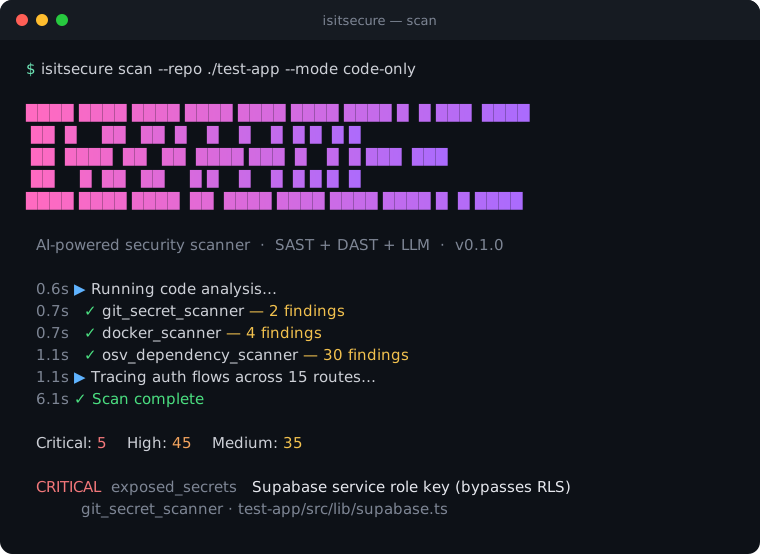
isitsecure scan --repo ./your-app — every scanner narrates as it runs, then you get a graded report (and a browseable HTML page) with the fixes.
Contents
- Demo · What It Does
- Install · Quick Start · What It Costs
- Scan Modes · Scan Depth
- What It Scans — DAST · Special DAST · SAST · LLM · Cross-Referencing
- Language Support · Output Formats · Suppressing False Positives
- Auto-Fix · Security Badge
- How We Compare · What It Does NOT Cover
- Configuration — API Keys · OOB Callbacks · Authenticated Scanning
- CLI Reference · Web UI · MCP (AI coding tools) · Try It on the Test App
- Benchmarks · Privacy · Architecture
- Scanner Documentation · LSP Setup
- Contributing · License · Acknowledgements
What It Does
isitsecure runs 42 rule-based scanners by default — up to 45 with --depth deep — (plus optional AI code review) against your web app in a single command. It combines four approaches that commercial tools sell separately:
- SAST (Static Analysis) — scans your source code for vulnerabilities without running it
- DAST (Dynamic Analysis) — tests your live app by sending real HTTP requests
- LLM Code Review — uses AI to find business logic flaws that pattern matchers can't detect
- AI Fix Generation — generates code patches with unified diffs for every finding
The unique parts:
- SAST findings automatically generate targeted DAST tests. Code shows no auth check → scanner sends an unauthenticated request and confirms it's exploitable.
- AI generates fixes, not just reports.
--output fixesproduces a Markdown fix plan you can paste into Cursor or Claude Code.
Code → SAST → Findings → Guide DAST → Test → Cross-Reference → LLM Triage → Report → Fixes
  ↑                                                                                       |
  └──────────────── LSP validates / suppresses false positives ───────────────────────────┘
Install
Requirements: Python 3.11+ and git. (isitsecure isn't on PyPI — the isitsecure name there is an unrelated project, so don't pip install it.)
Quick install (recommended)
The installer verifies Python/git, then clones the repo, sets up an isolated environment, installs everything, and runs first-time setup:
# macOS / Linux — download it, glance at it, run it
curl -fsSLo install.sh https://raw.githubusercontent.com/jaurakunal/isitsecure/main/install.sh
bash install.sh
# Windows (PowerShell)
irm https://raw.githubusercontent.com/jaurakunal/isitsecure/main/install.ps1 -OutFile install.ps1
./install.ps1
If Python or git are missing, the installer tells you the exact command to install them for your OS and stops cleanly — it never leaves a half-finished state.
Manual install
Prefer to do it by hand:
# 1. Clone the repo
git clone https://github.com/jaurakunal/isitsecure.git
cd isitsecure

# 2. Install into a virtual environment (recommended)
python3 -m venv .venv
source .venv/bin/activate          # Windows: .venv\Scripts\activate

# 3. Install with all features (browser DAST, LLM review, OOB detection)
pip install -e ".[all]"

# 4. First-time setup — installs the Chromium browser, language servers, optionally saves an API key
isitsecure setup
pip install -e ".[all]" is the recommended install and enables every scanner. If you want a lighter footprint, the extras are opt-in:
| Install | What works |
|---|---|
pip install -e . |
SAST / code-only scans only (--mode code-only) |
pip install -e ".[browser]" |
Adds DAST / live-URL scanning (requires isitsecure setup to install Chromium) |
pip install -e ".[llm]" |
Adds LLM code review, triage, and AI fixes (requires an API key) |
pip install -e ".[all]" |
Everything except [taint] (see below) |
pip install -e ".[taint]" |
Deterministic Semgrep taint/injection SAST for JS/TS, Python, Java, Kotlin, and Go. Install separately — semgrep's pinned dependencies don't co-resolve with [all]. The analyzer only needs the semgrep binary on PATH, so pipx install semgrep (or brew) works too; it falls back to LLM-only if absent |
URL/DAST scanning needs the [browser] extra — without it, isitsecure scan <url> exits with a message telling you to install it.
Quick Start
# Scan a live URL (DAST only, no API key needed)
isitsecure scan https://your-app.com --llm none

# Scan source code (SAST only)
isitsecure scan --repo https://github.com/you/your-app --mode code-only --llm none

# Full scan (SAST + DAST + LLM review)
isitsecure scan https://your-app.com --repo https://github.com/you/your-app --mode full

# One command: scan + fix everything (the magic)
isitsecure fix --repo ./your-app

# Or dry-run first to preview fixes
isitsecure fix --repo ./your-app --dry-run

# Generate a security badge for your README
isitsecure badge --repo ./your-app

# Export for GitHub Code Scanning
isitsecure scan --repo https://github.com/you/your-app --output sarif

# Open the web UI (for non-CLI users)
isitsecure launch
What It Costs
isitsecure is free and open source. The only cost is LLM API tokens for the AI-powered features:
| Scan Mode | API Key Needed | Estimated Cost |
|---|---|---|
| URL-only (DAST without LLM) | No | $0 |
| Code-only (SAST without LLM) | No | $0 |
| Code-only + LLM review | Yes | ~$5–8 |
| Full scan (SAST + DAST + LLM) | Yes | ~$10–15 |
Without an API key, you still get all rule-based scanners — 42 in the default quick depth (16 DAST + 8 special DAST + 18 SAST), or 45 with --depth deep (which adds 3 slower/aggressive DAST scanners). The LLM adds business logic review, semantic rule verification, injection false-positive adjudication (drops heuristic injection FPs by comparing the baseline vs. injected response), and intelligent triage — things no pattern matcher can do.
Supported LLM providers: Anthropic (Claude), Google (Gemini)
Scan Modes
| Mode | What It Does | Requires |
|---|---|---|
url-only |
DAST scanners against a live URL | Target URL |
code-only |
SAST scanners against source code | GitHub repo URL |
authenticated |
DAST with login credentials (IDOR, cross-user BOLA, RLS, privilege escalation) — plus the standard HTTP DAST scanners (injection, CSRF, SSRF, headers, …) now probe behind the login wall against protected endpoints | URL + credentials (add a second account for cross-user tests) |
full |
Everything: SAST + DAST + authenticated + LLM review + cross-referencing | URL + repo + credentials + API key |
auto (default) |
Detects mode from what you provide | Whatever you give it |
Scan Depth
Orthogonal to mode, --depth trades speed for coverage:
| Depth | What runs | When to use |
|---|---|---|
quick (default) |
Structural + config checks, error-based injection, a lightweight reflected + POST-body XSS pass, and the snapshot-based scanners (headers, CORS, RLS, source-map, SRI, client-exposure, redirects…). Fast. | Everyday scans — a solid first pass in a fraction of the time. |
deep |
Everything in quick plus the slow/aggressive probes: time-based (blind) SQL injection, the full XSS pass (adds static DOM sink analysis), auth-bypass timing, rate-limit bursts, and password-reset flows. |
When you want the full arsenal and can wait. |
# Fast pass (default)
isitsecure scan https://your-app.com --llm none

# Full, aggressive DAST
isitsecure scan https://your-app.com --depth deep --llm none
The scan narrates each phase and every scanner as it runs (with elapsed time), so a longer deep scan shows continuous progress rather than appearing to hang.
Testing the Mutation Surface (--probe-writes)
A path in a JavaScript bundle carries no HTTP method, so every endpoint is
discovered as a GET. Any scanner that tests POST/PUT then finds nothing
to work on — which leaves stored XSS, mass assignment, CSRF and SSTI
untested, because all of them live behind a state-changing request.
--probe-writes derives those endpoints from REST shape: POST to a
collection, PUT to an item.
isitsecure scan https://your-app.com --probe-writes
Measured on OWASP Juice Shop v20.1.1, url-only:
| without | with --probe-writes |
|
|---|---|---|
| recall | 22/45 (49%) | 28/45 (62%) |
| CSRF | 0/1 | 1/1 |
| SSTI | 0/1 | 0/1‡ |
| XSS | 1/7 | 4/7 |
| IDOR | 0/6 | 1/6† |
| mass assignment | 0/1 | 1/1 |
‡ SSTI and NoSQL read 0 on the deterministic scanner: their detectors were tightened to differential oracles (product-must-evaluate / operator-must-broaden), which removed ~18 false positives per scan and revealed the old credits were coincidental. Sound detection of these needs the agentic pentest path.
† --probe-writes IDOR is the mutation path (unauthenticated PUT/PATCH accepted on /api/Products, /api/Hints), not the read path; unauthenticated read-IDOR is 0 because it can't be told from public data without auth — real IDOR needs the authenticated cross-user pass.
It is off by default, and should stay off for anything you do not own. The scan writes to the target: it creates records, and an endpoint that sends email or charges a card will do so. It also takes roughly 72 minutes against 27 on that app, since the inventory doubles.
DELETE is derived and deliberately never sent — a scanner that destroys a
record to prove it could is not worth the finding.
What It Scans
DAST Scanners — Tests Your Live App
19 total — 16 run in the default quick depth; the 3 marked ◆ (slower/aggressive probes) are added by --depth deep.
| Scanner | What It Finds |
|---|---|
| XSS Scanner | Reflected, POST body, and DOM-based cross-site scripting (quick runs the reflected + POST-body network phases; --depth deep adds the static DOM sink pass) |
| Active Injection Scanner | SQL injection (error + time-based, incl. SQLAlchemy/sqlite3/psycopg errors), command injection, NoSQL injection, XXE, SSTI — injects query, body, and path parameters |
| CSRF Scanner | Cross-site request forgery on state-changing endpoints |
| Rate Limit Scanner ◆ | Missing or bypassable rate limiting on auth endpoints |
| Session Scanner | Insecure token storage (localStorage), missing cookie flags, long-lived JWTs |
| GraphQL Scanner | Introspection enabled, no depth limits, batch query abuse |
| SSRF Scanner | Server-side request forgery (internal IPs, cloud metadata) |
| File Upload Scanner | Unrestricted file types, path traversal in filenames |
| Mass Assignment Scanner | Accepting privileged fields (role, isAdmin) in request body |
| Security Headers Scanner | Missing CSP, HSTS, X-Frame-Options; server version disclosure |
| CORS Scanner | Wildcard origins, credentials with permissive CORS |
| Open Redirect Scanner | Unvalidated redirect parameters |
| Auth Bypass Scanner ◆ | Username enumeration, default credentials, account lockout bypass |
| HTTP Probe Scanner | Method tampering, host header injection, directory listing, .env exposure |
| Password Reset Scanner ◆ | Token leakage in response body, email enumeration, no rate limiting |
| Source Map Scanner | Publicly exposed .map files leaking original source (verified, not just present) |
| Mixed Content Scanner | http:// resources loaded on an HTTPS page |
| SRI Scanner | External CDN scripts/styles loaded without Subresource Integrity hashes |
| Client Exposure Scanner | Secrets in client JS — Supabase service_role keys, internal URLs, unreplaced env placeholders |
Special DAST Scanners (8)
| Scanner | What It Finds |
|---|---|
| IDOR Scanner | Insecure direct object references via ID swapping, plus authenticated cross-user (BOLA) testing with two accounts and an anonymous-access false-positive guard |
| JWT Scanner | Algorithm none bypass, weak secrets, key confusion attacks |
| RLS Deep Scanner | Supabase Row Level Security bypass via anon key and cross-user queries |
| Privilege Escalation Scanner | Admin route access, role self-elevation, object-level write bypass |
| Authenticated Crawler | Playwright-based login + BFS crawl to discover authenticated endpoints |
| Race Condition Scanner | TOCTOU bugs via concurrent mutation requests |
| DOM XSS Scanner | Playwright-based sink hooking (innerHTML, eval, location.assign) |
| Body Param Fuzzer | Prototype pollution, type confusion, injection via JSON body fields |
SAST Scanners (18) — Analyzes Your Code
| Scanner | What It Finds |
|---|---|
| Semgrep Taint Analyzer | Deterministic source→sink injection for JS/TS, Python, Java, Kotlin, and Go — SQLi, XSS, SSRF, path traversal, command injection, SSTI (a reproducible floor beneath the LLM reviewer; needs the [taint] extra, no-ops without the semgrep binary) |
| Git Secret Scanner | API keys, tokens, and credentials in git history (not just HEAD) |
| Route Auth Analyzer | Next.js/Express/Django/FastAPI/Spring routes missing authentication |
| RLS Policy Analyzer | Supabase tables without Row Level Security enabled |
| Middleware Analyzer | Incomplete middleware coverage (protects pages but not API routes) |
| Express Middleware Analyzer | Express-specific auth middleware gaps |
| Drizzle Schema Analyzer | Sensitive fields (isAdmin, role) exposed to mass assignment |
| Prisma Schema Analyzer | Similar checks for Prisma schemas |
| IaC Scanner | Terraform/CloudFormation misconfigurations (public S3, no encryption) |
| Docker Scanner | Running as root, exposed ports, .env copied into image |
| Shell Script Scanner | Command injection in deploy scripts |
| Dependency Scanner (npm) | Known CVEs in package.json dependencies |
| Python Dependency Scanner | Known CVEs in requirements.txt / pyproject.toml (Django, Flask, FastAPI, PyJWT, etc.) |
| Java Dependency Scanner | Known CVEs in pom.xml / build.gradle (Log4Shell, Spring, Struts, Jackson, etc.) |
| OSV Dependency Scanner | Real-time CVE lookups against Google's OSV.dev database (200K+ vulns, extracts npm, PyPI, Maven/Gradle, and Go dependencies; other ecosystems such as Rust are not extracted) — no hardcoded CVE list, no API key |
| Firebase Rules Analyzer | Overly permissive Firestore/RTDB security rules |
| OpenAPI Scanner | Internal endpoints exposed in API specifications |
| K8s Scanner | Privileged containers, no resource limits, hostPath mounts |
LLM-Powered Analysis (requires API key)
| Scanner | What It Finds |
|---|---|
| LLM Code Reviewer | Business logic flaws: missing ownership checks, race conditions in payments, incorrect authorization logic |
| Semantic Rule Verifier | Logical errors in RLS policies and Firebase rules (wrong column references, tenant isolation bugs) |
| LLM Business Logic Scanner | Attack planning: price manipulation, double-spend, privilege escalation via application logic |
| LLM Triage Service | Deduplicates findings, assigns priority, generates plain-language owner summary with A–F grade |
| AI Fix Generator | Generates code patches for each finding — paste into Cursor/Claude Code, apply in place with isitsecure fix, or open per-category PRs on a remote repo |
Cross-Referencing + Guided DAST
| Feature | What It Does |
|---|---|
| Lazy-Chunk Bundle Collection | Collects JavaScript from <link rel=modulepreload/preload/prefetch> as well as <script src> — a code-split SPA ships its routes as <link> chunks, so a script-only sweep sees the shell and none of the API surface |
| OpenAPI/Swagger Discovery | Probes /openapi.json, /swagger.json, /v3/api-docs and parses the spec into testable endpoints — finds attack surface on APIs with no crawlable frontend |
| HTML Form/Link Discovery | Reads <form>/<input>/query-links from server-rendered pages (bounded url-only crawl + inside the authenticated crawler) — finds attack surface on classic MVC apps with no JS API bundle |
| Cross-Origin Backend Mining | Mines JS bundles for an API host that lives on a different origin than the SPA shell (e.g. an API-gateway URL), resolving base+property URL concatenation into method/path endpoints; third-party and CDN hosts are excluded. Opt-in: without --follow-mined-backends a mined host is only reported, never probed |
| Endpoint Prioritizer + Time Budget | Ranks likely-vulnerable endpoints first and tests within a per-scanner time budget, so high-risk paths get covered before the clock runs out |
| SAST→DAST Feedback Loop | SAST findings generate targeted DAST tests (6 strategies: auth bypass, IDOR, injection, mass assignment, race condition, RLS bypass) |
| Cross-Referencer | Matches DAST + SAST findings for high-confidence confirmed vulnerabilities |
| Import Graph Centrality | Identifies shared utility files imported by many risky routes for LLM review |
| LSP Auth Flow Tracing | Uses TypeScript Language Server to verify auth middleware is genuinely applied |
Language Support
| Language | Route Mapping | Auth Detection | Dependency Scan | DAST |
|---|---|---|---|---|
| TypeScript/JavaScript (Next.js, Express, tRPC, GraphQL) | Yes | Yes | Yes (npm) | Yes |
| Python (Django, FastAPI, Flask) | Yes | Yes | Yes (pip) | Yes |
| Java/Kotlin (Spring Boot) | Yes | Yes | Yes (Maven, Gradle) | Yes |
| Go (net/http, Gin, Echo, chi, gorilla) | Yes | Yes | Yes (go.mod) | Yes |
| Ruby, Rust, PHP, etc. | No | No | No | Yes (DAST works against any HTTP API) |
DAST scanners test live HTTP endpoints regardless of backend language. SAST route mapping, auth detection, and dependency scanning are language-specific. Go auth detection is per-route (router/group middleware, in-handler checks) and the gopls LSP refines it — following a cross-file auth helper via go-to-definition to confirm a guard or suppress a false "missing auth". Go module dependencies (go.mod, direct and indirect) are checked against the OSV.dev vulnerability database, like npm/PyPI/Maven.
Output Formats
isitsecure scan URL --output table   # Terminal table (default)
isitsecure scan URL --output json    # Full JSON report
isitsecure scan URL --output html    # Self-contained HTML report
isitsecure scan URL --output sarif   # SARIF 2.1.0 for GitHub Code Scanning
isitsecure scan URL --output fixes   # AI-generated fix plan (Markdown with diffs)
SARIF results carry a per-result security-severity score, each rule takes the level and score of its most severe finding, and fingerprints are emitted as isitsecure/v1 (legacy) and isitsecure/v2.
If a scanner times out or crashes, or something you asked to scan could not be read, the table shows "Scan incomplete" instead of "safe to launch", labels the grade "Provisional (scan incomplete)", and lists what did not run. The JSON report carries scanner_errors, ingestion_errors and launch_verdict.incomplete (SARIF does not). This does not change the exit code: only an ingestion failure exits 1. The same state reaches the other consumers: the MCP scan result has incomplete and coverage_gaps (and safe_to_launch is false), the CI commit status is posted as error naming what did not run instead of success, and isitsecure badge labels an incomplete scan "provisional, scan incomplete" in grey. Work a scanner skipped (files the LLM review could not read, packages the dependency check could not look up) is listed in scanner_errors too.
Probe captures in reports (the curl-reproducible request/response evidence) have their secrets redacted: cookies, Authorization/API-key/CSRF headers, any header whose name contains token/secret/key/session, token- or password-like JSON and form fields, Bearer values and JWTs are replaced with a REDACTED placeholder, and the rest of the body is kept so the evidence stays useful. JWTs quoted in auth-bypass finding text are masked to an 8-character prefix plus length. A capture's curl command will therefore not replay an authenticated request verbatim.
Every export (JSON, HTML, SARIF, Markdown, the MCP export/explain tools and the web server's report endpoints) also runs the whole report through a shared redactor, so finding text, evidence, URLs and code snippets do not carry raw PII or secrets: emails become a***@example.com, SSN, phone and card numbers keep their shape with the digits starred, JWTs become eyJ…[redacted JWT, 3 segments], known provider keys keep their prefix (sk_live_[redacted token]), and long token-like strings and credential headers are replaced. UUIDs, timestamps, ordinary ids and plain words are left alone. This is regex-based best effort, lossy by design, and not a DLP guarantee. The web server stores the report unredacted (fixes and verification need it) and redacts on the way out; the fix flows (--output fixes, /api/fix, the MCP fix brief's file_content) work on your raw source, so a generated fix may echo secret-shaped strings from it. Error-based SQLi and NoSQL findings also carry a redacted baseline-vs-proof request/response pair (evidence_pair) showing the control next to the request that proved the issue.
Suppressing False Positives
A finding you've reviewed and accepted (a false positive, or an accepted risk) shouldn't nag you on every scan. Each finding has a stable fingerprint — the same across runs, environments (localhost vs. prod), and edits elsewhere in the file — shown under each row in the table output (fp <hash>) and in the JSON/SARIF output.
Suppress one by adding its fingerprint to a repo-local .isitsecureignore file, which is committed and reviewable in pull requests:
# See the fingerprints (in table or JSON output)
isitsecure scan https://your-app.com --output json | jq '.findings[] | {fingerprint, title, endpoint_url}'

# Suppress a finding (appends to ./.isitsecureignore with context + reason)
isitsecure scan https://your-app.com --suppress de0e57aeb5f61708 --suppress-reason "benign: /createdb re-populate, not injection"

# Future scans hide it automatically; review what's hidden anytime:
isitsecure scan https://your-app.com --show-suppressed
A fingerprint also covers the flagged source line (SAST, line number excluded; only when the line is positively identified, otherwise the original value is kept) or the first injected parameter (DAST), so two same-titled findings in one file get different fingerprints and suppressing one does not hide the other. Fingerprints recorded in an older .isitsecureignore, baseline or report (including for --suppress and verify --fingerprint) keep matching; a legacy entry still covers every instance. SARIF results carry both isitsecure/v1 (legacy) and isitsecure/v2 (current).
The .isitsecureignore file is plain text — one fingerprint per line, # comments for context — so suppressions live with your code and are reviewed like any other change. Delete a line to un-suppress.
# .isitsecureignore
de0e57aeb5f61708   # [injection_risk] GET /createdb — SQL injection (benign: not injection)
Suppressed findings are dropped from the findings list, counts, and themes in every output format. (The AI owner summary narrative is written during the scan, so it may still mention a finding you suppressed afterward.)
Baseline mode — only show what's new
For an app that already has a backlog of known findings, baseline mode lets you accept the current set once and then, on later scans, see only what's new — ideal for a CI gate that should fail on regressions but not on pre-existing debt.
# Accept the current findings as the baseline for this project (once)
isitsecure scan https://your-app.com --baseline-accept

# Later scans: show only findings new since the baseline
isitsecure scan https://your-app.com --baseline
Baselines are keyed per project (repo or target URL) and stored under ~/.isitsecure/baselines/ — machine-local state, unlike the committed .isitsecureignore. Baseline and suppression compose: --baseline shows new, not-suppressed findings. Findings match by the same stable fingerprint, so a baseline survives host/port/query changes and code edits.
In CI: the default ~/.isitsecure/ path is per-machine, so a fresh runner has no baseline and --baseline would show the whole backlog. Point --baseline-file at a path you commit to the repo (or cache between runs) so the gate compares against a shared, version-controlled baseline:
isitsecure scan "$URL" --baseline-file .isitsecure-baseline.json --baseline --output sarif
# establish/refresh it deliberately (e.g. on main):
isitsecure scan "$URL" --baseline-file .isitsecure-baseline.json --baseline-accept
Re-verifying a fix — is it fixed now?
After you fix something, isitsecure verify re-checks specific findings from a previous scan and tells you fixed vs. still-present — without re-scanning everything:
isitsecure scan https://your-app.com --output json -f before.json   # capture findings + fingerprints
# ...apply your fix...
isitsecure verify https://your-app.com --report before.json --fingerprint de0e57aeb5f61708
- DAST findings are re-probed against the target — the exact endpoint is re-run through the scanner that raised it. To avoid ever falsely claiming a fix, a
fixed/still-presentverdict is only given when a single-endpoint re-probe can faithfully reproduce the finding (endpoint-level checks like security headers / CORS / CSRF, and parameter-level injection where the tested parameter is recoverable). Findings that depend on crawl-derived state or multi-request flows (e.g. stored XSS) are reportedunverifiable— re-verify those with a full scan. - SAST findings are re-checked against a local
--repovia a code-only re-scan. A finding counts as fixed only when no remaining finding matches any of its fingerprints (current or legacy), so editing the flagged line without removing the bug staysstill-present. If the scanner that raised a finding did not run in the re-scan (for example the optionalsemgrepis not installed, it timed out, or OSV was unreachable), the verdict iscould_not_verify, neverfixed. - Omit
--fingerprintto re-verify every finding in the report. Exit codes make it a CI gate:0all clear (everything fixed),1at least one finding still present,2inconclusive — something couldn't be verified (unverifiable/error/could_not_verify— e.g. the target was unreachable or the re-scan couldn't read the repo; these are never reported as fixed) a requested fingerprint wasn't in the report, or the report file is malformed; a finding that disappeared from a file that no longer parses, or whose code now appears in another file, isunverifiabletoo, since it may have moved rather than been fixed. LLM-review findings (which need a model to reproduce) are alwaysunverifiable. --output jsonincludes acould_not_verifycount.
(This is the per-finding CLI counterpart to the MCP verify(scan_id) tool, which instead re-scans everything and reports grade movement.)
Auto-Fix: One Command to Fix Your App
fix works two ways depending on what you point it at:
- Local path → fixes are applied in place (git-free), with an automatic backup and a re-scan to confirm each finding is actually resolved.
- Remote GitHub URL (with a token) → the repo is cloned, fixed, and the changes are opened as per-category pull requests — nothing is pushed to the branch you scanned (the PR base).
# Local: scan your code and apply AI-generated fixes in place
isitsecure fix --repo ./my-app

# Preview fixes without applying (dry run)
isitsecure fix --repo ./my-app --dry-run

# Only fix critical issues
isitsecure fix --repo ./my-app --severity critical

# See the git/backup details instead of the plain-language summary
isitsecure fix --repo ./my-app --technical
Fix a remote repo → pull requests
# Clone a GitHub repo, generate fixes, and open per-category PRs
isitsecure fix --repo https://github.com/you/your-app --github-token $GITHUB_TOKEN

# Control how fixes are grouped into PRs (default: one PR per finding category)
isitsecure fix --repo <github-url> --pr-strategy per-file --max-prs 5
Each PR groups related fixes (by category, by default), one commit per finding,
onto a feature branch — never the base branch. --max-prs caps the number
of PRs (default 8); excess low-severity categories are batched into a single PR
so nothing is silently dropped. The token is used only for the clone, push and
PR; it is never stored or logged, and it is not put in the clone URL, a command
line or the clone's .git/config (it reaches git through the process
environment, and the clone lives in a 0700 temp directory that is removed
afterwards, including on Ctrl-C). Env var GITHUB_TOKEN also works.
How the remote flow behaves:
- Branch it fixes: the branch that was scanned (the report's branch) is
cloned and every PR is opened against it. When none is known, the repo's
default branch is looked up; a bad token, missing permission, renamed repo or
network failure is reported as such rather than silently assuming
main. - Branch names are
isitsecure/fix-<slug>; per-file and per-finding branches add a short stable hash (of the path, or of category + path + line + title) so two paths likea_b.pyanda-b.pynever collide and the same finding gets the same name on every re-run. A-fixessuffix is added if the name would equal the base branch. - Re-runs are never blocked, and never overwrite: before any LLM call the
remote is checked (
git ls-remote) forisitsecure/fix-<slug>,-2,-3and so on. If one of them has an OPEN pull request, that group is skipped (noted, no duplicate PR). A name that exists with no open PR (its PR was merged and GitHub kept the branch, or an earlier run pushed it but failed to open the PR) is left untouched and never reused; the next free-2,-3... name (up to-9) gets the freshly generated fixes. There is no force-push. If a branch is pushed but opening its PR fails, the error and theorphaned_branchesresult field name it.--dry-rundoes not contact the remote beyond the scan, so leftover branches are only detected on a real run. - Push failures show git's real message (hook, protected branch, push protection, token scope); only git's own non-fast-forward / fetch-first rejection is reported as "branch already exists".
- Git isolation: every git command runs with your global and system git
config ignored (
GIT_CONFIG_GLOBAL= null device,GIT_CONFIG_NOSYSTEM=1), so aurl.<x>.insteadOfrewrite cannot send the clone or push elsewhere (for example over ssh, around the token). Proxies must be set withHTTPS_PROXY/NO_PROXY, not in~/.gitconfig. - Commits use an
isitsecure[bot]identity with hooks and gpg signing disabled; finding titles and paths are flattened to one line, secret-looking values (URL credentials, bearer tokens, key/password assignments, common token shapes) are redacted, and@mentions, images, links,#123/GH-123references, backticks and bidi overrides are neutralised in PR text. A fix that fails to commit, makes no change, or targets a symlink is skipped and never leaks into another finding's commit. - Each git command has a timeout (120 s; 300 s for the clone) and is killed,
with its child processes, if it hangs or the run is cancelled (process group
on Linux/macOS,
taskkill /Ton Windows). - Exit status is
1if any error was reported or no PR was opened (including a leftover branch with no open PR), else0. - Result JSON (server
fix-alland the MCP/API):mode,repo,base_branch,fixed_count,skipped[],errors[],orphaned_branches[],summary, andpull_requests[](category,title,branch,url,finding_count,is_low_batch).
--repo accepts https://github.com/owner/repo[.git], [email protected]:owner/repo.git,
ssh://[email protected]/owner/repo or github.com/owner/repo. URLs with credentials, a
query string, a fragment, http://, or extra path segments (such as /tree/main) are
rejected. The ssh and scp forms are accepted for parsing, but the clone and
push always go over https with the token; your ssh keys are never used.
What the local flow does:
- Scans your repo with all SAST scanners
- Backs up the files it is about to change (a git ref when they are all tracked, otherwise a file copy; if no backup can be made it stops and changes nothing), then for each critical/high finding with a code location, sends the file to the LLM and writes a fixed version
- Re-scans the fixed code to confirm each finding is resolved; if the re-scan cannot run, nothing is reported as confirmed fixed
- Prints a plain-language summary of what was fixed, needs review, or couldn't
be fixed (pass
--technicalfor the git diff / backup-restore details)
Your original files are backed up before anything is written (a git ref, or a
file copy under ~/.isitsecure/backups/ — outside your repo, so it is never
re-scanned or committed; set ISITSECURE_BACKUP_DIR to move it); the summary
tells you how to review and restore them.
Applying never loses your work:
- Each file is written once, atomically (permissions and line endings kept).
- A file you edited after it was read is not overwritten; it is reported.
- If a write fails, the files already written in that run are put back, and the command says exactly what was restored. Nothing is described as "fixed" unless its fix is on disk.
- Counts are per finding, never per file.
Exit codes (usable as a CI gate): 0 when every selected finding was fixed
(or there was nothing to fix, or a local --dry-run found nothing unfixable); 1
when any write failed or was refused, any finding could not be fixed, the re-check
did not run, or a remote run hit an error or opened no pull requests; 2 for
invalid options. Findings that may have moved to another file after the fix are
listed under "Worth a look" and counted as needing review, never as fixed. An
unknown --severity (valid: critical,high,medium,low,info), --pr-strategy
or --max-prs is rejected before any paid scan or clone.
Security Badge
Add a security grade badge to your README:
isitsecure badge --repo ./my-app -o badge.svg
Then add to your README:

The badge shows your grade (A–F) and total finding count, styled like a shields.io badge.
How We Compare
isitsecure is not a replacement for enterprise security platforms. It's designed to be the one tool a solo developer or small team needs — combining capabilities that otherwise require 4-5 separate tools.
What only isitsecure does (no other OSS tool)
- SAST findings automatically generate targeted DAST tests (closed feedback loop)
- LLM reviews business logic (race conditions, price manipulation, ownership checks)
- One command scans + generates + applies AI fixes (
isitsecure fix) - Cross-references DAST + SAST findings for confirmed vulnerabilities
- LSP traces auth flows through call chains (TypeScript, Python, Java)
- Sound app-logic exploitation — cross-tenant BOLA proven by response-body discrimination (not status codes), JWT
alg=none/ RS→HS confusion forging, and differential injection oracles (SSTI arithmetic evaluation, NoSQL operator-broadening, OOB SSRF) — so a finding is a demonstrated exploit, not a pattern match - Honest, published benchmarking — per-challenge recall against OWASP Juice Shop is measured and reported (see
benchmarks/RESULTS.md), with an explicit anti-overfitting discipline (no app names or app-specific routes in the shipped engine). Most OSS scanners publish no recall numbers at all.
Where specialized tools go deeper
| Need | Best specialized tool | How isitsecure compares |
|---|---|---|
| Deep SAST (30+ languages) | Semgrep | We embed Semgrep for deterministic JS/TS, Python, Java, Kotlin, and Go injection taint (opt-in [taint]) and add LLM review on top; Semgrep's own registry covers far more languages and rules |
| DAST with advanced exploitation | OWASP ZAP / Burp Suite | Our DAST is simpler — fewer payloads, no WAF evasion |
| Secret scanning (800+ patterns) | TruffleHog / Gitleaks | Our git scanner covers common patterns, not exhaustive |
| Container + IaC scanning | Trivy / Checkov | Our IaC/Docker scanners are basic — use Trivy for depth |
| Enterprise compliance (SOC2, PCI) | Snyk / Checkmarx | No compliance mapping (yet) |
| Template-based vuln scanning | Nuclei (28K+ stars) | Not template-based — different approach |
| AI-agent / LLM pentesting | PentestGPT / Vulnhuntr / cai | Those are research-grade or single-class demos; isitsecure is a maintained, tested (~2,500 tests) and benchmarked product with the same LLM/agentic ideas wired into a deterministic scanner pipeline |
Who should use what
| You are | Use this |
|---|---|
| Solo dev / vibe coder shipping a web app | isitsecure — one tool, one command |
| Team with $25K+ security budget | Snyk + GitHub Advanced Security |
| Enterprise with compliance requirements | Checkmarx / Veracode |
| Pentester doing deep exploitation | Burp Suite Pro + Nuclei |
| DevOps focused on containers/IaC | Trivy + Checkov + Gitleaks |
isitsecure works well alongside other tools. Run isitsecure scan for the combined SAST+DAST+LLM view, and use specialized tools where you need deeper coverage.
What It Does NOT Cover
- Inter-procedural taint analysis — The opt-in Semgrep taint layer (
[taint]) does intra-file source→sink dataflow for JS/TS, Python, Java, Kotlin, and Go injection; cross-function/cross-file tracking (Semgrep Pro territory) still falls back to LLM reasoning - WAF evasion — DAST payloads don't include advanced bypass techniques
- Compliance mapping — No OWASP Top 10, CWE, or PCI-DSS tagging (yet)
- Network-level scanning — No port scanning, TLS analysis, or infrastructure enumeration
- Mobile apps — Web APIs only
- Ruby/Rust/PHP SAST — Route mapping not yet implemented (DAST still works; Ruby and Rust dependencies are not scanned)
Configuration
API Keys
Set via environment variable, .env file, or ~/.isitsecure/config.toml:
# Environment variable
export ANTHROPIC_API_KEY=sk-ant-...

# Or .env file in your project
echo "ANTHROPIC_API_KEY=sk-ant-..." > .env

# Or interactive setup
isitsecure setup
Optional Anthropic settings (same resolution order: env var, .env, then [llm] in config.toml):
| Variable | config.toml key |
Purpose |
|---|---|---|
ANTHROPIC_WORKSPACE_ID |
anthropic_workspace_id |
Sent as the anthropic-workspace-id header. Required by identity-linked keys (e.g. Cyber Verification Program, org-wide "All workspaces" keys); omitted when unset. |
ANTHROPIC_FALLBACK_MODEL |
anthropic_fallback_model |
Model used for a single retry when Anthropic's cyber safeguard refuses a request (an HTTP 200 with empty content). Defaults to claude-sonnet-5-5; a log warning is emitted when the retry happens. If the fallback also refuses (or none is set), the call raises LLMRefusalError carrying the refusal category. |
isitsecure setup stores the key in ~/.isitsecure/config.toml, created with owner-only (0600) permissions inside a 0700 directory. Re-running setup updates only the API key; other config.toml keys (such as anthropic_workspace_id) are preserved.
OOB Callbacks (Blind Vulnerability Detection)
isitsecure detects blind SSRF, XXE, and injection vulnerabilities using out-of-band (OOB) callbacks. By default it uses oob.isitsecure.ai — a free community server running interactsh.
What data is sent? Only the scan target makes DNS/HTTP requests to the OOB server. Your source code never leaves your machine.
Self-host your own:
# Deploy interactsh
docker run projectdiscovery/interactsh-server

# Point isitsecure to it in ~/.isitsecure/config.toml
[oob]
server = "http://oob.yourdomain.com"
Disable entirely: Add enabled = false under [oob] in config.
Authenticated Scanning
# Supabase auth
isitsecure scan https://your-app.com \
  --auth-email [email protected] \
  --auth-password yourpassword \
  --auth-provider supabase

# Firebase auth
isitsecure scan https://your-app.com \
  --auth-email [email protected] \
  --auth-password yourpassword \
  --auth-provider firebase

# Direct token
isitsecure scan https://your-app.com \
  --auth-provider token \
  --auth-token "eyJ..."
Cross-user IDOR / BOLA — supply a second account and isitsecure logs in as both users and checks whether one user can read or mutate another user's objects (broken object-level authorization). An anonymous-access guard suppresses false positives from endpoints that are simply public.
isitsecure scan https://your-app.com \
  --auth-email  [email protected] --auth-password alicepass \
  --auth-email-b [email protected]  --auth-password-b bobpass \
  --mode authenticated
Frontend-less / plain REST APIs — use --auth-provider token, which logs in against a generic REST login endpoint (auto-discovered, or pass it explicitly with --login-url):
isitsecure scan https://api.your-app.com \
  --auth-provider token \
  --auth-email [email protected] --auth-password alicepass \
  --auth-email-b [email protected] --auth-password-b bobpass \
  --login-url https://api.your-app.com/login
CLI Reference
isitsecure scan [URL] [OPTIONS]

Arguments:
  URL                    Target URL to scan (DAST)

Options:
  -r, --repo TEXT        GitHub repo URL (SAST)
  -b, --branch TEXT      Git branch [default: the repo's own default branch]
  -m, --mode TEXT        Scan mode: auto|url-only|code-only|authenticated|full
  --depth TEXT           Scan depth: quick|deep [default: quick]
  --probe-writes         Test the mutation surface (stored XSS, mass
                         assignment, CSRF). WRITES to the target — only for
                         an app you own or are authorized to test.
  --follow-mined-backends Also probe cross-origin API hosts mined from JS
                         bundles. Only for backends you are authorized to
                         test; off by default (hosts are reported only).
  --llm TEXT             LLM provider: anthropic|google|none [default: anthropic]
  -o, --output TEXT      Output format: table|json|html|sarif|fixes [default: table]
  -f, --output-file TEXT Write report to file
  --auth-email TEXT      Auth email/username for authenticated scanning (user A)
  --auth-password TEXT   Auth password (user A)
  --auth-provider TEXT   Auth provider: supabase|firebase|browser|token
                         (use token for a plain REST login)
  --auth-email-b TEXT    Second user's email — enables cross-user IDOR/BOLA testing
  --auth-password-b TEXT Second user's password (paired with --auth-email-b)
  --login-url TEXT       Explicit login endpoint (else auto-discovered)
  --github-token TEXT    GitHub token for cloning private repos (only sent to https://github.com/owner/repo URLs)
  --suppress TEXT        Fingerprint to add to .isitsecureignore (repeatable)
  --suppress-reason TEXT Reason recorded next to --suppress entries
  --suppress-file TEXT   Ignore file path [default: ./.isitsecureignore]
  --show-suppressed      List suppressed findings instead of hiding them
  --baseline             Show only findings new since the accepted baseline
  --baseline-accept      Record the current findings as the baseline
  --baseline-file TEXT   Baseline path [default: ~/.isitsecure/baselines/<project>.json]
  -v, --verbose          Enable debug logging

  # exit 1 if something you asked to scan couldn't be read (e.g. the repo
  # failed to clone) — a report that never saw your code isn't a clean scan.
  # A scanner timing out or crashing is reported as "scan incomplete" but does
  # not change the exit code.

isitsecure fix [OPTIONS]
  -r, --repo TEXT        Local repo path, OR a remote GitHub URL to open PRs against [required]
  --llm TEXT             LLM provider: anthropic|google [default: anthropic]
  --api-key TEXT         API key for the selected --llm provider (default: that provider's env var / config)
  --dry-run              Show fixes without applying them
  --severity TEXT        Severities to fix: critical,high,medium,low,info (unknown values are an error) [default: critical,high]
  --technical            Show git/backup details instead of the plain-language summary
  --github-token TEXT    GitHub token for remote-repo pull requests (env GITHUB_TOKEN; never stored)
  --pr-strategy TEXT     Group PRs by: per-category|per-file|per-finding|single [default: per-category]
  --max-prs INT          Cap on PRs; excess low-severity categories batch into one [default: 8]
  -v, --verbose          Enable debug logging

isitsecure verify [TARGET_URL] [OPTIONS]   # exit 0 all-fixed · 1 still-present · 2 inconclusive
  --report TEXT          Previous scan JSON (from scan --output json) [required]
  --fingerprint TEXT     Only verify these fingerprints (repeatable; default: all)
  -r, --repo TEXT        Local repo path for re-checking SAST findings
  -o, --output TEXT      Output format: table|json [default: table]

isitsecure badge [OPTIONS]
  -r, --repo TEXT        Path to local repo to scan [required]
  -o, --output TEXT      Output SVG file [default: isitsecure-badge.svg]
  -v, --verbose          Enable debug logging

isitsecure launch [OPTIONS]
  -p, --port INT         Port for web UI [default: 3000]
  --host TEXT            Host to bind [default: 127.0.0.1]; binding elsewhere prints a warning and only
                         allow-listed Host names are served (see ISITSECURE_ALLOWED_HOSTS)

isitsecure mcp            Run the local MCP server (stdio) for AI coding tools
isitsecure setup          Interactive first-time setup
isitsecure version        Show version
Web UI
Prefer a GUI? isitsecure launch starts a local web interface backed by the same scan engine — no CLI flags to remember:
isitsecure launch
# Opens http://localhost:3000 in your browser
The UI provides:
- Visual scan configuration — target URL, repo, scan mode, AI provider, and optional login credentials
- Live scan progress — a progress bar and a streaming scanner log
- Finding browser — filter by severity or scanner, plus full-text search, with each finding expandable for evidence, technical detail, and remediation
- Plain-language risk summary — an A–F grade, key risks, and a phased remediation plan
- One-click AI fixes — a "Generate Fix" button on any finding produces a unified diff inline (one finding at a time)
- Fix all — for a scan of a local git repo, generates fixes for the critical/high findings and commits them to a new
isitsecure/fixesbranch (-2,-3… if taken), then switches you back, so your working tree never changes. It needs a clean tree, re-checks that right before creating the branch, and never force-checks-out: if you edited or committed anything while fixes were generating, nothing is written and you get a markdown fix plan instead. Gitignored, untracked and skip-worktree files are never written. A dirty tree, a non-git folder or a remote/URL scan also gives the markdown plan (built from the real file contents; findings whose source isn't on this machine are listed as skipped, not guessed). One apply runs at a time per repo, a second click on the same scan attaches to the running job, and each job has an LLM call budget - Report export — download JSON, or open the self-contained HTML report in a new tab
- Scan history — recent scans are remembered locally in your browser
The web server resolves your LLM API key the same way the CLI does (ANTHROPIC_API_KEY, a .env file, or isitsecure setup), so scans and fixes work without pasting a key into the browser. You can still enter one in the scan form to override it; "Fix all" reuses the key entered with the original scan; that key is discarded once a fix-all from the scan finishes (a failed or cancelled job keeps it so a retry works), and a later fix-all then answers with a clear "key was discarded" message unless a server-side key is configured. Fix-all jobs live in memory only (the 50 most recent finished ones are kept, at most 3 run at once, DELETE /api/fix-all/{job_id} cancels one, and a job whose browser tab is gone is cancelled after a minute); they are lost on restart. API keys and GitHub tokens are scrubbed from logs, stored errors and git output.
A scan that errors or finishes without a report is shown as failed with its error (the report and export endpoints return 500 "Scan failed: ...") instead of staying "in progress".
Security model. The web server has no authentication, so it is meant for loopback only (the default --host 127.0.0.1). To block DNS-rebinding attacks it answers 421 to any request whose Host header is not localhost, 127.0.0.1, [::1] (any port) or the host you passed to --host, parses the Host header strictly (userinfo, #, ?, /, backslash, whitespace, control characters, bad ports and duplicate Host headers all get 421), and rejects state-changing requests (POST/PUT/PATCH/DELETE) and WebSocket upgrades whose Origin is not same-origin with the request (403 for requests, a close for WebSockets). Same-origin means an http/https Origin whose host and port equal the request's Host header, so another local web app on a different port is refused; null and malformed Origins are refused too. Requests with no Origin (curl, the CLI) are unaffected. To allow an additional UI origin, list it exactly in ISITSECURE_ALLOWED_ORIGINS=http://localhost:4000,https://ui.example (comma separated). The server keeps at most the 50 most recent finished scans in memory, and forgets a scan's LLM API key once no fix-all can still need it (scan failed or has no findings, or the first fix-all from it has finished). If you deliberately expose it (for example behind a reverse proxy), add the public names with ISITSECURE_ALLOWED_HOSTS=name1,name2 (comma separated). isitsecure launch prints a warning when you bind to a non-loopback address.
Use Inside Your AI Coding Tool (MCP)
isitsecure ships a local MCP server so your
AI coding tool (Cursor, Claude Code, Claude Desktop) can scan your code as a
tool — right in the loop where you're writing it. Nothing is hosted: the tool
spawns isitsecure mcp as a subprocess and talks to it over stdio.
Install the extra, then add one snippet to your tool's MCP config:
pip install "isitsecure[mcp]" # or isitsecure[all]
{"mcpServers": {"isitsecure": {"command": "isitsecure", "args": ["mcp"]}}}
Now ask your agent to check your code. It calls the scan tool:
scan(path, min_severity="medium")— runs a fast code-only (SAST) scan on a local repo and returns a security grade, a go/no-go launch verdict, severity counts, and a trimmed list of findings. Each finding carries a plain-English explanation (what it is, what an attacker could do, how to fix it) — guidance the agent can act on, not jargon.explain(scan_id, finding_id)— after a scan, dig into one finding: its specific description, the vulnerable code, and step-by-step remediation. Ask "explain the SQL injection one" and the agent calls it for you.fix(scan_id, finding_id)— hands your AI tool everything it needs to fix one finding (the finding, its source file, common fix patterns). Your AI tool writes and applies the patch with its own model and editor — so this needs no API key, and the MCP never writes files. (The CLI and web UI have no host AI, soisitsecure fixstill generates fixes itself and needs an LLM key.) Ask "fix the SQL injection."verify(scan_id)— after you apply fixes, re-scans and reports what cleared and any grade movement (e.g. F → D). Ask "did that work?"export(scan_id, format)— render the scan as HTML / SARIF / JSON / Markdown to share or attach (SARIF feeds GitHub code scanning). Ask "export the report" — your tool saves the returned file.scan_url(url)/scan_status(job_id)— DAST-scan a running app. DAST takes minutes, soscan_urlreturns a job id andscan_statuspolls it. Ask "scan my app at http://localhost:3000".
Code-only scans finish in seconds — the natural fit for the AI-coding loop;
scan_url/scan_status add live-URL/DAST scanning (which takes minutes) when
you need it.
The MCP is growing toward the full scan → understand → plan → fix loop. See docs/mcp.md for the design and roadmap.
Try It on the Test App
The repo includes VibeTasks — an intentionally vulnerable Next.js + Supabase app with ~50 security issues. All commands below are run from the repo root.
# Scan the bundled app's source (SAST only — fast, no API key needed)
isitsecure scan --repo ./test-app --mode code-only --llm none
To also run the live-app (DAST) scanners, start the app first, then scan its URL:
# In one terminal: start the vulnerable app
cd test-app && npm install && npm run dev   # serves on port 4000

# In another terminal, from the repo root: full scan (SAST + DAST)
isitsecure scan http://localhost:4000 --repo ./test-app --mode full
--repo accepts a local directory (scanned in place, including uncommitted changes) or a remote git URL like https://github.com/you/your-app. See examples/sample-report.json for what a scan produces.
Benchmarks
isitsecure ships a repeatable benchmark harness that scores recall (of the vulnerability classes an app is known to have, how many we catch) and false positives (findings that must not appear against a hardened build) on public, deliberately-vulnerable apps.
Measured coverage — be realistic about what a scanner catches. On OWASP Juice Shop v20.1.1 — a deliberately hard benchmark of 113 challenges — isitsecure detects 49% of the 45 DAST-detectable challenge classes in a url-only scan, scored automatically against the app's own /api/Challenges list. --probe-writes takes that to 62% and an authenticated two-user pass to ~67% — ~76% when authentication and --probe-writes are combined (they find different things: writes buy the stored-XSS and CSRF challenges, authentication buys cross-user object access and the profile-image SSRF — the only sound source of IDOR, since an unauthenticated scan can't tell a leaked record from public data). The url-only pass is deterministic and reproducible in one command (python benchmarks/run_benchmarks.py juiceshop, ~27 min — identical on repeat runs); the authenticated and --probe-writes modes are heavier and vary a little run-to-run (the cross-user IDOR harvest depends on a freshly-registered user having objects to find), so treat ~67–76% as a band, not a fixed figure. It's perfect on SQL injection (7/7, including login/authentication-bypass SQLi — a tautology that logs in where a real credential is rejected), file upload (4/4) and XXE (2/2), and strong on exposed data/secrets, open redirects and misconfiguration. The remaining gaps are rate limiting, SSTI, NoSQL, the stored/header XSS variants, and two IDOR challenges on routes the scanner doesn't reach (/rest/basket/:id, /rest/products/reviews), plus challenges needing multi-step business-logic exploitation. The ~76% figure needs credentials and --probe-writes (which writes to the target); a no-config url-only scan is the 49%. NoSQL now uses a differential oracle (a Mongo operator must broaden the query vs an exact-match control), which removed the class's old false-positive spray at the cost of any coincidental recall — it reads 0 on the deterministic scanner, honestly. In other words: a solid automated first pass that catches whole classes of real bugs in one command — not a substitute for a manual pentest. Full per-class breakdown, gaps, and methodology are in benchmarks/RESULTS.md.
python benchmarks/run_benchmarks.py juiceshop   # OWASP Juice Shop — the headline recall number
python benchmarks/run_benchmarks.py             # VAmPI (vulnerable + secure builds) + sast-injection
python benchmarks/run_benchmarks.py sast-injection  # taint recall/FP (code-only, no Docker)
python benchmarks/run_benchmarks.py --all       # + NodeGoat + crAPI + Juice Shop (heavy)
Most targets spin the app up in Docker, run a DAST scan, score against a known ground truth, and tear it down (require Docker). The sast-injection target is code-only (no Docker) — it scores the deterministic Semgrep taint layer on a JS/TS + Python + Java + Kotlin injection fixture (46/46 recall, 0 FP) and needs the semgrep binary instead; it's included in the default run. Measured results are tracked in benchmarks/RESULTS.md; see benchmarks/README.md for targets and how scoring works.
Privacy
- Rule-based scanning is fully local. SAST scanners clone your repo to a local temp directory and analyze it on your machine — no code leaves your computer unless you enable LLM review.
- DAST scanners send HTTP requests to your target URL. Nothing is proxied through external servers.
- LLM review sends code to your chosen API provider (Anthropic or Google). To be precise: it sends the full contents of files flagged by the rule-based scanners (capped at ~50 KB per file) — not your entire codebase, but for most source files that is the whole file, not just a snippet. Run
--llm noneto keep everything local. - OOB callbacks only involve your scan target making DNS/HTTP requests to the callback server. Your code is never sent there.
Architecture
See docs/architecture.md for the full pipeline design, including how SAST feeds DAST, how LLM review is prioritized, and how cross-referencing works.
Prefer pictures to prose? docs/interactive/ is a site of animated, step-by-step explainers: an architecture deep dive, nine scanner-group pages, and one page for every scanner. Open docs/interactive/index.html in a browser; no build step.
Scanner Documentation
See docs/scanners/ for detailed documentation on every scanner — what it detects, why it matters, real-world breach examples, and how to fix the vulnerabilities it finds. The scanners with a mechanism worth watching also have an animated page under docs/interactive/.
LSP Setup (Optional, Reduces False Positives)
Language servers let the scanner trace auth flows through your code (via go-to-definition) and suppress false positives — confirming auth middleware is genuinely applied, not just imported.
Let isitsecure install them for you:
isitsecure setup --lsp      # install/verify the Python, TypeScript, and Java language servers
isitsecure setup --check    # report what's installed (API key, DAST browser, LSP) — installs nothing
setup --lsp installs what it can cleanly (Python via pip always; TypeScript via npm if Node is present; Java via Homebrew if available) and prints guidance for anything it can't. It's also offered as a step in the full isitsecure setup. This is optional — scans still work without it using regex-based detection. For manual setup and per-language detail, see docs/lsp-setup.md.
For TypeScript it also provisions a private TypeScript 5.x runtime under ~/.isitsecure/lsp — typescript-language-server carries none of its own and won't start without one, and a scan runs against a copy of your project with node_modules stripped, so it can't borrow yours. Your global typescript is never installed or changed. To use a specific one instead, set ISITSECURE_TSSERVER_PATH to its lib/tsserver.js. isitsecure setup --check prints the runtime a scan will use.
Contributing
isitsecure is built on protocols and the strategy pattern. Adding a new scanner is straightforward:
- Implement
DASTScannerProtocolorCodeScannerProtocol - Add it to the scanner list in
isitsecure/engine/factory.py - Add tests under
tests/
Set up a dev environment with pip install -e ".[all,dev]", then run the suite with pytest. Issues and pull requests welcome at github.com/jaurakunal/isitsecure.
License
Apache 2.0 — see LICENSE.
Acknowledgements
- interactsh by ProjectDiscovery for the OOB callback protocol
- Playwright for browser automation in authenticated crawling and DOM XSS detection
Explore related projects
trimstray/the-book-of-secret-knowledge
A collection of inspiring lists, manuals, cheatsheets, blogs, hacks, one-liners, cli/web tools and more.
257,460 starsHack-with-Github/Awesome-Hacking
A collection of various awesome lists for hackers, pentesters and security researchers
125,103 starsswisskyrepo/PayloadsAllTheThings
A list of useful payloads and bypass for Web Application Security and Pentest/CTF
82,542 starscaddyserver/caddy
Fast and extensible multi-platform HTTP/1-2-3 web server with automatic HTTPS
78,935 stars