
jameshaworthcs/countinghouse
jameshaworthcs/countinghouse has 43 GitHub stars and 12 forks. GitHot measured 0 stars in 24 hours and -69 in 7 days. Last checked 2026-11-11 07:14 UTC. Last push 2026-11-06.
Counting House: a private, local-first UK personal finance tracker. Statements in, git-versioned JSON out: estate value, spending, tax year and projections.
Measured star growth
- in 24h
- 0
- in 7 days
- -69
- in 15 days
- Update delayed
- in 1 month
- Update delayed
Net star changes over overlapping periods, not daily totals. Missing measurements are left blank. Stars measure attention, not software quality.
README.md
OriginalCounting House
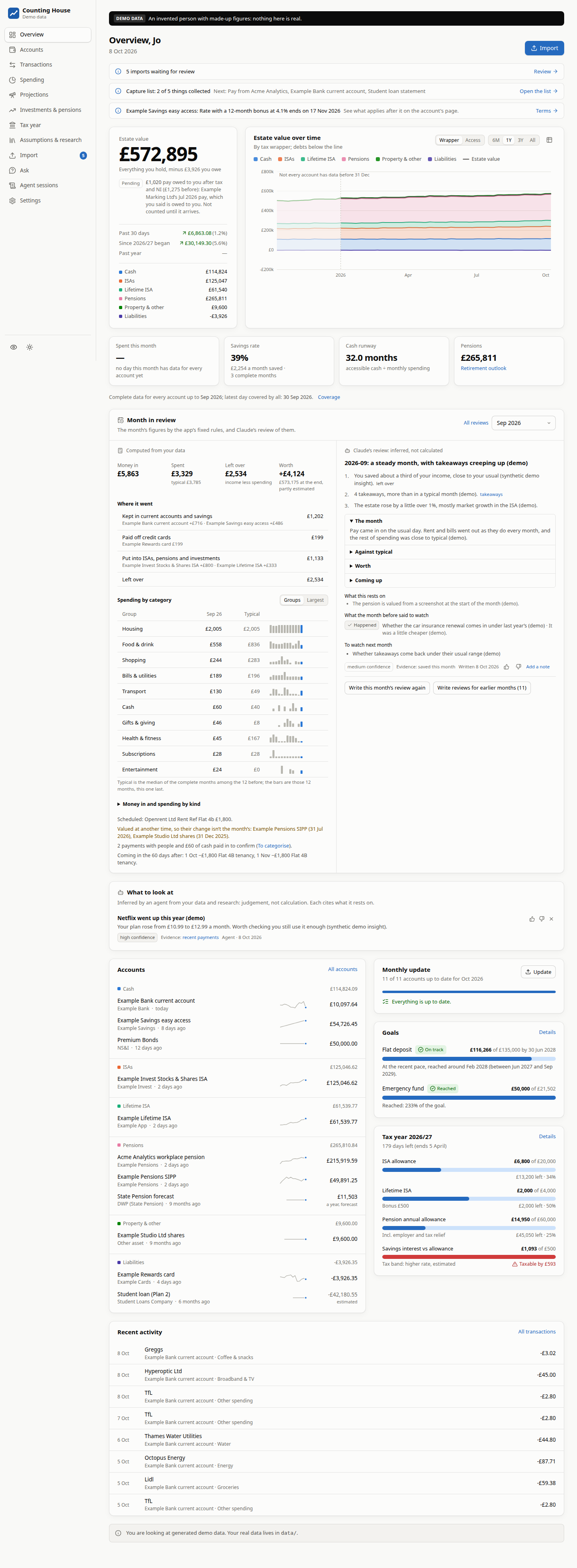
A private, local-first personal finance tracker for the UK. It runs on your own machine, as a website you reach on that machine or your private network. You feed it bank statements, CSV/OFX/QIF exports and screenshots of banking, ISA, LISA, SIPP and pension apps. It turns them into structured, validated, git-versioned data in a repository of your own, and shows you the whole picture:
- Estate value. Everything you hold minus everything you owe, over time. It can be split by tax wrapper (cash, ISAs, LISA, investments, pensions, property, debts) or by when you could spend it.
- Spending habits. Where the money goes and how that is changing, regular payments and price rises, weekday and time-of-day patterns, top merchants, and plain-English insights.
- Projections. Where your estate value heads if your income, spending and saving carried on, with each account growing at its own rate after charges. Shown as a range, not a single line, in today's money or future pounds, with a spending slider and a comparison against any past period.
- Investments & pensions. Value against money paid in, money-weighted returns, holdings and allocation, LISA bonus and penalty-adjusted value, and a retirement outlook.
- Tax year. The ISA allowance (and the £12,000 cash-ISA cap from April 2027), the LISA, the pension annual allowance with carry-forward, and interest against your Personal Savings Allowance.
- Self Assessment prep. The figures an SA100 return usually needs, gathered from your data with their sources and gaps flagged.
- Assumptions & research. Every modelling assumption (inflation, expected returns, fees, withdrawal rate…) is a dated, sourced record you can see and override. Agents can research your funds and providers from public sources and keep the assumptions current; the app says which figures are computed from your data and which are inferred.
Everything you import is a draft until you have reviewed it against the original document, side by side.
UK only, and not financial advice. The tax rules, allowances and providers are the UK's. The app shows you your own figures and some arithmetic on them; it does not tell you what to do with your money. Its Self Assessment pages gather figures for you to check: check everything yourself against your own records and HMRC's guidance before you submit anything.
Try it on demo data

In a codespace of your own (on your GitHub account and its Codespaces quota), the demo builds and opens in your browser after a minute or two: an invented household, nothing real, and no Claude. Its sign-in page shows a throwaway login, made afresh each time it starts (SELF_HOSTING.md, "The demo in a codespace"). Or run it yourself:
npm install
npm run demo          # generated demo data at http://127.0.0.1:4770: nothing real is touched
npm run dev           # development on demo data: API on :4760, UI with hot reload on :4761
Requirements: Node 22.18+ (24 recommended). Optional: tesseract-ocr and poppler-utils for the
offline reading engine, and the claude CLI logged in (or
ANTHROPIC_API_KEY in .env) for reading PDFs and screenshots.
Use it with your own data
Your data lives in a private git repository of its own, apart from this code, with no remote:
npm run init-data -- ~/dev/finance-data    # makes it, and prints the .env lines that point here at it
npm run set-password                       # a login: real data always needs one, even on this machine
npm start                                  # build and serve on 127.0.0.1:4760
To run it as a long-lived service (systemd, Caddy on a private network, deploys that roll back, sign-in with your OpenID Connect provider, backups), see docs/SELF_HOSTING.md.
The monthly routine (about ten minutes)
- Open Import. The Monthly update list shows which accounts need data this month, and how to export it from each bank's app.
- Drop everything in at once: CSV exports, PDF statements, screenshots of ISA, LISA and pension
apps. On your phone, the same page opens your camera roll. Anything saved into the data
repository's
inbox/(point a Syncthing folder at it) is picked up automatically. - Each file becomes a draft:
- CSVs, OFX and QIF files are parsed on your machine, instantly.
- PDFs and screenshots are read by a model (see "Privacy") in seconds to minutes.
- Accounts are matched, transactions categorised and duplicates flagged.
- Statements are checked (opening balance + transactions = closing balance).
- Click Commit all ready for the clean ones, and review the rest side by side with the original. Each commit becomes one git commit in your data repository.
Privacy
Nothing leaves your machine except:
- Documents for reading. PDFs and screenshots go to the model you choose for each task
(Settings → Models): Claude, through your own
claudelogin or API key, or a model service of your own on your private network. Every import shows which read it. CSV, OFX and QIF files never leave the machine. - Research queries, when you turn agents on (they are off in a new data repository). They carry only public, non-personal facts: fund names, ISINs, provider product pages. No balances, transactions or personal details ever go into one. Agents that read your figures get no web access.
- Sign-in, if you use an OpenID Connect provider: only the protocol goes there, never your data.
There are no analytics, no CDNs and no fonts from the web.
Security
- Network exposure. The server binds to
127.0.0.1only. A reverse proxy (Caddy) can expose it to a private network such as a tailnet; never the public internet. - Login. OpenID Connect (with PKCE; only a verified address on
FINANCE_OIDC_ALLOWED_EMAILSgets in) or a password (a scrypt hash in.env, with throttling). The session is a signed HttpOnly, Secure, SameSite=Strict cookie. Without a login, the app answers only direct local requests, and refuses to start on real data. - Request guards. A Host allow-list blocks DNS rebinding, a CSRF header plus an Origin check protects writes, and a strict CSP applies.
- What's stored. Account and card numbers are kept as their last 4 digits only. Original documents are archived in the data repository, which can be switched off in Settings.
- Keep your data repository private. It is your financial history. It has no remote and refuses to push; the app warns if it gets one.
Found a vulnerability? See SECURITY.md.
Commands
| Command | What it does |
|---|---|
npm run demo / npm run demo:reset |
Serve on :4770 / regenerate the synthetic dataset in demo-data/ |
npm run dev |
Demo data, API with reload on :4760, Vite UI on :4761 (FINANCE_DATA_DIR to change) |
npm start |
Build the UI and serve on 127.0.0.1:4760 (PORT to change; real data needs a login) |
npm run init-data -- <dir> |
Make a private data repository |
npm run deploy |
Deploy main (or -- <ref>) to the live service, with rollback; -- --status shows what is live |
npm run import -- <files…> |
Queue files for import from the terminal (copies them to the inbox) |
npm run records -- keys | status | check | write |
The validated write path for assumptions, research and insights (docs/AGENTS.md) |
npm run set-password |
Set a password login (a scrypt hash into .env); not used where OIDC is set up |
npm run validate |
Check the data directory against the format (the same checks as start-up) |
npm run check |
Typecheck + lint + tests |
npm run screens |
Screenshot every page of the demo in headless Chrome (fails on console errors) |
npm run leak-guard |
Check code, tests, docs and commits for personal data (docs/LEAK_GUARD.md) |
npm run fixture:anonymise -- <file> |
Turn a document a real import failed on into a synthetic test fixture |
Your data
Your data is plain JSON and JSONL, documented field by field in
docs/DATA_FORMAT.md, with JSON Schemas in schemas/. Money is in
pounds (2 dp), signed from your point of view. Dates are YYYY-MM-DD. Every record points back to
the import and original document it came from. You can query it with anything:
jq -s 'map(select(.category=="groceries")) | map(.amount) | add' ~/dev/finance-data/data/transactions/*/2026.jsonl
duckdb -c "select category, sum(amount) from read_json('data/transactions/*/*.jsonl') group by 1 order by 2"
The app commits every change automatically, so git history is a complete audit log; back the data repository up regularly. Format changes are handled by versioned migrations, and derived fields (payees, categories, transfer links) can be recomputed from stored source fields at any time. You never need to re-import old documents. See docs/ARCHITECTURE.md.
Documentation
| docs/ROADMAP.md | Principles, what is not built yet, and what to revisit |
| docs/ARCHITECTURE.md | How it works: store, ingestion pipeline, analytics, web app |
| docs/DATA_FORMAT.md | The data format, file by file and field by field |
| docs/INGESTION.md | Importers, adding a bank, how document reading works |
| docs/UK_RULES.md | Tax-year rules and allowance tables, with sources |
| docs/FORMULAS.md | Every computed figure: the formula, its inputs and its tests |
| docs/AGENTS.md | The contract for agents: research, assumptions, insights and the write path |
| docs/SELF_HOSTING.md | Running it as a service behind Caddy on a private network |
| docs/LEAK_GUARD.md | How personal data is kept out of this repository |
| docs/DECISIONS.md | Decision log |
| CONTRIBUTING.md | How to contribute: synthetic data only, the leak guard, commit messages |
Licence
Counting House is released under the MIT License.
Made by James Haworth.
Explore related projects
awesome-selfhosted/awesome-selfhosted
A list of Free Software network services and web applications which can be hosted on your own servers
336,193 starsimmich-app/immich
High performance self-hosted photo and video management solution.
118,850 starsStirling-Tools/Stirling-PDF
#1 PDF Application on GitHub that lets you edit PDFs on any device anywhere
96,278 starslouislam/uptime-kuma
A fancy self-hosted monitoring tool
93,514 stars