
jackbrumley/voquill
jackbrumley/voquill has 37 GitHub stars and 7 forks. GitHot measured 0 stars in 24 hours. Last checked 2026-11-09 22:58 UTC. Last push 2026-11-06.
Local, private cross-platform voice dictation app speak anywhere, type everywhere. System-wide push-to-talk that converts speech to keystrokes in any application.
What you can do
- Private & Offline by Default — On-device speech recognition powered by Whisper.cpp (Vulkan GPU / CPU) and NVIDIA Parakeet. Your voice never leaves your machine—no accounts, no cloud dependencies, no subscriptions.
- Push-to-Talk & Toggle Modes — Choose between Hold-to-Talk or Toggle mode. Customizable global hotkey with instant capture UI and press-to-cancel support during transcription.
- Voice Macros & Input Automation — Trigger automated keystroke combinations (Ctrl+Alt+1), key holds, typed text sequences, pauses, and custom sound feedback (synthesized TTS, custom recordings, chimes) using spoken phrases. Built-in visual sequence builder with import/export capabilities.
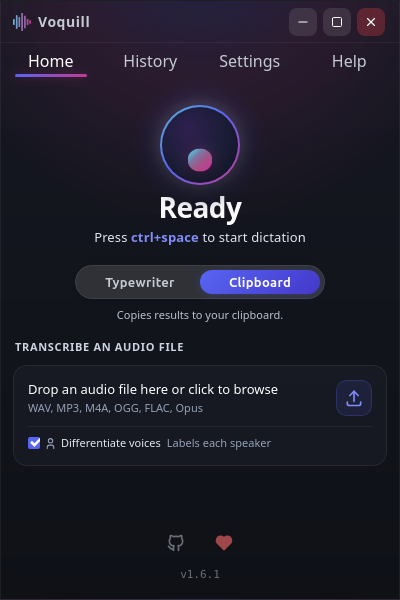
- Audio File Transcription — Drag-and-drop or browse audio files (WAV, MP3, M4A, FLAC, OGG). Fully integrated with speaker differentiation and post-processing.
Measured star growth
- in 24h
- 0
- in 7 days
- Collecting history
- in 15 days
- Collecting history
- in 1 month
- Collecting history
Net star changes over overlapping periods, not daily totals. Missing measurements are left blank. Stars measure attention, not software quality.
README.md
Original
FOSS Voquill - Private Push-to-Talk Dictation for Windows and Linux
Truly free, private system-wide push-to-talk dictation tool.











FOSS Voquill is offline dictation that works in any app on your system. Your voice never leaves your device, and there are no accounts, subscriptions, or cloud dependencies. On Linux, it uses XDG Portals for native Wayland support.
It exists because dictation should be a basic utility, not a locked service. If you want private, system-wide push-to-talk transcription on Linux or Windows, this is built for that workflow.
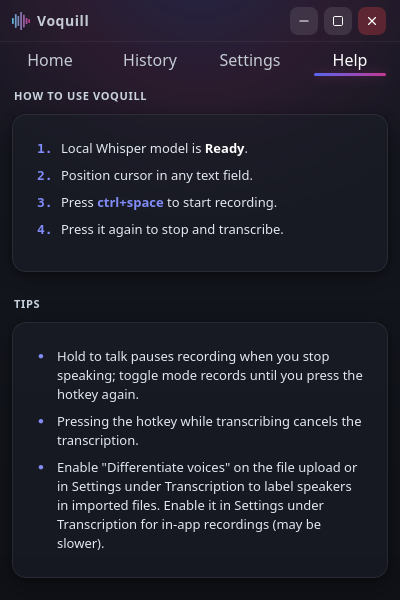
Screenshots
Install
Quick Install (Recommended)
The fastest way to install Voquill is via the one-line installer:
Windows (PowerShell / Windows Terminal):
irm https://voquill.org/install.ps1 | iex
Linux (Debian, Ubuntu, Fedora, Arch, etc.):
curl --proto '=https' --tlsv1.2 -sSf https://voquill.org/install.sh | bash
macOS (Apple Silicon, community-supported):
curl --proto '=https' --tlsv1.2 -sSf https://voquill.org/install.sh | bash
Prefer a visual installer or AppImage? Visit voquill.org for automatic platform detection and all package options.
Manual Download
If you prefer downloading standalone packages directly:
- Download Latest Release Packages
- Windows (Most users):
Voquill-Setup.exe(User install, no admin required) - Windows (IT / Admin):
.msi(System wide) - Linux (Debian / Ubuntu):
.deb - Linux (Fedora / RHEL):
.rpm - Linux (Cross-distro fallback):
.AppImage - macOS (Apple Silicon):
-macos-arm64.zip(not notarized; the one-line installer is recommended)
- Windows (Most users):
About macOS: macOS support is contributed and tested by the community, and every release is built and install-tested on Apple Silicon automatically. The app is not notarized by Apple; the one-line installer avoids the "unidentified developer" warning that a browser download triggers. Intel Macs are not supported.
Getting Started
- Launch Voquill
- On launch, you will see an initial setup screen.
- Configure your setup
- Set your hotkey, select your model, approve permissions, and choose your microphone.
- Adjust mic sensitivity so voice is clear without clipping.
- Use Test Microphone with playback to verify quality.
- Start dictating
- Focus any text field (email, docs, browser, editor).
- Hold your hotkey
Ctrl + Shift + Space(default), speak, then release to transcribe.
Features
- Private & Offline by Default — On-device speech recognition powered by Whisper.cpp (Vulkan GPU / CPU) and NVIDIA Parakeet. Your voice never leaves your machine—no accounts, no cloud dependencies, no subscriptions.
- Push-to-Talk & Toggle Modes — Choose between Hold-to-Talk or Toggle mode. Customizable global hotkey with instant capture UI and press-to-cancel support during transcription.
- Voice Macros & Input Automation — Trigger automated keystroke combinations (
Ctrl+Alt+1), key holds, typed text sequences, pauses, and custom sound feedback (synthesized TTS, custom recordings, chimes) using spoken phrases. Built-in visual sequence builder with import/export capabilities. - Transcript Post-Processing (Local & Cloud AI) — Clean up transcripts, fix grammar, punctuation, and speech artefacts using local LLMs (Qwen 2.5 1.5B, Llama 3.2 1B) or OpenAI-compatible cloud APIs (OpenRouter, Groq, Ollama, vLLM). Create custom prompt presets (or use built-in presets for grammar, email polish, and concise notes) and compare original vs. cleaned text side-by-side.
- Audio File Transcription — Drag-and-drop or browse audio files (WAV, MP3, M4A, FLAC, OGG). Fully integrated with speaker differentiation and post-processing.
- Differentiate Voices (Speaker Diarization) — Detect and label distinct speakers (
Speaker 1,Speaker 2) in both imported audio files and live dictations with configurable cluster sensitivity. - NVIDIA Parakeet Engine — Fast, CPU-optimized transcription supporting 25 languages with automatic background model warm-up.
- Audio Noise Reduction — Optional spectral gating to eliminate background noise (fans, room hum, electrical noise) before transcription. Configurable strength slider and recording up to 180 minutes (3 hours).
- Custom Dictionary & Vocabulary Hints — Add names, acronyms, and technical jargon that are supplied directly to transcription models as vocabulary hints.
- Instant Filler Word Removal — Strips "uh", "um", "you know", "kind of" instantly via regex without needing an AI model. Supports custom filler phrases.
- Reliable Pasting & Terminal Support — Typewriter mode (direct hardware simulation) or Clipboard mode with configurable paste shortcuts (
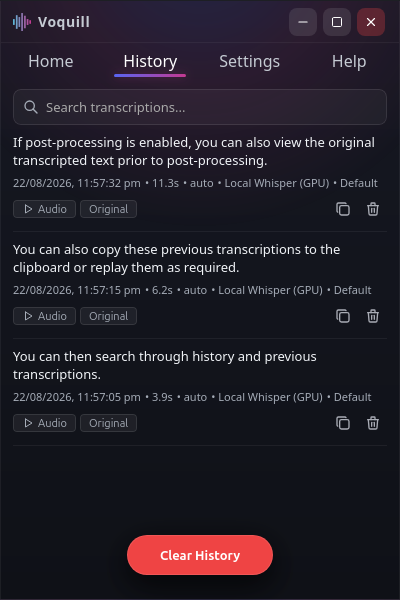
Shift+Insert,Ctrl+V,Ctrl+Shift+V) and automatic clipboard restoration. Defaults toShift+Insertfor full Linux terminal compatibility. - Searchable History & Native Audio Playback — SQLite-backed with FTS5 search. Listen back to recordings directly within the app, toggle between original and cleaned text, delete individual entries, or clear all. Configurable history retention with automatic disk pruning.
- Audio Device & Playback Selection — Select independent input microphones and output playback devices with built-in mic testing and live sensitivity metering.
- Full Wayland & Windows Integration — Native XDG Desktop Portals on Wayland (GNOME, KDE, Hyprland), native X11, and Windows WASAPI/SendInput. Supports launch at startup and
--start-hiddento launch minimized to tray. - Minimalist Overlay — Transparent status overlay during recording and transcription. Platform-native positioning (Layer Shell on Wayland).
See the full feature breakdown with planned items at docs/FEATURES.md.
The Philosophy
FOSS Voquill was created with a simple premise: voice dictation should be a basic utility, not a subscription service.
In an era of cloud-first AI, FOSS Voquill stands apart by putting privacy and freedom first:
- No Backend: No servers, no cloud, no data collection.
- No Accounts: No logins, no tracking, no onboarding.
- Truly Free: No subscriptions, no paid tiers. Free to use and build on.
- Privacy First: Your voice stays on your device. Transcription runs locally.
Watch the Promo
Prefer direct link: https://youtu.be/yKKyPUwEpDg
How to Build It Yourself
- Open Terminal in the project folder
- On Windows: open PowerShell in the Voquill folder.
- On Linux or macOS: open your Terminal in the Voquill folder.
- Install required project files
- Run:
npm install - This downloads everything needed to build Voquill.
- Run:
- Check your system is ready
- Run:
npm run deps:check - If anything is missing, it will print the install commands.
- Run:
- Build release packages
- Run:
npm run tauri:build(on macOS:npm run tauri:build -- --bundles app) - This builds production packages for your current platform.
- Run:
- Find your built files
- Linux and macOS location:
src-tauri/target/release/bundle/ - Windows location:
C:\vb\release\bundle\ - This folder contains installer/package files (such as
.msi,.deb,.rpm,.AppImage,Voquill.app).
- Linux and macOS location:
- Optional: Run in development mode
- Run:
npm run tauri:dev - This is for live testing while developing.
- It is not the final packaged release build.
- Run:
On Windows, all Tauri/Cargo build artifacts are written to C:\vb to avoid long-path build failures (the Vulkan shader build nests deeply enough to exceed the 260-character limit under longer roots).
Known Issues
- Language selection acts as a transcription hint and may not be reliably applied by all engines.
- Unicode and non-English keyboard input is best-effort; the Typewriter mode normalizes common Unicode characters (curly quotes, em-dashes, ellipses) to ASCII equivalents.
- AppImage is a cross-distro fallback, not the primary support target; desktop/portal integration can vary compared to distro-native
.deb/.rpminstalls. - Fedora AppImage builds can fail due to linuxdeploy strip incompatibility with RELR system libraries.
Technology
Voquill is built for performance and security:
- Tauri - Lightweight desktop framework.
- Rust - High-performance systems backend.
- Whisper.cpp - Optimized on-device speech recognition.
- Preact - Clean and responsive interface.
- Vite + npm - Frontend tooling and script orchestration.
License
This project is licensed under the GNU Affero General Public License v3.0 — see the LICENSE file for details.
Why AGPLv3?
Voquill is my small way of giving back to the open source community.
I chose AGPLv3 to make sure it stays genuinely open for everyone. You are completely free to use, learn from, and build on this code — the only ask is that if you make improvements, those changes are shared back with the community rather than locked away.
Project Provenance
FOSS Voquill is the original project, first published in July 2025. Built to give back to the open-source community. Truly free and Open Source
Explore related projects
n8n-io/n8n
Fair-code workflow automation platform with native AI capabilities. Combine visual building with custom code, self-host or cloud, 400+ integrations.
209,959 starslanggenius/dify
Build Agentic workflows, RAG pipelines, with rich AI model and tool support on one collaborative workspace. Deploy on cloud, VPC, or self-hosted, so teams move from prototype to production without rebuilding the stack.
160,773 starsmicrosoft/PowerToys
Microsoft PowerToys is a collection of utilities that supercharge productivity and customization on Windows
140,755 starsstablyai/orca
Orca is the place for working with a fleet of agents (e.g. Grok Bot, Claude Code). Run any coding agent with your own subscription. Available on desktop, mobile and remote runtime.
120,604 stars