
jacek-kurlit/pik has 583 GitHub stars and 19 forks. GitHot measured 0 stars in 24 hours and 0 in 7 days. Last checked 2026-11-10 02:23 UTC. Last push 2026-09-22.
Process Interactive Kill
What you can do
- Name - No prefix is required, just type process name, for example 'firefox'
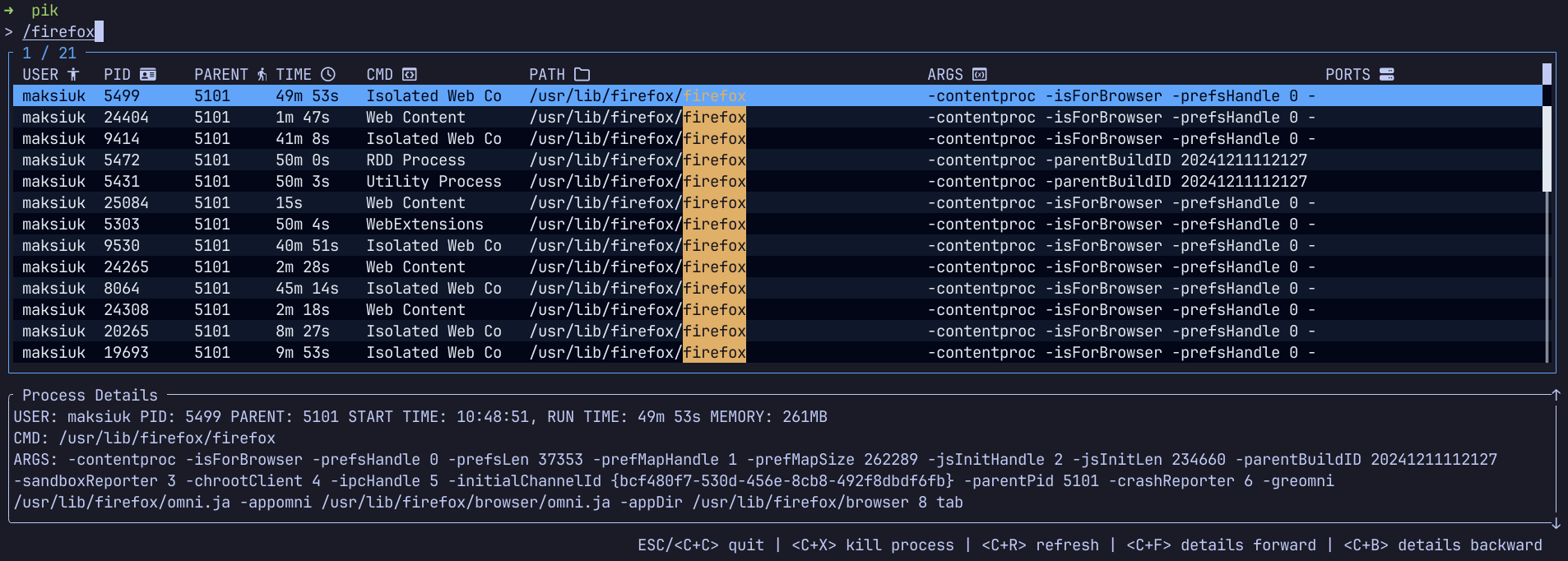
- Cmd Path - Prefix search with '/', for example '/firefox'
- Arguments - Prefix search with '-' for example '-foo'. Please note that if you want to use this feature in cli you must add --, for example pik -- -foo
- Ports - Prefix search with ':' for example ':8080'
Measured star growth
- in 24h
- 0
- in 7 days
- 0
- in 15 days
- Collecting history
- in 1 month
- Collecting history
Net star changes over overlapping periods, not daily totals. Missing measurements are left blank. Stars measure attention, not software quality.
README.md
Original
Pik



Process Interactive Kill is a command line tool that helps to find and kill process.
It works like pkill command but search is interactive.
This tool is still under development
Table of Contents
- Table of Contents
- Features
- Installation
- Configuration
- Configuration Recipes
- Migration Guides
- Caveats
- Development
Features
Pik allows to fuzzy search processes by:
- Name - No prefix is required, just type process name, for example 'firefox'

- Cmd Path - Prefix search with '/', for example '/firefox'

- Arguments - Prefix search with '-' for example '-foo'. Please note that if you want to use this feature in cli you must add
--, for examplepik -- -foo
- Ports - Prefix search with ':' for example ':8080'

- Everywhere - Prefix search with '~' for example '~firefox'

- Select exact process by id - Prefix with '=' for example '=1234'
- Select process family (process + it's children) - Prefix with '@' for example '@1234'
After selecting process you can kill it with Ctrl + X (SIGTERM), or force kill it with Ctrl + Alt + X (SIGKILL)
Installation
Archives of precompiled binaries for pik are available for Linux, macOS and Windows.
On Arch Linux
pacman -S pik
On Fedora
sudo dnf copr enable rusty-jack/pik
sudo dnf install pik
On Tumbleweed
sudo zypper install pik
On Gentoo
It is available via lamdness overlay
sudo eselect repository enable lamdness
sudo emaint -r lamdness sync
sudo emerge -av sys-process/pik
On Windows with Scoop
scoop bucket add jacek-kurlit https://github.com/jacek-kurlit/scoop-bucket
scoop install pik
On macOS with Homebrew
brew tap jacek-kurlit/tap
brew install pik
On Ubuntu with Snap
snap install pik-tui
If you're a Rust programmer, pik can be installed with cargo.
cargo install pik
Alternatively, one can use cargo binstall to install a pik
binary directly from GitHub:
cargo binstall pik
Configuration
Application configuration
You may set your preferences in config.toml file located in:
| Platform | Config dir |
|---|---|
| Linux | /home/:username/.config/pik |
| MacOS | /home/:username/.config/pik or /Users/:username/Library/Application Support/pik |
| Windows | C:\Users\:username\.config\pik or C:\Users\:username\AppData\Roaming\pik |
All options are optional, if skipped default values will be used.
Some of config fields have cli arg equivalent. If both are set cli arg is preferred.
Run pik -- --help to see cli options
The authoritative default configuration lives in default_config.toml which will be overridden with your local config. If you want to see final configuration use pik --print-config command.
Please refer to config for more details how to configure options,theme and key mappings,
and to recipes for ready-to-use configuration snippets.
Multiple meta key names support
Pik supports combining multiple modifier keys (meta keys) in key bindings. You can use any combination of "ctrl", "alt", "shift", "super", "hyper", and "meta" modifiers together.
Examples:
[key_mappings]
# Single modifier
quit = ["ctrl+c"]

# Combined modifiers
toggle_debug = ["ctrl+alt+d"]

# Multiple bindings, with different modifier combinations, for the same action
toggle_help = ["ctrl+alt+h", "f1", "alt+shift+H"]
This allows for flexible keybinding configurations that can accommodate different user preferences and avoid conflicts with terminal or OS shortcuts.
Every binding is a list, even when it holds one key: quit = ["ctrl+c"]. The bare string form
quit = "ctrl+c" is rejected with "invalid type: string, expected a sequence".
Combining shift with a letter: terminals report the shifted key as an uppercase character, so
write the letter uppercase — "alt+shift+H", not "alt+shift+h". The lowercase form is accepted by
the config parser and then never matches anything you press. Note that ctrl+shift+<letter> cannot
be detected at all on Unix terminals: ctrl+shift+x and ctrl+x send the same bytes. That is why
force_kill_process is bound to ctrl+alt+x, which every platform reports unambiguously.
Configuration Recipes
Ready-to-use snippets live in recipes.md: themes (Gruvbox, Catppuccin, Nord, terminal colors), readline and vim key mappings, macOS ignore paths, nerd font icons and a compact fullscreen layout.
A minimal config to start from:
screen_size = "fullscreen"

[ui]
icons = "nerd_font_v3"
Migration Guides
0.30.x to 1.0
Version 1.0 contains an embedded default_config.toml that is merged with your local config file. In some cases the merge result may not be what you intended.
Example:
Default config:
[ui.process_table.cell]
highlighted = { bg = "Yellow", add_modifier = "ITALIC" }
Your local config:
[ui.process_table.cell]
highlighted = { bg = "Red" }
Resolved result:
[ui.process_table.cell]
highlighted = { bg = "Red", add_modifier = "ITALIC" }
If you meant to remove a field inherited from the default config, you must be explicit about it:
highlighted = { bg = "Red", add_modifier = "" }
To inspect your fully resolved configuration, run pik -P.
Caveats
- Process name on linux system it is not always exe name also it is limited to 15 chars
- In linux process may appear on list but you are not allowed to get information about ports it uses. In such situations you need to run pik with root privileges
Development
Supported Systems
In theory pik is using coross compliant lib that allows to run it on all major platforms. In pratice I'm using linux and development is performed based on this OS. Pik will probably work on MacOs and Windows but that must be tested by community since I don't own computers with these OS'es. If you are able to test it on windows or macos please create issue to let me know.
Setup
Building
git clone https://github.com/jacek-kurlit/pik
cd pik
cargo build --release
./target/release/pik --version
Explore related projects
codecrafters-io/build-your-own-x
Master programming by recreating your favorite technologies from scratch.
561,398 starspublic-apis/public-apis
A collective list of free APIs
497,679 starsmorluto/rea
Reverse engineer anything with agents, from app behavior down to native binaries.
447,495 starsopenclaw/openclaw
The AI that really does things. Any OS. Any Platform. The lobster way. 🦞
394,261 stars