
ivankokan/Excel2LaTeX
ivankokan/Excel2LaTeX has 1,431 GitHub stars and 146 forks. GitHot measured +1 stars in 24 hours. Last checked 2026-11-06 08:18 UTC. Last push 2023-11-29.
The Excel add-in for creating LaTeX tables
What you can do
- Bold and italic (if applied to the whole cell)
- Left, right, center, and general alignment (per-cell or per-column)
- Vertical and horizontal borders (per-cell or per-column, single or double)
- Font color (using the xcolor package)
Measured star growth
- in 24h
- +1
- in 7 days
- Update delayed
- in 15 days
- Update delayed
- in 1 month
- Update delayed
Net star changes over overlapping periods, not daily totals. Missing measurements are left blank. Stars measure attention, not software quality.
README.md
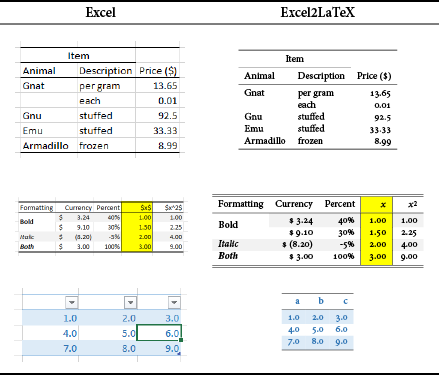
OriginalExcel2LaTeX
Making tables in LaTeX can be tedious, especially if some columns are calculated.
This converter allows you to write a table in Excel instead, and export the current selection as LaTeX markup
which can be pasted into an existing LaTeX document, or exported to a file and included via the \input command.
Known to be compatible with Windows Excel 2000–2016 (32-bit and 64-bit) and Mac Excel 2004, 2011, and 2016.
May also be compatible with other versions that support .xla add-ins. Does not work on LibreOffice Calc.
Features
Most Excel formatting is supported.
- Bold and italic (if applied to the whole cell)
- Left, right, center, and general alignment (per-cell or per-column)
- Vertical and horizontal borders (per-cell or per-column, single or double)
- Font color (using the
xcolorpackage) - Fill color (using the
colortblpackage) - Rotation (using the
rotatingpackage) - Merged cells (using the
multirowpackage, if needed) - Can convert
\,$,_,^,%,&, and#to appropriate macros, or leave them in-place - Supports
booktabspackage - Uses
bigstrutpackage whenbooktabsis not available - Makes standard LaTeX
tabularenvironment - Can surround
tabularenvironment withtableenvironment template - Copy output to clipboard or export to a
.texfile for inclusion using\include - Save table specifications to your Excel worksheet, then export all tables at once
Using
Just open the file Excel2LaTeX.xla in Excel. Then you will have two additional menu items in your Tools menu and a new toolbar with two buttons on it. For Excel 2007 and later, you will have two new buttons in the Add-Ins ribbon. If you plan to use the program frequently, you can save it in your addin directory and add it with Tools→Add-Ins. This way it will be loaded whenever Excel is opened.
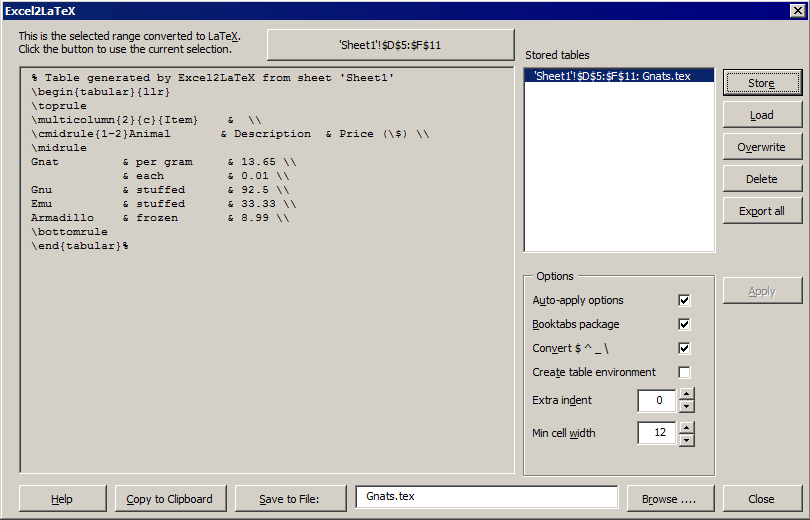
Select the table to convert and hit the button Convert Table to LaTeX. You
will be given the option to save the result to a .tex file, or send it to the clipboard
(so you can paste it into your LaTeX editor). Hit the Store button to store the
current settings so you can Load them later or Export All to files.
Contributing
The development repository and the bug tracker for this package are hosted on GitHub. To work with the project, you will require chelh's VBA Sync Tool.
License
Copyright © 1996–2017 Chelsea Hughes, Kirill Müller, Andrew Hawryluk, Germán Riaño, and Joachim Marder.
This work is distributed under the LaTeX Project Public License, version 1.3 or later, available at http://www.latex-project.org/lppl.txt
Chelsea Hughes currently maintains this project (comprising Excel2LaTeX.xla
and README.md) and will receive error reports at the project GitHub page
(see Contributing above).
Explore related projects
codecrafters-io/build-your-own-x
Master programming by recreating your favorite technologies from scratch.
560,411 starspublic-apis/public-apis
A collective list of free APIs
496,745 starsmorluto/rea
Reverse engineer anything with agents, from app behavior down to native binaries.
437,863 starsopenclaw/openclaw
The AI that really does things. Any OS. Any Platform. The lobster way. 🦞
394,063 stars